

But over time, I realized something: The more my messages sounded like everyone else’s, the more they got ignored.
“Please find attached” might be technically correct, but it’s robotic, outdated, and often breaks the natural flow of an email. Your language needs to feel human and clear. So if you’re still clinging to this formal relic, it’s time for a refresh.
In this post, I’ll walk you through modern, less awkward alternatives to “Please find attached,” plus real examples, style tips, and a step-by-step breakdown for writing better attachment emails. Because how you say something matters just as much as what you send.
Table of Contents
- “Please Find Attached” Defined
- When Not to Use Please Find Attached
- Please Find Attached vs. Please Find Enclosed
- Grammar Check: Attached To or Attached In?
- Alternatives to Please Find Attached
- Synonyms for “Attached”
- How to Write an Email With an Attachment

Please Find Attached
“Please find attached” is a phrase used to draw attention to a file included in your email — typically a document, spreadsheet, or slide deck that supports the message. It’s one of those classic business phrases that’s been passed down like an outdated tie: formal, rigid, and slightly out of place in today’s digital conversations.
Let’s be clear: There’s nothing wrong with the phrase grammatically. But context matters. In an age where conversational email and async communication rule the workplace, writing like you’re stuck in the 1800s (“please find enclosed” being its even stuffier cousin) creates a jarring disconnect.
Most professionals today understand what “please find attached” is trying to convey — but the tone can feel overly formal, even robotic. In fast-paced teams and modern client relationships, that formality can come off as cold or unnecessarily stiff.
From my own experience in sales, I’ve seen how just a small shift in tone — like replacing “please find attached” with something like “I’ve attached the proposal below” — keeps your message feeling human, natural, and clear. I’ve had better reply rates when I sound like a person, not a legal template.
And the numbers back this up. According to HubSpot’s State of Marketing Report, personalization and conversational tone in emails lead to higher open and response rates — with 76% of marketers reporting better engagement from tone-optimized content. That's a strong signal that even small wording choices matter.
Bottom line? “Please find attached” still technically works. But there are better, fresher, more modern ways to make your emails feel approachable — and that’s what we’ll walk through next.
.png)
Free Business Communication Guide
Communication tips to use throughout your professional career.
- Communicate to your audience
- Write with clarity
- Craft effective message
- Improve word choice
Download Free
All fields are required.
When Not to Use Please Find Attached
Let’s be honest: The phrase “please find attached” doesn’t belong in most modern emails. It might sound polite or professional at first glance, but in reality, it often works against you.
For one, it just feels stiff. Most of us are trying to build connection and clarity with our writing, not come off like a 19th-century solicitor. When your tone is friendly and conversational, dropping in “please find attached” can make the whole message feel jarring or overly formal. It’s like cracking a joke, then ending with “sincerely yours.” The rhythm breaks.
It’s also unnecessary. Attachments are obvious. If someone opens your email and sees a file, they don’t need to be told it’s there. And if you’ve already referenced the file earlier in your message, something like “I’ve attached the proposal for Q4” or “Here’s the deck we reviewed,” that’s more than enough. Clear, direct, and natural.
There’s also something subtle going on. “Please find attached” poses as a request, but it’s not really one. The reader doesn’t have a choice. The file is already attached. That makes the phrase feel weirdly passive-aggressive, similar to “thanks in advance,” which can rub people the wrong way if the tone isn’t just right.
Take this example:
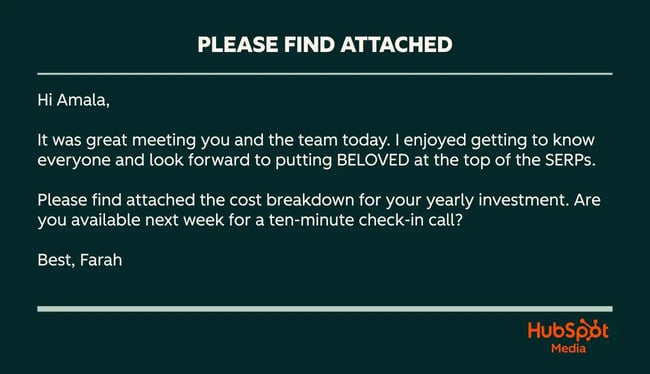
Everything about this message feels warm and natural, until that one line. “Please find attached” sticks out like a formal speed bump. It breaks the conversational flow and adds nothing the reader doesn’t already know.
Bottom line: If your goal is to sound human, helpful, and clear, there’s almost always a better way to reference a file. And we’ll get into those next.
Please Find Attached vs. Please Find Enclosed
If “please find attached” feels old-school, then “please find enclosed” is practically wearing a powdered wig. Both phrases have been floating around email templates for decades, and while they sound polite, they also feel like they were written in a time before inboxes had search bars.
At face value, “please find attached” and “please find enclosed” mean the same thing: There’s a file included. The difference is mostly technical. “Attached” refers to a file connected to your email. “Enclosed” comes from paper-based communication, like letters and packages, where physical documents were literally placed inside an envelope.
In theory, you could argue that “enclosed” doesn’t belong in a digital world. After all, there’s no envelope here. But in practice, both get used interchangeably, especially in formal settings. Still, that doesn’t mean they should be used.
Here’s my take: If you're trying to build trust, move deals forward, or simply not sound like a template generator from 2004, ditch both. There’s almost always a clearer and more human way to reference an attachment.
For example,
- Instead of saying: Please find enclosed the signed agreement for your review.
- Try: I’ve attached the signed agreement — let me know if you have any questions before Friday.
See the difference? One sounds like a person. The other sounds like a form letter.
At the end of the day, whether you lean toward “attached” or “enclosed,” the real win is using language that reflects how you actually speak. Formal doesn’t have to mean outdated. And clarity always beats tradition.
Grammar Check: Attached To or Attached In?
This one comes up more often than you’d expect, and I’ve seen plenty of people second-guess themselves mid-email. So let’s settle it: Is it “attached to this email” or “attached in this email”?
Technically speaking, “attached to” is the more grammatically correct option. When you upload a file, it becomes attached to the email as a separate component, not inside the body like a link or inline image. Think of it like a paperclip: It’s clipped to the message, not hidden in it.
That said, most people will still understand what you mean either way. Language evolves, and in informal settings, you’ll sometimes see “attached in this email” used casually. But if you’re aiming for clarity and professionalism, especially in customer communications, proposals, or anything forward-facing, stick with “attached to.”
Here’s how I frame it in my own writing:
- Correct: “The requested file is attached to this email.”
- Clunky: “The requested file is attached in this email.”
And honestly? If you’re already rethinking your phrasing, I’d go a step further and skip both entirely. Instead of saying something is attached, say what the file is and why it matters. For example: “I’ve included the updated timeline for review — key milestones are on page two.”
That keeps your writing smooth, direct, and aligned with how people actually read emails today. No grammar rabbit holes, no awkward phrasing, just clarity that moves things forward.
Alternatives to Please Find Attached
- Attach the file with no explanation.
- Here is ...
- I've attached ...
- This [X] has …
- I'm sharing [X] with you.
- You'll find the attachment below.
- Let me know if you have any questions about the attachment.
- The requested document is attached to this email.
- Relevant information is attached.
- The attached [X] includes …
- When you review the attached [X], you will see ...
- Please see the attached [X] for more details …
- Take a look at the attached [X].
- Attached with this email.
- I've linked [X].
- For reference, I've appended …
- Please see the enclosed …
- … added [resource] to this email.
- The enclosed document shows ...
- Enclosed is …
Option 1: Attach the file with no explanation.
If the sole purpose of your email is sending an attachment, cut the phrase entirely.
Monthly Progress Report
Hey Marley,
Nearly doubled my connect call conversion rate this month. I’m still a little shaky on demos; planning on doing some extra prep for my next ones. Looking forward to discussing with you.
- Jackie
Option 2: “Here is”
You can also opt for “here’s [title of the attachment].” Short and sweet.
Pricing options
Hi Saleh,
Great talking to you today and learning more about Kensington’s plans to expand into the French market. Here’s the pricing information you asked for.
Let me know if you have any questions before our call tomorrow.
- Jackie
Option 3: “I’ve attached”
This is another simple, non-jargon-y alternative.
Getting employees to share their feedback?
Hello Karim,
Congratulations on the promotion! I’ve worked with many People Ops directors (including LiveHire and 25/8) and know one of your first priorities is often increasing employee survey participation. I’ve attached an ebook with some helpful strategies — page 32 in particular has good ideas.
Would love to discuss how you could apply these to Granted; if you’re open to that, here’s a link to my calendar: [Link to Meetings tool].
Cheers,
Jackie
Option 4: “This [X] has … ”
You can also describe the attachment’s contents, such as, “This case study includes… ” or “This business case explains… ”
Might be good to show your boss
George,
Hope your trip went well and that you got in plenty of beach time. This report shows the impact of effective sales training on quota attainment; might be useful to show to your boss if she’s looking for potential ROI.
Best,
Jackie
Option 5: “I’m sharing [X] with you.”
This statement subtly puts you and your prospect on the same team, making your relationship feel more collaborative.
Have answers for you
Liz,
I did a little digging and found the answers to your questions. I’m sharing a PDF with you that lists our reselling policies. Let me know if you have any follow-up questions.
Best,
Jackie
.png)
Free Professional Email Templates
This collection of 17 professional email templates is here to help you streamline communication and boost productivity.
- Introduction emails
- Project updates
- Cold outreach
- And more!
Download Free
All fields are required.
Option 6: “You’ll find the attachment below.”
You never want an attachment to go unnoticed. This ensures your prospect is aware of the information you attached, but keeps the tone conversational and light.
ABC Schematics+HubSpot Proposal
Elena,
Thanks for telling me a little more about ABC’s goals and challenges this year. You’ll find the proposal we spoke about attached below.
Best,
Jackie
Option 7: “Let me know if you have questions about the attachment.”
This is another subtle way to communicate an attachment while letting your prospect know your door is open and you’re available for questions.
Questions? I’ve got answers.
Nesima,
Here are the white papers we spoke about this morning. Please let me know if you have any questions about the attachments.
Best,
Jackie
Option 8: “The requested document is attached to this email.”
When sending a document that has been specifically requested, make sure your prospect knows the information they asked for can be found in the attachment.
Details you requested inside
Michelle,
Thank you for your time this afternoon. The report you requested is attached to this email.
Best,
Jackie
Option 9: “Relevant information is attached.”
If the attached document expands on the topic of the email, call this out so the reader knows to reference the document for more information.
All-access content details
Jason,
We look forward to having you join us at the conference. All event details are outlined in the document attached.
Sincerely,
Jackie
Option 10: “The attached [X] includes … ”
For lengthier or more comprehensive documents, you can include a brief synopsis of what the prospect can expect to see when they open it.
Product selections requested
Hi Lily,
The attached catalog includes the new products launching this year. Please let me know your selections so we can proceed.
Best,
Jackie
Option 11: “When you review the attached [X], you will see …”
This statement both instructs the recipient to review the attached document and outlines what the document entails.
Performance metrics
Hi Erin,
Thank you for your insightful questions in today’s meeting! When you review the attached spreadsheet, you will see a full breakdown of the metrics we covered. Please let me know if you have any questions.
Best,
Jackie
Option 12: “Please see the attached [X] for more details …”
This helps you clearly call out what the attached document is and what pertinent details it contains for your prospect.
Monthly check-in
Hi Cleo,
Thank you for attending our monthly check-in. Please see the attached presentation for more details about last month’s performance.
Best,
Jackie
Option 13: “Take a look at the attached [X]”
Use this statement when you have a document that you need the recipient’s feedback on.
Request — your feedback is needed
Hi Eckhart,
Our team is developing our next catalog and would like your feedback on which design you prefer.
Please take a look at the attached samples and let me know which you think is better by 5:00 PM PST on November 6.
Best,
Jackie
Option 14: “Attached with this email …”
This option works best in highly formal contexts — think legal, academic, or governmental communication. In most business settings today, it can feel overly rigid or even archaic. If you’re using it, make sure it matches the rest of your tone.
Following up on sales manager interview — Jackie Johnson
Dear Zoey,
Thank you for your time during today’s interview. I appreciated your thoughtful questions and am honored to be a candidate for the sales manager position. Attached with this email are my professional references.
Best,
Jackie
Synonyms for “Attached”
Need some more alternatives? Switch it up with “attached” synonyms.
Option 15: “I've linked”
Whether you’re linking to site pages or content downloads, let your prospect know to look out for a link, so they don’t miss the valuable information you’ve included.
Here’s that info I promised you
Hey Adam,
I’m following up on our conversation yesterday. I’ve linked our pricing page here [insert link] — let me know if you have any questions.
Thanks,
Jackie
Option 16: “For reference, I’ve appended …”
Use this for a first introduction. If the prospect downloaded a piece of content from your site, let them know you noticed, and provide them with additional resources in your introductory email.
Growing Danielson Design’s customer base
Hi Bailey,
Thanks for downloading “10 Growth Hacking Ideas to Try.” I’ve helped many small businesses like Danielson Design transform their marketing initiatives into lucrative campaigns. For reference, I’ve appended a client’s case study below. Together, we grew their customer base by 30% in a period of six months.
If you’re interested in implementing some of these strategies, I’d love to share more. Here’s a link to my calendar: [Insert calendar link].
All the best,
Jackie
Option 17: “Please see the enclosed …”
While “enclosed” is technically fine, it’s another example of language rooted in physical mail. If you’re sending something digital, “attached” or even “linked” often reads better. Use “enclosed” only if you’re aiming for a very formal tone.
Next steps with Quinn Industries
Hi Sarah,
I’m excited to continue working with you to revolutionize Quinn Industries’ warehouse efficiency. Please see the enclosed contract and let me know if you and your team have any questions.
Thank you,
Jackie
Option 18: “… added [resource] to this email.”
If you’ve wrapped up a call or meeting with a prospect, send them a recap email and include notes about what was discussed. It keeps the conversation at the top of your prospect’s mind and reinforces key points and takeaways.
Following up on our call
Hey Adam,
Thanks for your time today. I’ve added notes from our call to this email, along with key takeaways and action items. Reach out with any questions before our next meeting on Tuesday, October 16, at 2:00 PM.
- Jackie
Option 19: “The enclosed [X] shows …”
If you’re using a document to reiterate a point or idea, mentioning the attached file will keep your reader focused on the key takeaway.
Let’s keep the conversation going
Hi Candace,
I look forward to continuing our partnership. The enclosed proposal shows the deliverables we would like to offer moving forward. Here’s a link to my calendar [insert calendar link] — schedule a meeting at your earliest convenience to discuss next steps.
Sincerely,
Jackie
Option 20: “Enclosed is …”
This is a simple way to indicate a document needs the reader’s attention without saying “attached.”
Thank you for your feedback
Hi Sacha,
Thank you for participating in our end-user survey. Your feedback is greatly appreciated. Enclosed is a token of our appreciation for providing your thoughts.
Sincerely,
Jackie
These “please find attached” alternatives will make your emails feel less stiff and stilted. Small words, big impact.
Free Business Communication Guide
Communication tips to use throughout your professional career.
- Communicate to your audience
- Write with clarity
- Craft effective message
- Improve word choice
Download Free
All fields are required.
How to Write an Email With an Attachment
Let’s be honest: Sending an email with a file shouldn’t feel like assembling an IKEA bookshelf. But over the years, I’ve seen just how easy it is to overcomplicate something as simple as saying, “Hey, here’s the thing we talked about.” Whether you’re sharing a proposal, an onboarding doc, or a post-call summary, the way you present that file matters because it impacts whether people actually open it.
So here’s how I write attachment emails that get opened, read, and acted on, without sounding like a 1990s fax cover sheet.
1. Collect your files first (and name them clearly).
Before you even open your email draft, get your attachments ready. Make sure the file is updated, saved in the right format (PDF beats DOC for most external comms), and — this part’s crucial — clearly named.
Nobody wants to download a file called V3_FINAL_final_FINAL.pdf. Instead, go with something like:
Acme_Partnership_Proposal_Q4_2025.pdf
If you’re sending multiple files, zip them or upload to a shared drive and link them. I usually limit attachments to two files max — beyond that, I default to Google Drive or Dropbox links for better context.
2. Double-check your recipient(s).
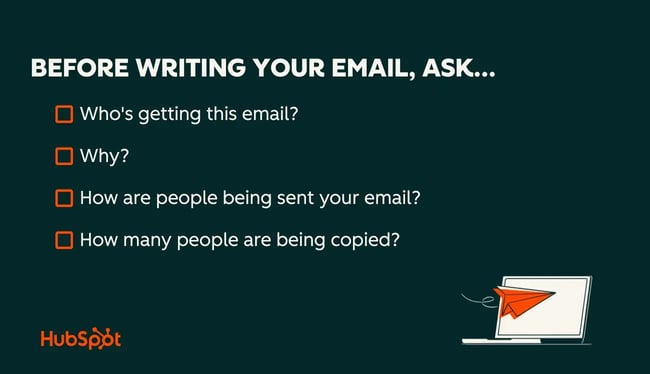
I can’t count the number of times I’ve seen someone send a file to the wrong client or miss a stakeholder. Before you hit send, take two seconds to scan the “To” and “CC” lines.
Ask yourself:
- Is this going to the right person(s)?
- Does everyone on this thread need this file?
- Will anyone on the thread raise a red flag if they see it?
Better safe than “recall message,” which rarely works.
3. Write a subject line that sets expectations.
If you’re sending a file, your subject line should say so. Keep it clear and searchable.
Examples that work:
- Follow-Up: Attached Proposal for Q4 Growth Plan
- Requested Slides – Workshop Deck for Oct. 10
- New Hire Docs + Onboarding Checklist
![clear subject line examples for attached emails: industry resources for [business name], presentation from today, custom quote for [business name], [name of document] (e.g., partnership contract)](https://53.fs1.hubspotusercontent-na1.net/hub/53/hubfs/please-find-attached-24-20251118-9527998.webp?width=650&height=374&name=please-find-attached-24-20251118-9527998.webp)
Avoid vague subject lines like “Info” or “Update.” A specific subject line saves time — and helps your recipient find the attachment later.
![unclear subject lines for attached emails: great meeting you today!, [empty], hi from [your name], [recipient’s first name]](https://53.fs1.hubspotusercontent-na1.net/hub/53/hubfs/please-find-attached-25-20251118-5676205.webp?width=650&height=374&name=please-find-attached-25-20251118-5676205.webp)
Pro tip: Get inspired with these sales email subject lines and check out these email subject line tips.
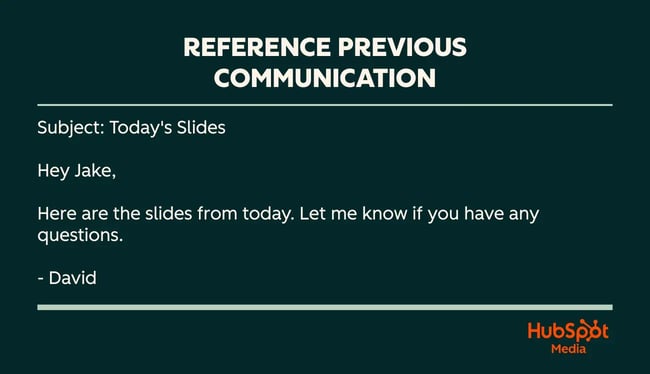
4. Open with context from your last touchpoint.
Don’t drop into an email cold. Warm it up with a short reminder of where you left off. This is especially helpful if you’re not on a daily communication rhythm.
Examples:
- “Thanks for walking through the timeline earlier today.”
- “As discussed in our call yesterday…”
- “Following up on your request from last week…”
This instantly orients the reader and shows you’re being thoughtful, not just firing off files without care.
5. Keep your message short and clear.
Once you’ve set the scene, get to the point. You’re sending a file. Say what it is, why it matters, and what they should do with it.
Here’s a solid structure:
- One sentence to introduce the attachment.
- One sentence to summarize its content or relevance.
- One soft call-to-action or next step.
Example:
“Attached is the updated agreement based on our discussion. I’ve highlighted the changes in Sections 3 and 5 for quick review. Let me know if you’d like to hop on a quick call to walk through anything.”

No fluff. No jargon. Just clarity.
6. Use an alternative to “Please find attached.”
You already know how I feel about this one. “Please find attached” sounds dated. Instead, use modern, natural phrasing like:
- “I’ve attached the Q4 roadmap we discussed.”
- “Here’s the slide deck from today’s demo.”
- “You’ll find the updated budget spreadsheet below.”
Want to sound helpful and human? Choose phrases that feel like how you’d talk in real life.
7. Include a clear call-to-action.
Never assume the attachment will speak for itself. What do you want the recipient to do after they review it?
Examples:
- “Let me know if everything looks good, and I’ll write for a signature.”
- “Feel free to comment directly in the doc.”
- “Does Friday at 2 PM work for a quick review call?”
A clear CTA keeps the conversation moving and shows you’re taking ownership of next steps.
8. Set up a clean email signature.
Your email signature is your digital business card; don’t leave it blank. Include your:
- Full name
- Job title + company
- Phone number
- Calendly or scheduling link (if relevant)
- LinkedIn (optional but helpful)
Pro tip: Use HubSpot’s free signature generator if you don’t have one. It adds polish and makes follow-up easier.
9. Review everything before sending.
Last step, but don’t skip it. Read your email out loud. You’ll catch awkward phrasing, missing words, or accidental tone slips that the eye might skip.
Double-check:
- Is the correct file attached?
- Are the names spelled correctly?
- Does the tone match the relationship?
- Is the CTA crystal clear?
If it passes all four, then you can hit send.
The phrase “please find attached” is out.
When I look back at the hundreds (probably thousands) of emails I’ve sent with attachments, I can honestly say this: The way you say something matters just as much as what you send. For years, I used phrases like “please find attached” because they sounded polite and professional. But over time, I realized they also sounded impersonal, dated, and sometimes even robotic.
Once I dropped the formalities and started writing like a human (clear, direct, helpful), my emails got more replies. People actually read what I sent. They clicked. They followed up. And my communication didn’t just sound better, it worked better.
If there’s one thing I hope you take from this guide, it’s that your emails don’t need to sound like templates from another decade. Whether you’re sharing a proposal, a white paper, or a calendar invite, there’s always a better option than “please find attached.” You just need to choose a language that reflects how people talk and how business gets done today.
So the next time you’re tempted to type “please find attached,” pause. Ask yourself: What would I say if I were talking to this person in real life? Then write that.
Because the best emails don’t just deliver a file — they build trust.
And that’s something worth attaching your name to.
Editor’s note: This post was originally published in February 2023 and has been updated for comprehensiveness.
Free Professional Email Templates
This collection of 17 professional email templates is here to help you streamline communication and boost productivity.
- Introduction emails
- Project updates
- Cold outreach
- And more!
Download Free
All fields are required.
Sales Emails
![Ghosted? How (and when) to send a follow-up email after no response [+ 18 examples]](https://53.fs1.hubspotusercontent-na1.net/hubfs/53/how-to-send-a-follow-up-email-after-no-response.jpg)


![23 Sales Email Templates With 60% or Higher Open Rates [+ Bonus Templates]](https://53.fs1.hubspotusercontent-na1.net/hubfs/53/sales-email-templates-2.jpg)
![How to Introduce Yourself in an Email in [Almost] Every Situation](https://53.fs1.hubspotusercontent-na1.net/hubfs/53/how-to-introduce-yourself-over-email-1.jpg)