The best customer service apps in 2026 go beyond simple help desk and ticketing features. Modern solutions also offer AI agents and chatbots that can resolve common customer inquiries, as well as AI copilots that streamline reps’ workflows with intelligent suggested replies and customer insights.
I’m a former HubSpot customer support rep, so I’ve spent countless days working within customer service software, troubleshooting and responding to customer inquiries. As a former rep, I can tell which features actually improve team productivity and which are simply nice-to-haves. That’s why I’ve evaluated the 10 best customer service apps in 2026 to determine what each tool does well, where it fits best, and what to look out for.
What are customer service apps?
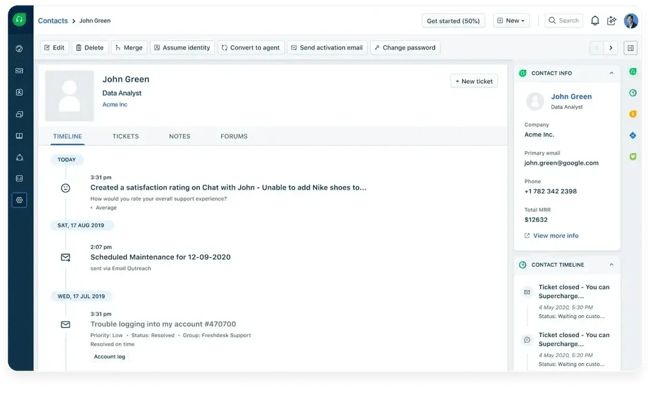
Customer service apps are software tools that help support teams receive, manage, and respond to incoming customer inquiries. Also referred to as customer service software or customer support platforms, these tools consolidate customer communications across all channels (email, live chat, SMS, phone, social media) into a shared workspace where reps can collaborate on tickets, track ticket status, respond to customers, and access customer history.
Customer service apps often include knowledge base tools, analytics dashboards that track rep performance and ticket volume, and AI features that streamline workflows and automate supported customer requests.
Service Hub is HubSpot’s customer service software that connects support interactions to HubSpot Smart CRM. HubSpot records those interactions on contact records, creating a single source of truth for sales, service, and customer success teams. Through the HubSpot mobile app, teams can access HubSpot Smart CRM, manage the shared support inbox, track tickets, and monitor SLAs on the go.
Key Features to Look for in Customer Service Apps
Omnichannel Ticketing System
A ticketing system converts each incoming inquiry into a trackable case, or ticket, that reps can assign, manage, and answer in a shared inbox. Omnichannel customer support gives teams one conversation view across email, SMS, phone, live chat, social media, messaging app, and contact forms. Many systems also support service-level agreements (SLAs), which define target response and resolution times and can trigger escalations as deadlines approach.
Automation and Workflow Rules
Automation and workflow rules let customer service leaders reduce repetitive work. Teams can route tickets by content, tag and prioritize requests, and escalate cases that breach SLAs or show negative sentiment. These rules help small support teams scale without adding avoidable administrative work.
Knowledge Base and Self-Service
A knowledge base is a self-service resource with a library of searchable articles, how-to guides, videos, and FAQs. Customers can get support without contacting a rep. Self-service resources can reduce ticket volume for repeat issues, freeing up reps to focus on more complex, high-value cases and customer relationships.
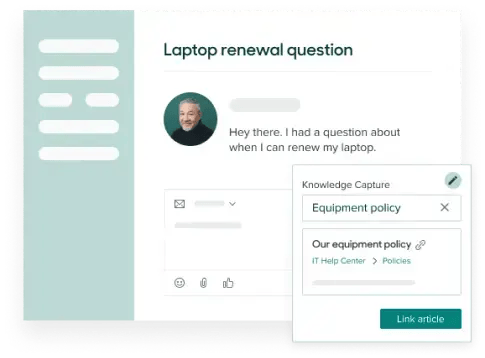
Many customer service apps now use approved knowledge base content to suggest answers inside tickets. As a support rep, I referenced our customer-facing knowledge base every day to troubleshoot issues and answer questions. A copilot that surfaced the right article inside the ticket would have saved me a lot of searching.
Pro tip: Prioritize articles that address the highest-volume ticket categories. Start with the most common repeat issues, measure which articles deflect or shorten tickets, and expand the library from there.
Reporting and Analytics
Reporting and analytics dashboards give customer service leaders visibility into customer satisfaction, team performance, and bottlenecks. Customer service apps should include out-of-the-box reports on first-response time, resolution time, ticket volume, and CSAT scores. The best customer service apps surface both team-level and individual performance data, so managers can coach effectively, measure performance against SLAs, and forecast staffing needs.
AI Features
Customer service apps typically use AI in two ways: to assist reps and to handle customer-facing inquiries. Service Hub's customer agent can resolve supported inquiries or route them to a rep.
- AI copilots: These rep-facing assistants can suggest replies, analyze sentiment, summarize ticket threads, and surface relevant knowledge base articles.
- AI agents: These customer-facing tools draw on approved company knowledge to answer questions, complete supported actions, and escalate cases that need a person.
CRM Integration
Customer service apps should integrate with a company’s existing CRM. CRM integration matters because it provides support reps with valuable customer data, giving them the context they need to deliver personalized support. Support data, including open cases, ticket history, and resolution notes, also needs to flow back to the CRM so that sales and success teams have a 360-degree view of the customer and their relationship with the business.
Many customer service apps connect to CRMs through application programming interfaces (APIs), native connectors, or integration platforms such as Zapier. Those connections can introduce sync delays, missing fields, or duplicate records. Service Hub and HubSpot Smart CRM share the same underlying customer record, so reps can see purchases, past tickets, sales interactions, and marketing touchpoints without switching platforms.
Best Customer Service Apps
The best customer service apps combine a shared inbox and ticketing with automation, reporting, AI, and integrations. The right choice depends on team size, channel mix, CRM requirements, and budget. The table below compares the 10 tools in this guide.
1. Service Hub + HubSpot Mobile App

Service Hub is HubSpot’s customer service software for support organizations ranging from startups to enterprises. It includes an omnichannel help desk, intelligent routing, workflow automation, self-service tools, service analytics, customer feedback, and customer success features.
Service Hub shares the same customer record as HubSpot Smart CRM. That connection gives support teams access to sales, marketing, and service context without relying on a separate sync. The HubSpot mobile app also provides service teams with a mobile help desk to manage the shared inbox, track tickets, monitor SLAs, and review reports.
Key Features
- Omnichannel help desk: Service Hub brings email, live chat, and other supported conversations into a shared inbox and routes tickets to the right rep.
- Self-service tools: A knowledge base and customer portal let customers find answers and track support requests.
- HubSpot Smart CRM connection: Customer-facing teams can work from a single record that includes sales, marketing, and service history.
- Reporting and feedback: Dashboards, call analytics, and customer feedback surveys help teams track performance and customer sentiment.
- HubSpot mobile app: Reps can manage the inbox, tickets, SLAs, and reports from mobile.
Best for: Teams that want customer service tools connected natively to HubSpot Smart CRM.
Pricing, Billed Annually
- Free customer service tools are available.
- Service Hub Starter: $7 per seat/month.
- Service Hub Professional: $90 per seat/month, plus a required one-time onboarding fee of $1,500.
- Service Hub Enterprise: $150 per seat/month, plus a required one-time onboarding fee of $3,500.
What we like: The knowledge base agent, currently in beta, analyzes ticket data and drafts articles from successful support interactions for a team to review before publishing. As a former support rep, I relied on knowledge base content every day. A tool that spots content gaps and drafts articles from resolved tickets would have made that library much easier to maintain.
2. Zendesk

More than 100,000 businesses use Zendesk, a customizable customer service platform that combines omnichannel ticketing, automation, reporting, AI agents, and an extensive app marketplace.
Zendesk’s breadth makes it a strong fit for large or complex support operations. Smaller teams, however, may need more setup and budget than simpler tools require.
Key Features
- Omnichannel workspace: Zendesk brings email, messaging, live chat, voice, and social requests into one agent workspace.
- Automation and routing: Triggers, workflows, and routing rules assign, prioritize, and escalate tickets.
- Help Center: Teams can build a branded knowledge base and customer self-service experience.
- Analytics: Dashboards track ticket volume, response times, resolution performance, and service trends.
- Marketplace and APIs: Apps and integrations extend Zendesk across the technology stack.
- AI agents: Zendesk can automate supported customer conversations across messaging channels.
Best for: Enterprise and mid-market support teams with dedicated operations teams.
Pricing, Billed Annually
- Support Team: $19 per agent/month.
- Suite Team: $55 per agent/month.
- Suite Professional: $115 per agent/month.
- Suite Enterprise + Copilot: custom.
- Copilot add-on: $50 per agent/month.
What we like: Zendesk’s depth of customization sets it apart. Support leaders can tailor ticket forms, workflows, and reporting views to fit their operations.
3. HelpDesk by Text

HelpDesk by Text is a cloud-based customer service app used by more than 13,000 support experts. It combines a multichannel inbox, ticket management, automation, self-service, and reporting in a streamlined interface.
Its AI features include an AI agent, ticket summaries, reply and tag suggestions, and Similar Tickets, which surface related resolved cases for reps.
Key Features
- Multichannel inbox: Email, website chat, Messenger, SMS, and Shopify conversations flow into one ticket workspace.
- Ticket automation: Rules route, tag, prioritize, and escalate work without manual triage.
- AI agent: Paid plans include a monthly allowance of AI-resolved conversations, with additional usage available.
- Agent-assist tools: Ticket summaries, reply and tag suggestions, and Similar Tickets help reps work through cases.
- Reporting and collaboration: Dashboards and shared ticket controls help leaders monitor performance and coordinate work.
Best for: Teams that want a straightforward multichannel ticketing system with built-in AI.
Pricing, Billed Annually
- Essential: $19 per user/month.
- Growth: $79 per user/month.
- Enterprise: custom.
- Additional AI resolutions: $49.50 per 50 resolutions.
What we like: Similar Tickets compares a current request with related resolved cases and surfaces relevant examples. As a former support rep, I spent a lot of time searching for similar cases. Surfacing them by meaning, not by exact keywords, would have sped up that work.
4. Intercom

Intercom is an AI-first customer service platform with a shared inbox, ticketing, automation, reporting, and a help center. Fin AI Agent handles customer-facing conversations across channels, while Copilot gives reps suggested replies and conversation summaries.
Intercom also includes in-app messaging and proactive support tools, which make it useful for digital products that support and onboard users through the same platform. Intercom charges $0.99 per Fin outcome rather than a flat monthly AI agent fee. That model ties cost to completed work, but high-volume teams should model usage because outcome charges sit on top of seat pricing.
Key Features
- Shared inbox and ticketing: Teams manage customer conversations, tickets, and handoffs in one workspace.
- Fin AI Agent: Fin handles customer-facing inquiries across chat, email, and messaging and escalates when needed.
- Copilot: Reps receive suggested replies, conversation summaries, and contextual assistance inside the inbox.
- Workflow automation: Assignment, routing, and multi-team inbox rules move conversations to the right owner.
- Help center and proactive support: Knowledge content, in-app messages, product tours, and campaigns support customers before and after they ask for help.
- Reporting: Dashboards track service metrics and Fin performance.
Best for: Digital product companies that want AI-led support and in-app messaging.
Pricing
- Essential: $19 per seat/month, billed annually.
- Advanced: $85 per seat/month, billed annually.
- Expert: $132 per seat/month, billed annually.
- Fin AI Agent: $0.99 per outcome.
- Copilot: $29 per agent/month, billed annually.
What we like: Intercom says Fin averages a 76% resolution rate, though results vary by industry, knowledge base depth, and configuration. I also like Intercom’s clean, minimal interface. I could see myself working comfortably in it every day.
5. Freshdesk

Freshdesk is a customer service app for teams that need ticketing, collaboration, automation, self-service, and reporting without the complexity or pricing of many enterprise platforms. Freddy AI adds customer- and rep-facing features, including automated responses, suggested replies, and ticket summaries.
Freshdesk’s core plans focus on ticketing, email, and self-service rather than native voice. Teams that need phone, SMS, and other real-time channels in one workspace should compare Freshdesk Omni, which starts at $29 per agent/month billed annually. Teams without phone support can avoid paying for that broader package.
Key Features
- Shared inbox and ticketing: Agents can assign, prioritize, track, and collaborate on customer requests.
- Automation and SLAs: Rules route and escalate tickets based on events, priorities, and service targets.
- Freddy AI: AI agents and Copilot features can deflect routine inquiries, summarize tickets, and suggest replies.
- Self-service: A knowledge base and customer portal help customers find answers without opening a ticket.
- Reporting: Dashboards track volume, response times, resolutions, and team performance.
Best for: Small and midsize teams that need advanced ticketing but not native phone support.
Pricing, Billed Annually
- Free program: $0 for one or two agents for six months.
- Growth: $19 per agent/month.
- Pro: $55 per agent/month.
- Enterprise: $89 per agent/month.
What we like: Freshdesk balances advanced ticketing, automation, reporting, and self-service with a relatively approachable starting price. Teams that do not need native voice can avoid paying for the broader Freshdesk Omni package.
6. Sprout Social

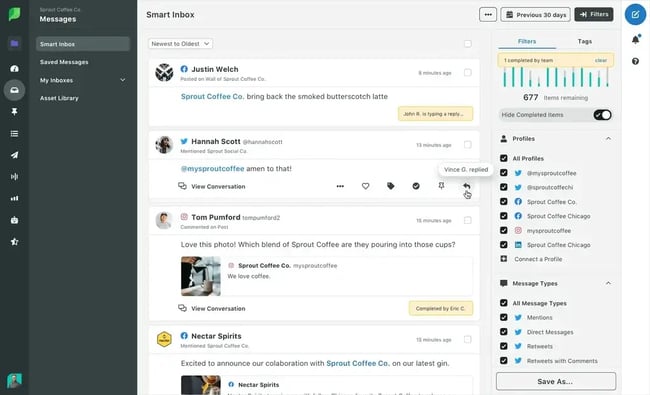
Sprout Social is a social media platform with customer care tools. Its Smart Inbox brings messages, comments, mentions, and reviews from connected profiles into one queue. Teams can assign conversations, add internal notes, track response status, and use sentiment analysis on eligible plans.
Sprout does not replace a full omnichannel help desk for most teams because it focuses on social channels. It fits brands that already primarily run support through social media, or that want social care alongside publishing, listening, and analytics.
Key Features
- Smart Inbox: Messages, comments, mentions, and reviews from connected social profiles flow into one queue.
- Team workflows: Assignment, notes, tagging, prioritization, and response tracking help teams manage social care.
- Sentiment analysis: Eligible plans flag negative messages and reviews for faster attention.
- Social listening: Teams can monitor brand mentions that occur outside direct interactions.
- Customer care reporting: Dashboards track response times, message volume, and team performance.
Best for: Brands that manage high-volume social customer care alongside social publishing.
Pricing, Billed Annually
- Essentials: $79 per seat/month.
- Standard: $199 per seat/month.
- Professional: $299 per seat/month.
- Advanced: $399 per seat/month.
- Enterprise: custom.
What we like: The Smart Inbox turns social messages into assignable teamwork, giving customer care teams more accountability than native social inboxes do.
Pro tip: Sprout Social makes the strongest business case when a team also uses its publishing, planning, and analytics tools. Teams that need sentiment in the Smart Inbox or help desk integrations must choose the Advanced plan, which costs $399 per seat/month, so customer care alone may not justify the cost.
7. Helply

Groove rebranded as Helply in May 2026, and now, Helply positions itself as an AI-first B2B support platform that charges per ticket rather than per seat. It combines a shared inbox, email, chat, messaging, workflow automation, a knowledge base, analytics, and AI assistance.
Each ticket includes AI triage, replies, actions, and escalation. Helply also uses support context to surface churn, upsell, bug, and feature-request signals. Because its pricing requires at least 250 tickets per month on an annual contract, very small teams may find that the former Groove positioning no longer applies.
Key Features
- Shared inbox: Email, chat, and messaging flow into one support workspace.
- AI assistance: Every ticket includes AI triage, replies, actions, and intelligent escalation.
- Workflow automation: Rules and smart escalations move tickets to the right owner.
- Knowledge and reporting: A knowledge base, analytics, and API access support self-service and operations.
- Unlimited seats: Teams can invite agents and cross-functional collaborators without paying per-seat charges.
Best for: B2B support teams that want AI included in ticket-based pricing.
Pricing, Billed Annually
- $1 per ticket.
- Minimum 250 tickets per month.
- Minimum annual contract: $3,000.
- No seat fees.
- Unlimited AI usage included.
- Volume discounts available.
What we like: Helply’s unlimited-seat model gives support, product, and customer success teammates access without adding seat costs. As a small business owner, I like that it ties cost to ticket volume, though the $3,000 annual minimum makes it a better fit for teams that already handle at least 250 tickets per month.
8. Gorgias

Gorgias is a help desk for ecommerce businesses. Its Shopify, WooCommerce, BigCommerce, and Magento integrations let reps view orders, issue refunds, cancel orders, and update shipping information inside tickets.
Gorgias brings email, live chat, social messages, and supported channels into one inbox; voice and SMS require add-ons. Automation, reporting, and AI Agent features support ticket routing and automated interactions.
Key Features
- Ecommerce order tools: Reps can view orders, issue refunds, cancel orders, and update shipping without leaving a ticket.
- Unified inbox: Email, live chat, social messages, and supported channels flow into one queue; voice and SMS require add-ons.
- Automation and AI: Rules, macros, triggers, and AI Agent route requests and automate supported interactions.
- Revenue reporting: Gorgias connects service interactions with sales activity and conversion data.
- Integrations: The Gorgias integration library currently lists 254 apps, including Shopify, WooCommerce, BigCommerce, and Magento.
Best for: Ecommerce brands.
Pricing
- Starter help desk: $10/month for 50 tickets, with a maximum of 3 agents.
- Starter with AI Agent: $40/month.
- Basic help desk: $50/month for 300 tickets.
- Basic with AI Agent: $77/month, billed annually.
- Pro help desk: $300/month for 2,000 tickets.
- Pro with AI Agent: $471/month, billed annually.
- Advanced help desk: $750/month for 5,000 tickets.
- Advanced with AI Agent: $1,227/month, billed annually.
- Enterprise: custom.
- AI Agent overage: $1.50 per automated interaction.
What we like: Support reps can issue refunds and manage orders directly in the help desk, which saves time for teams that would otherwise switch between order and support systems.
Pro tip: Gorgias prices the help desk by ticket volume, while AI Agent pricing depends on the number of included automated interactions and any overages. That structure can make costs less predictable during peak periods, so teams should model both ticket volume and AI usage.
9. Front

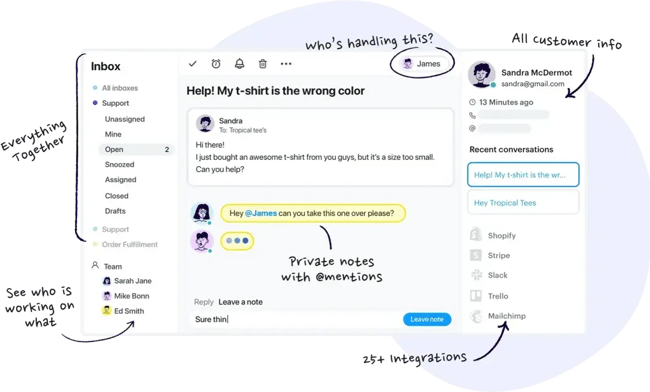
Front supports complex customer operations that span departments. Its collaboration tools let teammates add internal comments, co-draft replies, and see who is working on a message. Rules and approvals help support, billing, product, and customer success teams coordinate multi-step requests.
Front brings email, SMS, live chat, social messages, and WhatsApp conversations into a shared inbox. Automation rules, SLA tracking, reporting, and AI tools help teams route and answer those requests.
Key Features
- Shared-inbox collaboration: Internal comments, co-drafting, and collision detection help teams coordinate replies.
- Omnichannel support: Teams can manage email, SMS, live chat, social messages, and WhatsApp.
- Automation and SLAs: Rules route and tag requests, while SLA controls track service commitments.
- AI tools: Copilot suggests replies, and Smart CSAT infers customer satisfaction signals.
- Integrations and reporting: Front connects with Salesforce, HubSpot, Jira, and other tools and reports on team performance and service levels.
Best for: Teams managing complex, cross-functional customer operations where tickets require coordination across departments.
Pricing, Billed Annually
- Starter: $25 per seat/month for up to 10 users.
- Professional: $65 per seat/month for up to 50 users.
- Enterprise: $105 per seat/month with unlimited users.
- Copilot: $20 per seat/month on Starter and Professional; included with Enterprise.
What we like: Front’s internal comments and co-drafting tools support cross-team work. When I was a support rep, I sometimes had to involve product or customer success through a separate Slack message or email. Front lets teams coordinate that work inside the customer conversation.
Pro tip: Front’s Starter plan supports only one channel type—email, chat, or SMS—so teams must upgrade to Professional for omnichannel support.
10. Hiver

Hiver began as a Gmail-based help desk and now offers Hiver Omni, a dedicated customer service platform. It combines ticketing, email, live chat, voice, WhatsApp, and Slack into a single workspace, though channel access varies by plan. Paid plans add AI agents, Copilot, automation, analytics, and advanced integrations.
Hiver currently labels AI QA, AI Insights, and its AI Knowledge Builder as coming soon on the Elite plan, so teams should not treat those tools as generally available when comparing products.
Key Features
- Shared inbox and ticketing: Teams can assign, track, and collaborate on customer requests.
- Customer channels: Hiver supports email, live chat, WhatsApp, voice, and Slack, with access varying by plan.
- AI agents and Copilot: Paid plans add autonomous support and rep-assistance features.
- Automation and SLAs: Workflow rules route requests and track service commitments.
- Self-service and reporting: A knowledge base, customer portal, and dashboards support customers and service leaders.
Best for: Growing teams that want a free help desk with paid AI and omnichannel upgrades.
Pricing, Billed Annually
- Free plan available for unlimited users.
- Growth: $25 per seat/month.
- Pro: $55 per seat/month.
- Elite: $85 per seat/month.
What we like: Hiver’s free plan includes basic help desk functions for unlimited users, allowing a growing team to collaborate without a per-seat fee. Teams should still compare channel and automation limits before relying on the free tier.
Frequently Asked Questions About Customer Service Apps
These answers cover the apps customer service teams use, how to compare support quality, and which platforms fit common service operations.
What apps does customer service use?
Customer service teams use ticketing systems, communication platforms, CRM tools, knowledge bases, analytics, and automation apps. Some teams combine separate tools; others use a customer service platform such as Service Hub, which brings ticketing, automation, AI, reporting, the HubSpot mobile app, and HubSpot Smart CRM together on one platform.
Which app offers the best customer support?
No single app offers the best fit for every support team. Service Hub is a strong choice for teams that need CRM integration, automation, omnichannel ticketing, and mobile access; a more focused tool, such as HelpDesk by Text, may suit a smaller team with simpler workflows.
From experience, I’ve seen powerful platforms collect dust because agents found them clunky. The strongest option is the one the team can use consistently.
What’s the best customer service platform?
The best customer service platform matches the team’s channels, workflows, integrations, and budget. Service Hub fits teams that want support connected to HubSpot Smart CRM and mobile access; Zendesk fits complex enterprise operations; and Gorgias fits ecommerce teams that need order actions inside tickets.
When evaluating platforms, support leaders should prioritize three factors: how well the platform integrates with the existing tech stack, whether it supports the channels customers actually use, and how easily it scales as ticket volume and team size grow.
Get started with customer service apps.
The best customer service app makes it easier for reps to serve customers with the context they need. Explore Service Hub and the HubSpot mobile app if your team wants a shared support workspace connected to HubSpot Smart CRM on desktop and mobile.
Editor's note: This post was originally published in August 2023 and has been updated for comprehensiveness.