
Every click, purchase, and interaction tells a story, but too often, that story gets lost in scattered spreadsheets, disconnected systems, and manual processes. Collecting and using customer data is about understanding what customers want and building
a strong relationship at every stage.

When businesses can see the full picture of their customers‘ journey – from first touch to loyal advocate – they can personalize every interaction and uncover opportunities they didn’t even know existed. That's why having the right data tools is a necessity for growth.
In this article, readers will discover customer data collection software worth using.
Table of Contents
- What is customer data collection software?
- Customer Data Collection Software vs. CRM
- Customer Data Collection Software vs. Customer Data Platform
- How to Choose a Data Collection Tool
- 5 Top Tools to Consider for Customer Data Collection
- Customer Data Collection Software Comparison Table
- How to Get Started with HubSpot Data Studio
- Frequently Asked Questions About Customer Data Collection Software
What is customer data collection software?
Customer data collection software is a system that lets businesses gather, organize, and analyze information about their clients. It collects first-party data from multiple channels, giving companies a clearer picture of how people interact with their brand.
One example of customer data collection software is HubSpot’s Data Hub, which makes it easier to bring business data together and keep it clean, making insights more reliable.
.webp?)
Free Help Desk & Ticketing Software
Keep track of customer requests in one unified help desk that connects to your CRM database.
- Provide personalized, AI-powered support to your customers
- Save time, reduce errors, and streamline service processes
- Improve rep efficiency & time to resolution
- And more!
Customer Data Collection Software vs. CRM
Don't confuse customer data collection software with a customer system of records. Though they work together, these tools serve distinct roles.
Data collection tools like forms, surveys, and field apps are designed to gather raw customer data at the source, whether that’s feedback, sign-ups, or interactions in the field.
A CRM (customer relationship management system) is the system of record, where the collected data lives long-term. A CRM organizes customer profiles, tracks interactions, and supports sales, marketing, and service teams.
Essentially, customer data collection software feeds data into a CRM. Organizations use a collection tool whenever they gather fresh input — i.e., an event registration, a new lead, a feedback score. They need a CRM when they desire a single, unified view of that customer over time, using that history to build and manage the relationship.
For instance, HubSpot’s Data Hub acts as the customer data collection software, and the Data Studio feature connects to Google Sheets, Excel files, and data warehouses to keep data current.
Customer Data Collection Software vs. Customer Data Platform
Customer data collection software and customer data platforms (CDPs) serve different but connected purposes.
Customer data collection software captures first-party customer data from multiple channels; then, a CDP takes over. Platforms like Data Hub act as a CDP, bringing all that data together, cleaning and organizing it, and building a unified customer profile that can be used across marketing, analytics, and customer engagement.
Collection tools can work independently, but their full value comes when connected to a CDP or CRM. A CDP makes it possible to link data across channels and personalize experiences at scale, while a CRM serves as the central record of customer relationships.
How to Choose a Data Collection Tool
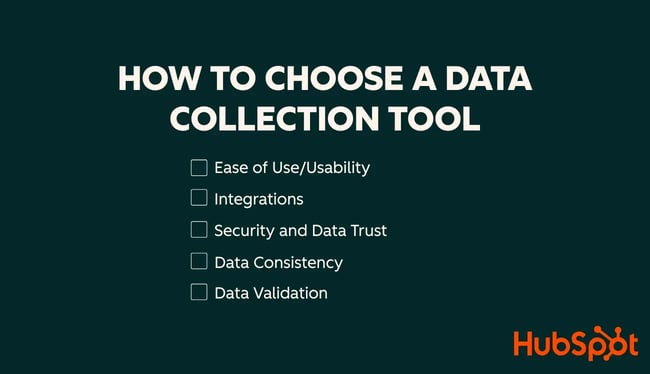
When choosing a data collection tool, think about how it fits business needs and workflows. There are five key parameters to consider: ease of use, integrations, security, data consistency, adn data validation.
Ease of Use/Usability
One of the most important questions to answer when choosing customer data collection software is: Can team members and customers use it without extensive training?
Doug Crawford, President and Founder of Best-Trade School, stresses this point: “The tool can have all the powerful features in the world, but if the people in your team cannot use it easily, your data will never be useful.”
He argues that overly complex platforms fail in practice, recalling those that looked great but “required long training sessions... and that was always frustrating for everyone involved.”
Crawford says that simplicity drives adoption and quality: “The best data collection tools are those that someone can open and gain a good understanding of without requiring extensive instruction. Simplicity improves completion rates, and engaged teams yield better, more accurate data.”
Integrations
A robust data collection tool must fit smoothly into a technology stack including a CRM, data hub, and other business systems.
For Alex Smith, Manager and Co-Owner of Render3DQuick.com, integration shapes every tool selection.
Smith warns that a data collection tool disconnected from the larger project management and communication systems is “destined to become an efficiency drain.” Many tools promise sophisticated features, but the benefit disappears when a workflow requires manual data transfers or rekeying. “You have already lost the benefit and impaired team efficiency,” he explains.
In his experience coordinating over 20,000 rendering projects, Smith's key advances came when systems easily exchanged data. He points to a clear example: adopting an integrated tool, which linked directly to their project management systems, created verifiable time savings. His team saw a 15 to 20 percent decrease in “extra” time previously spent on data updates and improved information accuracy.
Smith concludes that integration, while not “glamorous,” remains “a cornerstone of sustaining efficiency and reliability on projects of any size.”
Security and Data Trust
Choosing the right customer data collection tool should also revolve around whether the system can grow with the business while keeping data secure and compliant.
Michael Alexander, Managing Director at Tangible Digital, said that data trust and accuracy is always the number one factor in choosing a data sourcing tool. In his experience, every decision that shapes online strategy – from where budgets go to how content and outreach are scaled – depends on the integrity of the data feeding those choices. He warns others from falling into the trap of a “false reality”, i.e., a situation where metrics are either inflated or missing. These could heavily derail company growth.
He also pointed out that integration is just as important as accuracy. “A verified and quick integration has saved us hours a week in reporting while increasing overall confidence from the client in the data we provided them,” Alexander said. For agencies like his, a tool’s ability to scale securely and connect seamlessly with existing systems is what keeps insights reliable and strategies grounded in reality.
Data Consistency
When evaluating a data collection tool, consistency should matter just as much as accuracy. If different systems label the same action in multiple ways, it could distort performance metrics and lead teams to make decisions based on misleading insights.
Ollie Duff, a marketer at Koalify, suggests asking a simple question: “How well does the tool I’m looking at enforce data consistency at the point of capture?” Inconsistency across systems once caused his team to underestimate a key campaign. “Yes, the data will flow into the dashboard,” he said, “but it will tell the wrong story.” In Koalify’s case, a mislabelled refinance event led to two weeks of underinvestment in one of their most profitable campaigns.
Since that experience, Duff has prioritized tools that validate and standardize data as it’s collected. For him, ensuring consistency at the very beginning prevents costly missteps later.
Data Validation
A data collection tool is only as good as the information it captures. This makes data validation a non-negotiable requirement. The software must prevent errors at the point of entry through built-in rules, required fields, and real-time checks.
For Michael Benoit, Founder of California Contractor Bond & Insurance Services, validation is the most important factor when selecting a platform.
Benoit's industry demands absolute accuracy. “Given that we are in an industry where a single erroneous figure of a policy could end up creating a liability gap of $25,000, that level of built-in accuracy is the difference between a dependable tool, and a tool that creates a risk for the business,” he asserts.
He credits platforms like HubSpot for providing the necessary structure. By enforcing structured input for marketing and client data, these systems “help eliminate costly mistakes.”
5 Top Tools to Consider for Customer Data Collection
1. HubSpot Data Hub
HubSpot Data Hub is a customer data platform designed to unify, clean, and manage data from multiple sources. It centralizes information from marketing, sales, and service tools, which makes it easier for teams to use a single source of truth. With automated workflows and real-time updates, it keeps customer data accurate and actionable.
Best For
The Data Hub platform is ideal for businesses that either want to prevent a fragmented data strategy or need a system that will help consolidate their existing datasets. It works particularly well for teams that rely on multiple tools and want to make data-driven decisions.
How does it integrate with a CRM and CDP?
Data Hub integrates seamlessly with HubSpot’s suite of products as well as over 100 external platforms, including cloud databases like Snowflake and BigQuery. This integration ensures smooth data flows between tools and minimizes manual syncing. The flexible API also allows custom integrations for specialized use cases.
How does it support growth?
- Personalized marketing and sales. Centralized data allows teams to create more targeted campaigns, personalize interactions, and engage customers more effectively, boosting conversion rates and revenue
- Faster, informed decision-making. Teams can trust data accuracy, which lets them launch more effective campaigns and scale operations with confidence
- Turning data into insights faster. HubSpot’s internal and external integrations ensure all relevant data feeds into growth strategies without technical bottlenecks.
2. HubSpot Data Studio
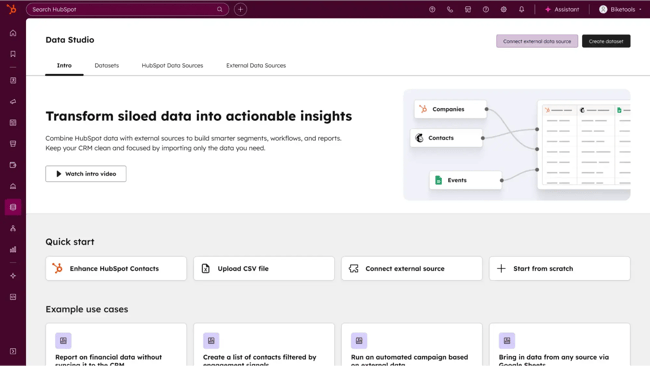
HubSpot Data Studio is the star feature of Data Hub, designed to consolidate all customer information in an easy, familiar spreadsheet view, complete with smart AI assistance. Data Studio accelerates business growth through unified, actionable customer data.
Data Studio lets anyone – technical or not – smoothly blend data from every corner of a tech stack. Anyone can build specific, customized datasets that power up even most complex segmentation, automation, and reporting efforts. Best of all, it manages the flow of data between external systems and the HubSpot CRM so teams get these advanced results without ever needing to write code or involve a specialized developer.
Best For
HubSpot Data Studio is perfect for small and mid-sized businesses that want to use data without getting buried in spreadsheets or code. It’s built for marketers, sales reps, and service managers who want a clear view of what’s happening with customers, and the ability to act on it fast. With AI doing the heavy lifting, users can blend data, spot trends, and launch smarter campaigns in a few clicks.
How does it integrate with a CRM and CDP?
HubSpot Data Studio integrates external customer data with CRM workflows. It bridges the gap between raw external data and core customer systems. Data Studio lets users connect directly to external sources like spreadsheets or large data warehouses such as Snowflake, and pull that data in automatically.
Once that data unifies, the cleaned datasets flow seamlessly into the HubSpot Smart CRM, where they power activation. This means the data immediately syncs into segments, reports, and workflows to drive campaigns, personalization, and analytics.
How does it support growth?
- Faster campaign launches. Marketing teams can pull in unified datasets and instantly create targeted segments in HubSpot, speeding up time to market for a campaign.
- Better segmentation and personalization. By blending CRM, CDP, and external data, teams can personalize outreach at scale, driving higher conversion rates.
- Reduced operational overhead. AI-assisted cleaning and automation cut down on manual data prep, freeing ops teams to focus on strategy.
- Smarter decision-making. Real-time, harmonized datasets make reporting and forecasting more accurate, which supports revenue planning.
- Scalability. As the business grows, Data Studio integrates new sources without re-architecting the CRM setup, ensuring long-term agility.
Free Help Desk & Ticketing Software
Keep track of customer requests in one unified help desk that connects to your CRM database.
- Provide personalized, AI-powered support to your customers
- Save time, reduce errors, and streamline service processes
- Improve rep efficiency & time to resolution
- And more!
3. Mixpanel
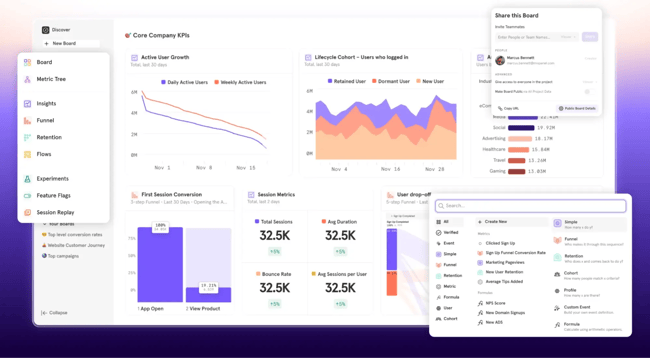
Mixpanel is a product analytics platform. It helps businesses understand how users interact with their digital products. It goes beyond basic reporting to help organizations improve product and web experiences.
Core Features
- Real-time insights. See what’s happening as it happens. Get instant visibility into user behavior and trends so the whole team can make smarter, data-driven moves
- Funnel analytics. Spot where users drop off and uncover opportunities to smooth out their journey. It’s the easiest way to boost conversions and keep customers coming back
- Cohort analysis and segmentation. Understand how different user groups behave over time to personalize experiences that really resonate
- Event tracking. Track the moments that matter (like clicks, sign-ups, and purchases) to see exactly what drives engagement and growth.
Pricing
- Free. Capped at 1M monthly events; 5 saved reports; 10K monthly session replays.
- Growth. Starts at $0; 1M monthly events free, then $0.28 per 1K events after with unlimited reports and 20K monthly session replays.
- Enterprise. Custom pricing; Unlimited monthly events with advanced analytics, and more.
What I Like
Mixpanel makes exploring data feel effortless. I can break things down, filter, or compare different user groups without touching a single line of code. The dashboard feels intuitive. It’s easy to zoom out for a high-level view or dive straight into specific behaviors when I need details fast.
4. FullStory
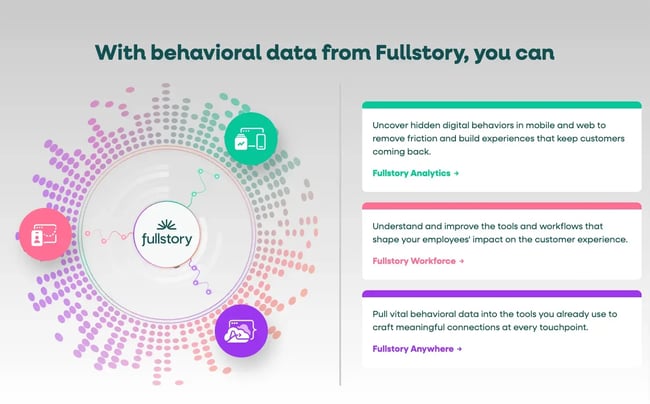
FullStory is a digital experience intelligence platform that makes recordings of user activity on websites and mobile apps.
With FullStory, users can re-watch how their sessions played out, where users clicked, how far they scrolled, or which forms they filled out. Among others, a tool like FullStory can help understand what a company can ask on a landing page and which types of data collection requests to avoid.
Core Features
- Autocapture. Record all user actions automatically, so nothing gets missed and there’s no need for manual tagging.
- Session replay. Replay full user sessions to understand how people interact with a site or app.
- Heatmaps. Visualize engagement patterns, showing which areas users focus on and where they encounter friction.
Pricing
Available on request for three packages — Business, Advanced, and Enterprise.
What I Like
I find FullStory particularly helpful for pinpointing both individual and recurring user issues. CS and product teams can replay sessions for users who reported problems and spot underlying browser behavior, which is useful for debugging and support. It’s also valuable for improving the overall UX, as you can see unexpected behaviors and spot potential bottlenecks.
I also recommend FullStory for fellow marketers, as it’s excellent for understanding how users actually experience your product and to validate how they respond to your marketing efforts on-site.
5. Jotform
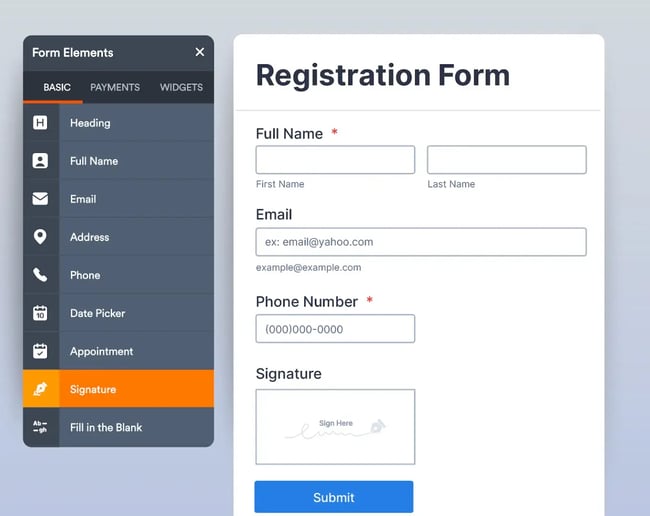
Jotform is an easy-to-use online form builder that helps teams create and collect the data that matters most. It’s flexible enough for individual creators and robust enough for organizations that need structure and collaboration in their survey software.
Core Features
- Jotform Teams. Build shared workspaces where teams can create forms, tables, reports, and apps together. Assign roles and permissions to keep everything organized and secure.
- Conversational forms. Make forms more engaging by asking one question at a time turning surveys into friendly, interactive experiences.
- Form translation. Reach a global audience with forms that can be instantly translated into over 130 languages.
Pricing
- Starter (Free) - $0 - 5 forms, 100 monthly submissions, 100 MB storage with Jotform branding.
- Bronze - $34/month - 25 forms, 1,000 monthly submissions, 1 GB storage, no branding.
- Silver - $39/month - 50 forms, 2,500 monthly submissions, 10 GB storage.
- Gold - $99/month - 100 forms, 10,000 monthly submissions, 100 GB storage, HIPAA compliance available.
- Enterprise - Custom pricing - Unlimited forms and submissions, enhanced security, multi-user support.
What I Like
I love how many ready-to-use templates Jotform offers for everything from event signups to job applications and surveys. Plus, it connects effortlessly with tools like Google Sheets, Slack, PayPal, and popular CRMs, so the data collected moves straight into existing workflows. It’s fast, flexible, and genuinely saves time.
Customer Data Collection Software Comparison Table
|
Tool |
What it Does |
Price |
|
HubSpot Data Hub |
A customer data platform that unifies, cleans, and manages data from multiple sources. Centralizes marketing, sales, and service data for accurate, actionable insights. Supports personalized campaigns, faster decisions, and seamless integrations with 100+ tools. |
Starts at $20/month (Starter); Professional at $800/month. 14-day free trial is available |
|
HubSpot Data Studio |
A tool within Data Hub that allows the creation of customized datasets from multiple sources. Blends external and CRM data with AI assistance for segmentation, reporting, and automation. Reduces operational overhead and accelerates growth through unified datasets. |
Included within Data Hub Professional and Enterprise tiers. |
|
Mixpanel |
User behavior analytics tool that tracks how people engage with your product. Includes live data monitoring, conversion path analysis, user segmentation, and interaction tracking to enhance product experience and boost user engagement. |
Free plan available; paid plans start at $25/month. |
|
FullStory |
User session analytics platform that captures visitor behavior across web and mobile applications. Offers automated event tracking, playback of user sessions, and visual engagement maps to identify problems, refine user experience, and measure marketing performance.Retry |
Pricing available on request (multiple packages available). |
|
Jotform |
Web-based survey and form creation platform for gathering information and feedback. Includes collaborative team spaces, interactive question flows, and support for multiple languages. Connects with Google Sheets, Slack, PayPal, and leading CRM systems. |
Free plan available; paid plans start at $34/month. |
How to Get Started with HubSpot Data Studio
1. Audit your data.
Before diving in, take a step back and review the already existing data. Identify what information matters most, whether that’s customer interactions, campaign results, or sales activity, and where current data might be falling short. Understanding gaps and goals upfront will help get the most out of HubSpot Data Studio from day one.
2. Make sure CRM data is standardized.
The data audit from step one might reveal data format inconsistencies. Making sure data is standardized is crucial for accurate data analysis and reporting in Data Studio. Two good practices are to:
- Check naming conventions to establish clear standards for properties to avoid confusion and maintain uniformity.
- Implement validation rules to make sure that the data that comes in through collection tools in the future follows set standards.
3. Build datasets in Data Studio.
Here’s how to create new datasets as a HubSpot user.
1. Access Data Studio.
Navigate to Data Management > Data Studio within your HubSpot account to begin.
2. Create a new dataset.
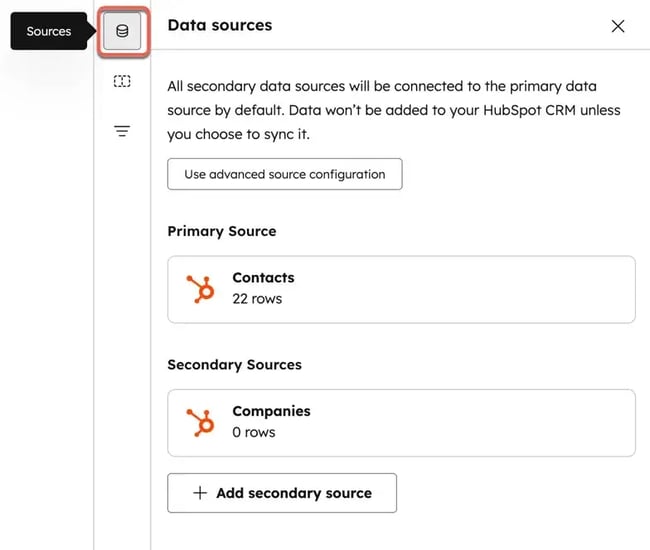
Click Create dataset in the top right. Choose a template or start from scratch. Select the desired data source, such as Google Sheets or Snowflake.
3. Define the dataset’s structure.
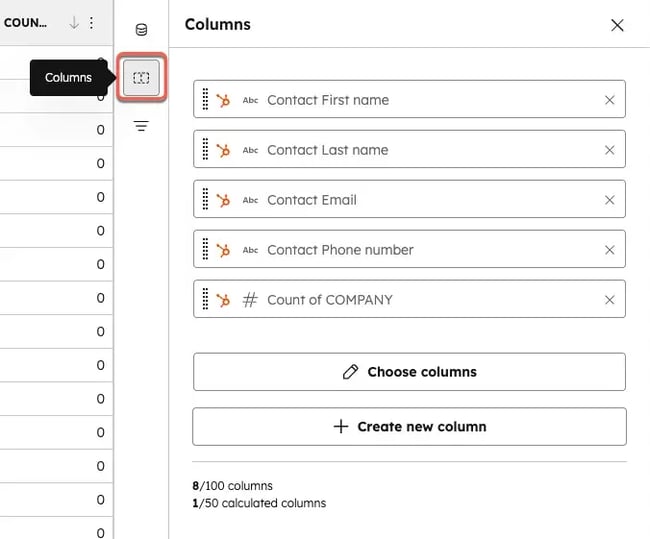
Add the necessary columns to the newly-created dataset. It’s easy to rearrange them with a drag-and-drop feature.
4. Enhance with smart columns.
HubSpot offers an AI-powered smart columns feature, which lets teams automatically generate new data points. This feature makes it easy to enrich each dataset without manual input.
5. Activate the dataset.
Once the dataset is configured, click Activate. Choose where to use the dataset, such as in workflows, lists, or reporting tools.
6. Monitor and optimize.
Once live, regularly review the dataset performance. Pay close attention to data quality and consistency across all integrated sources and make adjustments as needed.
4. Sync data to your CRM.
Before syncing data to a CRM, it’s necessary to connect any external sources required.
In HubSpot Data Studio, head to the External Data Sources tab – there are options to connect with over 100 systems, including CRMs, ecommerce platforms, and data warehouses. To add a new one, simply click Add External Data Source and follow the setup instructions.
Once connected, the data sources will appear in two categories:
- Ongoing syncs or apps, which automatically keep data up to date.
- Static imports, like uploaded CSV files, that provide a one-time snapshot of the data.
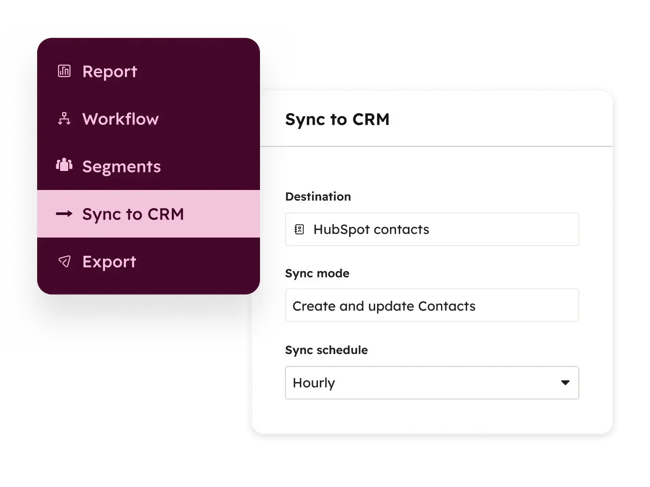
With sources connected, it’s possible to sync that data into HubSpot. Start by creating a dataset in HubSpot Data Studio that combines the internal or external data. In the Data Studio interface, hover over the dataset and click Use in → Sync to CRM.
A setup panel will show that allows you to:
- Choose the destination object (like Contacts, Deals, or Companies).
- Select a sync mode – create and update, create only, or update only.
- Set sync frequency (once, every 15 minutes, hourly, daily, etc.).
- Map each dataset column to the right CRM property, using a unique match key (like email) to prevent duplicates.
Once everything’s configured, click Start Sync. The first sync runs immediately, and future syncs will follow a chosen schedule. It’s possible to monitor progress and troubleshoot issues in the Sync Health & Monitoring dashboard, which shows how many records were created, updated, or had errors.
Frequently Asked Questions About Customer Data Collection Software
Do I need a CDP or a CRM to use data collection software?
You don’t need a CDP or CRM to use data collection software, but integrating with one helps you organize, analyze, and act on the data more effectively. For many businesses, a CRM is sufficient, especially when paired with HubSpot Data Hub.
A CRM works well if you’re mainly collecting leads, managing customer profiles, and tracking sales or service interactions. In this setup, data collection software feeds directly into the CRM, giving you a single place to activate insights.
A CDP adds value when you need to consolidate large, complex, or multi-source data (like website activity, product usage, ads, and offline events). This is where HubSpot Data Hub helps: it harmonizes and enriches data across systems, then syncs it into the CRM for activation.
What is customer data collection software, and how is it different from a CRM or CDP?
Data collection software captures customer inputs that feed CRM/CDP profiles. A CRM is the system of record where those inputs become contact/company records for sales, marketing, and service. A CDP goes further by unifying data from many systems (web, product, ads, offline) into persistent, analytics-ready profiles. HubSpot Data Hub bridges these layers. It harmonizes what’s collected, resolves identities, and routes clean, consistent data into the CRM. It scales toward CDP-style unification when sources and volume grow.
Which customer data collection tools are best for my business model and channels?
The best data collection tool for your business model and channels depends on how your business engages with customers.
- B2B lead generation: Web forms, chatbots, and event sign-ups that sync straight into your CRM.
- Ecommerce: On-site pop-ups, purchase feedback, and loyalty program forms that capture buying intent.
- Field services or NGOs: Mobile apps that work offline and push data when connectivity is restored.
- Customer feedback and research: Survey tools for NPS, CSAT, or in-product polls.
HubSpot Data Hub connects these collection tools with your CRM and channels. This way, no matter which mix you choose, your data is harmonized, deduplicated, and ready for activation across marketing, sales, and service.
How do I capture offline or field data and sync it with my CRM?
You can collect data in the field using offline-ready mobile apps that work even without an internet connection. Once back online, the app automatically syncs the data to the correct CRM objects like accounts, contacts, leads, or custom records. Built-in identity matching and deduplication ensure new info updates existing records instead of creating duplicates, keeping your CRM accurate and up-to-date.
What’s the best way to manage consent when collecting customer data?
The best way to manage consent when collecting customer data is to capture per-purpose consent at the point of collection using clear form UI patterns. These should be checkboxes or toggles that make it obvious what the customer is agreeing to.
Consent is stored as a property in the CRM, which lets you honor user preferences across channels and keep data up-to-date. Regularly validating customer information and linking consent to CRM records helps ensure the data is accurate, consented, and ready for AI.
How do I avoid duplicate records across multiple tools?
The best way to avoid duplicate records across multiple tools is to make sure each customer has a unique identifier, like an email, phone number, or customer ID. Combine this with simple normalization rules to keep data consistent and regular deduplication routines to clean up any overlaps. Before syncing everything at scale, run a small test sync to catch any issues early. This keeps the data clean and the team confident it’s accurate.
What’s a realistic first phase for teams just getting started?
A realistic first phase is a small, time-bound pilot that focuses on one team or process to demonstrate value quickly. For example:
- Select a high-impact area like capturing lead or customer info from a single touchpoint.
- Define key fields and consent to decide what data to collect and how to track permissions.
- Set up the tools, configure the forms, mobile apps, and/or integrations for this pilot.
- Run for 2-4 weeks and gather data, test syncing, and check deduplication routines.
- Review and share results, making sure to highlight time saved, cleaner records, or improved visibility to build buy-in across the broader team.
Customer data collection is the driving force for customer analytics.
Customer data collection software is essential for all types of companies – both those with online and offline presences. These tools let organizations capture, unify, and (most importantly) activate first-party data.
Unlike CRMs or CDPs, these tools focus on collecting consented data and syncing it into the core system of record, creating a foundation for growth-driven workflows.
Naturally, the question stands: How can the ROI of a customer data collection stack be measured while avoiding tool sprawl?
Success comes from tracking the efficiency of data capture, accuracy of records, and the impact on connected workflows. Consolidating tools into a unified platform reduces complexity and accelerates value. For best results, use a unified platform like HubSpot to standardize properties and consent, reduce complexity, and accelerate value.
Free Help Desk & Ticketing Software
Keep track of customer requests in one unified help desk that connects to your CRM database.
- Provide personalized, AI-powered support to your customers
- Save time, reduce errors, and streamline service processes
- Improve rep efficiency & time to resolution
- And more!
CDP

![Customer Data Integration: A Complete Guide [Expert Tips & Examples]](https://53.fs1.hubspotusercontent-na1.net/hubfs/53/customer-data-integration-1-20241218-9529716.webp)





![What Is an Identity Graph? [The Plain-English Guide]](https://53.fs1.hubspotusercontent-na1.net/hubfs/53/identity-graphs.jpg)