


Mobile customer service software enables support teams to deliver fast, personalized help directly from phones and tablets. It differs from traditional help desks by offering mobile-first workflows, offline ticketing, push notifications, and AI assistance that keep agents connected wherever they work.
Click Here to Get HubSpot's Customer Service Software
As customer expectations rise, these tools help teams manage conversations, capture photos or voice notes on-site, and sync automatically with CRM data. The best options in 2026 integrate AI copilots, omnichannel messaging, and real-time analytics into unified apps that perform just as well in the field as they do in office.
This guide explains how mobile customer service software works, which features matter most, how to evaluate tools in real-world conditions, and why HubSpot’s Service Hub with AI stands out as the leading all-in-one solution for mobile support.
What is mobile customer service software?
Mobile customer service software enables customer support interactions on phones and tablets. It differs from standard help desk software by offering mobile-first features like offline mode, push notifications, in-app SDKs, and AI assistance designed for real-time responsiveness.
Unlike traditional help desks, which rely on constant desktop connectivity, mobile customer service software is designed for the real world — wherever agents and customers actually are, whether that’s on a job site, in transit, or in the field.
Because 75% of service leaders now manage more customer service tickets than ever before, mobile-ready tools have become essential for keeping up with customer expectations. The best platforms support:
- In-app SDKs that embed live chat and ticket creation directly inside a customer-facing app.
- Offline ticketing so field reps can log issues or upload photos even when signal drops.
- Push alerts that keep agents informed in real time.
- AI copilots that summarize messages and recommend responses on the go.
Mobile platforms also make it easier to open or update tickets, share photos and voice notes, and receive notifications without switching between apps — critical functionality when 74% of service leaders say tool-switching slows down resolution times.
.webp?)
Free Help Desk & Ticketing Software
Keep track of customer requests in one unified help desk that connects to your CRM database.
- Provide personalized, AI-powered support to your customers
- Save time, reduce errors, and streamline service processes
- Improve rep efficiency & time to resolution
- And more!
Mobile Customer Service Software Features You Should Consider
Important features of mobile customer service software include offline mode, push reliability, camera upload, voice notes, OS share sheets, quick actions, and native notifications. These features enable service teams to stay productive, capture context in real-time, and deliver consistent customer experiences — even without reliable connectivity.
When evaluating mobile support tools, service teams should prioritize reliability, speed, and usability to best meet organization and customer needs. The best platforms combine these capabilities with CRM integration and AI assistance to support mobile workflows and ensure agents can resolve tickets and update records anywhere they work.
With just 35% of CRM leaders saying their customer data is fully integrated with their service tools, teams that are able to integrate with their CRM have a tremendous opportunity.
HubSpot Service Hub’s mobile app integrates natively with HubSpot Smart CRM.
Offline Mode
Offline mode allows agents to create, edit, or resolve tickets when no network connection is available. Once the device reconnects, the data automatically syncs with the main help desk and CRM. This capability is essential for service technicians, delivery staff, or property managers working in areas with limited signal. Platforms that handle data caching securely, without duplicate entries, help teams maintain accuracy while eliminating downtime.
Push Reliability
Push notifications ensure mobile service teams get timely information and updates. They alert agents to new messages, escalations, or SLA breaches within seconds. Reliability is critical as 82% of customers expect immediate problem resolution. Look for systems with built-in retry logic and configurable notification types, so no update gets lost during network transitions.
Camera Upload
Mobile cameras turn support interactions into visual documentation. Agents can attach before-and-after photos, serial numbers, or short clips to clarify problems. This simple feature reduces diagnostic back-and-forth and supports faster approvals for replacements or repairs. AI-enabled platforms can even tag or classify images automatically, adding searchable context to every ticket.
Voice Notes
Typing long responses on a small screen slows agents down. Voice note recording lets them capture quick updates, customer comments, or instructions hands-free. The best mobile customer support software transcribes these recordings automatically, making them searchable inside the CRM. It’s a time-saving, accessibility-friendly feature that also adds authenticity to support documentation.
OS Share Sheets
Integration with iOS and Android share sheets lets users send screenshots, files, or app content directly into a ticket — without leaving the current screen. This streamlines data collection and minimizes context switching, a pain point that 74% of service leaders say slows down ticket resolution. It’s especially useful for customer-facing teams who multitask across messaging, CRM, and field tools.
Quick Actions
Quick-action buttons automate repetitive mobile workflows like “Mark Resolved,” “Escalate,” or “Call Customer.” They shorten response time and prevent errors caused by manual entry. Ideally, these shortcuts should be customizable so teams can align them with unique service processes or escalation paths.
Native Notifications
Native notifications appear at the operating-system level rather than only inside the app. This ensures agents receive alerts even when the app is closed, without draining battery or relying on background refresh. Combined with AI-driven prioritization — like grouping urgent tickets or tagging repeat customers — native notifications keep service reps responsive throughout the day.
How to Evaluate Mobile Customer Service Software
Evaluating mobile customer service software requires testing it under real-world conditions. Reliability, offline performance, and push accuracy matter more than interface design or feature lists. The best approach is to run field-based trials that reveal how the platform behaves with spotty connectivity, heavy photo uploads, and frequent app switching — or any other components of your typical workflow.
“When our techs are delivering or servicing hot tubs, they can’t always depend on cell coverage,” says Kali Bennett, second-generation owner of The Waterworks Spa, Sauna. Swim. “We needed mobile customer service software that could log tickets offline, attach before-and-after photos, and sync notes automatically once we’re back in range. ”
Field testing like this shows whether the app can handle real-world latency, secure data synchronization, and user errors without losing information. It also helps identify hidden weaknesses — like duplicate tickets, slow image compression, or inconsistent alerts—that rarely appear in a demo.
Evaluating AI integration alongside mobility is essential. Of CRM leaders, 92% say AI has improved their customer service response times, and 84% see AI as an instrumental tool for interacting with modern customers.
Tools like HubSpot Service Hub combine both for faster, context-rich support.
Mobile Service Evaluation Checklist
Use this mobile customer service software evaluation checklist to compare each tool across five key benchmarks.
- Performance: App speed under low signal, load time for attachments, and battery impact.
- Offline workflows: Ability to create, edit, and sync tickets when disconnected.
- File uploads: Photo, video, and document handling with compression accuracy.
- Push reliability: Notification delivery within three seconds, with retry logic.
- Session resilience: App stability after network drops or multitasking.
- AI integration: Explore how AI can improve repetitive tasks and support service teams.
Best Mobile Customer Service Platforms
Four leading apps dominate the 2026 mobile support market: HubSpot Service Hub + AI, Zendesk, Freshdesk, and Zoho Desk. Only HubSpot provides unified CRM, omnichannel, and AI copilots in a single mobile experience.
|
Feature / Capability |
HubSpot Service Hub + AI |
Zendesk |
Freshdesk |
Zoho Desk |
|
AI on Mobile |
AI mobile assistant (summarization, translation, suggested replies) |
AI Assist (web-based, limited mobile) |
Basic automation only at the lowest level |
Limited at Lower Level Plans |
|
Push Notifications |
The mobile app supports features like Caller ID and call logging, |
Push notifications enabled |
Push notifications enabled |
Push notifications enabled |
|
CRM Integration |
Fully native |
Through integrations |
Via Freshsales CRM |
Native Zoho CRM |
|
Omnichannel Support |
Chat, email, phone, social |
Multi-channel suite |
Omnichannel support available |
Omnichannel support available |
|
Starting Price (for Minimum Level to Get These Mobile Features) |
$20 per user/month for Starter Plan |
$55 per user/month for Suite Plan |
$49 per user/month for Pro Plan; Full AI at an additional $29 per user/month |
$14 per user/month for Standard Plan |
|
Best For |
Unified AI-powered CRM with full visibility |
Enterprise-level customization |
Small teams seeking simplicity |
Existing Zoho CRM users |
While several leading platforms offer mobile apps for customer service, HubSpot stands out for its fully native CRM integration, AI-powered mobile assistant, and unified omnichannel experience (including social media messaging).
HubSpot Service Hub + AI (Recommended)
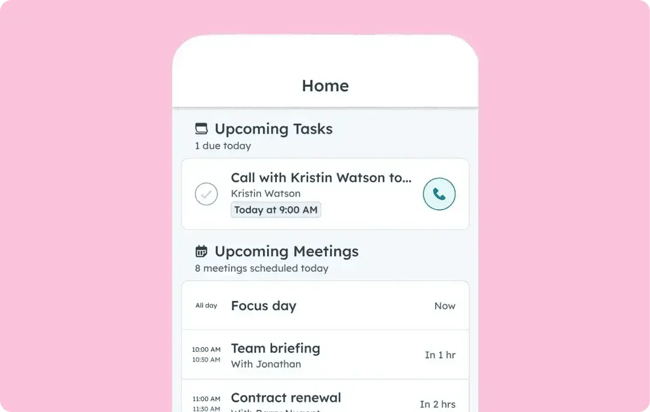
HubSpot Service Hub brings omnichannel support, AI assistance, and CRM data into a single, unified mobile experience. Agents can manage conversations, view contact timelines, and access tickets directly from the HubSpot mobile app, while the AI Breeze Assistant helps summarize threads, translate messages, and suggest replies in real time.
A remarkable 78% of service leaders say that they leveraged HubSpot’s CRM software to increase end-to-end visibility.
With native CRM integration, push notifications, and built-in automation, HubSpot enables service teams to deliver consistent, context-rich support wherever they work. It’s a complete solution for growing businesses that need both visibility and mobility — without adding tools or integrations.
- Best for: Teams seeking a unified, AI-powered CRM for service operations.
- Key features: AI mobile assistant, native push notifications, full CRM visibility.
- Starting price: $20 per user/month for the Starter plan.
Free Help Desk & Ticketing Software
Keep track of customer requests in one unified help desk that connects to your CRM database.
- Provide personalized, AI-powered support to your customers
- Save time, reduce errors, and streamline service processes
- Improve rep efficiency & time to resolution
- And more!
Zendesk
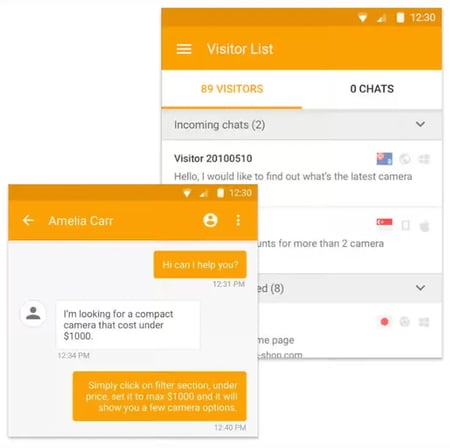
Zendesk offers a robust enterprise platform with customizable workflows and SDKs for in-app chat. Its customer service app provides reliable notifications and channel coverage but depends on integrations for CRM visibility.
- Best for: Enterprise organizations needing deep customization and multi-channel workflows.
- Pricing: From $55 per month.
Freshdesk
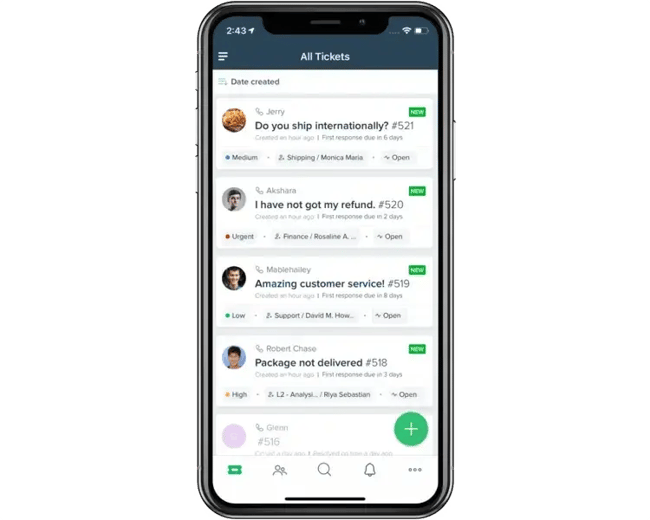
Freshdesk’s customer service app is intuitive and includes solid push notifications and automation, though its AI and CRM integration require higher-tier plans. It’s a fit for smaller teams that need simplicity without heavy setup.
- Best for: Small to mid-size teams seeking an affordable mobile service solution.
- Pricing: From $49 per month.
Zoho Desk
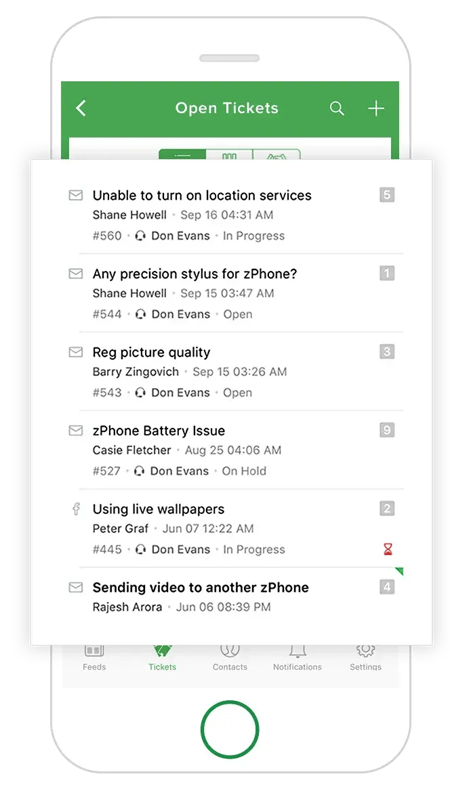
Zoho Desk integrates directly with Zoho CRM and includes reliable notifications and multi-channel support. While AI and advanced automation are limited at lower tiers, its native CRM connectivity makes it an efficient option for existing Zoho users.
- Best for: Existing Zoho ecosystem users.
- Pricing: From $14 per month.
Frequently Asked Questions About Mobile Customer Service Software
Do I need an in-app SDK, or is a web chat widget enough?
In-app SDK is the better choice if customers interact primarily inside a mobile app. It embeds chat and ticketing directly within the app, preserving session context and supporting features like push notifications and file uploads.
A web chat widget can handle simple browser-based conversations, but users often lose history when they switch apps or close tabs. For a unified experience across devices, platforms like HubSpot Service Hub integrate chat and messaging channels natively with the CRM.
How do I validate offline mode and reconnection?
To confirm whether a service app truly supports offline workflows, test ticket creation while disconnected. Put your phone in airplane mode, create or update a ticket, and reconnect. Reliable platforms automatically sync data — including timestamps and attachments — once connectivity returns, without duplicating entries.
While not all tools support full offline mode, HubSpot prioritizes reliability through native notifications and AI-powered triage to ensure agents stay productive in low-signal environments. Learn more in our guide to customer service software.
What’s the best way to secure mobile agents in a BYOD environment?
The best way to secure mobile customer service agents in a Bring-Your-Own-Device (BYOD) environment is to enforce security features like Single Sign-On (SSO), Mobile Device Management (MDM), and role-based permissions.
These controls protect customer data and prevent unauthorized access to CRM records. According to the 2024 HubSpot State of Service report, only 35% of CRM leaders say their data is fully integrated with service tools, which makes unified systems like HubSpot’s AI-powered Service Hub a safer and more efficient option.
When should I add WhatsApp and SMS to my support mix?
Add WhatsApp and SMS when your customers begin using them more frequently than email or chat, or when ticket response times start to lag. These channels meet customers where they already communicate and can dramatically improve responsiveness.
With 75% of CRM leaders now using omnichannel support, SMS is emerging as a top-performing channel for immediate issue resolution. HubSpot’s SMS and messaging tools let teams manage these conversations within the same CRM timeline, ensuring no context is lost.
The future of customer service is mobile (and unified).
Mobile customer service software is no longer optional — it’s the foundation of fast, reliable support. The right platform enables agents to respond instantly, capture on-site context, and sync updates directly with the CRM, ensuring that every interaction is accurate, visible, and complete.
Tools like HubSpot Service Hub and the AI mobile assistant make this possible by uniting CRM data, omnichannel messaging, and AI-powered productivity in one mobile workspace. According to the 2024 HubSpot State of Service report, 92% of CRM leaders say AI has improved response times, and 75% of HubSpot users increased retention — proof that intelligent automation drives faster, more consistent customer experiences.
From a customer’s perspective, I recently completed a warranty service request entirely through an app — no phone calls, no waiting. I uploaded photos, approved the service and fees, and received updates in real time. The process was fast, transparent, and stress-free.
From a business standpoint, I’ve helped teams design mobile workflows that deliver that same level of ease for customers while reducing friction for field technicians. When techs can capture images, send real-time updates, and automatically sync those details to the CRM everyone benefits. In-office teams have instant visibility, customers get accurate updates, and the experience feels effortless instead of transactional.
That’s the promise of mobile customer service done right: speed, clarity, and connection at every step.
Free Help Desk & Ticketing Software
Keep track of customer requests in one unified help desk that connects to your CRM database.
- Provide personalized, AI-powered support to your customers
- Save time, reduce errors, and streamline service processes
- Improve rep efficiency & time to resolution
- And more!