
Manually tracking website changes is more than just tedious. It is unreliable, outdated, and, in the age of AI, simply inefficient.
It‘s very easy to overlook important information when manually checking multiple pages, but tracking web changes is crucial for staying informed about everything from industry news to competitors’ actions.

Luckily, there are multiple methods to automate this process, such as website monitoring tools, RSS feeds, and API integrations.
In this post, we’ll explore the most common and effective methods to track changes on a website. Whether you're a business owner or simply want to stay updated on your favourite websites, this guide will assist you in finding the right tool for your needs.
Let’s get started.
.png)
Free Website Optimization Checklist
This website optimization checklist will help you perfect your website's:
- Performance
- SEO
- Security
- Mobile Performance
Download Free
All fields are required.
Why track changes on a website?
First of all, why might someone need to track changes on a website? Let’s explore the various use cases and benefits of tracking website changes below:
- Monitor the competition: For product managers, tracking your competitors’ key pages, such as product pages, pricing pages, and press releases, offers early insight into new feature launches, price changes, and shifts in messaging or positioning. Product managers can help inform their team of competitor movements and adapt strategies accordingly.
- Optimise content and spot trends: For content marketers, monitoring competitors’ newly published articles can help guide your content marketing strategy and align it with your audiences’ current interests and trending topics.
- Track technical stability and performance: Developers can leverage website tracking tools to monitor uptime, load times, cross-platform compatibility, and more. This helps developers improve their development and testing processes.
- Identify website errors and inconsistencies: For business owners managing their entire operation, monitoring websites is a vital quality-control measure. They can oversee their own websites to quickly detect accidental content deletions, branding mistakes, or inconsistencies.
- Meet legal and compliance requirements: For legal teams, tracking changes to legislation and regulations, or monitoring ongoing court cases, is necessary to proactively identify and mitigate potential legal and compliance risks.
Some other reasons to track changes on a website include monitoring the latest trends and competitor activity, or simply collecting specific data points such as weather, exchange rates, and price fluctuations.
So, how can you monitor website updates?
How to Track Website Changes
There are various methods for monitoring changes to websites. In this section, we’ll cover approaches from manual checking to advanced tools.
1. Check manually.
Manually detecting updates is a low-tech, free approach. It is also easier to manage when the monitored site rarely changes.
Another reason to choose the manual method is the importance of the information. If the tracked content is not critical or urgent for decision-making, you can review it at your convenience, as immediate updates are not necessary.
Additionally, this method works well for detecting visual changes, such as page styles or layout modifications, which are easily noticeable at a glance.
However, manual checking is the least efficient and most time-consuming method. Tools like website change-detection software or web scrapers, described below, are more effective and just as reliable.
2. Use website monitoring tools and extensions.
There are different types of software used in content monitoring. For example, you can choose desktop software, browser extensions, or web applications.
Additionally, some websites may block or limit specific tracking techniques, so check the website's terms of service before using any tracking tools.
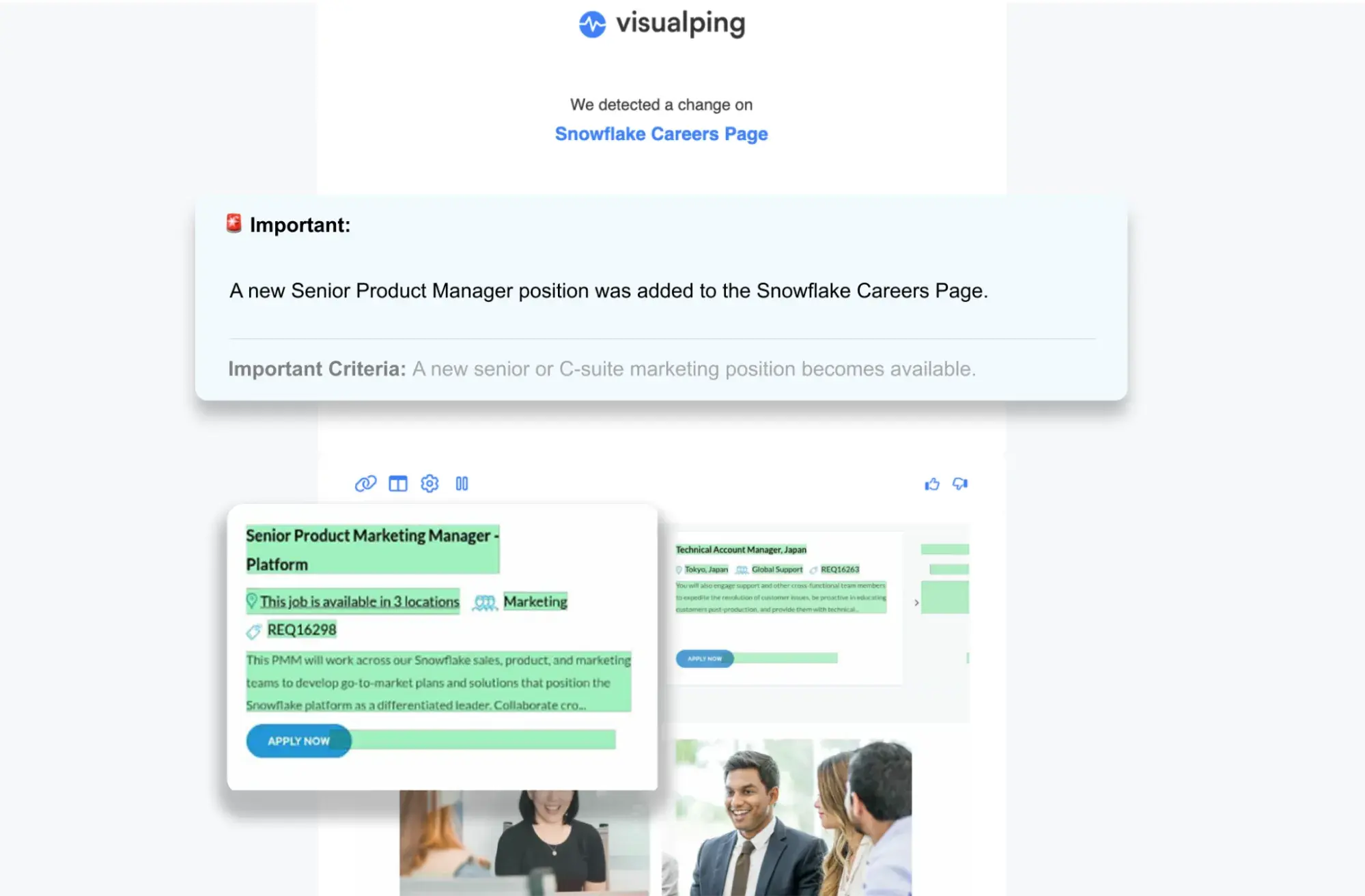
There is a range of online tools specifically designed to track changes on websites. Some, like Visualping, will use AI to alert you when a change on a website meets your criteria, with screenshots and a short summary of the change. Other simple yet equally efficient tools, such as PageCrawl or Trackly, will alert you when content changes.
The example below shows an AI-based alert that triggers only when a condition is met. In this case, the condition is a “senior or C-suite marketing position becoming available” on the tracked Snowflake career page.
The AI will allow you to filter out minor changes and only alert you when the condition is met. If a finance vacancy is posted, for example, it will get ruled out by the AI, and you will not be alerted. The use of AI significantly reduces the noise.
For an independent, user-reviewed ranking of the best website monitoring software, you can refer to G2's list of Best Website Change Monitoring tools.
In addition to web-based services, Browser Extensions are also very popular. Because extensions use your computer and internet connection, they are typically free regardless of how often they check a particular website.
Extensions have some limitations, however. Because it uses your browser, your computer needs to be on to monitor.
A well-known extension is WebSite-Watcher, which offers a freemium app for Windows and Android platforms (with synchronization between devices). It can check web pages, monitor RSS feeds, and highlight text changes.
3. Set up a workflow with APIs.
An API allows a software program to interact with a web-based application and exchange data. For example, a website monitoring tool can access specific data from a website's REST API, such as page content, metadata, and other website elements. The monitoring tool can then compare this data to previous versions to detect changes and alert users.
One benefit of API integration is that it enables website tracking tools to access data more quickly and efficiently than traditional web scraping. API integration also enables monitoring of dynamic web pages and single-page applications, which can be difficult or impossible to analyze using web scraping methods.
The REST API integration can also provide more accurate and reliable data, eliminating the risk of false alerts that can occur with web scraping.
Additionally, API integration allows monitoring tools to access and track information that is not available through web scraping, such as data stored in databases or other backend systems.
4. Create a web scraper.
Unlike API integration, web scraping involves retrieving website data in bulk and parsing it later as needed. Although it appears to be a crude, inaccurate way to track changes on a website, it has some advantages over API integration.
APIs require authentication using an API key or other credentials, which must be obtained from the website or application owner. In addition, many APIs have usage limits or other constraints, such as rate limiting or throttling, to prevent abuse or overuse. These restrictions are typically outlined in the API documentation and must be followed to ensure compliance with the terms of service.
That said, with web scraping, you don't need to worry about changes to the API that might require code updates, you don’t have the usage limits or other restrictions imposed by APIs, and you can extract and process any data from a website, including data that may not be available through an API.
On the other hand, custom scrapers are harder to set up. For a business owner without an applicable technical background, there is no workaround other than delegating the development of a custom scraper to an in-house tech team or using an IT outstaffing service like DOIT.
For instance, Python-based scraping tools, such as Scrapy, Frontera, or PySpider, require at least basic Python knowledge to run and customize. However, for advanced use cases, you need a solid understanding of the language.
Free Website Optimization Checklist
This website optimization checklist will help you perfect your website's:
- Performance
- SEO
- Security
- Mobile Performance
Download Free
All fields are required.
5. Explore the Google tools: Google Analytics and Google Alerts.
Google Alerts and Google Analytics are free tools. To start using them, follow the link and type in the keyword you want to receive an alert for. The app will also ask you to provide an email address to which alerts will be sent.
Next, you’ll set up custom alert criteria, including the frequency of email notifications, the types of content you would like to be informed about (video, blog articles, etc.), and the nature of the sources (news, personal blog, etc.). You can also choose the language and the region of the reports.
Google Alerts does not track one specific website by default. Instead, it will search the entire web for the freshest updates on the topic you specified. You can use a company name, a trend, a general name of a particular industry, etc.
Google Alerts is a handy tool for monitoring your brand mentions on the web, as well as those of your competitors. To limit the alert to a single site, you can use a “site:” query modifier. This way, you receive a Google alert when the website changes.
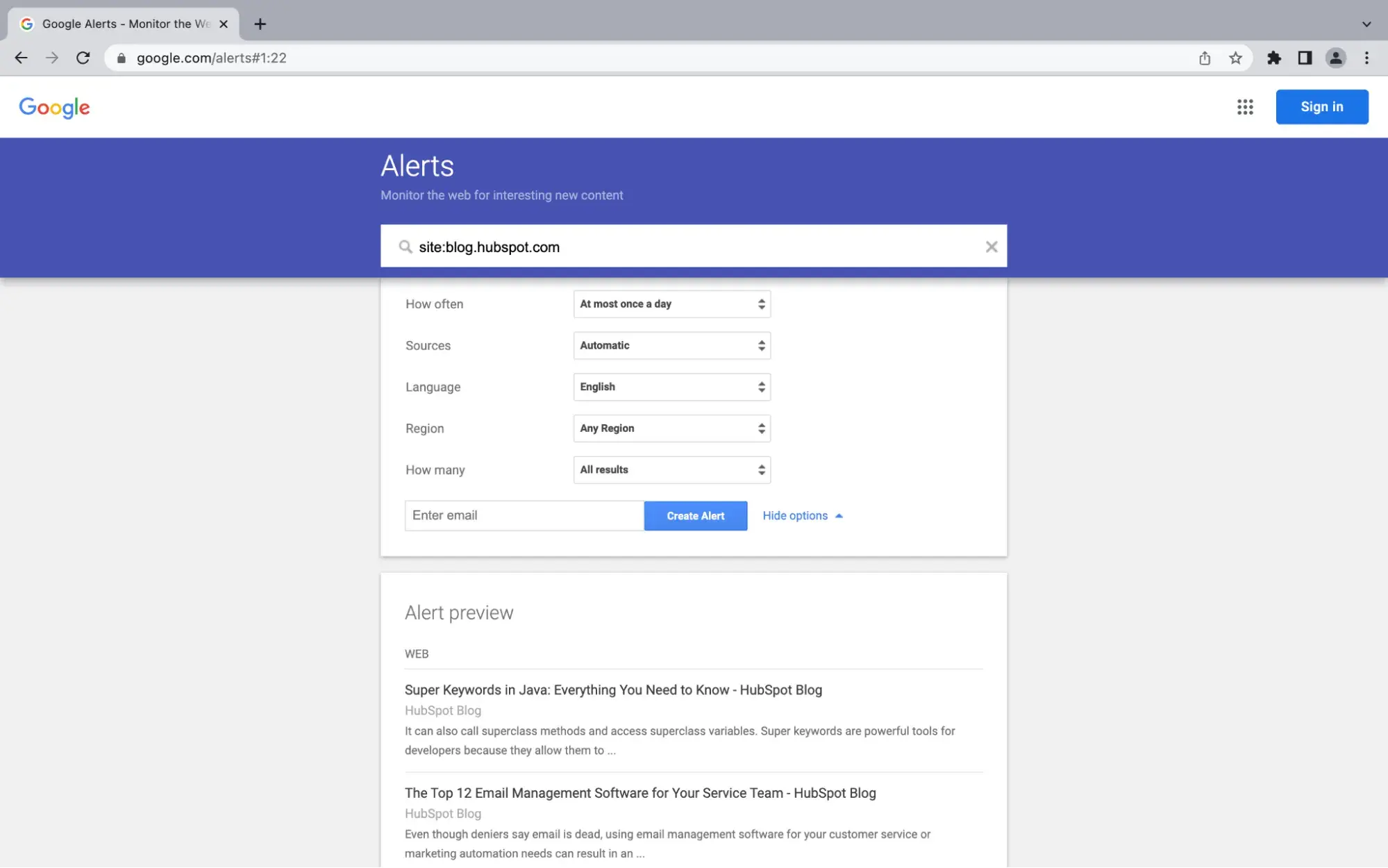
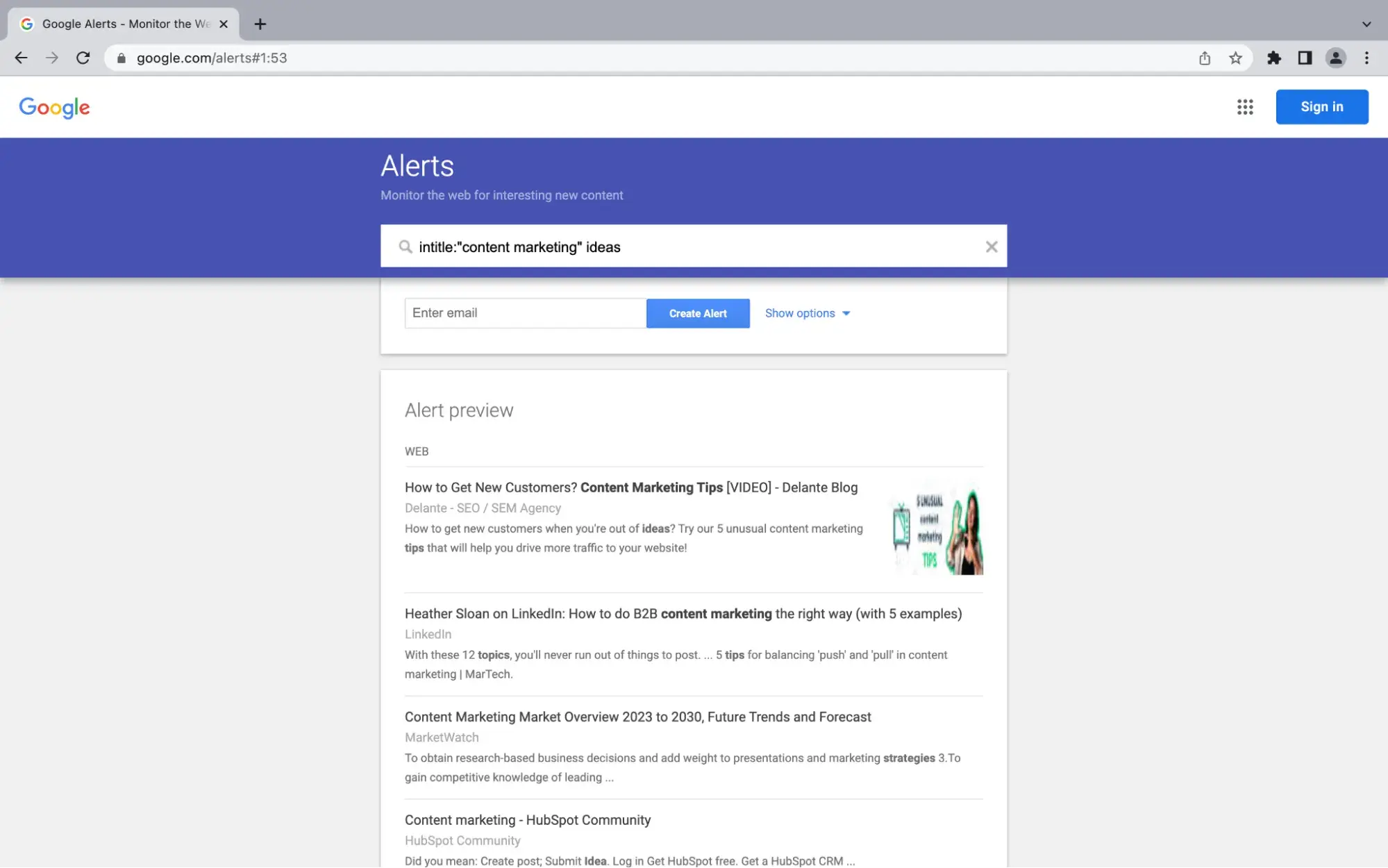
The other query modifiers that work in the Google search bar work here, too:
- “intitle:”
- “inurl:”
- “filetype:”
- “related:”
- “OR”
- “-” or “NOT”
- quotation marks for exact search matches
Google Analytics is not explicitly built to track changes on a website. Instead, it’s a tool that helps measure a website’s performance. Google Analytics can output a handful of helpful information into advanced reports. Some metrics include traffic sources, page views, time on page, bounce rate, site speed, etc. It expressly answers every marketer's question: “How are particular sections of website content performing?”
6. Use RSS feeds.
If you're looking for a simple tool to track changes on a website, especially for new blog posts or articles, an RSS feed is a classic and effective solution.
RSS (Really Simple Syndication) feeds are a free technology that, while less common than a decade ago, is still used by major publications like Reddit, The Washington Post, and CNN.
Essentially, the website provides a special link (the feed) that lists its latest content, which you can then add to a dedicated app called an “RSS reader.”
To subscribe to feeds, check whether the website offers an RSS feed first. For instance, Wappalyzer, a free Chrome extension, can help you detect this technology.
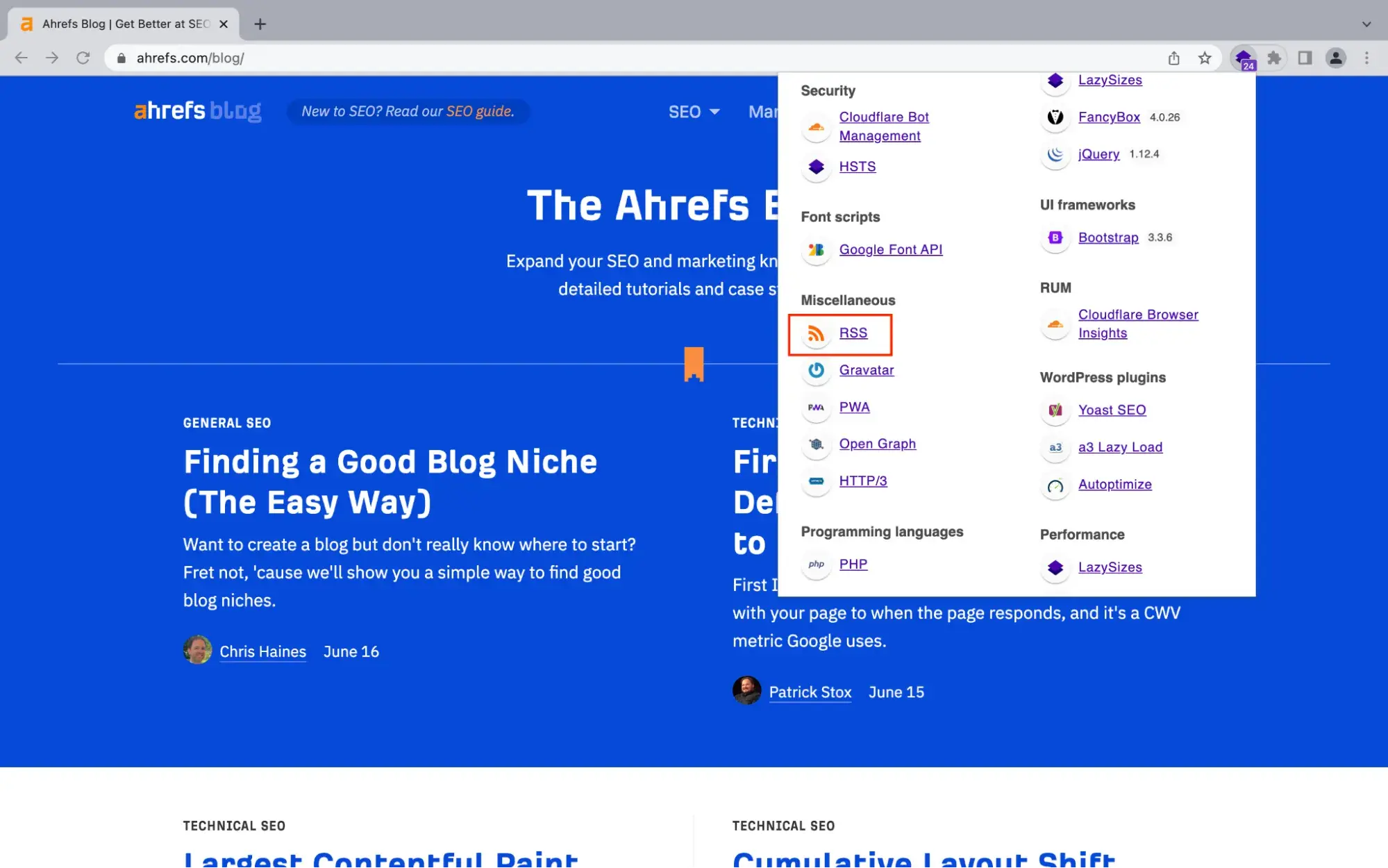
Your next step is to get an RSS reader. You can find ones with various customization options, e.g., keyword tracking. Moreover, a reader might be built into a browser or another application — for example, MS Outlook has an RSS folder.
7. Create automated workflows with no-code tools (new for 2026)
What about agentic tools, which are in vogue these days? Now, setting up an automated workflow triggered by a change detected by a website monitoring tool is possible!
Instead of just getting an email, you can use “no-code” platforms like Zapier or n8n to connect your monitoring tool to hundreds of other applications you already use, like Slack, Google Sheets, or Jira.
This allows you to turn a simple alert into a series of concrete actions. For example, when a website monitoring tool detects a change, it can instantly trigger an action in your automation platform.
That platform can then automatically create a task in Asana or Jira, send a detailed message to a specific Slack channel, add a new row to a Google Sheet to log the change, or even create a new draft post in WordPress.
This approach lets you build powerful, custom workflows based on an important change in website content. A marketer could automatically log a competitor's price change and alert the team via Slack, or a developer could create a high-priority ticket when a status page changes.
Connecting a monitoring tool to an automation platform often happens via webhooks, a real-time alerting mechanism. Some monitoring tools make this even easier. For example, Visualping has a dedicated n8n node that simplifies connecting its change alerts directly into these kinds of automated workflows.
Stay up-to-speed on website changes.
As we’ve covered, there is a wide range of methods to track website changes, from simple manual checks and RSS feeds to complex technical solutions like APIs and custom web scrapers.
While there is no single “one-size-fits-all” solution, the method you choose depends on your technical resources and specific goals. Manual checking is too unreliable for important information, and building a custom scraper can be costly and difficult to maintain.
For the vast majority of business and professional needs, a dedicated website monitoring tool offers the best balance between accuracy and simplicity. Web monitoring tools not only automate the tedious work of detecting changes, but also use AI to filter for changes relevant to you and to summarize key changes.
Ultimately, the goal is to find a reliable, automated system that fits your needs. By moving away from manual checking and adopting one of these methods, you can ensure you never miss an important change again.
Editor's note: This post was originally published in October 2023 and has been updated for comprehensiveness.
Free Website Optimization Checklist
This website optimization checklist will help you perfect your website's:
- Performance
- SEO
- Security
- Mobile Performance
Download Free
All fields are required.


.jpg)