Issues like broken links, slow pages, and crawl errors make websites lose traffic. The right website auditing tools can help catch these errors and drive growth.

Auditing tools surface clear, actionable recommendations, automate monitoring, and integrate with your CMS, CRM, and analytics tools. This article will cover some of the best website auditing tools in the market today and what to look for when choosing one.
Table of Contents
- What is a website auditing tool?
- Website Auditing Features Your Tool Should Have
- The Best Website Auditing Tools
- How to Choose a Website Audit Tool
- How often should teams audit their sites?
- Website Auditing Checklist
- Frequently Asked Questions About Website Auditing Tools
What is a website auditing tool?
Website auditing tools scan a website and flag problems that could hurt rankings. These tools check hundreds of signals to improve the user experience. That includes broken links, missing meta descriptions, slow pages, mobile responsiveness issues, and duplicate content.
Some auditing tools go deeper into technical SEO territory, looking at your XML sitemap, robots.txt file, structured data, and how search engines index your pages. For example, an SEO audit might reveal that key product pages aren’t being indexed properly, or that internal links aren’t distributing authority effectively across your site.
The output varies by tool. Users might get a scored report with an overall SEO score, a prioritized task list, or a detailed report with thousands of rows of data. What matters is that web teams can turn those findings into fixes that improve a site’s visibility in search results.

HubSpot's Free Website Builder
Create and customize your own business website with an easy drag-and-drop website builder.
- Build a website without any coding skills.
- Pre-built themes and templates.
- Built-in marketing tools and features.
- And more!
Website Auditing Features Your Tool Should Have
Modern SEO audit tools should be versatile, covering several site health factors. Technical SEO capabilities to catch crawl errors, while on-page SEO analysis identifies content problems that affect rankings. Actionable reporting prioritizes issues by impact. Then, continuous monitoring alerts users of new technical problems after site updates.
Here are other features to know before evaluating website auditing tools.
Technical SEO Coverage
Tools need to catch the backend issues, like crawl errors and canonical tag problems, that break indexing. If Google can’t crawl or index pages properly, nothing else matters. SEO professionals rely on comprehensive technical SEO audits to catch these issues.
On-page SEO Analysis
SEO issues include missing title tags, thin content, keyword gaps, internal linking problems, and meta tag errors. These elements affect individual pages and their rankings. Audit tools should analyze every page and flag optimization opportunities.
Performance and Core Web Vitals Tracking
Page speed, mobile usability, and Google’s Core Web Vitals directly impact rankings now. SEO audit tools should measure these metrics and show what’s slowing things down. That information improves both user experience and search engine visibility.
Actionable Reporting
A list of 500 errors doesn’t help anyone. Look for tools that prioritize SEO issues by impact, explain why each problem matters, and suggest specific fixes. Bonus points if they estimate the effort required and provide insight into which fixes will deliver the fastest gains.
Integration Capability
Can the tool talk to the CMS, analytics platform, or CRM? Integration means teams can push fixes directly into workflows, track changes over time, and measure how SEO improvements affect pipeline and revenue.
Continuous Monitoring
Continuous monitoring alerts users to new technical SEO issues, such as a broken page after a site update or a sudden drop in the number of indexed pages. It might also be helpful if the tool can monitor the website’s uptime.
AI Search Visibility
Traditional SEO tools check Google rankings. But with AI search engines like ChatGPT, Perplexity, and others changing how people find content, teams need tools to track whether AI models surface a website when users ask relevant questions.
The Best Website Auditing Tools
- HubSpot Website Grader
- Content Hub
- AEO Grader
- Screaming Frog SEO Spider
- SEOptimer
- SEMrush Site Audit
- Ahrefs Site Audit
- Google Search Console
Best Free SEO Audit Tool for Instant Baseline Checks
HubSpot Website Grader
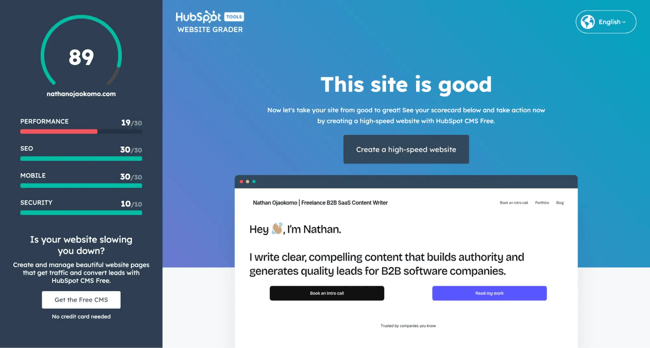
Website Grader gives sites an instant SEO health score across performance, mobile optimization, SEO basics, and security. Web teams can enter a URL, and within seconds, they get a scored report with clear next steps.
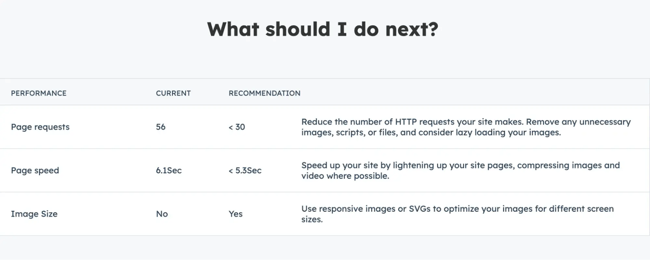
The tool analyzes your site and delivers a simple, visual report that anyone can understand, regardless of technical expertise.
Standout features
- Instant analysis with no account required
- Performance and page speed scoring
- Mobile responsiveness testing
- Security check (SSL certificate validation)
- SEO basics assessment (meta descriptions, page titles)
- Simple, shareable report format
What I like: Website grader is simple. You don’t need an account to use HubSpot Website Grader or get a detailed report.
The recommendations are prioritized and explained in plain language, making it accessible even if you’re not an SEO specialist. You can run unlimited scans and share results instantly, making it ideal for agencies presenting to clients or internal teams pitching SEO investments.
HubSpot Website Grader pricing: Free
Best SEO Audit Tool for Content Teams
HubSpot Content Hub
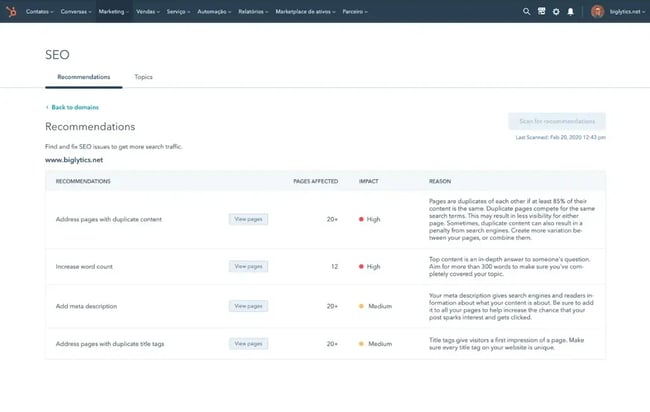
Content Hub includes built-in SEO tools that analyze content as it’s created. Users get real-time suggestions for improving on-page SEO, plus topic clusters and pillar page organization to strengthen the site’s architecture.
It’s designed for marketers who want to optimize content without switching between multiple tools.
Standout features
- Real-time on-page SEO recommendations while writing
- Topic cluster and pillar page strategy tools
- Internal linking suggestions based on content relationships
- Keyword targeting and optimization guidance
- SEO performance tracking tied directly to CRM data
- Content analytics showing which pieces drive pipeline
- Built-in competitive analysis
What I like: The SEO guidance lives where you’re already working. Marketers can write, optimize, and publish from the same place.
HubSpot’s Content Hub also connects to your CRM. This integration sets it apart from standalone SEO audit tools, as it allows you to build a content strategy, track which content drives pipeline, and measure SEO performance tied to revenue.
HubSpot Content Hub pricing: The Starter plan starts at $15/month. The Professional plan starts at $500/month for three seats.
Best Website Auditing Tool for AI Search Visibility
HubSpot’s AEO Grader
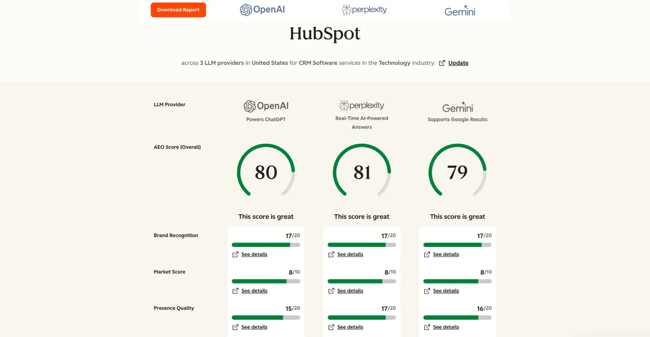
HubSpot’s AEO Grader shows whether AI models, like ChatGPT and Perplexity, are recommending a brand when users ask relevant questions. This is the new frontier of visibility tracking, and most traditional SEO audit tools don’t yet track it.
The insights HubSpot’s AEO Grader provides are increasingly vital for marketers as more searches move away from traditional search engines.
Standout features
- AI citation tracking across major AI platforms
- Brand mention analysis in AI-generated responses
- Competitive visibility comparison in AI search results
- Recommendations for improving AI discoverability
What I like: HubSpot’s AEO Grader addresses a gap most marketers don’t even know exists yet. As more searches move to AI interfaces, you need to know if you’re showing up in those answers.
The report gives you actionable data on where you have visibility and where you’re missing opportunities. Early adopters who optimize for AI search now will have an advantage as this channel matures.
HubSpot AI Search Grader pricing: Free
HubSpot's Free Website Builder
Create and customize your own business website with an easy drag-and-drop website builder.
- Build a website without any coding skills.
- Pre-built themes and templates.
- Built-in marketing tools and features.
- And more!
Best SEO Audit Tool for Technical Control
Screaming Frog SEO Spider
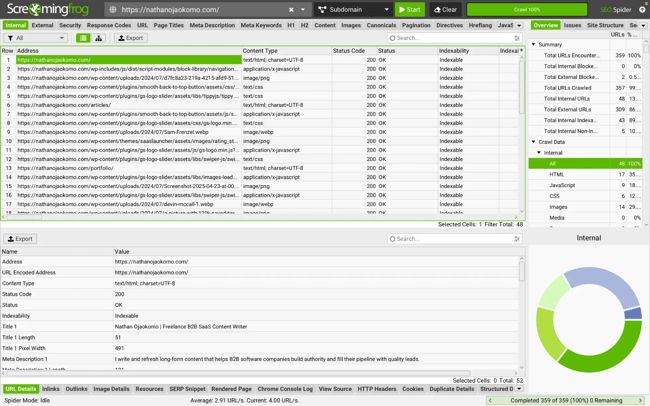
Screaming Frog is a desktop crawler that gives you raw access to every element of your website. It’s the tool technical SEO professionals reach for when they need to dig deep into technical SEO issues. The software performs comprehensive site audits that catch problems other tools might miss, and it lets you customize every aspect of the crawl to match your specific needs.
You’d need the paid version to get the most out of the tool, especially if you frequently publish content.
Standout features
- Desktop application with unlimited crawling (paid version)
- Integration with Google Analytics, Search Console, and PageSpeed Insights APIs
- Bulk export capabilities for large-scale analysis
- Visualization tools for site architecture
What I like: You can customize the crawl, export everything to spreadsheets, and slice the data however you want. If you know what you’re looking for, Screaming Frog will find it. The level of detail in each report makes it invaluable for SEO specialists working on complex sites.
You can schedule crawls, compare crawls over time, and build completely custom reports. It’s basically the Swiss Army knife of technical SEO audits.
Screaming Frog SEO Spider pricing: Free version limited to 500 URLs. Paid version is £245/year (~$279) for unlimited crawling and other features.
Best Website Auditing Tool for Most Budgets
SEOptimer
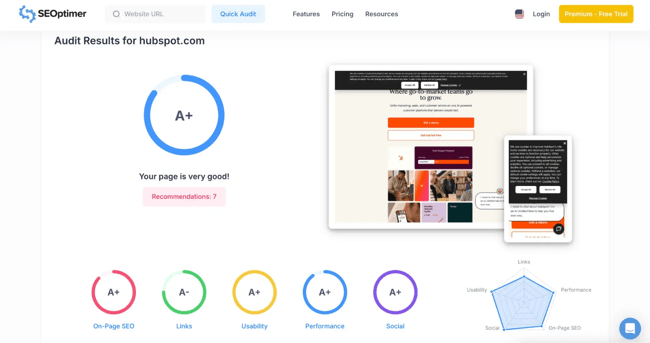
SEOptimer covers SEO fundamentals, performance, mobile usability, and security basics in an easy-to-understand format. The tool provides a clear SEO score that’s easy to explain to non-technical users, making it ideal for agencies and consultants who need to communicate technical findings without overwhelming their audience.
Standout features
- Embeddable audit widget for your website
- Automated weekly or monthly reports
- Competitor comparison features
- Clear prioritization of issues by severity
What I like: The reports look professional without requiring design work. Each report includes recommendations ranked by priority, making it easy for users to know what to fix first. You can embed an audit widget on your site to generate leads, and the white-label feature means you can present it as your own tool.
SEOptimer pricing: Free plan with basic audits. Premium plans start at $29/month for more frequent audits. The White Label plan costs $39/month. And Agency plans start at $59/month.
Best SEO Audit Tool for Competitive Intelligence
SEMrush Site Audit
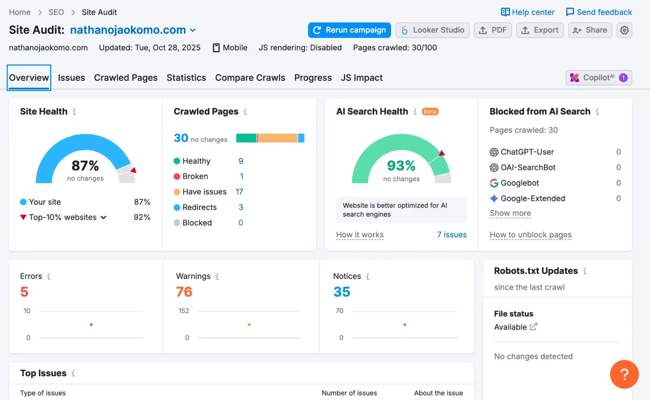
SEMrush’s Site Audit tool crawls your website and flags over 140 technical and on-page SEO issues. But the real value lies in tying those findings to competitive research, keyword tracking, and backlink analysis in a single platform.
Standout features
- Crawls over 140 technical and on-page checks
- Priority Score to focus on high-impact fixes
- Scheduled crawls with progress tracking
- Custom issue severity settings
What I like: You can fix problems while seeing the full competitive context, like how competitors structure their sites, keywords they’re winning, and where you have gaps. The Priority Score helps you focus on high-impact fixes first. Being able to audit your site while simultaneously researching competitor rankings and backlink profiles gives you context that most standalone audit tools can’t match.
SEMrush Site Audit pricing: Starts at $139.95/month for the Pro plan (includes Site Audit). Guru plan at $249.95/month. Business plan at $499.95/month for agencies and larger teams.
Best Website Auditing Tool for Backlink Analysis
Ahrefs Site Audit
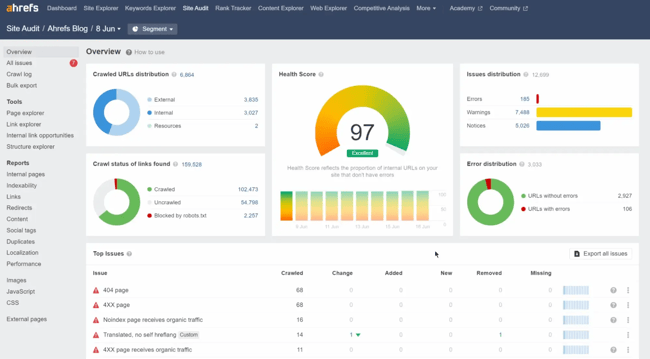
Ahrefs has a comprehensive Site Audit tool. It checks technical SEO, on-page factors, and performance, then connects those findings to your backlink profile and organic search data.
Marketers use the Ahrefs Site Audit tool to understand how technical issues might be wasting the authority you’ve built through links.
Standout features
- Health Score that tracks improvement over time
- 100+ pre-configured SEO checks
- Link equity analysis showing how authority flows through your site
- Orphaned pages detection
What I like: Seeing how technical SEO issues might be wasting link equity. For example, if you have broken pages with good backlinks, Ahrefs surfaces that immediately. The Health Score gives you a single metric to track progress over time.
Ahrefs Site Audit pricing: Starts at $129/month for the Lite plan. Ahrefs Webmaster Tools is free with limited features.
Best Free Website Auditing Tool from Google
Google Search Console
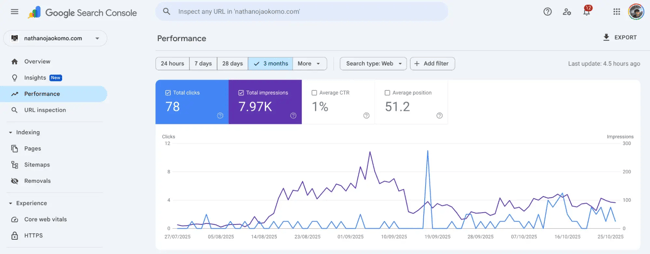
Google Search Console isn’t technically a traditional “SEO audit tool,” but it’s an authoritative source for understanding how Google sees your site. It shows you real crawl errors, indexing issues, mobile usability problems, and Core Web Vitals data straight from the search engine itself.
Every SEO professional should have this tool set up because it provides data directly from Google rather than estimates or simulations from third-party tools.
Standout features
- Index coverage report showing which pages are indexed and why others aren't
- URL inspection tool for checking individual pages
- Core Web Vitals report with real user data
- Mobile usability testing
What I like: It’s free and comes directly from Google. You see exactly what’s preventing your pages from ranking in search results. The data includes real user experience metrics and actual search performance data, not estimates.
When Google says a page has an indexing issue, you know it’s definitive. The URL inspection tool lets you test fixes in real time and request reindexing. This is the foundation every SEO strategy should be built on.
Google Search Console pricing: Free.
How to Choose a Website Audit Tool
When choosing an SEO audit tool, consider how it integrates with existing tools. Focus on the coverage needed for each industry. Then, make sure reporting capabilities work for the team’s stakeholders, with executive-friendly dashboards and trend charts to developer-focused exportable task lists.
Here are other factors to consider.
Stack Fit
Does the website auditing tool connect with the tech stack the team already uses ? For HubSpot users, Content Hub’s built-in SEO recommendations make more sense than a standalone audit tool that requires manual export and import.
Check whether the tool can push data to the CRM, analytics platform, project management system, and any other software the team uses.
Issue Coverage
What types of technical SEO issues does the website actually have? A blog-heavy site needs strong on-page analysis and content quality checks. An ecommerce site with thousands of product pages needs industrial-strength technical crawling and performance monitoring.
Ensure the chosen tool can audit the specific areas where the site is most likely to have problems.
Actionability
Teams should be able to action the audit tool’s recommendations. A report that says “fix broken links” without noting which pages need attention isn’t helpful. Look for SEO audit tools that prioritize issues, estimate impact, and let users know what they need to fix.
Reporting Flexibility
If the team presents to executives, they need clean dashboards and trend charts that communicate SEO health at a glance. If they’re coordinating with developers, they need exportable task lists with technical details. Some teams need both. Check what report formats each tool supports and choose accordingly.
Total Cost
Factor in both the tool cost and the time cost. A free SEO audit tool that generates 5,000 unsorted errors might cost more in analysis time than a paid tool that delivers 50 prioritized fixes. Consider the ramp time and ongoing management effort, not just the subscription price.
HubSpot's Free Website Builder
Create and customize your own business website with an easy drag-and-drop website builder.
- Build a website without any coding skills.
- Pre-built themes and templates.
- Built-in marketing tools and features.
- And more!
How often should teams audit their sites?
The frequency of website audits depends on how fast the website changes and how much risk users can tolerate. Audits also vary by website maturity, differing at launch, scale, and enterprise stage. Adits become more frequent as sites mature.
Launch Stage
Teams at the launch stage should run a full SEO audit monthly. At this stage, the website is small, and information is updated less frequently. Teams at the launch stage should run a full SEO audit monthly.
After launch, teams should set up Google Search Console (or one of its alternatives) to continuously monitor critical technical SEO issues, such as indexing errors. Most problems won’t be urgent, and teams have time to address them.
Pro tip: Focus on ensuring that the foundation of the core pages that drive the most traffic and conversions is sound.
Scale Stage
At the scale stage, teams should run automated SEO audits weekly and review them biweekly. This frequency enables continuous monitoring for Core Web Vitals, crawl errors, and broken links.
Scale sites are likely publishing enough content and making enough site changes that new SEO issues crop up regularly. Each audit should track progress on previously identified problems.
Enterprise Stage
Run audits continuously or at least weekly. With thousands of pages and frequent deployments, a problem can cascade quickly. Teams need to catch and fix SEO issues before they compound and affect the site's rankings.
I recommend setting up real-time alerts for critical technical issues.
Building an Audit Calendar
|
Weekly |
Monthly |
Quarterly |
|
Quick automated scan for critical technical SEO issues (broken links, crawl errors, server errors) |
Full technical SEO audit covering all pages |
Deep technical audit with custom checks for specific site architecture |
|
Core Web Vitals check on key product pages and high-traffic content |
Content quality review for recent blog posts and landing pages |
Site architecture review and internal links analysis |
|
AI search visibility spot check |
Backlinks health check |
Content pruning and consolidation analysis to remove thin or duplicate pages |
|
Review any new SEO issues flagged by monitoring tools |
Competitive comparison to see where competitors are gaining visibility |
Stack and integration review to ensure SEO audit tools are properly connected to analytics, CRM, and other platforms |
Assign clear owners for each task and set service level agreements (SLAs). If a critical SEO issue is found, like the site being accidentally blocked from search engines with a noindex tag, someone needs to fix it within hours, not days.
Website Auditing Checklist
Running a thorough website audit doesn’t need to be complicated. Here’s a streamlined checklist covering the most critical areas teams should review regularly.
For a complete breakdown with detailed instructions and troubleshooting tips, download our guide on running an SEO audit.
Crawling and Indexing
- Verify robots.txt is configured correctly
- Confirm XML sitemap is present and up to date
- Check that important pages are indexed in Google
- Test mobile-friendliness across devices
Indexing Problems
- Find and fix orphan pages (pages with no internal links)
- Review JavaScript and CSS for crawl blockers
- Ensure Googlebot can access critical content
On-page Elements
- Audit page titles (unique, under 60 characters, keyword-optimized)
- Check meta descriptions (compelling, under 155 characters)
- Review H1 tags (one per page, includes target keyword)
- Verify ALT attributes on all images
- Analyze URL structure for clarity and length
Rankings Monitoring
- Track keyword rankings over time
- Identify pages with significant ranking drops
- Compare performance year-over-year
Content Quality
- Check for duplicate content across pages
- Perform a Term Frequency-Inverse Document Frequency (TF*IDF) analysis on key pages
- Verify keyword focus aligns across all on-page elements
- Review content-to-advertising ratio
Site Architecture
- Evaluate internal linking structure (vertical and horizontal)
- Confirm proper link distribution to important pages
- Check for broken internal links
Technical Elements
- Review status codes (aim for 200 OK)
- Audit 301 redirects (check for chains)
- Set up redirects for www vs non-www
- Verify HTTPS implementation
Scripts and Code
- Assess JavaScript placement and impact
- Review use of iframes
- Check for outdated Flash elements
International SEO
- Verify hreflang tags if targeting multiple countries/languages
- Confirm proper URL structure for international sites
- Check language-specific redirects
Don’t forget to download the full guide for detailed instructions, tool recommendations, and troubleshooting tips for every step.
Frequently Asked Questions About Website Auditing Tools
What’s the best free website auditing tool for a quick baseline?
HubSpot’s Website Grader is the fastest way to get a baseline SEO audit. Teams don’t need an account, and it delivers a scored report in about 60 seconds covering the essentials: performance, mobile optimization, SEO basics, and security. The tool is perfect for marketers who need quick insight into their site’s health.
Do I need continuous monitoring, or is a monthly audit enough?
For a small blog or site that updates once a week, monthly SEO audits work well. For sites with daily updates, ecommerce inventory changes, or frequent code deployments, continuous monitoring is essential. A bad deploy can break hundreds of pages, and teams want to know immediately when technical SEO issues appear.
How do I connect audit results to revenue impact?
When an SEO audit identifies high-priority technical issues on key pages, fix them first and mark the date. Then track organic traffic, conversions, and assisted revenue from those pages over the next 30-60 days. Look for improvements in both rankings and user experience metrics.
This process is straightforward with HubSpot. Content Hub ties directly to the CRM. Users can see which organic visits turned into contacts, opportunities, and closed deals. The platform provides clear insight into which pages drive pipeline and how SEO improvements translate to revenue.
Which audit issues usually produce the fastest growth gains?
These patterns tend to move the needle quickly when running SEO audits:
- Fixing crawl errors and indexing blocks. If Google can’t access pages that should be indexed, fixing that can lead to immediate traffic recovery. Check robots.txt blocks, noindex tags, and server errors first.
- Improving Core Web Vitals on high-traffic pages. Google has confirmed Core Web Vitals as ranking factors. If top product pages or blog posts are borderline or failing, improving them can lead to rankings lifts within weeks.
- Eliminating redirect chains on essential pages. Every redirect adds latency and dilutes link equity. If top landing pages have three to four redirects before reaching the final URL, teams are leaving traffic on the table. Clean up redirect chains to improve both page speed and SEO performance.
- Addressing slow pages. Page speed affects both rankings and user experience. If an SEO audit flags slow pages, prioritize the ones that get the most traffic or drive the most conversions.
Can I integrate website auditing tools with my CRM and analytics platforms?
Yes, integration between an SEO audit tool, CRM, and analytics gives teams the complete data picture. Most modern SEO audit tools integrate with Google Analytics and Google Search Console at a minimum. For CRM integration, HubSpot has the most seamless setup. Content Hub’s SEO recommendations and Marketing Hub's analytics feed directly into the CRM.
The value of integration is closing the loop. When teams fix an SEO issue flagged in an audit, they should be able to measure whether it improved traffic, conversions, and revenue. Without integration, that’s a manual, time-consuming process that most teams don’t have resources for.
Start auditing smarter.
The best SEO audit tool for you depends on where you are right now. If you’re just starting and need a quick baseline, grab a free Website Grader scan. If you’re scaling and need continuous monitoring tied to revenue, HubSpot's Content Hub integrates SEO recommendations directly into your content workflow and connects fixes to the pipeline in your CRM. This gives you the insight you need to prove ROI to stakeholders.
Whatever tool you choose, make sure you’re not just running SEO audits for the sake of it.
Prioritizing what matters, get your team to fix it, track the work, and measure if it moved the needle on traffic and revenue. That’s how audits drive growth.
Ready to see where your website stands? Try Content Hub’s free SEO tools and get recommendations as you create content.
HubSpot's Free Website Builder
Create and customize your own business website with an easy drag-and-drop website builder.
- Build a website without any coding skills.
- Pre-built themes and templates.
- Built-in marketing tools and features.
- And more!
Website Development

![How to make a website with user accounts and profiles [with WordPress, Wix, and more]](https://53.fs1.hubspotusercontent-na1.net/hubfs/53/%5BUse%20(3).webp)
![How to build a Google Site that looks good and drives business [templates & examples]](https://53.fs1.hubspotusercontent-na1.net/hubfs/53/Website%20Redesign%20Terms.png)