

Table of Contents
- What is social selling?
- The Art of Social Selling
- Social Selling Best Practices
- Optimizing Social Profiles for Social Selling
- How to Engage With Your Buyers on Social Networks
- Working Social Selling Into Your Day
- Is social selling creepy?
- Measuring Social Selling Success
- Social Selling Tools
What is social selling?
Social selling is a sales strategy that uses social media platforms to connect, engage, and build relationships with potential customers. Unlike traditional sales approaches that often involve cold calls and direct pitches, social selling focuses on leveraging social media networks to understand and interact with prospects in a more personalized and authentic way.
By commenting on, liking, and sharing prospects’ and customers’ posts on networks like X, LinkedIn, Facebook, Instagram, and TikTok, salespeople create organic relationships with buyers over shared interests.
And it works. According to our 2024 State of Sales report, sales professionals say social media generates 33% of the highest-quality leads, on par with referrals from existing customers.
However, social selling isn’t for reps seeking quick wins or a silver bullet. To succeed, salespeople must put in the hours and effort to engage with their target buyers and build credibility.
50+ for Social Selling on LinkedIn and Beyond
Use this guide to improve your social selling efforts and close more deals from platforms like...
- TikTok
- And more!
Download Free
All fields are required.
The Art of Social Selling
When I was reviewing our State of Sales report, I was surprised to learn that a whopping 75% of salespeople use Facebook to find leads, followed by Instagram, LinkedIn, and YouTube.
But it’s not enough just to post advertisements and hope your prospects will be enticed to reach out. The key to success here is to grow your network and build a reputation on your selected social media platforms.
For example, Caleb John, director of sales and marketing at Exceed Plumbing and Air Con, tested two social selling strategies.
Posting 10 promotional offers in a single month caused his audience’s engagement rate to drop below 1%. But after just a few weeks of sharing a mixture of behind-the-scenes content, customer stories, and helpful home maintenance tips, engagement jumped to 12%.
“The takeaway is this: If a business looks like a non-stop ad, people will ignore it,” John says.
“Businesses that treat social media like a chat with potential customers, instead of a billboard, are the ones winning.”
As social selling is always in flux, you should always stay up-to-date with the latest trends. By doing so, you’ll not only keep your skills sharp and know where your best prospects are at the moment but also be able to anticipate where they might shift next.
Social Selling Best Practices
Social selling can be a lucrative resource to generate more leads and enhance your revenue.
However, there are several steps reps can take to level up their social selling skills. Here are 12 best practices I recommend you consider.
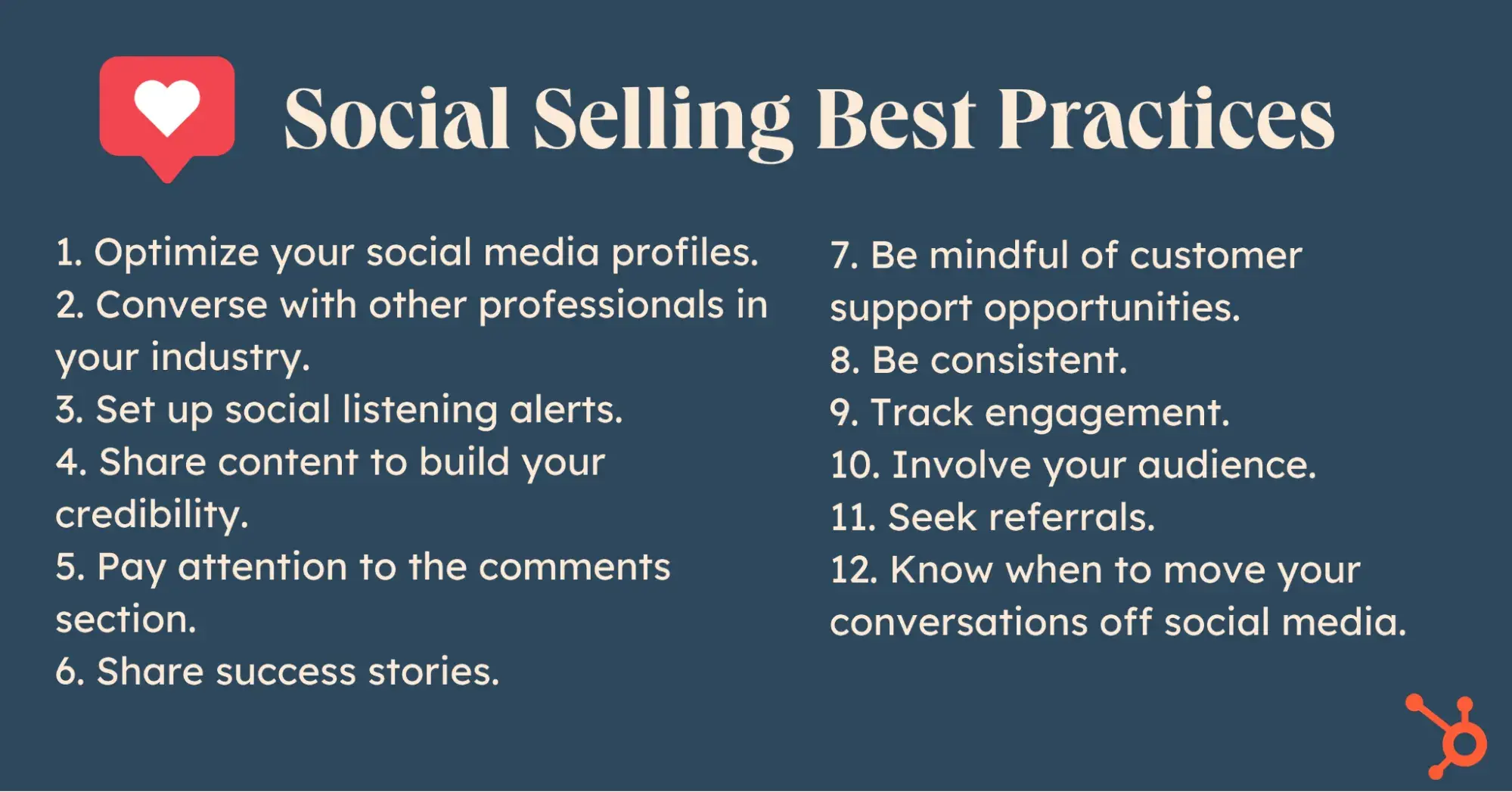
1. Optimize your social media profiles.
Optimize your social media profiles before beginning your social selling initiative. Prospects are less likely to respond if your profile is outdated or lacks essential information.
I’ll dig into more specifics of how to do this later, but according to Barbara Robinson, sales manager at WeatherSolve Structures Inc., a good rule of thumb is to prioritize authenticity and aim to connect with prospects as humans first.
“People are craving transparency, especially after all the noise from overly polished content everywhere else,” says Robinson. “No one wants to hear a perfect pitch anymore, right? People are sick of that robotic, polished stuff.” Instead, authentic social selling “is honestly just about being real and showing the human side of your brand.”
2. Converse with other professionals in your industry.
Join relevant groups and forums on LinkedIn and other networking sites to stay updated on industry trends.
Use valuable information to contribute to a discussion, as unsolicited, sales-y comments will annoy group members, just as a cold call or email would. Advance the conversation in a meaningful way, or just sit back and observe.
Joe Zappa, founder and CEO of Sharp Pen Media, believes you should follow and engage with influencers in your industry.
When Zappa first joined social media, he tried to comment on posts by prospects, industry leaders, and CEOs. However, Zappa now thinks “this approach can undermine your social marketing strategy because most prospects and industry leaders don’t post frequently.”
Zappa also notes that you risk coming off as if you’re selling something — “both to the person whose post you’re commenting on and to third parties interacting with the post.”
3. Set up social listening alerts.
Use Google Alerts or a social listening tool (HubSpot customers can use the Social Media Management Software) to set up social listening alerts. These are notifications that tell you when your prospects or customers experience a trigger event or post a possible sales opening.
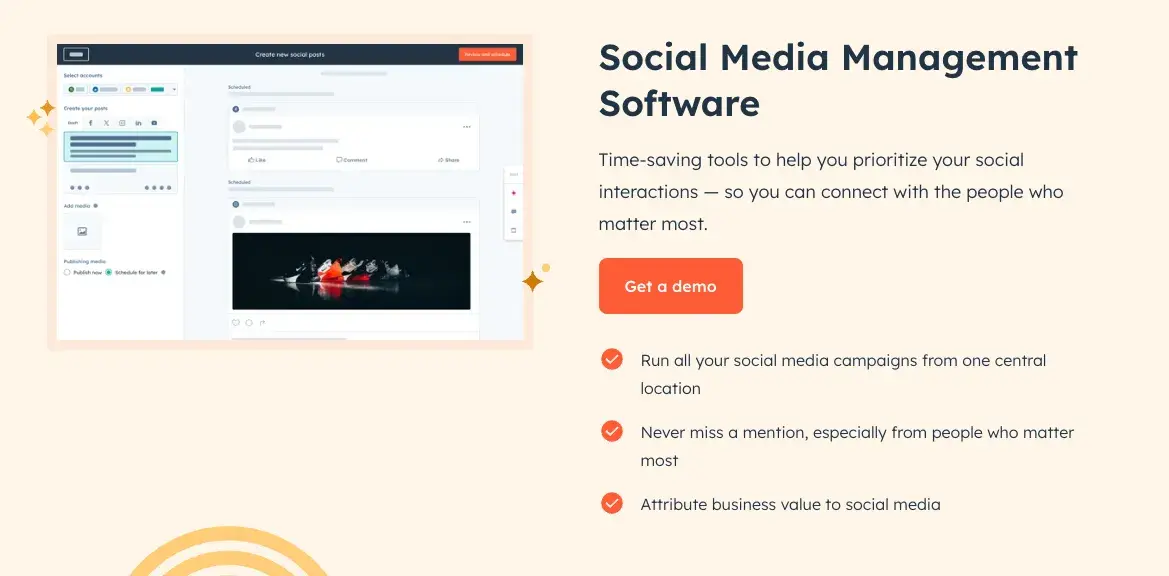
For example, say a prospect mentions they have a problem that you can address. A social listening alert can help you quickly join the conversation with helpful content or insight.
Similarly, if a potential buyer’s company hires a new CEO or expands its business, comment on the trigger event as soon as possible to get on their radar.
4. Share content to build your credibility.
Share original, industry-specific content to build credibility and engagement on social media.
Have you read any interesting articles related to your prospects’ industry? Share them! Did you see a thought-provoking study that could be a good conversation starter? Share it!
If you’re not sure where to find this content, start by checking out the articles and videos your buyers are already sharing, and subscribe to those blogs and social media channels. Then, share the content you think would be particularly interesting to your buyers on LinkedIn or your preferred social profile.
Don’t forget to ask people to engage in the comments to start conversations.
5. Pay attention to the comments section.
If you see high-engagement posts in your feed, browse the comments section and join the conversation. By reading the comments your prospects are leaving, you can better understand their point of view and preferences.
You will also get an idea of the content your prospects enjoy and engage with. This can help you decide what kind of content to share.
For example, if you see an active discussion about the best project management tools for people in your prospects’ industry, you might share your favorite tool and a few specific examples of how it has helped save you time.
While you don’t need to engage with every post you see, commenting can be a powerful tool, according to Alexander Low, managing director at DCM Insights.
“If you show up every day on social media here with intention and engage with people by liking or commenting on their posts, you are creating micro-moments of influence,” says Low.
If you just like/react to a post, only the author gets notified. However, when you comment on a post, every person who has liked, reacted to, commented on, or reposted gets a notification that you have commented.
“This is how you can network around lots of people at once. Focus on the outcomes you want to achieve, turn engagement into connections, and then take conversations offline; which you then have to nurture into opportunity,” says Low.
50+ for Social Selling on LinkedIn and Beyond
Use this guide to improve your social selling efforts and close more deals from platforms like...
- TikTok
- And more!
Download Free
All fields are required.
6. Share success stories.
Testimonials are a valuable form of social proof. Research shows that over 92% of B2B buyers say they are more likely to make a buying decision after reading a trustworthy review.
Sharing success stories from your other customers helps build your credibility with potential buyers. If a prospect resonates with a testimonial you share on their feed, they might be more inclined to use your solution.
“If you do a great job solving for the customer, they’ll always be keen to provide feedback — and the more you solve for them, the more positive that feedback will be. It’s a great habit to get feedback after a sales process and even better to have that feedback displayed in the form of a LinkedIn recommendation,” says Marlon De Assis-Fernandez, a principal sales manager at HubSpot.
Another rising strategy for generating social proof is leveraging user-generated content. Instead of simply sharing testimonials, invite your customers to share reviews of your products or solutions on their own social media channels.
For instance, Joel Popoff, CEO of Axwell Wallet, has primarily expanded his business through social selling. In his experience, consumers are far more likely to trust user-generated content than branded advertisements because posts from real-life customers feel less sales-y and more natural.
“The real power comes from everyday people talking about your product,” Popoff says.
“When we replaced polished product advertising with real customer videos, engagement doubled, and conversion rates increased by more than 30%. Our best-performing ad was outperformed by a single unboxing video from a micro-influencer.”
7. Be mindful of customer support opportunities.
More buyers are interacting with businesses on social media and messaging platforms. Keep an eye on what buyers and consumers are saying about your company in these spaces — especially if a customer is dissatisfied.
Staying alert to social media chatter about your company can give your customer support team a heads-up about a problem. You’ll also be more prepared to talk to prospects who may have seen disgruntled customer content.
For example, if you see a comment on social media where a customer expresses dissatisfaction with your company’s offering, take note of the issue.
If your company’s marketing or support teams haven’t yet responded, make them aware of the comment so they can address it, and note the language they use for the resolution.
Timeliness is key. The longer your customers see their and others’ concerns go unanswered, the less likely they’ll be to trust your company in the future.
8. Be consistent.
Spending all day on social media may not be the best use of your time, but you should aim for consistent posting and engagement.
Dan Tyre recommends sales reps post at least weekly on LinkedIn with individual follow-ups for prospects who engage with your content.
“The key is to have three or four interactions within 10-12 days, which shows professional persistence without overwhelming your prospect,” Tyre says.
9. Track engagement.
Social media engagement metrics include likes, comments, shares, and high engagement. This data indicates that a piece of content truly resonates with your audience. Learn from what works best so you can continue to share the most relevant content with your audience.
For example, if you notice that content about B2B sales tools gets the most likes, comments, or shares, that’s a good indication that the topic especially resonates with your audience. You can then discuss the topic more often.
10. Involve your audience.
Gone are the days of simply promoting your products on social media and hoping your audience is interested enough to buy. Instead, social selling today is all about building community and engaging prospective customers in real conversation.
“The biggest mistake in social selling today is treating social media like a storefront rather than a conversation,” says Amra Beganovich, founder of ecommerce brand Colorful Socks. “Consumers don’t want to be sold to. They want to participate.”
Invite your audience to get involved by asking questions and sharing content that makes them feel like they’re part of a community. Ask them to vote on new product designs or types of content they want to see. Give them a behind-the-scenes look at your processes. Host Q&A sessions so they can get to know you and your employees. I’ve either seen these ideas in action myself or heard how others leverage them to increase brand engagement.
And when people feel invested in your business — and, especially, in the people running it — they naturally want to support it by purchasing.
11. Seek referrals.
Social media isn’t just useful for connecting with your customers directly. It’s also great for building a network of professionals who can all help each other grow.
Request referrals from mutual connections to gain warm introductions to specific stakeholders and potential leads. When a customer expresses satisfaction, ask them to consider passing your information on to anyone they know who could benefit from your products or services.
Likewise, be on the lookout for opportunities to refer leads to your connections in return.
12. Know when to move your conversations off social media.
If you want to land the sale, you’ll eventually need to take the social media connections you make offline. After making a solid connection with a prospect on social media, offer to hop on a call to continue the conversation.
This will allow you to learn more about the prospect’s pain points or situation, which can help you gain the clarity you need to land the sale.
Tyre says that if interactions with a prospect who fits his vertical market and ideal customer profile move in a positive direction, he’ll seek out the contact’s email address to set up a call. They can then continue the conversation off social media.
13. [Bonus tip] Subscribe to LinkedIn Sales Navigator.
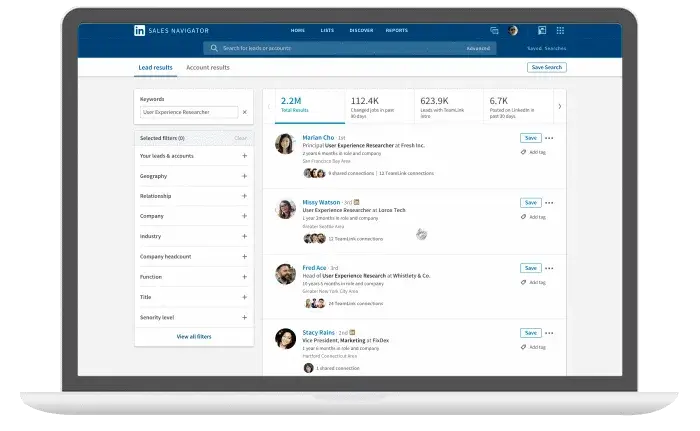
LinkedIn Sales Navigator is a premium service priced at $79.99 per month for its core plan, with a discount for annual subscriptions. The tool helps sales reps identify new leads based on their location, industry, company size, and other attributes needed to build a prospect list.
Want more? Watch this webinar as social selling experts Olga Bondareva, Ekaterina Altbregina, Sofia Lopatkina, and Assylkhan Shaidollayev share their best practices and successful case studies:
You can also listen to Guillaume Moubeche’s strategy for turning LinkedIn into a heavy lead machine:
14. [Bonus tip] Blog.
Sales reps don’t have to blog for effective social selling, but it can be a valuable way to attract qualified prospects. You can build influence in your industry and provide value to your audience with original insight and thought leadership.
Blogging can pay dividends for your lead-generation efforts. In a survey by Databox, more than 70% of companies said that blogging has become more effective at generating leads, and 84% reported that blogging generates more website traffic than video marketing.
To craft a post that captures your prospects’ attention, consider the following tips:
- Select a topic that resonates with your audience’s interests.
- Create compelling titles to grab attention.
- Avoid making your post excessively sales-oriented.
- Infuse your perspective and insights into the content.
- Share your posts across your social profiles, including X and LinkedIn, and employ relevant hashtags to enhance discoverability.
Optimizing Social Profiles for Social Selling
In the world of social selling, your social media account needs to be more than a digital resume. Your profiles should actively help you cultivate a reputation with your buyers as a trusted advisor who brings fresh insights to their business.
Your profiles need to reflect this new purpose. See ways you can optimize your social presence below.
X (formerly Twitter)
X profiles don’t have much real estate, so it’s easy to give yours a makeover. Follow these steps to do so:
- Use a professional picture for your profile photo.
- Use a positioning statement in your bio that includes a mini-insight.
- Link to your company’s X account (Example: Sales Rep @company).
- List your LinkedIn profile.
- Include relevant hashtags that your buyers follow.
If sellers contact them, 42% of buyers in the U.S. and Canada research those sellers by looking at their LinkedIn profiles. As such, optimizing your LinkedIn profile is an extremely valuable exercise.
Here are seven tips to ensure your LinkedIn profile is optimized for social selling:
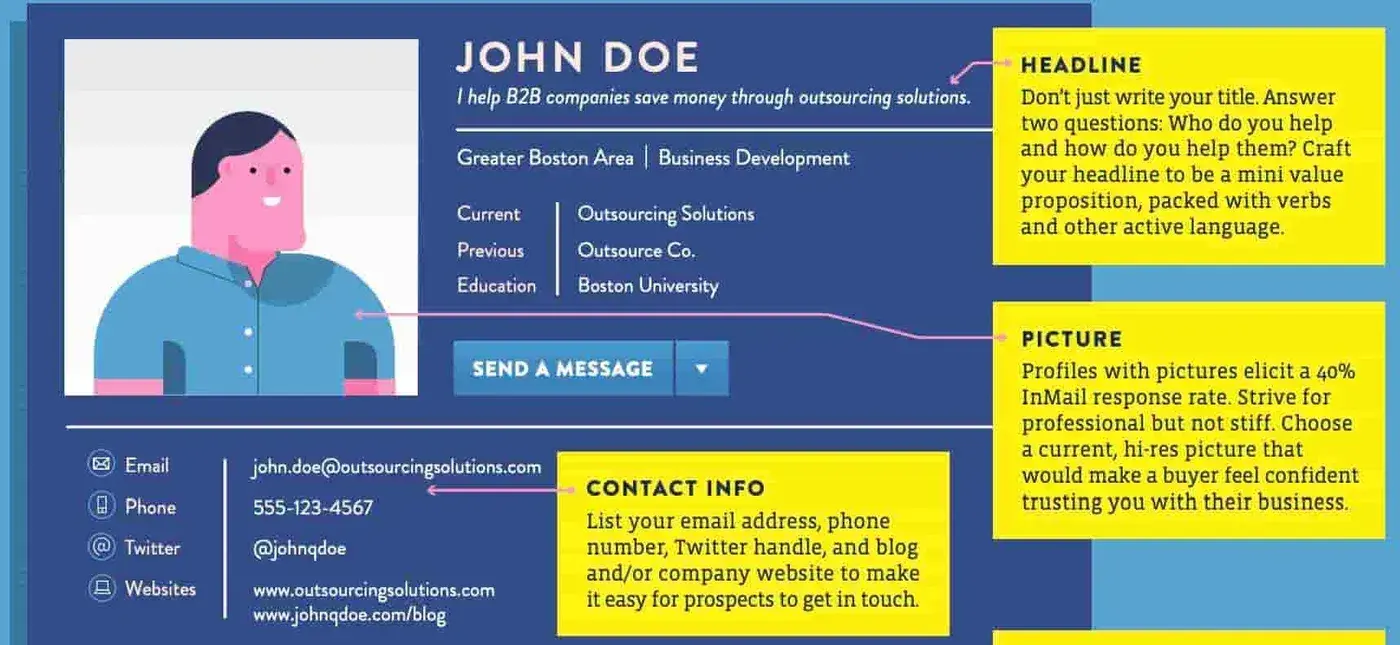
- Have a current, hi-res picture.
- Don’t just use your job title. Craft a compelling headline that goes beyond your job title. For example, consider answering two questions in your headline: Who do you help, and how do you help them?
- Tell your story in your About section in a way that grabs attention and gives prospective connections and buyers a sense of your personality.
- Cut the buzzwords. Focus on authenticity and be specific about your accomplishments.
- Post visual content that adds value to your potential buyers.
- In the experience section, emphasize how you enabled customers to improve their business — not how many times or by how much you exceeded quota.
- Seek recommendations from satisfied customers to bolster your credibility.
- Join groups relevant to your buyers, and engage with your connections.
To view a visual template illustrating what an optimized LinkedIn profile for social selling looks like, click on the image below.
How to Engage With Your Buyers on Social Networks
Social selling is all about engagement. But bear in mind that your interactions should be thoughtful, relevant, and personalized. Remember, authenticity is key.
Social engagement comes in four primary forms: sharing, liking, commenting, and connecting.
Sharing
Share content that interests your target buyers. The more relevant, exciting content you can share, the better.
You can link to your company’s content and what Jill Rowley calls “OPC” — other people’s content. Switching up your sources will nix the perception that you’re self-serving.
Jill Konrath, keynote speaker and sales expert, shares helpful content with her target audience on both her LinkedIn and X pages daily. Konrath uses her expert knowledge to share tangible advice and draw in a captive audience.
Sharing content is vital as more consumers make buying decisions online. In fact, half of adult social media users visit those platforms for the express purpose of learning about brands and viewing the content they share.
Liking
When you don’t have time for a comment or don’t have anything substantial to add, a like or favorite works just as well. Likes also work as a thank you when others share or repost your content.
Commenting
A comment should not just be a sales pitch or a link to your company’s website. Instead, it should be a thoughtful and thought-provoking response to an article. By commenting on lively, active threads that hit the core interests of your target audience, you can drive engagement for your own site.
For example, Lisa Dennis, president and founder at Knowledgence Associates, shares posts that her target buyers would care about and adds thoughtful comments to others’ content.
Want to make the most of your comments? Check out this guide on the best times to post across different social media networks.
Connecting
On X, you can follow prospects to your heart’s desire. But on LinkedIn, you should be more judicious.
A good rule of thumb for LinkedIn is not to request to connect with someone until you’ve had a meaningful interaction, either in person or online. Then, you can send a personalized invitation explaining why you’d like to be in their network.
For example, to request to connect, you can reference a blog post the person wrote or a piece of content they recently shared to show that you did your research.
Here’s an example of a strong LinkedIn invitation:
“Hi Jaime, we share 25 connections here, including Michelle Lee, who introduced me to Amy Chang, which landed me my current advisor position. Several people have mentioned you as someone I need to meet. I would love to connect.”
50+ for Social Selling on LinkedIn and Beyond
Use this guide to improve your social selling efforts and close more deals from platforms like...
- TikTok
- And more!
Download Free
All fields are required.
Working Social Selling Into Your Day
One of the most significant perceived hurdles to adopting social selling is that it takes too much time to make sales. How can sales reps keep up with their buyers on LinkedIn and X when they’re also trying to, you know, sell?
Like anything else, developing a routine around social selling will cut down on the time commitment. Even spending as little as 30-45 minutes a day on social selling tasks can make a huge impact on your success.
Whether you decide to batch those tasks or spread them throughout your workday, aim to cover all four types of engagement listed above by:
- Finding and sharing content that is relevant to your target buyers.
- Checking your notifications and responding to people who have commented on or shared your posts.
- Looking for active discussions or interesting content from people in your industry that you can contribute thoughtful comments to.
- Sending connection requests.
This doesn’t mean you need to send hundreds of messages or comment on every discussion you see, however. Instead, focus on creating just a few meaningful interactions each day. For example, you might share one relevant article, respond to any notifications, comment on two or three threads, and send one or two connection requests.
Is social selling creepy?
Many reps are hesitant to adopt social selling because they fear it will come off as “creepy” to buyers. After all, nobody likes the feeling that they’re being researched by people they don’t know.
Salespeople sometimes worry that starting a cold email with “I noticed on LinkedIn that you…” or “I liked your post about…” might scare prospects away instead of drawing them in.
If you’re worried about turning off prospects when social selling, here are some best practices for interacting on social media in a way that doesn’t feel creepy.
- Ideally, focus on interacting with prospects who have demonstrated interest in your products or services by engaging with your content, such as commenting on or sharing your posts. Messaging prospects who haven't shown interest can be perceived as intrusive.
- Personalize your messages. In general, tailored messages are seen as less intrusive compared to generic ones.
- Don’t reach out to contacts on non-professional accounts, such as personal Instagram or Facebook pages. For sales representatives, LinkedIn provides a more suitable platform for professional and positive engagement with prospects.
- Engage in “light” social selling interactions. Actions such as liking, favoriting, or reposting are generally considered less invasive than more in-depth interactions, such as direct messaging or commenting.
Remember, you want social media interactions to feel natural and conversational for both you and the prospect.
Measuring Social Selling Success
Measurement is arguably the most challenging part of a social selling initiative because the effects aren’t linear. There’s no formula yet that correlates the number of content shares or likes with the number of deals closed. But this doesn’t mean you can’t measure social selling at all.
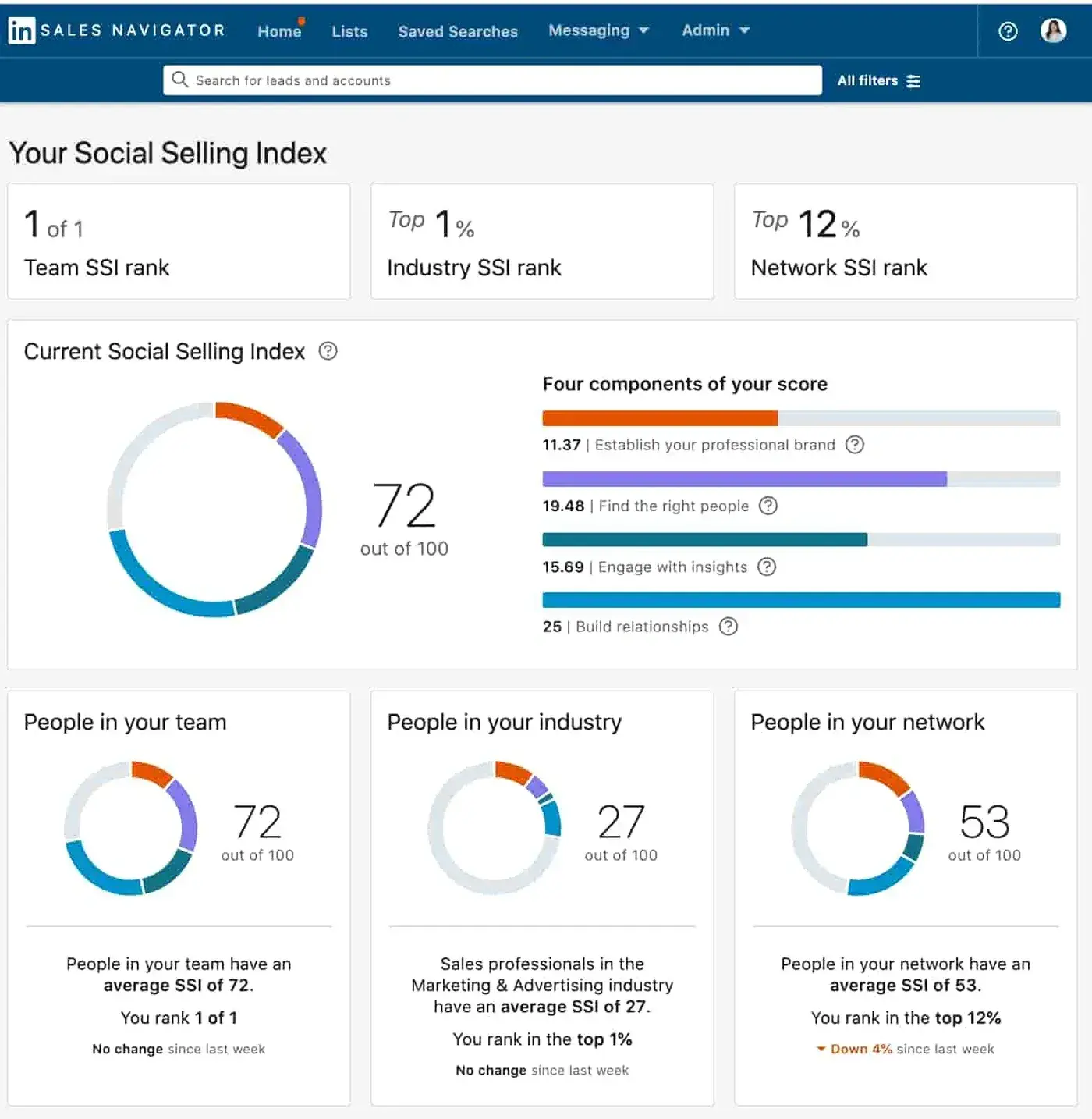
The majority of the social selling metrics available today assess an individual’s aptitude, like with Buzzsumo. LinkedIn has created its own tool, the Social Selling Index, to help users understand their effectiveness on the platform.
Social Selling Index
The Social Selling Index (SSI) measures how effective you are at establishing your professional brand and presence on LinkedIn.
You can view your score by following the link on LinkedIn’s Social Selling Index page. Your score gives insights into your effectiveness in establishing your personal brand, reaching the right people, engaging with insights, and building relationships. Your effectiveness is scored out of 100.
A subscription to LinkedIn’s Sales Navigator will get you even more insights and sales tools and, according to LinkedIn, can boost your SSI by 20% in as little as six months.
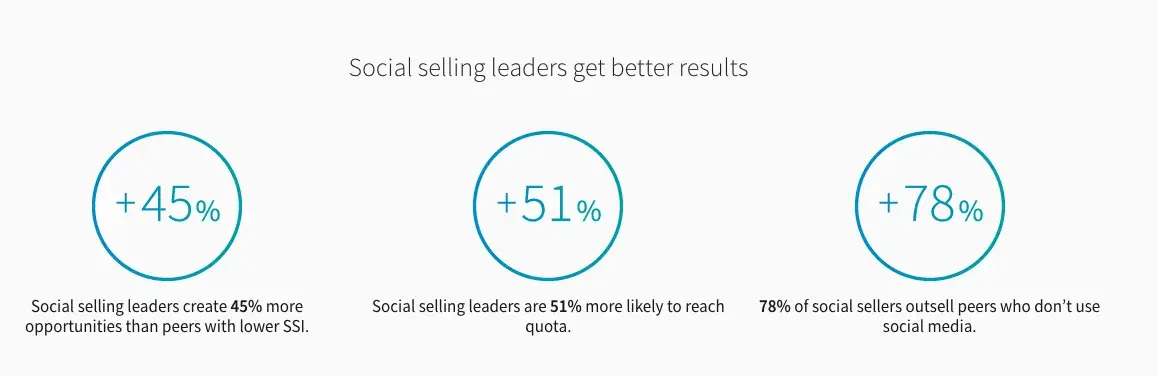
Salespeople with higher SSIs have 45% more sales opportunities than those with lower scores, and social sellers using the index outsell peers who don’t use social media.
On a larger scale, a company can also add a “social” source of deal options to their CRM software to see how many customers are coming from social selling.
Sales leaders who’d like to conduct a study on how social selling translates into sales should first systematize the practice and train reps on social best practices. They can then measure what impact the new routine has on closed deals by comparing future results to historical numbers.
50+ for Social Selling on LinkedIn and Beyond
Use this guide to improve your social selling efforts and close more deals from platforms like...
- TikTok
- And more!
Download Free
All fields are required.
Social Selling Tools
Social selling is easier to implement when you have the right tools for the job.
The product you choose depends on the specific needs of your organization and the challenges your buyers face.
Some of the most popular social selling tools available today include the following.
1. Oktopost

Oktopost is a powerful software suite that allows marketers to build B2B social selling plans for their organization. The platform also includes robust data collection and analysis capabilities, allowing sales teams to track ROI and derive insights from customer engagement.
Oktopost also integrates with several of the largest CRMs, making it easy to deploy in your organization.
Price: Pricing is available upon request.
2. Pulsar Platform

Pulsar Platform is an audience intelligence and social listening platform. This tool identifies trends and insights from the vast social media space.
Pulsar can help sales teams shape their messaging with real-time data on social media trends and conversations. You can also identify influencers big and small in social spaces, helping you maximize your sales efforts.
Price: Pricing is available upon request.
3. Vidyard
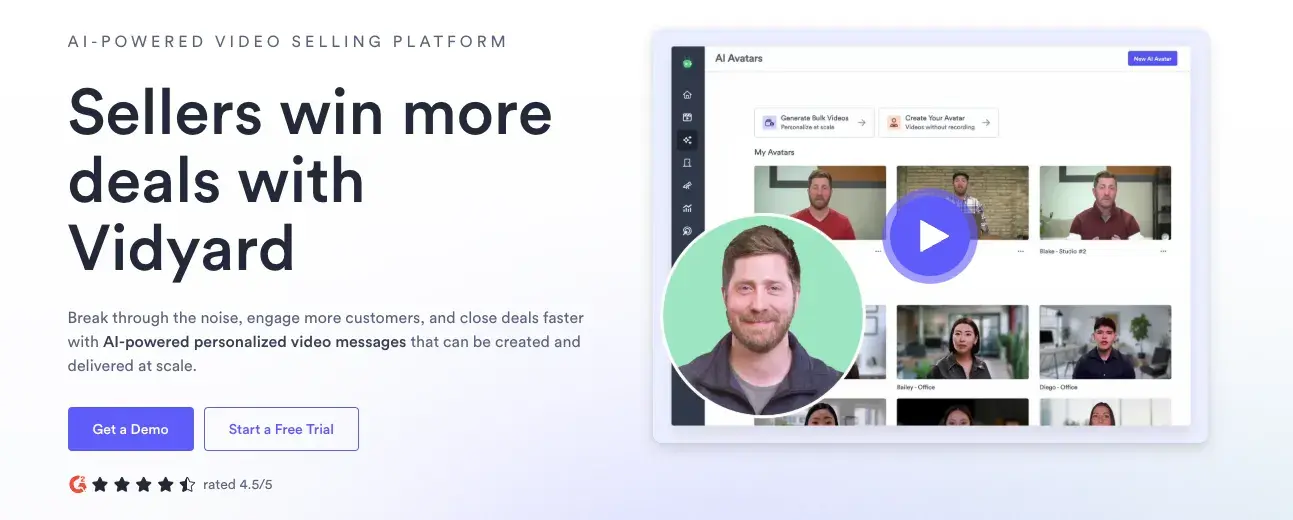
Vidyard lets you upload and share custom videos, which can give your sales team a critical edge in social selling. Video can smooth away countless friction points, reducing the number of steps it takes to bring prospects through your sales pipeline.
Vidyard is easy to use and includes numerous video templates and AI-powered tools that can help your team easily create professional-looking videos on demand.
Price: A free version is available. The Starter plan costs $59 per seat per month. Pricing for Teams and Enterprise plans are available upon request.
4. Seismic

Social selling involves countless moving parts, and Seismic helps you coordinate them all. With Seismic, you can track what pieces of content you share in each channel and their metrics to analyze performance.
Seismic allows social sellers to optimize their content delivery across the buyer’s journey, helping them to close more sales.
Price: Pricing is available upon request.
Getting Started With Social Selling
Now that you’re equipped with the basics of social selling, how to measure its effectiveness, and some social selling tools, you’re ready to get started with social sales.
Be sure to incorporate the best practices into your daily routine and train your sales team to do the same. At the same time, always be ready to pivot when — not if! — the effectiveness of your current social selling strategy changes.
Lead with authenticity, invite your prospects and peers into real conversations, and keep an eye on your metrics so you can continue to refine your social selling process.
Editor's Note: This post was originally published in November 2014 and has been updated for accuracy and comprehensiveness.
50+ for Social Selling on LinkedIn and Beyond
Use this guide to improve your social selling efforts and close more deals from platforms like...
- TikTok
- And more!
Download Free
All fields are required.
Social Selling
![LinkedIn for Social Selling: How to Research, Prospect, & Sell on Platform [+ New Data]](https://53.fs1.hubspotusercontent-na1.net/hubfs/53/copy%20of%20jade%20walters%20btb%20(40).png)

![6 Essential Social Selling Training Courses [+ Expert Tips for Social Selling]](https://53.fs1.hubspotusercontent-na1.net/hubfs/53/socialselling.webp)


-3.png)