Enter: Enterprise Resource Planning (ERP) software that simplifies the chaos by connecting finance, supply chain, HR, manufacturing, and project management into a unified system. Using ERP software, information flows seamlessly across cross-functional modules.
- Update inventory in the warehouse? Finance sees it instantly.
- Close a sale? Production schedules adjust automatically.
- Process payroll? Accounting updates in real-time.
This real-time visibility, often integrated with Customer Relationship Management (CRM) systems via data sync and APIs for smoother front-end coordination, turns disconnected operations into a truly connected enterprise. This makes ERP systems not just convenient, but the difference between controlled growth and expensive chaos.
This guide lists the best ERP software platforms in the market. Alongside this, it also explains how to choose the right deployment model and outlines a practical implementation roadmap.
Table of Contents
- Why Growing Companies Need ERP Software
- Benefits of Enterprise Resource Planning Platforms for Growing Businesses
- Which ERP should you choose: Cloud, On-Premises, Hybrid, or Two-Tier ERP?
- 4 Best ERP Software Tools for Growing Companies
- ERP Implementation Roadmap for Growing Teams
- Frequently Asked Questions About ERP Software
Free Sales Software
Built for productivity, powered by relevance.
- Sales Automation
- Call Tracking
- Lead Prospecting
- And More!
Why Growing Companies Need ERP Software
ERP software integrates finance, supply chain, HR, and operations data in one system. It brings structure to the chaos of growing businesses by creating a single operational backbone that unifies finance, inventory, and production into a reliable system.
“As a business scales, chaos sneaks in. Multiple spreadsheets, isolated systems, data drifts — and suddenly you’re running a circus instead of a company,” points out Amit Khanduja, the founder of Markivis.
According to research, organizations that use ERP systems report up to 78% higher productivity. Other benefits include faster order fulfillment, reduced operational costs, improved inventory accuracy, and better cash flow management — all critical advantages when you’re trying to scale without adding headcount proportionally (more on these below).
But here’s where things get even better. “Real magic happens when the ERP works hand in hand with the CRM — when both talk to each other seamlessly,” explains William Bellia, CEO at KaapiSoft. He points out, “That’s when growth stops being chaotic and starts becoming strategic.”
While the ERP software keeps operations stable, the CRM helps to drive customer engagement. Together, they connect the complete quote-to-cash cycle: from generating quotes to fulfillment, invoicing, and revenue recognition. No manual data entry. No disconnected systems. Just seamless flow that eliminates errors, improves cash flow, and turns operational efficiency into better customer experiences.
All these advantages are collectively driving the industry-wide adoption of ERP systems. As of 2025, the ERP market is projected to reach $147.7 billion within the year, underscoring the critical role of these systems in modern business operations.
Pro tip: HubSpot Smart CRM connects with ERP systems via data sync and APIs. The ready-made ERP integrations connect your customer-facing activities with back-office operations. With it, your sales team gets accurate inventory, pricing, and order status data in real time — helping them close deals faster and serve customers better. Learn more.
Benefits of Enterprise Resource Planning Platforms for Growing Businesses
ERP implementation lends growing businesses unprecedented clarity, control, and speed. They unify data, automate routine work, and turn scattered processes into connected, insight-driven operations, helping teams scale without chaos. Below are the most considerable benefits of ERP software for small and medium businesses.
A Single Source of Truth
As companies grow, their biggest challenge isn’t effort — it’s alignment. Data lives in silos across finance, operations, sales, and inventory.
As William Bellia says, “A well-implemented ERP turns scattered data into a single source of truth.” This transparency reduces manual errors, improves forecasting, and allows teams to make faster, data-driven decisions. In fact, integrating your ERP with a CRM like HubSpot additionally improves productivity, sales, and the customer experience.
Better Visibility and Control Over Costs
Visibility is the first step to better margins. ERP systems help uncover what’s really happening across the supply chain, cash flow, and operations, enabling early detection of inefficiencies.
Amit Khanduja put it perfectly: “The real payoff of ERP is tighter loops, not bigger dashboards.” You don’t just get more data; you get it when it matters most — helping you curtail costs and make timely calls. In fact, modern ERPs now use AI to highlight anomalies or inefficiencies automatically.
Automation That Compounds Efficiency
Teams can go from firefighting to flowing once ERP automates their daily grind — purchase orders, invoices, and inventory updates sync automatically.
In the words of Khanduja, “When routine work is automated, people stop being operators and resilience compounds.” The result shows up in several ways, such as orders arriving on time and invoices being accurate.
Accurate Forecasting and Faster Decisions
For growing businesses, speed is strategy. ERPs centralize data in real time, enabling trend analysis, demand forecasting, and the instant adjustment of operations. Modern platforms feature AI-driven recommendations, helping teams anticipate shortages, detect anomalies, and optimize resource allocation. As Bellia notes, this kind of visibility keeps the momentum without losing control — you get to be proactive rather than reactive.
Seamless Collaboration Between Teams
Confusion quickly disappears when everyone’s working from the same playbook. ERP systems enable this by connecting inventory to projects, projects to cash, and cash to customer commitments. In fact, when data from tools like HubSpot CRM flows seamlessly into your ERP, teams get the complete picture — right from lead to delivery. ERP software integration turns responsiveness into reliability.
The result? Teams trust the numbers, and overall decision-making becomes effortless. Simultaneously, customers receive accurate ETAs and a better experience, which in turn builds trust and drives repeat business.
Which ERP should you choose: Cloud, On-Premises, Hybrid, or Two-Tier ERP?
There’s no universal correct answer to which ERP model works best. Cloud, on-premises, hybrid, and two-tier ERPs all have their pros and cons. The ideal choice depends on how quickly your business needs to move, your existing infrastructure, and how much control you want or need to retain.
According to Khanduja, “Cloud wins for speed, elastic scale, and freedom from upgrade war rooms. We only choose on-premises when data sovereignty or deep machine integrations truly demand it.” For most growing companies, the agility and low maintenance of a cloud ERP outweigh the appeal of complete on-premise control.
In fact, Bellia sums it up neatly, “The deployment model shapes how you grow. Cloud gives agility, on-prem gives control, and hybrid or two-tier setups strike the balance between innovation and governance.”
Here’s a quick overview of what each of these ERP models entails.
Cloud ERP
What it is: Cloud ERP systems are hosted on the vendor’s servers and accessed through a browser, with the provider managing updates, uptime, and security. They’re quick to deploy — often within weeks — and operate on predictable subscription pricing, which keeps upfront costs lower. Cloud ERP offers faster deployment and lower upfront costs for growing businesses.
Who it is for: This model is ideal for growing companies that value agility, want to avoid maintaining complex infrastructure, and seek to leverage AI-driven insights as they scale.
Free Sales Software
Built for productivity, powered by relevance.
- Sales Automation
- Call Tracking
- Lead Prospecting
- And More!
On-premises ERP
What it is: On-premises ERPs are installed and managed locally on your own servers. This model offers complete control over data, configuration, and security, and is often chosen by manufacturers or financial institutions with strict data-residency or latency requirements.
Who it is for: While on-premise ERP allows deep customization, it also requires a heavier upfront investment and skilled IT staff. Therefore, it is typically used where compliance and performance outweigh speed, though some modern on-prem solutions now embed AI for process optimization.
Hybrid ERP
What it is: Many businesses prefer to keep core financials or sensitive data on-premises while running customer-facing or analytics modules in the cloud. Hybrid ERP enables gradual modernization — one function at a time — while also opening opportunities to leverage AI-driven analytics in cloud modules without touching sensitive data on-premises.
Who it is for: This approach works particularly well for international businesses looking to balance innovation with compliance.
Two-Tier ERP
What it is: The two-tier ERP model is designed for companies operating multiple entities or expanding through acquisitions. Deploying it, headquarters runs a robust enterprise ERP, while subsidiaries or regional offices use lighter, cloud-based tools. This setup maintains corporate governance and unified reporting while giving local teams flexibility.
Who it is for: A two-tier ERP is recommended if your company is scaling internationally or managing semi-autonomous business units, especially if you want to leverage AI insights at the corporate level while keeping local operations nimble.
From what I’ve personally observed, hybrid and two-tier ERP models are becoming the preferred middle ground, especially for businesses modernizing legacy systems without tearing everything down at once.
Bonus tip: It’s worth considering embedded AI features in your ERP. Tools with predictive analytics, intelligent workflow suggestions, and anomaly detection can accelerate growth while reducing risk. In my experience, these features often become a differentiator between “good enough” and “truly strategic” ERP systems.
Quick Decision Checklist for Growing Businesses
Choose Cloud ERP if you:
- Need to launch within 3–6 months.
- Want predictable subscription costs rather than a large upfront investment.
- Have limited IT staff for maintenance.
- Require frequent updates and new features.
- Support remote or distributed teams.
- Want easy access to AI-powered insights.
Consider on-premises ERP if you:
- Operate in heavily regulated industries with strict data residency rules.
- Require extensive customization beyond standard configurations.
- Have existing data center infrastructure and skilled IT teams.
- Process extremely high transaction volumes where hosting costs might exceed license fees.
- Need to maintain legacy system integrations.
- Seek selective AI capabilities integrated into internal processes.
Explore hybrid ERP when you:
- Face mixed requirements — some departments need cloud flexibility while others require on-premises control.
- Operate in multiple countries with varying data sovereignty laws.
- Already have on-premises systems but want to add cloud capabilities incrementally.
- Want to combine AI-driven analytics in the cloud with sensitive data stored on-premise.
Evaluate a two-tier ERP for:
- Multi-subsidiary organizations with different operational needs.
- Companies growing through acquisition.
- Businesses with autonomous divisions requiring different functionality.
- Leveraging centralized AI insights at headquarters while keeping local operations agile.
4 Best ERP Software Tools for Growing Companies
Choosing the right ERP system can feel overwhelming for a company that’s in growth mode. I've analyzed the market leaders and narrowed them down to four platforms that consistently deliver. These include:
- NetSuite
- Microsoft Dynamics 365
- Odoo
- Acumatica
1. Oracle NetSuite
Capterra rating: 4.2/5
Free trial: Yes
Key Features
- Multi-currency, multi-language, and tax compliance features.
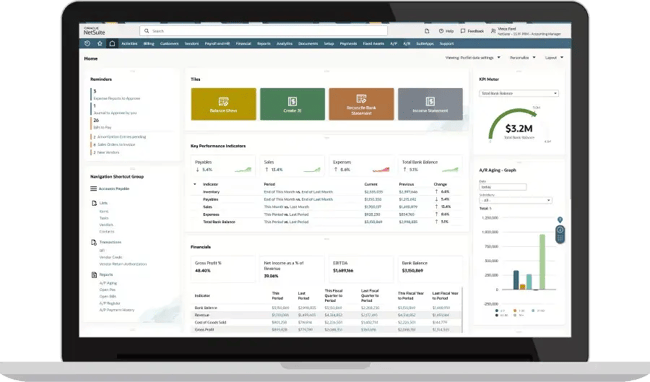
- Custom dashboards with advanced reporting capabilities.
- Extensive support resources, including user groups and forums.
- Applications spanning financial services, healthcare, IT, and niche industries.
- Real-time forecasting and strategic decision-making tools.
- Procurement and supply chain management features.
- Industry-specific solutions (including campus bookstores and publishing).
Best for: NetSuite is a solid ERP software for mid‑market companies that need a comprehensive, cloud-based solution and are in a position to invest in proper implementation.
What I like: NetSuite is the ERP I recommend to most because it genuinely eliminates the need for bolt-on solutions. I’ve watched companies consolidate multiple separate tools into NetSuite and immediately gain visibility that they didn’t know was possible.
In my view, the custom dashboards offer a rare combination of user-friendliness and complexity, so your finance team and warehouse manager can both get what they need without compromise.
In addition, NetSuite also offers excellent reporting and forecasting capabilities, providing valuable insights for strategic decision-making. This is particularly critical if you’re scaling fast and need to base decisions on real data, not gut feelings. The platform excels across accounting, supply chains, and virtually any business function, which makes it a great choice.
A potential drawback: I’d say the main trade-offs are implementation complexity and cost. It’s relatively resource-intensive to roll out, so smaller organizations with limited IT resources might struggle to do so.
2. Microsoft Dynamics 365
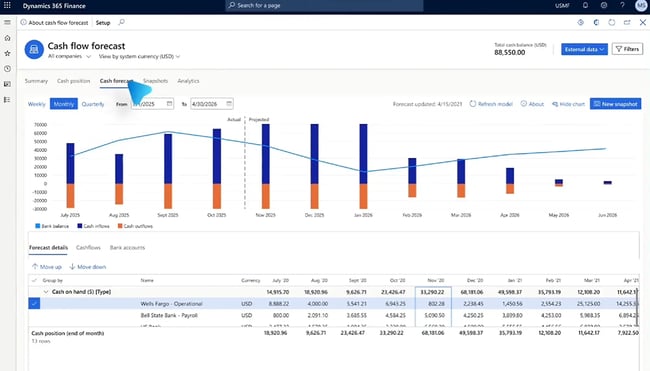
Capterra rating: 4.4/5
Free trial: Yes
Key Features
- Varied ERP and CRM capabilities in one platform.
- AI-powered Copilot for email creation, work order filling, and automated reporting.
- Power BI integration for comprehensive reporting.
- Point-of-sale (PoS) and interaction reporting tools.
- Automated workflows to reduce repetitive tasks and human error.
- Cloud and on-premise deployment options.
Best for: Small to mid-sized businesses already using Microsoft tools who want AI-driven automation and integrated customer management.
What I like: The unique combination of AI-powered ERP and CRM applications that enhance both CRM and ERP processes. Microsoft Dynamics 365 enables companies to see their entire process from beginning to end, automate it, and analyze it — something growing businesses truly need. With it, you’re not just managing back-office operations; you’re essentially connecting them directly to customer-facing activities, making it an excellent sales ERP software.
Its AI assistant, Copilot AI, is what differentiates Dynamics from other ERP systems in my view. It can intelligently do quite a bit, right from filling work orders and identifying issues before they escalate to automating inventory ordering based on patterns.
A potential drawback: It works well only if you’re already in the Microsoft ecosystem. I’ve also read reviews suggesting some people find its setup and navigation subpar.
3. Odoo
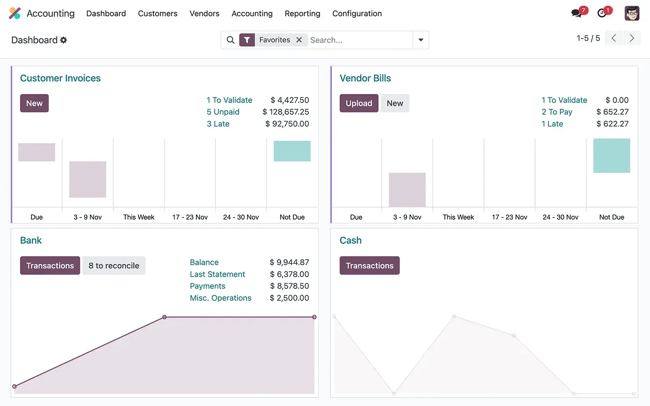
Capterra rating: 4.2/5
Free trial: Yes
Key Features
- Open-source architecture with 30+ integrated business apps.
- Built-in CRM, inventory, manufacturing, project management, and more.
- No-code app studio for custom workflows.
- Active community and third-party app marketplace.
- Flexible deployment (cloud, on-premise, or hybrid).
- Modular approach — pay only for what you need.
- Free community edition available for basic needs.
Best for: I think Odoo is a solid ERP software for small businesses. If you’re a bootstrapped or cost-conscious SMB with technical resources who value flexibility over out-of-the-box polish, this is the tool for you.
What I like: Odoo, in my view, stands out as a cost-effective ERP solution. The modular pricing structure means you’re not paying for features you won’t use for another two years, and the open-source foundation gives you an escape from the velocity that proprietary systems simply can’t match. I usually recommend Odoo when a company has an internal developer or a technical co-founder who can handle its customization needs.
The trade-off is clear: While you sacrifice some polish and support responsiveness, you end up paying a fraction of what other tools with similar capabilities would cost. Its inventory and order processing features streamline operations and enhance customer satisfaction, especially for ecommerce and distribution businesses.
A potential drawback: If you go for it, you’ll need to budget for implementation support. If your team isn’t technical, DIY Odoo deployments can spiral out of control without proper expertise.
Free Sales Software
Built for productivity, powered by relevance.
- Sales Automation
- Call Tracking
- Lead Prospecting
- And More!
4. Acumatica
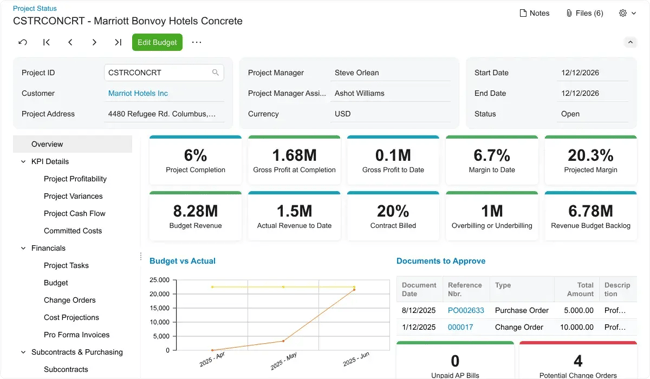
Capterra rating: Unavailable
Free trial: Unavailable
Key Features
- Wide range of industry-specific editions from construction and retail to manufacturing and distribution.
- Mobile-responsive design with native mobile apps.
- Robust project accounting and job costing modules.
- AI-driven features like automated expense reports from receipt photos.
- Consumption-based pricing (pay for resources, not per user).
Best for: Project-based businesses and mid-market companies with large, collaborative teams who want a powerful ERP without per-seat pricing penalties.
What I like: Acumatica’s consumption pricing model is brilliant for growing companies. You pay for the computing resources, applications, and transaction volume you use rather than adding $100/month every time you hire someone. I’ve watched many companies avoid budget battles because adding users in Acumatica doesn’t trigger finance approvals.
The interface consistently earns high marks for ease of use. After personally seeing multiple implementations, I can confidently say it’s one of the quickest platforms to onboard. The drag-and-drop dashboards mean your team spends less time in training and more time actually using the system. It’s powerful for construction and project-based businesses, where job-costing accuracy directly impacts profitability.
A potential drawback: I’ve read that their support could be improved. Moreover, it’s not quite as comprehensive as NetSuite for complex multi-entity scenarios. However, for most growing companies, I reckon it’s more than sufficient.
|
Platform |
Best For |
Deployment |
Pricing |
Key Strength |
|
Oracle NetSuite |
Mid-market to enterprise |
Cloud |
Premium |
All-in-one capabilities |
|
Microsoft Dynamics 365 Business Central |
SMBs in the Microsoft ecosystem |
Cloud, On-premise |
Mid-range |
Integration & scalability |
|
Odoo |
Cost-conscious SMBs |
Cloud, On-premise, Hybrid |
Budget-friendly |
Customization |
|
Acumatica |
Growing companies |
Cloud, On-premise |
Flexible |
User experience |
Pro tip: When selecting an ERP system, prioritize factors such as:
- Integration with existing tools, such as HubSpot CRM, to introduce simplicity and accuracy.
- Scalability to accommodate your company’s growth.
- User-friendliness to ensure smooth adoption across your organization.
ERP Implementation Roadmap for Growing Teams
Rolling out an ERP isn’t just a tech project — it’s an operational reset. The smartest approach is to start small, integrate early, and scale in phases. Phased ERP rollout reduces implementation risk and business disruption. Following an integration-first roadmap helps growing teams to realize value fast while keeping day-to-day operations steady.
Below, I’ve put together a phased, integration-first roadmap that prioritizes early wins, builds user confidence, and scales gracefully. Here’s what you can do.
Phase 1: Discovery and Alignment
Always begin by mapping current workflows, identifying bottlenecks, and defining measurable goals. The biggest mistake I see is leaving out the people who’ll actually use the system. Involving both leadership and on-ground teams early on ensures your choice of ERP software fits well with how your business really runs — not just how it looks on paper.
Pro tip: Don’t just document processes during discovery; ask why they exist. I’ve discovered that many inefficiencies come from legacy habits, not real business needs. Clarity on that impacts ERP implementation outcomes.
Phase 2: Integration-first Foundation
Before adding new modules or automation, prioritize connecting your ERP to your existing systems. Start with systems that already hold your critical data — typically your CRM (such as HubSpot), accounting software, and inventory tools.
ERP integration enables seamless quote-to-cash, service, and renewals workflows. I’ve found that integrating early on quickly builds trust. That’s because when teams see familiar data flowing in real time, they begin to believe in the system’s value.
Phase 3: Process Automation and Data Migration
Once integrations are solid, move on to migrating all essential data and automating repetitive workflows — such as invoicing, purchase orders, order tracking, and reporting. In my experience, introducing automation in small, controlled batches keeps disruptions low and adoption high.
Pro tip: Run old and new systems in parallel for at least one reporting cycle. I’ve learned that it’s the simplest way to spot mismatched data before it becomes a problem.
Phase 4: User Training and Adoption
Perfectly good ERPs can also fail. That happens when teams aren’t adequately trained or supported. So treat this stage like an internal launch — with live demos, feedback loops, and clear communication about the “why.” When people see the ERP software system lighten their daily load with their own eyes, resistance will turn into momentum.
Pro tip: Identify a few “power users” in each department early on. Rely on them as internal champions who help others navigate the transition.
Phase 5: Optimization and Scale
Remember, go-live isn’t the finish line — it’s the starting point for optimization. Schedule a 90-day review window to gather user feedback, assess adoption, and adjust workflows. This is also when you should start layering in advanced analytics, forecasting, or reporting to unlock deeper value.
Pro tip: Treat optimization as an ongoing sprint, not a post-mortem. I’ve seen that momentum compounds when improvement becomes routine.
Frequently Asked Questions About ERP Software
Do we still need an ERP if we already have a CRM?
Yes, you need an ERP even if you already have a CRM. That’s because a CRM and an ERP serve different but complementary roles. The CRM focuses on managing customer relationships — leads, deals, and service interactions. On the other hand, an ERP manages the back end: inventory, billing, procurement, and operations.
I like to think of it as a CRM shows who you’re selling to, but an ERP shows how you deliver on those promises. When the two systems integrate — for example, HubSpot CRM feeding data into your ERP — you get complete visibility from pipeline to payment.
How long does an ERP implementation usually take?
There is no fixed timeline for ERP implementation. It depends on your business size and complexity, but most growing companies I’ve worked with take between 3 and 9 months for a full rollout.
The integration-first approach I recommend often delivers value earlier, sometimes within the first 60 days, because teams start seeing live data flow long before the final go-live. The key is not to rush; stable integration and user adoption matter far more than speed.
Can we integrate an ERP without replacing our existing systems?
Yes, you can absolutely integrate an ERP without bidding goodbye to your existing systems. In fact, I often recommend it.
A well-planned ERP doesn’t have to uproot your existing tech stack — it can unify it. Many growing businesses begin by integrating their ERP with existing tools such as HubSpot CRM, accounting platforms, or inventory software. This staged approach minimizes disruption and helps teams gradually get used to the new system.
Pro tip: If you’re looking for intelligent integration between your tools, HubSpot’s AI automates routine tasks triggered by ERP events across CRM and ERP.
When should a small business move from accounting tools to an ERP?
From my experience, the tipping point for small businesses comes when your team spends more time reconciling data than analyzing it. If you’re managing multiple spreadsheets, manually matching invoices to inventory, or struggling with forecasting, it’s time to graduate from basic accounting tools to an ERP solution. Consider it a nudge the moment operations start feeling reactive instead of proactive.
Implement ERP to scale smarter, not harder.
Scaling a growing business is a balancing act: Speed on one side, control on the other. A well-implemented ERP bridges this gap. It gives you real-time visibility, seamless workflows, and confidence in every decision.
In fact, introducing the right ERP software, alongside an innovative front-end system like HubSpot CRM, gives you the whole picture — from the first conversation to the final delivery.
From my own experience, the businesses that win with ERP aren’t just the ones that deploy faster — they’re the ones that adopt more deeply. They invest time in alignment, integration, and continuous optimization. I’ve watched those companies grow with less stress, fewer silos, and stronger customer trust.
If you’re considering ERP for your team, I’d echo: Start with what’s already working — your CRM, accounting, and inventory systems. Build from there instead of going for a complete overhaul at the onset. That’s how you turn technology from a cost into a competitive advantage.
Free Sales Software
Built for productivity, powered by relevance.
- Sales Automation
- Call Tracking
- Lead Prospecting
- And More!
Management