The following examples demonstrate how different organizations leverage AI-generated websites to achieve specific business outcomes. Each site showcases distinct approaches to AI implementation, from educational platforms to creative portfolios.
Table of Contents
- AI-Generated Website Examples
- How to Generate a One-Page Website with HubSpot
- How to Generate a Multipage Website With HubSpot
- Frequently Asked Questions About AI-Generated Websites

HubSpot's Free Website Builder
Create and customize your own business website with an easy drag-and-drop website builder.
- Build a website without any coding skills.
- Pre-built themes and templates.
- Built-in marketing tools and features.
- And more!
AI-Generated Website Examples
Let’s dive into seven real-world top AI websites that demonstrate AI’s capability to produce professional, functional web presences across various industries and use cases.
1. Reading Advantage
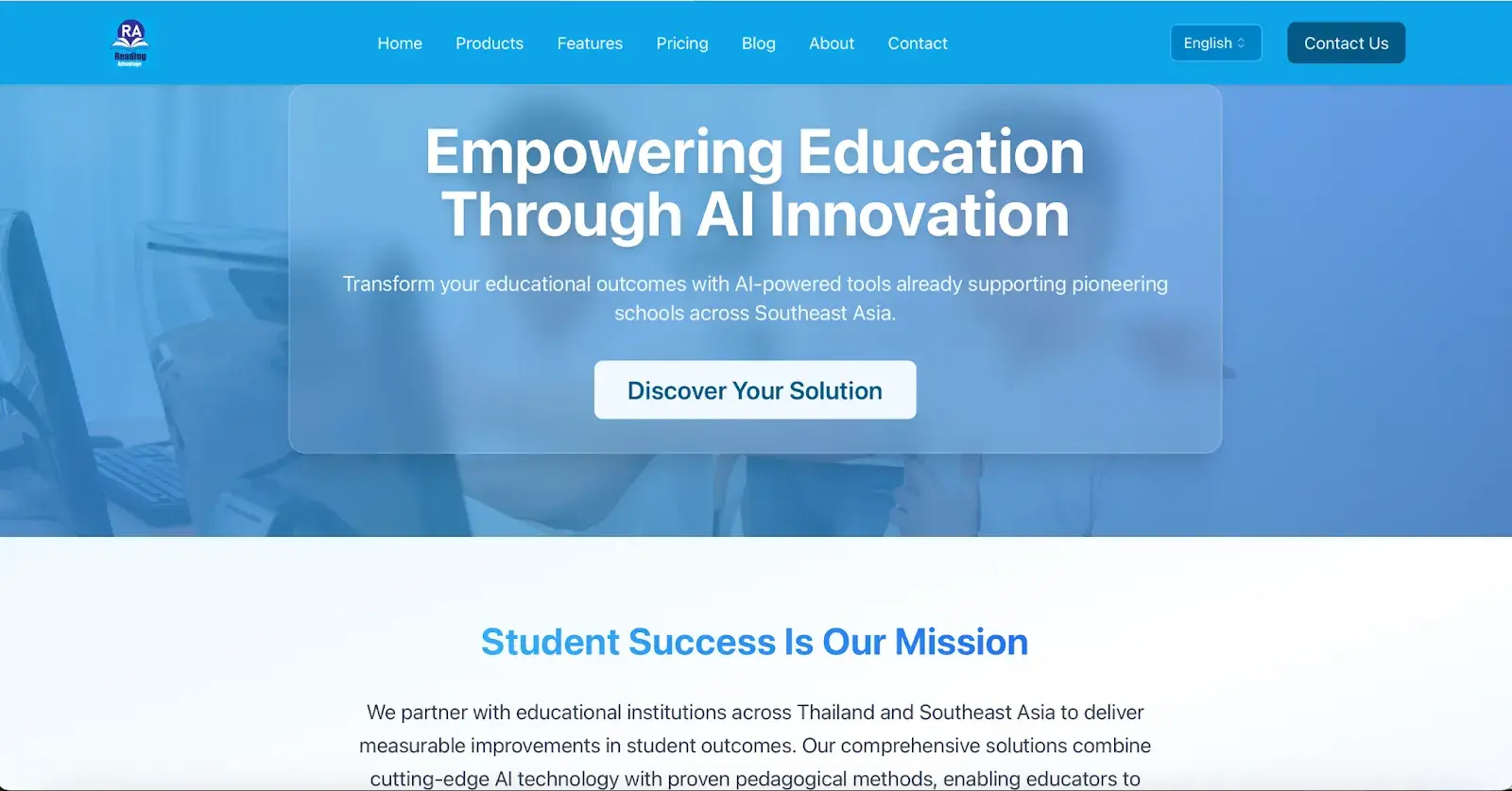
Reading Advantage delivers AI-powered educational solutions that personalize reading instruction for students across Southeast Asia.
The AI-generated hero section immediately establishes credibility with “Empowering Education Through AI Innovation” and includes a clear “Discover Your Solution” call-to-action (CTA). The three-card feature layout (“Extensive Reading Made Easy,” “Easy Classroom Launch,” “Progress You Can Trust”) makes complex technology approachable with simple icons and benefit-focused headlines. The “Ready to Transform Your Institution?” closing section maintains conversion focus with a prominent “Schedule a Demo” button.
Pro tip: AI-generated educational platforms work best when they balance technical credibility with accessibility — use benefit-focused headlines rather than feature lists to appeal to decision-makers.
2. Atlas Training
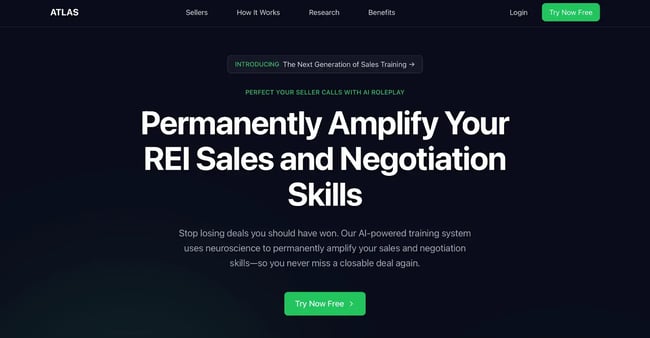
Atlas Training provides AI-powered sales training through realistic property owner simulations that help real estate professionals improve negotiation skills.
The AI creates a bold, attention-grabbing hero with “Permanently Amplify Your REI Sales and Negotiation Skills” that immediately communicates the value proposition. The page demonstrates effective single-page architecture with a header navigation (Sellers, How It Works, Research, Benefits) that jumps to specific sections — smart for keeping visitors oriented on long-form layouts. The testimonial section uses a full-screen quote format that builds credibility.
Pro tip: This page demonstrates how AI can generate comprehensive single-page sites, but there’s a risk of information overload. The Atlas example includes hero, simulation showcase, testimonials, methodology breakdown, research validation, benefits grid, pricing table, and footer across one continuous scroll. For complex B2B services, consider whether a multipage structure might improve conversion by reducing cognitive load per page.
What I love: Atlas has a secondary navigation in its footer. This is very helpful since all of their content is on one page.
Use HubSpot’s one-page website builder to create your website in minutes with HubSpot AI.
3. Faisal Shariff
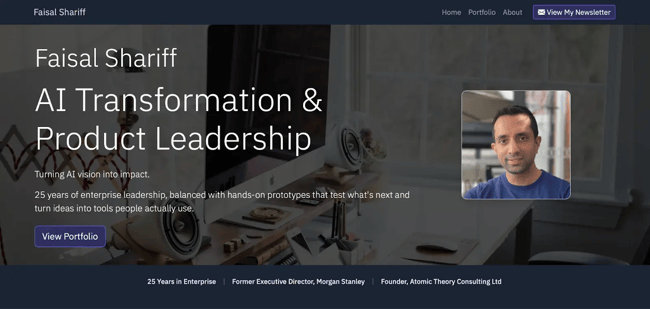
Faisal Shariff showcases an AI product leadership portfolio featuring hands-on prototypes and enterprise AI transformation projects.
The AI generates a clean, professional personal brand site with “AI Transformation & Product Leadership” as the hero headline and a professional headshot that immediately establishes credibility. The page structure moves from hero to newsletter signup (“Build Smarter with AI”), then to a portfolio section with detailed project cards (StageSnap, SpatiaLearn) that include challenge–solution–impact frameworks. Each project card uses consistent iconography and organized subsections that make complex AI products easy to scan. The dark navy color scheme with purple accents creates a cohesive professional identity throughout.
Best for: Technical professionals and consultants who need portfolio sites that demonstrate expertise through project showcases rather than service lists.
Pro tip: Faisal’s site demonstrates how strong branding elevates AI-generated structure — while the card layouts and section organization follow typical AI patterns, the consistent color palette, custom typography, and professional photography transform generic templates into distinctive personal branding. Invest time in customization (colors, fonts, images) to make AI-generated sites feel custom-built.
4. Dram Good
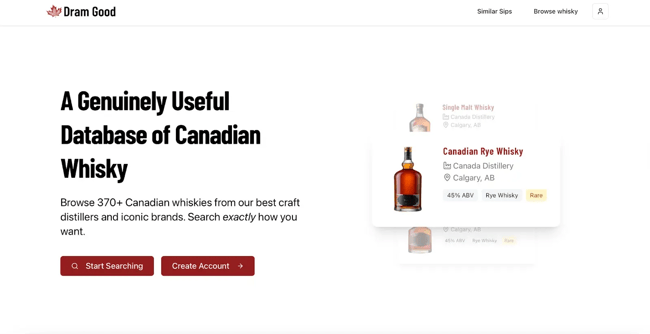
Dram Good curates a searchable database of Canadian whiskeys featuring 370+ products from craft distillers and iconic brands.
The AI generates a no-frills, content-first design with “A Genuinely Useful Database of Canadian Whisky” as the hero headline — immediately communicating value without marketing fluff. The page prioritizes functions with two prominent CTAs (“Start Searching” and “Create Account”), and organizes products into scannable card grids.
Pro tip: Dram Good demonstrates how AI-generated sites excel at straightforward utility — when budget and timeline are constrained, prioritize clear information architecture and functional design over elaborate customization. The simple card layouts and clean typography serve the product database effectively without requiring expensive design work.
5. Lamprey Zone Music
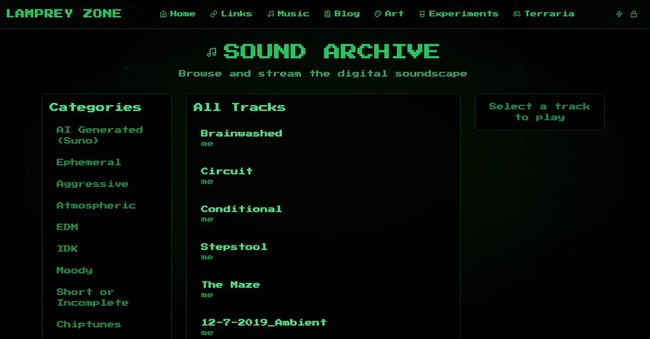
Lamprey Zone showcases a personal music archive with AI-generated tracks organized by mood categories and streaming functionality.
The AI creates a distinctive retro-tech aesthetic with monospace green text on a black background — evoking classic terminal interfaces that perfectly match the electronic music content. The three-column layout efficiently organizes Categories (left), All Tracks (center), and a play prompt (right) for intuitive browsing.
Pro tip: Lamprey Zone shows how AI can generate niche aesthetic styles when prompts emphasize tone and visual references. Match your site’s visual style to your content’s vibe for authentic personal branding.
6. Krsna
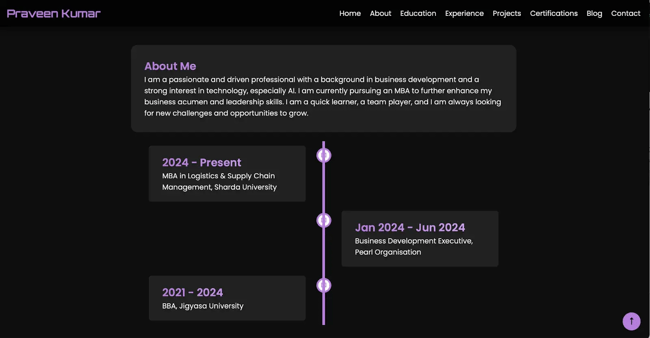
Praveen Kumar presents a professional digital resume showcasing MBA education, business development experience, and technical skills in AI and data analysis.
The dark theme with purple accents creates modern sophistication that works across industries. The “About Me,” “Skills,” and “Interests” sections break professional information into digestible chunks with a clear hierarchy. The comprehensive navigation transforms a static resume into an interactive portfolio.
Best for: Any professional — from MBA candidates to tradespeople — who needs an accessible online presence for job applications, networking, or career advancement.
Pro tip: Business professionals, educators, healthcare workers, and service providers can now create sophisticated online portfolios without coding skills or designer budgets. A digital resume increases discoverability, provides more context than paper CVs, and signals tech-savviness to employers — advantages AI website builders now make accessible to everyone, not just developers.
Check out how you can generate a website using HubSpot’s Free AI-Powered Website Generator.
7. Prolific Pours

Prolific Pours provides luxury bar catering and bespoke cocktail curation for corporate events, weddings, and private gatherings.
Their UI is visually stunning. The site is rich with an emerald green and warm cream color palette that evokes sophistication and luxury hospitality. The wavy divider elements between sections create visual flow and sophistication beyond basic rectangular blocks. The “About Us” section uses an asymmetric layout with text on the left and a rounded-corner cocktail image on the right, adding visual interest.
What I like: The sophisticated green/cream palette, elegant typography, professional photography, and thoughtful design details like wavy dividers transform a template into a distinctive brand experience. Premium businesses should prioritize visual polish in AI prompts.
There’s a myth going around that all AI-generated websites look the same. But as you saw in these AI website design examples, with proper branding, you can still make your business website look custom. If you need inspo, check out these dynamic website examples.
HubSpot's Free Website Builder
Create and customize your own business website with an easy drag-and-drop website builder.
- Build a website without any coding skills.
- Pre-built themes and templates.
- Built-in marketing tools and features.
- And more!
How to Generate a One-Page Website with HubSpot
HubSpot’s AI-powered landing page builder generates complete, branded one-page websites through a single comprehensive prompt combined with template and industry selections. Hubspot's AI analyzes the prompt to create customized layouts, write compelling copy, generate relevant images, and configure conversion elements in under 60 seconds.
This walkthrough demonstrates the complete process using Bella Vista Trattoria, a family-owned Italian restaurant, as the example business. The step-by-step approach shows exactly how restaurants and similar local businesses can launch professional web presences without technical expertise or design skills.
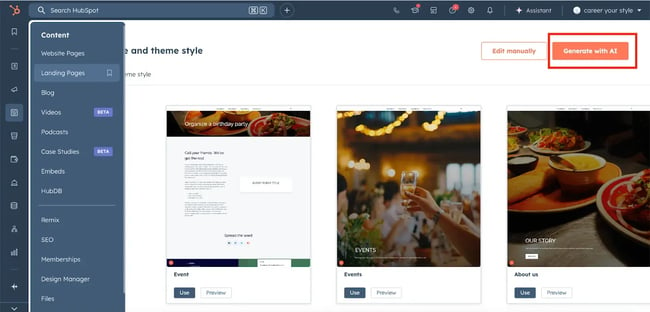
Step 1: Navigate to landing pages and start with AI.
HubSpot’s one-page website builder lives within the landing pages feature. After logging into your HubSpot account, navigate to Content > Landing Pages from the main dashboard. In the top right corner of the landing pages screen, click the Generate with AI button to access the AI-powered page generator.
HubSpot provides free access to the AI landing page builder without payment information or trial restrictions. Free accounts publish to HubSpot-branded domains, while paid accounts can connect custom domains.
Step 2: Select a template and complete the AI prompt.
The builder first asks you to select the landing page template from a variety of selections. Purpose options include offering downloadable content, generating leads, promoting events, booking meetings, or general information sharing. Each template tells the AI which conversion elements to prioritize.
For Bella Vista Trattoria, the perfect selection is Homepage since the goal involves capturing reservation requests and catering inquiries.
Next, the description field requests comprehensive details about the business, goals, and desired functionality. This single prompt provides all the context the AI needs to generate appropriate content, headlines, layouts, and CTAs. Hubspot's AI gives a prompt template. All the web designer has to do is fill in the red blanks with specific business information.
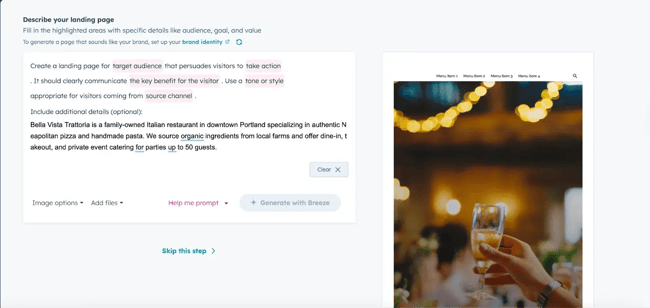
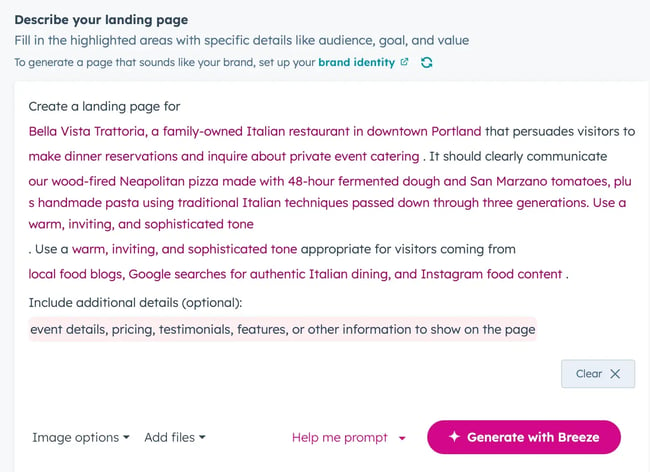
Here’s what I entered for each field:
- Business description: Bella Vista Trattoria, a family-owned Italian restaurant in downtown Portland.
- Target audience: Diners interested in authentic Italian food and organically sourced ingredients.
- Take action: Make dinner reservations and inquire about private event catering.
- The key benefit for the visitor: Our wood-fired Neapolitan pizza made with 48-hour fermented dough and San Marzano tomatoes, plus handmade pasta using traditional Italian techniques passed down through three generations.
- Tone or style: Warm, inviting, and sophisticated tone.
- Source channel: Local food blogs, Google searches for authentic Italian dining, and Instagram food content.
Step 3: Add supporting content files (optional).
HubSpot allows users to upload up to five files to enhance the AI’s content generation. Supported file types include images, videos, PDFs, transcripts, and documents. The AI analyzes uploaded files to incorporate relevant details, extract key messaging, and select appropriate imagery for the generated page.
For Bella Vista Trattoria, I uploaded:
- High-resolution photos of signature dishes (wood-fired pizza, handmade pasta).
- Restaurant interior and dining atmosphere photos.
- Existing menu PDF and catering package information.
- Brief chef biographies or restaurant history documents.
The AI examines uploaded images to understand visual brand identity, color preferences, and subject matter. Menu PDFs provide specific dish names, pricing context, and service descriptions. Biography documents supply authentic staff details that make team sections more credible. This supplemental content helps the AI generate more accurate, brand-aligned pages that require less manual editing after generation.
Step 4: Customize the generated one-pager.
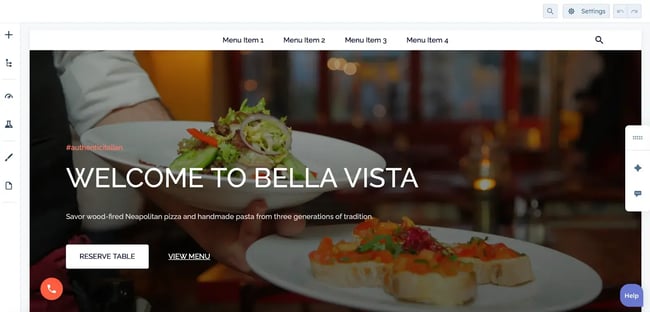
HubSpot Content Hub provides a drag-and-drop content editor that activates immediately after page generation. Click any section, text block, image, or button to access editing options without coding knowledge.
Edit text and headlines.
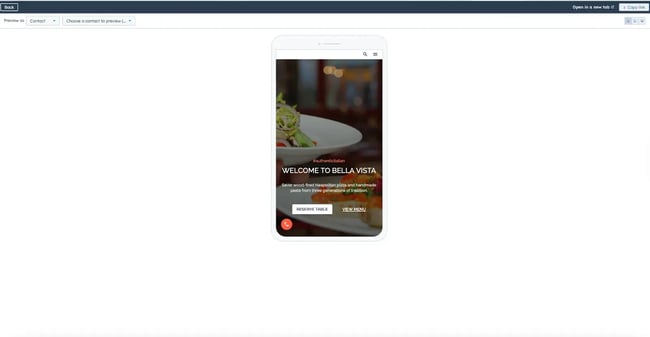
Click any text element to edit inline — change the “WELCOME TO BELLA VISTA” headline, modify the subheading about wood-fired pizza, or update the “#authenticitalian” hashtag to match actual social media campaigns.
Customize buttons.
The “RESERVE TABLE” and “VIEW MENU” buttons can be edited to change text, colors, and destinations — link them to external reservation platforms like OpenTable or configure them to scroll to on-page forms.
Replace images.
Click the background image to upload your own high-resolution photos of signature dishes, the dining room, or the wood-fired oven in action.
Adjust colors and fonts.
Access the style settings in the left sidebar. There, teams can change the color palette and typography to match brand guidelines.
Add or remove sections.
Use the + Add section button in the top navigation to insert additional content blocks like menus, galleries, or testimonials, then drag sections to reorder them.
Update navigation menu.
Click the navigation bar to replace “Menu Item 1, 2, 3, 4” with actual section names like “About,” “Menu,” “Reservations,” and “Contact.”
Step 5: Optimize for SEO, test mobile, and publish.
Before publishing, optimize the landing page for search engine visibility and mobile performance. HubSpot Content Hub includes built-in recommendations that analyze page content and suggest improvements.
SEO Optimization
Set the page title to “Bella Vista Trattoria - Authentic Italian Restaurant in Downtown Portland” to incorporate the business name, primary offering, and location. This title format helps the page appear in local searches for “Italian restaurant Portland,” “Neapolitan pizza Portland,” or “authentic Italian dining Portland” — the types of queries that drive the Google search traffic specified in the original prompt.
Write a meta description within 155 characters: “Family-owned Italian restaurant serving authentic Neapolitan pizza and handmade pasta. Made with organic local ingredients. Reservations and catering available.” This description incorporates key differentiators while including search terms that drive qualified traffic.
Configure image alt text for accessibility and SEO. Describe images specifically: “Wood-fired Neapolitan pizza with San Marzano tomatoes and fresh basil” rather than generic “pizza image.” Detailed alt text helps the page appear in image searches while ensuring screen readers convey meaning to visually impaired visitors.
Mobile Responsiveness Testing
Use HubSpot’s mobile preview tool to verify the page displays correctly on smartphones and tablets. The AI website designer generates mobile-responsive designs automatically, but testing ensures a better experience. Adjust any elements that feel cramped or difficult to interact with on smaller screens.
Publishing
Click the Publish to make the site live. HubSpot offers immediate publishing or scheduled publishing for specific dates and times. Schedule launches to coordinate with marketing campaigns, social media announcements, or when staff can monitor initial traffic and respond to inquiries promptly.
Free accounts publish to the HubSpot-branded domain immediately. Paid accounts publishing to custom domains should verify DNS settings are configured correctly to avoid accessibility issues.
How to Generate a Multipage Website With HubSpot
HubSpot’s AI website generator creates complete websites by turning business information into professional sites with custom layouts, initial copy, and tailored CTA buttons. The AI website generator is part of HubSpot Content Hub, which enables AI-powered content creation and management.
How It Works
After signing up for Content Hub, describe your business through simple prompts. HubSpot’s AI creates the design, writes initial copy, and adds relevant CTAs based on your responses about your business, industry, and goals.
What You Get
The AI generates a complete website package including custom layout, content sections, and CTA buttons — not just templates to fill in. You receive a full draft website ready to customize and publish.
Customization
Use HubSpot’s drag-and-drop website builder to personalize the AI-generated site. Content Hub provides pre-built themes, page templates, and no-code editing tools to refine the design without technical expertise.
Integrated Features
The AI-generated website includes:
- Free CRM integration for lead capture and contact management.
- Forms and CTAs that convert visitors into leads.
- SEO recommendations to increase organic search traffic.
- SSL security on all HubSpot-hosted content.
- Custom domain connection for brand recognition.
- Analytics tracking to monitor performance.
Publishing
Publish the website whenever ready. HubSpot hosts the site on fully managed infrastructure that scales automatically.
Frequently Asked Questions About AI-Generated Websites
Can an AI-generated website work for enterprise compliance?
AI-generated websites meet enterprise compliance requirements when built on platforms prioritizing security, accessibility, and regulatory adherence.
HubSpot’s AI website generator produces WCAG 2.1 Level AA-compliant sites by default, meeting ADA and Section 508 accessibility requirements. Additionally, HubSpot Content Hub implements SSL encryption automatically and maintains SOC 2 Type II certification, protecting customer data through verified security controls.
How do I connect an AI website to my CRM for better personalization and reporting?
HubSpot Smart CRM integrates automatically with AI-generated websites. Form submissions populate CRM contact properties in real-time, creating or updating records immediately. HubSpot Marketing Hub reporting dashboards track website performance alongside CRM data, revealing how visitors progress through the buyer’s journey.
What is a realistic timeline to launch an AI-generated website?
AI-generated websites launch in hours to weeks. Organizations with prepared brand guidelines, content assets, and defined conversion objectives launch faster. HubSpot’s native integrations with major platforms minimize technical overhead compared to custom-built websites. Some common timelines follow:
- HubSpot’s one-page website builder generates functional landing pages in under 10 minutes. Basic customization adds one to two hours, enabling same-day launches for time-sensitive campaigns.
- Multipage websites through HubSpot’s AI website generator produce complete site structures in 10 to 15 minutes. Content refinement and design customization typically require three to five business days.
- Enterprise implementations with multiple stakeholders and integration requirements extend timelines. Turnaround varies based on legal compliance verification and comprehensive testing.
Which AI website builder should I choose?
AI website builder selection depends on CRM integration needs, growth objectives, and marketing automation requirements. HubSpot’s AI Website Generator excels for:
- Businesses requiring native CRM integration and automated lead nurturing.
- Companies using or planning to implement HubSpot Smart CRM.
- Organizations needing scalability from simple landing pages to complex web applications.
- B2B teams requiring account-based marketing, lead scoring, and sales enablement tools.
Check out more AI web development tools here.
Deploy your AI website in minutes.
AI-generated websites represent a fundamental shift in how businesses establish and maintain their online presence. From educational platforms to ecommerce stores, AI handles the technical complexity of web development while maintaining design quality and user experience standards.
HubSpot’s AI website generator and one-page builder provide accessible entry points for businesses seeking to leverage AI for web development. The platforms generate websites in minutes while offering customization. Integration with Smart CRM and Marketing Hub transforms these AI-generated sites into comprehensive marketing tools.
The transition to AI-generated websites will accelerate as platforms mature and businesses recognize the efficiency gains. Organizations that adopt AI website builders today position themselves to iterate faster, test more frequently, and respond to market changes with agility that traditional development cycles can’t match.
HubSpot's Free Website Builder
Create and customize your own business website with an easy drag-and-drop website builder.
- Build a website without any coding skills.
- Pre-built themes and templates.
- Built-in marketing tools and features.
- And more!
Website Design Examples

![15 black and white website designs to inspire your own [+ pro tips]](https://53.fs1.hubspotusercontent-na1.net/hubfs/53/black-and-white-website-design-1-20250520-1336267.webp)
![Gradient Website Design Examples That Prove This Trend Is Far From Over [+Tutorials]](https://lh7-us.googleusercontent.com/htOWIbyCIoCMxSjC4gJunkGnhCzXpccjTrL8NwoGdRdCsSiEmEAxe_qBFkMrzy2Y8d3cwEr_DMzSGHq9Xi-hQFnMJCo8HDQJ1yQGigcSfFxI2QKXo0s7xXSB2sY-eALG1iUqnHXgomcDsnp7AHRSH1s)
![15 Brochure Website Examples to Inspire You [+ How to Make One]](https://53.fs1.hubspotusercontent-na1.net/hubfs/53/brochure-website-examples-1-20250319-362228.webp)
![28 Types of Websites to Inspire You [+ Real-Life Examples]](https://53.fs1.hubspotusercontent-na1.net/hubfs/53/types-of-websites.png)


![10 of my favorite interactive websites [+ how I make my own]](https://53.fs1.hubspotusercontent-na1.net/hubfs/53/%5BUse%20(1)-Sep-27-2025-03-02-58-8817-PM.webp)