.png?width=112&height=112&name=Image%20Hackathon%20%E2%80%93%20Vertical%20(75).png)
In this guide, we’ve laid down the step-by-step process of running Facebook ad campaigns. And to make it even better, we put together a checklist to help you keep all of your campaign details straight.
With this resource in hand, you can build the right ad for the right audience on this expansive platform.
In this blog, we’ll cover the following:
- Why advertise on Facebook?
- About Facebook Ads Manager
- How to Run Facebook Ads
- How to Create Facebook Ads
- Using Facebook Ads Manager for Your Next Campaign
Why advertise on Facebook?
With nearly 1.9 billion users every day, Facebook offers a unique opportunity for marketers to augment their organic efforts through advertising campaigns.
Compared to the post boost, Facebook Ads have a higher CTR (click-through rates), lower CPM (Cost per 1k impressions), lower CPC (Cost-per-click), and better reach. It also makes sense to run Facebook ads in 2024 when your target audience is worth 2.249 billion.
If you’re still on the fence, these reasons might convince you:
- Build brand awareness. Facebook ads are displayed impulsively while scrolling the feed, whereas Google ads only appear when a user heads over to the search engine. Also, the graphics in Facebook ads garner more clicks and higher awareness from the customers through emotional marketing.
- Reach wide target customers. Facebook has vast user data, with audience segmentation elements like interests, behaviors, income, spoken languages, and education. Advertisers can leverage these metrics to target a specific set of customers without wasting their budget.
- Gain powerful insights. Ad performance tracking is recorded and available in real time. You can use these metrics to understand what’s working and how to improve your advertising strategy for future campaigns.
I’ve even got some real numbers to prove my point here.
- Facebook ad spend is forecasted to reach $187.35 billion by 2025.
- Facebook Ads reach 62.2% of all Americans aged 13 and up.
- The average Facebook user clicks on 11 ads per month.
However, the fortune of your Facebook ads starts with the basics. In my experience, most businesses end up messing with the ads because of the incorrect ad manager setup or a weak foundation.
The trouble is, with both time and money on the line, there’s not much room for oversight.
To help fine-tune your system, let’s first start with an overview of Facebook Ads Manager and its significant features.
.png)
Free Facebook Advertising Checklist
A Step-by-Step Process for Facebook Advertising, Including:
- Planning
- Budgeting
- Monitoring
- Analyzing
Download Free
All fields are required.
Facebook Ads Manager
Before starting with your first ad campaign, you’ll need to set up your Facebook Ads Manager account. It is a sophisticated dashboard that provides users with an overview of all their campaigns.
Over the last few years, the Ads Manager has added various features for the advertisers – complicating the interface.
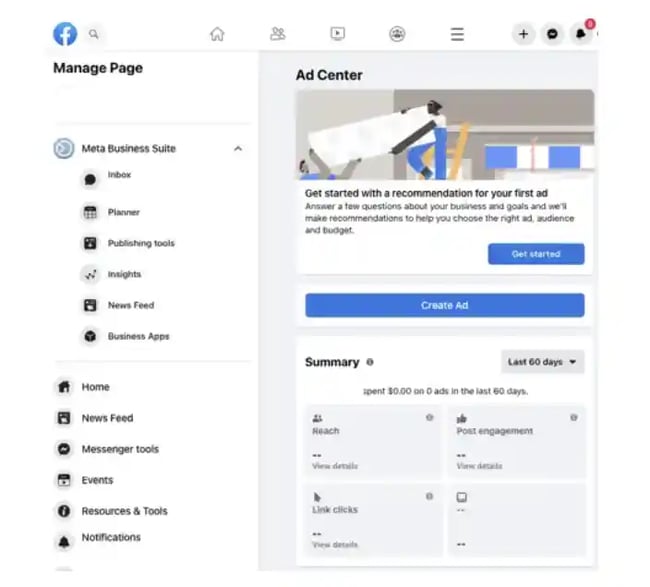
For quick navigation, the Ads Manager has three campaign structures:
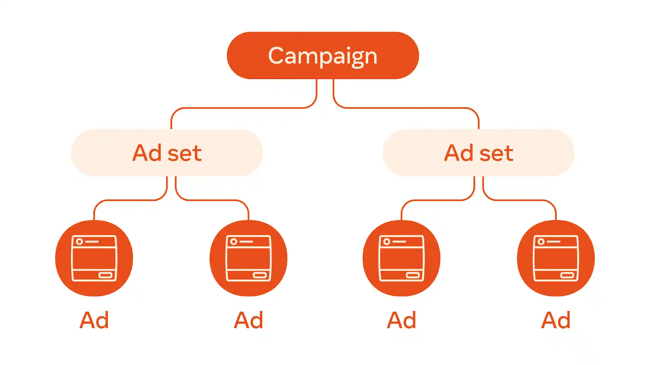
- Campaigns. This is the first part of your campaign structure. The campaign gives an objective of your ad. You can choose what you want from your ad: Awareness, Traffic generation, Sales, App promotions, leads, or engagement.
- Ad sets. This defines your targeting strategy – the audience to which you want to display your ads. You can have multiple ad sets per campaign and different budgets for each.
- Ads. This is the final step in your ad creation. You can create multiple ads per ad set. Try and test with various ad formats and different ad placements.
- Automated ads. This section is only available if you’ve created Automated Ads. This offering is best fit for beginners and those looking for a simple way to gain exposure. The trade-off: You lose the precision you may achieve manually. This section will list all your Automated Ads and a summary of recent results.

How to Run Facebook Ads
- Create an account with Facebook
- Start creating an ad through Facebook Ads Manager
- Choosing buying type
- Choose an objective
- Name your campaign
- Choose your Special Ad category
- Choose A/B split testing
- Set performance goals
- Choose your budget and schedule
- Choose your ad placement
- Ad set up
- Choose ad format
- Create your ad
- Monitor your ad's performance
- Report on Facebook ad performance
So, now you know the power of Facebook ads manager. Now, let’s explore how to actually run ads. I’ll demonstrate the steps below.
1. Create an account with Facebook Ads Manager.
To use the Facebook Ads Manager, I need a Facebook Business Page (learn how to set one up here). This is because I can’t run ads through personal profiles.
If I were managing someone else’s ads, I would need an admin, editor, or advertiser access to set up ad campaigns.
The next step is setting up my payment. This payment method is used by the Meta business account to charge me for active ads.
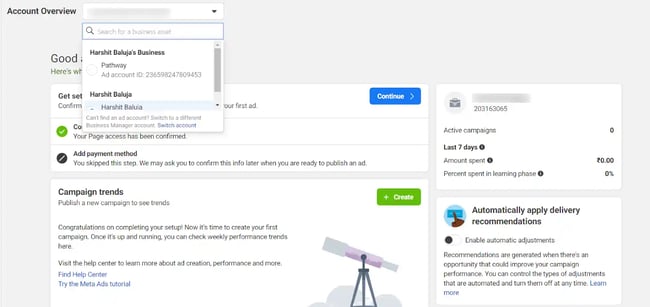
Once set up, the Ads Manager becomes the control center for your Facebook ads.
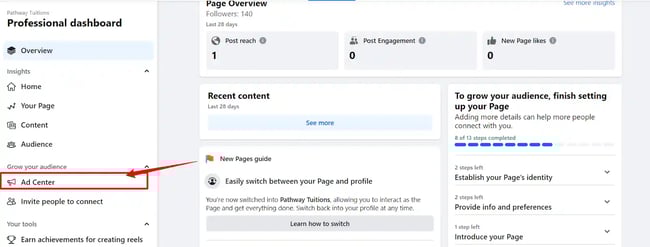
I can also navigate to the Ads Manager through my Facebook page account. On the left panel of the page, click on Ad Center and scroll down to find a link to Ad Manager.
2. Start creating an ad through Facebook Ads Manager.
Once I log into the Ads Manager, I can see a performance dashboard where all of your campaigns, ad sets, and ads will be listed, including the results they’ve driven for my Facebook page.
Unless I’ve already created an ad for my Facebook page, this dashboard will be empty.
To create a new campaign, ad set, or ad through the Facebook Ads Manager, tab over to the type of ad I want to create. Click the green “Create” button to the far left of these ad types, as shown below.
3. Choose buying type.
Meta gives users two choices for buying type: Auction and Reservation.
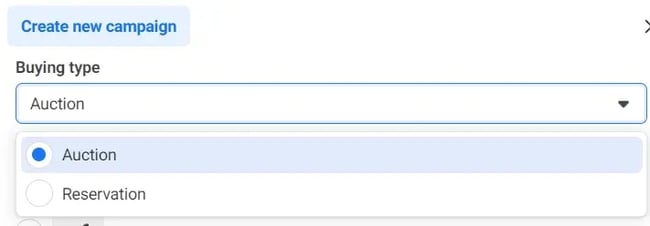
Auctions offer more efficiency, flexibility, and choice for campaign objectives. I can set a daily or a lifetime. Ads can be placed on Facebook, Instagram, Messenger, and Audience Network. Advantage campaigns are available.
Reservation offers less flexibility but lets you plan your campaigns in advance with more predictable results. Ads can be placed on Facebook and Instagram. Reservation also offers frequency control.
To get a better understanding and clear difference between the two, read their help guide.
Free Facebook Advertising Checklist
A Step-by-Step Process for Facebook Advertising, Including:
- Planning
- Budgeting
- Monitoring
- Analyzing
Download Free
All fields are required.
4. Choose an objective.
Facebook Ads Manager, like many social media advertising networks, is designed with my campaign objective in mind. Before getting started, Ads Manager will prompt me to choose an objective for my campaign.
There are six different objectives to choose from. The list has been cut down from 11 objectives to only six:
By choosing one of these objectives, I’m giving Facebook a better idea of what I’d like to do so they can present me with the best-suited ad options. As shown in the screenshot above, Facebook’s ad options include:
- Awareness. This is great for raising awareness for your brand and boosting customer reach, video views, or store location awareness.
- Traffic, for directing traffic to the website, Instagram page, a specific landing page, or even Whatsapp.
- Engagement. This is great for higher engagement on posts, websites, or any link that you share. Increases the likelihood of receiving messages and conversions.
- Focusing on leads. That includes any action that you want customers to do, like filling out the form, purchasing, booking a meeting, and so on…
- Sales. This objective is for people who are likely to make purchases through a catalog, calls, Messenger, Instagram, or websites/apps.
- App promotions. This is targeted for app installs or compelling audiences to make in-app purchases.
I’d say, setting a campaign objective can decide the fortune of your ads. Choosing the wrong objective will leave your ad unidirectional – giving poor results.
Laia Quintana, marketing head of TeamUp, considers this step a game-changer. She says, “The objective-based approach of Ads Manager allows us to focus on what truly matters — getting more app installs.”
By selecting ‘App Installs’ as their campaign objective, TeamUp was able to leverage Facebook’s powerful ad algorithm to reach potential customers. “This not only optimizes our ad spend but also increases the efficiency of our marketing efforts,” Quintana says.
Featured Tool: Facebook Advertising Checklist
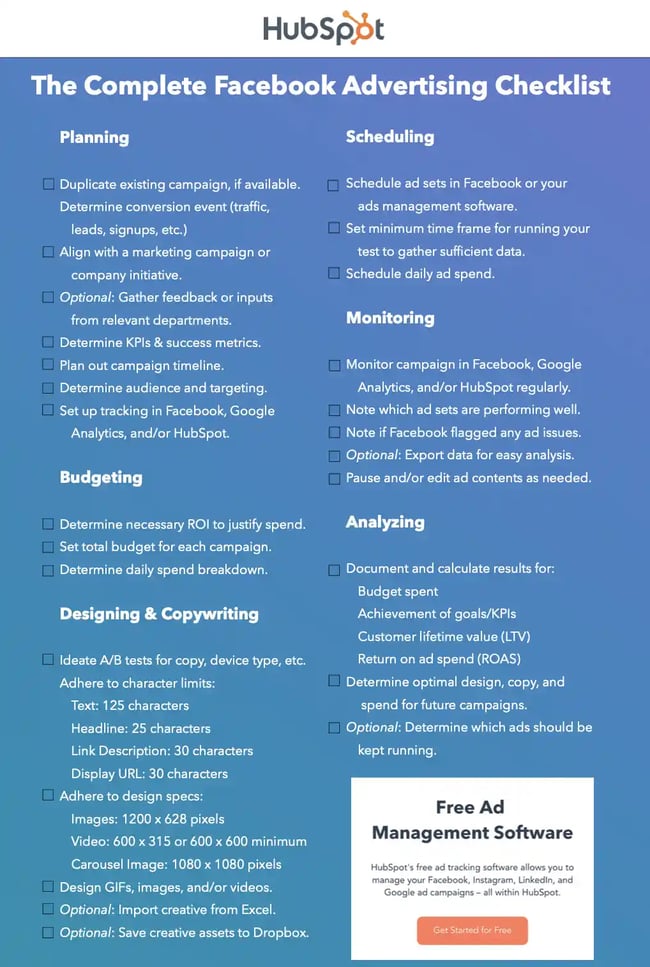
Don’t forget to download the Facebook Ads Checklist and save it for Facebook ad campaign best practices.
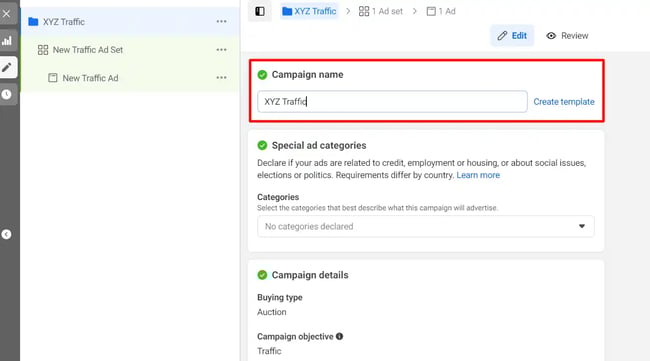
5. Name your campaign.
Next, I name my ad campaign so it resonates with my business and goals. For instance, you can name your campaign “XYZ Traffic,” with the brand name being XYZ and the objective being the traffic.
6. Choose your Special Ad category.
Facebook introduced a special ad category that limits the audiences for certain ad types to protect them from discrimination. Though these may limit the audience reach, I'd say it’s a good approach to prevent age and gender-based discrimination.
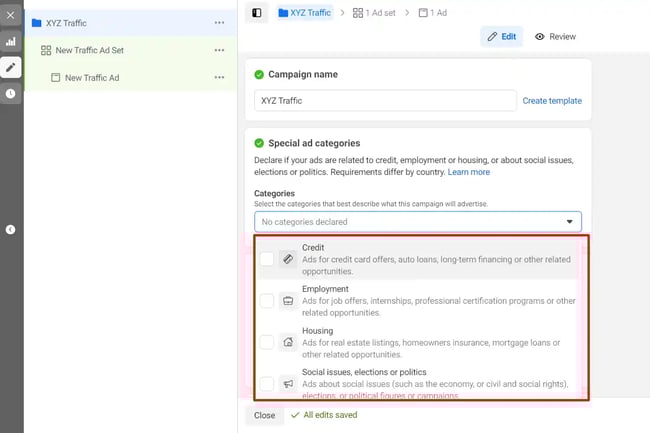
The following categories are included under the special ad category:
- Credit.
- Employment.
- Housing.
- Social issues.
Selecting these categories ensures that your ads remain compliant with Facebook’s advertising discriminatory policies.
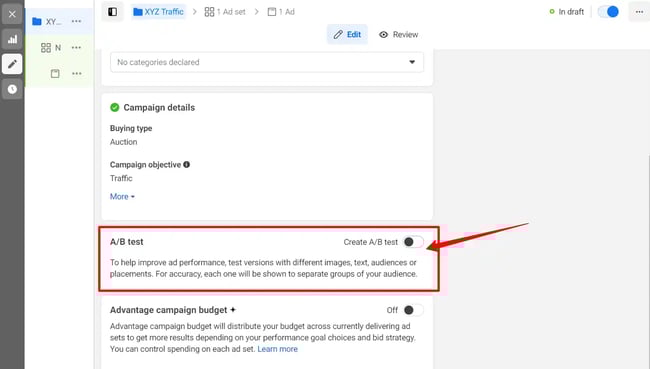
7. Choose A/B Split testing.
Performing the A/B test for my ads can help me choose the right version of your ad. I can experiment with different images, variations of texts, ad placements, and CTAs to maximize my ad performance and save my budget.
I can toggle on or off your AB test option to enable split testing.
8. Set performance goals.
After I have created a campaign, the next step is to create a specific ad set, which estimates my audience reach based on demographics and geographical location.
For each type of campaign objective (refer to step #3), there are a few sets of performance goals – which actions advertisers want their audience to perform.
This campaign objective, for example, I chose, aims at driving traffic. The conversion location displays the location where I want to drive my ad traffic. (Website, Mobile app, calls, or Instagram profile).
If my goal is to drive traffic to my website or to the messenger, the Ads manager gives various selections for performance goals — from maximizing the number of clicks to maximizing the number of conversions and more.
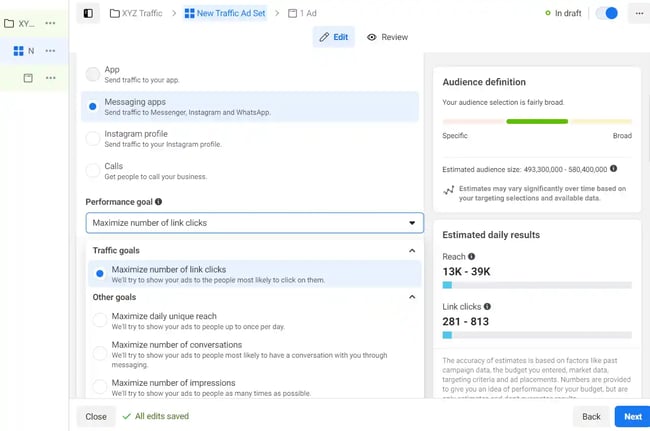
On the right side, I get an estimate of your audience reach with the current selection of performance goals and audience filters.
9. Choose your budget and schedule.
The ad budget represents the maximum amount of money that I’ll spend on the campaign. I can set either a daily or a lifetime budget for my ad campaign.
Facebook allows me to set either a daily budget or a lifetime budget. Here’s how they differ from each other.
- Daily budget. If I want your ad set to run continuously throughout the day, this is the option I would want. Using a daily budget means that Facebook will pace my spending per day. Keep in mind that the minimum daily budget for an ad set is $1.00 and must be at least 2x your CPC.
- Lifetime budget. If I were looking to run my ad for a specified length of time, I would select the lifetime budget. This means Facebook will pace my spend over the period I set for the ad to run.
10. Choose your audience.
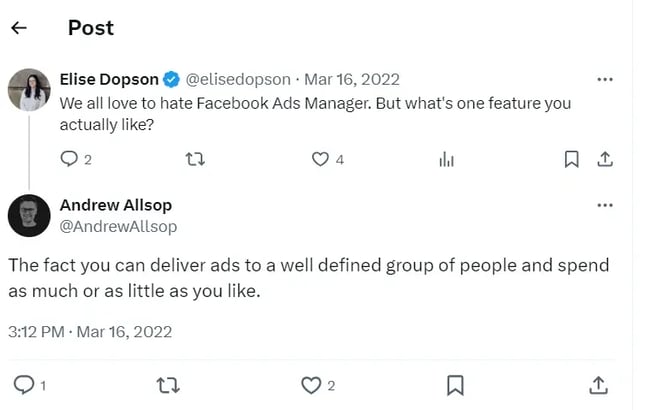
My next step is to configure my target audience. I can do this for each ad set that belongs to the same campaign. Setting up my target audience can adjust the reach of my ad and slash my ad spends to a large extent.
This tweet says it all:
Facebook has limited the target audience filters to three specifics: location, gender, and language.
If I need a more specific audience type, Facebook uses the new Meta Advantage+ audience feature to broaden the audience. With this feature, Meta uses AI to create a specific audience based on the specific information or insights from Pixels.
I can even switch to an old custom audience settings in the ad creation settings. Meta also predicts and compares the better targeting option for your ad campaigns.
If you are just starting, I recommend you experiment with several different targeting options until you reach an audience that fits just right.
Also, if you’re wavering between choosing a specific audience over a broad one, consider your objective. Let’s say, for the objective of driving traffic, you’ll probably want to focus on the type of people you know will be interested in your offering.
However, if you’re looking to build brand awareness or promote a widely appealing offer, feel free to focus on a more general audience.
Once I find a group that responds well to my ads, Facebook allows me to save these audiences from being used again later — so I may not need to repeat this step once I’ve been running Facebook ads for a while.
Free Facebook Advertising Checklist
A Step-by-Step Process for Facebook Advertising, Including:
- Planning
- Budgeting
- Monitoring
- Analyzing
Download Free
All fields are required.
11. Choose your ad placement.
Besides my target audience, my ad budget may also be affected by the ad placement. Different ad placements may have different conversion rates, and different objectives may have different ad placements.
Like their target audience, Facebook has an AI-powered Advantage+ placement to maximize your ad reach. Meta’s AI system will automatically place ads across multiple places based on where they’ll perform the best.
For experienced advertisers, you can decide on the ad placements by choosing the manual placement. This will give you various filters to set to streamline ad placement such as the devices, platforms (like Instagram, Facebook & Messenger), placement types and content type exclusions.
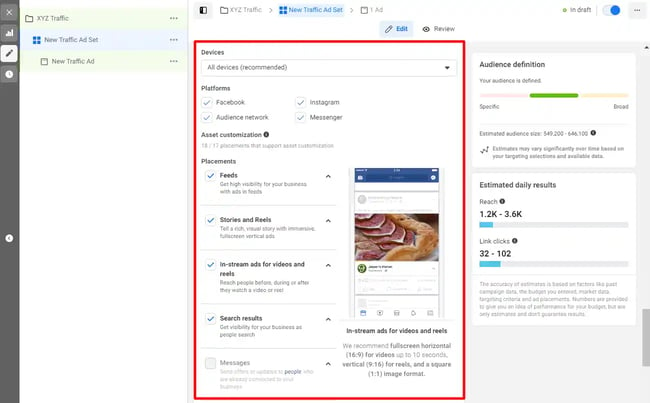
Here are the several ad placement locations:
- Feeds.
- Stories and reels.
- Reels overlay.
- In-stream.
- Search results.
- Messages.
- Apps and overlay.
12. Ad set up.
Now that I have created a campaign and the ad sets, it’s time to set up my ads. Here, the first step is to set up my meta account. I can choose whether I want to connect my Facebook account with Instagram.
By doing so, I can display these ads on my Instagram feed or story.
I can choose an existing post or create a new ad using the ad setup option. Additionally, Facebook has a new creative mockup feature where advertisers can create a mockup of ads to test which type of ad suits their audience's needs.
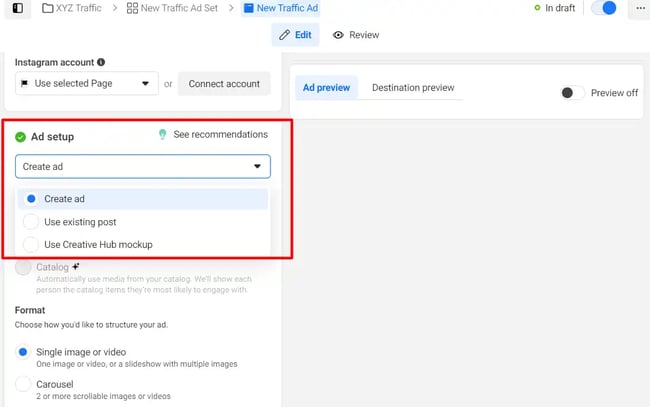
13. Choose ad format.
This ad option is broken down into two formats: Links and Carousels. Essentially, this means that I can either display a single-image ad (Links) or a multi-image ad (Carousel) with three to five scrolling images at no additional cost.
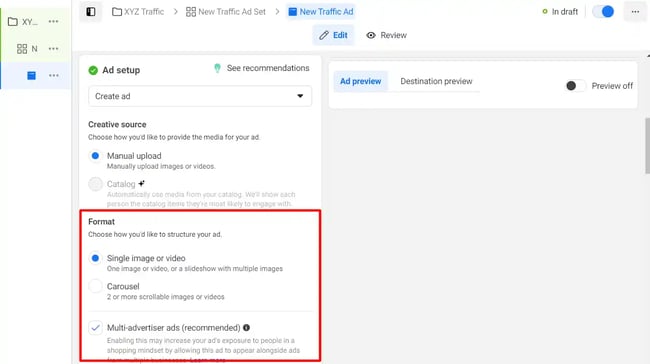
A Links ad will be displayed like this.
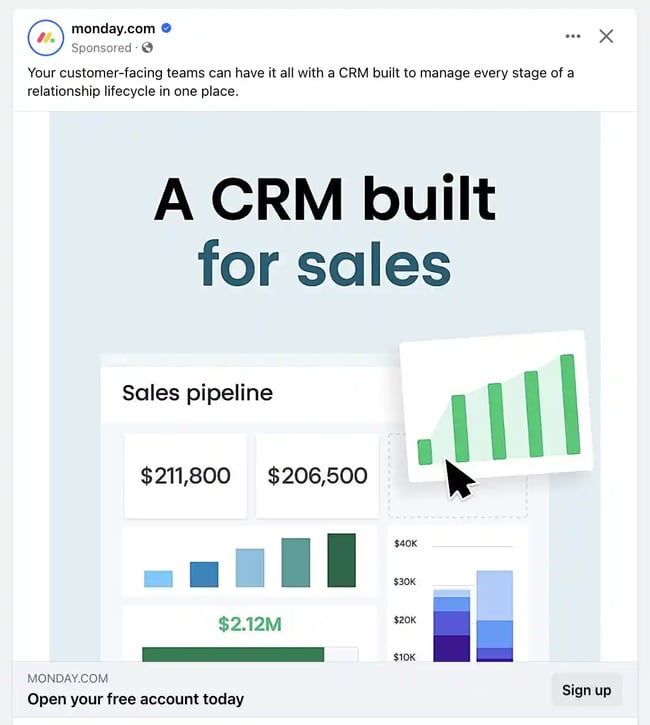
A Carousel ad will be displayed like this.

Once I decide between the two, I need to upload my creative assets. It’s important to note that for each type of ad, Facebook requires users to adhere to certain design criteria.
For single-image ads, Facebook asks that users adhere to the following design recommendations:
- Text: 125 characters.
- Ad headline: 25 characters.
- Image ratio: 1.91:1.
- Image resolution (including CTA): 1080 x 1080 pixels.
For multi-image ads — also known as Carousel Ads — Facebook provides the following design recommendations:
- Recommended image size: 1080 x 1080 pixels.
- Image ratio: 1:1.
- Text: 125 characters.
- Headline: 40 characters.
- Link description: 20 characters.
Remember that these are the ad options for the “Traffic” objective.
If I selected “boost your posts,” I would be presented with different ad options like the Page Post Engagement: Photo ad. This ad has a unique set of design recommendations.
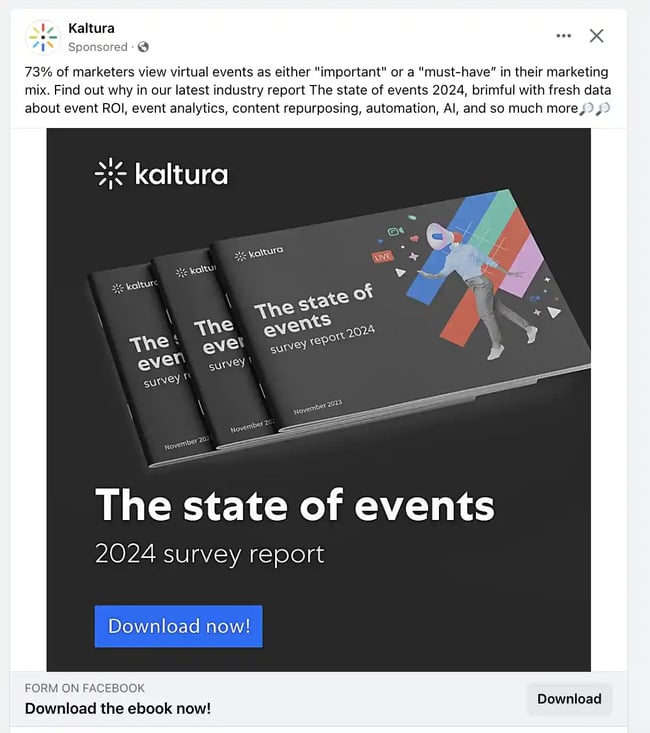
Once I select an ad type, the Ads Manager will prompt me to identify how I’d like to display my ad. The options they provide are as follows: Desktop News Feed, Mobile News Feed, and Desktop Right Column.
Here's how each ad would appear.
Desktop News Feed
Mobile News Feed

Desktop Right Column
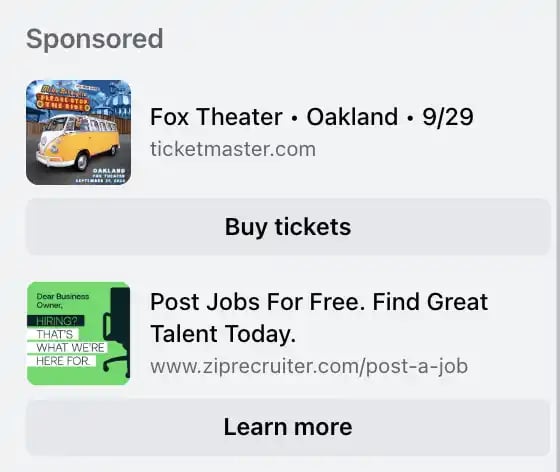
Be aware if your ad isn’t associated with a Facebook page, you’ll only be able to run Desktop Right Column ads.
14. Create your ad.
The final step is to create my ad with a graphic and descriptive text. Once I choose to upload the media files, I can either use the existing ones in my Facebook library or upload them from my computer or mobile device.
Here’s what else my Facebook ad includes:
- Primary text. You can add up to 5 primary texts to use on your different ad placements. Display your product savings and offers here.
- Headline. This appears below the visual and is meant to grab the audience’s attention.
- Description. The appearance of descriptions may vary based on ad placements. Add the text here to give a detailed description of your ad copy.
- Call-to-action. Choose what action you want your audience to perform.
15. Monitor your ad’s performance metrics.
Once my ads are running, I have to keep an eye on how they’re doing. To see their results, I need to look in two places: the Facebook Ads Manager and my marketing software.
There are over 350 different metrics and terms in Ads Manager and chances are that you might get bogged down in this massive pool of data.
According to Facebook, here are some of the key metrics to look for (and their definitions):
- Performance, which can be customized further to include metrics like results, reach, frequency, and impressions.
- Engagement, which can be customized further to include metrics like Page likes, Page engagement, and post engagement.
- Videos, which can be customized further to include metrics like video views and the average percentage of video viewed.
- Website, which can be customized further to include metrics like website actions (all), checkouts, payment details, purchases, and adds to cart.
- Apps, which can be further customized to include metrics like app installs, app engagement, credit spends, mobile app actions, and cost per app engagement.
- Events, which can be further customized to include metrics like event responses and cost per event response.
- Clicks, which can be further customized to include metrics like clicks, unique clicks, CTR (click-through rate), and CPC (cost per click).
- Settings, which can be further customized to include metrics like start date, end date, ad set name, ad ID, delivery, bid, and objective.
16. Report on Facebook ad performance.
I can receive custom reports via email as well. Here’s how to set it up:
- Navigate to “Analyze and Report” through the upper main menu.
- Choose “Ads Reporting.”
- Select “Create Custom Report.”
- Select and open a saved report.
- Choose “Save As” next to the save icon. Give your report a name and check “Schedule Email.”
- Follow the prompts to edit and confirm your reporting preferences.
While there are certainly a lot of details to keep straight when planning a paid Facebook ad, it’s important that you don’t lose sight of the big picture. Reporting on clicks and conversions from Facebook is important.
However, if you’re using URLs with specific UTM codes, you have an opportunity to measure your ads’ full-funnel effectiveness using your marketing software.
Tracking URLs will help your marketing software keep track of how many leads, or better yet, how many customers you’ve gained from your advertising efforts. This information is useful in determining the ROI of this source and can also be used to inform your overall Facebook marketing strategy.
If you’re a HubSpot customer using our ads tool, this process is already taken care of for you. You can also create unique tracking codes for your Facebook campaign by navigating to the “Tracking URL Builder” on the Reports homepage.
All you’ll need to do is plug in the URL, attach a campaign, and choose the source you want the URL to be attributed to in your Sources Report.
Once your ad launches and you start getting conversions on your website, you’ll be able to easily track how many visits, contacts, and customers you’re generating.
Free Facebook Advertising Checklist
A Step-by-Step Process for Facebook Advertising, Including:
- Planning
- Budgeting
- Monitoring
- Analyzing
Download Free
All fields are required.
How to Create Facebook Ads
To create a Facebook ad that drives measurable results, follow these tips.
1. Define your target audience and create ads for them.
While creating ads, it’s tempting to make your messaging vague enough to resonate with everyone. But if you want your Facebook ads to be effective, tailor them to a specific audience.
Before you start creating images/videos and writing ad copy, figure out who is most likely to become paying customers. These are the people you should try to persuade with your ads.
Ryan Robinson, CEO of Right Blogger, accentuates the importance of the target audience.
Robinson says, “In my experience, it's often beneficial to start with a slightly broader audience initially and then slowly refine it based on performance data. This allows you to gather insights about who is truly engaging with your ads before narrowing down too much.”
He gives a convincing example of leveraging the defined target audience mixed with various ad placements for one of his clients specializing in eco-friendly products: “We defined their target audience as environmentally conscious urban dwellers aged 25-45, and created visually appealing carousel ads showcasing the client's products.”
From there, the team tested different ad placements and copy variations, until they found the sweet spot. Robinson says this boosted the Facebook ad campaign's website traffic by 23% and online sales by 13% compared to our previous campaigns.
“The continuous optimization based on performance data helped us refine our targeting and creative approach, leading to a better return on ad spend and improved brand awareness among our ideal customers,” Robinson says.
That said, continuous optimization is the key to success in your ad campaigns.
To take things up a notch, use Facebook’s advanced targeting feature to add (or remove) people who follow certain apps, events, or pages. This may take a bit of time, but you’ll increase the ROI of your ad campaigns.
Although Kylie Haack is a real estate company that sells properties, this ad is targeted specifically toward people who want to appraise their homes — not people who want to buy.
2. Write a catchy but clear headline.
Your headline is usually the first thing people will see on your Facebook ad. If it doesn’t catch people’s attention, it will reflect negatively on your click-through rate (CTR) and conversion rate.
With headlines, don’t try to shove your offer down people’s throats. Instead, be clear and conversational, and try to communicate your product’s benefits, if possible.
In this ad, HubSpot is urging people who need help with Facebook or Instagram marketing to check out their free guide on the topic. Their headline for this ad is: Maximize Lead Generation.
This simple, but powerful, headline summarizes the benefits people would get if they read and apply what’s in the free guide.
Pro Tip: To improve your headlines and get better results, run split tests (more on that below). These tests can help you determine the messaging that gets people to convert.
3. Don’t use text-heavy graphics.
According to Facebook, images with less than 20% of text perform better. So try not to design graphics with too much text on them.
Text-heavy graphics can distract a prospect from your message, so it’s best to let the graphics speak for themselves. For example, the ad below has too much text.
To prevent this from happening, you can use a longer ad caption. But if you must use text on your image, try using a smaller font and fewer words to reduce the proportion of text to image.
4. Use simple and easy-to-understand language.
Ad copywriting is not an avenue to channel your inner Victorian author. It doesn’t matter if you’re an Insta-famous poet or you’ve won a Pulitzer — using verbose language in your Facebook ads will confuse your prospects.
When writing ad copy, the main goal is to make it easy for anyone to understand. When a prospect sees your ad, they should instantly know:
- What your offer is.
- How it will benefit them.
- What to do next.
That’s why I love this Mailchimp ad, which helps people with online stores automate their marketing.
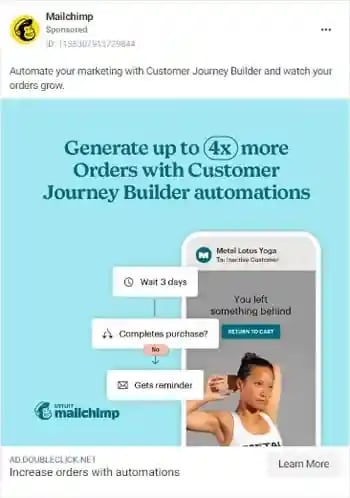
The copy in this ad is simple and to the point: “Automate your marketing with Customer Journey Builder and watch your orders grow.” Then, Mailchimp gives a simplified visualization of what the automation process looks like.
This helps prospects understand exactly how the Customer Journey Builder feature can take things off their plate and help them grow their business.
5. Use social proof in your ads.
When a prospect sees your Facebook ad — especially if it’s the first time — they may not trust your brand or offer immediately. And that's okay.
It’s your job to convince them that you’re the real deal. A great way to do this is to use social proof in your ads.
Social proof comes in many forms — reactions, comments, shares, testimonials, and reviews. Featuring these in your ads shows prospects that other people have worked with your brand and purchased your offer without any regrets. Once they see this, they may be convinced to be your customer, too.
Before Adobe acquired the company, Figma was really good at using social proof in their Facebook ads.

In the ad above, the product design lead at Onfido, Steve Denis, walks people through how Onfido uses Figma to organize and scale its design systems. The message is simple: If other companies trust Figma to meet their design needs, you can, too.
6. Match your Facebook ad to your landing page.
When you run ads on Facebook, you’re essentially telling your audience that if they click your ad, they’ll get exactly what you’re offering on the page your ad leads to.
There’s no quicker way to lose the trust of your audience and increase your bounce rates than to send people to a landing page that has absolutely nothing to do with the offer they were interested in.
When designing your ad and landing page, ensure that the offer promised in the ad is the same as the one on the landing page. You should also include common elements, such as colors, fonts, and images, that will make it easy for people to recognize your offer and convert.
Here’s a great example of ad-landing-page sync.


Here, Yoga International is advertising their free breathwork classes that can help people “unwind tension and improve self-healing.” The ad and the landing page it leads to share several design elements.
That includes brand colors, image choices, and fonts. These common elements help prospects feel like the landing page is an extension of the Facebook ad, rather than a new offer entirely.
7. Have a direct call-to-action in your ad.
The perfect Facebook ad should have a clear action the prospect should take.
Some ads are designed to spread awareness about a brand. Other ads lead users to installs, ebook downloads, or sales.
Ideally, ads do both. But to be on the safe side — and to get results that move the needle toward business growth — be clear on exactly what you want your prospects to do after they see the ad.
Calls to action like “Sign up,” “Follow,” “Download,” “Install the App,” and “Shop Now” clearly communicate the desired course of action to a prospect. Without a good CTA, people would see your ad, but they’ll have no idea what to do next.

In this ad, Dermalogica, a skincare company, advertises a power trio of three products. Plus, the bundle is less than half of the original prices of the individual products.
The ad is straightforward. It says what the product is, what the discount is, and the perk (free shipping) you get if you buy the product.
The “Shop Now” call-to-action is direct. This indicates that Dermalogica’s goal is for people to click the link and buy the product package.
8. Run A/B tests.
The only way you can improve your Facebook ads is to run split tests on everything — from the headline to ad copy to visuals and CTAs. Sometimes, an ad might not perform well because the copy isn’t convincing enough or the visuals aren’t eye-catching.
To know for sure, create different variations of the same ad — changing one thing at a time — and publish them. Let them run. Then, check to see which version(s) gets the most likes, comments, shares, and conversions.
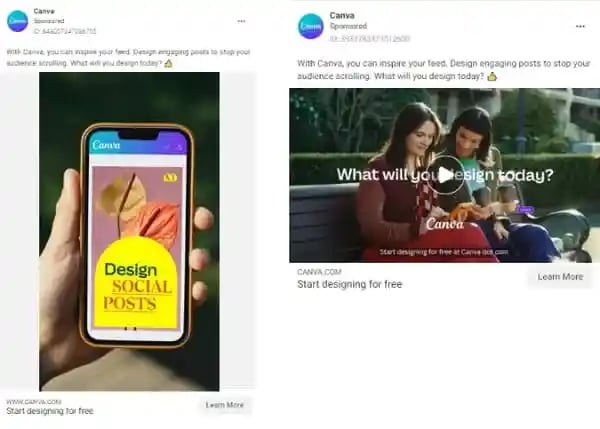
In the instance above, Canva ran A/B tests on the ad creatives. In both ads, the ad copy is exactly the same, but the visual assets are not — one’s an image, and the other is a video.
Although the ad copy is the same, the change in visuals can spell a huge difference in the ROI from both ads.
Using Facebook Ads Manager for Your Next Campaign
Now that you know how to set up an ad, it’s time to create one of your own so you can spread brand awareness on Facebook, generate traffic, and gather leads from your ideal prospects on the platform. If you’re looking for a CRM to enhance your Facebook Ad campaign, here’s your guide on the best CRMs for Facebook leads.
Editor’s note: This post was originally published in September 2019 and has been updated for comprehensiveness.
Free Facebook Advertising Checklist
A Step-by-Step Process for Facebook Advertising, Including:
- Planning
- Budgeting
- Monitoring
- Analyzing
Download Free
All fields are required.
Facebook Advertising


![Anatomy of a Facebook Ad: How to Create Scroll-Stopping Campaigns [+ Examples]](https://53.fs1.hubspotusercontent-na1.net/hubfs/53/anatomy-of-a-fb-ad.png)

![What Is Facebook CBO? Budget Optimization Done Right [Tutorial]](https://53.fs1.hubspotusercontent-na1.net/hubfs/53/facebook-cbo.jpg)

.jpg)