
By prioritizing social media engagement, businesses can avoid this fate and accomplish their marketing goals. Likes and comments may seem like vanity metrics, but they are catalysts for the greater traffic, conversions, and sales brands need to grow.
Pulling from the latest data from our 2025 Social Media Trends report, let’s unpack everything you need to know about social media engagement and how to harness it for your business.
Table of Contents
- What is social media engagement?
- Why is social media engagement important?
- How to Increase Social Media Engagement
What is social media engagement?
Social media engagement is when social media shifts from passive to active, from laying around on the couch to up and running around the neighborhood. It’s any interaction a user has with an account, creator, or piece of content on a social media platform, including likes, comments, direct messages, shares, clicks, and tags.
The State of Social Media in 2025
Explore the top trends in social media for brands to know and optimize your social strategy.
- AI Content Creation
- Community Building
- Social Media Shopping
- Social Vs. Search Engine
Download Free
All fields are required.
Why is social media engagement important?
These days, anyone can post on social media or get a high follower count. Heck, posting can be automated, and followers can be bought. Neither of these are worth bragging about, but high engagement? That’s something you can be proud of.
In a marketing context, engagement is the first step toward actually accomplishing your goals with social media. Want to drive website traffic? You need to get someone to click. Want to build awareness? That’s where sharing comes in.
It all starts with engaging, but there are also several other benefits.
Influences Algorithm
Achieving organic social media marketing success isn’t impossible, but it is much harder than a decade ago. Regardless of platform, what your audience sees is determined by an algorithm.
Our survey found keeping up with features and algorithm updates is one of the top 5 challenges marketers face with social media, but industry experts agree engagement is one of the most consistent criteria.
Check out Meta’s content ranking criteria, for instance.
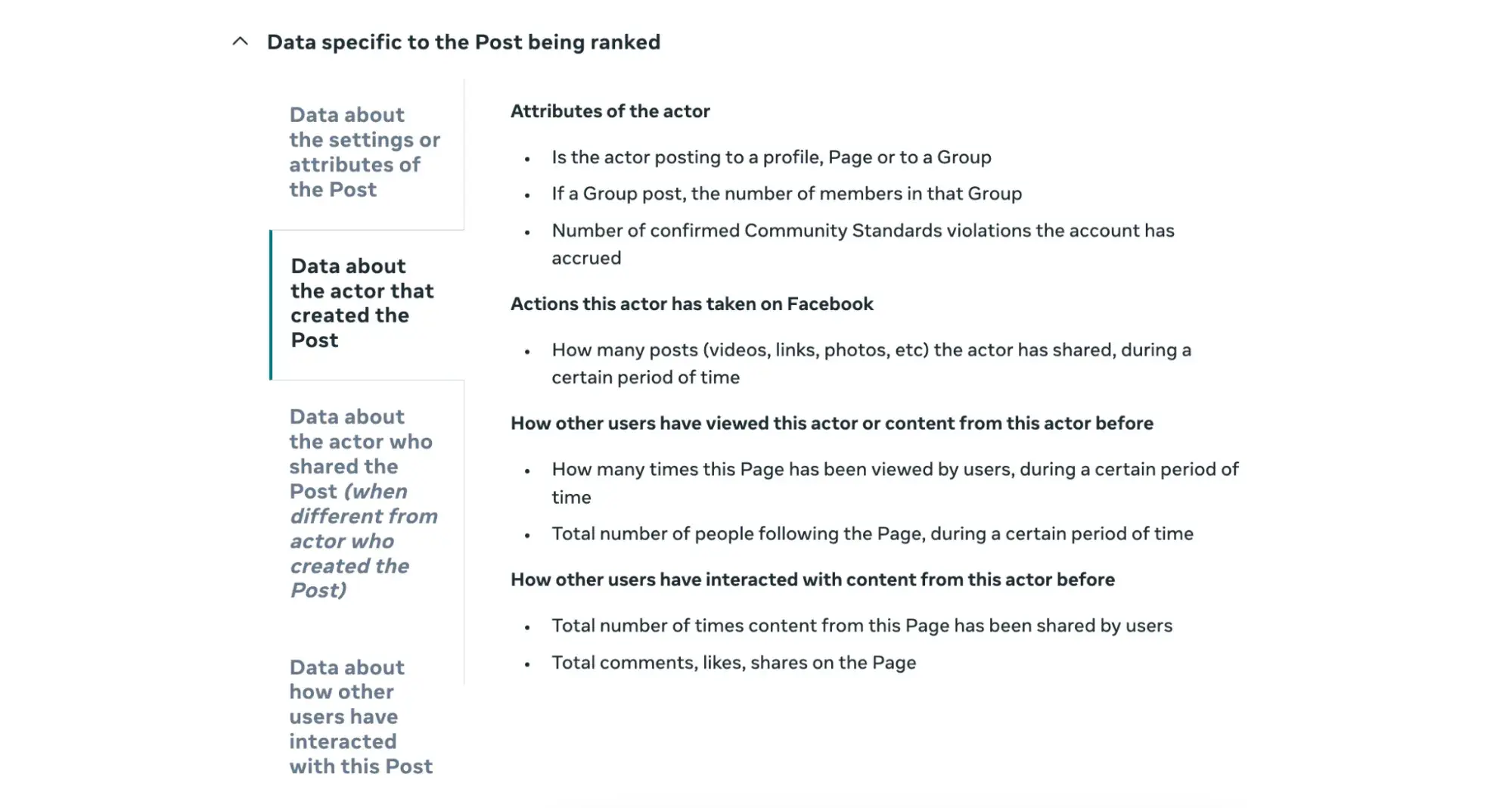
Social media algorithms see engagement as a vote of confidence. The more people engage, the better the content and the more it should be shared.
Increases Brand Awareness and Discoverability
The better you do with social media algorithms, the more likely your content will appear in explore/discovery feeds and be seen by new people. New people mean new potential audience members and, more importantly, customers.
Marketers named building brand awareness their top goal with social media in 2025, so this can’t be ignored.
Fosters Trust and Sense of Community
Algorithm aside, engagement is what makes social media social. It’s how you form a personal connection with your audience and build trust.
And it’s not just about you engaging with your customers. Customers interacting with each other is also important. TikTok, Instagram, or otherwise, comment sections can get pretty wild as your audience interacts among themselves, but even this chaos creates a sense of community.
It brings people together under a common interest or conversation, making them feel part of something larger.
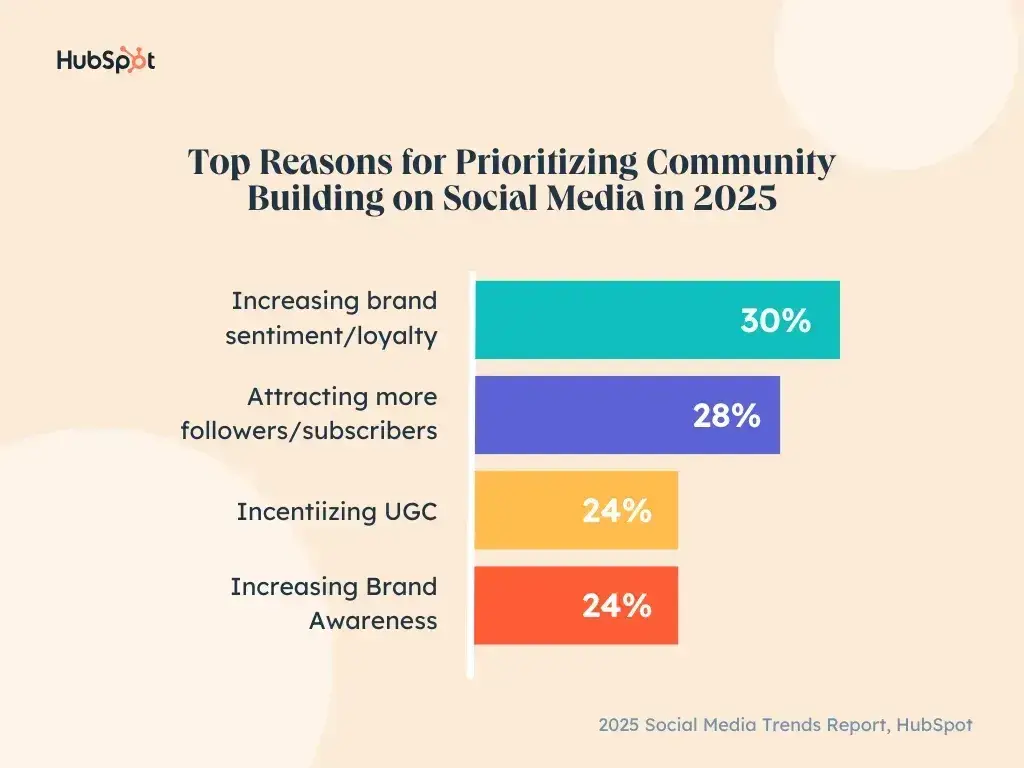
85% of marketers say building an active community in this way is important to their overall social media strategy this year. It can help increase brand sentiment and loyalty, attract followers, and incentivize user-generated content, among other things.
How to Increase Social Media Engagement
Now that you know why social media engagement matters, how can you boost it for your brand? Here are six tips you can follow.
1. Cater to the platform culture.
YouTube stole Stories from Instagram, and Instagram stole short-form vertical videos from TikTok. But even though social media platforms seem to be copying each other, no two are exactly alike.
To leave the biggest mark and earn the highest social media engagement, publish content that feels natural and specific to that platform.
This means not just using the features and mediums popular there but delivering the value or messages your audience wants and expects to get there.
Sure, both Instagram and LinkedIn host videos, but the same content won’t necessarily resonate. This is likely why Duolingo focuses its LinkedIn content on hiring and recruiting talent, while its Instagram content is catered to attracting and appealing to users.
Know the culture of the platform you’re posting to, cater to it, and you’ll be well-poised to maximize your social media engagement.
Want tips for specific platforms?
- Facebook Engagement: Everything You Need to Know [+ Research]
- How to Increase Your Instagram Engagement Rate
- How to Get More Followers on Instagram: 17 Ways to Your First (or Next) 1000
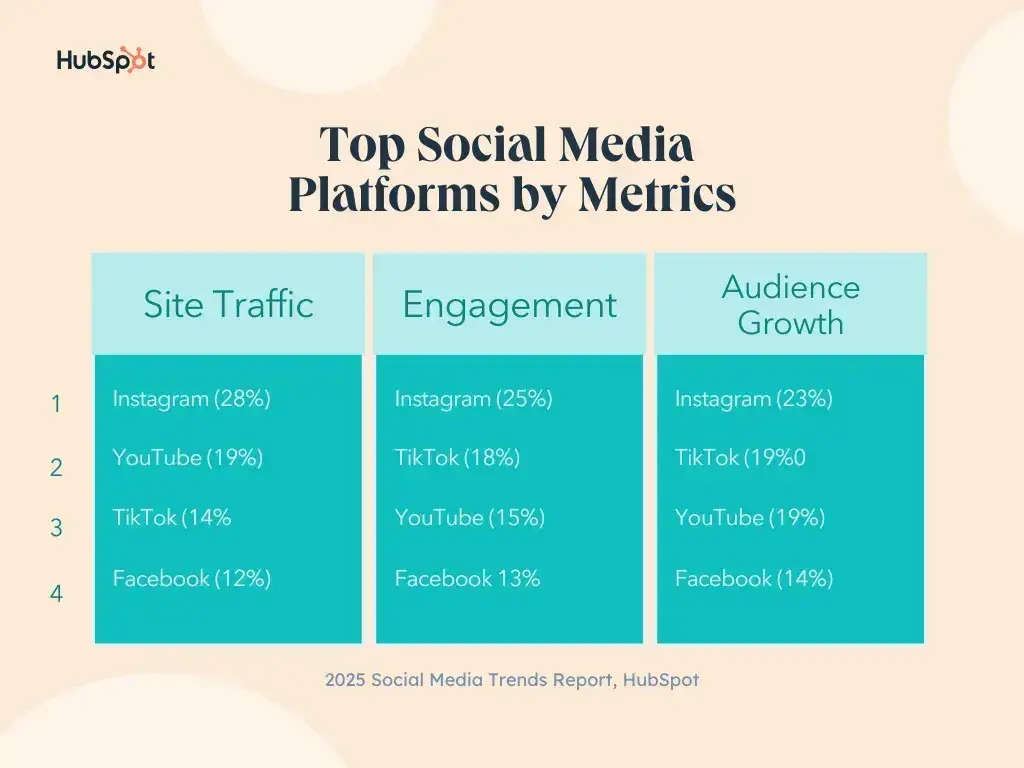
Pro tip: In our recent social trends survey, marketers named Instagram the top platform for overall engagement. If your audience is hanging out there, it's a great place to start.
2. Post consistently.
I’m a firm believer in quality over quantity, but I’ve found social media engagement really requires a balance.
You see, social media content has a short shelf-life — basically microscopic on platforms like X (formerly Twitter). No matter how good your content is, it can get buried quickly, so you need to consistently post high-quality, relevant content to stay in front of your audience and engage them.
The easiest way to do this is to commit to a posting schedule. Having a set time on your calendar to post gives you a deadline to abide by and gives your audience a specific time to anticipate hearing from you.
Pro tip: Use a social media management tool to help maintain consistency.
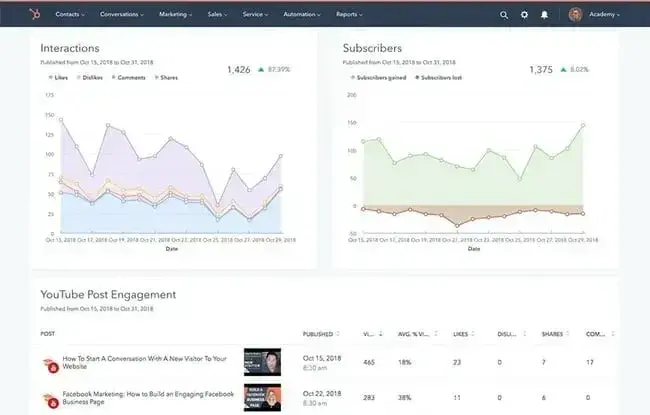
Get Started with HubSpot’s Social Media Tool
Also, experiment with different times to see what works for your audience and persona. Your target persona can drastically impact your posting timing and frequency, especially if they are in a different time zone.
The State of Social Media in 2025
Explore the top trends in social media for brands to know and optimize your social strategy.
- AI Content Creation
- Community Building
- Social Media Shopping
- Social Vs. Search Engine
Download Free
All fields are required.
3. Ask questions.
What’s the easiest way to get a response out of someone? Ask a question.
Questions are like conversational calls to action — they tell your audience what you want them to do next, and sometimes that’s all the convincing they need.
Ask for open-ended opinions in the comments (like Meta below) or prompt people to “vote” by taking different actions on your posts. For instance, they could hit “like” if the answer to your question is no or comment with their favorite emoji if the answer is yes.
Both of these are easy but effective ways to foster engagement.
Shopify does a great job in this Instagram post, asking their followers to share what motivates them in the comment section.
Pro tip: Several platforms have dedicated features you can take advantage of to ask your audience questions. Think polls on LinkedIn (like this one from Slack) and Facebook or the “Polls” sticker in Instagram Stories.
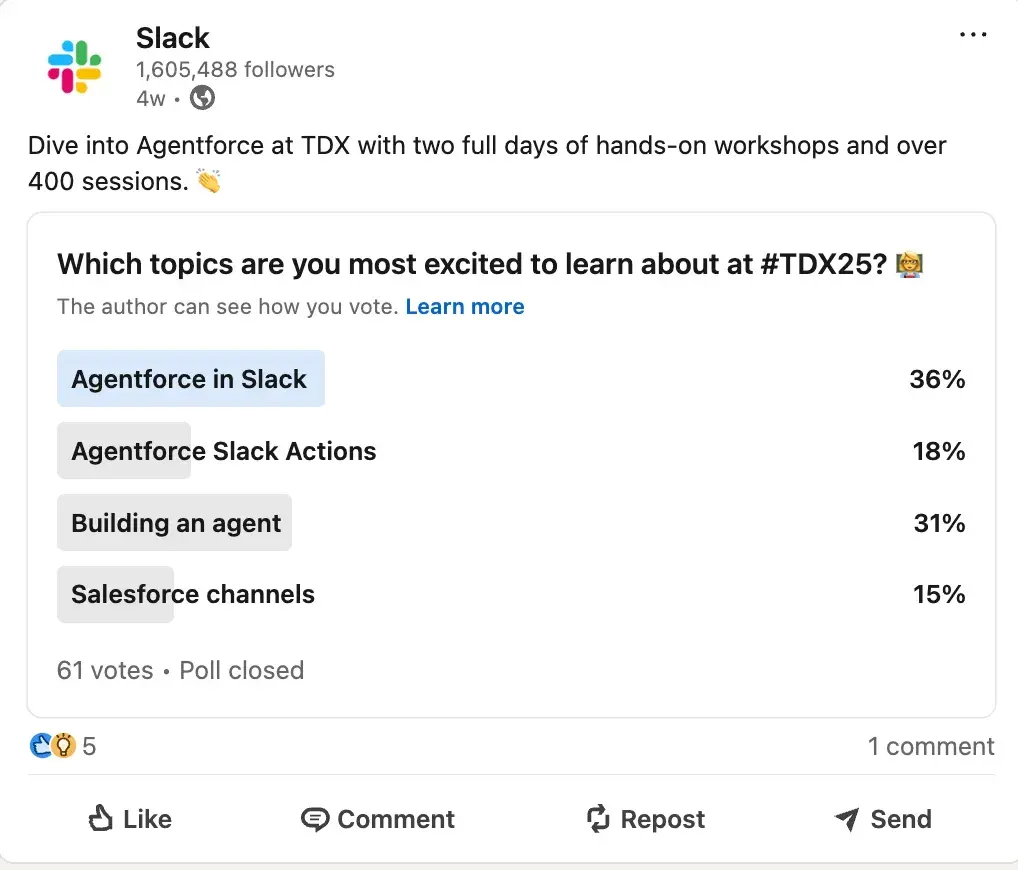
These features elicit engagement from your audience and add variety to the mediums in your social media feed.
4. Host a giveaway or contest.
People love freebies — well, at least I know I do. They incentivize engagement, making people that much more willing to participate. Think of them like party favors — not expected but very much appreciated.
With this in mind, a popular engagement strategy on social media is hosting a contest or giveaway. You can require audiences to engage (e.g., like, comment, share) to enter to win, and if you ask them to tag friends, you’ll also build brand awareness.
Korean skincare brand Laniege regularly uses this tactic on its Instagram, generating thousands of likes.
5. Use humor.
In a recent study by HubSpot research, marketers reported that humorous content delivers more ROI than any other type, and who’s really surprised?
“Humor is serious business in social media marketing,” explains Samantha Meller, Head of Social at HubSpot Media. “When done right, genuinely funny social media content can make your brand feel more ‘human.’ This can make your followers, audience, and customers feel more connected to it.”
Funny content is also the content people want to “like” and share with their friends. So, look for ways to incorporate it naturally into your social media strategy.
Taco Bell has been a master of this for years, and it only continues with its TikTok content.
6. Collaborate with relevant brands and influencers.
Our survey found that 77% of marketers say influencer marketing delivers better ROI than other channels. That’s huge, especially with 44% noting engagement as their most important campaign metric.
With this in mind, explore the influencers, creators, or even other businesses your buyers follow. If relevant to your brand or offering, consider collaborating with them to get in front of new potential followers. This helps with discoverability, reach, and social proof.
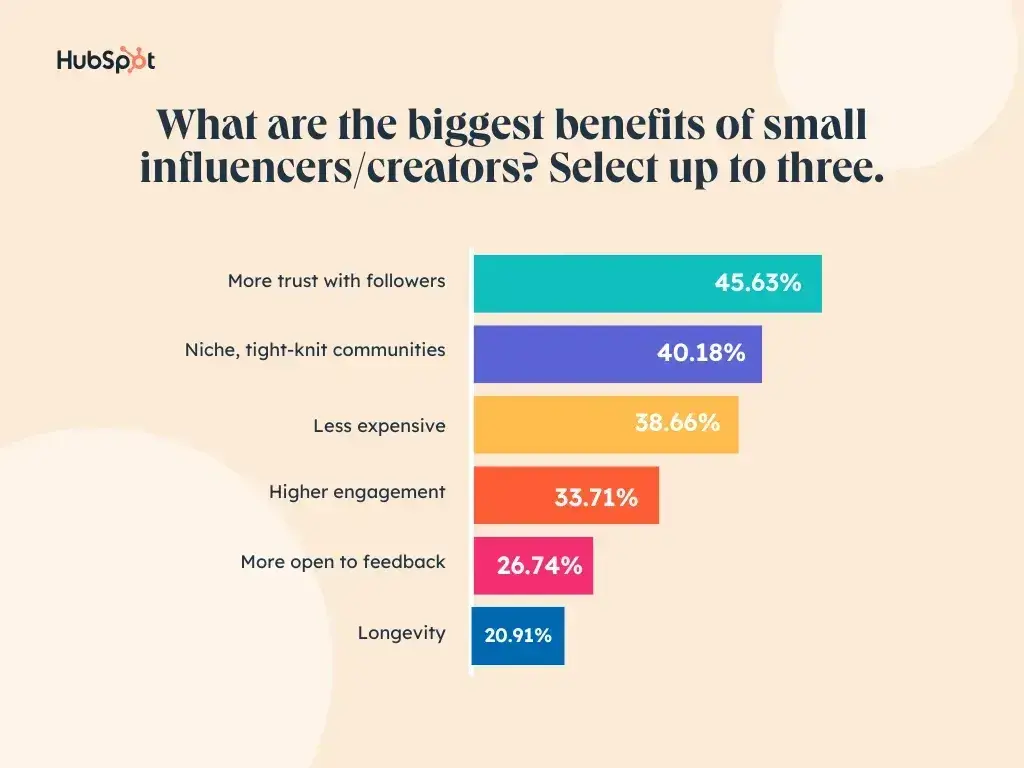
Pro tip: Go niche. Nearly 45% of marketers reported seeing the most success with micro-influencers, followed by macro and nano-influencers. Mega-influencers (those with over a million followers) came in last.
While mega influencers may have a larger audience, their engagement is typically low. Some reported benefits of smaller influencers included more trust with their followers, access to tight-knit communities, and affordability.
Learn more about your options for influencer marketing.
Engage to Elevate Your Social Media
Social media engagement isn’t just a numbers game — it’s the heartbeat of your brand’s online presence — or the life of the party, if you will.
The more you engage, the more visibility, trust, and community you build. By understanding platform culture, posting consistently, asking the right questions, and tapping strategies like giveaways, humor, and collaboration, you can create a dynamic social presence that drives real results.
At the end of the day, social media is meant to be social. Treat it like a conversation over cocktails, and you’ll turn passive followers into active participants, loyal customers, and even brand advocates.
The State of Social Media in 2025
Explore the top trends in social media for brands to know and optimize your social strategy.
- AI Content Creation
- Community Building
- Social Media Shopping
- Social Vs. Search Engine
Download Free
All fields are required.
Social Media Marketing
![12 social media trends marketers should watch in 2025 [new data]](https://53.fs1.hubspotusercontent-na1.net/hubfs/53/social-media-trends_6.webp)
![The best social media platforms for video content in 2025 [consumer data]](https://53.fs1.hubspotusercontent-na1.net/hubfs/53/img-1-20250516-9399498.webp)

.png)
![Social media shopping in 2025: Everyone’s shopping on social — here’s how marketers can keep up [new data]](https://53.fs1.hubspotusercontent-na1.net/hubfs/53/1052%20x%20850%20social%20media.jpg)


![Best Social Media Marketing Courses to Take Online [Free & Paid]](https://53.fs1.hubspotusercontent-na1.net/hubfs/53/ft-smm.webp)