In this post, I’ll cover what a website audit is, the different types of audits, how to conduct an audit, and ways to use information from an audit to improve your SEO and conversions.
I’ve also spoken with some SEO consultants and specialists who’ve shared actionable tips, which you’ll find interspersed in the article.
Table of Contents
What is a website audit?
A website audit is an examination of page performance prior to large-scale search engine optimization (SEO) or a website redesign. Auditing your website can determine whether or not it's optimized to achieve your traffic goals and give you a sense of how you can improve it to reach those goals.
Before I dive into the things you should keep an eye out for, let me go through some of the different types of audits you can perform.
.png)
Website Accessibility Checklist
This checklist will help you make the following more accessible on your website:
- Web Pages
- Navigation
- Video & Media
- And More!
Download Free
All fields are required.
Types of Website Audits
Here are a few common audits among marketers.
1. Competitive Website Audit
A competitive website audit tracks your competitors and their online strategies to help you see what opportunities your brand could be missing out on.
Essentially, a competitive audit allows you to see what’s working for other companies in your market so that you can incorporate those tactics into your own strategy.
Start by performing a SWOT analysis on a competitor’s website. In a SWOT analysis, you track the website’s strengths, weaknesses, opportunities, and threats.
For example:
- A strength could be that their website is easier to navigate than yours.
- One weakness could be that their website has slower page loading times.
- Opportunities could be items or tools missing from their website that you can add to yours to give you an edge.
- A threat could be that their website ranks higher in search engine results pages (SERPs) than your own, resulting in your site losing leads.
During this audit, also consider the tools and software they are using to streamline their processes. This can help you discover new ways to run your site more efficiently and make it more accessible for consumers.
2. SEO Link Audit
This type of audit processes the links pointing to your website to find potential issues or opportunities in your backlink profile. By evaluating your links, this audit will help optimize your site to rank for your target keywords.
Link audits consider the URL source, domain, and anchor text to see if value and equity (called “link juice”) are being passed on to your page. This will gauge how much a link is helping or hurting your website's visibility in SERPs.
Links from well-respected websites are much more valuable than links from smaller, less well-known sites.
To perform an SEO link audit, start by gathering all of your link data. You can do this with Google Search Console by entering your domain and then clicking on “Links to Your Site” under “Search Traffic.”
From there, you can download the latest links and create a link audit spreadsheet. Afterward, you manually evaluate your links by paying attention to factors like anchor text, IP address, and page content.
You can also use tools like Ahref's backlink checker to take the guesswork out of analyzing the value of the links you gathered.
3. Lead Conversion Optimization Audit
A lead conversion optimization audit analyzes a website’s conversion issues and opportunities. In this audit, you’ll need to analyze how traffic is coming to your website and where it’s coming from.
Google Analytics is an excellent tool for this step. Knowing where your traffic is coming from will help you better understand your audience’s behavior and will help you optimize your site’s content to suit their needs.
Speaking of content, you’ll also need to analyze the content on your website. Make sure the content is helpful, informative, and up-to-date.
Is the latest information about your business uploaded to the site and easily visible? Does your content contain keywords and phrases to boost its ranking in SERPs?
Outdated or irrelevant content can hurt conversions and hurt your SERPs ranking.
Other aspects of your website you need to observe are:
- Forms. Do your forms collect enough information to contact a lead?
- Checkout process. If you notice a lot of shopping cart abandonment, customers are likely having issues with the checkout process on your website.
- Design and layout. Are CTAs clear and visible? Is the copy too small and difficult to read? Is the website easy to navigate?
- Overall user experience. Are there any sources of frustration for visitors to your site?
Pro tip: Veruska Anconitano, an international expansion consultant, recommends the following: “Use behavior flow reports in Google Analytics to find drop-off points. To identify this, look at where users exit most frequently in the flow or where they loop back to a previous page.
Once you’ve found these areas, adjust your CTAs, page design, or content to reduce friction. For example, if users often drop off from a product page, consider simplifying the checkout process or adding more trust signals like reviews or guarantees to keep them engaged.
This approach tackles both SEO and conversion by refining the user experience at critical stages.”
4. Social Media Audit
Your brand’s online performance can also be impacted by social media. If your social media presence isn’t pushing more traffic to your website, then it’s time to conduct a social media audit.
To start the audit, create a list of all your company’s social media accounts. Do some extra digging to make sure you don’t miss any you’re not aware of, such as accounts started by other departments.
From there, go through each account to determine if they’re all consistent with the company’s branding — using the same images, logo, tone of voice, etc.
Then, you’ll need to evaluate each page’s performance. What kind of content performs the highest, and which content type performs the lowest? Are these pages being updated frequently?
Finally, use information from the evaluation to better understand your audience and optimize your social media to engage them. You’ll then be able to update your social media strategy to further delight your audience, more effectively attracting them to your website.
5. SEO Website Audit
While an SEO link audit analyzes the links associated with your website, an SEO website audit evaluates all the factors that can impact your site's performance in SERPs. This includes links but also extends to other aspects such as keyword usage, content, metadata, page speed, user journey, and video optimization.
It‘s possible to conduct an SEO audit on your own, but you’ll likely get more thorough answers in less time by employing an agency.
To perform one by yourself, I would start by understanding the purpose of the audit. Next, crawl and analyze your website using software. Here are some tools to choose from when conducting an SEO site audit (you can mix and match based on your needs):
- Google Search Console (free)
- HubSpot’s website grader (free)
- Ahrefs (paid with certain free tools)
- Semrush (paid but can avail a free trial, also comes with certain free tools)
- SE Ranking’s website audit (paid but can avail a free trial and is more affordable, also comes with allied free tools)
- Screaming Frog SEO Spider (limited free use)
Next, assess:
- Technical SEO. This includes insights on crawling, indexing, security, page speed, Core web vitals, site hierarchy, among others.
- On-page SEO. This includes content (review keywords targeted, content quality/depth, search intent, heading structure, images, videos, CTAs) and user experience.
- Off-page SEO. This includes backlinks, domain authority, and local SEO.
Pro tip: If this is your first site audit, I recommend you start with a free tool (or a free trial of a paid tool) along with Google Search Console to get your feet wet and keep expenses low.
Website Accessibility Checklist
This checklist will help you make the following more accessible on your website:
- Web Pages
- Navigation
- Video & Media
- And More!
Download Free
All fields are required.
6. Data Privacy Audit
A data privacy audit verifies that you’re following applicable data privacy laws and ensures you’re creating a safe space for website visitors. Search engines look for privacy-related pages when determining whether a website is high-authority.
For example, Google’s primary goal is to serve the best and most trustworthy content to users from reputable sources. Sites that comply with data privacy requirements will most likely be viewed as more authoritative than those that don’t have these essential legal policies.
To conduct a data privacy audit, determine what personal information your site collects from visitors, identify the laws you must follow, list all cookies your site uses, and create and publish website policies to meet legal requirements.
Most websites need a:
- Privacy Policy
- Cookie Policy
- Consent Banner
- Terms and Conditions Agreement
While you can create these on your own, it’s much easier and more efficient to use managed solutions, like a privacy policy generator.
To take the guesswork and hassles out of privacy compliance, use a reputable generator vetted by a legal team and data privacy experts.
It should also include clauses that meet compliance requirements outlined by the most common data privacy laws.
Now that I’ve covered a few different audits you can conduct to improve your website, let’s discuss the perks of an audit.
The Benefits of a Website Audit
- You can compare your website to your competitors.
- You can improve your SEO.
- You’ll optimize conversion rates.
- You can optimize your website performance.
- You can identify issues early.
1. You can compare your website to your competitors.
Conducting a website audit will allow you to compare your website to your competitors. You can analyze how well you’re ranking against competitors for keywords and determine potential new sources of revenue.
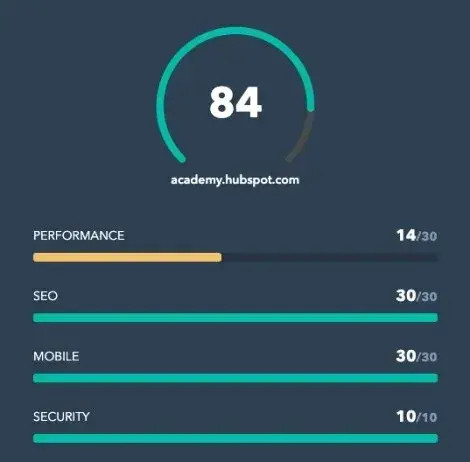
You can use tools, like HubSpot's Website Grader, to perform an audit on your competitor’s websites to gather more insights. You can learn how your competitors are attracting visitors and see how they’re garnering conversions.
Ultimately, this will help you brainstorm new tactics and strategies for your site.
2. You can improve your SEO.
With a website audit, you will be able to identify any missed SEO opportunities and remedy any misguided or poorly executed SEO pitfalls (e.g., keyword stuffing, exact match anchor text links, etc.) throughout the content of your website.
An audit will also allow you to refocus your SEO efforts on users first and search engines second. This will safeguard you from constantly chasing changes to search ranking algorithms, meaning you won't be applying misguided practices just to show up at the top of the SERPs.
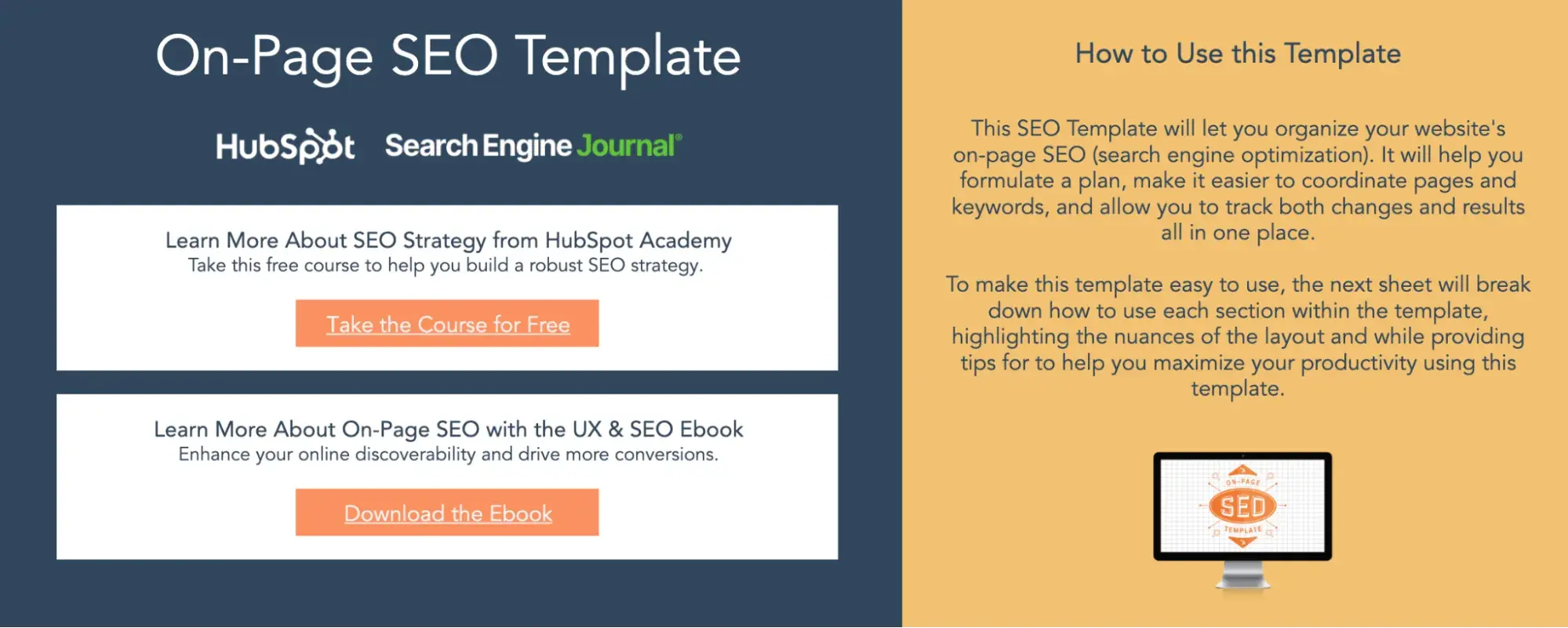
Pro tip: One great tool that can help keep your SEO details organized is HubSpot’s free On-Page SEO Template.
3. You'll optimize conversion rates.
Website audits also enable you to re-evaluate the effectiveness of your website in terms of lead generation and conversion.
As a result, you’ll be able to spot any previously overlooked opportunities to convert visitors into leads by adding relevant CTAs, as well as identify deficiencies in your landing pages so you can optimize them to boost conversions.
Pro tip: Learn more about CTA selection to optimize the CTAs on your website.
4. You can optimize your website performance.
Website audits usually evaluate a site for its content and technical performance.
As a result, an audit will give you a chance to inspect the robustness of your website’s technical framework and infrastructure.
It will also evaluate how friendly your website is to search engines and determine how easy it is for users to navigate your website to find the content they are looking for.
5. You can identify issues early.
Finally, a website audit finds issues that are hurting your SEO and conversions such as broken links, hidden content, and long page load speed times. Identifying these issues will help you address problems that are diverting traffic.
Assessing both the content and technical aspects of your website will open up opportunities to drastically improve the traffic and conversions your website generates.
Now that I’ve gone over what a website audit is and why you should do one, let's look at how to conduct one.
How to Conduct a Website Audit
- Run the website URL through a site audit tool.
- Find technical errors.
- Analyze design and UX.
- Assess website content.
- Create a website audit report.
1. Run the website URL through a site audit tool.
I’d start with a website auditing tool to help analyze how my site is performing. This can help test various important facets of a site and then provide specific recommendations.
2. Find technical errors.
Technical errors like ones related to performance, SEO, mobile, and security, can negatively impact a customers‘ experience on your website. If I notice visitors aren’t staying on a site for long, or I see a lot of abandoned shopping carts — a website audit is a great way to find out why.
3. Analyze design and UX.
How is the website design working for visitors and customers? Some software have heatmaps showing what parts of a site design draw the most attention. This type of analysis helps communicate how the overall design and user experience impact visitors.
Pro tip: Raquel González, SEO consultant and CEO/Founder at MintyConnect, recommends doing some hands-on work too: “While auditing tools are valuable, they may overlook critical UX elements. Complement their analysis by personally navigating the entire website. This hands-on approach reveals non-functional elements and user journey issues that automated tools might miss, ensuring a more thorough site evaluation.”
Website Accessibility Checklist
This checklist will help you make the following more accessible on your website:
- Web Pages
- Navigation
- Video & Media
- And More!
Download Free
All fields are required.
4. Assess website content.
An audit also helps me evaluate website content such as blogs, landing pages, product/service pages, among others.
During an audit, I’d want to know how the current pages are stacking up, identify areas of improvement, and ensure that the content targets readers at every stage of the buyer’s journey.
Going deeper, I’d also look at meta descriptions and review image alt text. Additionally, I’d ask: “Is my content ranking well in search engines?” and “Is my on-page SEO and performance aligned with my traffic numbers?”
5. Create a website audit report.
Creating a website audit report that clearly communicates the site issues found (and what to do about them) is an easy job when you have the right tools.
There are a number of choices available, and HubSpot’s Website Grader is one of the most user-friendly. It quickly and automatically generates a report after entering the web address you want to have crawled along with an email address.
For those with more technical experience, Semrsh’s Site Audit Tool is a very thorough reporting option, but getting started for free does require jumping through a few hoops.
You would need to create an account, answer some questions about yourself, and choose to skip a trial in order to create the free audit report.
Their in-depth report can look overwhelming unless you’re coming to the game with some technical chops.
Whichever reporting product you choose, it should provide a clear display of important website categories — such as SEO performance and the effectiveness of your security measures — and then list the individual issues along with recommended fixes.
Having a full website audit report in your hands enables you to start making improvements yourself or to efficiently send the information to the appropriate teams within your organization.
Pro tip: Preeti Gupta, B2B SaaS SEO consultant and founder of Packted, shares the following advice: “When presenting an audit report, I find it important to prioritize the recommendations based on the input you collected. I do this as simply as assigning priority to each task based on the resources it will take, the impact it will have, and more.”
Assessments to Make When Auditing Your Website
First, go ahead and enter your website into HubSpot's Website Grader — this will give you a general overview of your website's strengths so you can gauge your focus on each of the assessments that follow in this article.
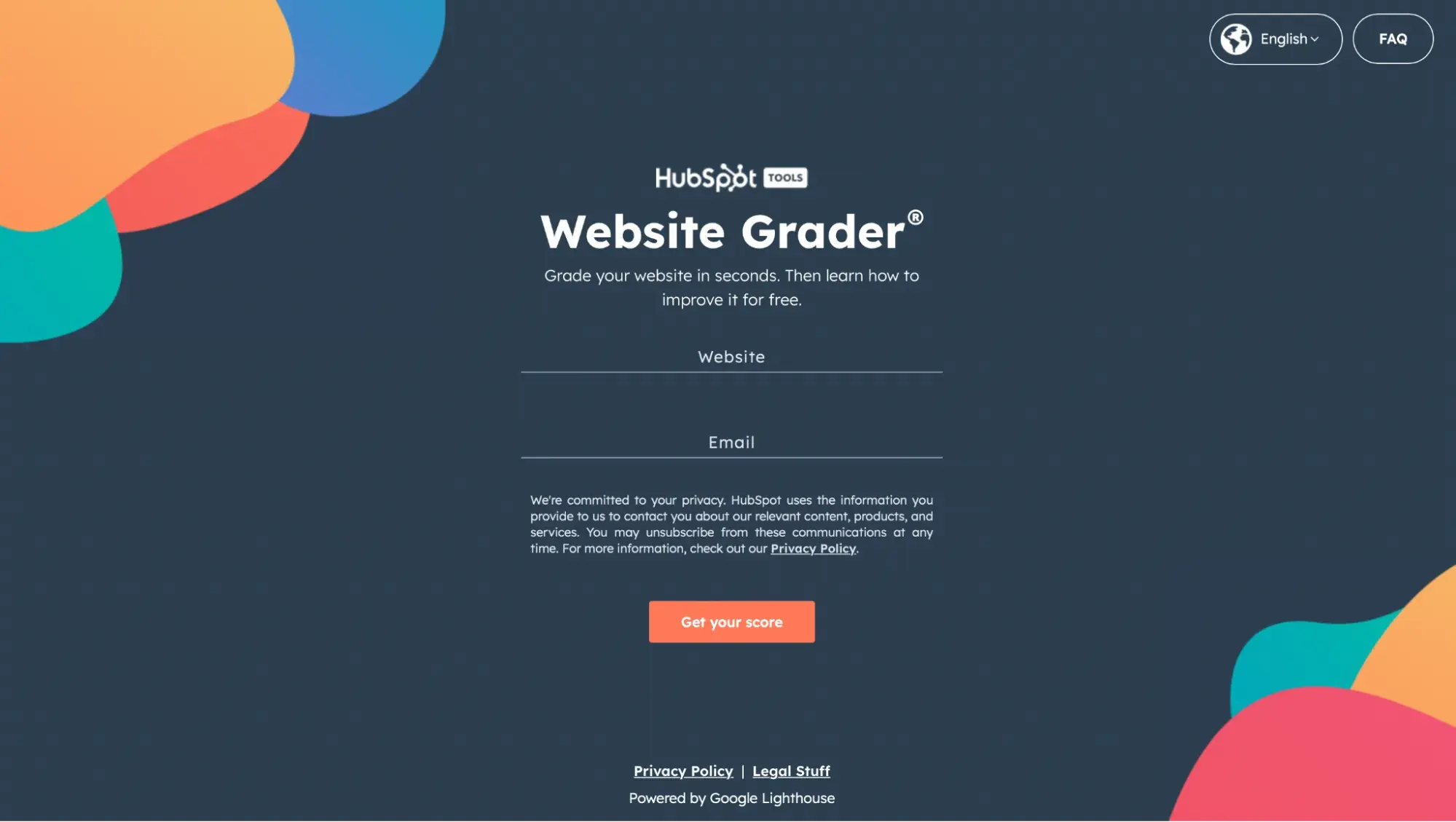
Check out HubSpot's Website Grader
How'd you do? Got an idea of which website audit benefits you need the most? Here we go!
1. Website Performance Assessment
In the first part of your website audit, I’d focus on how users navigate your website — from your homepage to blog posts, to landing pages, and any related content in between.
Make a list of the pages on your website and ask yourself the following questions to evaluate them for optimization opportunities:
Is your website optimized for maximum usability?
The more visitors you can attract to your website, the more opportunities you'll have to generate leads and, ultimately, customers. But only if your website performs well.
Just having a website does not guarantee results. As part of determining the overall efficiency of your website, your audit should check to make sure your site is designed with your visitors in mind.
The design and overall navigability of your website should correspond with what a person would come to the site to seek out, such as more information on a business-related topic, resources, product/pricing information, testimonials, etc. This will largely depend on your individual business.
The main goal here is to make it easy for people to get the information they‘re looking for. As a result, you’ll likely see conversion rates improve on their own.
To audit your website for usability, consider the following questions:
- Are all the main value propositions of our business easily accessible via our main navigations/menu items?
- Do we have a simple yet intuitive website design and page layout? Make sure pages aren't too cluttered; littered with ads, CTAs, or links; or void of internal links altogether.
- Are your conversion paths and/or shopping cart or checkout processes intuitive? Are there a ton of distractions along the way that could be creating friction for your site visitors?
Consider doing some user testing with members of your target audience to ensure you‘re effectively surfacing the content they’re looking for and that they find it easy to navigate to the parts of your website they're interested in.
How is your website's overall speed?
Are there excessive page sizes or long page load and server response times? Does your site go down frequently? Site speed can be impacted when image files are too large or HTML and CSS needs to be cleaned up.
Ultimately, fast-loading and optimized pages will lead to higher visitor engagement, retention, and conversions. To quickly check a web page's load time, download MozBar, a toolbar by Moz that you can attach to your browser for simple page analysis every time you visit a website.
2. SEO Assessment
Optimizing the performance of your website is crucial to holding onto visitors, but the above questions aren't the only ones I’d be asking.
It’s also crucial to audit the content you‘re publishing to ensure it’s actually solving your visitors' problems.
Is your website content high quality?
As you evaluate your content for quality, think about it from your target audience’s perspective:
- Did this information leave me satisfied?
- Did it answer all of my questions?
- Does it give me all the resources relevant to this topic?
- Do I know what to do next?
Keep in mind quality content should appeal to the interests, needs, and problems of your buyer personas. Present them with interesting and well-written content. Always aim to leave the reader with immediately actionable next steps such as calls-to-action or links to resources.
Is your website search engine optimized?
Make sure all your web pages are following on-page SEO best practices. To audit your content for on-page SEO, conduct a keyword analysis in which you do the following:
- Consult your analytics to review keyword performance. Which keywords are giving you the biggest gains in traffic and leads?
- Assess how well you're factoring keyword performance into your content strategy. How much relevant content are you adding to your website to target those keywords?
- Review basic on-page SEO elements like URLs, page titles, meta descriptions, and copy. Make sure keywords are included where relevant.
Pro tip: To help you conduct an on-page SEO audit of your content, check out this blog. You can also download our free On-Page SEO template.
Website Accessibility Checklist
This checklist will help you make the following more accessible on your website:
- Web Pages
- Navigation
- Video & Media
- And More!
Download Free
All fields are required.
3. Conversion Rate Assessment
While high-quality, search-engine-optimized content is a great way to boost your traffic numbers, it's what happens once those visitors are on your website that really counts.
This is where optimized calls-to-action (CTAs), marketing offers, and landing pages play a major role in the performance of your website.
Not only do they offer you opportunities to capture visitors' information so you can follow up with leads, but they also keep your visitors engaged with your content and your brand.
To audit your website for maximum conversion potential, I’d ask the following questions:
- How many marketing offers do I have in my content arsenal to gate behind landing pages?
- Do I have a variety of marketing offers that appeal to all my different buyer personas?
- Do I have any landing pages/conversion forms on my website to begin with?
- How optimized are those landing pages?
- Do I have conversion opportunities for visitors in varying stages of the funnel?
- Am I using CTAs effectively? Am I missing opportunities to include CTAs on various pages of my website?
Pro tip: Erica Ylimäki, growth marketer at Trustmary, recommends the following: “Check for bulk optimization options for conversions … Some examples include aiming for a simpler conversion (such as getting visitors to sign up to a newsletter instead of getting them to register to your software) or trying out a new CTA placement (exit intent popups, above the fold, below the fold). In our case, adding a hero CTA to blog posts has been especially effective.”
4. Technical Assessment
Once you‘ve addressed the three primary goals of a website audit, it’s time to loop in a developer or someone from your IT department for a technical evaluation. You could also hire an outside agency — just be sure to do your homework first.
Keep in mind that there may be some carry-over from the three assessments above — website performance, SEO, and conversion rate. The technical evaluation, however, addresses all three to maximize the user experience (UX).
Here's what I’d be looking for in the technical assessment stage of your website audit.
Is your website design responsive?
Does your website have a responsive design? Meaning, is it a mobile-friendly website?
Smartphone usage worldwide has grown exponentially, and it’s important for websites to be compatible with the rising demand.
Is your website error message free?
Are response code errors popping up all over your website where there shouldn't be any? Calling out 302-, 404-, and 500-level response codes can be useful to tell users that something's wrong.
However, having this happen is also an indication that someone isn't cleaning up broken links and, as a result, leading users to dead ends. Find those error messages and clean up your broken links.
Are your website URLs optimized?
Does your site have URLs of excessive length due to keyword stuffing? Do they contain session IDs and/or include tons of dynamic parameters? In some cases, these URLs are difficult for search engines to index, resulting in lower clickthrough rates from search results.
Does your website have too much Flash or JavaScript?
Identify areas of your navigation that are entirely Flash or JavaScript. Search engines have challenges with reading and accessing these, which could prevent your site from getting indexed.
These elements also present problems from a usability perspective. Visitors are often looking for a very specific piece of information when visiting your site. If they have to sit through a 10-second visual introduction before they can find your hours of operation, you’re going to have a pretty frustrated visitor on your hands.
Is your site structure optimized for search engines?
We already talked about site structure as it relates to accessing content and usability for users, but it's also important to make sure your site structure is optimal for search engines. If pages on your site are not internally linked to other pages on your site, those pages are less likely to be indexed.
Are you defining how your web pages are crawled and indexed by search engines?
This can be done through various methods that include everything from robots.txt files to sitemaps. These tools help you guide search engines toward your website’s most useful content.
Robots Meta Tags or robots.txt Files
The robots meta tag lets you use a granular, page-specific approach to controlling how an individual page should be indexed and served to users in search results. These tags should sit in the <head> section of a given page.
The robots.txt file, on the other hand, is a text file that allows you to specify how you would like your site to be crawled. Before crawling a website, search engine crawlers will generally request the robots.txt file from a server.
Within the robots.txt file, you can include sections for specific (or all) crawlers with instructions (“directives”) that let them know which parts should or should not be crawled.
Public and XML Sitemaps
Your website should also have public and XML sitemap files. The public sitemap is one that users can access to review the pages of your site, like the index of a book.
The XML sitemap is for search engines to review pages that get added to your site, all in one place. The usual location of a sitemap.xml file is www.domainname.com/sitemap.xml.
The XML sitemap is something every website should have. It offers an opportunity to tell Google and the other search engines which pages on your site you want to be crawled and indexed.
While search engines don’t guarantee they will abide by your sitemap, anecdotal evidence has proven time and time again that XML sitemaps help provide insurance that your pages are found, and found faster — especially if your sitemap(s) dynamically update your new web pages.
Are you defining the canonicalization of content?
The canonicalization of your website content is your final major technical consideration. To gain more control over how your URLs appear in search results — and to minimize issues related to duplicate content — you need to pick a canonical (preferred) URL as the preferred version of the page.
You can indicate your preference to Google in a number of ways. One such way is to insert the canonical tag (rel=“canonical”) in an HTTP header of a page.
Be sure to have someone check that the canonical tag is properly implemented across the site by making sure it points to the correct page, and that every page doesn't point to the homepage.
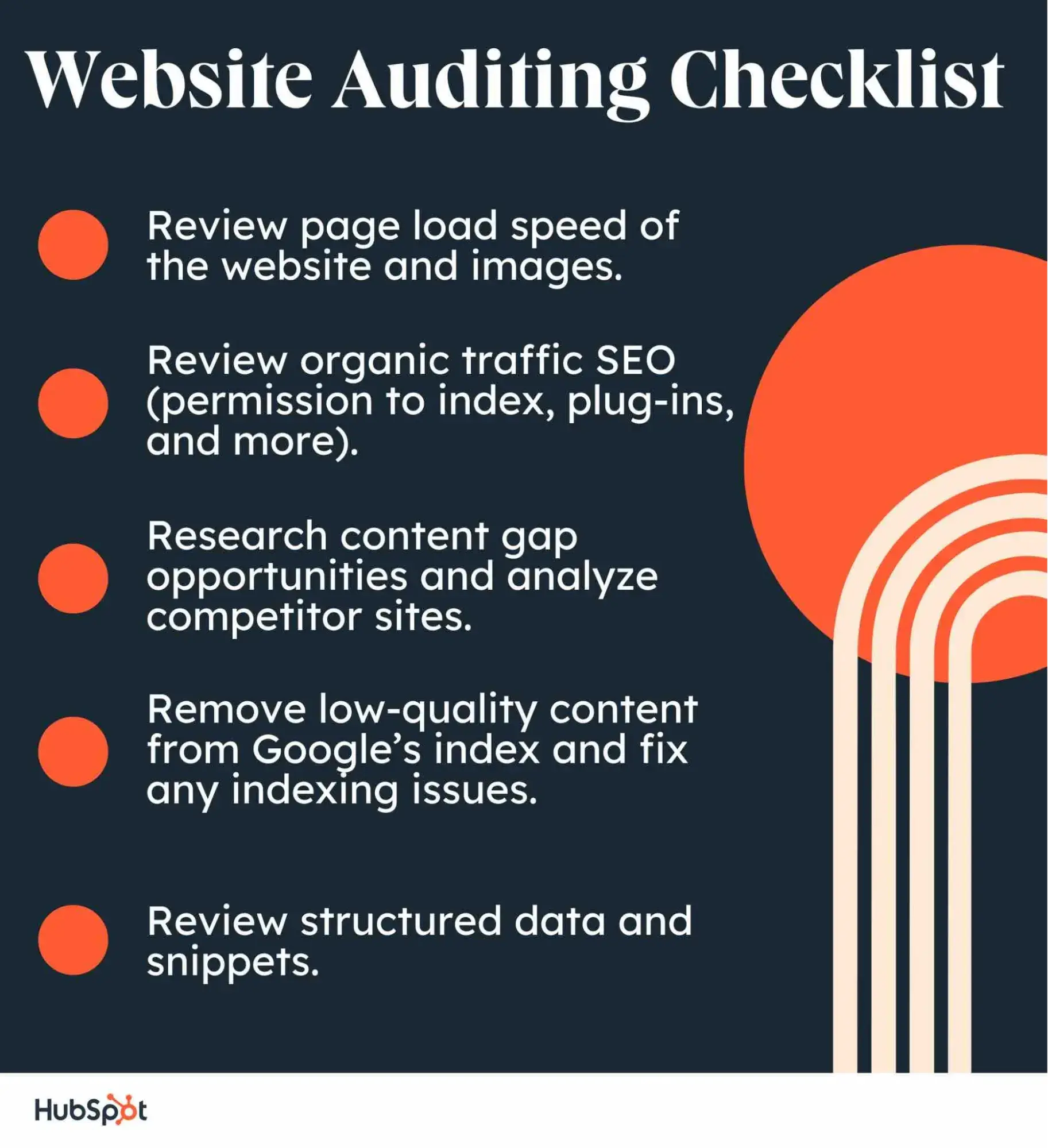
Website Auditing Checklist
Before getting started, I’d use this basic website auditing checklist to review certain necessary elements of a site’s performance.
Website Audit Example
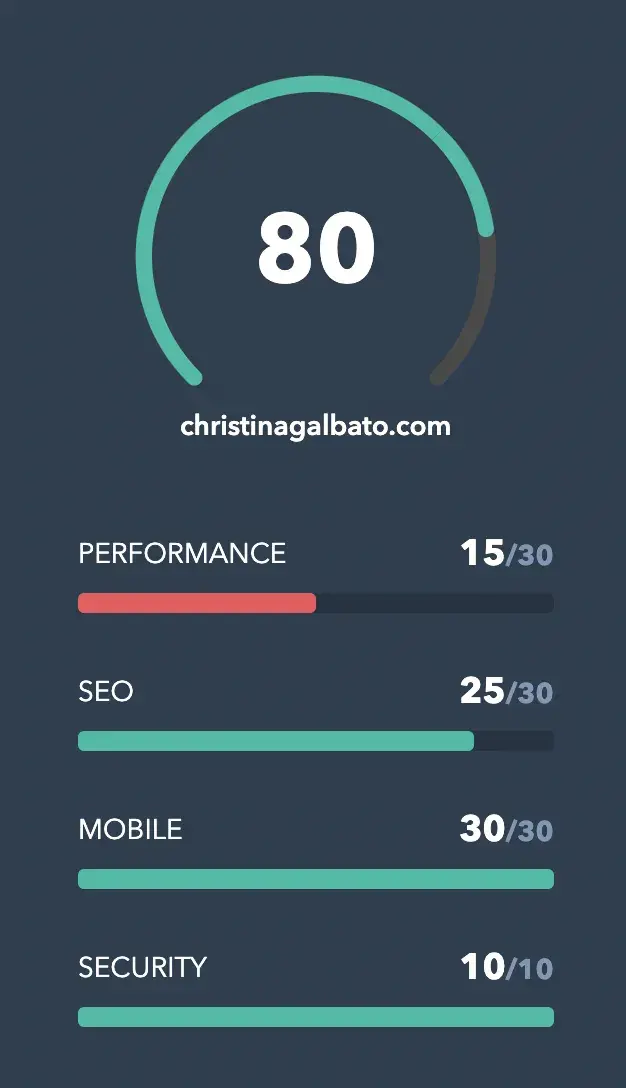
To pull all this together, I decided to run a website audit on one of my favorite bloggers, Christina Galbato.
Take a look at the image below. This website is performing well. SEO and mobile are scoring very high. The main areas for improvement for this site would be performance and security.
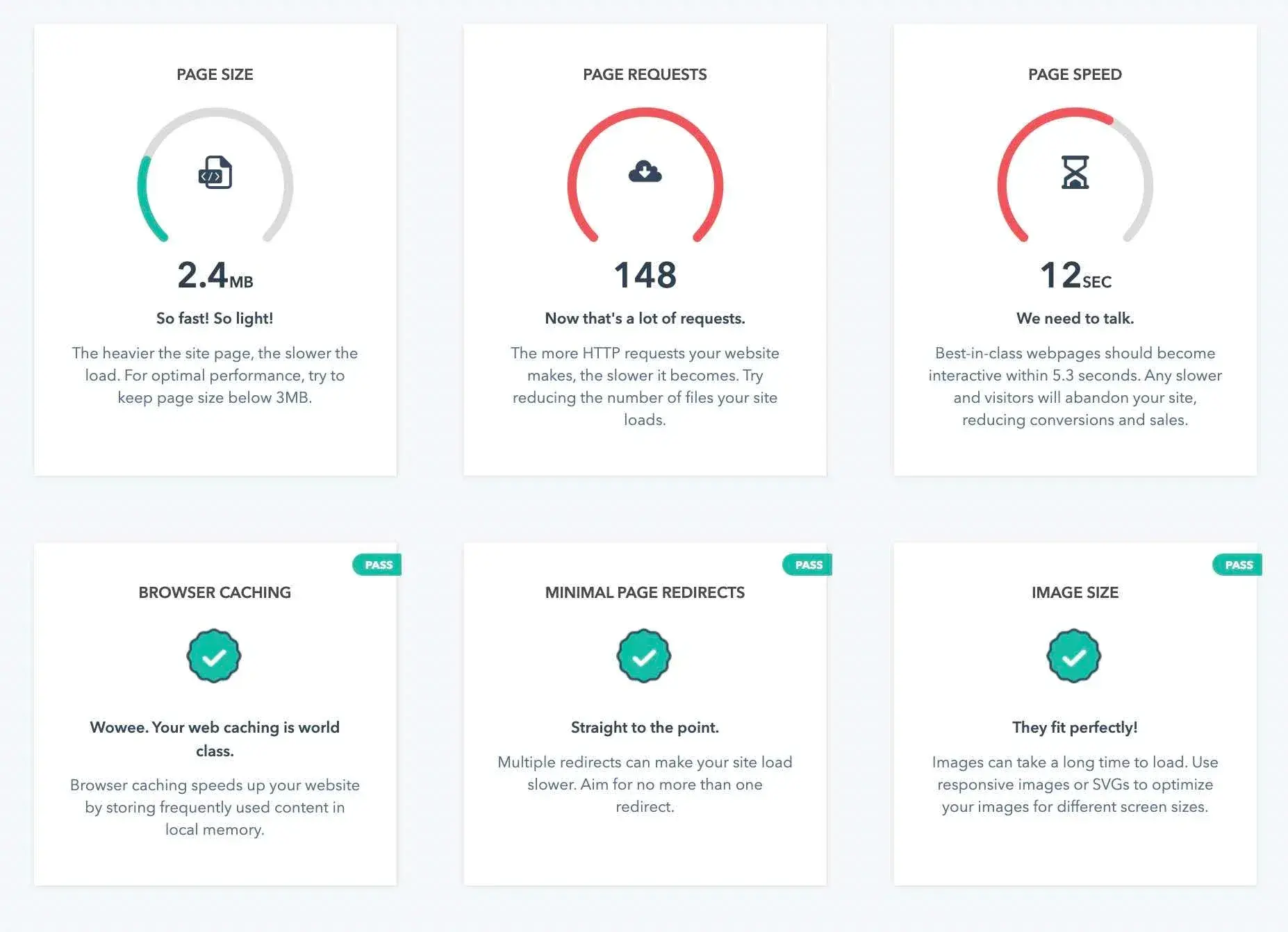
But, “What does this mean?” Well, let me dive in a little deeper. In each section, the website grader lets me know what I’m (or in this case Christina) is doing well and what could be improved upon.
Then, the grader gives recommendations to improve the site overall.
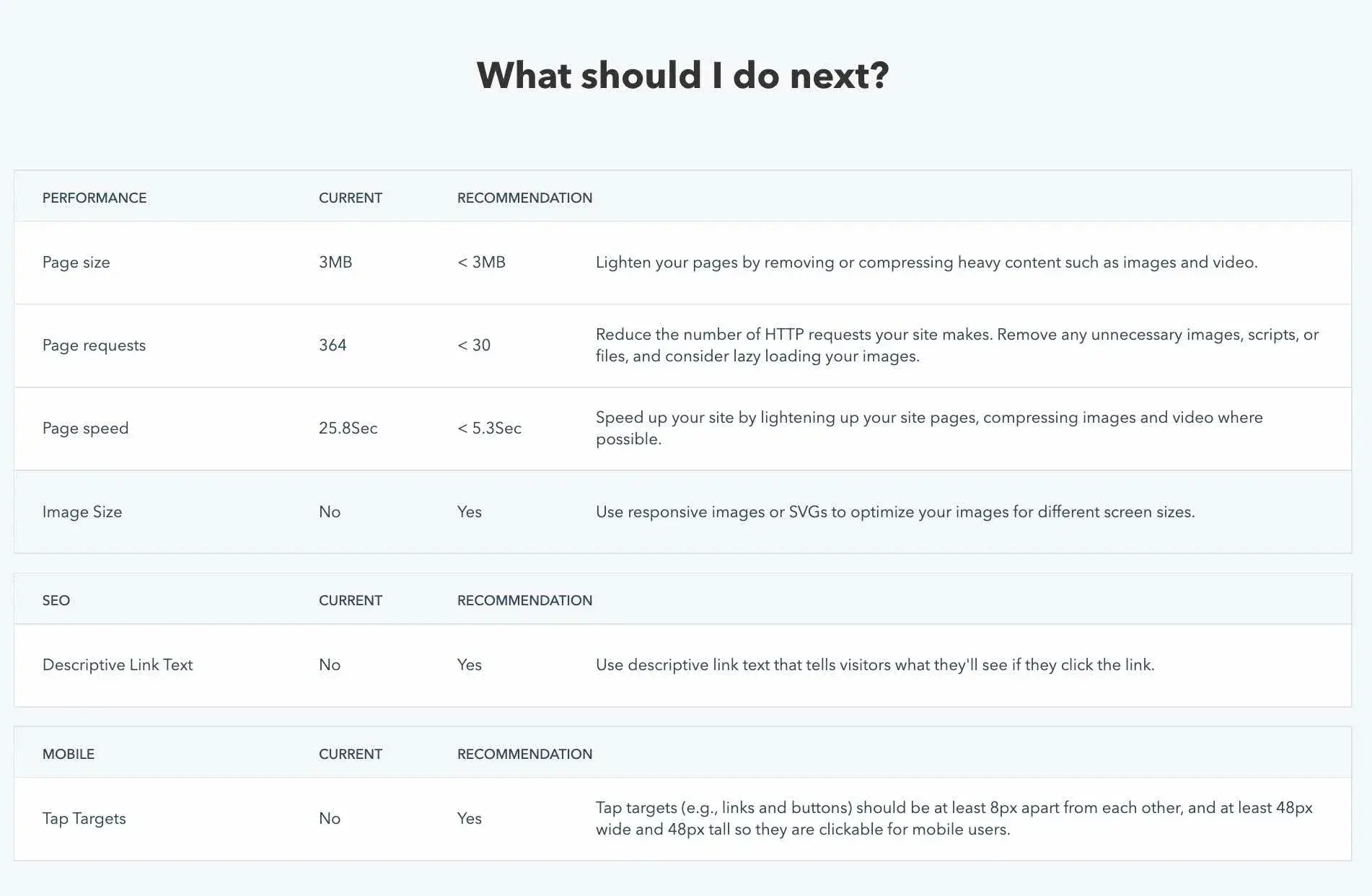
Next, there’s a table that helps compare the current site to the recommendations.
Wrapping up the Website Audit
At the beginning of the auditing process, I asked the important questions: “How am I doing?” and “How does my website compare to those of my competitors?”
Now, as I complete the audit, I’ll know the answers to those questions — and I’ll have actionable steps to improve my website, thus making it more competitive.
Editor's note: This post was originally published in April 2018 and has been updated for comprehensiveness.
Website Accessibility Checklist
This checklist will help you make the following more accessible on your website:
- Web Pages
- Navigation
- Video & Media
- And More!
Download Free
All fields are required.
SEO


.png)




.jpg)
![The Future of Google: Web Strategists Predict How AI Overviews & Other Search Changes Will Impact Traffic [New Data]](https://53.fs1.hubspotusercontent-na1.net/hubfs/53/seo-sge-1-20241031-8247348.webp)