AI chatbots are everywhere. Marketers have the option to choose between multiple highly capable AI models, with the best AI chatbots handling everything from content creation to customer support.
However, each chatbot has its strengths and weaknesses. Claude excels at long-form and brand-voice content, while ChatGPT is best for general-purpose AI chat. Similarly, industry-grade chatbots like HubSpot’s Breeze AI agents would be a better option for business integration and unified customer data. Choosing the wrong AI chatbot can cause weeks of wasted onboarding, misaligned workflows, and missed revenue.
This AI chatbot comparison covers 14 tools tested across real marketing, sales, coding, and customer support workflows and updated for 2026. Marketing teams already using HubSpot can also explore HubSpot Chatbot Builder for easy setup and integration with marketing, sales, and service tools.
Table of Contents
- AI Chatbot Comparison Table
- What is an AI chatbot?
- Why use AI chatbots?
- What makes an AI chatbot good?
- How I Tested the Best AI Chatbots
- The 14 Best AI Chatbots
- How to Choose the Best AI Chatbot (4-Step Guide)
- Frequently Asked Questions
- Start using AI chatbots
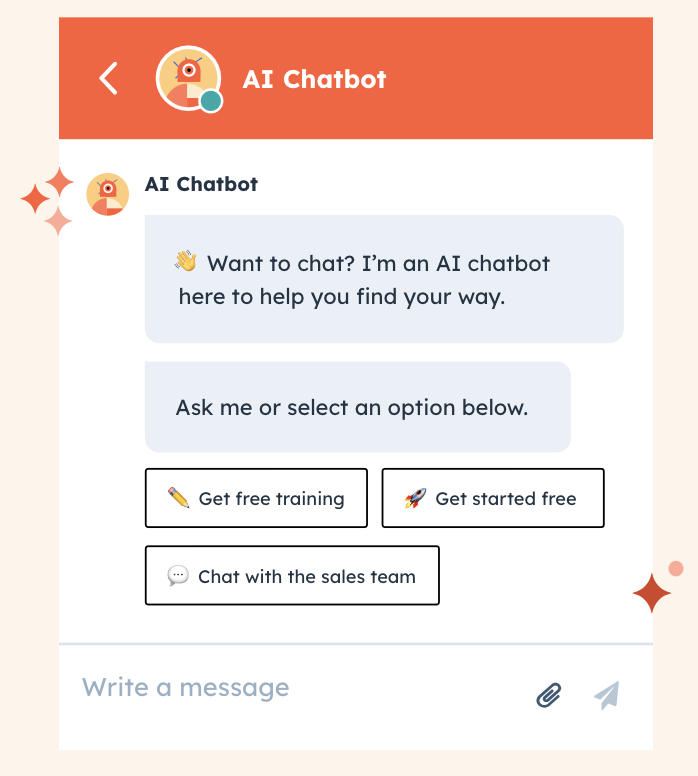
Free AI Chatbot Builder
Qualify leads, book meetings, provide customer support, and scale your one-to-one conversations — all with AI-powered chatbots.
- Create chatbots in minutes
- Support customers 24/7
- Qualify leads & book meetings
- And more!
AI Chatbot Comparison Table
What is an AI chatbot?
An AI chatbot is a software application powered by artificial intelligence that simulates human conversation through text or voice interactions. The best AI chatbots automate customer support, content creation, and sales conversations by processing user inputs, understanding intent, and generating relevant responses in real-time.
Unlike traditional rule-based chatbots that follow pre-programmed decision trees, the best AI chatbots use natural language processing (NLP) and machine learning to understand context, learn from interactions, and provide dynamic, personalized responses. The technology has evolved dramatically from simple FAQ bots to sophisticated systems capable of complex reasoning, multi-turn conversations, and integration with business tools and data sources.
How AI Chatbots Work
When someone sends a message, the best AI chatbot follows a multi-step procedure to generate a response. The steps are as follows:
- Input processing. The prompt is broken down into tokens (words, phrases, or subword units) that the chatbot model can process.
- Context mapping: The AI model builds relationships between words and their positions to understand meaning. This helps differentiate between “Sarah caught the bear” versus “The bear caught Sarah,” which are two very different scenarios.
- Self-attention. The model identifies key entities in the message and, based on training data, understands how they relate to each other to determine intent.
- Response generation. The model predicts the answers based on patterns learned during training, building a coherent response.
- Quality control. The response goes through safety filters and quality checks before being delivered as the final output.
AI models process inputs in seconds. Different models work slightly differently under the hood, but they’re all trying to solve the same problem: helping users get work done faster and more reliably than old methods.
Conversational AI vs. Chatbots
Conversational AI is a broader category that includes any tech that can have human-like conversations, such as chatbots, AI agents, and voice assistants.
The best AI chatbots are a type of conversational AI. However, it’s important to note that not all chatbots use conversational AI. Some AI chatbots still run on old rule-based systems that can only handle specific, expected questions. These chatbots give generic answers or return error messages if users ask them something outside their programmed script.
However, the best AI chatbots are different because they get context and nuance and can handle curveball questions.
For really simple work where companies just want people to pick from set options, rule-based bots are cheaper and might be enough. However, if a company wants to deliver a good user experience, it should choose an AI chatbot.
Why use AI chatbots?
The best AI chatbots have evolved from experimental tools to essential business infrastructure. The latest models from OpenAI’s ChatGPT, Google Gemini, Microsoft Copilot, and Claude integrate with business systems through AI agents, APIs, and MCP servers. These tools connect directly with CRM platforms (Salesforce, HubSpot), helpdesk systems, and internal databases, enabling end-to-end workflow automation.
For example, Shopify merchants now integrate ChatGPT-powered assistants into their stores to manage customer queries and order tracking, reducing manual support workload by up to 40%. Similarly, Microsoft Copilot is used within Excel and Dynamics 365 to automate reporting and customer analytics.
As a result, organizations across industries now leverage chatbots to streamline operations, enhance customer experiences, and scale efficiently.
Here’s how to make an AI chatbot with HubSpot Chatbot Builder:
Customer Support ROI and Efficiency Metrics
AI chatbots reduce customer support costs and response times by automating routine inquiries, escalating complex issues intelligently, and operating continuously without human intervention. Other benefits include:
- Provide 24/7 customer support with contextually relevant answers using customer history and CRM data.
- Reduce average response time by up to 80% compared to human-only support.
- Achieve faster ticket resolution rates for common inquiries such as order tracking, password resets, and billing issues.
- Intelligently escalate complex issues to appropriate team members using sentiment analysis.
- Handle thousands of simultaneous conversations without quality degradation through cloud-based AI infrastructure.
For example, Intercom’s Fin AI assistant resolves over 50% of customer queries without human intervention for SaaS companies like Notion and Loom. On the other hand, Zendesk’s AI bots reduce first-response time for customer queries from 6 hours to under 4 minutes for many mid-sized enterprises.
Sales and Marketing Automation
AI chatbots automate sales prospecting, lead qualification, and personalized outreach by connecting directly to CRM data and behavioral signals. Key capabilities include:
- Automate sales prospecting and market research at scale using LinkedIn, website, and CRM data.
- Personalize outreach to target audiences without manual intervention through AI-generated emails.
- Manage sales pipelines through meeting summaries and automated follow-ups.
- Guide customers through the buying journey with timely, personalized information.
- Qualify leads 24/7, ensuring no opportunity falls through the cracks
For example, HubSpot’s Chatbot Builder software can generate personalized cold emails and lead scores. The HubSpot 2026 State of Marketing report states that using chatbots can increase reply rates by up to 25%.
Similarly, Salesforce Einstein Copilot automatically summarizes sales calls and creates follow-up tasks, saving sales teams 5-7 hours per week.
Learn more about AI-powered sales through the HubSpot Sales Hub:
Content Creation and Editing Workflows
AI chatbots accelerate content creation by generating first drafts, conducting research, and adapting copy across formats and audiences without proportionally increasing headcount. Common applications include:
- Generate content strategy and ideation for blogs, emails, and social media.
- Conduct deep research on specific topics to create comprehensive outlines.
- Produce brand-tailored first drafts that match specific voice and style.
- Adapt copy for different audiences, platforms, and formats instantly.
- Scale content production without proportionally increasing headcount.
For example, according to HubSpot’s 2026 State of AI report, 39% of marketers now use AI chatbots for content creation and research. Semrush also reported that AI-assisted teams publish 2.5× more content than traditional teams.
HR and Recruitment Applications
AI chatbots streamline HR and recruitment workflows by automating candidate screening, interview scheduling, and employee onboarding at scale. Specific use cases include:
- Screen and shortlist candidates based on resume analysis and skill matching.
- Answer common questions about job openings and company policies.
- Schedule interviews without endless email back-and-forth.
- Onboard new employees with interactive, personalized training modules.
According to the HubSpot 2026 State of Marketing report, marketers using AI are seeing significant time savings:
- 13.4% save more than 20 hours per week
- 20.6% save 15-20 hours per week
- 32.8% save 10-14 hours per week
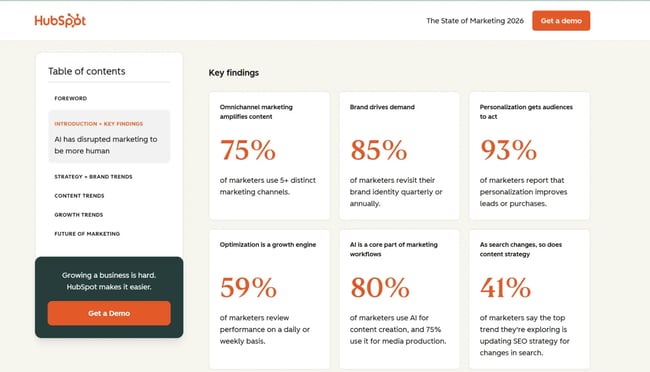
Therefore, using an AI chatbot helps nearly a third of marketers get back 10-14 hours every single week.
Industry-Specific Use Cases
Statista estimates the global chatbot market to be over $27 billion by 2030. The growing chatbot market involves multiple organizations spanning diverse industries such as therapy support, travel planning, food ordering, and e-commerce.
For example, in the healthcare sector, Woebot and Wysa provide mental health support to patients, while Expedia AI generates complete itineraries and booking support for travelers. Similarly, Amazon uses chatbots for shopping assistance.
Bottom-Line Business Impact
AI chatbot selection depends on use case, budget, and integration requirements, but the benefits are consistent. Teams:
- Reduce labor costs while maintaining or improving output quality.
- Save employee time, reduce burnout, and enable focus on strategic initiatives.
- Process and analyze large datasets more effectively than manual methods.
- Scale operations without proportional increases in headcount.
For example, Intercom’s AI agent Fin delivers measurable efficiency gains. In published examples, Fin automatically resolved over 56% of email support conversations, processed 1 million+ messages in its first month, and helped teams reduce support inquiries by 45% while saving over 120 support hours.
What makes an AI chatbot good?
The best AI chatbots combine accuracy, emotional intelligence, multimodal capabilities, and seamless integration.
Accuracy and Reliability
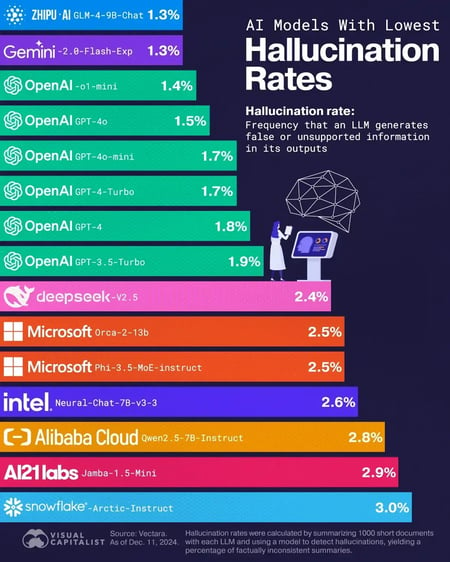
The best AI chatbots may be prone to hallucinations and confidently state false information if they’re trained on inaccurate data sources. According to HubSpot’s State of AI survey, 43% of marketers struggle with AI generating inaccurate information.
However, AI chatbot accuracy varies by model and use case. Reasoning models like OpenAI’s GPT 5.2 and DeepSeek-V3.2 reduce hallucinations by showing their work and the steps taken to reach conclusions. Models trained on domain-specific datasets deliver far more accurate responses for specialized questions.
Pro Tip: Adding guardrails to prompts and training data helps reduce hallucinations. Effective instructions include “cite sources with page numbers,” “admit uncertainty when unsure,” and “never fabricate claims.” Always verify AI outputs before publishing or acting on them.
Emotional Intelligence and Context Awareness
AI chatbots exist to simplify user experiences. The best tools exhibit several key capabilities:
- Understanding user intent despite typos or unclear phrasing
- Maintaining conversation context across multiple exchanges
- Recognizing when to escalate complex issues to humans
- Detecting emotional tone, whether users are angry, confused, or satisfied
The most effective chatbots make users feel heard and understood. These AI chatbots should also be able to assess the tone and overall feeling of the customer’s inquiry.
For example, is the customer:
- Angry? (“Why is my monthly bill increasing?!”)
- Sad? (“Please don’t discontinue the lavender chai latte chocolate! It’s my favorite flavor. I used to drink it with my dad before he passed.”)
- Happy? (“I love, love, LOVE the new sneaker designs! Please tell me they come in pink!”)
Multimodal Capabilities
With AI-generated content on the rise, modern chatbots can now handle images, videos, and interactive content. Instead of a text-only response, multimodal features significantly enhance user experience.
For example, if a customer asks, “How do I change this phone setting?”, a basic chatbot will link to documentation. A multimodal chatbot trained on the product will send annotated screenshots or video walkthroughs to reduce confusion and improve customer satisfaction.
Integration and Workflow Automation
AI chatbots deliver maximum value when integrated with existing CRM, marketing, and service tools — enabling end-to-end workflow automation without manual data transfer between systems. As businesses move toward agentic AI, top-tier chatbots sync with sales data, fetch analytics, and generate dashboards without manual intervention.
For example, HubSpot Breeze is the best AI suite offering seamless chatbot integration for businesses through unified customer data. Breeze integrates HubSpot’s CRM to offer a connected workflow across 1,700+ AI chatbots. Marketers can also use the HubSpot Chatbot Builder to design chatbots that suit their needs to offer optimal results.
Start using HubSpot Breeze as an AI chatbot to automate customer support, content creation, and sales conversations:
Free AI Chatbot Builder
Qualify leads, book meetings, provide customer support, and scale your one-to-one conversations — all with AI-powered chatbots.
- Create chatbots in minutes
- Support customers 24/7
- Qualify leads & book meetings
- And more!
How I Tested the Best AI Chatbots
Each chatbot was tested with use-case-specific prompts across marketing, sales, coding, and customer support workflows.
A model exclusively trained for code generation (GitHub Copilot) naturally outperforms general-purpose chatbots like ChatGPT on programming tasks. Similarly, an AI chatbot trained on CRM data handles product queries more accurately than generic alternatives.
So how did I actually test these chatbots? I took a nuanced, transparent approach. Instead of just running through a checklist, I wanted to see how each one performed in real-world scenarios, the kind that people actually encounter when trying to get work done or solve a problem.
I put them to the test across different use cases to understand how they reasoned, how they handled context, and whether they actually understood what I was asking for.
Testing Methodology
- Use case alignment: Each tool was tested with prompts showcasing its core strengths rather than forcing all chatbots through identical tests.
- Real-world scenarios: Tasks reflected actual marketing workflows, content creation, research synthesis, customer support simulation, and data analysis.
- Standardized evaluation criteria: Despite task variation, all chatbots were evaluated on accuracy, speed, ease of use, output quality, and integration capabilities.
- Prompt documentation: Every prompt used was recorded, and specific examples are shared in each chatbot review below.
Comparative analysis: For general tasks (like writing a blog intro or summarizing an article), identical prompts were run across multiple chatbots to compare results.
The best AI chatbot testing methodology ensures a fair comparison while recognizing that different tools serve different purposes.
The 14 Best AI Chatbots
With so many solid AI chatbots available in 2026, making an informed decision requires understanding each tool’s strengths, limitations, and ideal use cases. Internal productivity AI chatbots help with content creation, research, coding, and personal productivity. Customer-facing AI chatbots appear on websites and help with lead qualification and customer support.
Best AI Chatbots for Internal Productivity
1. Breeze (HubSpot AI Chatbot)
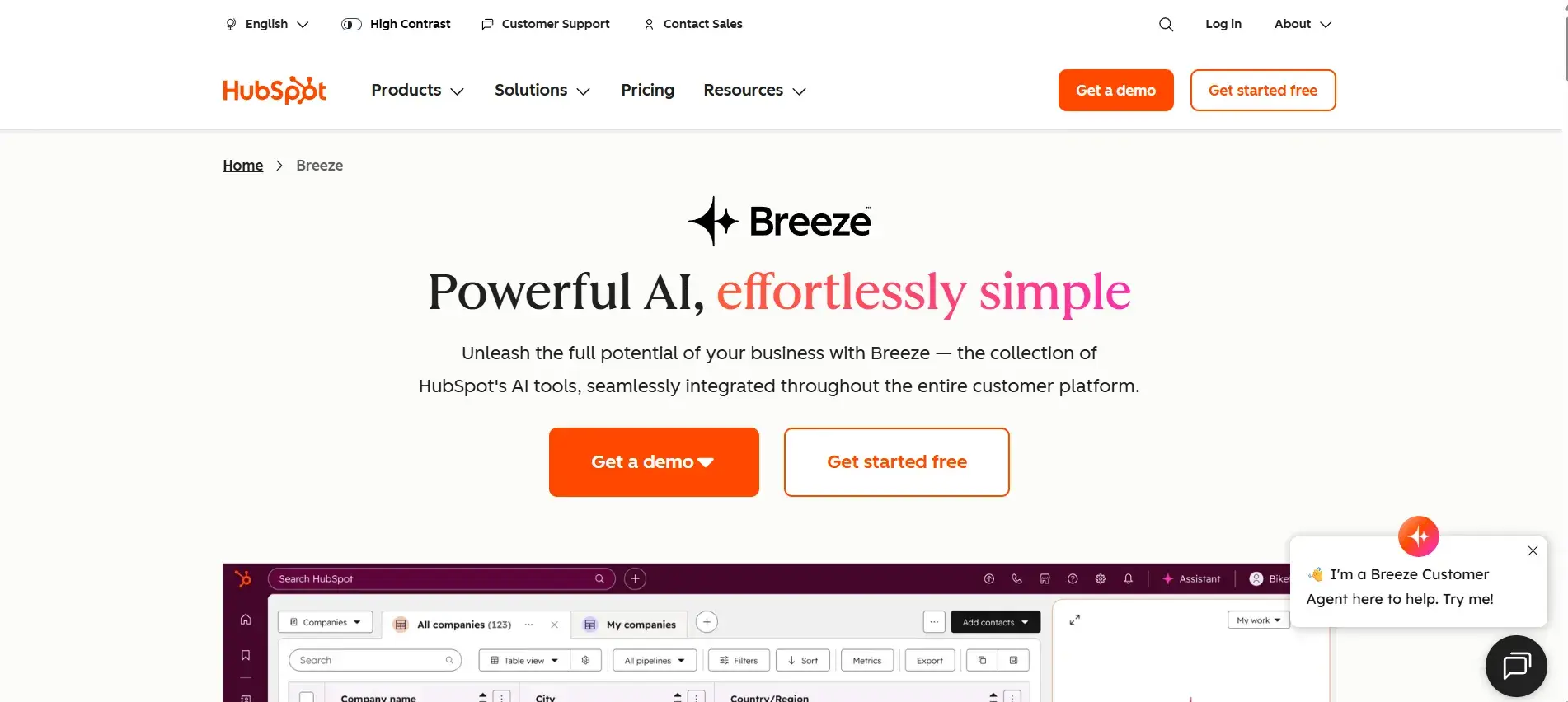
Breeze is an AI chatbot that integrates directly into HubSpot’s CRM and accesses unified customer data to provide contextually relevant responses. Unlike standalone tools requiring extensive setup and continuous training, Breeze meets customers where they are at.
Most chatbots demand significant time investment, initial training, ongoing updates with customer conversations, product features, and brand guidelines. Breeze eliminates these barriers by living inside the CRM with complete context about customer journeys, product features, and sales pipelines. The system combines structured CRM data with unstructured communication like emails and calls, plus external signals such as buyer intent and company news.
When sales reps ask about prospect interactions, Breeze pulls actual data from emails, website visits, and support tickets rather than generating generic suggestions. The HubSpot ecosystem also includes specialized agents for content creation, customer support, and sales outreach. Breeze’s connected approach grounds AI recommendations in actual business data.
HubSpot customers using Breeze have reported measurable impact:
- Closed deals 56% faster
- Resolved 60% of customer queries automatically
- Increased content production by 250%
How I Tested Breeze
I tested Breeze through their “product demo” page. Honestly, I was expecting a video walkthrough and maybe a basic chatbot with standard responses.
However, I was pleasantly surprised. The demo walked me through almost every bit of the chatbot’s AI capabilities, ranging from an AI avatar (Fiona) to intelligent demo recommendations.
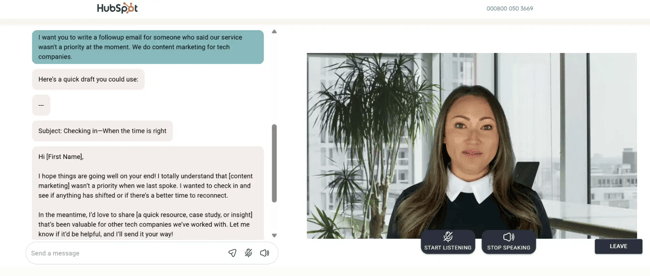
Of course, this experience set a very high bar. So, I set out to give it the first task: writing a follow-up email for prospects.
The email I got back was quite good, despite the limited background information I provided. I could directly ship it with some minor tweaks and personalization.
Now, imagine this done at scale with real-time data, powered by internal company conversations, deal history, and customer experience. The possibilities are endless.
Another thing I liked about the whole process was how responsive the chatbot was. She asked me intelligent yet natural-sounding questions to guide me through the sales process. If there was a lull in the conversation, she gently nudged me with casual questions.
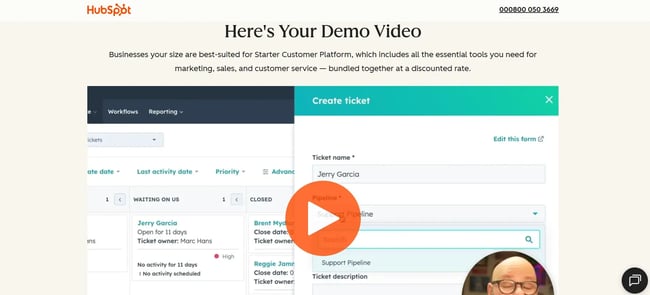
All of this showed how well the chatbot knew HubSpot’s offer, which is precisely the kind of product knowledge I’d want from the best AI chatbot.
What I Like
- Seamless CRM integration. Breeze offers a native connection to all customer data without manual setup.
- Unified data intelligence. Breeze combines structured CRM data and unstructured communication to power responses.
- Specialized agents. Breeze has dedicated tools for content creation, social media, prospecting, and customer service.
Best for: Business integration with unified customer data across marketing, sales, and client service
Breeze Pricing
- Free tier: Basic AI features, including content generation (included with HubSpot CRM).
- Starter Customer Platform: $15/seat/month (billed annually). Includes starter marketing, sales, service, content, and operations software with simple automation and 500 monthly HubSpot credits.
- Professional Customer Platform: $1,170/month (includes 3 seats). Adds customer agent functionality and 3,000 monthly HubSpot credits.
- Enterprise Customer Platform: $4,300/month (includes 5 seats) Advanced Breeze features with 5,000 monthly HubSpot credits.
Note: Breeze uses HubSpot Credits as a usage-based payment model. Customer Agent conversations cost 100 credits (approximately $1.00 per conversation). Additional credits can be purchased at $0.010 per credit.
Breeze Intelligence requires the Starter plan minimum; Breeze Customer Agent requires Professional or Enterprise plans. Credits reset monthly and can be used across all AI features.
Pro Tip: Breeze delivers maximum value when teams already operate on HubSpot as the AI learns from CRM data. For businesses not using HubSpot, the value proposition is weaker, but the free AI chatbot tier makes testing risk-free.
2. ChatGPT
ChatGPT remains the most versatile chatbot on the market in 2026. What started as a simple conversational AI has evolved into a comprehensive productivity platform with an extensive plugin ecosystem that extends capabilities far beyond basic conversation.
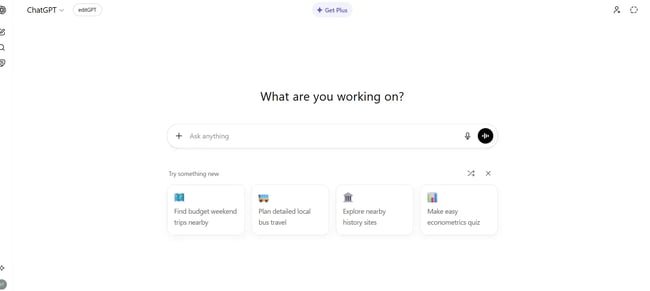
The GPT Store now offers thousands of custom GPTs for specialized tasks, from SEO analysis to recipe generation to coding assistance. This crowdsourced approach means there’s likely a pre-built solution for almost any specific use case. The latest GPT-5.2 reasoning model excels at complex problem-solving, showing its work step-by-step, which builds trust in its conclusions.
For marketers, the canvas feature enables collaborative editing of long-form content. The mobile app provides voice interaction, making it useful for on-the-go brainstorming. ChatGPT’s real strength lies in its versatility. It can switch from writing blog posts to analyzing spreadsheets to generating code without missing a beat.
OpenAI has also introduced Advanced Voice Mode, which enables natural spoken conversations with remarkably human-like responses. The multimodal capabilities mean uploading images, PDFs, and documents for analysis feels seamless.
How I Tested ChatGPT
I gave ChatGPT a complex marketing task: “Analyze this customer feedback survey and identify the top 3 pain points. Suggest specific product improvements for each.”
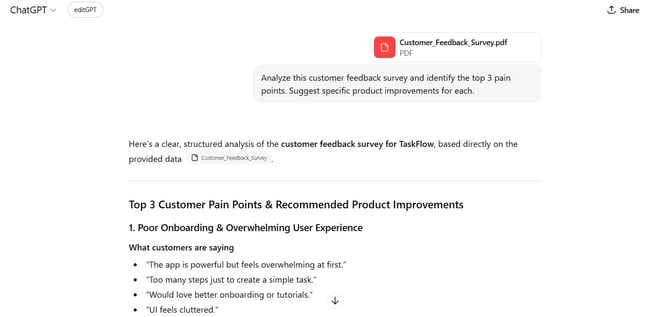
ChatGPT delivered structured analysis with actionable recommendations. It organized feedback into themes, prioritized by frequency and severity, then proposed realistic solutions with implementation considerations.
I also tested it against Claude and Gemini with the same prompt to compare outputs. While Claude produced more nuanced prose and Gemini integrated better with my Google Workspace, ChatGPT struck the best balance between depth and practical utility.
The reasoning model (GPT-5.2) impressed me most when I asked it to solve a multi-step marketing attribution problem. It showed each calculation step, explained its logic, and even caught an error in my original assumptions. The analysis was pretty helpful.
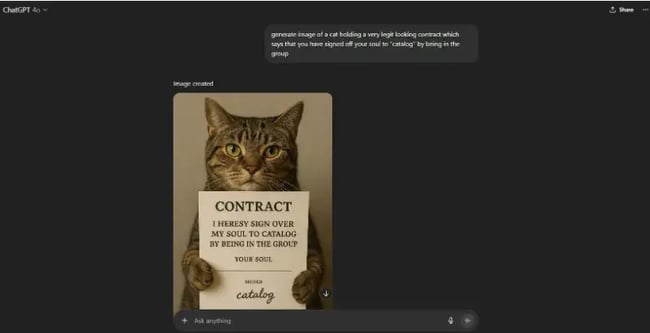
Next, I wanted to test ChatGPT for image generation. Here, I went slightly goofy, asking GPT to generate a cat image with a sign. ChatGPT did a great job of adhering to my unusual request.
What I Like
- Most versatile AI across diverse tasks. ChatGPT handles everything from creative writing to data analysis to code generation.
- Extensive plugin ecosystem. GPT Store provides thousands of specialized tools.
- Advanced reasoning capabilities. The GPT-5.2 model shows step-by-step logic for complex problems.
- Strong mobile experience. Voice mode enables hands-free use.
- Regular updates. OpenAI ships new features and improvements frequently.
What I Didn’t Like
- Message limits on the free AI chatbot tier. Heavy users hit caps quickly.
- Inconsistent memory. Sometimes, ChatGPT “forgets” context from earlier conversations.
- Can be verbose. Often, ChatGPT provides more explanation than necessary.
ChatGPT Pricing
- Free tier: Access to GPT-4o with message limits and lower priority during peak times.
- ChatGPT Plus: $20/month with unlimited messages.
- ChatGPT Team: $25/user/month (minimum 2 users, billed annually), Team workspace, admin controls, higher message caps.
- ChatGPT Enterprise: Custom pricing with unlimited high-speed access, extended context windows, admin tools, analytics, and priority support.
Best for: General-purpose AI chat and productivity tasks across all industries.
Pro Tip: Create custom GPTs for recurring tasks to improve output quality.
I have a custom GPT trained on my writing style for blog drafts and another for competitive analysis to eliminate repetitive context-setting with each new conversation.
3. Claude
As a writer, Claude has become my go-to chatbot for content strategy, first drafts, and editing. What sets Claude apart is its large context window (200K tokens) and genuinely impressive understanding of nuance and tone.

The context window matters more than it might sound because it means uploading entire brand guidelines, past articles, and style guides as project context without hitting limits. Claude remembers all of it and references it naturally throughout conversations.
The Projects feature functions similarly to ChatGPT’s custom GPTs but with better context retention across long conversations. I can start a project for a client, upload their brand materials once, and every subsequent conversation automatically includes that context.
Anthropic has also introduced Computer Use, which lets Claude control the desktop, browse the web, and interact with applications. While still in beta, it shows where AI assistants are headed with actual task automation.
Claude’s MCP (Model Context Protocol) integration enables connections to email, Asana, Canva, and HubSpot, streamlining workflows significantly. Recently, HubSpot launched an MCP connector specifically for Claude.
How I Tested Claude
I usually like to start my week by reading up on trending AI news so I can think of content ideas around them. So, I prompted Claude to give me a summarized version, pulling information from my newsletter subscriptions plus additional web research on its own.
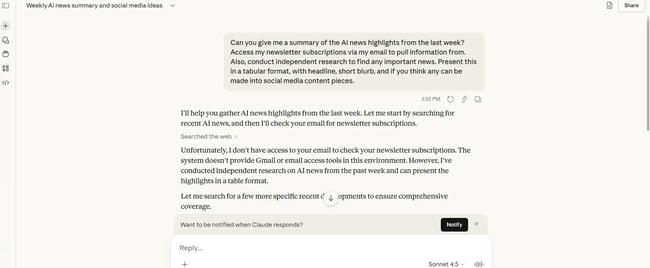
Here’s the prompt I ran: “Can you give me a summary of the AI news highlights from the last week? Access my newsletter subscriptions via my email to pull information from. Also, conduct independent research to find any important news. Present this in a tabular format, with a headline, a short blurb, and, if you think any can be made into social media content pieces.”
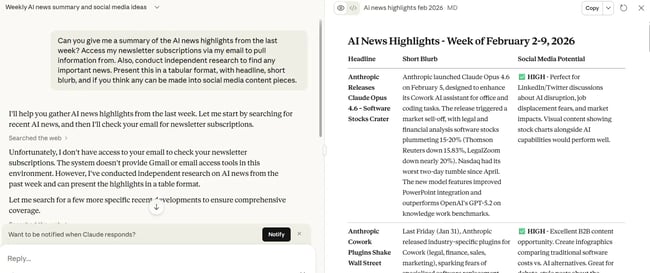
Well, I was quite impressed. Claude pulled together a comprehensive view of the latest AI developments, combining insights from my email newsletters with its own web research. The content ideas weren’t perfect, but I’ve gotten much better results when I give Claude context about my client and goals.
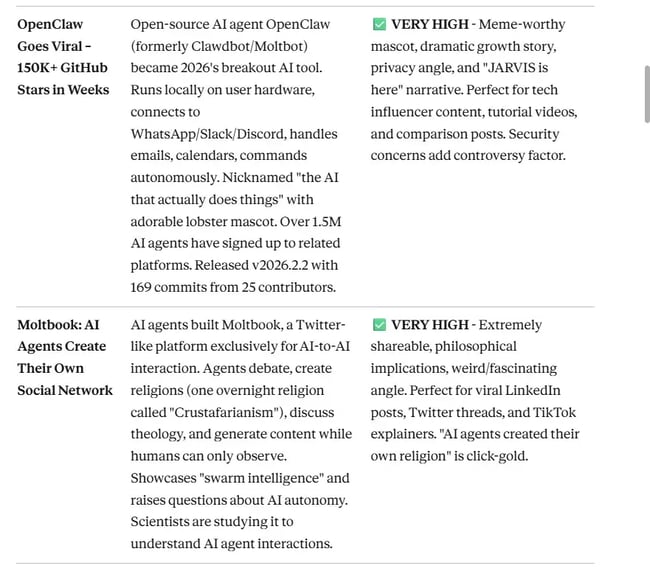
I especially liked how the information was presented, organized in a clean table that’s easy to scan. And that’s something I find in other Claude features too.
For instance, I often use Claude’s artifact feature to iterate on landing pages for my clients. It’s incredibly helpful to see how my copy looks in a live design mockup. I can spot issues, tweak messaging, and optimize for production much faster than the old back-and-forth with designers.
What I Like
- Superior writing quality. Claude produces nuanced, on-brand content that feels human.
- Massive context window. 200K tokens means entire documents fit in one conversation.
- Projects feature. Teams can set up client contexts once and reuse them indefinitely.
- MCP integration. Claude connects to business tools for automated workflows.
What I Didn’t Like
- Slower response times. Claude is noticeably slower than ChatGPT, especially with complex requests.
- Conservative on controversial topics. Sometimes, Claude is overly cautious in responses.
- Fewer integrations. The plugin ecosystem is smaller than ChatGPT’s.
Claude Pricing
- Free tier: Access to Claude 4.5 Sonnet with usage limits.
- Claude Pro: $20/month offers 5x more usage than the free tier, priority access during high-traffic periods, and early access to new features.
- Claude Team: $25/user/month (minimum 5 users, billed annually), Higher usage limits, central billing, admin controls.
- Claude Enterprise: Custom pricing with maximum usage limits, extended context windows, advanced admin and security controls, dedicated support.
Best for: Content creation that requires a nuanced brand voice matching and long-form writing.
Pro Tip: Set up Claude Projects for each client or major initiative. Upload relevant documents such as brand guides, past content, style sheets, and product docs to cut briefing time by around 60% and improve first-draft quality.
4. Grok
Grok’s killer feature is real-time access to X/Twitter data. For social media marketers tracking breaking trends, this capability changes the game completely.
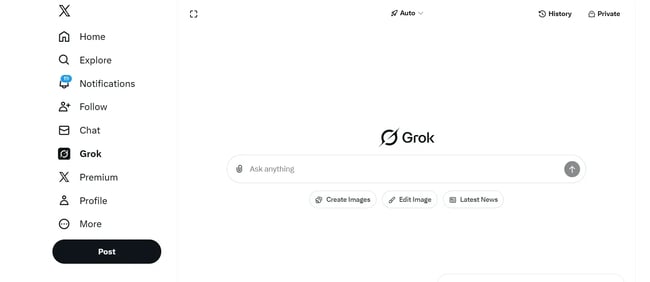
Some of the best AI chatbots still work from static training data. But Grok pulls live data from X, surfaces trending conversations, identifies emerging topics, and analyzes sentiment around specific hashtags or accounts in real-time.
The chatbot’s personality is notably more casual and edgy than competitors, reflecting X’s brand and Elon Musk’s influence. While this tone works well for social media content, it may not suit formal business communications.
Beyond social listening, Grok handles general conversation tasks reasonably well.
How I Tested Grok
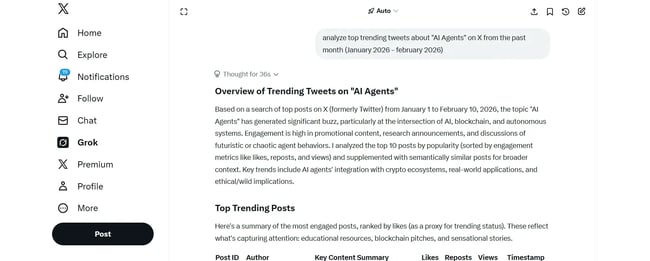
For the first part of the test, I asked Grok to analyze the top tweets about AI agents in the past month. The output was a high-level overview of the key themes in trending posts. I could easily verify the source and authenticity of the tweets by following the linked handles.
Next, I turned on the “DeepSearch” feature. DeepSearch is ideal for any task that needs heavy research and analysis. For this test, I asked Grok to analyze the handle of a popular X influencer in the AI niche. Based on its analysis, I also prompted it to develop a content strategy for an influencer who wants to achieve similar success.
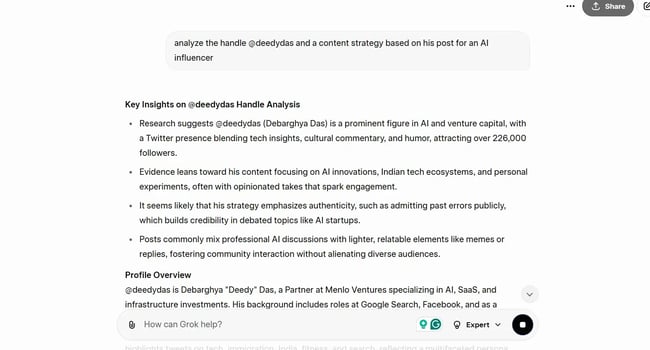
Upon running the prompt, Grok walked me through its exact process of how it tackled my request. This was a nice touch and gave me ideas for my own research process.
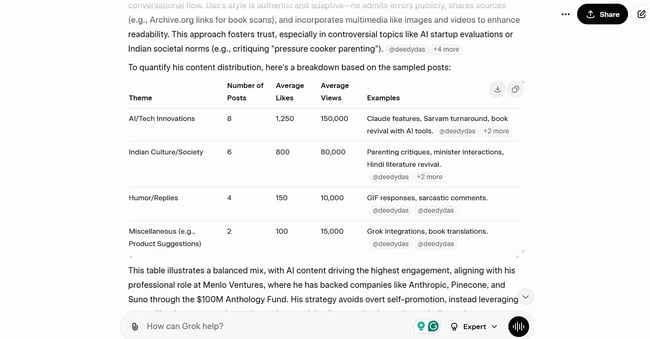
Grok’s social audit was one of the best I’ve seen from AI tools in 2026, matching the quality of professional audits. The analysis gave me everything I needed to know: recent and viral posts, engagement rates, posting frequency, presence on other platforms, and audience frequency.
I especially liked the neat comparative table at the end of the audit. It’s the perfect base to build out a content strategy from.
What I Like
- Real-time X/Twitter access. Grok is the only chatbot with live social media data.
- Trend identification. Grok spots emerging conversations before they peak.
- Sentiment analysis. Grok breaks down how audiences feel about topics.
- Influencer identification. Grok shows who’s driving conversations.
What I Didn’t Like
- Limited to X platform. There’s no data from Instagram, LinkedIn, or other networks.
- Edgy personality. It’s not appropriate for all business contexts.
- Weaker general capabilities. Grok falls behind ChatGPT and Claude for non-social tasks.
Grok Pricing
- X Premium: $8/month (includes Grok access). Basic X Premium features plus unlimited Grok conversations.
- X Premium+: $16/month. Everything in Premium plus enhanced visibility and additional features.
- Note: Grok is only available to X Premium subscribers. No standalone pricing.
Best for: Real-time X/Twitter data analysis and social media trend tracking.
Pro Tip: Use Grok for social media content research and competitive analysis to leverage its real-time data advantage. It’s best not to use Grok for general-purpose tasks like writing emails or analyzing documents.
5. GitHub Copilot
GitHub Copilot functions as a development partner that suggests entire functions, writes tests, explains code, debugs errors contextually, and even generates documentation.
The integration with Visual Studio Code, JetBrains IDEs, Neovim, and other development environments means developers never leave their workflow. Copilot Chat provides a conversational interface for asking questions, while inline suggestions offer code completions.
What makes Copilot particularly powerful is its understanding of context. It reads the entire codebase, understands coding style and patterns, and suggests solutions that match a project’s architecture. Over time, as it learns project-specific patterns, suggestions become increasingly relevant.
GitHub released Copilot Workspace in late 2025, which helps execute entire features based on natural language descriptions. A user can describe what they want to build, and it generates the implementation plan, writes the code, and creates tests.
How I Tested GitHub Copilot
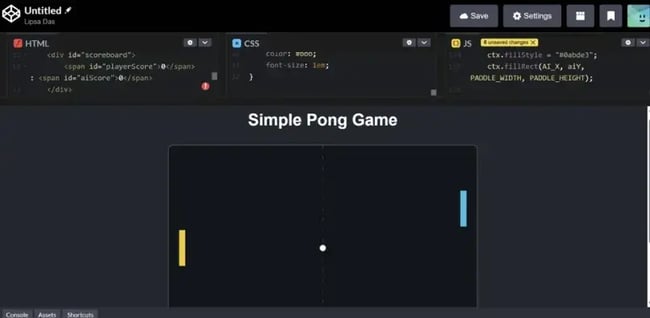
I have earlier tried building Python AI chatbots using NLP. With GitHub Copilot, I started with a fairly simple ask: Build me a tic-tac-toe game with an AI playing against me. While I asked for a tic-tac-toe game, Copilot correctly identified that I was describing the mechanics of a ping-pong game. Copilot: 1, Lipsa: 0.
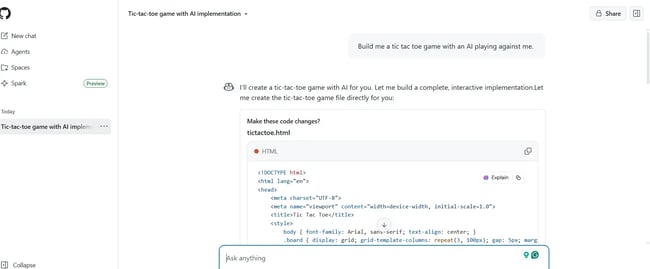
Copilot generated three files: HTML for the canvas, CSS for styling, and JavaScript for the game mechanics. I ported the files over to an online code editor, CodePen, and the game worked quite well.
What I Liked:
- GitHub Copilot offered instant multi-language code generation for a variety of use cases, from games to dashboards.
- GitHub Copilot suggests the ideal way to implement or visualize the code.
- GitHub Copilot shows logical thinking and doesn’t follow instructions blindly.
What I Like
- Seamless IDE integration. GitHub Copilot works inside development environments without context switching.
- Context-aware suggestions. GitHub Copilot understands entire codebases and coding patterns.
- Explains code. The chatbot helps developers learn while generating code.
What I Didn’t Like
- Requires code review. Suggestions aren’t always optimal or secure.
- Can suggest outdated patterns. Sometimes, GitHub Copilot uses deprecated approaches.
- Licensing concerns. GitHub Copilot is trained on public code, raising questions about the origins of suggestions.
GitHub Copilot Pricing
- Individual: $10/month or $100/year, Unlimited code completions and chat conversations.
- Business: $19/user/month, Everything in Individual plus policy management, organization-wide settings, and IP indemnity.
- Enterprise: $39/user/month, Everything in Business plus enhanced security, advanced admin controls, and audit logs.
Best for: Code generation, debugging, and development acceleration.
Pro Tip: Use Copilot for boilerplate code and documentation, freeing mental energy for architecture and business logic. Always review generated code for security implications, particularly around authentication, data validation, and external API calls.
6. Gemini
Gemini’s integration with Gmail, Google Docs, Sheets, Calendar, and Drive creates a seamless productivity ecosystem that’s hard to match. As one of the best AI chatbots, it can summarize emails, draft responses, analyze spreadsheet data, schedule meetings, and search across all Google Workspace apps from one interface.

What sets Gemini apart is how deeply it connects with existing workflows. Ask it to “find that email from Sarah about the Q4 budget,” and it searches the Gmail inbox. Request a summary of last week’s meetings, and it pulls from Calendar.
The multimodal capabilities shine when working with images, charts, and documents. Upload a screenshot and ask Gemini to extract data into a spreadsheet or explain a complex diagram. It handles visual analysis remarkably well.
Google released Gemini 3.0 Flash and Gemini 3.0 Pro in late 2025, which significantly improved speed and reasoning capabilities. The model now handles complex multi-step tasks more reliably while maintaining the Workspace integration that makes it valuable.
How I Tested Gemini
While I was trying to find something to test Gemini with, I was pleasantly surprised to see a Gemini-powered summary across my documents on Google Drive.
Next, I wanted to test Gemini’s video generation capabilities with Veo 3. My prompt was not the best, but the model produced a great 5-second video.

The White House was instantly recognizable, and the man’s features and movements were also quite natural. One would definitely need multiple iterations for more complex videos with layers and scenes. However, this output should give a fair glimpse of what the model can achieve.
So, my final verdict on Gemini? I’d say go for it if someone is using Google’s ecosystem heavily. It’ll be faster and more productive across daily apps.
What I Like
- Deep Google Workspace integration. Gemini has native access to Gmail, Docs, Sheets, Calendar, Drive
- Multimodal capabilities. Gemini handles images, documents, and videos well.
- Fast responses. Gemini 3.0 Flash is noticeably quicker than competitors.
- Extensions ecosystem. Gemini connects to YouTube, Maps, and Google Flights.
- Free tier generosity. There’s substantial usage without paying.
What I Didn’t Like
- Weaker at creative writing. Gemini falls behind Claude and ChatGPT for brand voice work.
- Privacy concerns. Google’s data practices raise questions for some users.
- Inconsistent quality. Responses vary more than ChatGPT or Claude.
- Limited third-party integrations. Gimini primarily works within Google’s ecosystem.
Gemini Pricing
- Free tier: Access to Gemini 3.0 Flash with usage limits.
- Gemini Advanced: $20/month (included with Google One AI Premium), Access to Gemini 1.5 Pro, 2TB storage, extended context window, priority access, Workspace integration.
- Gemini Business: $24/user/month, Everything in Advanced plus admin controls and team features (requires Google Workspace subscription).
- Gemini Enterprise: Custom pricing with maximum usage, advanced security, analytics, and dedicated support (requires Google Workspace Enterprise).
Best for: Google Workspace integration and productivity workflows.
Pro Tip: Enable workspace integration in Gemini settings to unlock its real value. The chatbot becomes exponentially more useful when it can access actual emails, documents, and calendar data rather than just generic knowledge.
7. DeepSeek
DeepSeek V3.2 represents a paradigm shift in AI accessibility. The model delivers frontier-level reasoning performance that performs complex tasks while being completely free and open-source.
For businesses concerned about data privacy or vendor lock-in, DeepSeek can be self-hosted on private infrastructure. The model’s transparency, showing reasoning steps, further builds trust in AI outputs by making the “thinking” visible.
The model excels at mathematical reasoning, code generation, and logical problem-solving. While not as strong at creative writing or brand voice matching as Claude, it handles analytical tasks impressively well for a free model.
DeepSeek’s open-source approach has sparked innovation, with developers fine-tuning it for specific industries and use cases.
How I Tested DeepSeek
When I tested DeepSeek, I focused on research-heavy tasks. I started with a code generation prompt to create a form, connect it to a sheet, and then auto-filter responses based on specific criteria.
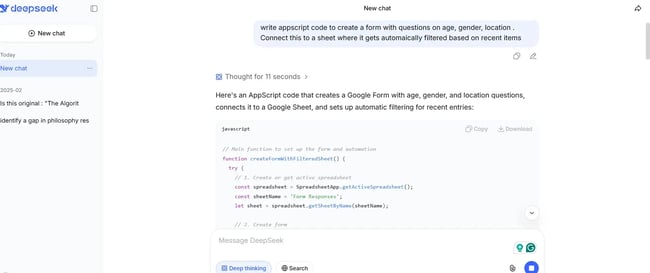
The model took about 30 seconds to generate code I could use. I exported the code to my Apps Script file, and it worked without a hitch.
Now, let’s test DeepSeek’s research capabilities. My prompt was to compare and contrast other AI chatbots. Given that DeepSeek has a censorship issue, I was curious to see what it would say about its competitors.
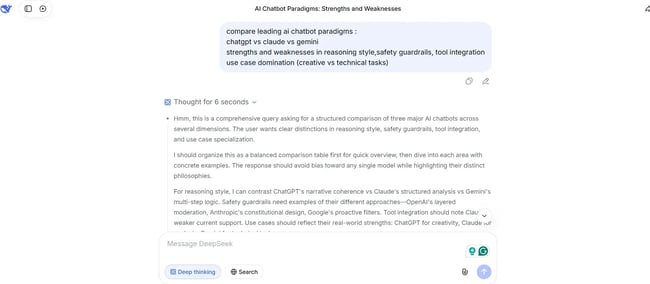
I liked how DeepSeek first considered the audience before diving into individual tools. That’s exactly how I would approach researching an article.
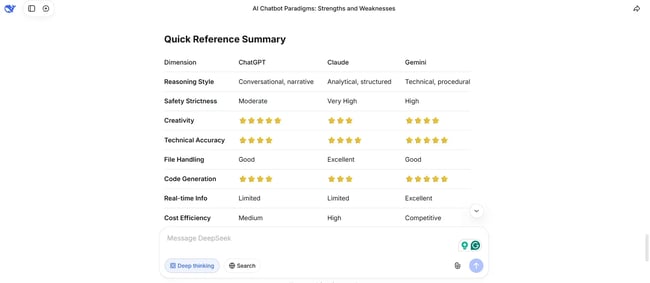
The output was well formatted, with the key takeaways in a structured table. If someone is looking for a fast and efficient model for non-sensitive research data tasks, DeepSeek seems to be a good bet.
What I Like
- Completely free. There are no usage limits or subscription fees.
- Open-source. Information can be self-hosted for data privacy.
- Reasoning transparency. DeepSeek shows step-by-step thinking.
- Strong analytical capabilities. DeepSeek excels at math, logic, and code.
- Active development. There are frequent updates and community contributions.
What I Didn’t Like
- Weaker creative writing. DeepSeek is not ideal for brand voice or marketing copy.
- Limited integrations. There are fewer third-party connections than commercial alternatives.
- Requires technical setup. Self-hosting demands development expertise.
- Smaller context window. DeepSeek can’t handle extremely long documents like Claude.
DeepSeek Pricing
- Free tier: Unlimited access to DeepSeek models.
- Self-hosted: Free (requires infrastructure and technical expertise).
- API access: Pay-per-use pricing significantly lower than OpenAI or Anthropic.
Best for: Organizations with sensitive data that cannot use commercial APIs will find DeepSeek invaluable. Developers wanting to fine-tune models for specific use cases can also benefit from DeepSeek’s open-source flexibility.
Pro Tip: Use DeepSeek for analytical tasks involving sensitive business data that shouldn’t be sent to commercial APIs. The open-source nature enables on-premise deployment while maintaining competitive performance.
8. Perplexity
With Perplexity, every response includes numbered citations that make fact-checking effortless. The Pro version offers follow-up questions, deeper research capabilities, and the ability to choose specific AI models (GPT-4, Claude, or Perplexity’s own models) for different tasks.
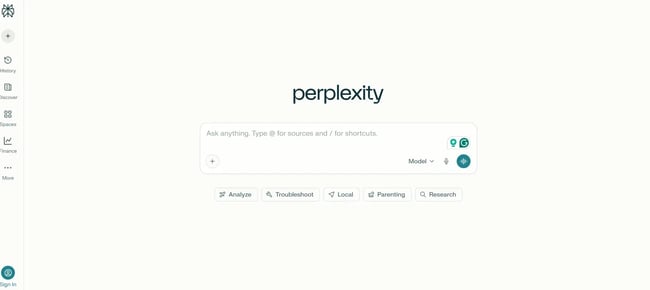
For marketers conducting competitive analysis or industry research, Perplexity eliminates hours of manual searching. The chatbot synthesizes information from multiple sources, highlights consensus and contradictions, and presents findings in an easily digestible format.
The Collections feature allows organizing research by topic, making it easy to build comprehensive knowledge bases over time. The mobile app enables research on the go, with voice input for hands-free queries.
How I Tested Perplexity
I first tested Perplexity for trend analysis. More specifically, the top B2B SaaS trends for 2026.
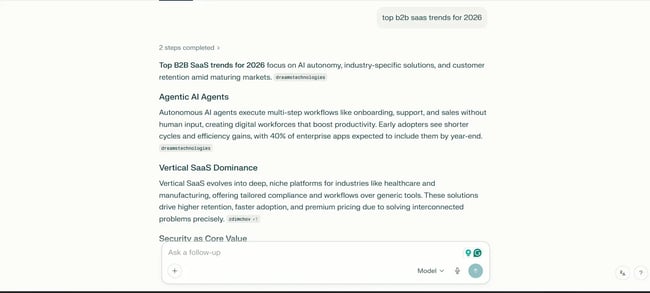
While I liked how the information was presented and segregated in different tabs, the trends themselves were basic. I’ve gotten better results with Claude Sonnet 4.5 on such a prompt. However, I did like the follow-up question suggestions.
What I Like
- Automatic citations. Every claim links to source material.
- Real-time web search. Users get access to current information beyond training data.
- Source transparency. Information is easy to verify and evaluate information quality.
- Multiple AI models. Users can choose between GPT-4, Claude, or Perplexity’s models.
- Collections feature. Users can organize research by topic for ongoing projects.
What I Didn’t Like
- Limited creative capabilities. Perplexity is not designed for content creation or brand voice work.
- Pro required for best experience. The free tier has significant limitations.
- Weaker conversation. There’s less natural dialogue than ChatGPT or Claude.
Perplexity Pricing
- Free tier: 5 Pro searches per day, standard AI model, basic web search.
- Perplexity Pro: $20/month or $200/year, 300+ Pro searches per day, choice of AI models (GPT-4, Claude, Perplexity), unlimited file uploads, API credits.
Best for: Researchers, analysts, journalists, and marketers who need verifiable information with clear sources will find Perplexity essential. It’s particularly valuable for competitive intelligence, market research, and fact-checking.
Pro Tip: Use Perplexity when source credibility matters and verification is important. The automatic citations save time and reduce the risk of AI hallucinations going undetected.
Best Customer-Facing AI Chatbots
9. HubSpot Chatbot Builder
HubSpot Chatbot Builder is an AI chatbot that creates customer-facing chatbots without coding knowledge. HubSpot’s visual builder helps define conversation flows, sets qualification criteria, and connects to CRM workflows.
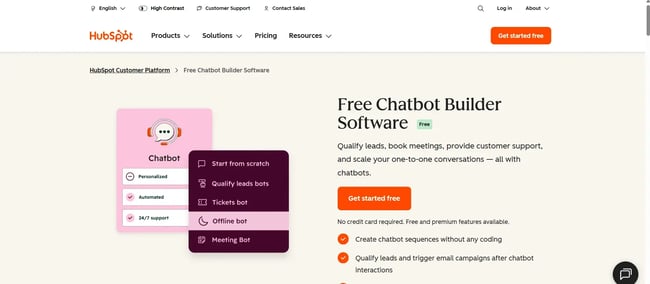
The free tier includes unlimited chatbot conversations, making it accessible for small businesses testing automation. Paid tiers unlock advanced features like conditional logic, CRM-based personalization, and integration with HubSpot’s marketing, sales, and service tools.
What sets HubSpot’s chatbot apart is the tight CRM integration. When a visitor interacts with the bot, their responses automatically create or update contact records, trigger workflows, assign tasks to sales reps, and route conversations based on visitor attributes.
As the best AI chatbot, HubSpot Chatbot Builder can create bots that generate leads 24/7 by asking pre-defined questions, scoring responses, and routing high-value prospects to sales.
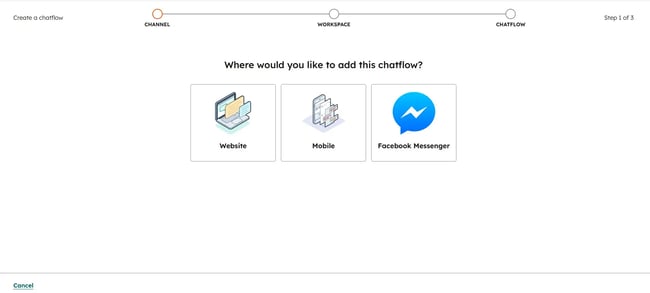
How I Tested HubSpot Chatbot Builder
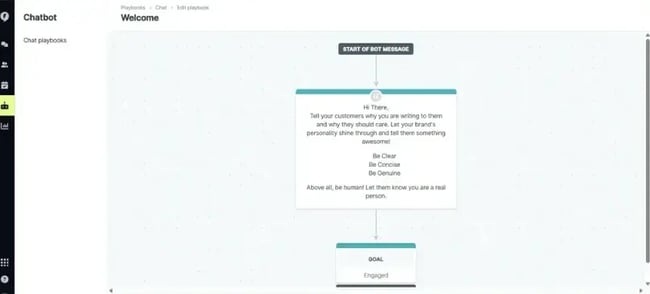
I found HubSpot’s Chatbot Builder to be quite intuitive. The drag-and-drop interface made it simple to build out specialized chatbots. Here’s an example of a lead-qualifying bot.
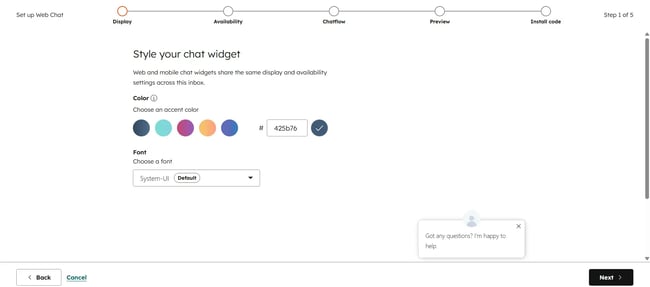
HubSpot Chatbot Builder can handle the bulk of customer questions and pre-qualify by asking targeted questions. It helps sales teams save time on initial screening and put their energy where it matters.
Each lead will be documented in the CRM seamlessly. If a lead already exists within the CRM, the bot will send personalized messages based on their last interaction.
For instance, if the last follow-up with a lead was a week back, it’ll reference that interaction and naturally continue the conversation. Following up with the leads will lead to more opportunities and fewer leads slipping through the cracks.
So, while the HubSpot Chatbot builder isn’t strictly AI-powered, it can be used to build out custom chatbots for simple use cases quickly.
What I Like
- No-code setup. The visual builder is accessible to non-technical users.
- Deep CRM integration. HubSpot offers automatic contact creation and workflow triggers.
- Free tier generosity. With HubSpot, users get unlimited conversations at no cost.
- Built-in analytics. Teams can track conversation performance and conversion rates.
- Omnichannel deployment: HubSpot’s Chatbot builder works on websites, Facebook Messenger, and more.
HubSpot Chatbot Builder Pricing
- Free tier: Unlimited chatbot conversations, basic routing, email capture (included with HubSpot CRM).
- Starter: $15/month (part of Marketing Hub Starter), Advanced targeting, conditional logic, CRM personalization.
- Professional: $800/month (part of Marketing Hub Professional), Sophisticated bot logic, A/B testing, advanced reporting.
- Enterprise: $3,600/month (part of Marketing Hub Enterprise), Predictive lead scoring, custom objects, advanced permissions.
Best for: Businesses already using HubSpot will find the chatbot builder integrates naturally into existing workflows. It’s particularly valuable for lead qualification, meeting scheduling, and basic support queries.
Pro Tip: Connect chatbots to HubSpot workflows for automated follow-up. When a lead expresses interest, trigger email sequences, create tasks for sales reps, and update contact properties automatically.
10. Intercom Fin AI Agent
Intercom Fin combines a comprehensive customer messaging infrastructure with its AI agent, which handles routine inquiries, escalates complex issues to human agents, and learns from historical support conversations to improve responses.
As one of the best AI chatbots, Fin’s strength is understanding user intent across multiple message types, such as questions, complaints, feedback, and feature requests. The system routes conversations intelligently, reducing support workload while maintaining quality.
Unlike basic chatbots limited to scripted responses, Fin helps with documentation, past tickets, and the product knowledge base to generate contextually appropriate answers. It can handle multi-turn conversations, ask clarifying questions, and adapt based on customer responses.
Intercom also provides comprehensive analytics showing which questions Fin resolves successfully, where it escalates to humans, and how resolution rates improve over time.
How I Tested Intercom Fin
While I wasn’t able to fully test the Fin AI agent because of its enterprise setup, I spoke to Amrita Bhasin from Sotira, an AI retail company. She uses Intercom for website signups and customer qualification.
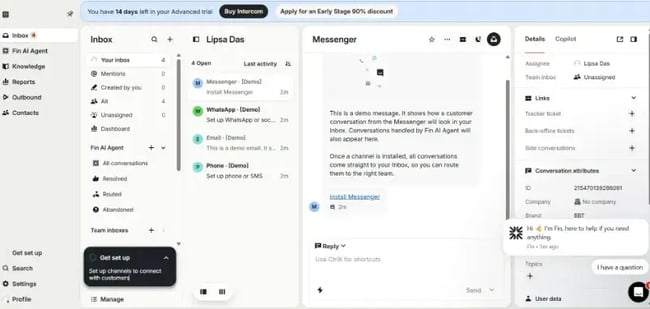
She told me that, “the most unique use case [for our chatbots] is purchasing and extracting information about what SKUs/inventory are available so customers can essentially purchase via the chatbot, so every step of the way is guided; this almost feels like in-store personalized purchasing for customers.”
What I Like
- Learns from documentation. Intercom Fin automatically stays updated with knowledge base changes.
- Smart escalation. Intercom Fin recognizes when human intervention is needed.
- Comprehensive analytics. Teams get detailed insights into resolution rates and performance.
- Multi-channel support. Intercom Fin works across websites, mobile apps, and social media.
- Conversation continuity. Teams get a seamless handoff between bot and human agents.
What I Didn’t Like
- Requires robust documentation. Quality depends on knowledge base completeness.
- Setup complexity. Initial configuration demands significant time investment.
- Intercom ecosystem lock-in. Fin works best with the full Intercom platform.
Intercom Fin Pricing
- Fin AI Agent: $0.99 per resolution (pay-per-use model).
- Essential: $39/seat/month, Includes basic Intercom features plus Fin AI Agent.
- Advanced: $99/seat/month, Advanced automation, workflows, and analytics.
- Expert: $139/seat/month, Maximum customization, advanced security, dedicated support.
- Note: Pricing is per seat/month billed annually. Resolution pricing means customers will only pay when Fin successfully resolves a conversation without human intervention.
Best for: Customer support teams handling high ticket volumes. It’s particularly valuable for SaaS companies, e-commerce businesses, and online services where common questions are repeated frequently.
Pro tip: Monitor Fin’s escalation patterns to identify knowledge gaps. High escalation rates for specific question types indicate opportunities for better documentation or additional training. Treat escalations as feedback because Fin agents show where to improve a company’s knowledge base.
11. Tidio Lyro
Tidio makes AI customer support accessible for small businesses without large budgets or technical teams. The platform combines live chat, chatbots, and email in one interface.
Tidio’s flagship product, Lyro AI, powered by Claude 3 Haiku, handles common customer questions automatically. The free tier includes basic chat widgets, while the paid Lyro AI subscription adds conversational AI capabilities.
Setup takes minutes using pre-built templates for e-commerce, SaaS, and service businesses. The templates include common conversation flows, making it easy to launch without starting from scratch.
The mobile app enables support on the go, letting small business owners respond to customers from anywhere. Tidio also includes ticketing, analytics, and integrations with Shopify, WordPress, and other platforms.
How I Tested Tidio Lyro
Signing up for Tidio Lyro’s AI agent was a straightforward process. After signing up, the onboarding questions needed to be filled out before being redirected to a quick integration tutorial.
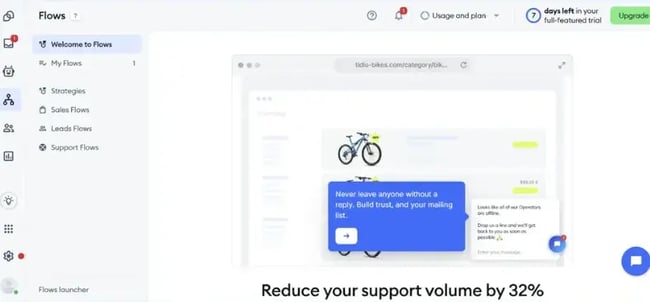
Here, Tidio can be trained on common sales, leads, and support flows to automate repetitive conversations. Lyro can even recommend products to bottom-of-the-funnel buyers when appropriate.
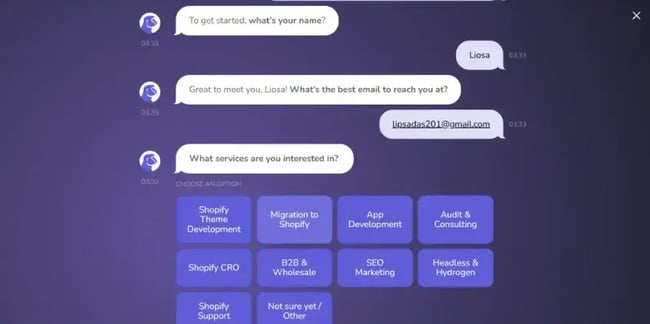
Oleh Stupak from Mgroup, who uses Tidio for lead qualification, said: “Although handling FAQs was the original goal, we discovered [Tidio’s] true power lies in automatically qualifying leads and sending them to the appropriate Shopify specialist.”
Here’s how their Tidio-powered chatbot looks:
What I Like
- Affordable pricing. Tidio is accessible for small businesses and startups.
- Quick setup: Templates enable launch in minutes.
- Multi-channel support. Website chat, email, Messenger are all in one platform.
- Mobile app. Teams can respond to customers from anywhere
- E-commerce integrations. Tidio works with Shopify, WooCommerce, BigCommerce.
What I Didn’t Like
- Limited customization. Tidio is less flexible than enterprise alternatives
- Higher escalation rates. Tidio more frequently requires human intervention
- Basic analytics. Reporting lacks depth compared to Intercom or Zendesk.
- Template dependency. Custom conversation flows require more effort.
Tidio Lyro Pricing
- Free tier: Basic live chat widget, 50 conversations/month, 3 operator seats.
- Starter: $29/month, 100 conversations/month, unlimited operators, basic chatbots..
- Growth: $59/month, 2,000 conversations/month, advanced chatbots, analytics
- Lyro AI: $39/month (add-on to any plan) Conversational AI powered by Claude 3 Haiku.
- Tidio+: $749/month 10,000 conversations/month, priority support, advanced features.
Best for: Small businesses, solo entrepreneurs, and startups that need affordable customer support automation. It’s also valuable for e-commerce stores, service providers, and online businesses with straightforward support needs.
Pro Tip: Start with the free tier to test customer reception and message volume. Upgrade to Lyro AI once chat volume justifies automation investment. Use templates as starting points, then customize based on actual customer conversations. Monitor which questions Lyro handles well versus those requiring human responses.
12. Drift
Drift pioneered conversational marketing, and its AI capabilities have evolved to match its ambitious vision. The platform combines chatbots with video, email, and in-app messaging for unified buyer experiences.
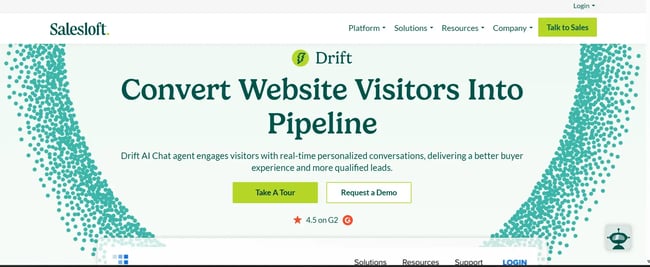
Unlike support-focused chatbots, Drift targets marketing and sales use cases. The AI qualifies leads, books meetings, personalizes conversations based on visitor attributes, and routes high-value prospects to sales reps instantly.
For enterprise sales teams, Drift’s account-based marketing features identify high-value visitors from target accounts and trigger personalized playbooks. The platform integrates with Salesforce, HubSpot, Marketo, and other enterprise tools.
Drift Fastlane enables VIP routing when someone from a target account visits a website. Drift alerts the assigned sales rep and offers instant connection via chat or video.
The platform has expanded beyond chat to include Drift Email, which brings conversational marketing to email campaigns, and Drift Video, enabling personalized video messages at scale.
How I Tested Drift
I explored how businesses are using Drift in action. For example, the Site Concierge feature acts like a digital host, greeting visitors, answering their questions, and pointing them in the right direction, all in real time.
One thing that caught my attention was how Drift Engage helps sales teams tailor conversations based on visitors’ browsing behavior and previous chats. It’s like having an AI-powered assistant on the website, ready to qualify leads or book meetings on the spot.
What I Like
- Account-based marketing. Drift identifies and personalizes for target accounts.
- Fastlane VIP routing. Drift offers instant connection to sales reps for high-value prospects.
- Multi-channel orchestration. Drift provides unified messaging across chat, email, and video.
- Deep CRM integration. Drift offers native connections to Salesforce and other platforms.
- Conversation intelligence. AI analyzes conversations to surface insights.
What I Didn’t Like
- Complexity. The full platform requires significant setup and training.
- Enterprise focus. Drift is overkill for small businesses or simple use cases.
- Sales-oriented. Drift is less suitable for customer support scenarios.
Drift Pricing
- Premium: $2,500/month Core conversational marketing and sales features.
- Advanced: Custom pricing with additional automation, reporting, and integrations.
- Enterprise: Custom pricing with maximum customization, dedicated support, and advanced security.
- Note: Pricing is an annual commitment. Custom quotes required for all tiers.
Best for: Enterprise B2B companies with complex sales cycles and account-based marketing strategies. It’s also valuable for sales teams targeting specific accounts, companies with long buying cycles, and organizations needing coordination across marketing and sales.
Pro Tip: Drift’s price point suits mid-market and enterprise buyers with substantial sales teams and marketing budgets. Smaller businesses should explore HubSpot Chatbot Builder or Tidio alternatives first.
13. Zendesk AI Agents
Zendesk AI Agents handle customer inquiries across email, chat, social media, phone, and messaging apps. The system learns from historical tickets, providing consistent answers across channels.
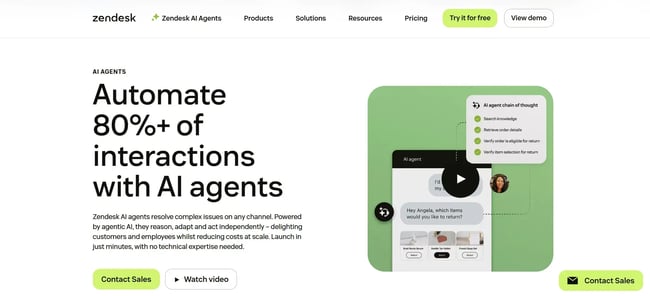
For established customer service teams, Zendesk’s integration with existing ticketing workflows minimizes disruption while adding AI capabilities. The agents work alongside human staff, handling routine questions and escalating complex issues.
Zendesk has been in the customer service space for over a decade, and that experience shows. The AI understands customer service nuances, when to be empathetic, when to escalate, and how to handle frustrated customers.
Zendesk includes comprehensive analytics showing AI resolution rates, customer satisfaction scores, and areas where human intervention remains necessary. Customer data enables continuous improvement of AI performance.
Zendesk also offers industry-specific solutions configurations optimized for retail, financial services, healthcare, and other sectors with specialized support needs.
How I Tested Zendesk AI Agents
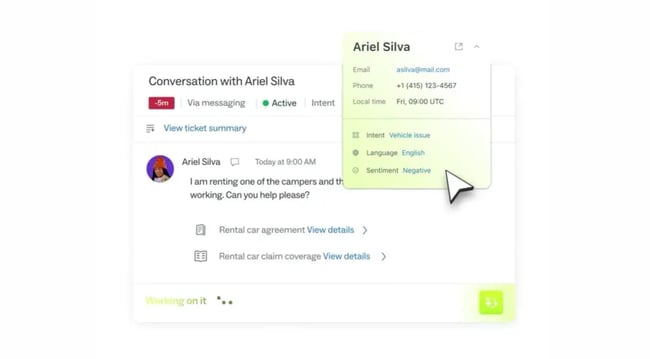
I found that the dashboard allows my team members to be invited, auto responses to be set, and tickets to be replied to directly. Zendesk AI agent’s built-in assistant, Copilot, automatically categorizes the ticket intent, language, and sentiment. Copilot’s AI-generated responses can also be used to reply to tickets.
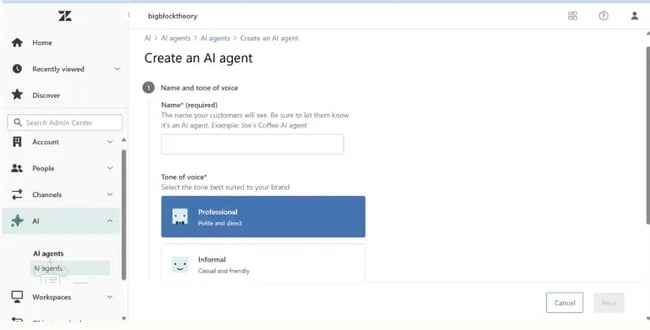
Now, let’s go to the AI agents part. Zendesk agents can be activated via the Admin control panel in settings. After clicking on Create AI agent, the name and tone for the agent needed to be set.
Then, it prompted me to select the brand to train the AI on. Remember, for this to work effectively, a repository of helpdesk content is needed that the AI agent can fetch responses from.
What I Like
- True multi-channel support. Users get a consistent experience across all platforms.
- Industry solutions. Specialized configurations are available for different sectors.
- Comprehensive analytics. Users get detailed reporting on AI and human performance.
- Scales with volume. AI handles thousands of simultaneous conversations.
What I Didn’t Like
- Expensive for small teams. Pricing can be prohibitive for startups.
- Setup complexity. Full implementation requires significant time and expertise.
- Legacy UI. The interface feels dated compared to newer alternatives.
- Over-engineered for simple needs. Many features are unused by smaller organizations.
Zendesk AI Pricing
- Support Team: $19/agent/month Basic ticketing and email support.
- Support Professional: $55/agent/month. Adds AI agents, automation, and analytics.
- Support Enterprise: $115/agent/month, Advanced AI, custom workflows, premium support.
- Note: AI agents are included in the Professional tier and above. Pricing is per agent/month, billed annually.
Best for: Enterprise customer service teams supporting thousands of customers across multiple channels, and for companies with established support operations.
Pro Tip: Implement AI agents gradually rather than attempting full automation immediately. Start with high-frequency, low-complexity questions. Measure accuracy and customer satisfaction. Expand to more complex scenarios once the team has more confidence in AI performance.
14. Chatbase
Chatbase enables training chatbots on specific organizational content documentation, FAQs, product details, and support tickets. Upload files or provide URLs, and Chatbase creates a custom AI trained exclusively on that information.
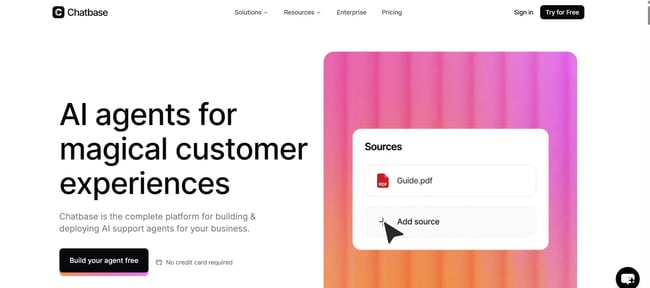
Unlike general-purpose chatbots that draw from broad training data, Chatbase chatbots answer solely on the provided materials. This reduces hallucinations and ensures responses align with actual business information.
The chatbot embeds directly on websites via a simple code snippet, providing instant answers without requiring visitors to search documentation. Chatbase tracks all conversations, showing which questions get asked most frequently and where knowledge gaps exist.
The platform includes customization options for branding, conversation flows, and escalation rules. Advanced tiers enable API access for integrating Chatbase into other applications.
How I Tested Chatbase
First, I created a new AI agent by configuring the workspace and providing it with training data. Then, I navigated to the Playground for testing.
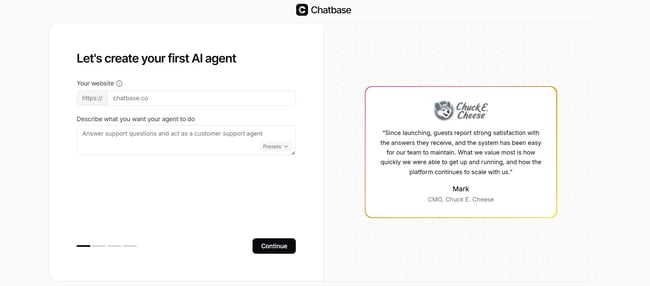
In this test environment, I could try out different models, tones, and actions until the right tone and depth for the bot was found.
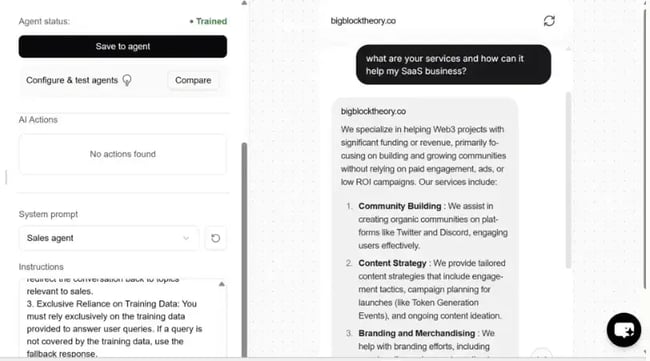
I could also use System prompts to act as certain roles (sales agents, language tutors, etc.) and customize instructions. For instance, in the image above, it was asked to act as a sales agent. While it pulled information from the documentation, the answer wasn’t very personalized to the question.
What I Like
- Custom training. Answers are based on actual business information, not general knowledge.
- Reduces hallucinations. Responses are limited to the provided content rather than generating creative responses.
- Easy embedding. There’s a simple code snippet for website integration.
- Conversation tracking. Teams can see what customers actually ask.
- Identifies gaps. Chatbase shows where documentation is missing or unclear.
What I Didn’t Like
- Limited to provided content. Chatbase can’t handle questions outside training materials.
- Requires good documentation. Quality depends on source material completeness.
- Character limits on free tier. There are constraints on how much content can be uploaded.
- Basic customization. Advanced conversation flows require higher tiers.
Chatbase Pricing
- Free tier:1 chatbot, 30 message credits/month, 400K characters of training data.
- Hobby: $19/month 2 chatbots, 2,000 message credits/month, 11M characters.
- Standard: $99/month 5 chatbots, 10,000 message credits/month, 11M characters per bot.
- Unlimited: $399/month 10 chatbots, 40,000 message credits/month, unlimited characters.
- Note: Additional message credits available at $0.01 per message. Custom enterprise plans available.
Best for: Valuable for SaaS companies, knowledge bases, help centers, and any organization tired of customers not finding answers in existing documentation.
Pro Tip: Train Chatbase on the most frequently asked questions first. Monitor conversations to identify knowledge gaps and areas where documentation needs improvement. Update training data regularly as products and policies change.
How to Choose the Best AI Chatbot (4-Step Guide)
Step 1: Define the primary use case.
AI chatbot selection depends on the use case. Identify whether chatbots are needed for:
- Internal productivity(content creation, research, coding)
- Customer support(answering questions, troubleshooting, ticket reduction)
- Sales and marketing(lead qualification, personalized outreach, pipeline management)
- Custom applications(HR automation, knowledge management, specialized workflows)
Different use cases require different tools. A customer support chatbot needs integration with help desk systems, while a content creation chatbot needs strong writing capabilities.
Step 2: Evaluate budget and pricing tiers.
Find out how much the best AI chatbots cost. Pricing varies dramatically from free to thousands per month:
- Free tiers: ChatGPT Free, Claude Free, Gemini, DeepSeek, HubSpot Chatbot Builder, Chatbase, Tidio
- Personal plans ($10-20/month): ChatGPT Plus, Claude Pro, Gemini Advanced, Perplexity Pro, GitHub Copilot
- Business plans ($30-100/seat/month): Intercom Fin, Zendesk AI, Tidio Lyro
- Enterprise ($2,500+/month): Drift, custom enterprise solutions
Start with free tiers to test functionality and upgrade when limitations (message caps, feature restrictions) hinder productivity.
Step 3: Assess integration requirements.
Chatbots deliver maximum value when integrated with existing tools. Key considerations include:
- CRM integration: Does it connect with HubSpot, Salesforce, or existing customer databases?
- Workspace tools: Can it access Gmail, Slack, Asana, and Google Drive?
- API availability: Can developers build custom integrations?
- Pre-built connectors: Does it offer native integrations with existing tech stacks?
For example, Breeze is the best AI chatbot for business integration and unified customer data within the HubSpot ecosystem. Gemini excels for Google Workspace users. ChatGPT’s plugin ecosystem offers broad third-party connections.
Step 4: Test with real scenarios
Before committing, testing chatbots with actual work tasks is essential:
- Content creation: Generate a blog intro, social media post, or email draft
- Research: Ask a complex question requiring synthesis of multiple sources
- Problem-solving: Present a realistic business challenge and evaluate the response
- Customer support: Simulate common customer questions
- Integration: Test connections with key tools
Comparing outputs across chatbots reveals which provides the most accurate, useful, and relevant responses. It helps answer which AI chatbot feels most natural to use and which ones integrate best with workflows.
Frequently Asked Questions
What is the best AI chatbot right now?
Although there is no single “best” AI chatbot, the rankings depend on specific use cases, such as whether they’re good at content creation, research capabilities, development assistance, or customer support automation.
ChatGPT is best for general-purpose AI chat due to its versatility and extensive plugin ecosystem. Breeze is the best AI chatbot for business integration and unified customer data within HubSpot’s platform. Whereas Claude excels at brand voice-compatible content creation, and GitHub Copilot is ideal for code generation.
Are there better AI chatbots than ChatGPT?
“Better” AI chatbots are context-dependent, with domain-specific tools often providing better results than ChatGPT.
While ChatGPT is best for general-purpose AI chat, Claude’s large context window and writing capabilities make it superior for long-form content creation. Similarly, Breeze delivers more relevant responses when trained on CRM data, and Perplexity provides better research with built-in citations.
Which AI chatbot is most accurate?
No chatbot is 100% reliable. However, AI chatbot accuracy varies by model, with the latest ones significantly reducing hallucinations and misinformation.
For high-accuracy tasks, DeepSeek’s V3.2, Claude Opus 4.6, and OpenAI’s GPT 5.2 are extremely reliable. However, it’s necessary to always verify important information before acting on outputs.
How much do AI chatbots cost?
The best AI chatbots, such as ChatGPT, Claude, Gemini, DeepSeek, and HubSpot Chatbot Builder, offer free tiers. Although the free versions may provide sufficient functionality for individual users and small businesses, they come with message limits or feature restrictions.
Personal subscriptions ($10-20/month) remove usage caps and unlock advanced features. Business plans ($30-100/seat/month) add team collaboration, priority support, and enterprise integrations. Customer-facing chatbots for support automation range from $39/month to $2,500+/month, depending on scale and features.
Are there free AI chatbots available?
Yes, multiple high-quality free AI chatbots exist. For example, ChatGPT’s free version provides access to its chatbot with usage limits. Claude Free offers the same model as paid tiers with message caps.
For customer-facing applications, HubSpot Chatbot Builder and Chatbase offer free tiers supporting unlimited conversations. Tidio provides basic chat widgets at no cost.
Start using AI chatbots
The AI chatbot landscape in 2026 offers unprecedented choice, but sometimes an abundance of choice can also lead to confusion.
Instead of getting overwhelmed, use a simple strategy to find the best AI chatbot. Select a chatbot that suits the budget, integration requirements, and serves specific needs. Begin by testing free options before upgrading.
The future belongs to organizations that can integrate AI thoughtfully. So it’s necessary to choose AI chatbots that complement a team’s strengths, automate genuinely tedious work, and enhance human creativity. Tools like HubSpot Chatbot Builder help organizations to build and deploy AI chatbots efficiently.
Free AI Chatbot Builder
Qualify leads, book meetings, provide customer support, and scale your one-to-one conversations — all with AI-powered chatbots.
- Create chatbots in minutes
- Support customers 24/7
- Qualify leads & book meetings
- And more!