.webp?width=112&height=112&name=Help-Desk-EN@3x%20(1).webp)
Call center software is the backbone of delivering great customer service at scale. While AI and chatbots are great for quick fixes, there’s no replacement for the speed and comfort of talking to a live agent. Call center software makes that seamless experience possible by routing customers to the right agents and helping teams execute an omnichannel strategy.

The human touch also eases frustration. Once, I spent what felt like forever trying to resolve a billing issue with endless automated prompts. When I finally connected with a live agent, they already had my account details and solved my issue in minutes.
This guide covers the must-have call center software features, the best tools available, and how to choose the right one for a growing team.
Table of Contents
What is call center software?
Call center software is a platform that manages customer communications across channels like phone, email, live chat, and social media. Incoming questions are routed to an agent who can help. Interaction history is logged and connected to customer records, giving service reps the context they need before a conversation starts.
Most modern call center software is cloud-based, so agents can work from anywhere while staying connected to the same system and customer data. Managers also get real-time visibility into team performance through built-in dashboards.
.webp?)
Free Help Desk & Ticketing Software
Keep track of customer requests in one unified help desk that connects to your CRM database.
- Provide personalized, AI-powered support to your customers
- Save time, reduce errors, and streamline service processes
- Improve rep efficiency & time to resolution
- And more!
Benefits of Call Center Software
Call center software does more than manage phone queues. When implemented well, call center software improves response times, agent performance, customer experience, and business outcomes across the board.
Faster Response Times and First Contact Resolution
Speed is one of the most measurable benefits of call center software. Automatic call routing and CRM integration mean agents spend less time gathering context. They can then solve issues faster. Contact centers using AI see a 14% increase in issues resolved per hour and a 9% reduction in average handling time. In high-volume environments, those gains add up quickly.
Improved Customer Experience Across Channels
Customers expect to move between channels without having to repeat themselves. Call center software unifies those channels into a shared inbox, so a customer who starts on chat and follows up by phone gets a seamless experience. Sixty-six percent of customers expect companies to understand their needs and expectations thoroughly. Omnichannel software is what makes that expectation achievable at scale.
Better Agent Performance and Coaching
Call monitoring, call recording, and real-time dashboards give managers the visibility they need to coach effectively. Supervisors can listen in on live calls and review recordings to identify training gaps.
Actionable Data and Reporting
Call center software surfaces metrics like call volume, average handle time, wait times, and customer satisfaction scores. That data drives smarter staffing decisions and reveals where customers are experiencing friction. Predictive analytics improve call center efficiency and productivity by 60%, making reporting one of the highest-leverage features in a modern platform.
How to Choose the Right Call Center Tool
Choosing call center software is not just about features. The right tool depends on team size, existing tech stack, budget, and how customers prefer to get in touch. Here are the key criteria to consider when shortlisting call center tools.
1. Omnichannel Support
The best call center software handles all customer communication channels in one place, including phone, email, live chat, and social media. Incoming calls should be logged so agents can follow up across channels with full context. A unified inbox ensures customers never have to repeat themselves, regardless of how they choose to reach out.
For me, CRM integration is non-negotiable. Having the full customer story accessible during a call is what separates a good support experience from a frustrating one
Pro tip: HubSpot’s omnichannel customer service suite allows reps to connect with customers wherever they are.
2. Scalability
Call center software should grow with the team without requiring a platform migration. That means supporting additional agents, new channels, and more advanced features as the business expands. Locking into a tool that can only handle current needs can create unnecessary friction down the road.
3. Ease of Use and Onboarding
An intuitive interface reduces training time and increases agent adoption. Look for clean layouts, drag-and-drop workflows, and easy-to-find features. Built-in onboarding resources, like tutorials and guides, help new agents get up to speed quickly. If a team spends more time learning the software than using it, it is not the right fit.
Pro tip: Train and onboard new customer support hires with HubSpot’s Free Customer Service Training Manual Template. Customize it with company training processes, employee resources, and product information.
4. Real-time Reporting and Insights
Dashboards with metrics like wait times, resolution rates, and customer satisfaction scores give managers the visibility needed to make faster decisions. Being able to spot a spike in wait times before it becomes a pattern is exactly the kind of flexibility good reporting provides, and it is worth prioritizing when evaluating platforms.
5. Support Quality
Mistakes happens — outages, bugs, glitches, etc. Reliable vendor support reduces downtime when issues arise. Look for 24/7 support availability across multiple channels, including chat, email, and phone. Self-service resources, like how-to guides, make a meaningful difference for day-to-day questions.
6. Security and Compliance
Call centers handle sensitive customer data, making security a non-negotiable. Look for compliance with industry standards, such as GDPR, HIPAA, or PCI-DSS. Then, evaluate features like encryption, data masking, and access controls. Audit trails help track changes and demonstrate compliance.
Types of Call Center Software
1. Inbound Call Center Software
Think of inbound call center software as the frontline for handling customer calls. Features like automatic call distribution (ACD) match customers with the best available agent, while interactive voice response (IVR) lets them solve simple issues or connect with the right department faster.
Best for: Support teams and businesses that want to focus on resolving customer issues quickly. For example, a retail company might use inbound call software to manage returns and exchanges without the chaos.
2. Outbound Call Center Software
Outbound call center software is built for proactive outreach, covering sales calls, follow-ups, and customer surveys. It typically includes predictive dialers that automate number dialing to reduce idle time between calls. Call scripting tools, which keep conversations consistent and professional, also fall into this category. Campaign management features track performance across outreach efforts, making it easier to measure results and refine approaches over time.
Best for: Sales teams and companies conducting market research. A telecom company could use outbound software to upsell data plans to existing customers.
3. Cloud-based Call Center Software
Say goodbye to clunky hardware! Cloud-based call center software runs entirely online, so agents can work from anywhere while staying connected to the same system. It scales with growing teams, integrates with CRMs, and updates automatically — all with secure cloud storage.
Best for: Remote teams and growing businesses looking for flexibility. A startup, for instance, might choose cloud-based software to set up a cost-effective remote support team.
4. On-premises Call Center Software
On-premises call center software is for those who want full control. It’s hosted on internal servers, making it a go-to for businesses with tight security or compliance requirements. While it requires upfront investment, the payoff is complete customization and data control.
Best for: Organizations in highly regulated industries or those with in-house IT teams. One example is a bank that wants to keep customer data secure and comply with regulations.
5. AI-powered Call Center Software
AI-powered call center software takes automation to the next level. Think chatbots for instant answers, predictive analytics to optimize workflows, and sentiment analysis to gauge customer mood. It even assists agents in real time, suggesting responses or solutions.
Best for: Teams swamped with high call volumes or looking to boost efficiency. A tech company, for instance, might use AI to resolve basic troubleshooting via chatbots, leaving agents free to handle tougher cases.
6. Virtual Call Center Software
Virtual call center software is a lifesaver for distributed teams. It’s designed for remote work, with features like cloud storage and real-time tracking to keep productivity on point — even without a central office.
Best for: Remote-first companies or businesses with seasonal staffing needs. An insurance company might rely on virtual call center software to onboard temporary agents during peak claims season.
Free Help Desk & Ticketing Software
Keep track of customer requests in one unified help desk that connects to your CRM database.
- Provide personalized, AI-powered support to your customers
- Save time, reduce errors, and streamline service processes
- Improve rep efficiency & time to resolution
- And more!
Call Center Software Features
The best call center software depends on a team’s specific needs. Every tool has benefits and drawbacks. To understand which tool is right for a service department, create a list of desired features and then focus on top choices.
Below are a few features I recommend considering in your search.
1. Omnichannel
For most companies, voice is one channel of many. Teams also provide customer support through email, live chat, and social media. So, consider how well new call center software will integrate with other channels. HubSpot found that a unified customer service experience reduces friction and increases frontline efficiency.
Ideally, incoming calls should be logged on a help desk, which will allow agents to follow up via email. Everyone on the team can see the context of previous customer interactions — regardless of the channel they took place on. As a result, brands create a consistent customer experience no matter which channel the interaction begins on.
2. Call Routing
If customers call with questions, their inquiries need to go to the right person. Call routing makes sure that the best agent is assigned to every query. Teams often need to reconfigure their phone tree when there are staffing or organizational changes. Try setting up and changing a workflow during the trial period to make sure the system is flexible.
Pro tip: HubSpot’s Call Tracking creates sophisticated call flows with advanced routing capabilities.
3. CRM Integration for Customer Context
No customer wants to repeat their issue to different support reps. When agents have more context about who’s calling, they provide more effective support. Call center software that offer CRM integration provide a complete view of the customer. Agents can look at trends in product usage and take steps to ensure the customer doesn’t need to reach out again about the same issue.
What’s more, many call center tools provide context through CTI (computer-telephony integration) pop-ups that identify a customer through their phone number and surface previous interactions through the browser. Understanding how a software logs calls and integrates with other systems is critical to providing agents with enough helpful context.
4. Cloud-based Calling
Cloud-based calling, or a Voice over Internet Protocol, (VoIP), is a phone system that runs through the internet instead of a phone line. Reps can take calls on any device connected to the internet, which is cheaper to install and maintain than regular landlines. That’s because VoIP doesn’t require on-premise hardware, which removes the typical maintenance and infrastructure costs that traditional phone lines have.
5. Reporting
Call center software should track important metrics, like incoming call volume, call trends, call monitoring, and agent efficiency. It’s impossible to plan without knowing how the team currently performs. Reporting can identify common issues that customers are calling about, demonstrate gaps in support coverage, and highlight potential training opportunities.
6. Outgoing Calls
Call center software isn’t just for inbound customer service. Agents might need to make outbound calls if the company offers proactive customer support options. Sales teams may also work through call center software to place calls to prospects.
If a contact center also requires agents or sales teams to place outgoing calls and bulk SMS messages, look for software that includes an automated dialer. Then, evaluate call logging features, so the team’s CRM stays up to date.
7. Usage Pricing
Take a close look at the software’s pricing per phone call or per use. Depending on how the chosen software assigns phone numbers, teams might be charged more than expected for each minute on the phone. Before committing to new phone lines, confirm what’s included in the package and how much each call and minute will cost.
8. Interactive Voice Response
An interactive voice response feature will allow your customers to speak with an automated system before reaching support teams. While your customer might not enjoy talking to a machine, they may resolve some of their issues through this option. Customers can also provide basic information that allows reps to serve them better.
An IVR feature helps manage teams’ call volume and automatically collects relevant information from customers. When the customer gets to a human, all the information the representative needs is already available, and the customer won’t have to repeat themselves.
9. Call Scripting
If teams handle a high volume of calls related to similar issues, look for a call center software that offers a scripting feature. Like a chatbot, a call script picks up on certain keywords in the customer’s email and provides troubleshooting instructions based on a common answer. Users should be able to look at the script history and personalize responses to the customer.
A call scripting feature could also come in handy because it allows teams to create common scripts that all agents can use. That way, the customer has a consistent experience regardless of the agent they’ve reached.
10. Escalation Management
The best call center software offers escalation processes for urgent customer support queries. From the moment a customer calls with an issue, they should be able to move forward to the appropriate party at each step of the process. Call center software should also allow agents to de-escalate issues by granting vouchers, discounts, or refunds.
11. Call Monitoring and Quality Assurance
With call monitoring, supervisors can listen in or join calls. It’s particularly helpful for training new agents or providing feedback. Advanced call monitoring tools often include call recording capabilities, so teams can review past interactions and pinpoint areas for improvement. Managers can then use these recordings for compliance purposes or as examples for training sessions.
12. Workforce Management Tools
Workforce management tools within call center software can help you plan and optimize staffing. Managers can forecast call volumes and track agent availability. Additionally, these tools can integrate with reporting features to provide insights into busy times so that the right number of agents are always on duty.
10 Call Center Tools You Should Try
1. HubSpot
Get Started with HubSpot’s Call Center Tools
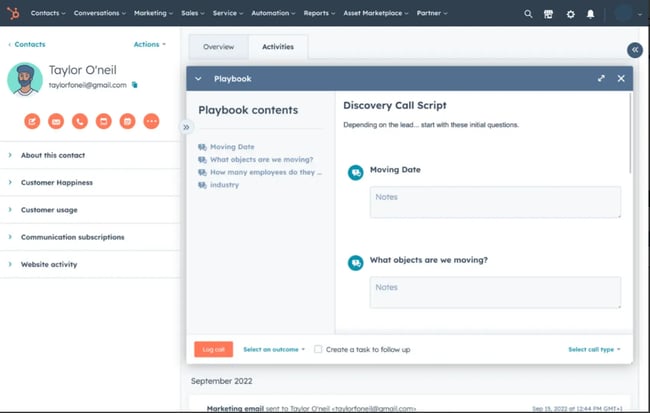
HubSpot’s VoIP software integrates seamlessly with its CRM, giving support and sales teams a single platform for managing customer interactions. Agents can make and receive calls directly from HubSpot, with automatic call logging and recording that reduce manual effort. Comprehensive analytics allow managers to track call outcomes and engagement metrics.
HubSpot’s Starter Customer Platform consolidates sales, marketing, and customer service tools into one. Its ease of use and extensive feature set make it a top choice for businesses looking to streamline workflows and improve efficiency.
Best for: Call log management and prioritization, CRM integration, reporting and analytics, and teams needing a scalable platform.
Pros
- Free plan available for small teams
- Intuitive interface with minimal learning curve
- Detailed customer insights via CRM
Limitations
- Advanced features are gated behind paid plans
- The breadth of features can feel overwhelming for new users
Pricing: Free with paid plans from $20/user/month
2. Dialpad Cloud Contact Center
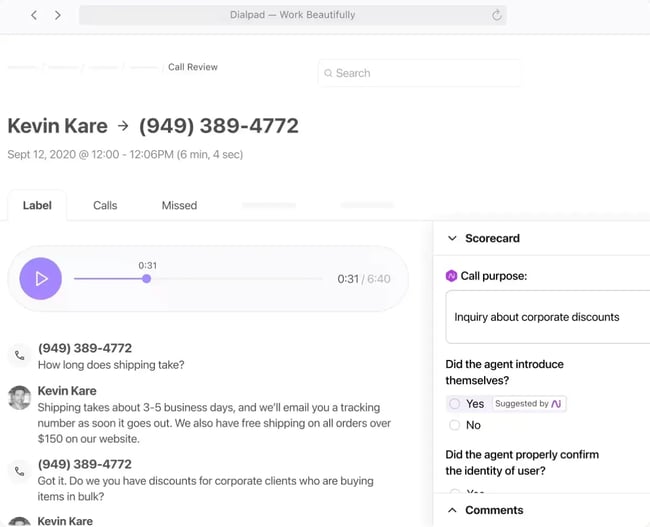
Dialpad Cloud Contact Center consolidates all customer interactions across channels into a single app, accessible from any device. The platform’s AI features include real-time voice transcription, sentiment analysis, agent coaching, and chatbot self-service.
Dialpad integrates with popular CRM and CX tools, including HubSpot, Salesforce, and Zendesk. Setting up a new contact center with Dialpad takes just a few minutes. Agents, phone numbers, and settings can all be managed directly from the account dashboard.
Best for: Outbound calls, workforce engagement management, sentiment analysis, CRM integrations, and call routing.
Pros
- Strong AI capabilities, including transcription and sentiment analysis
- Centralized interface for all communication channels
- Quick setup and user-friendly design
Cons
- Contact center functionality (Dialpad Support) is a separate product
- Advanced AI features may require additional onboarding
Pricing: Pricing available on request
3. Nextiva
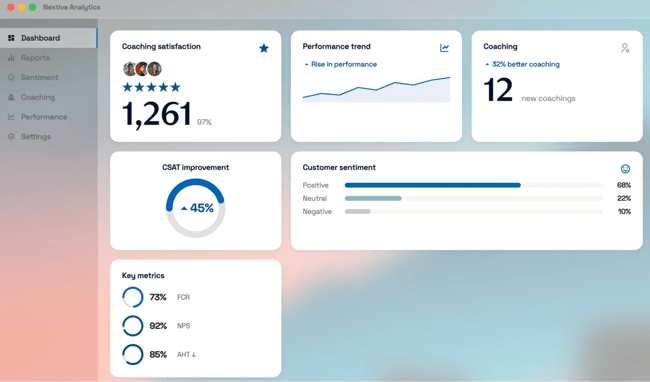
Nextiva combines robust contact center software features with affordability, making it a suitable choice for small to mid-sized businesses. The interactive voice response (IVR) system streamlines call routing, while virtual agents can handle repetitive tasks.
Nextiva’s cloud-based infrastructure ensures reliable performance and remote accessibility. Nextiva also includes detailed reporting tools. Managers can use them to monitor KPIs, such as average handling time and call resolution rates.
Ease of use and flexible pricing plans make the software ideal for teams looking to enhance productivity without breaking the budget.
Best for: Interactive voice response, call recording, cloud-based calling, call routing, and reporting.
Pros
- Competitive pricing with scalable plans
- Virtual agent capabilities for handling routine inquiries
- Strong omnichannel support features
Cons
- Advanced workforce management features require higher-tier plans
- Some customization limitations on entry-level plans
Pricing: From $23/user/month; 7-day free trial available
4. JustCall
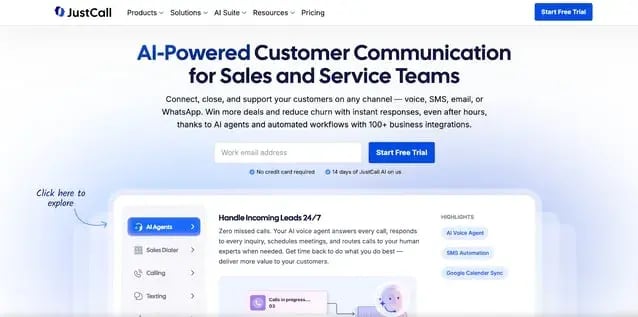
Built specifically for sales and support teams, JustCall is a cloud-based outbound call center software that unifies communication channels — such as voice, SMS, MMS, and WhatsApp — into a single AI-powered platform.
Built sets itself apart with 100+ CRM and business app integrations to help automate workflows. The software also offers local phone numbers in 70+ countries for global reach. Smart features include automatic call transcription, sentiment scoring, and real-time coaching suggestions on every call.
Best for: Small to mid-sized businesses with remote or global teams, customer-facing sales and support teams, and teams needing VoIP, texting, and AI-powered analytics.
Pros
- Native bulk SMS/WhatsApp with AI-assisted template replies.
- Strong AI features – automated call summaries, transcription and sentiment scoring
- Deep CRM/sales tool integration (e.g. seamless Pipedrive, Zoho, HubSpot links) with automated call logging and tagging
- Dashboards and reports on team performance (call volume, response times, conversation metrics) so managers can spot trends
- Intuitive, user-friendly interface with a clean UI and easy navigation
Cons
- Some advanced AI features require higher-tier plans
- Slight learning curve for complex setups
Pricing: From $29/user/month (Team); $49/user/month (Pro); $89/user/month (Pro Plus); custom pricing for Business
5. Aircall
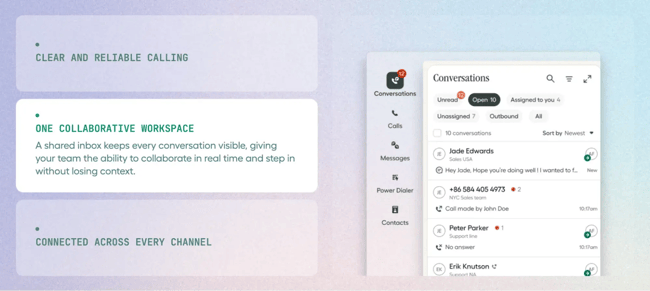
Aircall is a cloud-based call center platform with a strong focus on training and coaching features. Core capabilities include IVR, cloud-based calling, skill-based routing, call queuing, queue callback, and live call monitoring.
Aircall’s whispering feature allows managers to coach agents in real time without the customer hearing. This feature is particularly useful for onboarding new reps. Call center analytics give managers visibility into individual and team performance.
Best for: Cloud-based calling, interactive voice response, CRM integrations, call monitoring, and shared call inbox.
Pros
- Strong focus on training features like call whispering
- Easy setup and excellent integrations
- Advanced reporting capabilities
Cons
- Higher per-user cost compared to competitors
- Limited customization in some workflows
Pricing: $30/user (Essentials); $50/user (Professional); Custom (Enterprise)
Free Help Desk & Ticketing Software
Keep track of customer requests in one unified help desk that connects to your CRM database.
- Provide personalized, AI-powered support to your customers
- Save time, reduce errors, and streamline service processes
- Improve rep efficiency & time to resolution
- And more!
6. Ringover

Ringover is a user-friendly, cloud-based call center software designed to help support and sales teams streamline communication and improve performance. With more than 70 integrated features, it combines automation and human touch to deliver a modern, efficient customer service experience.
Ringover’s built-in AI virtual assistant can handle routine requests. Meanwhile, tools like IVR, live call monitoring, and CRM integration ensure that complex queries are handled effectively. Ringover integrates with HubSpot, so teams get complete customer context.
Ringover is accessible via web and mobile apps, allowing remote and hybrid teams to stay connected and productive.
Best for: Small to mid-sized support and sales teams, AI-assisted call handling, teams using HubSpot, Salesforce, or Zoho, and real-time coaching and monitoring.
Pros
- Quick to set up with a user-friendly interface
- Includes AI tools like virtual assistants, call summaries, and transcription
- Seamless CRM integrations with HubSpot, Salesforce, and others
Cons
- Limited advanced reporting in entry-level plans
- Some automation features require higher-tier plans
Pricing: $21/user/month (Talk); $44/user/month (Business); Custom pricing (Advanced & Enterprise)
7. RingCentral RingCX

RingCX is RingCentral’s AI-driven, cloud-based contact center solution designed to support both agents and supervisors in delivering exceptional customer experiences. The system consolidates voice, video, messaging, email, and 20+ digital channels into a unified workspace. Agents can engage across channels without switching tools.
AI features include real-time guidance and automated conversation summaries. For supervisors, RingCX offers live dashboards, AI-generated evaluation cards, and reporting across 350+ metrics. Native CRM integration with HubSpot ensures teams have complete customer context at every step.
Best for: AI-driven agent workflows, omnichannel customer support, supervisor analytics and coaching, CRM integrations, and data-rich reporting.
Pros
- Streamlined, channel-agnostic workspace for agents
- AI capabilities for smarter conversations and faster resolutions
- Supervisor visibility with real-time and historical data
- Out-of-the-box and customizable reporting options
Cons
- Advanced features may require onboarding and configuration
- Pricing can vary depending on add-on features
Pricing: Pricing starts at approximately $65 per user per month
8. CloudTalk
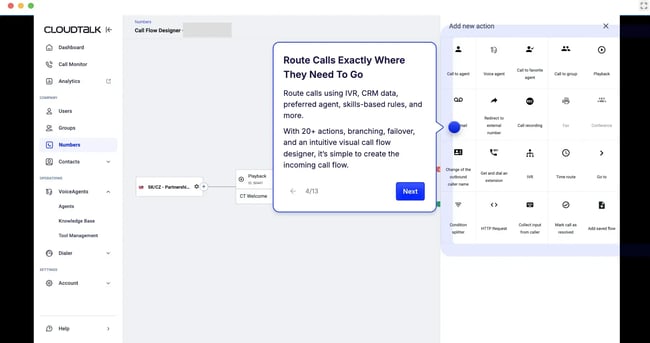
CloudTalk is an AI-powered cloud call center software designed to optimize both inbound and outbound communication for modern sales and support teams. It enables users to make and receive calls directly from their browser or CRM — no physical hardware needed. CloudTalk combines high-quality VoIP infrastructure with powerful analytics and AI capabilities.
Best for: Sales and support teams looking to scale efficiently, businesses relying on data-driven communication, and teams using integrated CRMs and helpdesk platforms.
Pros
- Highly customizable call queues
- Advanced reporting and analytics
- Flexible integration options
Cons
- Higher-tier plans may be expensive for small teams
- Learning curve for advanced features
Pro tip: CloudTalk’s HubSpot integration lets you leverage its advanced reporting and real-time analytics across both CloudTalk and HubSpot. Use it to drive better business outcomes, faster.
Pricing: $25/user/month (Starter); $30/user/month (Essential); $50/user/month (Expert); Custom
9. Aloware
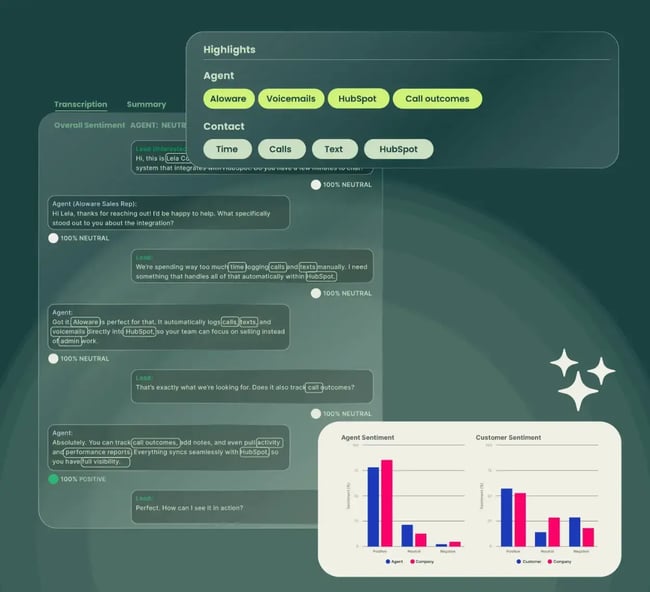
Aloware is the AI-powered phone system designed for HubSpot users to drive faster, more meaningful sales conversations. The platform includes a sales power dialer, bulk SMS, and a conversational AI chatbot that answers questions using an existing knowledge base.
Aloware’s AI voice analytics provide conversation highlights, summaries, and transcripts so managers can track team performance without reviewing every call. By connecting directly with HubSpot, Aloware allows teams to click to call contacts, automate sales workflows, and respond to leads quickly.
Best for: Outbound calling, inbound call routing, CRM integrations, compliant calling and texting, sales workflow automation, and AI-powered analytics.
Pros
- Comprehensive communication channels
- Seamless CRM integration
- Real-time analytics and reporting
- User-friendly interface with mobile accessibility
Cons
- Advanced features may require a learning curve
- Pricing may be higher compared to basic call center solutions
Pricing: $30/user (iPro + AI); $60/user (uPro + AI); $80/user (xPro + AI).
10. LiveAgent
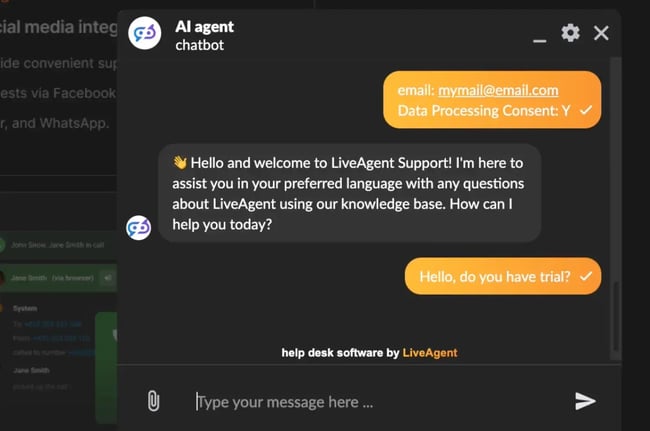
LiveAgent is a comprehensive help desk and call center solution that consolidates email, chat, calls, and social media messages into a unified ticketing system. Core call center features include automated call distribution, IVR, and call recording. A customizable interface and workflow options make it accessible for businesses of varying sizes and support volumes.
Best for: 24/7 customer service support, outbound calls, automated callbacks, advanced reporting and analytics, and integrations and APIs.
Pros
- Unified platform for multiple communication channels
- Robust ticketing and live chat features
- Comprehensive reporting and analytics
- Customizable workflows and user-friendly interface
Cons
- Advanced customization may require technical expertise
- Some features are available only in higher-tier plans
Pricing: Free; $15/agent/month (Small Business); $29/agent/month (Medium Business); $49/agent/month (Large Business); $69/agent/month (Enterprise).
Why Call Centers are Still Essential in the Age of AI
AI is everywhere in customer support, but that doesn’t take away the spotlight from call centers. Sure, chatbots and virtual assistants are great for quick, routine questions, but they’ll never match the empathy of a real human.
When I’m frustrated or dealing with a tricky issue, the last thing I want is to get stuck in an endless loop of AI prompts. I want to talk to someone who can actually help. Even from a business perspective, putting all your eggs in the AI basket feels like a gamble.
Nearly half of customers will switch brands after even one bad AI experience. AI might streamline processes and save time, but it doesn’t work when people need emotional understanding or tailored solutions. That’s where call centers help, offering the human connection AI just can’t replicate.
That doesn’t mean AI doesn’t have its perks, of course. I’ve seen how it can boost call center efficiency, automate repetitive tasks, and provide agents with real-time insights. But the real magic is in the mix: Let AI handle the simple stuff, and let skilled agents handle the complex, high-stakes, or emotional cases.
It’s this balance — speed plus a personal touch — that will keep customers coming back.
Frequently Asked Questions about Call Center Software
What makes a good call center tool?
A good call center tool provides seamless omnichannel support and integrates with a CRM. The tool should scale with the team as it grows and provide real-time insights through dashboards. An intuitive interface that agents actually want to use is equally important.
What are the essential call center software features to look for?
Prioritize omnichannel support, automatic call routing, CRM integration, cloud-based calling, real-time reporting, and call monitoring. Hubspot’s VoIP software is a strong option for teams that want a unified customer context across all of these channels.
What’s the best call center software for growing businesses?
HubSpot’s VoIP software integrates directly with HubSpot CRM, automatically logs and records calls, provides comprehensive analytics, and scales from a free plan to enterprise. Service Hub works well for teams running unified sales, marketing, and service operations.
Are call centers still necessary with AI chatbots everywhere?
Yes, call centers are still necessary in the age of AI. While AI handles routine questions effectively, nearly half of customers will switch brands after one bad AI experience. Human agents remain essential for complex issues, emotional support, and building lasting customer relationships.
Use call center software to supercharge your support team.
Modern customers expect excellent support across every channel. Managing those channels on disconnected systems creates friction for both customers and support teams. Call center software solves that by bringing communication channels, automation, and real-time insights into one place.
Great customer support goes beyond solving problems. The goal is to make every interaction feel effortless. The right tools are what make that possible at scale.
Editor’s note: This article was originally published in March 2019 and has since been updated for comprehensiveness.
Free Help Desk & Ticketing Software
Keep track of customer requests in one unified help desk that connects to your CRM database.
- Provide personalized, AI-powered support to your customers
- Save time, reduce errors, and streamline service processes
- Improve rep efficiency & time to resolution
- And more!
Customer Service