Consumer behavior continues shifting toward mobile applications, with users now spending the majority of their time in apps rather than web browsers. Businesses that only offer experiences for desktops miss significant opportunities to engage customers.

Transitioning from website to mobile app allows businesses to meet customers where they spend most of their digital time. Companies that successfully make the shift often see improved customer engagement and retention rates.
Converting a website requires careful planning around costs, platform selection (iOS versus Android), and ongoing maintenance requirements. This guide explores why businesses need mobile apps, how to approach the conversion process, and real-world examples from brands that have successfully made the transition.
Table of Contents
- Why do businesses need a mobile app?
- When should a company convert its website into an app?
- Should the Mobile App Be Android or iOS?
- Variables to Consider When Converting Websites to Mobile Apps
- How to Convert a Website Into an App
- Tools to Convert a Website to an App
- How to Choose the Right Tool
- Examples of Apps Converted From Websites
- Frequently Asked Questions
Why do businesses need a mobile app?
Mobile applications allow buyers to access businesses on the go with an interface built specifically for their phones. The ease of use increases customer engagement, and businesses see the benefits. In fact, nearly half of small businesses already offer a mobile app.
When I bought myself an iPad Pro, I started to notice a change in my behavior. Instead of using a web browser to visit websites on my laptop or my iPad, I would almost always try to find an app instead, because an app offered a better experience than a website.
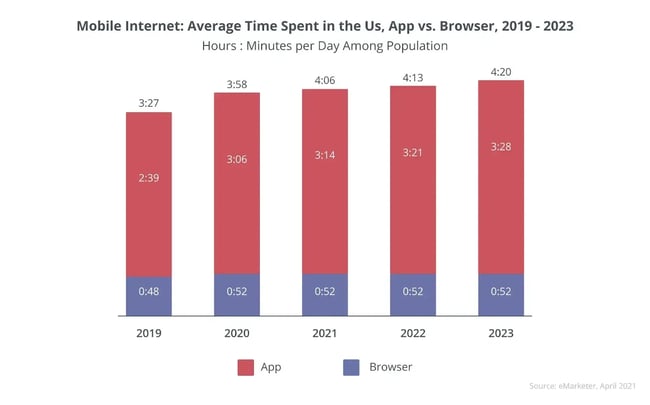
It turns out that I‘m not alone, and most people nowadays spend more time on apps than on web browsers. So, if a business only has a website that people can access via their web browsers, it’s missing out on a great way to engage customers and maybe even create a better experience for them.
Based on my personal experience, here are a few reasons why a business might want to convert its site into a mobile app.

HubSpot's Free Website Builder
Create and customize your own business website with an easy drag-and-drop website builder.
- Build a website without any coding skills.
- Pre-built themes and templates.
- Built-in marketing tools and features.
- And more!
Ease of Access
Once a user installs an app, it’s much easier to open and engage with that application than it is to open a website in a separate browser application. Fewer barriers between the user and the content are always a good thing.
According to recent research in 2022, mobile users spend 90% of their time in apps compared to 10% in web browsers. This is up from 86% in 2018, a trend that will likely continue to increase going forward.
Search Engine Optimization
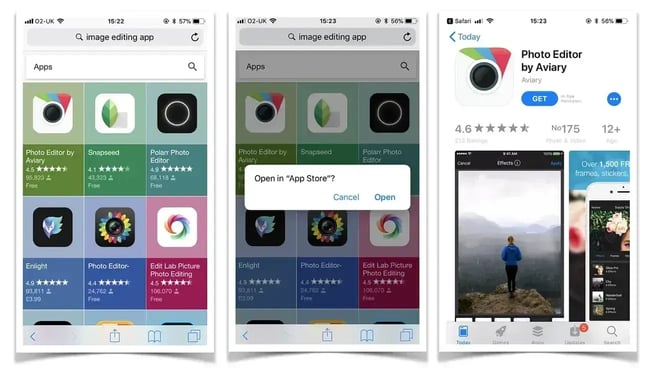
An app can also help business owners more effectively reach customers on search. Why? Google displays app packs directly in search results for relevant queries, placing mobile applications above traditional website listings. These app packs showcase relevant applications before users scroll through standard search results.
Websites without corresponding mobile apps remain ineligible for this premium search placement, limiting their visibility to users. Because Google knows that visitors are interested in apps, it cuts out the middlemen and displays app listings directly.
Mobile-Friendly Interface
Marketers, website owners, and web developers must create experiences that users will enjoy, making mobile-friendly interfaces extremely important. Mobile apps have the same information as desktop sites while offering a mobile variant that's more user-friendly.
Push Notifications
One of the biggest advantages of mobile apps is the ability to send push notifications to users. When push notifications are enabled, alerts appear on the user's locked or home screen. Users can see messages as soon as they check their phone, making them more likely to engage.
For example, according to data collected by MobiLoud, push notifications receive an average CTR of around 8%, whereas emails are more in the 1% range.
Integrations
Mobile apps have access to smartphone features that websites do not. For instance, web teams can add biometric login, access phone contacts, and camera functions. Web developers can also integrate iOS and Android apps with third-party, vendor-provided SDKs (Software Development Kits) to provide advanced functionality. With these new features, the user experience becomes more immersive.
Offline Mode
During travel, and when in areas with weak or no internet connection, users may not be able to access a company’s website. Mobile apps offer offline functionality, allowing users to access certain aspects of the app even when they are not connected.
For example, a business may provide functionality to download audio, video, or other content for later offline consumption.
When should a company convert its website into an app?
If the website is already mobile-friendly, a business may not need an app to improve its customer experience. In that case, a mobile app would just be extra work that won't pay off if more users simply prefer the website.
Here are some questions that can help determine if a mobile app makes sense for a business:
- Is the website responsive and mobile-friendly?
- Is the website only for marketing purposes, or do users visit it to get something done?
- Are there app-specific features that would elevate the experience of an app versus the website?
- How important is an app to the future success of the business?
- Do the competitors offer a mobile app?
- Are the customers asking for an app?
Duong Nguyen, a product manager at WebMD Health Services, also recommends thinking about the goals for the app. She says there are two very high-level purposes for making a website into an app:
- To reach new customers who might not have been able to be reached with just a website.
- To act as a utility for existing website users.
Many apps are a combination of the two. But many of the apps that exist emphasize one priority over the other.
If a business doesn’t think an app will help reach new customers, and teams don‘t think it adds any utility for existing customers, an app may not be needed.
HubSpot's Free Website Builder
Create and customize your own business website with an easy drag-and-drop website builder.
- Build a website without any coding skills.
- Pre-built themes and templates.
- Built-in marketing tools and features.
- And more!
Should the mobile app be Android or iOS?
Teams may have to decide whether to focus on Android or iOS apps. In an ideal world, digital teams should offer apps to both types of users. However, businesses may have to make a tough decision if they don’t have the bandwidth or resources to build two unique apps. To make the right choice, consider geographic usage and app store approval guidelines.
Global and Geographic Usage
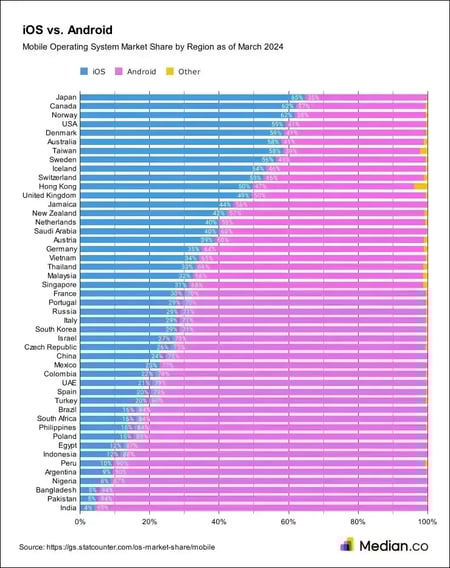
Consider where customers are located and what type of phones reign supreme in those areas. Looking globally, Android does have a larger user base than iOS. In Q1 2024, the overall Android OS market share was 70.8%, whereas the iOS market share was 28.5%.
However, that doesn't necessarily mean that Android will be more popular with customers. For example, iOS is more popular in the U.S. If the business focuses on that market, it may need to put more emphasis on iOS than Android.
Here's a great chart from app development platform Median.co that breaks down usage by region.
Both operating systems offer comparable functionality. However, the underlying code for iOS and Android is completely different. As a result, consider building native apps for each platform, rather than trying to re-purpose one app for the other platform.
App Store Approval Guidelines
Another difference between Android and iOS is the app store approval guidelines. Apple's guidelines are very strict. In fact, Apple tends to only approve mobile apps that use features, content, and UI that elevate the app beyond a basic website.
While developers can indeed convert a website into an app, the end product must look and feel native to mobile. According to Apple, “If the app is not particularly useful, unique, or ‘app-like,’ it doesn’t belong on the App Store.” Therefore, it's more common for websites that are converted into iOS apps to be rejected by Apple App Store reviewers.
Apple also pays attention to the user interface (inappropriate UI is the most frequent reason for rejection). It offers "Human Interface Guidelines” and “UI Design Dos and Don'ts" for designers and developers to follow.
If an app’s user interface is built using existing web content, it’s critical to ensure it meets Apple’s requirements. If Apple feels an app's interface is substandard, it will reject it from the App Store.
However, the tides are turning. Starting in 2025, iPhone users in the 27 EU countries can install apps outside the App Store. That's a major shift in Apple’s tightly controlled app ecosystem, giving apps more distribution options through third-party app stores.
Variables to Consider When Converting Websites to Mobile Apps
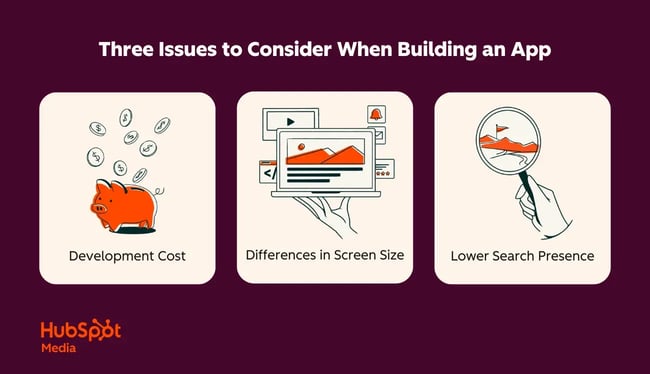
There are different approaches to converting websites into mobile iOS and Android apps. The approach a team takes will depend on the requirements and goals a business has for its app. Consider the following variables before converting a website to an app:
- Development cost.
- Screen size.
- Search presence.
Development Cost
Apps are different from websites. Businesses can't just use a low-cost builder tool like a content management system to make them. Instead, business owners will likely need a developer or development team.
Native app development can be expensive. However, it‘s better to invest some money at the start of the process for a good result, rather than paying a service multiple times to create the perfect interface.
I‘ll talk more about pricing in the next section. But, when a company invests thousands to build an app, they’ll need to get a quote before committing to app development.
Screen Size
The mobile market is full of unique devices, including multiple types of smartphones and tablets. When creating a UI/UX design, developers should consider different screen sizes and ensure that all elements display well on various devices. To avoid problems, web teams should cooperate with an experienced and skilled UI/UX designer.
Search Presence
Typically, people search for websites more than they search for mobile apps. While Google will help by adding “app packs” to search results, teams can also add a pop-up on their website to tell users about the mobile app. This prominent placement encourages people to download the app, especially if the site isn't responsive on mobile.
With all of our bases covered, let's put our plan into action and discuss how to convert a website into a mobile app.
How to Convert a Website Into an App
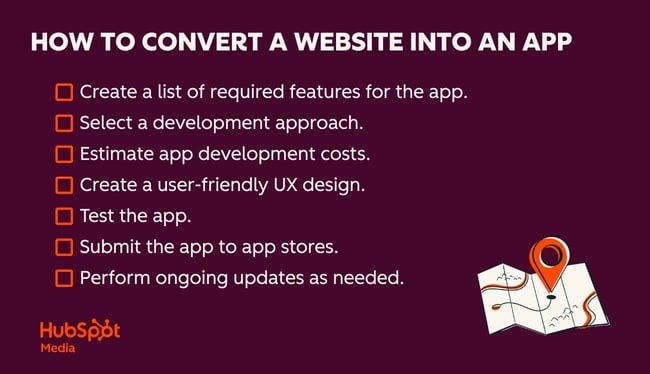
1. Create a list of required features for the app.
Before diving headfirst into app development, it‘s important to consider what features to include in the mobile app. Not only does this give developers an idea of what they’ll need to build, but it will also help businesses calculate costs.
Teams can get carried away thinking about all the possible functions an app can perform. By coming up with a vetted list of features, teams create an attainable vision for an app. That makes sure every feature is useful to the target audience.
2. Select a development approach.
In general, there are three routes that web teams can take when they develop a mobile app:
- Hire an in-house team.
- Outsource app development.
- Choose an app development platform.
In my experience, all three approaches have pros and cons.
In-House Team
An in-house team tends to be more expensive. Businesses need to pay for things like hardware, software, taxes, vacations, and more. However, in-house development allows businesses to control the development process and create an app tailored to their exact specifications.
Outsourced App Development
Outsourcing tends to be cheaper, as a business owner can hire developers internationally at lower rates. The downside of this is that the owner can‘t oversee every aspect of development. They have to trust that they hired the right people to do the job.
Teams that outsource app development want to regularly check in to ensure they aren’t delivered an app that looks nothing like the original blueprint.
App Development Platform
A third option is to leverage an app development platform like Median.co to deliver iOS and Android apps powered by website content. This approach is often favored by SMBs and larger enterprises that have web development expertise but lack iOS and Android talent.
Opting to use a platform to develop an app can be cheaper and faster than working from scratch. However, teams may be limited if they want to offer functionality not supported by the platform.
3. Estimate app development costs.
Now, it's time to start crunching numbers. A good rule of thumb is that the more complex an app is, the more expensive it will be to develop. In fact, one analysis found that an app can cost anywhere from $13,000 for a simple app to $82,000 for a complex app.
Luckily, if business owners go the app platform route, they’ll see costs drop by an order of magnitude, as they benefit from the scale of a solution that’s built hundreds of thousands or millions of apps.
While a complex app might still cost $10,000 to develop with an app development platform, it’s possible to launch a simple app for less than $1,000.
4. Create a user-friendly UX design.
Aside from the basic functionality of the app, the UX design is the most important factor to prioritize when building an interface. After all, what‘s the point of developing a mobile app if it’s not as responsive as the website?
If developers can‘t make mobile apps more mobile-friendly than their website, then consider investing more in the website’s design than building a brand-new app.
Duong Nguyen also highlights the importance of prioritizing features when converting a website into a mobile app. With a website, teams can afford to be a little “greedy” because there‘s so much space. But with a mobile app, businesses are much more limited with what they can do and how they can present data.
She recommends analyzing user behavior (and speaking with users if possible) to ensure the business is prioritizing the right functionality in the mobile app.
Pro tip: Check out this complete guide to UX design to find tips to improve user experience.
5. Test the app.
Teams should test the app before submitting it to the app store. This will allow them to fine-tune its features and fix any glitches or flaws before users discover them. This helps retain users who might have deleted an app after experiencing these issues and saves support teams time dealing with complaints.
Even if all flaws can’t be fixed before launch, teams will at least be aware of potential issues and can prepare their service departments before they’re exposed to these types of inquiries.
Pro tip: Use Website Grader to test mobile performance. Teams can identify elements that slow down the app and hinder performance.
HubSpot's Free Website Builder
Create and customize your own business website with an easy drag-and-drop website builder.
- Build a website without any coding skills.
- Pre-built themes and templates.
- Built-in marketing tools and features.
- And more!
6. Submit the app to app stores.
Once an app is ready to launch, the final step is to submit it to the app stores for review and, hopefully, approval. Both the Apple App Store and Google Play Store have a review process in which a reviewer tests the app to verify its functionality and compliance.
While developers need to be diligent to ensure a successful approval, it’s possible that the initial submission may be rejected. If so, don’t be discouraged. The rejection reason will hopefully be addressable, and teams can resubmit with success.
However, the app store reviewer will only specify the reason for rejection and will not provide guidance on a solution. Similar to getting any other type of professional advice, businesses want to ensure they’re working with an expert who can help guide them to a solution.
7. Perform ongoing updates as needed.
Investing in the app doesn’t stop once it’s launched and started onboarding users. Businesses should continue to update apps with new features and functionality. Maintenance keeps apps relevant for users in the ever-changing and innovating mobile market.
Updates are also a part of compliance. Teams need to make sure their apps support the latest iOS and Android devices and software updates, as well as changing app store policies. To ensure no surprises, make sure to update the app at least every 6-12 months.
Business owners can keep an app updated through an ongoing contract with app developers (a contract will help make sure they’re performing their duties as needed) or by way of updates provided by a chosen app development platform.
Read: How to Make Your Own App: Planning, Designing, and Launching
Tools to Convert a Website to an App
There are several tools/frameworks that can help turn an existing website into a fully functional mobile app. Each option varies in the level of customization, coding, and control it offers. The right choice depends on the business’ specific goals and resources.
That said, here are four tools to convert a website into an app.
1. PWABuilder
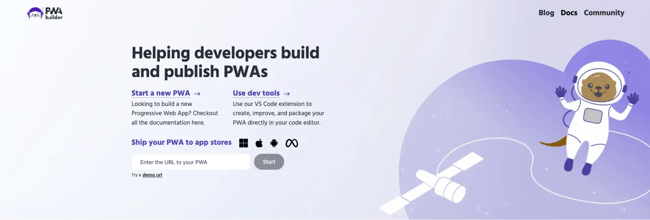
PWABuilder is a free, open-source tool created by Microsoft that helps developers build, package, and publish Progressive Web Apps (PWA). PWA websites offer an app-like experience, including offline access, push notifications, and fast performance.
PWABuilder works by analyzing an existing website’s URL to generate the files and code needed to transform it into a functional PWA. The platform simplifies the technical setup process, while ensuring the app meets performance and compliance standards across devices.
Key Features
- PWA Starter Kit: A production-ready template with a pre-configured manifest and service worker to accelerate PWA development.
- App store packaging: Generates installable app packages for Google Play, Microsoft Store, and other major app stores. For Google Play, it uses Google’s Bubblewrap utility for smooth integration.
- Validation and scoring: Includes a quality report card that evaluates the PWA’s quality and provides actionable steps to improve it so it meets platform-specific criteria.
- Advanced customization: For Android packaging, PWABuilder allows advanced customization of the PWA’s appearance and functionality, including the splash screen, status bar, and push notifications.
2. WebViewGold
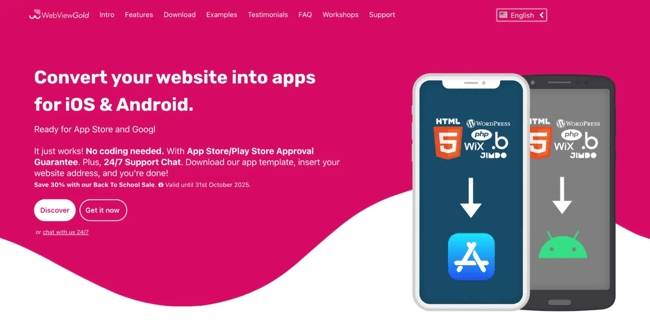
WebViewGold is a commercial app template that helps businesses, creators, and entrepreneurs convert an existing website into a mobile app. No coding required.
Webview app packages a website inside a native app shell, so that the resulting app can function as a full-screen browser that mirrors the original site’s design and content.
WebViewGold works with many website types, including WordPress, HTML, PHP, Progressive Web Apps (PWAs), and more.
Key Features
- No coding required: Fully functional templates make the setup as simple as inserting a website URL.
- Offline support: Optional fallback mode displays local HTML content when offline, and automatically switches back to the live site when the connection is restored.
- Push notifications: Integrates with services like OneSignal, Firebase, and Pushwoosh to send updates and alerts directly to users.
- App store submission support: Offers detailed publishing guides and optional paid services for cloud building and publishing assistance.
Pricing: There are three pricing tiers:
- WebViewGold for iOS - $109
- WebViewGold for Android - $109
- Full Service - $349
Read: 5 Plugins to Convert a WordPress Site to a Mobile App
3. Thunkable

Thunkable is a no-code platform that enables users to build native iOS, Android, and web apps through an intuitive drag-and-drop interface. Creators describe their app idea, and Thunkable generates a working project with pre-built screens using its AI capabilities. Users can then design the user interface (UI) and define the app's logic with interactive building blocks.
The platform is well-suited for rapidly prototyping, testing, and deploying apps. That’s why Thunkable is popular among entrepreneurs, educators, and product teams exploring new ideas.
Key Features
- Drag-and-drop UI design: Create visually engaging layouts by dragging and positioning components such as buttons, images, maps, and sliders onto the screen.
- Block-based logic: Define app functionality using a block-based system that connects logic visually, similar to Scratch-style programming.
- Live testing: Instantly preview and test apps on the mobile device as changes are made to the UI/logic.
- Extensive integrations: Connect the app to external services and data sources via APIs, or use out-of-the-box integrations for platforms like Google Sheets, Firebase, and Airtable.
- Monetization options: Add in-app purchases and display ads to the app via Google AdMob.
Pricing: There are five pricing tiers (billed yearly):
- Free - $0
- Accelerator - $18/month
- Builder - $37/month
- Advanced - $99/month
- Education - Custom
4. Ionic + Capacitor
Ionic and Capacitor work together to transform a standard web application into a native mobile app for iOS and Android, as well as a PWA. Ionic provides the user interface (UI) components. From there Capacitor acts as the bridge that connects the web app to device-specific hardware and software features.
How They Work Together
- UI development with Ionic. Developers build the app’s interface using standard coding languages (HTML, CSS, and JavaScript). The Ionic Framework includes a library of pre-built UI components that resemble native elements, including buttons, tabs, form inputs, and navigation menus.
- Platform bridging with Capacitor: Once the web app is ready, developers use Capacitor to package and deploy it. Capacitor wraps the web code in a native container, which uses a full-screen browser to display the Ionic interface. Then Capacitor’s web-focused API manages communication between the web code and the native platform’s SDKs.
- Accessing native features: Capacitor includes a set of core plugins that give the web app access to native device functionality. This allows developers to integrate powerful native features using familiar web languages, rather than platform-specific code.
- Multi-platform deployment: With Capacitor, developers can build their app once. From there, they can release it on iOS, Android, and the web. They can use a single codebase to generate the native packages required for app store submission.
Benefits of the Combination
- Code reusability: Using a single codebase across platforms saves development time and resources while maintaining a consistent experience.
- Access to native functionality: The Capacitor bridge extends web applications with native APIs for a richer, more integrated user experience.
- Streamlined workflow: Ionic and Capacitor provide a cohesive ecosystem with tools for prototyping, live reloading, and simplified build management.
- Open source and community support: Both frameworks are open source and supported by a large, active community of developers offering extensive documentation and plugins.
How to Choose the Right Tool
When selecting a platform to convert a website into an app, it’s important to compare how each option performs across key criteria like compliance, ownership, and analytics support.
The table below outlines how the four tools differ.
|
Criteria |
PWABuilder |
WebViewGold |
Thunkable |
Ionic + Capacitor |
|
Compliance |
Automatically generates app manifests and meets PWA standards; supports app store packaging with Microsoft and Google guidelines. |
Includes publishing guides and supports app store requirements for iOS, Android, and macOS. |
Handles app store submission for native builds; follows platform compliance but has limited control over backend data handling. |
Full control over app architecture; developers manage compliance directly for app store and privacy standards. |
|
Performance |
Optimized for speed and offline use with service workers and caching. |
Performance depends on the website and device; it uses WKWebView and Chromium for stable rendering. |
Performs well for moderate app complexity; heavier apps may load slower due to no-code overhead. |
Near-native performance with hardware acceleration, smooth transitions, and optimized touch response. |
|
Ownership |
Open-source; all generated files and code can be exported and customized. |
License-based model; users own compiled app files but rely on vendor templates. |
Project data hosted on Thunkable’s servers; limited direct access to raw source code. |
Full code ownership; developers maintain complete control over app source and builds. |
|
Cost |
Free and open-source. |
Ranges from $109 to $349 |
Ranges from $18/month to $99/month, billed yearly. A custom plan is available. |
Free and open-source; costs are primarily tied to developer resources and app store fees. |
|
Support |
Backed by Microsoft; it provides strong documentation and a GitHub community. |
Commercial support with optional add-on services; documentation and tutorials included. |
Active support forum and documentation; limited one-on-one technical help. |
Extensive open-source community with enterprise support options via Ionic’s parent company. |
|
Analytics compatibility |
Easily integrates with Google Analytics, Firebase, and HubSpot via tracking code. |
Supports web-based analytics embedded within the wrapped website. |
Integrations available for Firebase, Google Sheets, and Airtable analytics. |
Compatible with any analytics SDK, including Firebase, Mixpanel, and custom tracking scripts. |
How HubSpot’s Website Grader Helps
Website Grader assesses mobile performance and readiness for app conversion, giving businesses a clear picture of how well their current site would perform as an app. It analyzes factors like page speed, responsiveness, and overall user experience — key metrics that determine whether a site can deliver an app-like experience smoothly.
HubSpot’s Website Grader also highlights technical issues, such as heavy scripts or slow-loading assets, that could affect performance once the site is packaged into a PWA or wrapper app. By addressing these insights early, teams can ensure their website is optimized not just for browsers, but for smooth conversion into a high-performing mobile app.
HubSpot's Free Website Builder
Create and customize your own business website with an easy drag-and-drop website builder.
- Build a website without any coding skills.
- Pre-built themes and templates.
- Built-in marketing tools and features.
- And more!
Examples of Apps Converted From Websites
To demonstrate what it's like to turn a website into an app in the real world, here are five examples from well-known companies.
The New Yorker
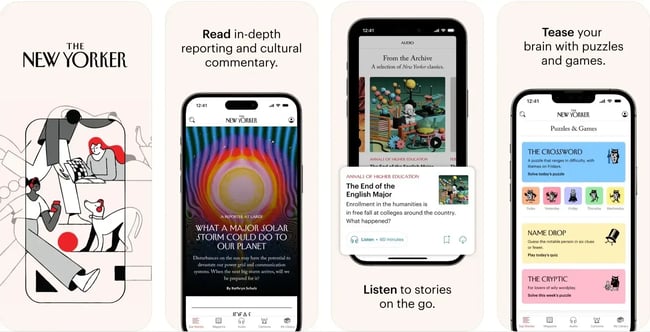
Print isn’t dead. It now just comes with an app. The New Yorker has adapted from print to website to mobile application. The desktop version of the website serves news stories, opinion pieces, cartoons, a shop, and more.
The app feels like it’s providing the full New Yorker experience — all the way down to the cartoons and crosswords.
While it works great on smartphones, I thought the app was especially enjoyable when I was browsing on my iPad, because the extra space really gave the New Yorker's visuals room to shine.
H&M
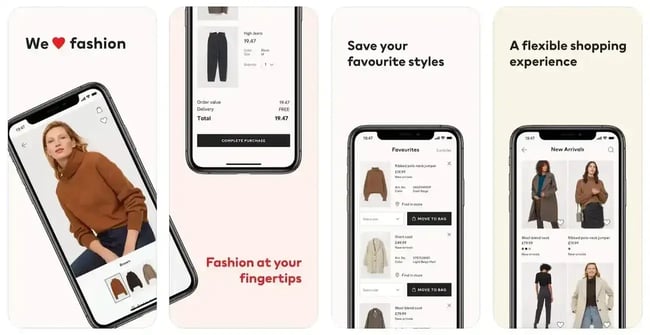
Many online stores adapt their desktop websites to the mobile realm with apps. Take H&M, for instance: Its mobile app provides a shopping experience comparable to that of the website and allows users to tailor their experience.
The app builds in new features to enhance the shopping experience that customers couldn‘t get from the website. For example, the app allows shoppers to scan an item’s price tag to view more information, such as the number of additional items the store has in stock.
There‘s also a really cool visual search feature. I can upload a picture from my photo library, and H&M’s app will try to locate the actual product in the picture (or something similar to what H&M offers). That's smart way to engage customers.
Blue Apron
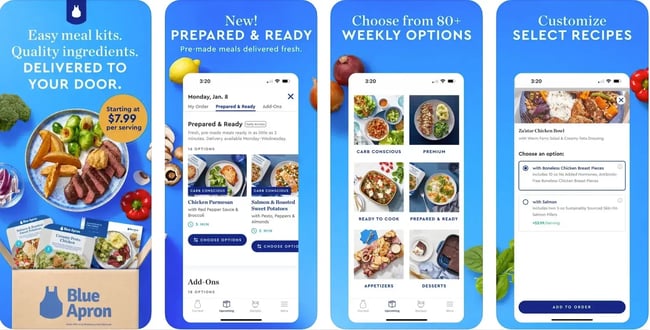
Blue Apron provides meal kits to help home cooks prepare dinner fast. On the website, members can order their meals and manage their subscriptions. By converting its service into a mobile app, Blue Apron has made it even easier for customers to explore new recipes, save their favorites, and manage their accounts.
I like this app because it does a great job of onboarding new or prospective customers. I can tell it's not just a tool for existing customers.
For example, when I first opened the app, I was greeted with a short-but-sweet slideshow that highlights some of the unique value propositions that Blue Apron offers. Blue Apron's app also let me browse the menus without needing to create an account. That’s a great way to get people interested in the Blue Apron service.
Calendly
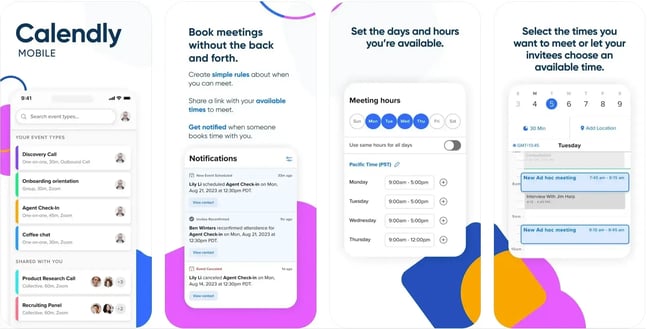
Calendly is a scheduling application for professionals. To accommodate on-the-go users, the company created a mobile application for iOS and Android. Users can schedule meetings, review and modify appointments, and book meetings on the clean mobile interface.
Where Blue Apron’s app was trying to help them reach new customers, Calendly's app seems more like a utility for people who have already signed up to the Calendly website.
When I opened the app, I was greeted immediately with options to sign in to my existing Calendly account or create a new one. There‘s no explanation about what Calendly does because Calendly assumes I’ve already visited the website.
As Duong covered earlier, businesses will need to determine whether their app is for new or existing customers and then design it with that in mind.
Canva
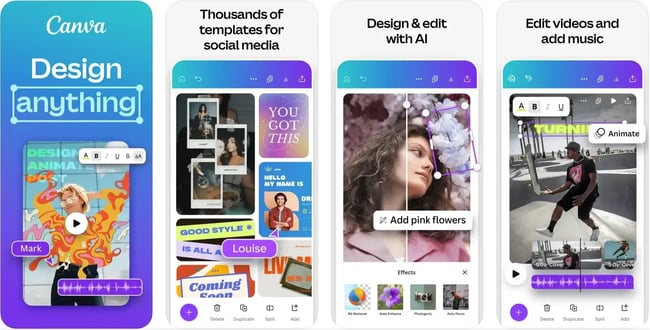
Like Calendly, design company Canva took the strengths of its web application and condensed them into a mobile app version to reach a wider customer base. It allows users to make customized graphics, edit photos, and even edit short videos on their phone.
Canva's app features multiple opportunities to upgrade. I saw several notices trying to convince me to upgrade my free plan to a 14-day free trial of Canva Pro. The app becomes a way to convince free website users to turn into paid customers.
Frequently Asked Questions
What’s the difference between a PWA, a wrapper app, and a native app?
A Progressive Web App (PWA) runs in a browser but behaves like a native app, offering features like offline access and push notifications. A wrapper app takes an existing website and packages it inside a native shell for app stores, often using web views.
Do I need an app if my mobile site is already responsive?
Businesses with a mobile site may not need an app. Teams can build an app if they want to enable mobile-specific features, offline access, faster load times, and push notifications.
Will a webview app be rejected by Apple or Google?
App approval depends on the quality of the app. Google and Apple require apps to provide unique native value beyond a website. The apps must also provide meaningful functionality and comply with design and performance standards.
Can I keep my website’s SEO if I ship an app?
SEO and app visibility are separate. The existing website will continue to rank in search results, while the app can gain exposure in app stores.
How often should I update the app?
Apps should be updated whenever the website changes in ways that affect functionality or branding. For native or wrapped apps, updates should be pushed through the app stores at least every few months to maintain compatibility and security.
How do I migrate users from web to app without hurting conversions?
To migrate users, encourage adoption gradually. Use website banners, email prompts, or QR codes inviting visitors to install the app. Offer small incentives, like faster checkout or exclusive features, but keep the web experience intact so users can transition at their own pace.
How do I measure app adoption and connect app data to my CRM?
Integrate analytics tools like Google Analytics for Firebase or HubSpot’s mobile SDK to track installs, engagement, and retention. App engagement data can be integrated with HubSpot Smart CRM, allowing teams to view user interactions and app behavior alongside other marketing and sales data.
Can I make my website act like an app without publishing to the app stores?
Yes. Building a PWA allows a website to behave like an app without requiring app store approval. It’s often the fastest, lowest-cost way to deliver an app-like experience.
How much does it cost and how long will it take to convert my website into an app?
App conversion cost varies by approach and ongoing maintenance. A basic PWA built with free tools like PWABuilder can be completed in a few days at minimal cost, while commercial wrappers like WebViewGold may range from $100 to $300 per platform.
No-code builders like Thunkable charge between $18 and $100 per month, depending on usage and features. For full hybrid frameworks like Ionic + Capacitor, expect development costs between $10,000 and $90,000, depending on design complexity, custom integrations, and native functionality.
From Website to App: Deciding What’s Best for the Brand
With people spending more time on mobile, businesses should consider whether they could benefit from converting their website into an app.
While there are plenty of benefits to making an app, it’s undoubtedly a bigger investment than maintaining a responsive website. But if the investment seems worth the cost, it may be time for the business to go mobile.
Editor's note: This post was originally published in April 2021 and has been updated for comprehensiveness.
HubSpot's Free Website Builder
Create and customize your own business website with an easy drag-and-drop website builder.
- Build a website without any coding skills.
- Pre-built themes and templates.
- Built-in marketing tools and features.
- And more!
Website Development

![How to make a website with user accounts and profiles [with WordPress, Wix, and more]](https://53.fs1.hubspotusercontent-na1.net/hubfs/53/%5BUse%20(3).webp)
![How to build a Google Site that looks good and drives business [templates & examples]](https://53.fs1.hubspotusercontent-na1.net/hubfs/53/Website%20Redesign%20Terms.png)