The following article is a guest post by David Weichel of CPC Strategy. To learn more about CPC Strategy register for the upcoming webinar entitled "How To Promote Your Products On Google" presented by CPC Strategy's CEO, Rick Backus, and HubSpot.
Advertising products on Google Shopping is a great way for ecommerce merchants to generate new leads and compete for traffic and sales outside of Google’s Organic Search. Just as a site owner would optimize his webpages for SEO, there are steps that ecommerce merchants can take to optimize their data feed and improve their return on Google Shopping.
Optimize Keywords in Product Titles and Descriptions
Including robust keywords in your product titles and descriptions can help to improve your visibility on Google Shopping. Make sure that you’re sending compelling product descriptions that utilize the keywords that will drive traffic to your ecommerce site.
-
Leverage keywords that you already rank well for in Organic Search
- If you rank well for keywords organically, chances are you’ll rank well for them in Google Shopping as well.
- Identify and include keywords that you should be competing for.
Enhancing your product titles and descriptions with this kind of keyword data will help your listings to compete on Google Shopping’s results pages.
Add Trusted Merchant Reviews
Adding merchant reviews is a surefire way to improve visibility on Google Shopping in the long term. Positive reviews help to establish consumer confidence and are looked upon favorably by Google Shopping’s ranking algorithm.
Below are a few major US review sites trusted by Google:
- Google Checkout
- Bizrate.com
- ResellerRatings.com
- Epinions.com
- Yahoo.com
- PriceGrabber.com
- TrustPilot.com
- ReviewCentre.com
- ViewPoints
- RateItAll.com
Ecommerce merchants should be confident in the level of customer service they offer. Start collecting surveys from customers in order to build your brand and improve your visibility on Google Shopping.
Add Rich Snippets to your Google Shopping Feed
Enhance the appeal of your product listings on Google Shopping by including rich snippets to your data feed. Rich Snippets are basically product reviews that are displayed alongside your products. If your webpages have individual product reviews, then you can include this info in your data feed to Google Shopping.
Below is an example of a Rich Snippet in Google Shopping’s OneBox.
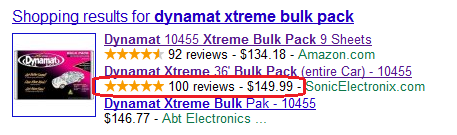
Including this basic review info enables Google to display Rich Snippets for your listings in Google’s OneBox results. If you have product reviews on your site, all you need to do is:
Add the following columns to your Google Shopping feed
- Product_Review_Average
- Product_Review_Count
- Add the rel=”canonical” link element to each one of your product pages
- Let Google know that you’re submitting Rich Snippets in your data feed
As with any reviews, this helps to build consumer confidence in your listings which will in turn improve click through rates on Google Shopping.
Optimize the Product_Type Column
The Product_Type column is Google’s taxonomy, or category, column. Ecommerce merchants will often fill this column with their own internal categorization. While these values are considered valid, we’ve seen notable improvements in traffic by simply adhering to Google's unique product_type values instead.
If Google’s taxonomy is not quite as specific as your store’s internal categorization, you can extend the taxonomy tree to include your level of detail.
-
Start with the most relevant, detailed product_type value that Google offers
- Add the ‘>’ symbol to the end
- Add more specific categories from your internal categorization until you’ve reached the desired level of detail
Merchants are also encouraged to include multiple product_type values if your items qualify. You can do this by simply placing each value within double quotations and separating them with a comma.
Optimizing your product_type column enables Google to place your products in the appropriate categories and funnel more qualified leads to your store. Make sure that your product_types are formatted correctly before submitting your Google Shopping feed.
Add UPCs
Depending on market competition and availability of UPCs for your products, adding UPCs to your data feed can improve visibility on Google Shopping. By adding UPCs to your data feed, your listings will be included on comparison pages with bigger sellers that often outrank product listings from smaller sellers.
If you don’t have UPC values stored away in a database somewhere, try researching your products on Google Shopping to see if you can find them. Here’s how:
- Perform a somewhat generic search for one of your products on Google Shopping
- Click the Compare Prices button for the item that corresponds to the item you’re looking for
- Confirm that this is the product you want the UPC for
- Scroll down to the Details section where you’ll find the UPC, Brand and Part Number
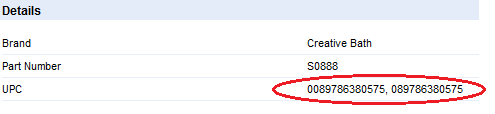
Add UPCs to the GTIN column in your Google Shopping feed and you’re all set.
Include Custom Attributes
Google provides eCommerce merchants with a list of required and recommended attributes for their products, but they can still submit additional product information via custom attribute columns.
To create a custom attribute column for your Google Shopping feed, all you need to do is:
- Add the desired column with the appropriate column title and values
- Insert a “c:” in front of the column title
So, your custom attribute column should look like this:"c:custom_attribute_name"
Including the custom attribute information in your data feed enables your products to show up for more long tail searches on Google Shopping.
Troubleshoot Data Feed Errors
This sounds like common sense, and it is, but it requires a certain level of attention that many ecommerce merchants just aren’t giving to their Google Shopping feeds. Make sure to log in to your Google Merchant Center frequently to make sure that your data feed isn’t being rejected or resulting in errors.
- Log in to your Google Merchant Center
- Click on the Data Quality tab to see errors and warnings that have been flagged by the Google Product Search team
- Address and fix the listed issues
Making sure that you’re submitting quality data is essential to running a successful campaign on Google Shopping. Whenever you are making changes to your data feeds, you should make sure that the new changes aren’t creating any issues in the Google Merchant Center. All a merchant’s efforts to improve and optimize his data feeds for Google Shopping are futile if it only results in more errors and poorer data quality.
Ecommerce

.png)

![50 Ecommerce Statistics To Know in 2024 [New Data]](https://53.fs1.hubspotusercontent-na1.net/hubfs/53/ecommerce-statistics.png)



![6 Tactics to Boost Ecommerce Sales [Without Discounting]](https://53.fs1.hubspotusercontent-na1.net/hubfs/53/boost-ecommerce-sales-fi%20(1).jpg)