
If you're hip to the popular email marketing statistics, you probably know all too well that your email database slowly dies over time.
In fact, 25% of your list will expire every year as readers switch jobs, email providers, or unsubscribe from your emails. As your list depreciates, it’s important to not only make sure you’re keeping your list clean, but also that you’re not throwing away active contacts.
What’s the solution? A re-engagement campaign!
What Is a Re-Engagement Campaign?
A re-engagement campaign is a systematic method for re-awakening inactive subscribers, while also identifying which email addresses in your database you should let go of. The campaign only involves your stale contacts -- people who have been on your list for a long time who may or may not still be opening, reading, and clicking on your emails. The goal of a re-engagement campaign is to identify which portion of your list you should retain, and which portion you’re better off removing.
Why Is This So Important?
There are several reason why you would want to execute a re-engagement campaign:
1. You're Emailing an Old List or Switching ESPs
A re-engagement campaign is critical if you’re going to start emailing an old list, or if you’re moving over to a new email service provider (ESP). Batch-and-blasting an old list can get you into some pretty hot water! Your email provider would likely suspend your account if you exceed a certain threshold of bounces. And once you’re suspended, most email providers will reach out and ask you about your list source in order to determine how much of a risk you are to their network.
Senders with continued high bounce rates can hurt that ESP’s sending reputation, or even result in them getting added to block lists. It’s similar to borrowing the keys to your friend’s car -- your buddy is going to be mighty angry with you if you crash his beloved wheels!
2. To Keep Your Domain's Reputation Healthy
Another reason to execute a re-engagement campaign is to keep your domain’s reputation healthy. If you repeatedly email people who don’t open, read, or click on your emails, you run the risk of tarnishing the reputation of your company’s domain. Domain reputation is a big factor when it comes to getting into inboxes. And, most importantly, your domain reputation can follow you to different providers. So even if you hop from one email provider to another, you’re not fooling anyone if your domain reputation is tarnished.
3. To Stay Budget-Conscious
Lastly, executing a re-engagement campaign will enable you to make sure you’re not wasting your money. As your list gets older, you'll end up getting less bang for your buck if you don’t clean out the stale contacts. A re-engagement campaign will ensure that you’re not wasting precious marketing budget on email sends to dead addresses.
How to Launch a Re-Engagement Campaign, Step by Step
Ready to launch your first re-engagement email campaign? Follow these 5 steps, and you'll reap the benefits of a successful email re-awakening!
Step 1: Give Each of Your Contacts an Age
First, establish a way to assign an age to each of your contacts. There are several ways you can do this, depending on what data is accessible. For example, you could either use the date the contact became a subscriber, the last interaction date, the date of the contact’s source, or any other indicator of age.
Step 2: Decide When Contacts Become Unengaged
Once you've established an age for each of your contacts, select a cutoff point where you suspect your list starts to become unengaged. Your cutoff can start anywhere between 3 and 6 months old.
Step 3: Segment Your List
Choose how granular you want to be about segmentation. The more granular you are, the more value you’re likely to get out of this campaign. That is, you can pinpoint your "dead" contacts more accurately if you group your list in 3-month segments versus 6-month segments.
The idea is that there’s a cliff -- i.e. there's a certain point in which all contacts beyond a certain age are too cold to continue emailing. The question you want to answer is: At what point does the number of bounces, SPAM complaints, and dead addresses outweigh the benefits of the emails sent? The more refined your segmentation is, the better you'll be able to pinpoint that age.
(For example, HubSpot’s revamped Email tool, which is currently rolling out to our customers, includes a sleek list segmentation tool that offers a simple way of doing this. You can quickly create cohorts of your database based on demographics, interests, and behaviors.)
When building your segments, you should aim to keep them around 5,000 contacts or fewer. This number is based on the fact that aside from bounce rate, the actual volume of bounces matters too. Depending on your ESP, it may be okay to have a high bounce rate if the volume of bounces isn't too high.
Step 4: Design Your Emails and Craft Their Copy
The next step is to design your emails and develop the copy for the campaign. Create one email for each segment you're trying to reawaken. You can either send the same email to each segment, or if you've decided to segment more granularly using other variables in addition to just age, you can choose to cater the content/offer and copy within that email to the interests of that particular segment of contacts.
The one key component you can't afford to ignore is that you should be offering something your unengaged contacts will think is highly valuable. Consider this to be your last chance to engage these stale contacts before you cut them loose.
Ultimately, your goal is to try to get them to interact with the message. A good method for choosing the content/offer to include in your emails is to analyze the performance of past email sends, and choose something that you know already performs well.
Engagement is critical, because it's a metric used by email providers to evaluate whether or not to deliver email into an inbox. They’re actually looking at what subscribers are doing; for example, in the Gmail client, how many people archived your email without reading it? If they did open it, did they spend time reading it? Actions, like clicking "Reply," signal positive engagement to email services, and strengthen your sender reputation as a result.
Step 5: Systematically Send Your Emails
Once you have your segments and emails prepared, start by sending your email to the youngest segment. Wait 24 hours, and then check your success metrics. These include: (1) bounce rate (2) complaint rate and (3) click and opens rates. If all of these numbers look healthy, proceed to send the email to your next segment. Repeat this process until the numbers start to look dicey.
You're probably wondering, "What qualifies as dicey?" Here is a rundown of what you should be keeping an eye out for:
1. Bounce rates over 5% are cause for concern, as anything over 5% can get your account shut off by some ESPs. For more info on what an acceptable bounce rate is, you should check with your ESP. Most ESPs publish such information in their acceptable use policy.
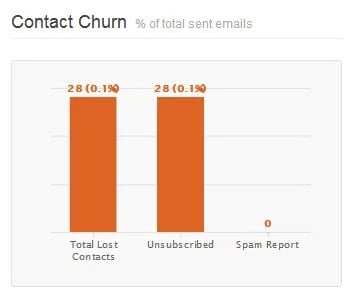
2. SPAM compliant rates should be 0.1% or lower , although the actual threshold that most ISPs publish is 0.3%. Anything over 0.3% would likely result in a chat with your ESP's abuse desk. In addition to the bounce rate, HubSpot's own Email tool, for example, makes the SPAM complaint rate of every email easy to access:
3. Open and click-through rates are more subjective. The best way to determine a threshold for these is to think in terms of dollars. That is, ask yourself, "Is it worth it to continue spending money and time to email these people?" If you're not getting a suitable conversion rate from a given segment, it's time to let them go.
That's all there is to it! Once you notice that your metrics are reporting some pretty dismal numbers, it's safe to assume any segment of contacts who are older than that should be removed from your list.

![Email Analytics [Research]: 8 Email Marketing Metrics You Should Track](https://53.fs1.hubspotusercontent-na1.net/hubfs/53/Untitled%20design%20(51).jpg)
![How to Embed Video in Email [Quick Tip]](https://53.fs1.hubspotusercontent-na1.net/hubfs/53/embed-video-in-email.jpg)
![23 Email Marketing Tips to Improve Open & Clickthrough Rates [+HubSpot Blog Data]](https://53.fs1.hubspotusercontent-na1.net/hubfs/53/make-emails-more-clickable_8.webp)

.jpg)