


Seven in ten customers have walked away from a brand due to a poor customer service experience. Not high prices. Not a lack of features. Just one frustrating interaction.
Click Here to Get HubSpot's Customer Service Software
And it’s not always the agent’s fault — it’s the tech. Behind every “Sorry for the delay” message sits a maze of disconnected tools, missed notifications, data silos, endless context switching, and manual follow-ups.
The right web-based customer service software helps teams (and data) work in sync. HubSpot Service Hub provides an omnichannel inbox, knowledge base, automation, AI assistance, and CRM-native reporting in a browser-based system that’s easy to deploy.
This post breaks down what web-based customer service software really means, highlights must-have features, reviews leading platforms, and offers a framework to help companies choose the right solution for their needs.
.webp?)
Free Help Desk & Ticketing Software
Keep track of customer requests in one unified help desk that connects to your CRM database.
- Provide personalized, AI-powered support to your customers
- Save time, reduce errors, and streamline service processes
- Improve rep efficiency & time to resolution
- And more!
What is web-based customer service software?
Web-based customer service software enables customer support management across multiple channels via a web browser, without requiring installation on local computers. Key components include omnichannel support, shared inbox, ticketing system, live chat, knowledge base, automation, integrations, security, and strong analytics.
The difference between web-based and app-based customer service software is that web-based platforms run in a web browser (like Chrome, Firefox, or Safari). Users simply navigate to a URL and log in.
On the other hand, app-based or desktop-based software requires downloading and installing a dedicated application on each device. These run locally and may need manual updates when new versions are released.
The benefits of web-based customer service solutions include:
- Accessible on any device with an internet connection: Support agents can work from any location and any device with a web browser; no installation required. This flexibility helps remote teams and global operations.
- Faster deployment and automatic updates: IT teams don't have to stress about compatibility issues, version control, or pushing updates to individual devices. Everyone automatically gets new features and security patches without significant downtime or manual intervention.
- Scalability: As a team grows, organizations can add new users without provisioning hardware or dealing with licensing complications. Scaling up or down is as simple as adjusting a subscription.
- Cross-platform compatibility and integrations: Web-based software work across Windows, Mac, and Linux — no separate versions needed for each operating system. Many platforms also offer dedicated mobile apps for iOS and Android. Web solutions typically integrate more easily with other cloud tools and CRMs.
What to Look For in a Web-Based Customer Service Platform
A good customer service platform unifies customer interactions — chat, email, phone — into one interface. It enables self-service through knowledge bases and chatbots, automates ticket routing and reply suggestions, builds in security and compliance, delivers robust analytics, and provides mobile support.
Key capabilities to look for include the following.
Omnichannel Routing and Shared Inbox
Leading customer service solutions unify channels like email, live chat, social media, WhatsApp, and SMS into a shared inbox, with consistent customer context.
Prioritize intelligent routing that assigns tickets based on agent skill, workload, or customer priority — ensuring fast, consistent responses without channel-switching or lost conversations.
Insights from the Field
Monique Pelle-Kunkle, vice president of Operations at Franchise Genesis, scaled a business in Hawaii to 100+ locations in one year. She notes that her team had franchisees texting urgent questions at 6 a.m. their time while emailing documentation requests later in the day.
“Without a system that routed everything into one queue, our support team would've missed critical messages buried in different platforms. After consolidating channels, response times dropped to under two hours average,” Pelle-Kunkle says.
Knowledge Base
An integrated knowledge base provides customers with instant access to helpful articles, FAQs, and troubleshooting guides, reducing ticket volume. Here’s an example of what HubSpot’s looks like:
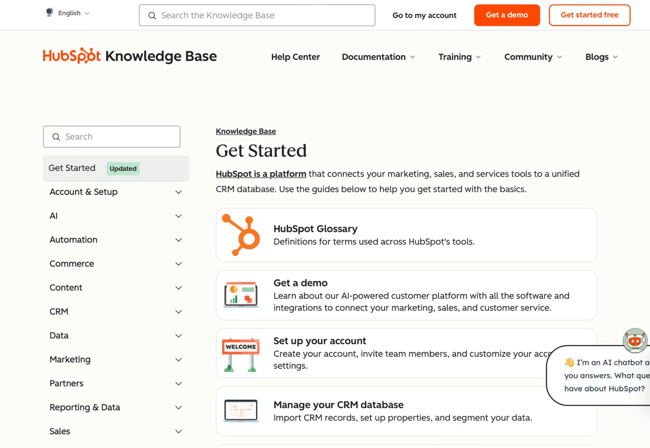
When choosing a knowledge base, consider features like:
- An intuitive editor for creating and updating content.
- Smart search that surfaces content based on customer intent, not just keyword matching.
- Version control for tracking changes.
- Article analytics that reveal how content is performing.
- Ability to browse articles by topic.
- Ability to embed help content directly within your product.
Real-time Reporting
Real-time insights help teams spot service bottlenecks fast (like spikes in unresolved tickets, rising response times, or SLA breaches) so managers can rebalance resources before customer frustration builds.
Look for customizable dashboards that surface leading indicators like first-response time, resolution rate, ticket backlog, and CSAT trends by agent. Advanced systems add drill-down reports and exportable data via APIs.
Automation and Workflows
Focus on automating repetitive tasks — ticket assignment, follow-ups, status updates. Look for no-code automation that lets teams set rules for auto-tagging, ticket escalation, and SLA enforcement. Then, deploy chatbots to handle common inquiries.
HubSpot Service Hub lets businesses build workflows triggered by ticket properties, customer behavior, or time-based conditions to automate actions like:
- Routing tickets to the proper agents.
- Sending follow-up surveys after resolution.
- Creating tasks for sales reps when support tickets meet predefined criteria that signal expansion opportunities.
AI Assistance
86% of customer relationship management (CRM) leaders who use AI say it has positively impacted their CSAT. AI-powered features in customer service solutions can help teams with:
- Sentiment analysis
- Intelligent chatbots
- Conversation summarization
- Multilingual support
- Voice transcription
- Smart response suggestions (for agents)
- Predictive analytics
Insights from the Field
Joey Martin is the CEO of WySMart.ai, a company that deploys AI-driven tools for small businesses. Martin recalls that his team partnered with a uniform retailer that lost multiple after-hours inquiries because nobody could answer basic questions like, ‘Do you have XYZ scrub color in stock?’ or ‘What are your embroidery prices?’
“We deployed an AI assistant trained on their inventory and services. It handled 200+ conversations in the first month, converting 47 into booked appointments or direct sales,” Martin says.
Team Collaboration
Quality customer service relies on strong internal communication. Choose a platform that supports private notes, internal chat, and @mentions within tickets, so teams can internally loop in specialists across departments.
Insights from the Field
Rohit Agarwal, co-founder of Zenius, a recruitment firm for remote teams, says collaboration features in their customer service tool sped up our query resolution time by 30%.
“A client was unable to access the monthly productivity report of a team we placed with them. Our customer service agent could tag the concerned HR employee on our end and solve the issue directly. This saved us the hassle of redirecting the client to multiple other representatives. Our CSAT scores notably increased from 4.1 to 4.7 within two quarters,” Agarwal says.
Mobile Support
Ensure the platform comes with a mobile app that provides complete ticket management, not just basic viewing.
Agents should be able to reply to customers, collaborate with colleagues, access knowledge base articles, monitor performance on the go, and receive push notifications for urgent issues.
Other Capabilities
Consider security features, live chat, and integration needs when choosing customer support software. Key questions to ask include:
- Does the platform provide the necessary security and compliance features (such as built-in encryption, role-based access controls, and audit trails) to meet the company’s data protection and regulatory requirements, including standards like GDPR, HIPAA, or SOC 2?
- Can it integrate live chat into the website or app while allowing seamless handoff to agents?
- Does it offer built-in integrations and open APIs to easily connect with popular tools and the current tech stack?
Next, I’ll look at some of the leading web-based customer service software.
Free Help Desk & Ticketing Software
Keep track of customer requests in one unified help desk that connects to your CRM database.
- Provide personalized, AI-powered support to your customers
- Save time, reduce errors, and streamline service processes
- Improve rep efficiency & time to resolution
- And more!
Best Web-Based Customer Service Software
This section will compare five popular web-based customer service platforms, examining their key functions, pricing, ideal use cases, and G2 reviews to help you find the solution that best fits your team's needs.
|
Feature |
HubSpot Service Hub |
Zendesk |
Freshdesk |
Help Scout |
Gorgias |
|
CRM |
CRM-native architecture (free plan available) with unified customer data. Can also sync sales/marketing data for teams with Sales Hub and Marketing Hub. |
Requires third-party integrations. |
Separate CRM product (Freshsales) available. |
Requires third-party integrations. |
Requires third-party integrations. |
|
Inbox and ticketing system |
Omnichannel inbox with intelligent routing and collaboration tools, plus an integrated ticketing system tied to CRM data. |
Omnichannel support and enterprise-grade ticketing with extensive customization. |
Multi-channel support, shared inbox, and robust ticketing. |
Lightweight shared inbox (email-first and also supports social and chat). |
Omnichannel inbox specialized for e-commerce. |
|
Self-Service |
Customizable searchable knowledge base, AI-generated content, AI-powered chatbots, and customer portals. |
Advanced self-service through a help center, community forums, and AI agents. Can manage multiple help centers from one account. |
Knowledge base and Freddy Self Service with AI article suggestions, and chatbots. |
Easy-to-manage Docs knowledge base with embedded search and public articles. |
Ecommerce-optimized self-service: branded help center, order tracking, and returns/ cancellations flows, and AI chat with hand-off. |
|
Automation and AI |
Strong automation via Workflows, AI Assistants, and CRM data; automates ticket routing, follow-ups, and knowledge base updates. AI features help summarize conversations, suggest responses, and improve service insights — all natively tied to HubSpot CRM. |
Powerful automation with triggers, macros, and workflows; AI tools like Zendesk AI and Intelligent Triage auto-classify tickets, suggest replies, and summarize conversations. |
Uses Freddy AI for smart ticket suggestions, sentiment detection, and automated responses; rules automate routing, SLAs, and repetitive tasks. |
Simple automation tools for workflows, saved replies, and customer tagging; light AI assists with conversation summaries and response suggestions. |
Strong ecommerce-focused automations; AI detects intent, automates order lookups, and drafts replies for common issues. |
|
Best For |
Growing companies that value unified customer data, solid features, and a platform that scales with them. Can also integrate sales/marketing on a centralized platform through other Hubs. |
Large enterprises needing scale and highly customizable support. |
SMBs seeking an intuitive platform with a good feature set. |
Small teams prioritizing ease of use and an email-first platform. |
E-commerce stores particularly on Shopify. |
1. HubSpot Service Hub
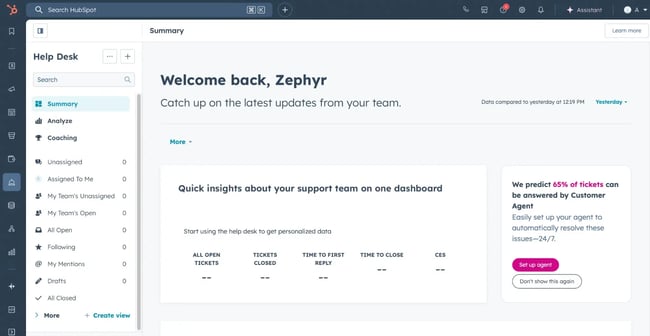
HubSpot Service Hub delivers a unified, CRM-native platform that scales with your business. Built on the Smart CRM with HubSpot's AI, it combines omnichannel support, knowledge management, advanced automation, and customer visibility in one intuitive solution.
Unlike standalone point tools, Service Hub is part of HubSpot's CRM — so support conversations, deal stages, customer records, and account details all live in one connected system. No platform hopping or context switching.
Here’s what customers say about HubSpot:
-
72% of service leaders report higher customer lifetime value with HubSpot.
-
After six months on Service Hub, customers saw a 57% boost in ticket resolution rates.
Core Features
- Omnichannel shared inbox centralizes email, chat, phone, social media, and messaging into one unified view, with real-time collaboration, collision detection, and AI-powered reply suggestions.
- Smart CRM unifies customer data for personalized context and efficient support. Its native connection with Service Hub surfaces customer insights directly within conversation threads.
- Customer agent accelerates agent productivity with AI-powered drafts, conversation summaries, and autonomous ticket resolution with intelligent handoff.
- Customer Success workspace monitors renewal dates, tracks account health with customizable scoring, and flags at-risk accounts.
- Knowledge base builder enables self-service with SEO-friendly articles, multi-language support, and embedded help widgets.
- Conversation intelligence records and transcribes calls, identifies keywords and sentiment, highlights coaching moments, scores interactions, and compiles performance trends across the support team.
- Automation features help teams route tickets by priority or skill, trigger follow-up emails, schedule CSAT surveys, send internal notifications, and escalate unresolved cases — all through a visual workflow builder.
- Advanced analytics track team performance, CSAT, and ticket resolution times with built-in dashboards. As Service Hub shares data with Marketing Hub and Sales Hub, teams with access can also measure how service impacts retention, expansion revenue, and lifetime value.
Pricing
There’s a free plan available, no credit card details required. The Starter plan begins from $20/month per seat, Professional from $100/month per seat, and Enterprise from $150/month per seat.
Best For
HubSpot Service Hub excels for growing businesses prioritizing unified customer data and a CRM-native solution. Great for teams looking for scalable automation and a platform that grows with the company (from SMB to enterprise).
It’s even more powerful for companies using — or planning to use — HubSpot for marketing and sales, as the integrated ecosystem provides a holistic view of the customer lifecycle.
What I Like
- Service Hub solves the fundamental problem of disconnected customer data. The CRM-native architecture eliminates data silos by connecting tickets directly to contact records, deal stages, and company information.
- Unlike AI bolted onto platforms, HubSpot's AI is built natively within the HubSpot ecosystem, making it more contextually aware. Knowledge base agent can even draft new help articles from support tickets — teams just edit and approve.
- The Customer Success workspace provides proactive account management tools typically found only in standalone customer success platforms.
- HubSpot Marketplace hosts 1,800+ app integrations, with comprehensive APIs and developer tools for custom connections.
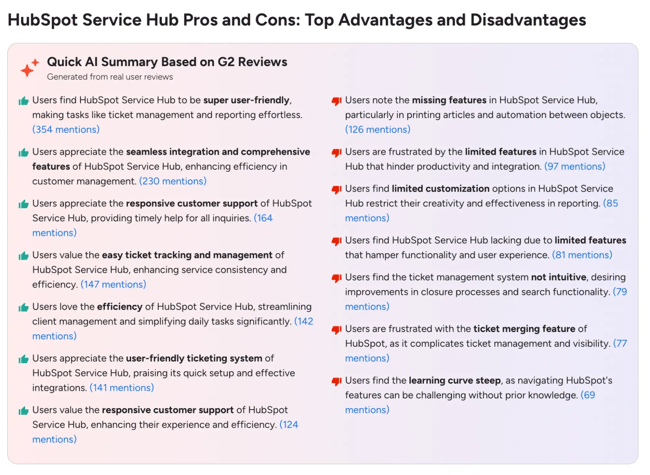
What Customers Say (Pros and Cons)
Here’s what was highlighted across G2 customer reviews.
2. Zendesk For Customer Service
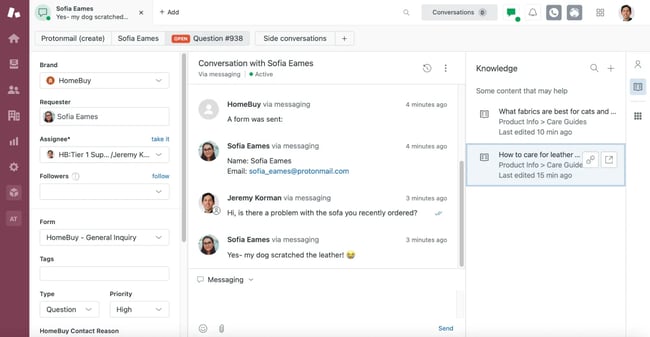
Zendesk is a mature help desk platform known for its extensive feature set and enterprise-grade capabilities.
Core Features
- Omnichannel Agent Workspace unifies customer context across all channels with side conversations for internal collaboration and linked tickets related issues.
- AI and automation handle intelligent triage with intent detection, auto-resolution of common requests, call summarization, and writing assistance for agents.
- Robust analytics include real-time monitoring, customizable dashboards with 50+ pre-built metrics, and NLP-powered conversation mining.
- Other features include advanced data privacy and compliance, workforce management, knowledge base, community forum (gamification and moderation tools), and strong automation.
Pricing
When companies pay monthly, they can get the Support Team plan for $25/month per agent, Suite Team for $69/month per agent, Suite Professional for $149/month per agent, and Suite Enterprise for $219/month per agent.
Best For
Zendesk suits mid-to-large support teams that operate across multiple channels and need strong routing, specialized workflows, and robust third-party integrations. Also great for enterprises that require deep customization, advanced analytics, and strong security and compliance.
What I Like
- Powerful customization enables teams to create custom objects (for tracking contracts or assets), define custom ticket fields with 50+ types, manage dynamic content, automate complex workflows through triggers and business rules, and build custom apps.
- Comes with out-of-the-box AI-powered quality assurance tools teams can use immediately — no coding or model training required. The AutoQA scorecard evaluates agent performance, while Spotlight identifies conversations that need human review.
- Multi-brand support lets enterprises manage multiple products from one account while maintaining separate help centers, branding, and agent workflows.
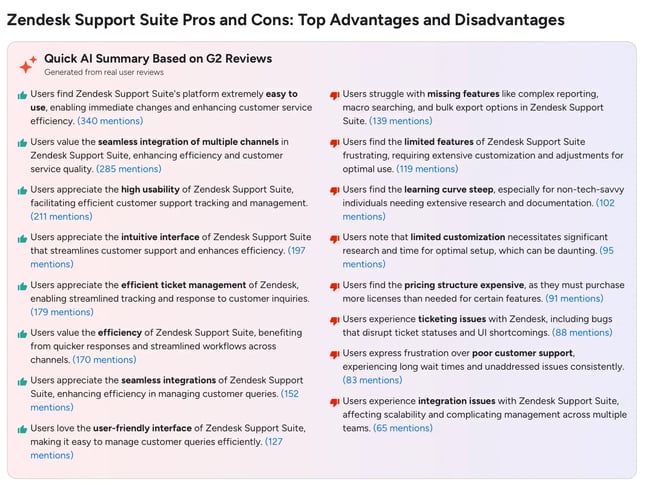
What Customers Say (Pros and Cons)
Below is a summary of insights from G2 customer reviews.
3. Freshdesk
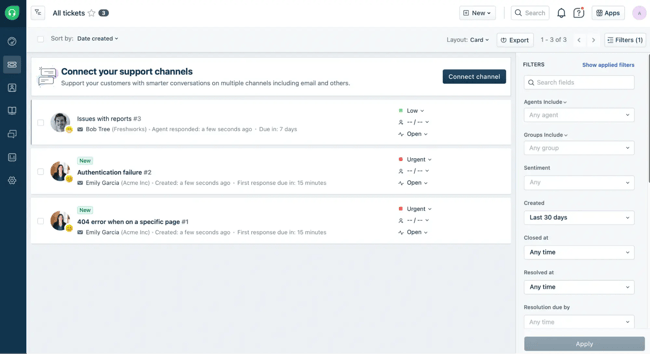
Freshdesk delivers ticketing, automation, and multi-channel support features that appeal to SMBs seeking value without overwhelming complexity.
Core Features
- Ticketing system consolidates queries from multiple channels into one view, detects collisions, and enables internal collaboration through notes. Agents can link tickets that share a related issue and split complex ones into smaller sub-tickets for parallel work.
- AI assistant (Freddy AI) helps agents with intelligent ticket triage, sentiment analysis, and contextual writing (and translation) assistance. It assists customers through chatbots and instant query resolution.
- Workflow automation manages SLAs, routes, and prioritizes tickets by agent skill, capacity, or customer sentiment, and handles escalations and time/event-based triggers.
- Other features include a customer support portal (with self-service capabilities such as a knowledge base and community forum), reusable email templates, basic analytics, a mobile app, and a marketplace with 1200+ apps.
Free Help Desk & Ticketing Software
Keep track of customer requests in one unified help desk that connects to your CRM database.
- Provide personalized, AI-powered support to your customers
- Save time, reduce errors, and streamline service processes
- Improve rep efficiency & time to resolution
- And more!
Pricing
Freshdesk offers a free tier for up to 2 agents. Paid plans with monthly billing include Growth at $18/agent, Pro at $59/agent, Pro + AI Copilot at $94/agent, and Enterprise at $95/agent.
Best For
Freshdesk suits SMBs seeking an easy-to-use system with a solid feature set. Ideal for teams prioritizing quick initial setup and straightforward support workflows over advanced customization or deep CRM integration.
What I Like
- The interface feels familiar and intuitive, without a steep learning curve.
- The free plan offers a cost-effective solution for startups.
- The “parent-child” ticketing system speeds resolution by splitting challenging tickets into sub-tickets that teams can tackle simultaneously.
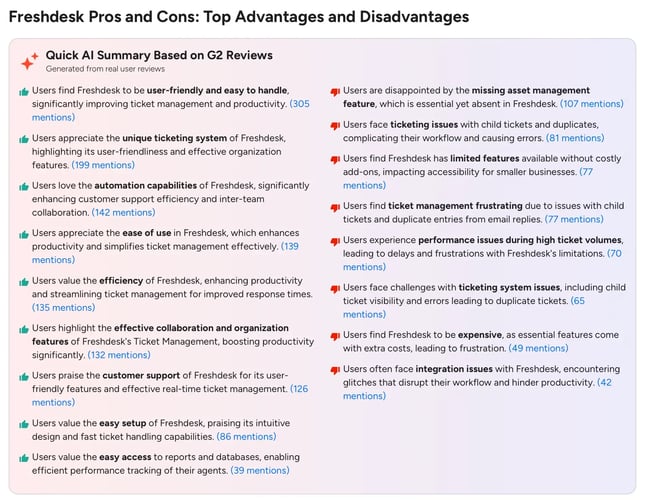
What Customers Say (Pros and Cons)
Here’s what the G2 reviews talk about.
4. Help Scout
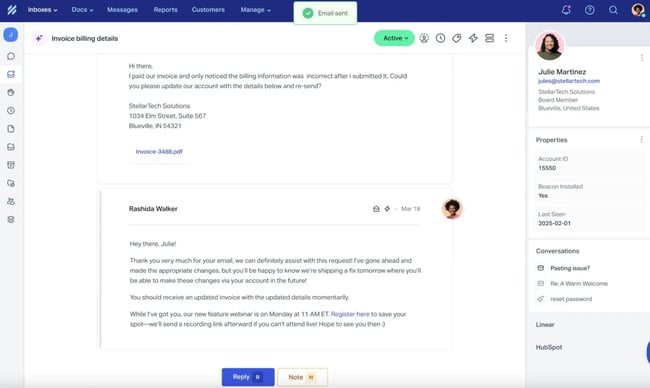
Help Scout is an email-first customer service platform with a clean, intuitive interface. The platform focuses on simplicity and human-centered support over complex ticketing systems.
Core Features
- Shared inbox works like email (also supports live chat and social) with collaboration features like assignments and internal notes. SMS and phone support are available through third-party integrations.
- AI powers conversation summaries (AI Summarize), text editing and translation (AI Assist), and suggested replies based on past conversations (AI Draft).
- In-app messaging via the Beacon widget delivers live chat and AI answers in 50+ languages.
- Other features include a knowledge base, saved replies, collision detection (alerts agents when teammates are active on the same request), workflow automation, CSAT/NPS surveys, basic reporting, and a mobile app.
Pricing
Help Scout uses contact-based pricing with unlimited users included. A free plan is available. Paid plans, billed monthly, start at $55 for 100 contacts (Starter) and $83 for 100 contacts (Plus). Pro plan pricing is available on request.
Best For
Help Scout suits teams wanting unlimited user access without added costs. Ideal for startups and growing businesses with steady support volumes that value ease of use over deep customization — and primarily manage support via email.
What I Like
- The interface feels just like email, making adoption intuitive.
- AI features are built in across all plans, even the free one.
What Customers Say (Pros and Cons)
Here’s what users commonly mention on G2.
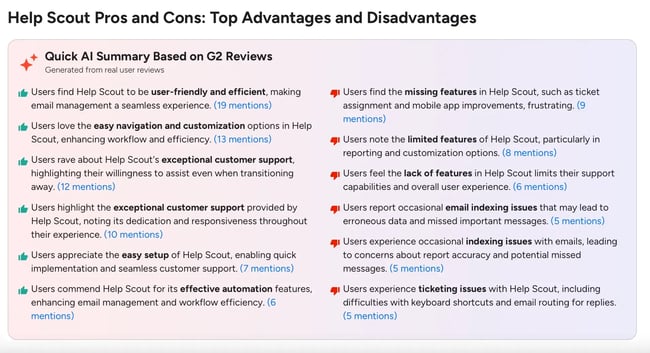
5. Gorgias

Gorgias is an eCommerce-focused customer service platform designed for online stores, particularly Shopify merchants.
Core Features
- Gorgias integrates smoothly with Shopify, BigCommerce, and WooCommerce, allowing agents to view customer data and order history directly in tickets.
- Omnichannel helpdesk consolidates email, live chat, social media, SMS, and voice support.
- AI Agent autonomously resolves common requests such as order tracking, returns, refunds, and product recommendations.
- Other notable features include campaigns for proactive live chat engagement, macros for customizable pre-written replies, and Flows for guided self-service customer journeys.
Pricing
Gorgias uses ticket-based pricing. When billed monthly: Starter costs $10 for 50 tickets; Basic: $60 for 300 tickets; Pro: $360 for 2,000 tickets; and Advanced: $900 for 5,000 tickets. Voice calls and SMS support cost extra. Enterprise pricing is available on request.
Best For
eCommerce brands on Shopify, BigCommerce, WooCommerce, Magento, and PrestaShop.
What I Like
- Built for eCommerce from the ground up, Gorgias tailors its rules, macros, and automations to shopping workflows and offers integrations to loyalty, shipping, and review platforms.
- For Shopify stores, agents can edit orders, process refunds, and update shipping without leaving the helpdesk.
- Revenue dashboard attributes sales to support interactions, showing which agents and campaigns drive conversions.
What Customers Say (Pros and Cons)
Here’s a breakdown of the main themes from G2 reviews.
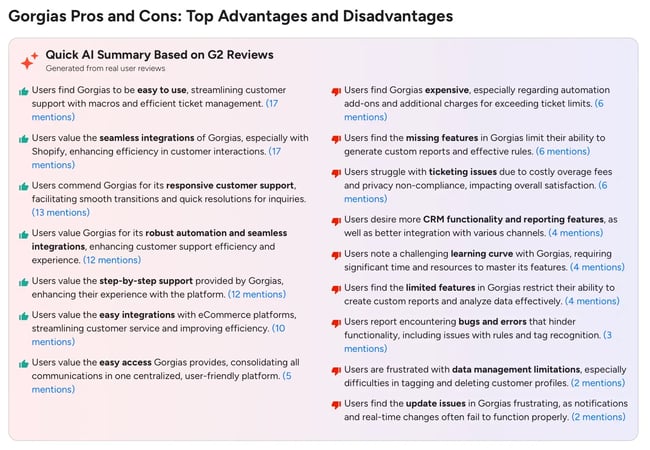
Want to go more granular when choosing a tool? Check out these comparison articles on the best AI customer service software and the top knowledge management platforms. Or continue below for helpful guidelines on selecting the optimal platform for business needs.
How To Choose the Right Web-Based Customer Service Platform
3 out of 4 consumers will spend more with companies that deliver a good customer experience. That’s why the right customer support solution matters. When evaluating platforms, consider the following factors:
- Feature set and capabilities
- User-friendliness
- Support channels and organizational needs
- Company budget
- Scalability
- Customer reviews (G2, TrustRadius, Capterra)
- Unfiltered user feedback (Reddit, forums)
- Product demos
Here’s a quick, practical framework for choosing support software based on team size.
Small Teams (1-5 Agents)
Focus: Speed to value, budget-friendly, quick implementation, and minimal complexity.
These companies, typically startups and small businesses, need a solution that works out of the box — no long setup, no training marathons.
Look for platforms with free tiers or low starting costs, intuitive interfaces without feature bloat, plus essentials like a shared inbox and basic automation. Strong self-service capabilities like knowledge bases and chatbots help reduce the support load, especially for one- or two-person teams.
Mid-Size Teams (5-50 Agents)
Focus: Omnichannel support, automation, scalability, and cross-functional alignment.
Growing companies need platforms that connect service with marketing and sales data, powered by robust automation that helps scale without rapidly expanding headcount.
Prioritize omnichannel support (as customers engage across more touchpoints), SLA management, workflow automation, native CRM integration, and connectivity with other tools. Unified customer data, team collaboration, analytics, and role-based access controls all become critical as multiple departments interact with the same account.
Enterprise Teams (50+ Agents)
Focus: Global operations, consistent customer experiences, AI-driven automation, and enterprise-level security and compliance
Large organizations need secure, scalable systems with workforce management, multi-region deployment, and sophisticated reporting. Advanced customization supports complex workflows without sacrificing governance.
Robust APIs, native enterprise integrations, SSO, GDPR compliance, multi-language capabilities, and dedicated vendor support help keep security and operations tight.
Frequently Asked Questions About Web-Based Customer Service Software
Is web-based customer service software the same as cloud-based software?
While there is a difference, these two terms are often used interchangeably as most modern customer service platforms — like HubSpot Service Hub — are both web-based and cloud-hosted.
Web-based software can be hosted on-premises or in the cloud, whereas cloud-based platforms are hosted on remote servers managed by a provider. So, all cloud-based software is web-accessible, but not all web-based software runs in the cloud.
How long does implementation usually take?
Implementation for web-based customer service software typically takes 2 to 8 weeks, depending on company size, complexity, data migration needs, and custom workflows. Smaller teams can go live sooner, while larger organizations with integrations and automation require more planning and setup time.
Can I migrate from Zendesk or Freshdesk to HubSpot?
Yes, it’s possible to migrate from Zendesk or Freshdesk to HubSpot through native migration tools and third-party services. Data like tickets and contacts can be imported, but custom fields, automation rules, and workflows require manual rebuilding. Plan for around 4-6 weeks for complete migration and team training.
Note: Freshdesk migrations only transfer the last 120 days of tickets.
What security controls should I expect?
In a web-based customer service platform, such as HubSpot Service Hub, expect built-in security controls such as role-based access, encryption of data in transit and at rest, two-factor authentication, and compliance with standards like GDPR and SOC 2.
Enterprise plans typically add IP restrictions, audit logs, and data retention policies to meet regulatory requirements.
Which metrics should I track after launch?
Track post-launch KPIs like first response time, ticket resolution rate, average ticket resolution time, Customer Satisfaction Score (CSAT), Net Promoter Score (NPS), and reopen rates.
For deeper insights, monitor ticket volume by channel, self-service resolution, and agent utilization.
Why Customer Service Should Live In Your CRM
Siloed systems create siloed thinking. And that thinking costs companies. The hidden toll of integration complexity, data fragmentation, and constant context switching slows teams — and revenue — down.
However, when customer service lives inside your CRM (rather than being third-party integrated), every support interaction automatically enriches the customer record. No API calls. No sync delays. No data mapping nightmares when field names don't match across systems.
When a customer reaches out, agents instantly see deal stages, past tickets, and account information.
For growing businesses, the smart long-term play isn‘t bolting customer service onto an existing tech stack. It’s choosing CRM-native platforms like HubSpot Service Hub that build on a shared data foundation from day one.
Free Help Desk & Ticketing Software
Keep track of customer requests in one unified help desk that connects to your CRM database.
- Provide personalized, AI-powered support to your customers
- Save time, reduce errors, and streamline service processes
- Improve rep efficiency & time to resolution
- And more!