

Choosing the right CMS features is critical to streamline content production from ideation to publication. According to HubSpot's 2026 State of Marketing report, website/blog/SEO remains the top ROI-generating channel. Consequently, a platform’s robust CMS capabilities are essential to maintaining a sustainable revenue stream for companies, thereby supporting long-term revenue growth.

This guide breaks down the top 16 features of content management systems that are essential for digital marketers, web managers, and IT decision-makers evaluating their content infrastructure.
Throughout this guide, HubSpot Content Hub serves as a key reference point — an AI-powered CMS with drag-and-drop editing and built-in SEO recommendations that brings many of these capabilities together in one platform.
Table of Contents
- Understanding Modern CMS Requirements
- Key CMS Features
- Frequently Asked Questions About CMS Features
Understanding Modern CMS Requirements
A content management system (CMS) enables the creation, editing, organization, and publication of digital content without requiring deep programming knowledge. Beyond blogging, modern CMS features power e-commerce stores, membership communities, and enterprise content operations at scale.
While evaluating CMS features, it’s best to start with an honest assessment of business goals. Before comparing platforms, identifying which content management system key features align with specific objectives determines which capabilities actually matter.
A startup building its first professional site has fundamentally different needs than a mid-sized company consolidating three websites or an enterprise managing global content operations.
The following framework helps prioritize CMS features based on organizational maturity and growth stage:
- Foundation Features: Non-negotiable basics of a CMS include an intuitive interface, content editing, security, and backups.
- Growth Features: CMS capabilities that become critical as content operations scale are workflow management, multi-language support, advanced SEO tools, and integrations.
- Advanced Features: CMS features for complex requirements involve headless architecture, custom APIs, enterprise security, and advanced analytics.
- Innovation Features: Cutting-edge CMS capabilities comprise AI-powered content creation, predictive analytics, and automated personalization.
The most effective starting point is assessing where operations stand today and where they need to be within 12 to 18 months — this framework reflects business goals, not platform preferences.

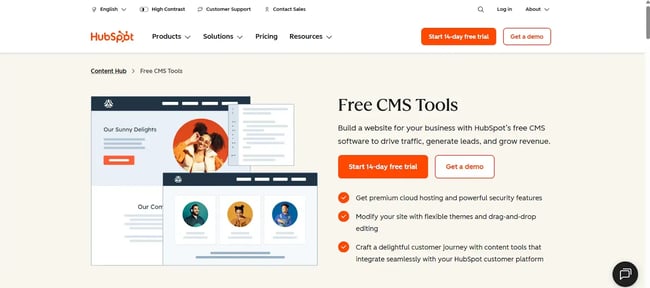
HubSpot's Free Website Builder
Create and customize your own business website with an easy drag-and-drop website builder.
- Build a website without any coding skills.
- Pre-built themes and templates.
- Built-in marketing tools and features.
- And more!
Key CMS Features
The 16 CMS features below represent the capabilities that matter most across organizations of all sizes and maturity levels. Each is grounded in real platform behavior, with objective analysis, implementation experience, and practical guidance.
1. Intuitive Dashboard
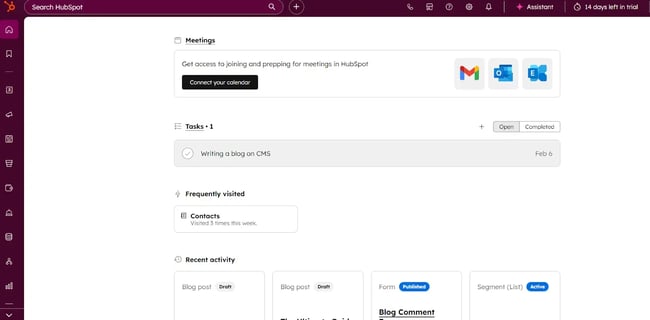
The admin dashboard is the operational core of any CMS. It centralizes content production, distribution, performance tracking, and site management in one place. A well-designed dashboard reduces the number of clicks needed to access critical functions and presents relevant information at a glance without burying it under layers of options.
Role-adaptive dashboards deliver the most value. While content creators need to see drafts, deadlines, and publishing queues, administrators need security alerts and traffic summaries.
HubSpot Content Hub integrates with the HubSpot customer platform to centralize website management, campaign execution, and lead tracking in a single dashboard. This consolidation reduces context switching and keeps content, CRM, and analytics data accessible through a single interface.
My experience: I spend most of my time managing workflows from the dashboard, so how it’s laid out matters to me more than anything else.
The first thing I do when I log in is check what’s pending, such as drafts, approvals, and scheduled posts. On a good dashboard, I can see all of that without clicking into separate menus.
I also use the traffic summary directly from the main screen to get a quick sense of how recent posts are doing. When the dashboard is well organized, I get to actual work faster. When it’s cluttered or buries things, I end up wasting time just navigating.
Best for: Teams with multiple contributors managing different content types across blogs, website landing pages, ad copies, email campaigns, and social media channels.
Pro tip: During a CMS features evaluation, track how many clicks it takes to complete the three most frequent daily tasks from the dashboard. If the number exceeds two clicks for any of them, that friction compounds over time. Try using a dashboard that gets the job done in the fewest clicks.
2. Responsive Themes
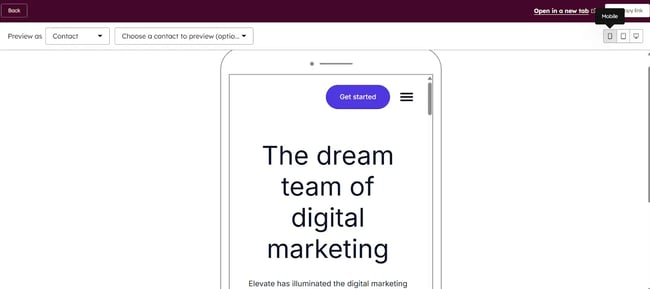
Responsive themes are important CMS features that automatically adjust a website's layout, typography, and navigation to deliver an optimized experience across all devices. These themes use flexible grid systems and CSS media queries to ensure content remains readable and functional across desktops, tablets, and phones.
According to the HubSpot State of Consumer Trends report, 63% of consumers prefer to find information about brands and products on mobile devices — making mobile-responsive design non-negotiable. Themes that actively reorganize layout and interaction patterns for smaller screens — rather than simply scaling content down — deliver the strongest smartphone experience
HubSpot's CMS tools enable teams to build websites using flexible, mobile-optimized themes and drag-and-drop editing without requiring developer resources. HubSpot’s theme library includes professionally built options that balance visual design with performance optimization, ensuring fast load times across devices.
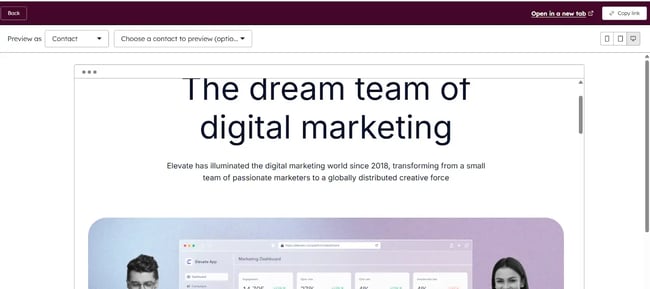
My experience: I always test how a theme looks on my phone before I commit to it. The layout that works on a desktop often breaks completely on mobile. Buttons get too small, menus overlap, and text gets hard to read.
I’ve noticed that some themes just shrink everything down, which doesn’t actually help. The ones I prefer are the ones that rearrange the layout for smaller screens by stacking elements differently and resizing navigation.
I usually just browse a few pages and tap around. If something feels off or is hard to use on my phone, I switch to a different theme.
Best for: E-commerce operations, local businesses, and any B2C site where mobile traffic represents more than half of total visits.
Pro tip: Test candidate themes on physical devices, not just browser developer tools. Emulators miss real-world issues such as touch interaction delays, rendering differences, and actual load times over mobile networks.
3. Powerful Content Editing and Publishing Tools
Content editing tools are essential CMS features that determine how efficiently a team can create, format, and publish material. Modern CMS platforms offer WYSIWYG editors that provide real-time visual feedback, drag-and-drop functionality for multimedia elements, and the flexibility to work across structured and unstructured content. The publishing interface should make it nearly impossible to go live with unfinished content.
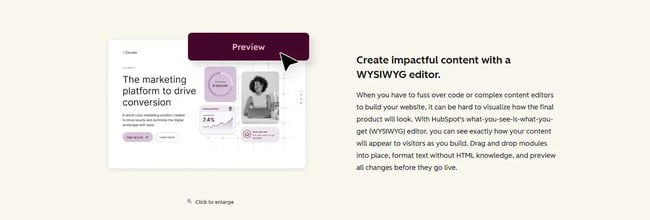
Editors that serve both technical and non-technical users without compromise are rare and valuable. The ability to toggle between visual, HTML, and markdown modes gives each contributor the level of control they need.
Moreover, HubSpot's 2026 State of Marketing report found that 60% of marketers already leverage short-form video, which delivers the biggest content ROI, demonstrating how essential CMS features must extend well beyond text editing to support multimedia content production.
HubSpot Content Hub offers high-quality content editing tools that enable marketing teams to build visually polished pages, manage multimedia assets, and publish across channels from a single interface. The HubSpot AI content writer accelerates the content creation process by generating drafts, suggesting headlines, and optimizing copy. This reduces production time while preserving brand voice consistency.
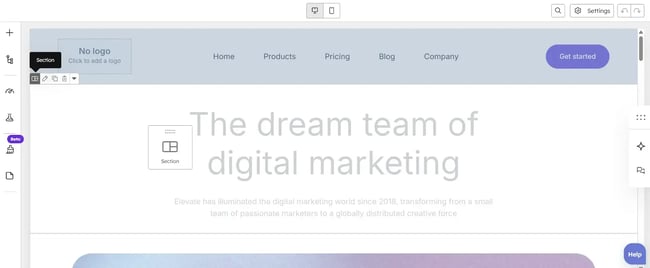
My experience: I use content editors every day, and I've tested several platforms to find what actually holds up under real workloads.
I like being able to drag and drop images and blocks into place without writing code for simple pages. But sometimes I need to edit the HTML directly to fix something specific, and I appreciate it when the editor lets me do both without switching tools.
While building a campaign page, I arranged sections visually, then jumped into the HTML view to adjust a layout detail before publishing. The tools I prefer have a clear preview and a deliberate publish button, so I can double-check before anything goes live.
Best for: Organizations with contributors at varying technical skill levels, from full-time content teams and subject matter experts to those who publish occasionally.
Pro tip: Request a sandbox environment during evaluation and have both the least and most technical team members attempt to create content for a real page. The direct experience of team members will surface usability gaps that no sales demo can reveal.
4. Version Control and Backups
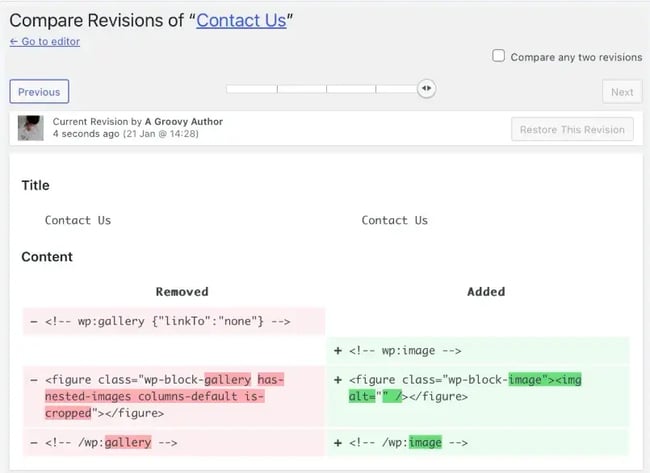
Version control tracks every change made to content over time, allowing teams to review history, compare versions, and restore previous states when needed. Backup systems create complete copies of a site's content, database, and files at regular intervals. Together, these CMS features protect against data loss due to technical failures, security incidents, or human error and reduce the risk of costly, time-consuming recovery operations.
CMS platforms that make version control transparent and accessible transform it from a safety net into an active collaboration tool. Side-by-side version comparisons, clear attribution of changes, and single-click restoration are the baseline. Automated backups that run without manual intervention add another layer of reliability.
For example, WordPress's revision history is a well-known reference point for how version control can work at the individual post level.

My experience: I rely on autosave more than I used to. I’ve had moments where I accidentally deleted a section or changed something I didn’t mean to, and being able to go back to a previous version saved me a lot of rework.
For example, accidentally deleting content in WordPress isn’t a disaster since the revision history lets me roll back to an earlier draft instantly. On the backup side, I prefer a CMS that handles it automatically, so I don't have to remember to set it up. My current setup uses a plugin for backups, and I like that I can choose the schedule and where the backup gets saved. I check on it occasionally just to make sure it’s running.
Best for: Any organization where multiple people edit and update content, and especially businesses in regulated industries, where maintaining version history is important for compliance.
Pro tip: Confirm that backup storage is physically separate from primary hosting infrastructure. Cloud-based backup solutions provide the strongest protection against server-level failures or security incidents.
5. Multi-language Content Creation
Multi-language functionality enables the creation, management, and publication of content in multiple languages from a single CMS. Advanced CMS features include implementations that provide translation workflows, automatic language detection, and seamless navigation between language versions. The system should automatically maintain relationships between translated pages, so updates to one version don't orphan others.
Platforms that treat multi-language support as a default capability — rather than an add-on — deliver the most reliable experience. Intelligent grouping of language variants, independent update capability, and language-specific SEO handling are key differentiators.
For example, HubSpot Content Hub automatically groups multilingual variants and provides a language switcher module that can be added to any page template.
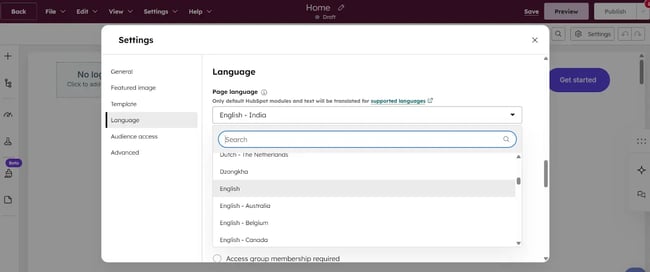
My experience: I’ve worked with multi-language content before, and the part that I always focus on is keeping translations in sync. I like it when the CMS groups translate pages together, and flag when one version has changed but the others haven’t.
I also check that the language switcher works smoothly on the front end because it’s one of those things visitors actually use. When switcher tools are built in and easy to navigate, it makes a noticeable difference in how polished the site feels.
Best for: Companies serving international markets, organizations with multilingual audiences, or businesses actively planning geographic expansion.
Pro tip: Verify that the platform handles regional language variants correctly. Brazilian Portuguese and European Portuguese, for example, are distinct. Also, confirm support for right-to-left languages if Middle Eastern or South Asian markets are in scope.
6. Publishing Controls
Publishing controls are essential CMS features that establish who can create, edit, approve, and publish content through role-based permissions and workflow management. These systems ensure appropriate oversight at every stage while preventing unauthorized changes. Advanced controls include content scheduling, multi-step approval chains, and audit trails that document every action taken.
Permission systems that balance security and usability are the standard against which CMS platforms are held. Predefined roles such as administrator, editor, author, or contributor cover most organizational structures, but the ability to create custom roles matters for teams with unique needs.
For example, WordPress's five-role system (Administrator, Editor, Author, Contributor, Subscriber) is a widely understood reference point for how publishing controls function in practice.
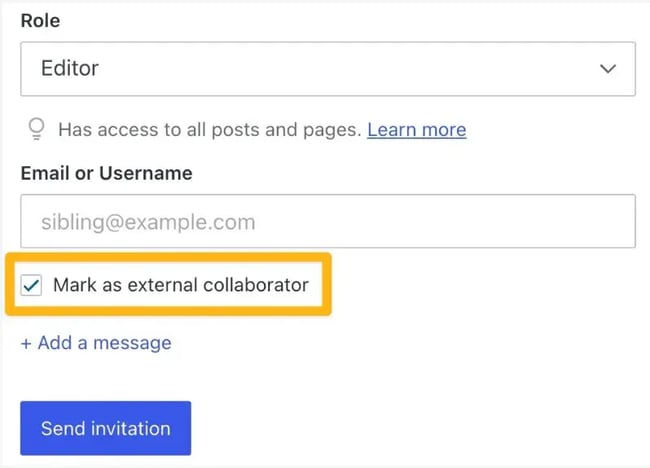
My experience: I’ve set up roles for different people, such as editors, contributors, and admins, on CMS before. The thing I noticed most is how much smoother things run when someone can only do what they’re supposed to do.
For instance, WordPress allows contributors to submit drafts while editors retain full control over approvals and publishing. When I use WordPress, I don’t have to worry about a contributor accidentally changing site settings or publishing something before it’s reviewed.
I also like being able to create a custom role when the default options don’t quite fit, for example, giving a freelancer just enough access to draft and submit, nothing more.
Best for: Organizations with multiple content contributors, teams in regulated industries requiring approval workflows, or any business where quality control before publication is non-negotiable.
Pro tip: Map out the full content governance structure before configuring any permissions. Define who performs each action to create, edit, approve, publish, or delete for each content type. This exercise frequently surfaces process gaps that no CMS configuration can fix on its own.
7. Built-in SEO Tools
Built-in SEO tools are important CMS features that help optimize content for search engines without requiring specialized technical expertise. These features include customizable URLs, meta tag management, XML sitemap generation, structured data implementation, and real-time optimization suggestions.
The most effective SEO systems provide keyword analysis and readability scoring directly inside the content creation interface, making SEO optimization a part of the writing process. SEO tools that surface specific, actionable optimizations build long-term organic capability rather than producing short-term ranking fluctuations.
For example, HubSpot's Content Hub delivers AI-powered SEO recommendations as content is being written. It shows opportunities to strengthen keyword placement, improve meta descriptions, and add subtopics.
The HubSpot AI content writer helps teams create optimized content faster by generating SEO-friendly headlines, meta descriptions, and body copy that already incorporates best practices.
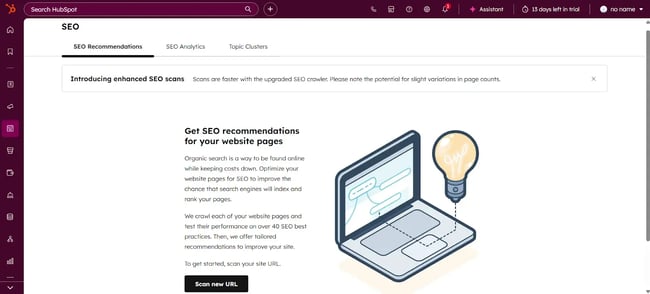
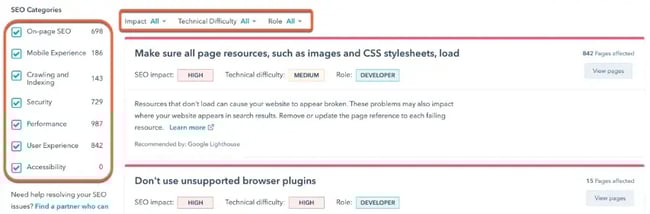
My experience: I use HubSpot’s built-in SEO suggestions while I’m writing, not after. It’s much easier to adjust a headline or a meta description in the moment than to go back and fix it later.
I check the keyword suggestions and readability score before I hit publish. It only takes a minute, and I’ve noticed it helps me catch things I would have missed otherwise.
Using a CMS with built-in SEO helps me ensure my URLs are clean and my meta tags are filled in. Having it right there in the editor means I actually do it consistently, instead of skipping it when I’m in a rush.
Best for: Small to mid-sized businesses without a dedicated SEO team, content teams building in-house optimization expertise, or any organization where organic search is a primary traffic source.
Pro tip: Prioritize platforms whose SEO toolkit includes mobile optimization checks. Google‘s mobile-first indexing means mobile performance directly affects search rankings, and this shouldn’t be treated as an optional feature.
8. Robust Integrations
Integration capabilities allow a CMS to connect with other business systems such as marketing automation tools, analytics services, and e-commerce infrastructure. These connections enable data synchronization, workflow automation, and unified reporting across a technology stack.
Modern platforms support integrations through APIs, webhooks, and pre-built connectors. For example, WordPress alone offers over 62,000 free plugins, and Drupal provides more than 55,000 contributed modules.
Integration marketplaces with official and community-developed connectors reduce implementation time significantly compared to custom API work. Well-documented APIs enable developers to build custom integrations efficiently when prebuilt connectors don't cover a specific use case.
HubSpot Content Hub connects to third-party apps via API and supports direct integrations with tools like Google Search Console, surfacing search performance data within the CMS dashboard.
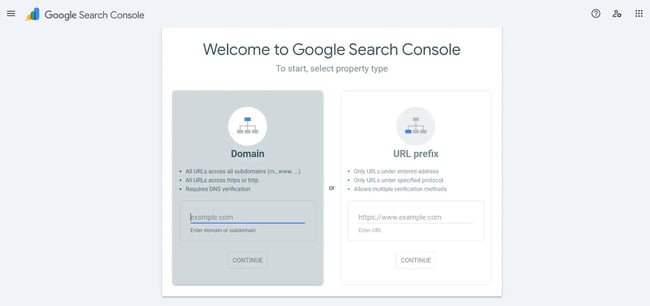
My experience: I use a few tools alongside my CMS, such as Google Analytics, a CRM, and an email platform. When they connect smoothly, I don’t have to move data between them manually.
I recently set up a Google Search Console integration, and it was straightforward. Now I can see how my pages are performing in search without leaving the CMS.
I also confirmed that the CRM connection works as expected: form submissions on the site should feed directly into it. When integrations just work out of the box, it saves me a lot of back-and-forth.
Best for: Organizations running multiple business systems, companies where marketing and sales alignment is a priority, or teams that need unified analytics across platforms.
Pro tip: Before committing to a platform, verify that integrations already exist for every critical business system in the stack. Check integration reviews and user feedback since a poorly built connector can create more disruption than it solves.
9. Detailed Analytics
Analytics capabilities are critical CMS features that track website performance, audience behavior, and content effectiveness. Comprehensive solutions measure traffic sources, page views, bounce rates, conversion paths, and engagement metrics. Advanced implementations include attribution modeling and predictive insights.
When analytics integrate directly with the CMS dashboard, teams can access performance data without switching between platforms, enabling faster, more informed decision-making.
The most effective analytics implementations surface key metrics prominently in the dashboard while allowing deeper exploration for teams that need it — balancing executive-level visibility with analyst-level detail.
HubSpot‘s unified analytics approach connects website performance with broader marketing and sales data, providing context that goes beyond traffic numbers. Google Analytics integration remains a standard baseline for CMS platforms that don’t offer native analytics.
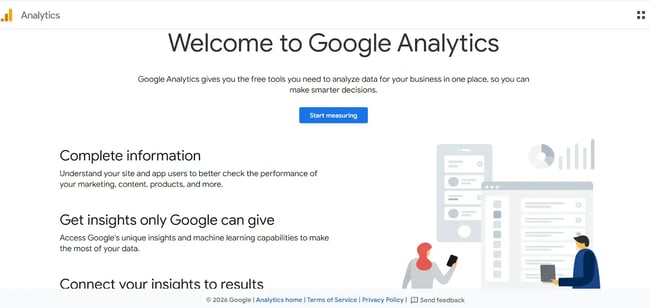
My experience: I check the analytics dashboard regularly to see how my content is actually performing. Page views are useful, but I care more about what people do after they land: whether they stay, click through, or fill out a form.
I’ve used the traffic source and conversion data to figure out which posts are actually worth the effort. Sometimes the numbers surprised me because a post I thought was doing well had almost no conversions, while a quieter post was bringing in real leads. I use that kind of data to decide what to write next and where to focus my time.
Best for: Data-driven organizations, companies with significant digital investment that require ROI measurement, or teams actively optimizing content strategy based on performance.
Pro tip: Define key performance indicators before selecting an analytics tool. E-commerce operations need conversion rate and average order value. B2B companies need lead quality and sales cycle metrics. The analytics platform should measure the indicators that directly tie to business objectives.
10. Pre-Made Templates
Pre-made templates are CMS features that provide professionally designed layouts for common page types such as homepages, landing pages, blog posts, and contact forms. Quality templates accelerate website development, maintain design consistency across a site, and include high-converting elements.
A template is typically a single-page layout that exists within or alongside a theme, and it can be downloaded and customized independently. A curated collection of high-quality templates delivers more value than a massive library of outdated designs.
The ability to customize templates without coding, while still allowing developers to access and modify underlying code, provides flexibility for teams at any technical level.
HubSpot's Content Hub templates through its Asset Marketplace, and developers can create custom JavaScript, HTML, HubL, and CSS assets within the same environment where pages are published.
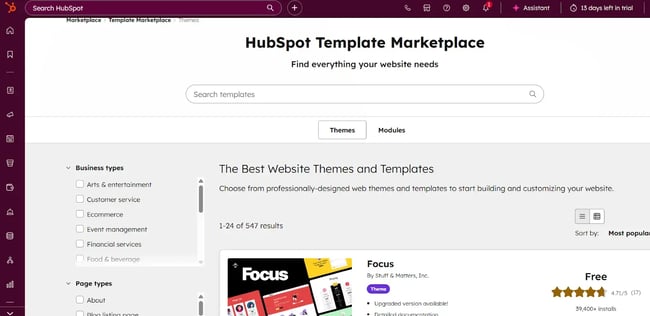
My experience: I’ve used pre-made templates a few times when I needed to get a page up quickly. I just browse through the options, pick one that looks close to what I need, and swap in my own content and branding.
It usually takes me less than an hour to get something decent-looking live. I do check how the template looks on mobile before I commit, since some of them look great on desktop but fall apart on a phone.
I also look at whether I can actually customize the sections I need to change without digging into code. The ones that let me do that are the ones I keep coming back to.
Best for: Startups and small businesses without in-house design teams, organizations that need to launch quickly, or companies testing design directions before committing to full custom development.
Pro tip: Preview templates on actual devices before selecting them. Load times, animation smoothness, and content reflow behave differently on real hardware than in browser previews. Confirm that the template library includes layouts for every page type the site will need.
11. Content Staging
Content staging provides an isolated environment where teams can build, test, and refine changes before deploying them to a live site. This workspace allows experimentation without risk to content production. Advanced staging systems support scheduled deployments, rollback capabilities, and testing of complex changes such as full-site redesigns or bulk content migrations.
Staging environments are important CMS features that closely mirror production infrastructure, including server configurations, integrations, and live data, providing the most reliable testing experience. The ability to sync between staging and production easily reduces friction.
HubSpot's Content Hub includes a built-in staging environment, eliminating the need to manage separate servers or sign up with specific hosting providers.
My experience: I use the staging environment whenever I’m making bigger changes to the site, like a new page layout, a redesigned section, or anything I don’t want to risk breaking on the live site.
I build it out in staging first, click around to make sure everything works, and then push it live once I’m confident. It’s saved me from a few embarrassing moments where something would have gone live broken if I hadn’t caught it first.
I like those tools where staging is built into the CMS, and I don’t have to set up a separate server or environment on my own.
Best for: Organizations making significant website changes, companies in regulated industries that require approval before content goes live, or teams that need to test new features without affecting visitors.
Pro tip: Establish clear protocols for staging use before the first project begins. Define which types of changes require staging testing, who has access, and how often the staging environment should sync with production.
12. Security
Security features protect a website, its data, and its visitors from cyber threats. Comprehensive security includes SSL/TLS encryption, Web Application Firewalls (WAF), DDoS protection via content delivery networks, regular software updates, malware scanning, and intrusion detection.
The Federal Trade Commission received over 1.1 million reports of identity theft in 2024 alone — a figure that underscores why enterprise-grade security should be available across all CMS plan tiers, not reserved for enterprise accounts.
The most reliable systems include automatic updates, continuous monitoring, and clearly documented incident response procedures.
Evaluating security requires asking specific questions: Does the platform include a CDN to prevent DDoS attacks? Is SSL included or purchased separately? How often are vulnerability scans conducted? These are the baseline criteria for any serious CMS evaluation.
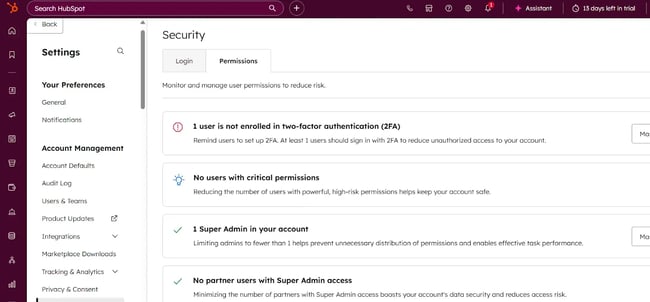
My experience: Security isn’t something I used to think about much until I realized how easily things can go wrong.
Now I run through a few basics whenever I evaluate a new CMS: whether SSL is active, updates are running automatically, and a firewall is in place.
I’ve also started paying attention to whether plugins and add-ons are actively maintained. An outdated plugin is one of the easiest ways a site can get compromised, and it’s something I can actually control.
I keep automatic updates turned on and do a quick check on security settings every few weeks just to stay on top of it.
Best for: Every organization, but with heightened priority for e-commerce sites, businesses that collect personal information, and any operation in a regulated industry.
Pro tip: Request formal security documentation during the evaluation process. Look for SOC 2 or ISO 27001 certifications, third-party audit reports, and information about bug bounty programs. These signals indicate that security is treated as a core responsibility, not an afterthought.
13. Support
CMS support services provide the technical assistance, documentation, and community resources that teams rely on to resolve issues, maintain site performance, and maximize platform capability. Quality support includes multiple channels, such as email, phone, and chat, as well as comprehensive documentation, community forums, and educational resources.
Open-source platforms typically rely on community-driven support forums rather than dedicated customer service teams. Joomla, for example, has over 800,000 community members who actively participate in its support forum.
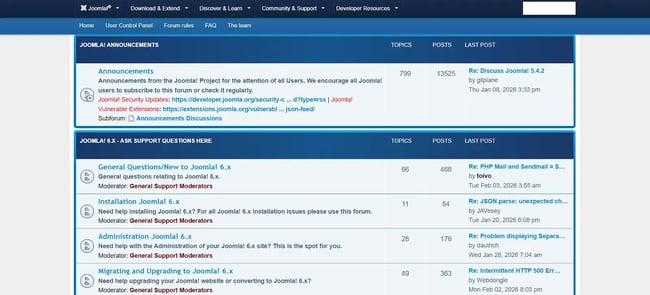
The most effective support combines strong self-service resources with responsive direct assistance for complex issues. Knowledge bases, video tutorials, and active community forums handle routine questions well.
When critical problems arise, like a site going down during peak traffic, responsive support teams with deep product knowledge prevent extended downtime from becoming a revenue crisis.
My experience: I’ve reached out to CMS support a handful of times, mostly for things I couldn’t figure out on my own from the documentation. The speed and quality of the response made a big difference each time.
I also use the knowledge base and tutorials before contacting anyone directly, and a good one can save me a lot of time. I’ve tried both dedicated support and community forums.
For quick questions, forums work fine. But when something is actually broken, and I need it fixed fast, I want to talk to someone who knows the platform inside out.
Best for: Mission-critical websites, teams without dedicated technical resources, or industries where even brief downtime carries significant financial or reputational consequences.
Pro tip: Test support responsiveness before signing a contract. Submit questions through different channels and measure response time and quality. Review community forum activity and resolution rates. The support experience during a crisis is a reliable indicator of how a vendor will perform when it matters most.
14. Migration
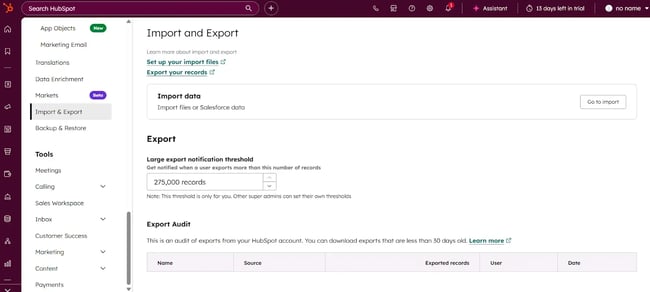
Migration capabilities facilitate transferring content, design elements, and configurations from an existing system to a new CMS. Quality migration support includes automated import tools, data mapping assistance, URL redirection to preserve SEO equity, and testing protocols.
Migration complexity varies significantly based on content volume, custom functionality, and structural differences between the source and target platforms. Platforms that provide clear migration documentation, automated tools for common source systems, and professional services for complex migrations set the standard.
Equally important is the availability of export functionality. A vendor that makes it easy to take data out demonstrates confidence in the product and respects the organization's data ownership.
My experience: I’ve gone through a CMS migration before, and the first thing I did was take stock of all my existing content, like posts, pages, and images. I used the migration tools to automatically import what I could, and then manually recreated a few templates that didn’t carry over.
Setting up URL redirects was one of the things I paid the most attention to, because I didn’t want to lose any search ranking. The migration also made me go through a lot of old content I hadn’t looked at in a while, and I ended up cleaning up a bunch of outdated stuff while I was at it.
Best for: Organizations with substantial existing content libraries, companies outgrowing their current platform, or businesses consolidating multiple websites into a single CMS.
Pro tip: Treat migration as an opportunity to audit and improve content, not just move it. Eliminating outdated material and consolidating duplicates before the transfer reduces migration complexity and results in a cleaner, better-performing site from day one.
15. AI-Powered Content Creation
AI-powered content creation tools assist with writing, editing, and optimizing content using artificial intelligence and natural language processing. These CMS features range from simple grammar checks and writing suggestions to complete draft generation, topic ideation, and automated personalization. Advanced systems learn from brand voice, industry context, and performance data to provide increasingly relevant assistance over time.
AI tools that augment human creativity rather than attempt to replace it deliver the most sustainable value. The best implementations help overcome initial drafts, accelerate ideation, and surface suggestions for improvement.
HubSpot AI content writer helps identify genuinely useful topics for an audience and generates drafts or outlines that writers can build from within the CMS.
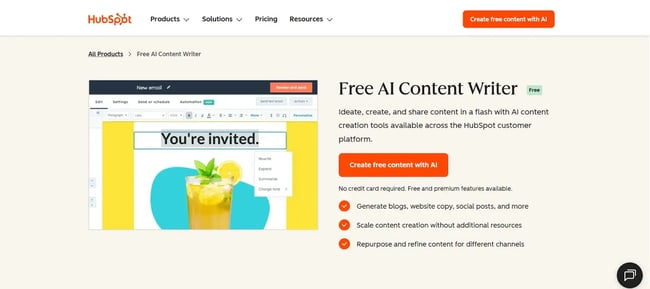
My experience: I use the AI writing tool when I’m stuck or need a starting point. I type in a quick description of what I’m trying to say, and it gives me a draft I can work from.
I always edit it, sometimes quite a bit, but it gets me past the blank page faster than staring at an empty editor. I like that it’s built right into the CMS, so I don’t have to switch between tools and copy and paste. I’ve also used it to generate headline options and meta descriptions, which is genuinely handy when I’m trying to move quickly.

Best for: Small teams producing high volumes of content, organizations scaling content operations without proportional headcount increases, or businesses that need consistency in tone and quality across many contributors.
Pro tip: Establish clear internal guidelines for AI-assisted content before it becomes routine. Define which content types benefit from AI drafting, what review standards apply before publication, and how AI-generated material should be handled differently from fully human-written content.
16. AI-Powered SEO Recommendations
AI-powered SEO tools analyze content and website structure to deliver intelligent optimization recommendations. These CMS features evaluate semantic relevance, content comprehensiveness, competitive positioning, and technical SEO factors simultaneously.
Advanced implementations monitor search engine algorithm updates and adjust their guidance accordingly. The goal is proactive optimization, catching issues and opportunities before they affect rankings.
Context-aware recommendations that account for a specific site's industry, competitive landscape, and existing content deliver far more value than generic checklists. Real-time feedback during content creation prevents SEO mistakes at the source.
HubSpot's AI-powered SEO features examine domain authority, existing content performance, and topic cluster structure to recommend strategies tailored to the site's specific strengths and gaps.
My experience: I use HubSpot's AI SEO tool to check my content before publishing. It flags things like keyword placement, duplicate meta descriptions, and topic gaps that I might not catch on my own.
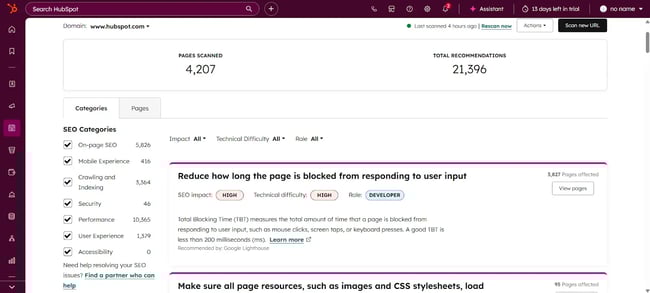
I’ve found it useful for spotting issues on older posts, too. Sometimes there’s something basic that’s been sitting there for a while without anyone noticing. I don’t follow every recommendation it gives, but I treat it as a useful second opinion.
It’s especially helpful when I’m trying to figure out what to write about next. It can point me toward topics where there’s actually room to rank.
Best for: Organizations that prioritize organic search traffic, companies competing in crowded markets where visibility requires strategic optimization, or teams that want to maximize SEO impact without a large in-house SEO department.
Pro tip: Treat AI SEO recommendations as strategic input, not absolute directives. Optimization involves balancing search visibility with user experience, conversion goals, and brand consistency. The AI surfaces patterns and opportunities, but the final decision should account for broader business objectives.
Frequently Asked Questions About CMS Features
What are CMS features?
CMS features are the functional capabilities a content management system provides for creating, managing, publishing, and optimizing digital content. Some popular CMS features include interactive dashboards, pre-set themes and templates, multi-language content support, SEO, and analytics tools. The right combination of CMS features depends on organizational size, technical capability, and long-term content strategy objectives.
What is a CMS and its examples?
A content management system is software that enables users to create, edit, and publish digital content without extensive programming knowledge. Popular examples include WordPress, HubSpot Content Hub, Drupal, Shopify, and Wix.
What is CMS functionality?
CMS functionality refers to the core actions a content management system enables: content creation, media management, publishing workflows, and user permissions. The features of content management systems extend further to include SEO, analytics, and API integrations.
What are the key highlights of CMS?
Key CMS highlights include intuitive visual editing with real-time feedback, collaborative workflows with version control, built-in SEO tools, responsive design across all devices, robust security protections, comprehensive analytics, extensive integration ecosystems, and AI-powered content assistance.
Choosing the Right CMS Features
Selecting a content management system with the appropriate CMS capabilities is a high-stakes decision. The right platform is one whose capabilities align most closely with the team's skills, content strategy, and business objectives.
HubSpot's 2026 State of Marketing report found that measuring marketing ROI remains the single biggest challenge for one in three marketers, and 73% report increased budget scrutiny over the past year. The right CMS helps streamline operations so that every content management decision becomes measurable and cost-effective.
The evaluation process for identifying appropriate CMS features should start with the highest-priority requirements and narrow from there — testing platforms with real tasks performed by actual team members who'll use them daily. Auditing business needs first, then matching them to platform capabilities, is how the right CMS gets chosen.
HubSpot's Free Website Builder
Create and customize your own business website with an easy drag-and-drop website builder.
- Build a website without any coding skills.
- Pre-built themes and templates.
- Built-in marketing tools and features.
- And more!
Content Management System





.webp)