-Mar-14-2025-05-55-40-8841-PM.png?width=112&height=112&name=Featured%20Image%20(1)-Mar-14-2025-05-55-40-8841-PM.png)

In this guide, I’ll share five critical questions to help you reap the benefits of usage-based pricing (and avoid the risks). You’ll get expert tips from Garcia and other leaders with firsthand experience evaluating and using usage-based AI tools, and walk away feeling more confident as you negotiate contracts.
This is the third post in our AI credit-based pricing series. Check out our posts on what AI credit-based pricing is and why vendors are moving toward usage-based models.
The 5 Questions to Ask AI Vendors
1. How much will each action actually cost us in credits — and how will we know before we trigger it?
Asking this upfront is crucial. For Thibault Garcia, founder of go-to-market agency Reachly, the issue wasn’t that he was unaware of how credits were priced — it was that he didn’t know the prompt would run on all 28,000 rows.
What a Good Answer Looks Like
- Per-action cost table. The vendor should publish a per-action credit table that maps credits to specific tasks. Even within a single tool, costs can vary wildly. In email-finding software, Garcia notes, finding an email might cost one credit, verifying one might cost half, and finding a phone number can run 10.
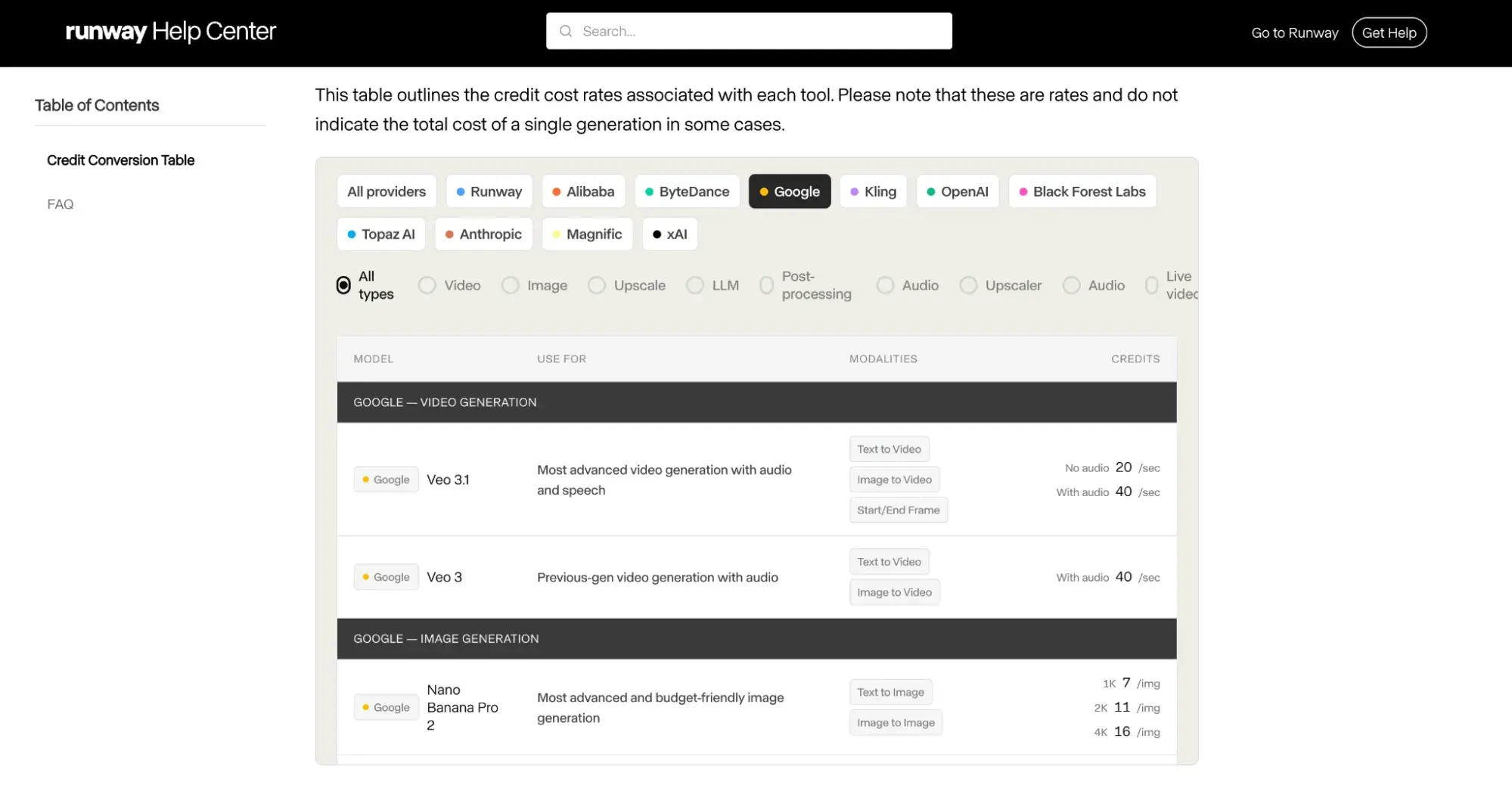
Video agent API vendor Runway has one of the most intricate per-action cost tables I’ve seen. Users can select the model and task and get details on how many credits it will cost them. For example, Google Veo 3.1 with audio is 40 credits per second of video, while Nano Banana Pro image generation in 4K is 16 credits per image.
- Previews/labels within the software itself. The product should show cost previews before triggering bulk or high-volume actions, and ideally, gate the expensive ones behind confirmation prompts. It’s also helpful if it displays labels indicating that an action uses AI credits.
Red Flags to Watch Out For
- Unclear pricing. “Some tools are now saying this action could cost you anywhere from one to ten credits, depending on complexity,” warns Garcia. “But if there’s no clear table on how that translates into actual cost, that’s definitely a very, very big red flag to look for.”
- Failed actions that still consume credits. “Most of the tools, if they look for it but they don’t find what they’re looking for, you don’t pay for that credit,” Garcia says. But that’s not the case for every tool, so it’s crucial to check.
-Mar-14-2025-05-55-40-8841-PM.png?)
Free AI Agents Playbook
This practical guide reveals where to start, which applications deliver real value, and how to implement agents that transform workflows without replacing jobs.
- Marketing Workflow Automation
- Sales Acceleration System
- Operational Excellence
- Implementation Blueprint
Download Free
All fields are required.
Form not available
2. How will our costs scale as we add teams, users, or use cases?
This question exposes the real pricing model behind the contract. Under a per-seat model, costs scale with headcount. Under credit-based pricing, costs scale with what the AI actually does — prompts, generations, automations, task volume — which means an entry-tier price tells you almost nothing about what you’ll pay at full deployment.
What a Good Answer Looks Like
- Documented pricing tiers. The vendor should share what credits cost at multiple commitment levels, not just the smallest one. If the only rate you can see is the starting tier, you’re not going to be able to realistically forecast the spend for year two.
- Scaling math you can replicate. You should be able to take your projected usage, apply the vendor’s published rates, and arrive at the same number their rep gives you. If you can’t, the pricing isn’t transparent.
Red Flags to Watch Out For
- Vague answers about how costs will scale. It’s normal to have to contact a sales rep or sign up for a demo to see enterprise software pricing. What isn’t normal, though, is when a rep won’t walk you through what your projected usage translates to in credits and dollars once you’re on the call. Sometimes that’s because the setup is genuinely complex and they need more info to quote accurately. In that case, ask them what they need and follow up. But if they keep dodging after you’ve supplied the inputs, that’s a red flag.
- Tiers that get more expensive per credit as usage grows. Garcia says that this is rare, but he has seen it. “This makes no sense, and I don’t think it’s something that’s very democratized.” He adds, “It should be the more you use it, the cheaper it becomes.”
3. What will our total spend look like across realistic usage scenarios?
First-time AI buyers have no historical consumption data to anchor a forecast, and overcommitting to a credit tier is real and expensive. The upside to AI tools, Garcia notes, is that you can usually make sure they’re useful before you sign: “It’s very good for us because we don’t have to spend too much money. We can test the tools.” The question is whether the vendor gives you a structured way to do so.
What a Good Answer Looks Like
- A trial mechanism that produces real data. Pilots, sandboxes, or free credits let you gather baseline usage numbers before committing. HubSpot, for example, offers 28-day free trials of its customer and prospecting agents.
- A scenario-modeling framework. Garcia recommends forecasting your demand against what the tool is replacing and then running bad-case, base-case, and good-case scenarios at that volume. “The credit is one thing,” he says, “but what is your cost per credit? And given your volume, what would that look like on a monthly basis, quarterly basis, or yearly basis?”
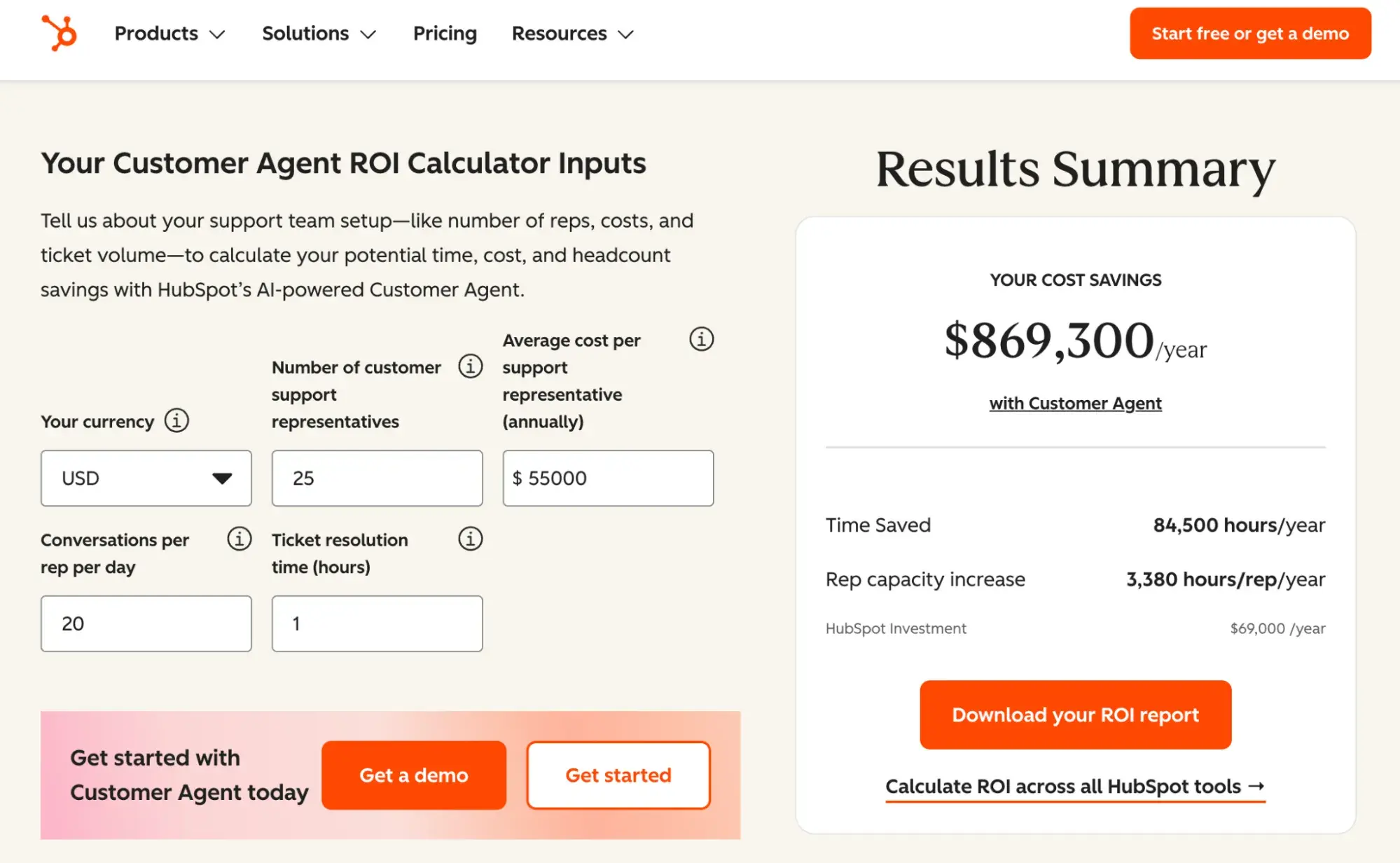
- A vendor-supplied ROI calculator with visible assumptions. Calculators that show their math let you stress-test the inputs. For example, HubSpot’s Customer Agent ROI calculator lets you adjust inputs such as the number of support reps, average cost per rep, conversations per rep per day, and ticket resolution time. It models projected cost savings and time saved. It also publishes the methodology — including how each metric is calculated and assumptions like 260 working days per year — so you can see how the numbers were built.
Red Flags to Watch Out For
- No trial mechanism. If the vendor doesn’t offer a pilot, a reasonable amount of free credits, or a sandbox to test it before you commit, you’re taking a real risk on whether it will prove useful to your company.
- An ROI calculator you can’t audit. If the assumptions driving the savings estimate aren’t visible or editable, the number is marketing, not modeling.
4. Is the pricing aligned with the value we’ll actually receive?
Credit-based pricing has a structural quirk: Vendors get paid for usage, not outcomes. You can burn credits whether or not the AI actually delivers value, which makes it worth asking what, exactly, you’re paying for beyond raw model access.
Oleksii Glib, CEO and founder of software development company Acropolium, cautions that many AI tools today are little more than thin wrappers. “They are just taking the AI tokens, they wrap it into their interface, and sell it at a higher price,” he says. “This is not the value they are giving.”
Free AI Agents Playbook
This practical guide reveals where to start, which applications deliver real value, and how to implement agents that transform workflows without replacing jobs.
- Marketing Workflow Automation
- Sales Acceleration System
- Operational Excellence
- Implementation Blueprint
Download Free
All fields are required.
Form not available
What a Good Answer Looks Like
- Three defensible sources of value beyond the model itself. The vendor should be able to name what they add on top of foundation-model access, such as proprietary data, workflow design, integrations, customer-specific context, or network effects. Glib’s example: A platform like Clay or HubSpot that pairs customer behavior data with AI can deliver something that you couldn’t easily build by using the OpenAI or Anthropic API directly. “That’s a great thing to have because the value of AI is enriched with additional data which is not present in AI,” he says.
Here’s what a real-life value add in an AI tool looks like: Breeze Prospecting Agent is built on top of the HubSpot CRM, meaning it accesses contact records, deal context, and buying signals to recommend high-intent buyers and personalize outreach. If a company simply asked ChatGPT to write a prospecting email, it would miss the full context specific to each business and deal.
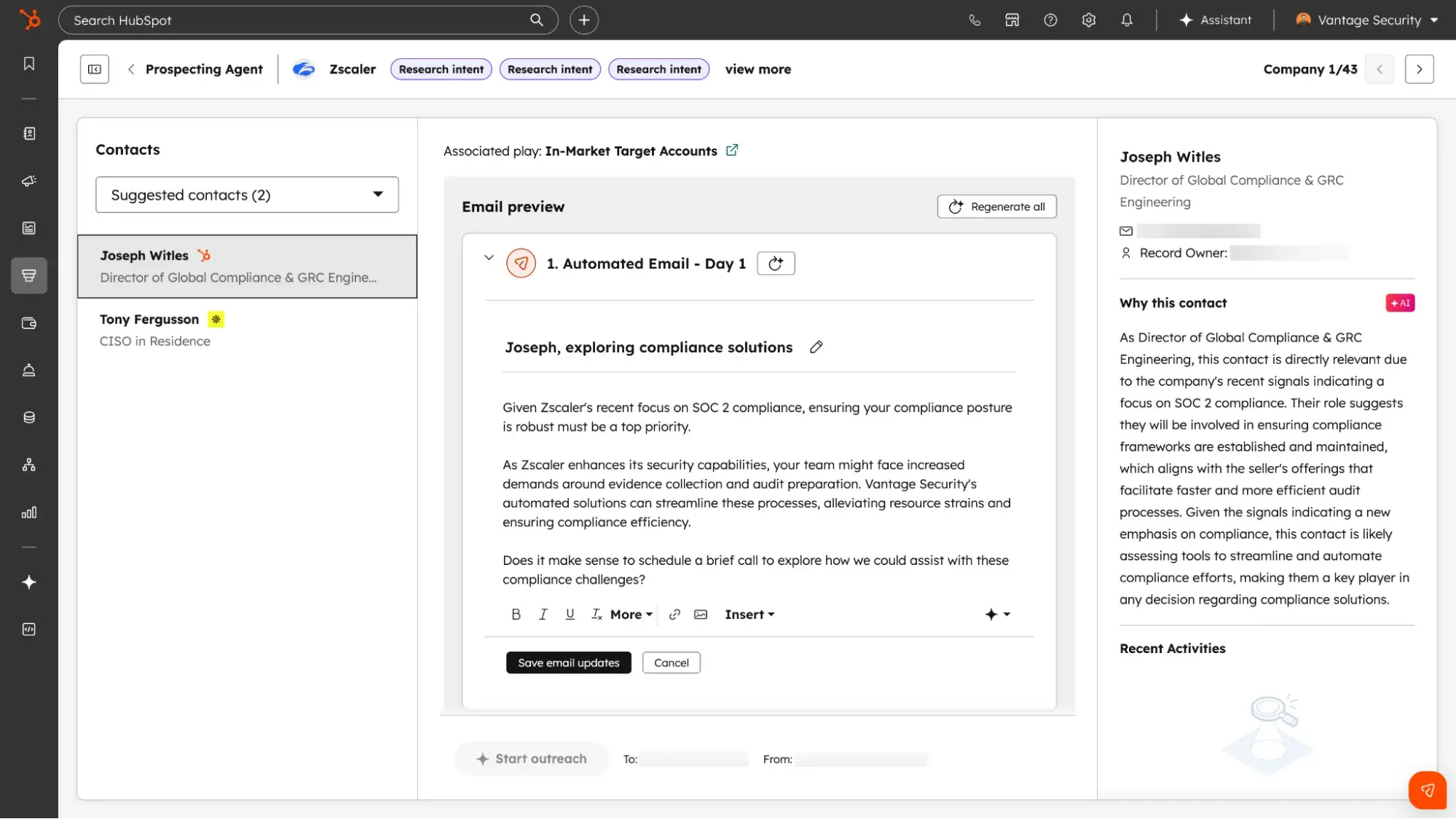
- Outcome- or success-based pricing, where the use case allows. Some vendors charge only when the AI delivers a defined result (a resolved ticket, a booked meeting, a closed deal, etc.). Where that’s feasible, it’s a stronger signal of value alignment than per-credit metering. For example, HubSpot’s Breeze Customer Agent and Prospecting Agent have outcome-based pricing where customers pay only when the agents complete the assigned task.
Red Flags to Watch Out For
- The pitch leans on the underlying model. If the vendor’s strongest answer is “we use GPT-5” or “we run on Claude,” you may be paying mostly for access to someone else’s model (in which case, you might be able to go directly to the model provider and save money). Compare the vendor’s price against the cost of using the foundation model directly, and ask what additional value the product adds beyond model access.
- Failed actions still consume credits. See question 1. If you try to use AI to complete a task and it fails, but you still get charged credits for it — that’s a clue that pricing isn’t tied to value delivered.
5. What controls and visibility will we have over our ongoing spend?
Every budget-holder’s worst nightmare is when their actual spend goes way over their projection. This question quells that fear. Responsible vendors will have guardrails in place to help you manage your spend. It’s up to you to check before signing the contract.
What a Good Answer Looks Like
- Real-time usage dashboards. You should be able to see credit consumption as it happens instead of waiting for a month-end invoice to find out where your budget went.
- Configurable alerts at thresholds you set. Useful alerts fire at 50%, 75%, and 90% so you have time to course-correct if needed.
- Hard spending caps and the ability to pause AI features. When you hit your limit, the platform should stop spending, not keep racking up charges and bill you later.
- Role-based budget controls. Admins should be able to assign credit budgets by team or user, so a single power user can’t burn through the whole pool. For example, Anthropic lets Claude Code business admins set usage caps at the individual user level.
Red Flags to Watch Out For
- Usage data only available in monthly invoices. You’ll only learn about a problem after the credits are gone.
- Alerts that fire at 100%. This doesn’t give you time to correct before you hit usage caps.
- No way to cap spend or limit by role. If any user can trigger any volume of credits, the vendor is offloading risk management to you.
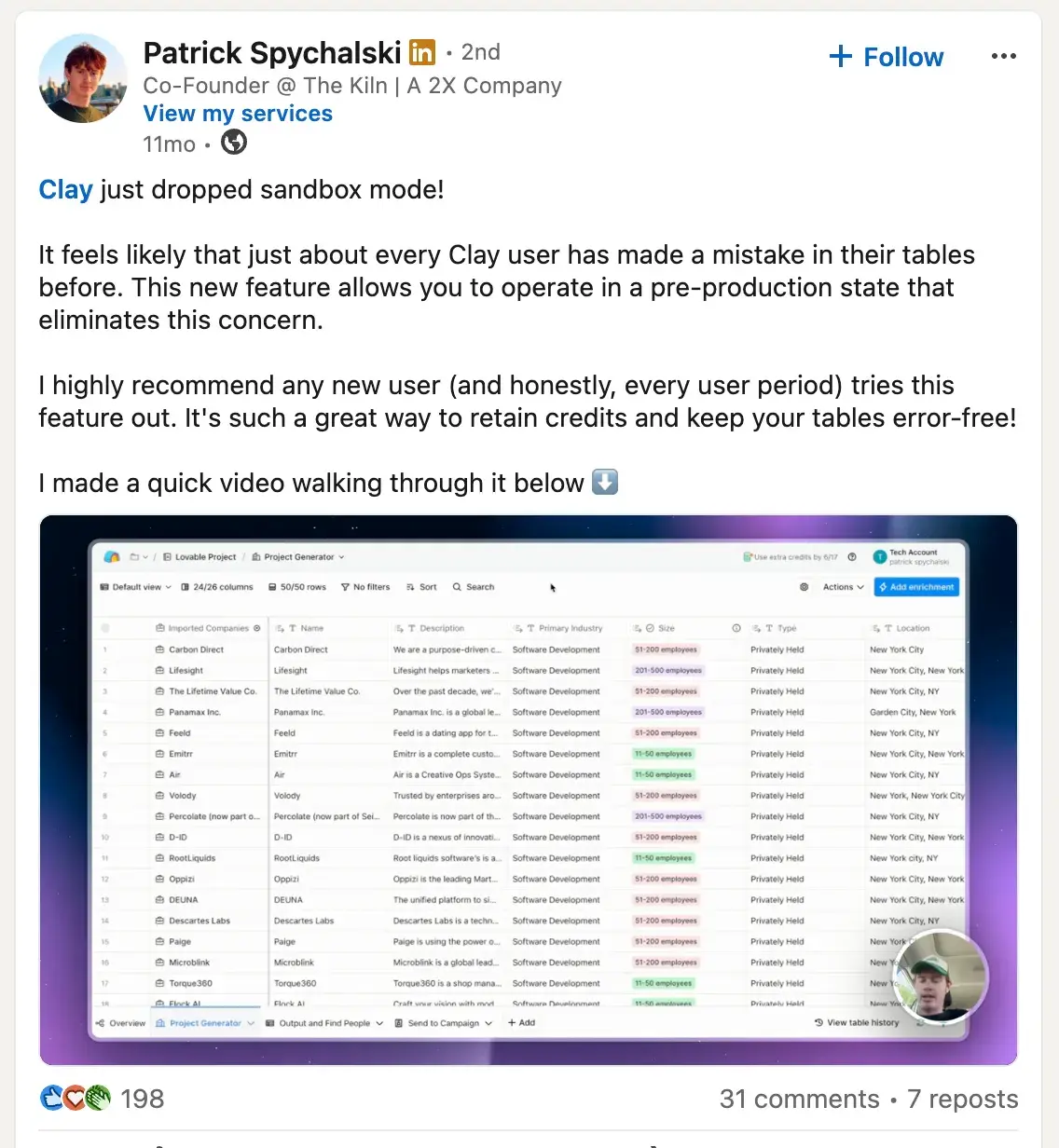
As I alluded to earlier, after Garcia’s costly table mistake, Clay introduced Sandbox mode — a great example of the type of guardrails you should ask vendors about.
Prevent unexpected charges by asking the right questions.
Credit-based pricing on your AI tools doesn’t have to be scary. The lesson in Garcia’s story isn’t about the software nor its pricing model. As he put it, problems start with “not being aware of what an action and a tool can actually result in.” This list of five questions aims to help you avoid surprise invoices by making you aware of exactly how each vendor’s credit-based pricing works, and what value they’re bringing to your workspace.
Free AI Agents Playbook
This practical guide reveals where to start, which applications deliver real value, and how to implement agents that transform workflows without replacing jobs.
- Marketing Workflow Automation
- Sales Acceleration System
- Operational Excellence
- Implementation Blueprint
Download Free
All fields are required.
Form not available
Artificial Intelligence