
SEO reporting is the process of analyzing and communicating the impact of search engine optimization efforts over a defined period. An effective SEO and AEO report focuses on key performance indicators (KPIs) such as visibility, traffic, conversions, and revenue. The report helps business stakeholders understand how organic search contributes to growth.

Strong reporting goes beyond surface-level metrics. SEO reporting helps teams prove SEO return on investment (ROI) and business impact. It connects performance to outcomes, including lead quality, pipeline contribution, and ROI. This enables marketing teams and stakeholders to evaluate what’s working and make informed decisions.
Tools like HubSpot’s SEO Marketing Software can help your team produce effective SEO reports that are clear, focused, and actionable. By combining automated data with expert analysis, they provide a reliable framework for tracking progress, justifying investment, and continuously improving SEO strategy.
Table of Contents
- What is an SEO report?
- What are the benefits of an SEO report?
- How to Create an SEO Report
- SEO Report Template
- SEO Reporting Tools at a Glance
- SEO Report Best Practices
What is an SEO report?
An SEO report is a structured summary of search engine optimization (SEO) and answer engine optimization (AEO) performance over a defined period, typically monthly. It brings together key data, completed activities, and strategic insights to demonstrate how SEO and AEO contribute to visibility, traffic, leads, and business goals such as conversions and revenue.
At its core, an SEO report is designed to translate performance into meaningful outcomes for continuous SEO improvement. Rather than listing metrics in isolation, it connects organic search activity to business impact. This helps stakeholders understand what’s working, where opportunities exist, and what actions should come next.
HubSpot AEO Tool
See exactly where your brand shows up in answer engines and take action to close AI visibility gaps.
- Track AI mentions.
- Analyze citations
- Monitor prompts
- Benchmark competitors
What’s included in an SEO report?
SEO reports should always be tailored to a company’s specific business and marketing goals. However, there are core components that stakeholders expect to see to support decision-making, measure performance, and guide next steps. At a minimum, a well-structured SEO report should include:
- Front cover including the client’s brand name, URL, an image, and a clear report title (e.g., “Monthly SEO Update Dashboard”). This sets the context and ensures the report is easily identifiable.
- Executive summary, which includes high-level insights, key wins, challenges, and clear commentary on performance. This section should highlight metrics such as clicks, impressions, keyword visibility, and visibility within AI search environments, so that stakeholders can understand the impact quickly.
- Organic traffic metrics, including sessions, users, and traffic trends over time. This helps demonstrate how SEO contributes to overall website performance and how it compares to other channels.
- Keyword performance and rankings, covering positions (e.g., 1–3, 4–10), target keyword clusters, and visibility trends. This section should also highlight movement in rankings and identify opportunities or gaps.
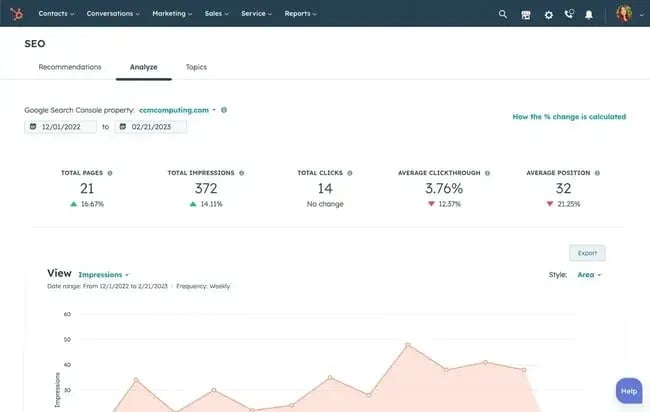
- Google Search Console (GSC) metrics, including clicks, impressions, click-through rate, average position, top-performing queries, and a broader view of keyword coverage.
- Page performance, which details top-performing pages across the site. This often includes multi-channel data (e.g., from GA4) to provide a holistic view of how key pages contribute to overall performance, not just organic traffic.
- Conversion tracking and revenue impact, including leads, form submissions, phone calls, and, where possible, revenue generated from organic search. This is critical for demonstrating SEO’s contribution to business outcomes.
- AEO and AI performance, including traffic and visibility from AI-driven platforms such as AI search engines and assistants. This section helps benchmark emerging channels and track growth in non-traditional search environments.
- Technical SEO health, including updates and insights related to site performance, indexing, crawlability, Core Web Vitals, and any critical issues (e.g., indexation errors or technical regressions).
- Competitive context, which may include competitor rankings, share of voice, keyword gaps, or benchmarking against key competitors to provide additional market context.
- Rank tracking, showing distribution of keywords across position ranges (e.g., top 3, top 10), either manually or via automated tools such as Looker Studio or third-party platforms.
- Additional work completed, detailing tasks delivered outside of standard scope or highlighting key initiatives completed during the reporting period.
- Objectives and next-step recommendations, outlining priorities for the upcoming period based on performance insights. This ensures the report leads directly into action and strategy refinement.
You might also include these items in an SEO report as well:
- Backlink profile and analytics showing backlink increases. Ideal if you’re building links or monitoring PR success.
- Local SEO stats such as calls, directions, and local pack rankings.
- Content performance or content auditing of specific pages.
- Site speed & Core Web Vitals show a quick check on performance metrics like loading speed, interactivity, and visual stability.
What format should an SEO report take?
SEO reports can be presented in several formats, depending on the audience and level of detail required:
- Dashboards (e.g., Looker Studio). Ideal for real-time, automated reporting and ongoing monitoring
- Slide decks. Useful for stakeholder presentations and summarizing key insights
- Written reports or PDFs. Best for detailed analysis and documentation
The most effective format balances clarity with depth. This way, stakeholders can quickly understand performance while giving SEO teams space to provide analysis and strategic direction.
What are the benefits of an SEO report?
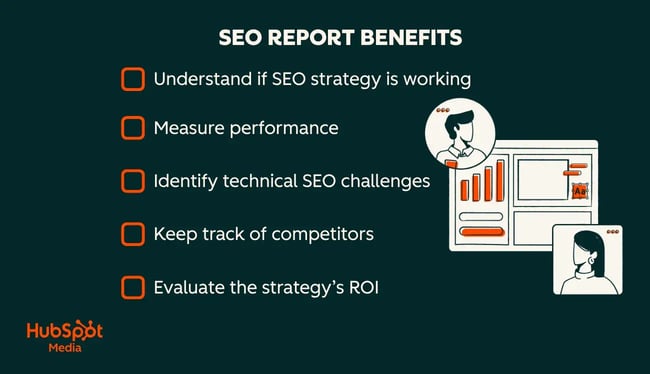
SEO reporting plays a critical role in connecting organic performance to business outcomes. Beyond tracking rankings and traffic, a well-structured report enables better decision-making, improves efficiency, and ensures SEO remains aligned with wider marketing and revenue goals. Here are three major benefits of SEO reporting.
1. Connect SEO to revenue and business goals
Effective SEO reporting proves the value of organic search by linking rankings and traffic to conversions, leads, and revenue.
Tracking performance is only the starting point. The real value comes from understanding what happens after a user converts. For example, an increase in form submissions may look positive on the surface, but without validating lead quality or sales outcomes, it’s impossible to measure true impact.
This is where marketing-qualified leads (MQLs) and sales-qualified leads (SQLs) become critical. An MQL is a lead that meets predefined marketing criteria, such as downloading a resource, filling out a form, or engaging with key pages. An SQL goes a step further, having been vetted by sales as a genuine opportunity with a higher likelihood of converting into revenue.
Featured Resource: MQL vs. SQL: What they are and how they differ
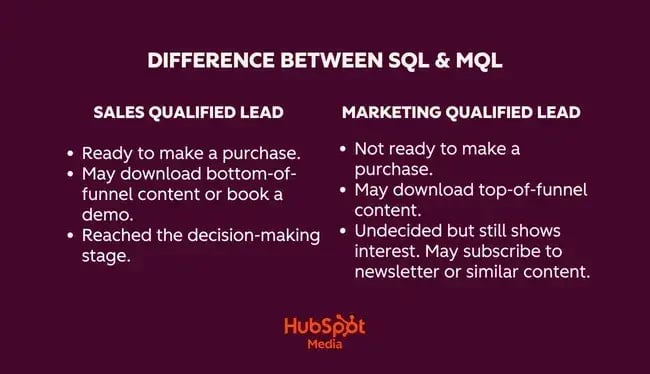
Stronger reporting connects SEO data with sales feedback. By analyzing where leads originated, which pages drove conversions, and how those leads progressed from MQL to SQL (and ultimately to closed deals), businesses can identify which SEO efforts generate high-value opportunities — not just volume.
The feedback loop between marketing and sales is so important. Marketing teams can share data on traffic sources, landing pages, and keyword intent, while sales teams provide insight into lead quality, deal progression, and revenue outcomes. Together, this creates a clearer picture of ROI and enables more informed, commercially driven SEO strategies.
Here’s how it works in practice. I created an SEO report and tracked conversions, which showed a clear increase in form submissions. The following screenshot shows my report with form submissions on the up.
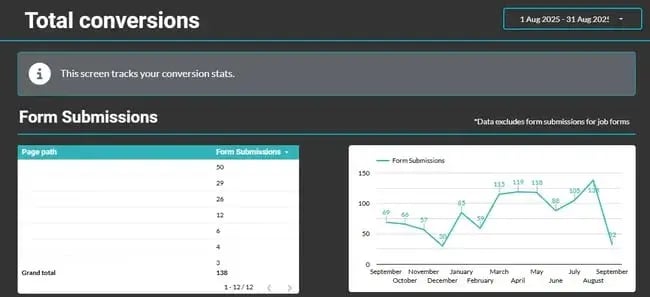
However, there was a gap. I had no visibility into lead quality or what happened after conversion. When a new marketing director joined, we used the reporting data to cross-reference inquiry types with their commercial value. While lead volume was strong, the insight revealed an opportunity to shift strategy toward higher-value opportunities.
With that feedback loop in place, we refined the SEO approach, resulting in leads that were not just higher in volume but significantly higher in value. When marketing connects SEO to business goals, it enables teams to:
- Prove ROI and secure budget by linking SEO performance to revenue, not just clicks or impressions
- Demonstrate channel value to stakeholders through clear attribution of leads, sales, and pipeline contribution
- Identify which pages and strategies drive conversions by tracking where inquiries originate across the site
- Validate lead quality, not just volume, by working with sales to understand which leads turn into real opportunities
- Make faster, data-driven decisions using real performance insights rather than assumptions
- Improve forecasting and planning by identifying trends, seasonality, and high-performing content early
- Refine strategy toward higher-value opportunities based on what actually generates revenue
- Strengthen collaboration between marketing and sales through shared visibility into lead progression and outcomes
2. Save time with automated SEO reporting
Automation plays a key role in making SEO reporting scalable and efficient, especially as websites and data sources grow more complex. Manually pulling data from multiple platforms, such as analytics tools, search consoles, and ranking software, is time-consuming and prone to inconsistencies. Automated SEO reporting reduces manual reporting time. It centralizes data into a single, reliable source, with metrics updating in real time.
Important note: Automation alone is not enough. The most effective SEO reporting combines automated data collection with human analysis. This balance ensures SEO reporting remains efficient while still delivering meaningful insights. Experts can:
- Identify trends
- Investigate anomalies
- Explain performance in context
The best thing about automation is that it reduces the time spent on data collection. This means SEO specialists and marketing teams can focus on higher-value work, such as analysis. For example, instead of manually compiling keyword rankings each month, automated dashboards can highlight shifts in visibility instantly. This allows teams to investigate why performance has changed and take action sooner.
3. Align teams and spot opportunities early
Regular SEO reporting creates alignment across marketing, sales, and development teams, ensuring everyone is working toward shared goals.
When reporting is consistent and visible, it becomes easier to identify what’s working, where bottlenecks exist, and which areas require attention. For example, if SEO recommendations, such as new landing pages or technical fixes, are delayed, reporting creates a natural checkpoint to address these blockers and keep projects moving forward.
SEO reporting plays a critical role in identifying issues early. Sudden drops in traffic, unexpected spikes in indexed pages, or declines in keyword rankings can signal technical or strategic problems. With regular reporting in place, these anomalies can be investigated and resolved before they have a significant impact on performance.
At the same time, reporting surfaces opportunities that might otherwise go unnoticed. Trends in search demand, emerging high-performing pages, or shifts in user behavior can all inform future strategy. For example, identifying seasonal search spikes earlier than expected allows teams to prepare content and campaigns in advance, rather than reacting too late.
Ultimately, SEO reporting acts as a shared source of truth. It brings teams together around data and ensures decisions are evidence-driven.
When SEO teams come back to your report each month, there’s a reasonable challenge for everyone. For example, if SEO requested a landing page, and developers couldn’t get to it, they can ask why and create a plan to prevent it from happening again. Teams can use the feedback loop created by the reporting process to keep teams accountable and projects moving.
How to Create an SEO Report
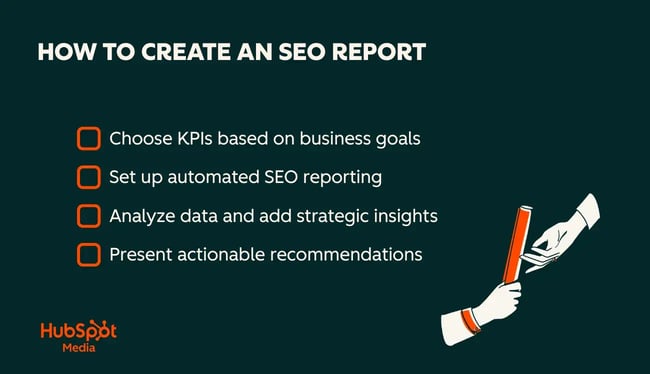
Here is a four-step framework for creating an SEO report.
Step 1: Choose your KPIs based on business goals
The foundation of any SEO report is choosing the right key performance indicators (KPIs). SEO KPIs should align with business goals and stakeholder needs. Common SEO KPIs include:
- Visibility metrics. Impressions, keyword rankings, share of voice
- Traffic metrics. Organic sessions, users, and channel contribution
- Engagement metrics. Click-through rate (CTR), bounce rate, time on page
- Conversion metrics. Form fills, downloads, calls, and lead generation
- Revenue metrics. Pipeline contribution, closed deals, and revenue from organic traffic
In addition, modern SEO reporting should include AEO KPIs, such as:
- Traffic and sessions from AI-driven platforms (e.g., ChatGPT, Perplexity)
- Visibility in AI search features and zero-click environments
- Assisted conversions from AI or non-traditional search journeys
SEO KPI reporting varies depending on the business model. For example, a B2B company may prioritize lead quality and pipeline value, while an ecommerce business will focus more heavily on revenue and transactions. The key is ensuring every metric ties back to business impact.
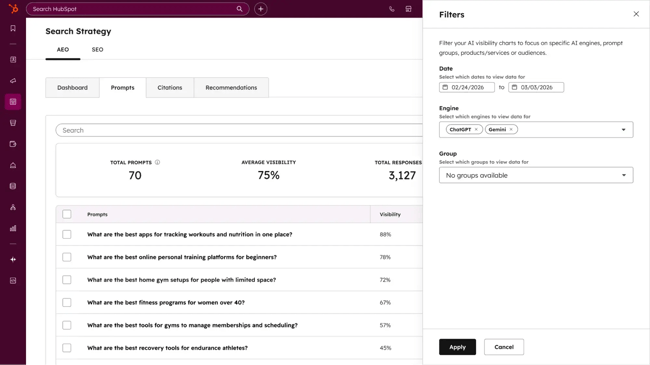
HubSpot AEO and SEO reporting tools connect SEO performance to broader marketing metrics. Tools like HubSpot AEO can support this by helping teams see how often a brand appears in answer engines, which prompts are generating citations, and how visibility compares to competitors.
Step 2: Set up automated SEO reporting
Automation enables consistent, scalable reporting without manual data collection each month. Most SEO teams use a combination of tools to centralize reporting, such as:
- Google Search Console (GSC) for search performance data
- Google Analytics (GA4) for traffic and conversion insights
- Looker Studio for building live dashboards; SEO reporting dashboards provide real-time visibility into SEO performance
- SEO platforms such as Semrush or Ahrefs for rank tracking and keyword data
- HubSpot for integrating SEO performance with lead and revenue data
Automation can be used to track:
- Traffic by channel and source
- Clicks, impressions, CTR, and average position
- Keyword rankings and visibility trends
- Conversions and goal completions
- AI and AEO performance signals
The goal is to create a repeatable reporting framework where data updates automatically, allowing teams to focus on interpretation rather than data collection.
Step 3: Analyze data and add strategic insights
Data alone does not drive decisions; interpretation does. This step focuses on identifying trends, anomalies, and opportunities within the data. For example:
- Why have clicks increased or declined?
- Which pages or keywords are driving performance?
- Are changes linked to seasonality, algorithm updates, or content improvements?
Rather than listing metrics, effective SEO reporting explains what the data means in context. This includes connecting performance to broader business activity, such as campaigns, product launches, or market trends.
Strong analysis also highlights opportunities, such as emerging high-performing content, keyword gaps, or shifts in user behavior. This enables teams to act proactively rather than reactively.
Step 4: Present actionable recommendations
The final step is turning insights into clear, actionable next steps. Every SEO report should answer: What should happen next? Recommendations may include:
- Optimizing underperforming pages or keywords
- Expanding content in high-growth topic clusters
- Addressing technical SEO issues impacting performance
- Improving conversion paths on high-traffic pages
- Testing new strategies based on emerging trends
Recommendations should be specific, prioritized, and tied directly to the data presented. This ensures SEO reporting is not just retrospective, but a forward-looking tool that drives continuous improvement.
Pro tip: Don’t be scared to make recommendations! SEO report recipients rely on the expertise of their SEO specialist to guide next steps. Make your recommendations clear. Include future experiments, why you’re doing them, and what data inspired the change.
SEO Report Template
An SEO report has many sections, and what’s included will depend on the unique needs of your business. Many tools create templates, including screenshots and a slide document.
Pro tip: Tools like HubSpot’s Marketing SEO tool can help track your desired metrics and easily produce a report, along with visuals, to help understand the data.
Get Started With HubSpot SEO Tools
Title and Summary
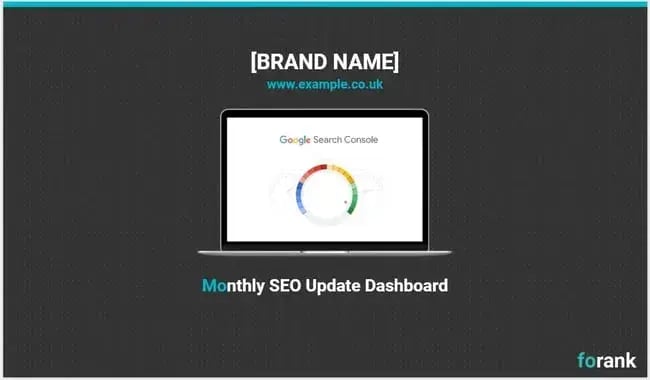
Whether you’re presenting your SEO report as a slide deck or PDF, you’ll need a title and summary. Be sure to mention the specific time period the report covers upfront. That can be the name of the month, the quarter, or the year. Include:
- Brand name
- URL of the site I’m doing the SEO report for
- An image placeholder, or add an image of the website
- Title: “Monthly SEO Update Dashboard.”
With Looker Studio, for example, recipients can change the dates to see data linked for specific months, so there’s no need to specify the month.
Organic Traffic Overview
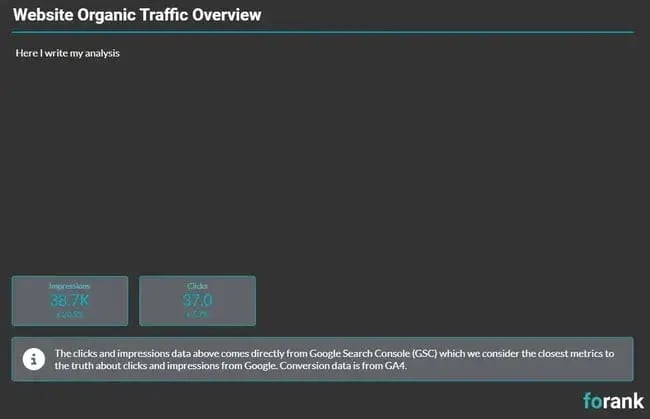
An SEO report will contain a wealth of data. Teams can refer to the tables and charts to gain a great understanding of an SEO’s progress. This section, instead, helps synthesize notable trends in your performance. This is a summary of your most important findings. In the highlights section, call out the following:
- Your most important two or three SEO metrics and the site’s performance relating to them.
- What your team excelled at in the given period.
- The biggest SEO-related tasks you’ve completed.
- Where your team fell short and why.
A senior-level leader should be able to scan this section and understand what the rest of your report will cover.
An Overview of Your KPIs
Before diving into more specific elements of SEO performance, call out your most important metrics all in one spot. There are tons of free and paid tools that can centralize all your reporting and templates in one place.
I recommend checking out tools like Google Search Console, Google Analytics, Semrush, SE Ranking, Ahrefs, and other SEO tools that can cater to your needs.
This section of the SEO report enables decision-makers to understand performance quickly. There’s no need to use multiple charts for this section. That information will appear later. Instead, try to synthesize the most important KPIs into one chart, like the one pictured within SE Ranking below.
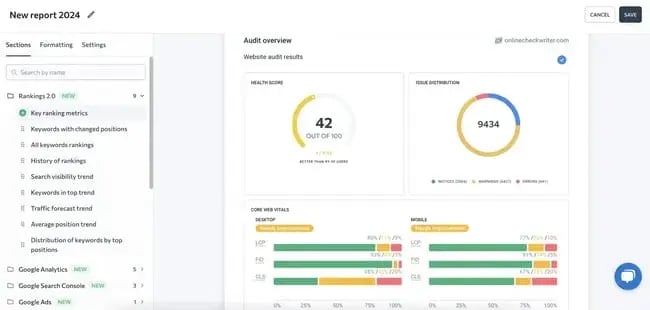
The content included in this section will vary by company. Consider including these metrics in the SEO report:
- Traffic. The number of people who are visiting your website or blog.
- Rankings. This is how well a website is doing on SERPs. Is your website ranked high on a search engine like Google, or is it buried on page two or beyond?
- Keywords. Is your website coming up for the keywords you’re targeting in your business and content marketing?
- Leads/conversions. How many people are clicking through your website with the prospect of being a customer or converting from a lead to a customer?
Website Overview
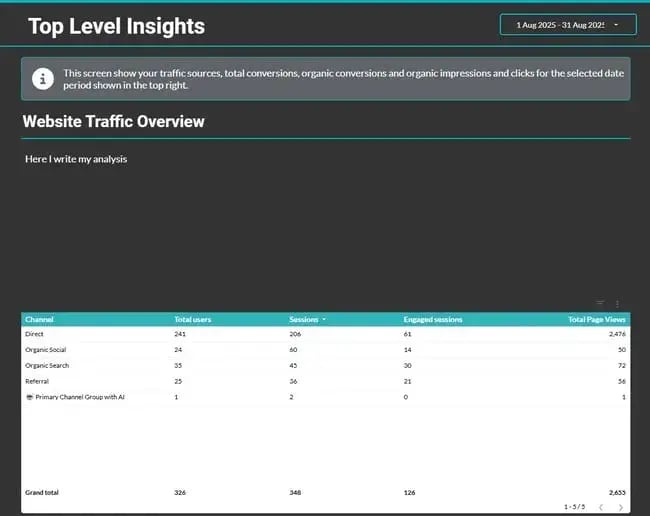
This section of your SEO report covers your website’s overall performance.
In the overview, I like to cover traffic overall, including organic and inorganic traffic. Although I’m reporting on SEO directly, I also like to consider the site’s impact across the broader marketing landscape.
Organic Traffic
Organic traffic refers to the visitors who land on a website through unpaid search engine results. These are the folks who find a site through Google, Bing, Yahoo, or AI search engines. By understanding organic traffic, teams can see how successfully they’ve targeted keywords through their content.
In-Organic Traffic
Inorganic traffic refers to visitors who arrive on a website through paid advertising campaigns, direct links, referrals, social media advertising, affiliate marketing, and email marketing.
For both types of traffic, take note of the overall traffic volume, where traffic came from, and what actions users take on the site. Note the visitor bounce rate, average session length, and engagement rates.
Pro tip: I tend not to report on conversions here because I believe it should be done on a channel-by-channel basis, rather than using GA4, since GA4 employs a last-touch attribution model and therefore isn’t truly reflective of the channel’s contribution to a sale. I use the section at the top to write top-level insights on relevant metrics such as:
- Domain Authority. This metric reflects the overall strength of your website’s domain. It’s measured on a scale from 1 to 100. The quality and quantity of backlinks pointing to a site affect this metric. Higher domain authority often means a site ranks higher in search engine results.
- Indexing Status. This refers to which website pages are included in search engine indexes. You’ll know whether search engines have crawled and indexed your website’s content. If certain pages are not indexed, it could impact their visibility and organic search traffic.
- Page authority measures the strength of individual pages on a website. It evaluates the likelihood of a specific page ranking well in search results. Factors like internal and external links, content quality, and relevance influence page authority.
- If your site has several hub pages, you’ll want to evaluate page authority for each. For example, if I were evaluating this site, I would look at page authority for the Marketing, Service, Website, and Sales blogs.
- Overall traffic by channel. Although this is an SEO report, I like to look at the marketing landscape and see how other channels are performing, because marketing is a holistic endeavor.
Works Completed
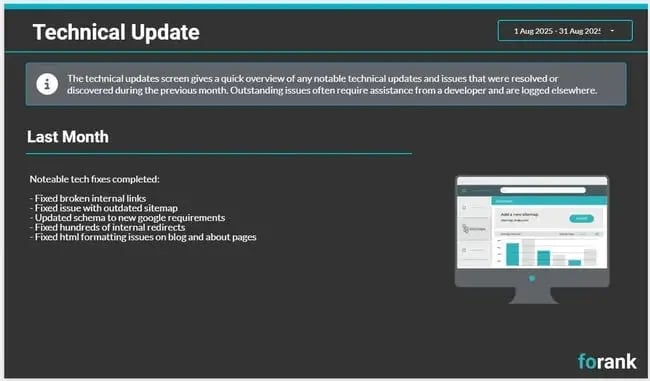
I’m a consultant, so I tend to have slides for:
- Technical updates completed, which generally list the small tasks done as part of the SEO retainer.
- Additional works completed is the work we’ve done that was maybe out of scope, or not usually part of the monthly scope.
- Actions for next month are the tasks we will be doing the following month.
These slides may not be necessary for brands with in-house terms, but I like to put what I’ve done out there in plain English to showcase the work completed.
Keyword Analysis
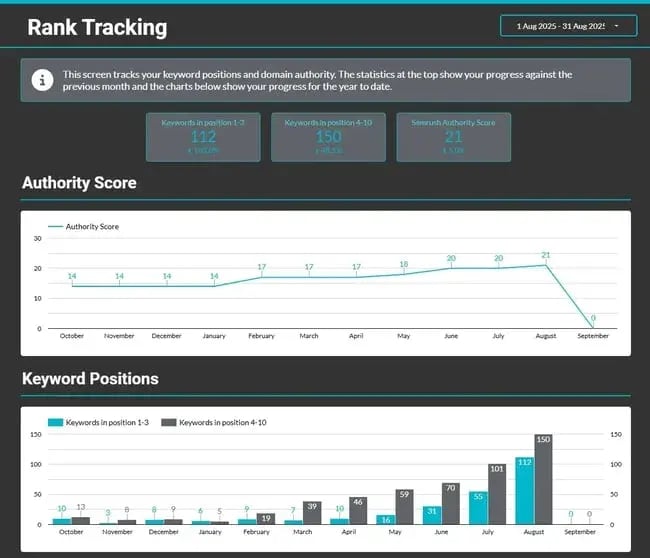
For keywords, I like to focus on:
- Keyword rankings in positions one to three and four to ten. In my SEO report, I keep the keyword reporting high-level with the most important keywords, but of course, I analyze keywords across the board. For my own analysis, I also look at those on page two and beyond.
- Specific clusters, including focus keywords agreed upon with stakeholders, are the key topics or pillars that the client wants to rank for.
The rankings SEO report template is pictured above, and I also picked specific topics to monitor. Here’s what that looks like:
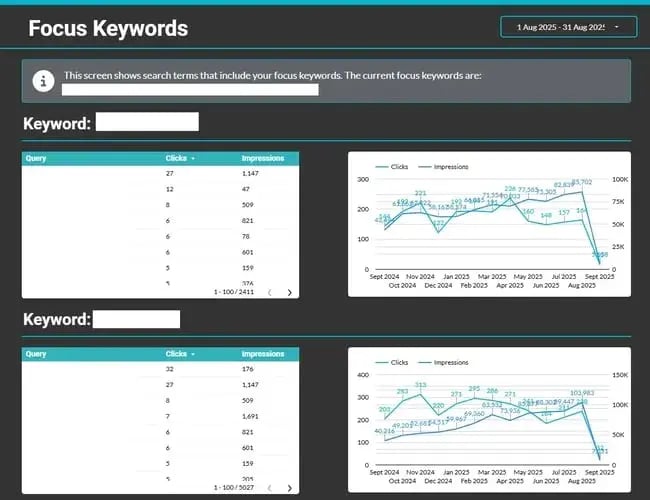
The line graph makes data easy to digest, and other reports use arrows, red/green color coding, or +/- symbols, which can make understanding the data easy. Let’s take a look at this sample template from Ahrefs.
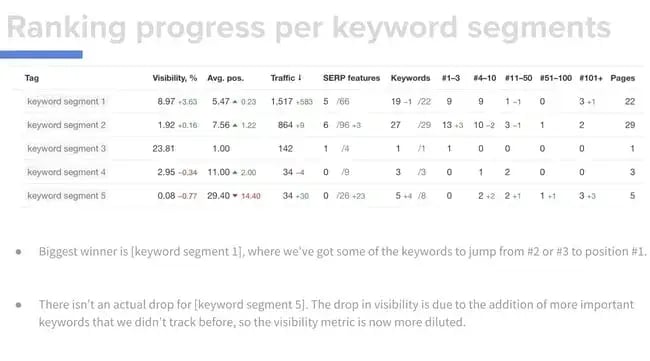
Within the screenshot, there are spots for specific keywords and keyword segments. The chart then includes the keyword’s visibility, the team’s average position in search for that keyword, and how much traffic came in from the phrase. For more detail, include how often the site features on the Search Engine Results Page (SERP) for a certain keyword.
Pro tip: Include the search volume for a given keyword. This will give context for your performance. Is traffic low because the keyword is rarely searched? Or is your approach the reason for a missed opportunity?
Try calling out potential keyword gaps in this section. This allows SEO teams to tailor content that will help the site rank for the phrase in the future.
AI Overview
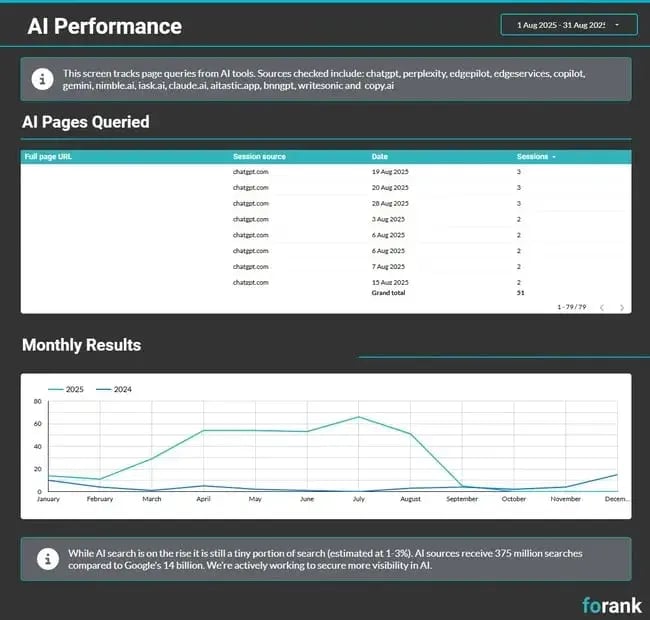
In modern-day SEO, traffic from AI tools is worth tracking. While traffic levels are still relatively low compared to traditional search engines like Google, establishing a benchmark now makes it easier to measure growth as answer engines continue to shape how users discover brands.
At a minimum, this section should track sessions, engagement, and conversions. Over time, this data helps build a clearer picture of how AI-driven discovery contributes to overall performance.
However, traffic alone doesn’t tell the full story. Visibility in AI-generated answers, including whether a brand is cited, recommended, or excluded, is becoming just as important as clicks. This section of the report can then combine both perspectives:
- Traffic from AI sources (via analytics tools such as GA4)
- Visibility and citation data (via AEO tools)
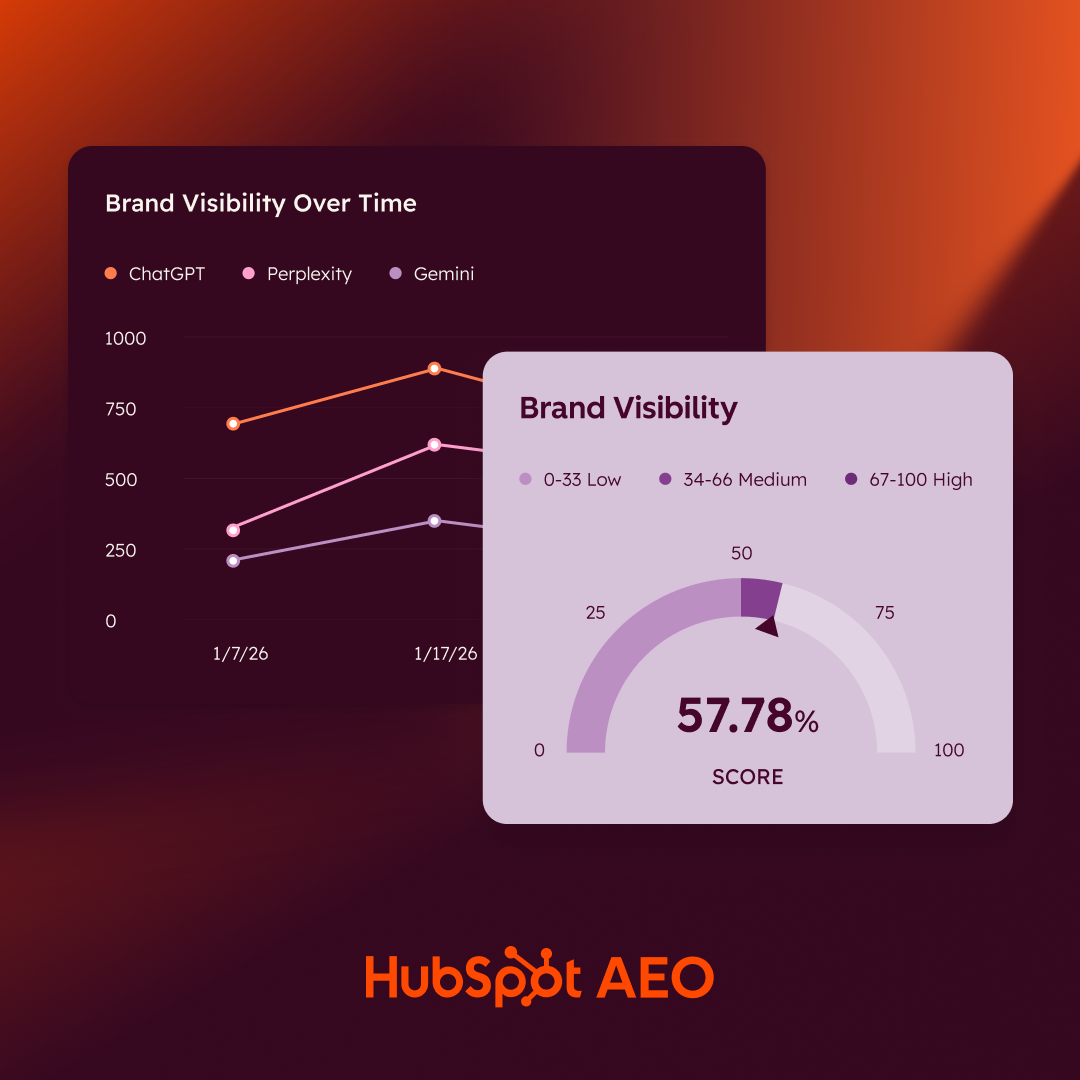
HubSpot AEO measures AI visibility directly. By tracking how often a brand appears in responses to monitored prompts across ChatGPT, Gemini, and Perplexity, marketers can understand where they are gaining or losing visibility, even when users don’t click through to a website.
Marketing Hub Pro and Enterprise come with AEO features at no extra cost. For those not on Marketing Hub, HubSpot AEO is also available as a standalone tool starting at $50/month. Now, every business can create data-driven AEO reports.
Backlinking Overview
Backlinks are links on external sources that direct users to your website. When a website links to a website, it’s essentially vouching for the credibility, relevance, or quality of your content. Backlinks are considered a crucial ranking factor for search engines like Google.
Let’s say a website sells the best cat brush online, and hundreds of pet-care websites link to that product. Google knows the product is trustworthy and has high authority in cat grooming. Because other sources indicate that the site offers something valuable, the site ranks higher.
However, if the brush is only linked to spam websites, the site’s authority will take a hit. This section evaluates the quality and quantity of backlinks pointing to your website.
A backlinking overview may include information about referring domains, anchor text, link diversity, and any toxic or spammy backlinks that could be negatively impacting your SEO. If your marketing team is running link-building campaigns, include your performance here.
Technical SEO Overview
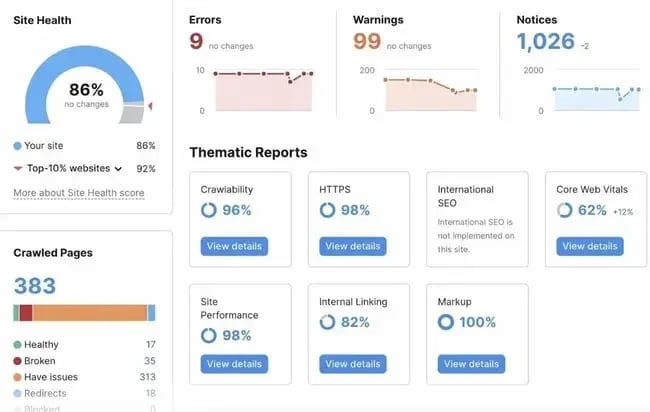
Having the right heading structure, fast loading times, and accessibility features helps improve SEO performance. This section identifies areas where a site is struggling and suggests ways to improve these technical aspects. Evaluate the following in preparation:
- Website crawlability. Analyze if search engines effectively access website pages. Look for any issues that might hinder crawling, such as blocked pages, an incomplete robots.txt file, or the use of “nofollow” tags.
- Website speed. Slow-loading pages can negatively impact user experience and search engine rankings. Use tools like Google PageSpeed Insights or GTmetrix to evaluate your site’s speed and pinpoint any performance bottlenecks.
- Multimedia optimizations. Large images or improper file types can cause your site to load slowly, impacting your ranking. You’ll also want to title your images properly and add alt text so crawlers can understand what’s in the images.
- URL structure. Review the structure of your website’s URLs. Ensure they are descriptive, concise, and follow SEO-friendly practices, such as using relevant keywords.
- Broken links. Identify and fix any broken links on your website. Broken links can negatively impact user experience and harm your website’s credibility.
Recommendations/Takeaways
After reading the report, the team will have a solid understanding of SEO performance. Now’s the chance to tell them how to adapt based on the data gathered. Identify areas that need improvement and explain how this will impact SEO strategy moving forward.
Pro tip: I like to add notes columns on my slides to provide my recommendations as we go; however, I do have a slide for objectives, which includes recommended next steps and the tasks I’m going to do next month. Highlight what specifically the SEO team will focus on before your next reporting session.
SEO Reporting Tools - at a Glance
SEO analysis tools can help make SEO reporting easier, faster, and even automate some sections. Here’s a comparison table including all tools mentioned in this article:
SEO Report Best Practices
The following principles help ensure reports are efficient, relevant, and commercially valuable.
1. Automate everything you can and analyze what you can’t
Automated SEO reports should handle recurring data collection, such as traffic, rankings, and conversions. This reduces manual effort and ensures reports are consistent and scalable over time. Then, SEO experts and marketing teams add real value by interpreting the data, identifying trends, explaining anomalies, and connecting performance to business outcomes.
Example: An automated dashboard highlights a drop in organic clicks. Rather than simply reporting the decline, analysis reveals that rankings remained stable, but the click-through rate fell due to increased AI search features. This insight informs a strategy shift toward optimizing for AEO and SERP features.
Here’s a screenshot from my report showing the plain-English, human analysis of the data. In the report, I acknowledge which keywords a site has started appearing for, then loop it back to an action (creating new event pages).
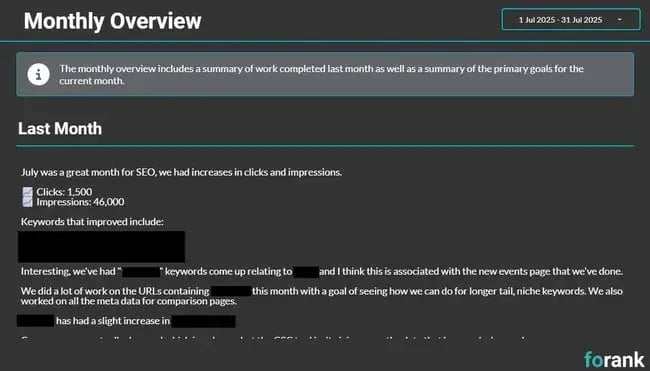
The human analysis layer of SEO reporting should include conversations with complementary marketing teams. Speaking to teams is especially important in B2B marketing, where attribution is a challenge. The long sales cycles and multiple makers involved in B2B marketing mean that decisions aren’t made overnight. Plus, the sales process might include multiple touchpoints, and the contact form filled out is just the beginning.
In my reporting meetings, I ask questions about what happened with the lead and where they are in the sales process. For example, “Have they booked a demo yet?” My co-founder is a mastermind behind data. She says, “We’re big believers in closing the loop between marketing and sales. It’s not enough to report on volume — we want to know about lead quality. Are these the right-fit customers? Are they converting? Did they mention seeing us somewhere unexpected? Without that feedback loop, you’re flying blind.”
2. Customize reports for the audience reading them
SEO reports should be tailored to the needs, knowledge level, and priorities of the audience. Senior stakeholders typically need a high-level view focused on performance, ROI, and business impact. SEO specialists and marketing teams require more detailed insights, including keyword performance, technical issues, and tactical opportunities.
Example: An executive report may include a one-page summary showing traffic, leads, and revenue from SEO. In contrast, a working report for the marketing team includes detailed keyword movements, page performance, and technical recommendations.
3. Always connect performance to revenue or pipeline
Modern SEO reporting must go beyond visibility metrics and demonstrate commercial impact. This means linking organic performance to leads, pipeline, and revenue wherever possible.
It is challenging to tie revenue to SEO, but it’s not impossible. Here are some metrics or analyses that help tie SEO efforts to business objectives:
- Track form fills and match them to closed deals.
- Attribute leads to specific landing pages and keywords.
- Integrate CRM and sales data with analytics to connect SEO activity to revenue.
- View revenue from other channels that are pushing audiences to your page.
- Create audiences for email or PPC, then ask those teams for the conversion data.
While attribution can be complex, integrating analytics with CRM and sales data helps create a clearer picture of how SEO contributes to business growth.
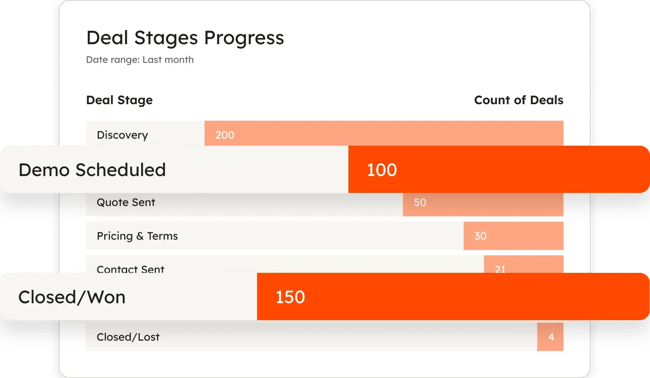
Example: Tracking form submissions or demos scheduled alongside landing page URLs shows which pages drive conversions. Then, connecting this data to CRM records, it becomes possible to identify which SEO-driven leads progressed to sales opportunities — and which resulted in closed revenue.
Tools like HubSpot’s Smart CRM make this process significantly easier by connecting marketing and sales data in one place. By tracking contacts from their first interaction through to closed revenue, businesses can clearly see which SEO efforts generate pipeline — not just traffic.
4. Choose a consistent SEO reporting frequency
Consistency is essential for identifying trends and making informed decisions. Monthly reporting is common, as it provides enough data to identify meaningful trends while maintaining regular visibility. However, some businesses may benefit from quarterly reporting with additional ad-hoc check-ins. Reporting frequency depends on campaign pace, stakeholder needs, and business goals.
Example: A business reviewing SEO performance monthly can identify seasonal trends, such as unexpected spikes in demand earlier than anticipated. This allows teams to adjust content and campaigns proactively rather than reacting too late.
Using SEO Reports
With over a decade of experience in digital marketing, I recommend creating and sending SEO reports to optimize your online presence. Strike a balance between automation to streamline reports and manual analysis to add value.
Answer engines like ChatGPT, Gemini, and Perplexity are changing how users discover brands, making AEO visibility just as important to track as traditional organic traffic. Building AEO metrics into your reports now means you’ll have the benchmarks in place as these channels grow.
Tools like HubSpot’s SEO Marketing Software, Smart CRM, and HubSpot AEO make it easier to connect the dots — from keyword rankings and organic traffic through to leads, pipeline, and brand visibility across answer engines. Whether you’re reporting to a senior stakeholder or an in-house marketing team, HubSpot reporting tools connect SEO performance to broader marketing metrics, giving everyone a clearer picture of what’s working and where to focus next.
By tracking and reporting on your website’s performance, you will see where your SEO strategy is effective and where adjustments may be needed. Your SEO report is critical to success.
HubSpot AEO Tool
See exactly where your brand shows up in answer engines and take action to close AI visibility gaps.
- Track AI mentions.
- Analyze citations
- Monitor prompts
- Benchmark competitors
Seo

![SEO audits: How to conduct one that drives traffic growth [+ checklist]](https://53.fs1.hubspotusercontent-na1.net/hubfs/53/seo-audit-1-20251217-6006144.webp)

.png)




.png)