.png?width=112&height=112&name=Image%20Hackathon%20%E2%80%93%20Vertical%20(75).png)

What is a Facebook lead?
A lead is a person who has indicated an interest in your company's product or services by giving you their information in some way. A lead can show interest in various ways: by filling out a form to download an ebook, requesting a demo, or completing an online survey.
Unfortunately, simply liking a status update, photo, or video on your Facebook page doesn't qualify someone to become a Facebook lead. That type of action doesn't indicate interest in your company or product/services, as it's possible they just liked your post because it had a cute puppy in it, you know?
Below, let’s review the two types of leads you can capture on Facebook and what their differences are.
The 2 Types of Leads You Can Capture on Facebook
There are two types of leads you can generate on Facebook: direct and indirect leads.
Don't miss this live virtual event with Facebook and HubSpot on how to grow your business faster than ever with Facebook.
Direct Leads
A direct Facebook lead is generated by sharing content that links directly back to a lead form on your website. Visitors then share information in exchange for an offer — whether an ebook, coupon, infographic, or any other piece of content. This form is typically on a landing page dedicated to that specific offer.
Indirect Leads
Indirect leads are generated by using Facebook on the path to conversion. For example, if you share a blog post containing a call-to-action to a landing page at the bottom of the post, your initial Facebook share indirectly leads visitors to that landing page.
While directly promoting landing pages is an instant gratifier of leads generated, providing relevant content without a form makes your Facebook presence a friendlier home for content that your target audience will want to come back for again and again.
Let's look at few ways to generate both indirect and direct leads in the section below.
How to Generate Leads on Facebook
Lead Ads
Lead ads are arguably the most popular tool used on Facebook to generate leads. These are posts that are sponsored by your business and they appear on your audience's News Feeds, Stories, Marketplace, and more. These ads target Facebook users who are most likely to be interested in your company based on the behaviors they display both on Facebook and off. Once a user clicks on a lead ad, they're prompted to fill out a form and submit contact information to your company.
Facebook Posts
Your Facebook posts are probably what got your audience's attention in the first place. These can be one-off posts or a dedicated campaign that points viewers back to your website or Facebook page. You can include a link to a form within the actual post, or direct users to a landing page where they can submit their information.
Facebook Messenger
Facebook Messenger is like a built-in live chat feature for your Facebook Page. Users can reach out to you in a private 1:1 conversation and ask questions about your brand and its products.
Don't have the time to manage a live chat channel 24/7? No problem. You can install a bot on your page to respond to customer inquiries.
Whether it's a bot or a person, your team can use Facebook Messenger to direct interested visitors to your website and landing pages so they can convert from prospects to leads.
Facebook Events
Does your company host an annual networking event? Perhaps has a charity or a fundraiser that users can donate to? Share it on Facebook.
You can use the Events tool to create dedicated pages for your upcoming events. Your audience can sign up, fill out forms, and become leads all while registering for your event in one place.
Facebook Live Video
If you're looking for a more spontaneous approach to lead generation, you might want to try Facebook Live Video. Live Video creates a real-time, public stream that your audience can watch on their News Feed. Viewers react and comment on your video as it's running and you can use this platform as a way to direct prospects to your marketing content.
For example, if you're partnering with a local celebrity for an upcoming road race, you might ask them to "Go Live" on Facebook and show your followers what they're doing to prepare for the race. Not only does this give people a behind-the-scenes look at the race prep, but it also gets the word out about your event.
When you're video is over, the recording is still available on your Facebook page. That way, people who may have missed the live version can catch the recording later on.
Photo Albums
Keeping with our road race example, let's your race when off without a hitch and it was a massive success. Your marketing team was there the entire time taking photos and capturing the most exciting moments from the day.
But, the marketing team wasn't just taking photos for fun. They're planning to repurpose those images as lead generation content on your Facebook page.
How? For starters, they can post a photo album on your company's Timeline. This album would show followers how much fun and excitement there was at your race and it would motivate people to sign up for your next one. All you have to do now is include a link to your website in the comments, and you'll be generating new leads in no time.
These are just a few ideas for leveraging Facebook for lead generation. Read on for some more ways you can use this platform to generate leads for your business.
12 Ways to Generate Leads on Facebook
Now, let’s dive into some ways you can capture leads, whether they are direct or indirect.
1. Post landing pages for offers directly to Facebook.
One of the best lead generation ideas on Facebook is sending people directly to a landing page containing your offer. (If you don't have many lead-generating offers yet, read this blog post for ideas.)
When you do this, make sure the offer has a compelling featured image that's getting pulled into the Facebook post. To ensure Facebook pulls the right image from your blog post into your Facebook posts, you'll need to optimize the image size and add the proper open graph tags to your website, which you can learn how to do here.
You'll also want to make sure it's clear to the reader where you're sending them. If they think they're clicking into a blog post and find themselves needing to fill out a form, they could get confused or frustrated.
Use phrases like "Download your ebook" or "Get your cheat sheet" to indicate where you're sending them and the action they need to take.
Here's an example from Sprout Social's Facebook Page, which contains a "Download this toolkit" CTA.
In addition to using clear language, you may want to nix the stock photo from that image in favor of your custom image. Even the least design-savvy of marketers can easily create a custom image in PowerPoint or Canva that includes the name of the offer, just like we did in the example below. (Click here to browse through and download our collection of 100 free social media image templates.)
2. Post the blog posts that generate the most leads.
Another way of generating leads from your content is to pick and post the blog posts that generate the most leads.
The topic and title of the blog post will intrigue your audience to click and read, and then they'll find a CTA within that post — preferably high up, near the intro — to either a solution to a problem they're having or to something they want to learn more about.
Pro Tip: Our social media managers have found they can generate more leads from Facebook by posting blog posts containing anchor text CTAs in the introduction. If you aren't using anchor text CTAs yet, you may want to read up on the study we did on anchor text CTAs and consider adopting the process yourself. In every post we tracked for that study, the anchor text CTA was responsible for between 47% and 93% of a post's leads.
Here's an example of a post from our Facebook page linking to a blog post that includes an anchor text CTA in the introduction:
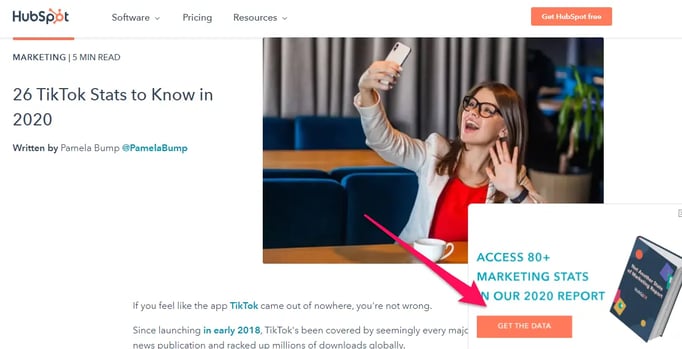
And here's that anchor text CTA, indicated by the red arrow. The blog post has a pop-up that prompts readers to download a free report containing more social media stats.
3. Include links to landing pages in your image captions.
Most marketers understand the importance of using visuals like images and videos in their Facebook strategy. For example, Facebook posts with images see a higher engagement rate when compared to those without images.
To turn these higher engagement rates into lead generation opportunities, consider including links to your website in the descriptions for your images — especially your profile picture and cover photo descriptions.
Whether it's to a blog post, a piece of lead gen content, or just an "About Us" page, links help your audience get to know your company better. And the descriptions of your profile picture and cover photo are prime real estate to do it. That way, any time people view your cover photo directly, they can access the download link.
Make sure you shorten your links and add UTM codes so you can track clicks on them. Shortening and tracking features are available in the HubSpot Marketing Platform and with tools like Bitly.
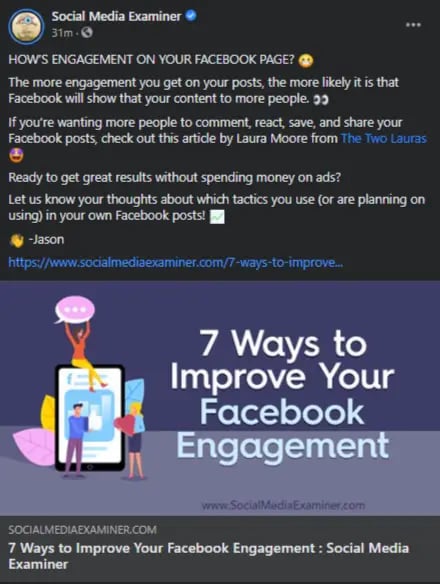
Here's an example from Social Media Examiner's Facebook Page:
4. Use videos to promote lead generation offers.
Facebook's organic reach dropped to around 5.2% in 2020, a massive dip from 52% in 2016, thanks to the tweaks in Facebook's algorithm.
Without creating a Facebook ad, it's almost impossible for your audience to see your content. To get as much engagement as possible, marketers have turned to videos.
Why? For starters, Facebook's algorithm favors video content. As a result, video posts have an average engagement rate of 0.26%, which is higher than engagement rates of other post types.
So, if you're trying to increase your lead generation efforts on Facebook, you'll want to start using videos on your Facebook page to introduce and promote your content, whether they're offers, events, courses, or something else.
In addition to the text CTA that you can add in the video's description, you can also include a verbal CTA to "register" or "download," both earlier in the video and at the very end.
Check out how L.L. Bean used a video to encourage sign-ups for its course:
Here's another example from us here at HubSpot, in which we used a how-to video to introduce a gated offer:
We've also created videos specifically to promote lead generation content as we did here for our career assessment called The Next Five:
5. Use Facebook Live videos to remind people to register.
Videos can be pretty time-intensive to create, not to mention intimidating. But you don't necessarily have to pull together the time and resources to create a perfectly scripted and edited marketing video to leverage the power of video on Facebook — especially if you're a small business.
Facebook Live is a feature that allows anyone to broadcast videos from their mobile device straight to their Facebook News Feed. The best part about these live videos is that they're meant to be a little scrappier and more spontaneous than regular marketing videos — making them more authentic and personal.
So, get the conversation going about your lead generation offers by creating a live video to promote them. You might promote an event by showing the setup live, for example. Or, you might promote an offer by hosting an open Q&A on live video where you interact with Facebook commenters live and on camera.
Just like you'd do with your standard videos, add a verbal CTA to the video in addition to the text CTA. In a live video, though, you'll want to repeat that CTA even more than you would with a pre-recorded video. Why? Because when you first start live streaming, you may have zero people watching. Even a few seconds in, you could only have a handful of viewers.
As people find your video on their News Feeds, they'll join in — but that means you'll want to repeat the CTA a few times to catch people up. You can also add a text CTA in the video's description.
6. Pin posts that link to lead generation offers to the top of your feed.
Pinning a post to the top of your Page's Timeline allows you to highlight and showcase what would otherwise be a typical post. It'll stay at the top of your Timeline for up to seven days, after which it'll return to the date it was published on your Page's Timeline.
You can identify a pinned post by an unmistakable “pinned post” marker at the top of the post. Any post you decide to pin should be valuable to your audience and relevant to your online objectives.
Here's an example of what that looks like from Refinery29's Facebook Page:
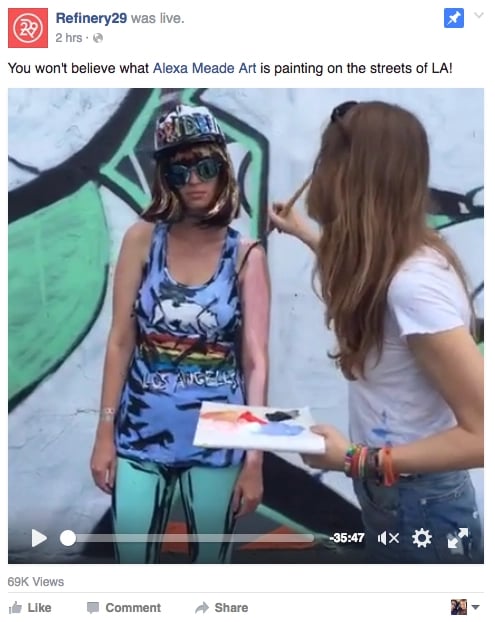
You can pin any type of post, from text to images to videos, even live videos. If you pin a Facebook Live video, that video will simply show up at the top of your profile with the whole recording, indicating that the Page "was live" at a certain point (as shown above).
7. Add a CTA button to your Facebook Page.
Adding a relevant CTA button to your Facebook Page is a crucial lead generation tactic that no marketers will want to miss out on.
Back in late 2014, Facebook added a feature to its business Pages allowing users to place a simple call-to-action button at the top of their Facebook Pages. This button is simple but powerful, and it can help drive more traffic from your Facebook Page to your website — including landing pages, contact sheets, and other lead generation forms. You can learn how to install and use the Facebook CTA button here.
You'll find you have 17 pre-made button options to choose from. These options include "Sign Up," "Shop Now," "Contact Us," "Book Now," "Use App," Watch Video," and "Play Game."
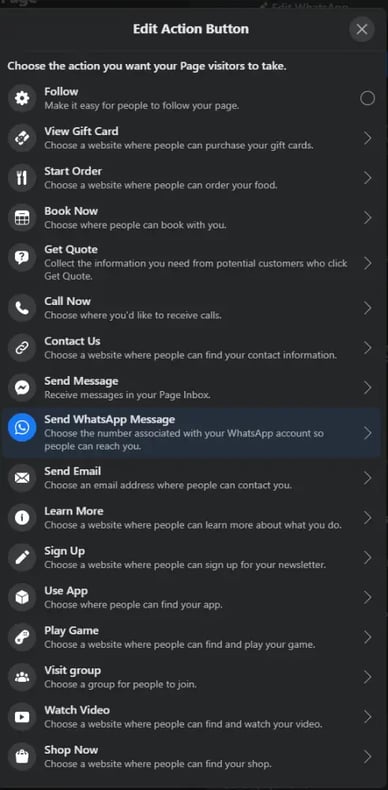
Once you choose a button and link it to a page on your website, it’ll appear up at a fixed location right below your cover photo and to the right.
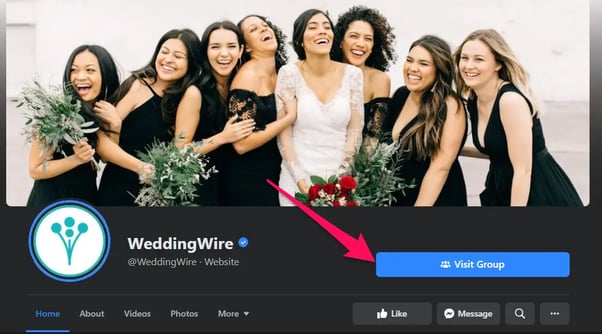
While some marketers choose a CTA and keep it the same for weeks and months at a time, consider taking your marketing game a step further and switching up that button — and the web page it links to — to match your team's and business goals and the campaigns you're running at the time.
For example, you might align the CTA with your cover photo design and a pinned post around a single campaign
8. Ask for input from your Facebook audience about your products.
You can feed two birds with one scone (as my colleague Carly Stec would say) by posting a status update asking for feedback on your products/services and then linking to a landing page where people try your tool for free.
You'll encourage sign-ups by linking directly to the landing page, and your followers will love the opportunity to give their two cents.
The obvious risk here is that you'll be opening up the floodgates for negative commenters, so be selective on the tools and products you post for feedback.
Make sure you're posting something you're proud of and ready to receive feedback for. You'll also want to have at least one or two people prepared to respond to Facebook comments as they roll in — both the positive and the negative.
If you do receive negative feedback, respond as quickly as possible to show you care and prevent them from turning into something more serious. If you get complaints about the product, use the "customer is always right" approach and say you're sorry.
You'll get respect from other customers for being upfront. Share your appreciation for folks' feedback. Finally, ask how you can help — and then actually help. Take notes on the feedback you get and send it to the people who can make things happen.
(This post contains more tips for dealing with negative comments on social media)
9. Run a contest or giveaway.
People love contests and giveaways. Not only are they fun, but they can also teach you a lot about your audience — all the while engaging them, growing your reach, driving traffic to your website, and (drum roll, please) generating leads.
Since your giveaway aims to generate leads, you'll need to publish posts that include an attractive featured image or video, compelling and straightforward copy, and a link to your giveaway page where they can fill out their details into your lead forms.
Read this post to learn more about running successful social media contests.
(Before you start your Facebook contest, though, make sure you can run it legally by reading through their Page Guidelines. Facebook has cracked down on contests due to liability issues, so read through their strict rules ahead of time.)
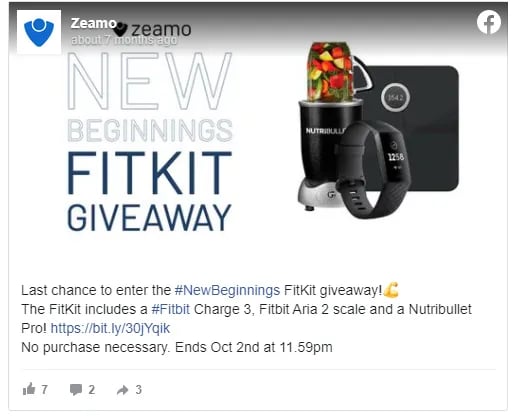
Below is an example from Zeamo's Facebook Page:
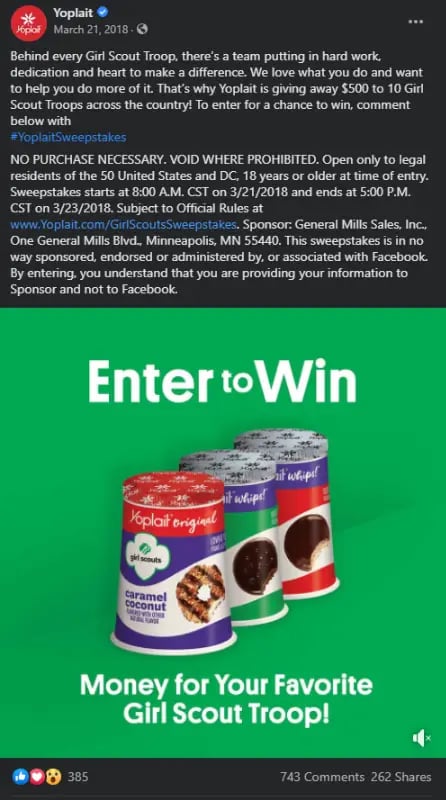
And here's another example, this time from Yoplait. It promoted its contest using a video to get more visibility on folks' News Feeds. And you can tell the contest was a success considering the amount of engagement the post received.
You could also extend your giveaways throughout other platforms like Instagram and Twitter.
10. Create a Facebook event page for your next webinar.
While sharing landing pages with dedicated content offerings are effective, webinars are another great format for capturing leads. While you can promote your webinar's sign-up form by posting them to your business Timeline. Another way to spread the word is by creating a Facebook Event with a separate registration page on your website.
Once you invite someone to a Facebook Event, you can encourage them to register on a separate page, where they'll become a lead. In terms of reaching new audiences, Facebook Events are also more visible than standard posts on the News Feed.
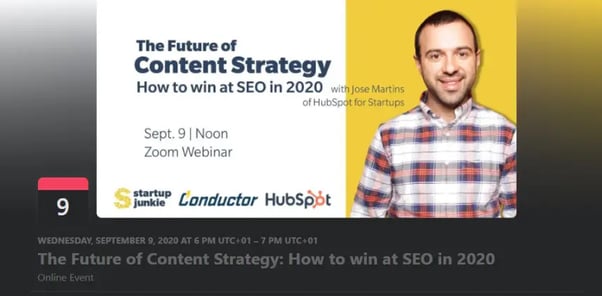
Facebook also added new features that help businesses promote their events and see how they’re performing. For example, you can create ads for the desktop and mobile News Feed that boost awareness of events and drive responses.
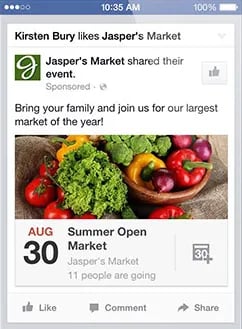
If you host events and webinars often, you can also use the Events tab on your Facebook page to share with your followers in a single view. That way, people visiting your page can scroll through your upcoming events and webinars. (If you don’t see the tab on your Page, click "Manage Tabs" at the bottom of your tabs and reorder them, so Events is one of the first to appear.) Read this blog post for more tips on hosting great webinars.
11. Run targeted ads to extend your content's reach.
One of the best things Facebook can do for your business is to expand your reach to new audiences by running a targeted ad campaign for lead generation.
Thanks to Facebook's very sophisticated targeting options, you create ads that target people based on their location, age, gender, interests — and even the things they do off Facebook.
There are three overarching formats for Facebook ads that I'll cover here: boosted posts, right-hand column ads, and News Feed ads.
The main distinction here is the placement of the ad and the amount of writing and size of images they allow.
- Boosted Post: This is Facebook's way of letting marketers turn otherwise regular Facebook posts into ads by "boosting" them. The post will show organically to some users, but to get better reach, the admin will press "boost" (shown only to admins, not to other users) to deliver to a larger number of fans and targets you can select ahead of time.
- Right-Hand Column Ads: This is the most traditional ad placement used to turn a user into a Facebook lead. The ad usually appears on the right side of a user’s News Feed. We often see less expensive clicks and conversions when using these ads, along with more advanced testing options.
- News Feed Ads: These appear directly in a user's News Feed and look more like native advertising, although you can also add a small CTA button. They're part of a tactic called "dark posts," which means using News Feed-style ads that don't get published to the News Feed of your Page. In our experience, these ads have a higher engagement rate than right-hand column ads (which makes your Page look super healthy), but they can also be more expensive.
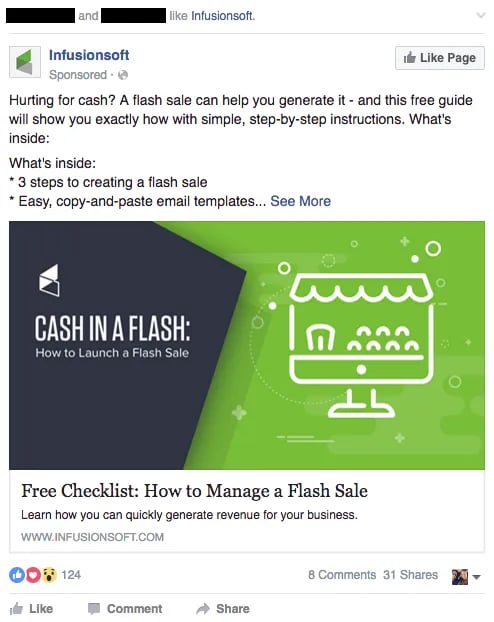
While we won't go too much more in-depth on Facebook advertising (download our Facebook advertising ebook if you want to learn more), here are two examples of Facebook ads in users' News Feeds. This first one is a boosted post that targets people based on their Facebook connections:
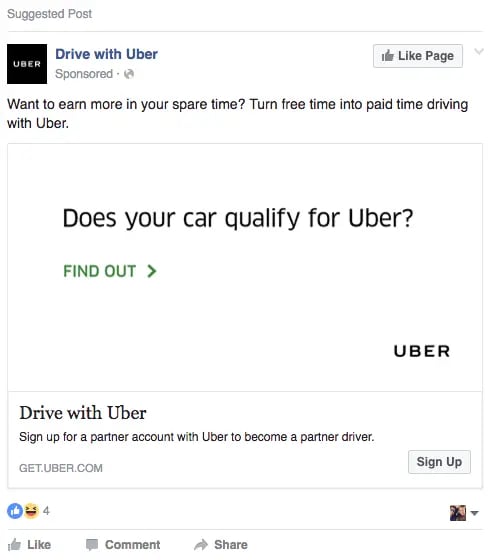
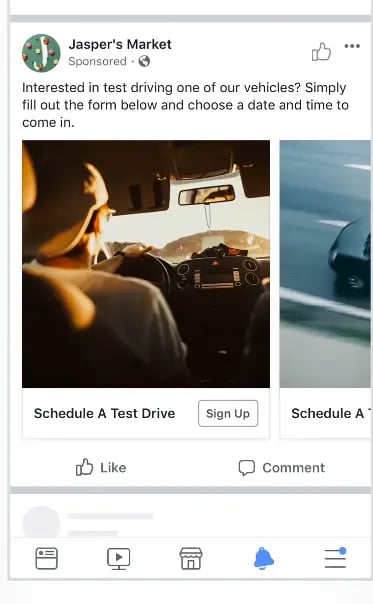
This second one is a News Feed ad, which lets you add a CTA button to the post — in this case, "Sign Up." These CTAs are only available for News Feed ads.
Whatever the kind of ads you want to create for lead generation, you can always use HubSpot's ad software to manage your ads from Facebook and other social media channels within your HubSpot CRM.
12. Run lead ads to simplify the mobile signup process.
As if Facebook's addition of CTA buttons to its link ads wasn't exciting enough, it added an entirely new feature called lead ads in 2015, which lets users sign up for lead-generating offers and content without leaving Facebook.
Facebook created lead ads specifically to simplify the mobile sign-up process by creating instant forms that make it super easy for mobile users to fill out their contact details.
Why? Because the forms will auto-populate instead of mobile users having to pinch-and-zoom and type into tiny form fields. When you click on a lead ad, a form opens with your contact information automatically populated based on what you've shared with Facebook already, like name and email address.
Talk about solving for a form of friction. Of course, you can edit your contact information before you click "Submit."
We won't detail how to create lead ads here because we already have a guide that talks about how you can make them.
How do you extract the leads you get from lead ads? If you're a HubSpot customer, you can integrate Facebook Lead Ads directly with your HubSpot account.
If you're not a HubSpot customer, you can export a CSV straight from your Facebook Page, download them from Ads Manager or Power Editor, or request it directly through the API.
We hope you found these ideas for ways you can generate leads from Facebook helpful. Remember, though, that Facebook is constantly changing. While the ideas here are a solid start for success, nothing beats testing each strategy for your audience.

Lead Generation
![What is a lead magnet? 20 lead magnet ideas and examples [+ step-by-step]](https://53.fs1.hubspotusercontent-na1.net/hubfs/53/lead%20magnet%20represented%20by%20a%20magnet.webp)



![Gated Content: What Marketers Need to Know [+ Examples]](https://53.fs1.hubspotusercontent-na1.net/hubfs/53/UNGated%20Content.png)

![What Is Demand Generation? Here’s How You Can Create Buzz for Your Offering [FAQs]](https://53.fs1.hubspotusercontent-na1.net/hubfs/53/demand-generation-1-20250321-225687.webp)