.png?width=112&height=112&name=Untitled%20design%20(25).png)
-1.png)
At the start of my marketing career, I managed two small email lists — one for my beauty blog and another for a literary magazine — and this experience was my first ample glimpse into growing a business. This email marketing guide stems from those early days, when I quickly discovered why marketers are so passionate about email marketing.
Unlike social media platforms, these email lists were entirely mine (as I managed them), and this allowed me to build close, meaningful relationships with my subscribers. Over time, I realized that most of the magazine’s ardent readers and the people who frequently bought the affiliate products on my blog were my email subscribers.

If email marketing was so effective for these two small ventures, just imagine its potential for larger businesses.
In this guide, I’ll show you what email marketing is, from its benefits and types to getting started and some drawbacks you may experience. You’re in for a ride, so buckle up.
Table of Contents
- What is email marketing?
- Benefits of Email Marketing
- Email Marketing You Can Send to Customers
- Getting Started With Email Marketing
- How to Build Your Email List
- How to Send Marketing Emails
- Email Marketing Stats You Should Know
- Email Regulations You Should Know
- Email Marketing Tips
- Drawbacks of Email Marketing
What is email marketing?
Email marketing is a form of digital marketing that involves sending promotional messages or newsletters to a list of subscribers via email.
The goal is building customer relationships, promoting products or services, increasing brand awareness, and ultimately driving sales.
In my experience, email marketing allows me to reach my target audience directly with personalized and relevant content. It’s also cost-effective, easy to track, and provides valuable data for analyzing campaign success.
Marketers have been using email as a channel for almost as long as they’ve been using the internet. The first marketing email was sent in 1978, resulting in $13 million in sales.
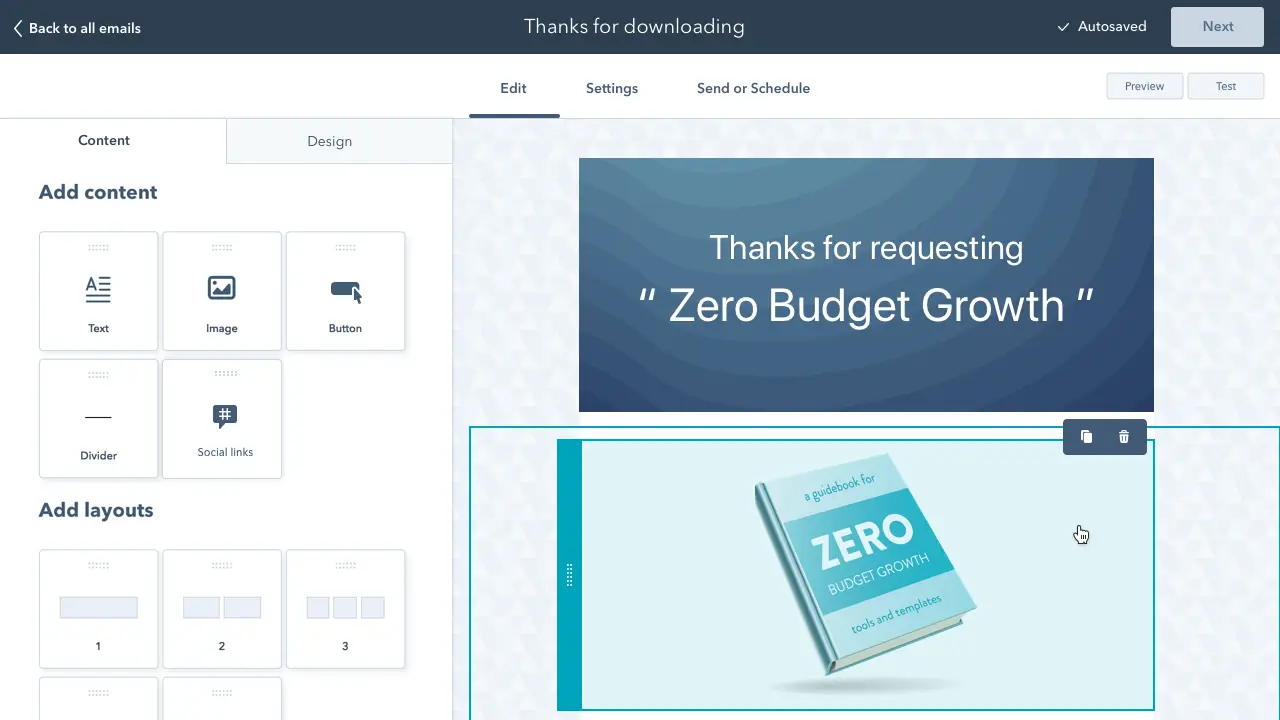
Free Email Marketing Tools
Create, personalize, and optimize your marketing emails without waiting on designers or IT.
- Boost email opens.
- Design stunning emails.
- Automate follow ups.
- And more!
Email has been one of the most highly used marketing channels ever since.
This is because email is a flexible yet cost-effective way to reach many people relatively quickly. I can also personalize my message to target specific audiences and generate leads.
Email marketing can take many different forms. These campaigns can include a single email announcing new content, an ongoing newsletter delivered regularly, or contacting customers about product updates.
Email isn’t as shiny as newer channels, like messaging and social. However, email is an effective way to build an audience that gets results.
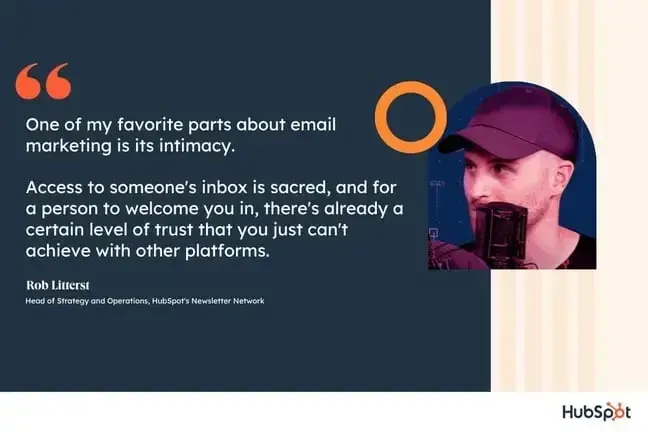
“One of my favorite parts about email marketing is its intimacy,” says Rob Litterst, head of strategy and operations for HubSpot’s Newsletter Network.
“Access to someone’s inbox is sacred, and for a person to welcome you in, there’s already a certain level of trust that you just can’t achieve with other platforms,” he says.
Master the fundamentals of email marketing with a free online course.
When to Use Email Marketing
Email marketing remains a powerful tactic to:
- Build relationships. Build connections through personalized engagement.
- Boost brand awareness. Keep your company and your services top-of-mind for the moment when your prospects are ready to engage.
- Promote your content. Use email to share relevant blog content or valuable assets with your prospects.
- Generate leads. Entice subscribers to provide their personal information in exchange for an asset that they’d find valuable.
- Market your products. Promote your products and services.
- Nurture leads. Delight your customers with content that can help them succeed in their goals.
Benefits of Email Marketing
Email marketing has steadily proven itself as a powerful channel for reaching and engaging your audience. It offers a mix of personal touch and cost-effectiveness that many other channels just can’t match. Let’s dive into some of the key benefits you can harness when you add email to your marketing strategy.
1. Cost-Effective
Email marketing is budget-friendly compared to traditional advertising methods like print ads or television commercials. Most email platforms offer affordable plans, and sometimes even free options, that still pack a punch in delivering your messages.
Since you don’t have to invest heavily in expensive media placements, you are free to experiment more, refine your campaigns, and allocate resources to other creative or strategic projects.
Moreover, email marketing has a high return on investment (ROI), making you an average of $36 for every $1 spent.
2. Direct and Personalized Communication
One of the reasons I rate email marketing so highly is because it gives you the ability to deliver personalized messages straight to your audience’s inbox. I’ve experienced firsthand how personal touches, like addressing me by my name or referencing a previous interaction we’ve had, has made me fall in love with a brand and made me look out for every email they send me.
By segmenting your email list based on factors like purchase history or interests, you can make each email feel like it was written just for that person. It’s like having a one-on-one conversation with your customers.
3. Strengthened Brand Awareness
Every time you send an email, you get a chance to reinforce your brand’s identity. With consistent messaging, carefully chosen images, and a unique tone of voice, your emails help establish who you are and what you stand for. Over time, this builds a strong association between your brand and the quality or value you provide.
Your subscribers start to recognize your style and look forward to your emails, which is exactly the kind of lasting impression you want to create. Whether it’s through eye-catching designs or thoughtful content, each email adds another brushstroke to the overall picture of your brand.
4. Measurable Results and Insights
With email marketing, every send and every click is trackable. This level of measurement is a game-changer because you always know what’s working and what isn’t. You can look at open rates, click-through rates, bounce rates, and even conversion rates to see where you might improve.
For example, if a particular subject line isn’t performing well, you can adjust it and test a new approach the next time. This constant feedback loop means you’re always learning and evolving, so your campaigns get better with each send.
5. Increased Customer Engagement and Loyalty
Consistency is key when it comes to building lasting relationships with your customers. With email marketing, you get the chance to stay in regular contact with your audience by sharing news, special offers, or insightful content. This regular engagement isn’t just about selling — it’s about building a community around your brand.
When I still ran my beauty blog, I liked to think of my (very small) email list as a group of friends who trusted my advice and recommendations. Over time, that trust translates into customer loyalty, and loyal customers are more likely to stick with your brand for the long haul.
6. Increased Conversion Opportunities
Every email is a chance to drive your audience toward a goal, whether that’s making a purchase, signing up for an event, or simply visiting your website. By including clear calls-to-action (CTAs) in your emails, you guide your readers step-by-step through the customer journey.
“While it’s the second-most used marketing channel (beat by social media), a whopping 95% of email marketers call it practical,” says Pamela Bump, head of content growth at HubSpot.
“For HubSpot — and our blog team — we’ve deeply leveraged email and even catered blog posts to our very subscribers,” she says. “Over the years, this has driven high ROI, millions of page views, countless conversions, and even customers.”
A great way to increase conversions is to experiment with different CTA placements and phrasing to see what resonates best with your audience. For example, you can shift your CTA button closer to the top of the email to see if it’ll result in more click-through rates. It may sound simple, but these tweaks can make a big difference in turning interest into action.
7. Automation and Scalability
As your business grows, so does the challenge of staying in touch with every customer. Email sequence software comes with powerful automation tools that let you schedule emails or even trigger messages based on user actions — like a thank-you email when someone makes a purchase.
This means you can “set it and forget it” to a large extent. For example, when I ran the email marketing for a literary website, I set up an automated email series that nurtured leads over days or even weeks. This saved me countless hours while still delivering a personalized experience to every subscriber.
Automation not only helps you scale your efforts but also ensures that each customer journey is smooth and consistent.
Email Marketing You Can Send to Customers
Email marketing isn’t a one-size-fits-all approach. Depending on your audience, goals, and the current stage of your customer journey, you can adopt various email types to engage your audience effectively. Here are some common types of email marketing that you can send to your customers (with examples from my own inbox):
1. Welcome Emails
A welcome email is usually the first email you send new subscribers, and it sets the tone for your relationship with them. This email typically provides a warm introduction to your brand, offers essential information about your products or services, and may include a special incentive — like a discount or free resource — to encourage further engagement.
It also typically includes one or more CTAs that show how a new subscriber can derive value from your offering.
Here’s a welcome email from Strava, the running app:
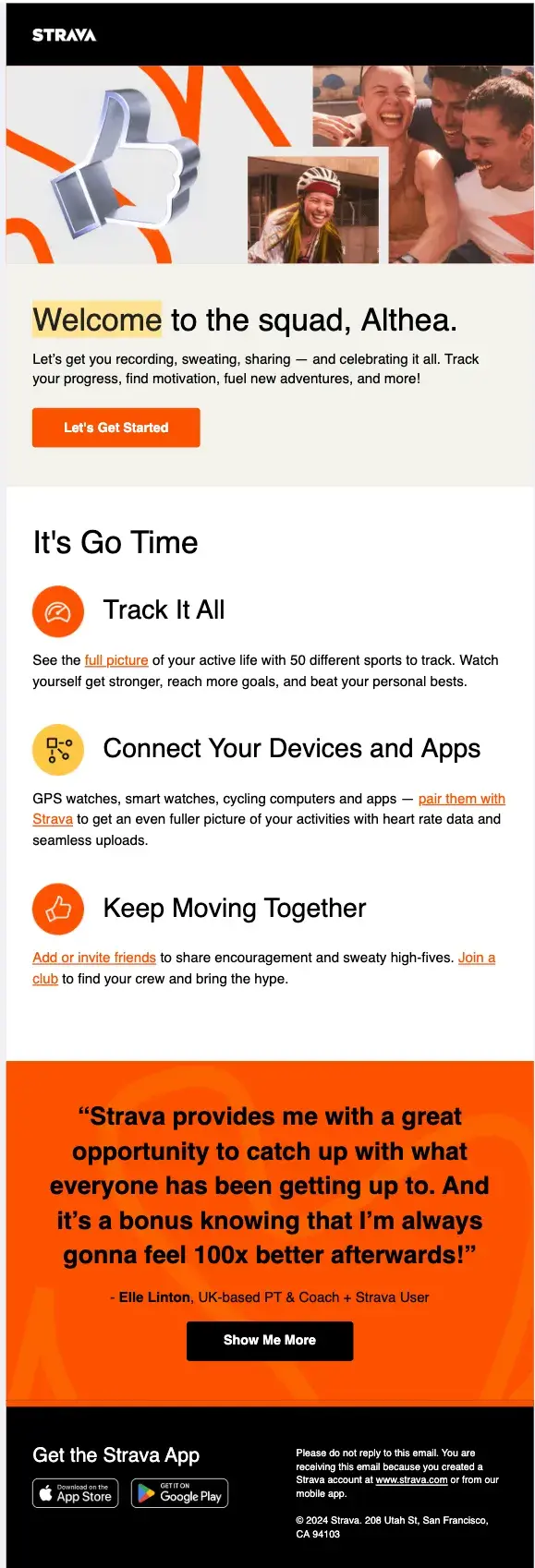
What I like: The headline and the accompanying cheerful images right above it did a good job of setting my mind at ease and making me feel accepted as I resumed my running journey. Right off the bat, Strava put a CTA urging me to get started with using the product to record my running progress.
But it doesn’t stop there. It goes on to list three ways I can derive value from Strava: by tracking up to 50 different sports, connecting GPS and smartwatches with Strava to get even more health information, and adding/inviting friends to join in their fitness endeavors.
This helped me know exactly what I can do with the app and where I should go next. And on the off chance I was still in doubt about whether or not to proceed, there was a testimonial right beneath those CTAs to convince me the product is amazing.
Pro tip: Include testimonials in your welcome email to sway on-the-fence subscribers to give your product a try.
Email Marketing Planning Template
Organize your email marketing strategy and metrics with this free template.
- Gather data
- Summarize results
- Manage A/B tests
- And More!
Download Free
All fields are required.
2. Promotional Emails
Promotional emails are designed to spark immediate action from your audience. They typically highlight special offers, discounts, or upcoming events to drive short-term engagement and sales.
Here’s one from ASOS, the fashion brand:
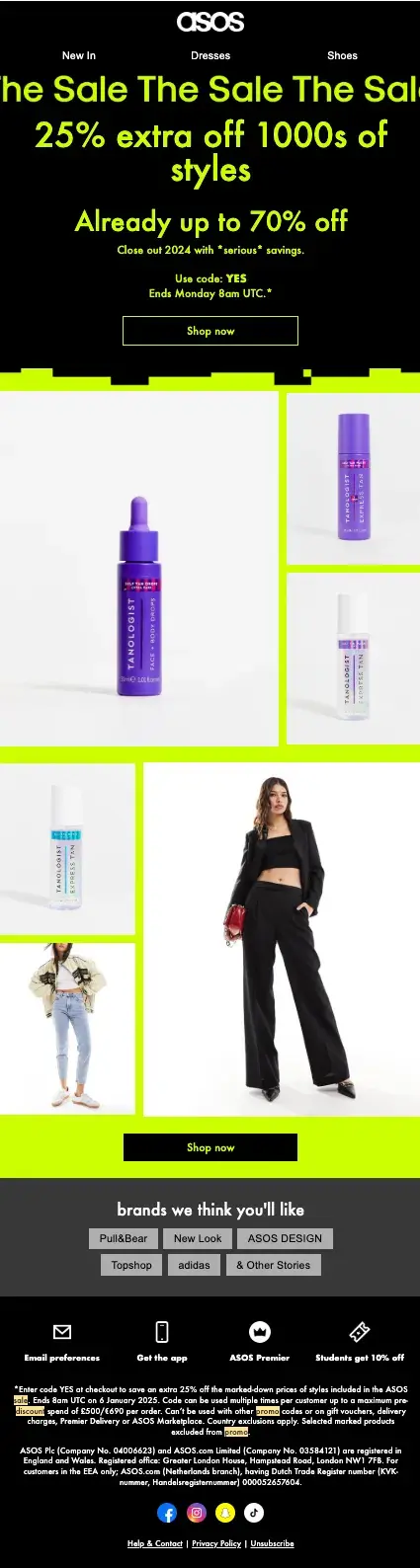
What I like: I’m a regular ASOS shopper and, in this promotional email, ASOS is offering a generous discount up to 70% off to close out the year. They smartly capitalized on the fact that people like to shop near year-end, but also want to save money. In the header, ASOS provides all the information I need to get the discount, including the code, the CTA to Shop Now, and the deadline for the discount (which creates a sense of urgency and FOMO).
Beneath the header, there are pictures of some skincare products and clothing articles to lure me in, as well as some suggestions on the brands ASOS thinks I’ll like. I do like New Look a lot, so I know they pay attention to customer behavior.
Pro tip: Personalize your promotional emails by suggesting products/brands/services that your recipients regularly patronize. Also, offer a generous discount they can’t resist!
3. Newsletters
Newsletters are a versatile tool for nurturing long-term relationships with your audience. They typically deliver valuable content, including industry news, expert tips, or insights related to your products and services. The goal of a newsletter is to keep your subscribers informed and connected with your brand over time.
As a content marketer, one of my favorite newsletters is Field Notes from Omniscient Digital, a premium content marketing agency:
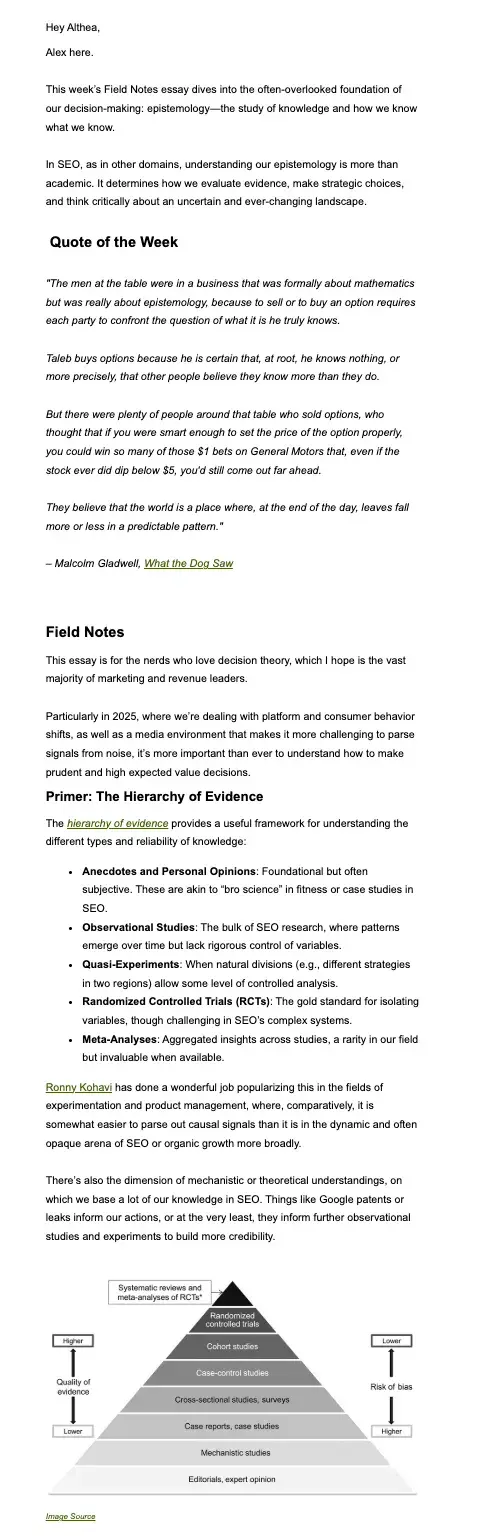
What I like: This particular newsletter on SEO epistemology is really long, and I couldn’t even get up to half its contents into the screenshot. Yet, every sentence is value-packed and fluff-free. I take a couple of days to read through the newsletter because I keep taking notes and learning stuff. It goes out about once or twice a month, and I “star” it every time it hits my inbox because I know I’m going to learn a lot from it.
And that’s the point of a newsletter: to teach your subscribers about your brand/industry.
Pro tip: In your newsletters, balance informative content with a friendly tone and maybe some visuals. This will keep your audience consistently engaged and boost customer loyalty.
4. Transactional Emails
Transactional emails are automatically triggered by user actions on your website or app. These include order confirmations, shipping notifications, and password resets. Though their primary purpose is to inform, they also offer a prime opportunity to reinforce your brand’s professionalism and reliability.
If you shop on Amazon, you’ve likely received one of these before:
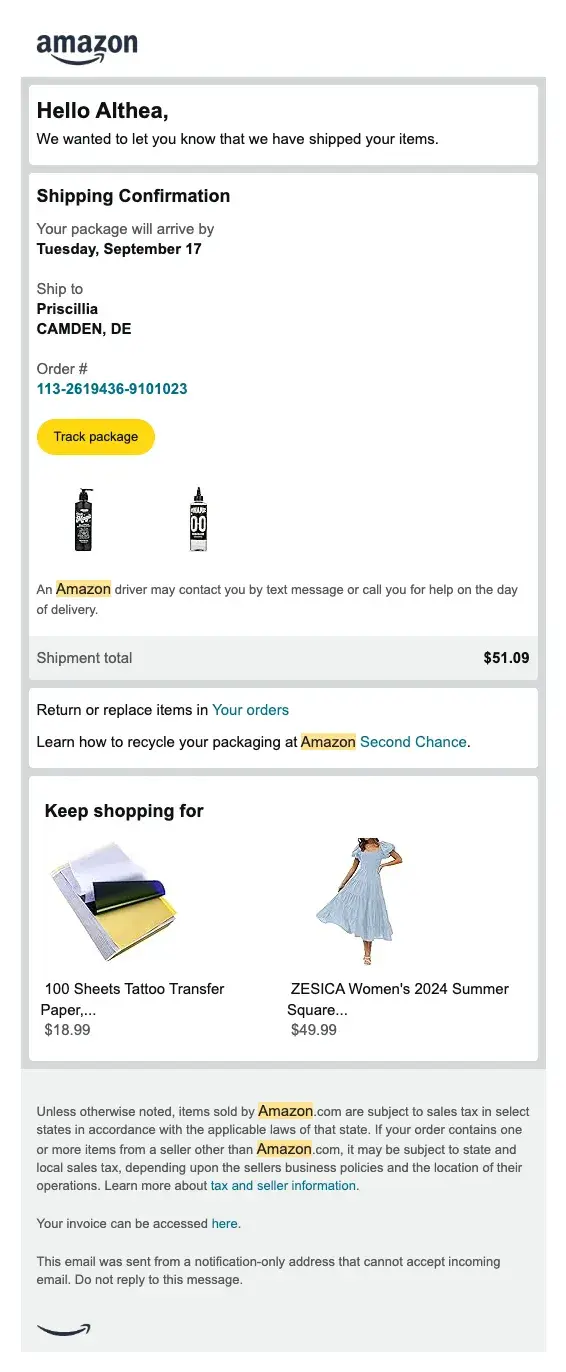
What I like: This email was triggered when I purchased a tattoo stencil gel and ink mixing solution from Amazon. It succinctly offers all my shipping information, including what I bought, the order number, where I’m shipping to, the date my package will arrive, and a link to track my package’s movement.
It could stop there and still be a good transactional email, but Amazon went further to add a Keep shopping for section with suggestions that relate to previous purchases.
Pro tip: In your transactional emails, suggest products/services you think recipients will like to buy/hire to increase your average order value and keep them using your product.
5. Re-engagement Emails
Re-engagement emails are designed to win back inactive subscribers or customers who haven’t interacted with your brand in a while. These emails typically include a message that acknowledges the time gap and may offer incentives — such as exclusive deals or a quick survey — to reignite interest.
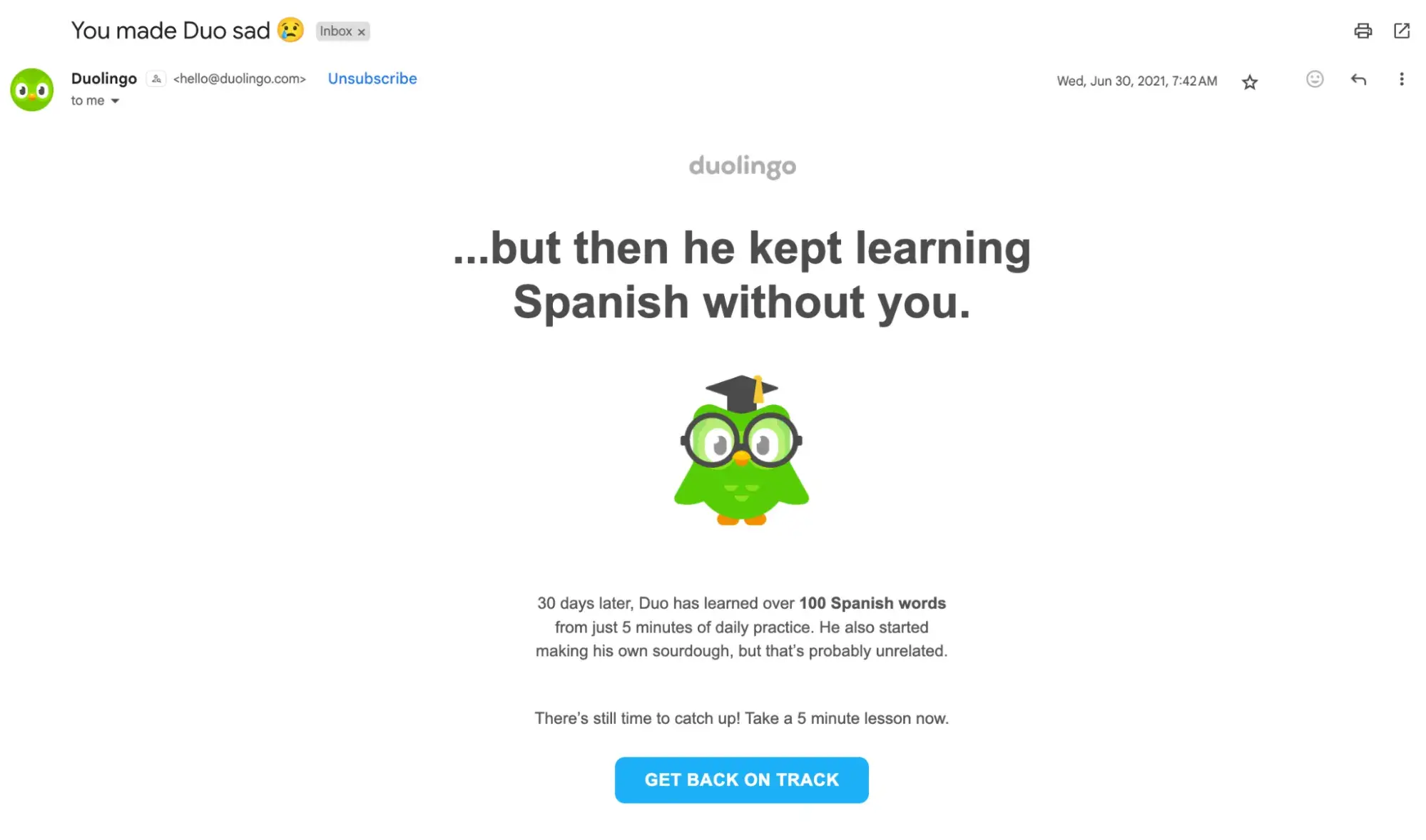
I haven’t found a brand whose re-engagement emails have worked on me as well as the ones sent by Duolingo:
[alt text] email marketing guide, duolingo reengagement email
What I like: Duolingo clearly takes the emotional route with this email, humanizing the rather adorable green bird and making me feel as though I owe him my lesson attendance. And if I falter, I’m doing him a disservice. So, to stop Duo from feeling sad, I click the Get back on track button and take my Spanish lessons.
Pro tip: Craft your re-engagement emails with empathy and a clear value proposition, as they serve as a second chance to capture your audience’s attention.
6. Abandoned Cart Emails
Sometimes, you try to order something from a website. You have your money. You’ve put the items you want in the cart. But, life gets in the way, and you forget to check out. Don’t worry. It happens to the best of us.
When you notice that a customer has added items to their online shopping cart but hasn’t completed their purchase, send them an abandoned cart email. This email serves as a reminder and often includes elements like product images, customer reviews, or a discount offer to help nudge the customer toward finalizing the purchase.
Here’s one I like from FashionNova:
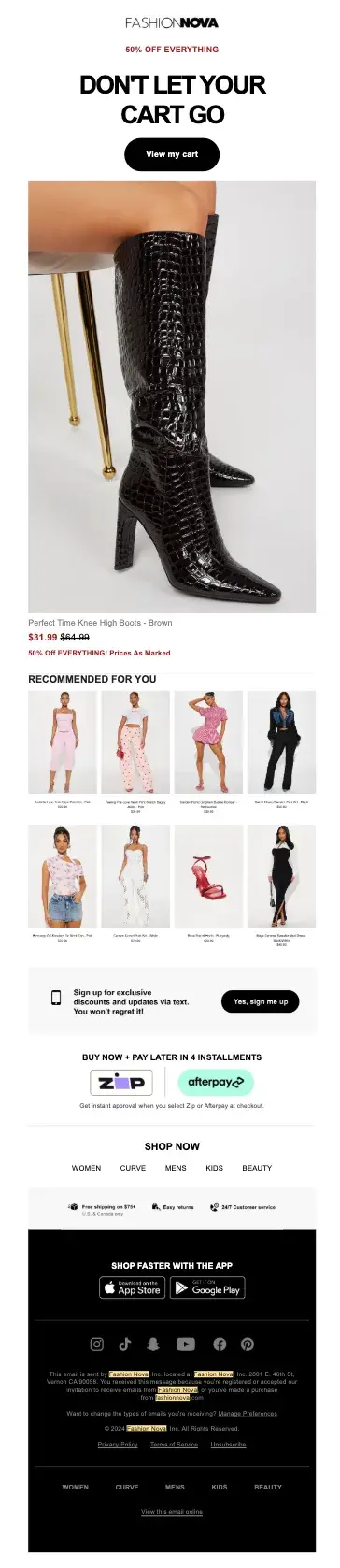
What I like: Of course, I intended to buy those stunning boots, but the 50% off everything FashionNova offered was a great incentive to get me to check out with the speed of lightning. I even ended up adding two more items to my cart because of the product recommendations FashionNova made right underneath the boots.
There was even more incentive in the form of Buy Now, Pay Later, which is very effective for customers who prefer to pay in installments.
Pro tip: Increase your average order value by making personalized product recommendations in your abandoned cart emails.
Getting Started With Email Marketing
I know it’s easy to get overwhelmed with the vast possibilities of email marketing, so let’s break down a few key steps to get you started building a solid email campaign that will delight your customers.
You can think of these steps as creating a successful email marketing strategy.
1. Create an email marketing strategy.
You can learn how to build an effective email strategy and send emails that people actually want to read. It just takes a plan (one that can be broken down into a few key steps).
Think of the following five steps as an outline for your email strategy. We’ll dive deeper into some of these in a moment.
.png)
A Beginner's Guide to Email Marketing
How to execute and measure successful email marketing campaigns
- Growing an email list.
- Remaining CAN-SPAM compliant.
- Using email automation.
- Segmenting your audience.
Download Free
All fields are required.
2. Define your audience.
Effective emails, whether a campaign or a one-off, start with understanding your audience.
Like everything else in marketing, start with your buyer persona, understand what pain points they’re dealing with, and tailor your email campaign to your audience’s needs. To better use and understand your defined audience, I suggest using HubSpot’s Marketing Analytics software.
3. Establish your goals.
Usually, before I think up campaign goals, I gather some context.
I always want to know the average email stats for my industry and use them as benchmarks for my goals. This should be your process as well.
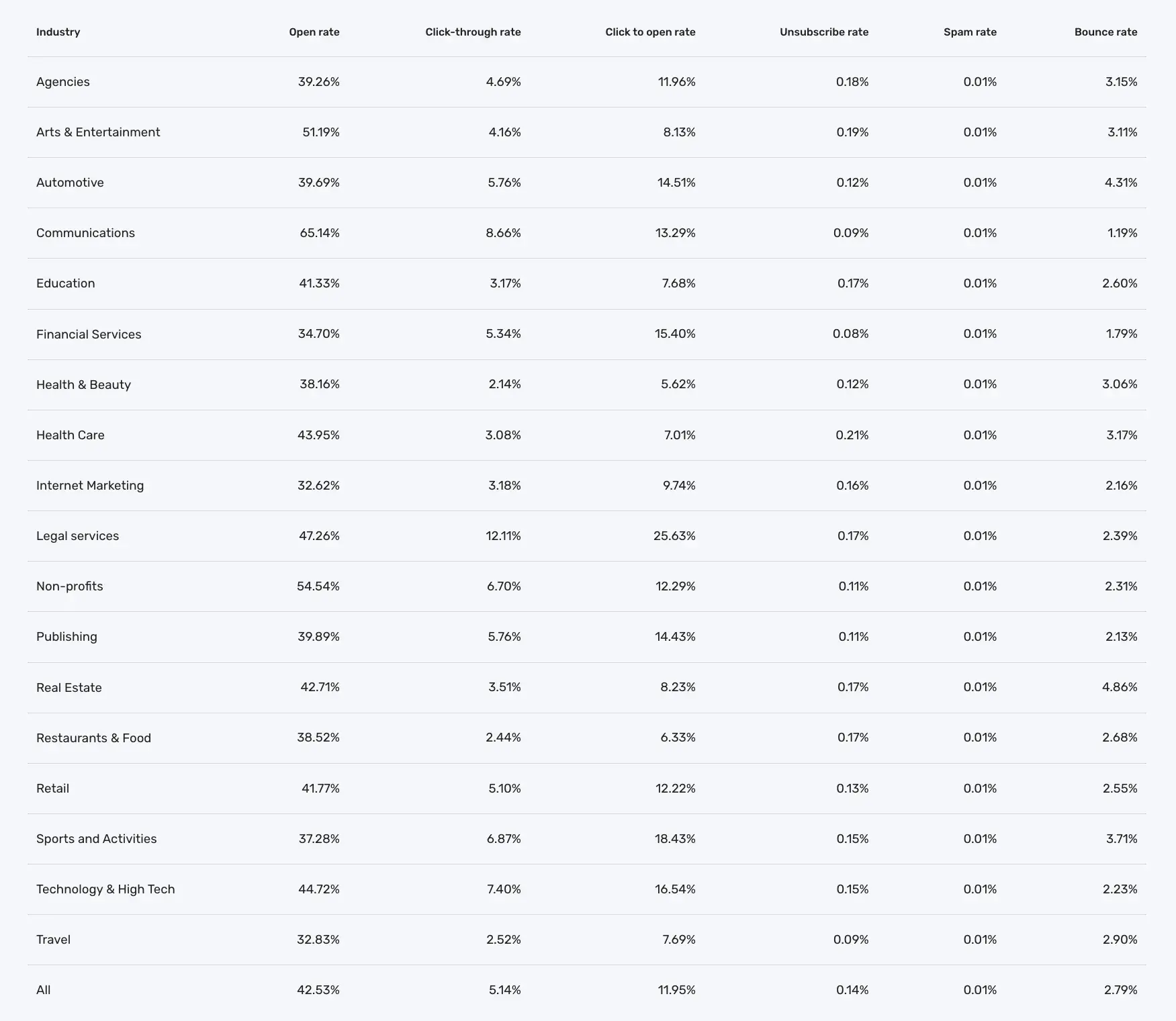
As you can see, these benchmarks vary greatly. Using this guide will help you create realistic goals for your team.
4. Build your email list.
You need people to email, right? An email list (I’ll cover how to build your email list in the next section) is a group of users who have permitted you to send them relevant content.
To build that list, you need several ways for prospects to opt-in to receive your emails.
Don’t be discouraged if you only have a few people on your list. It can take some time to build. In the meantime, treat every subscriber and lead like gold, and you’ll start seeing your email list grow organically.
5. Choose an email campaign type.
Email campaigns vary, and trying to decide between them can be overwhelming. Do you send a weekly newsletter? Should you send out new product announcements? Which blog posts are worth sharing?
The answer is subjective, but I recommend starting by understanding the different types of email campaigns (here are some excellent ones). For example, there are:
- Promotional emails, which focus on getting the word out about your offers.
- Regularly scheduled newsletters that keep recipients updated on your business, promotions, events, etc.
- Customer journey emails, like welcome emails to greet new customers or milestone emails to congratulate people on the length of their relationships with your company.
- Transactional emails that outline recent transactions, order updates, or abandoned cart notifications.
- Nurturing emails that push your potential customers further down the buyer’s journey with relevant and interesting information.
- Surveys and questionnaires that collect helpful data from email recipients.
- Re-engagement emails that build renewed interest from customers or leads you haven’t heard from in a while.
Then, based on your email marketing goals, you decide what works best for your audience.
You don’t have to choose just one type. You can set up different lists for different types of emails so customers and prospects can sign up for and receive relevant emails.
Pro tip: Need help writing your emails? I recommend Campaign Assistant, HubSpot’s generative AI tool that helps you quickly write effective marketing email copy that aligns with your campaigns.
6. Make a schedule.
Decide how often you plan to contact your list and inform your audience upfront.
This way, they’ll know exactly what to expect ahead of time. Forgetting this can lead to high unsubscribe levels and even get you in their spam.
In addition, once you set a schedule, be consistent. It will build trust and ensure you stay at the top of your audience's mind.
7. Measure your results.
This should come as no surprise. As a marketer, I measure everything. Being meticulous about every key metric will help you make small changes to your emails, yielding large results.
I’ll dive deeper into the exact KPIs to monitor further on, but marketers told us that the most important email marketing metrics to track are click-through rate, open rate, and leads/conversions from email.
These metrics hint at your emails’ subject lines and body copy effectiveness, but can also give you the green light to send out follow-ups at just the right time for maximum response rates.
Pro tip: You can get notified as soon as a prospect interacts with an email with HubSpot’s free email tracking software. This way, you can be sure you’ll send out perfectly timed follow-ups.
8. Choose an email marketing platform.
An email marketing provider (ESP) is an excellent resource if you’re looking for any support while fine-tuning your email marketing efforts.
Depending on your needs and types of campaigns, there are several paid and free email marketing platforms, including HubSpot, Mailjet, Constant Contact, MailChimp, or other Mailchimp alternatives, like Moosend.
To spare you the research, here’s a brief rundown of the tools I just mentioned and who they’re best for:
- HubSpot: Great for scalability. You can get started with its email marketing tools, then gradually get access to more advanced features via Marketing Hub, like email health analytics and cross-channel marketing tools (SEO and social media, for example).
- Mailjet: Solid choice if you’re looking for a collaborative email design platform. You can work on and collaborate on email layouts with multiple team members in real-time, as well as roll out, test, and manage email campaigns.
- Constant Contact: Particularly handy if you want to streamline lead acquisition and nurturing by unifying your social media and email marketing efforts. Constant Contact handles social media scheduling and email campaign management under the same roof.
- Mailchimp: Good choice for eCommerce stores. Mailchimp integrates natively with platforms like Shopify and WooCommerce, and includes the tools necessary to set up landing pages and create personalized email campaigns based on purchase behavior, for example.
- Moosend: Suitable for solopreneurs without much experience in email marketing. Moosend is affordable and easy to use. Plus, it covers all the basics, and then some.
Each of the tools I mentioned has its own forte. For example, HubSpot’s Email Marketing tool allows me to efficiently create, personalize, and optimize marketing emails that feel and look professional without designers or IT.
There are a variety of features to help me create the best email marketing campaigns and support all of my email marketing goals.
Additionally, I can analyze the success of my email marketing so I can share the data that matters most to my business with my team. The best part? HubSpot’s Email Marketing service is available for free.
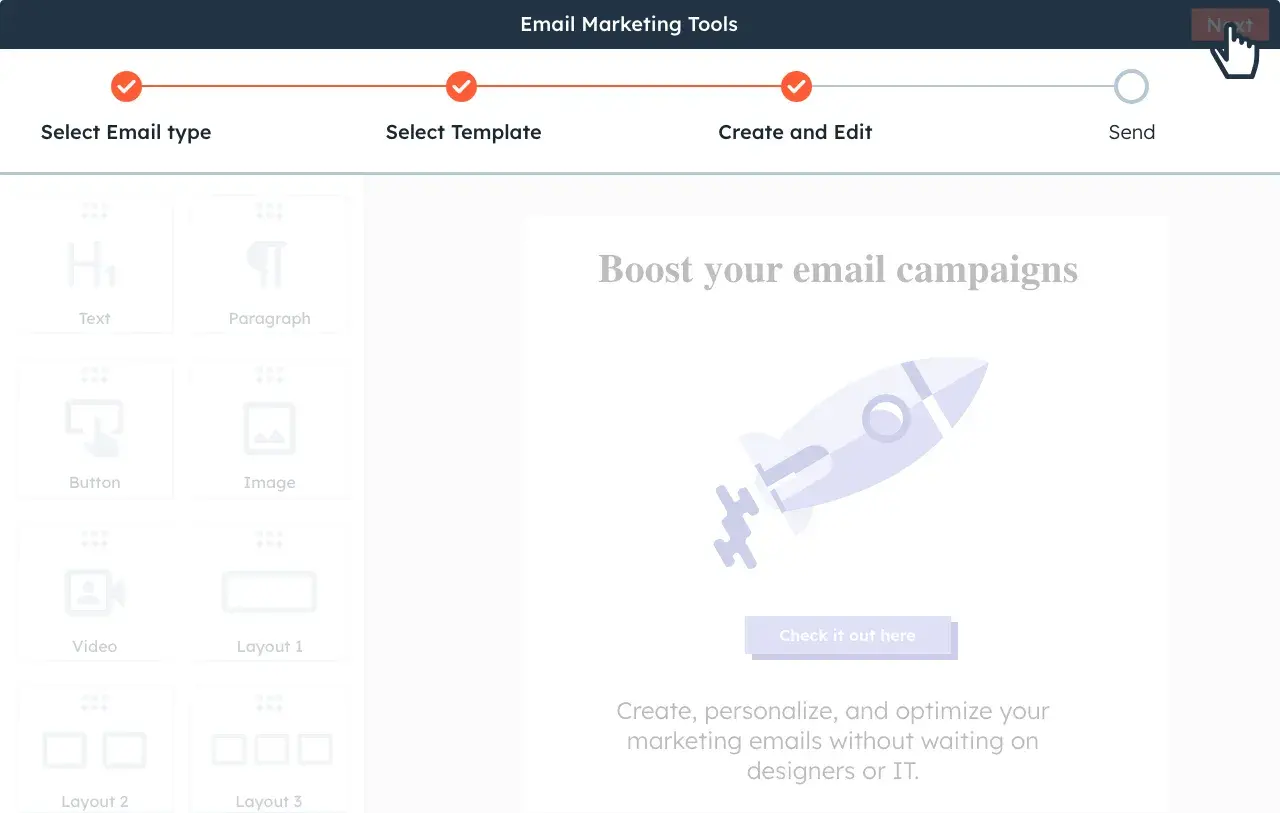
Start using HubSpot’s Email Marketing Service for free.
Here are examples of features services like HubSpot offer to consider when choosing an email service provider:
- CRM platform with segmentation capabilities.
- Good standing with Internet Service Providers.
- A positive reputation as an email service provider (ESP).
- Easy-to-build forms, landing pages, and CTAs.
- Automation.
- Simple ways to comply with email regulations.
- Ability to split test your emails.
- Built-in analytics.
- Downloadable reports.
Now that you understand the steps to creating an email marketing strategy, we’ll look at what’s involved in building your email list.
How to Build Your Email List
Now, to my favorite part: filling the email list with eager prospects who are excited to hear from you.
There are many creative ways to build your email list (and, no, purchasing emails ain’t one).
Tactically speaking, list building comes down to two key elements that work cohesively to grow your subscriber numbers: lead magnets and opt-in forms.
Featured Resource: The Ultimate Guide to Email Newsletters
Here’s how I build and grow my email lists.
Use lead magnets.
Your lead magnet is exactly as it sounds: It attracts prospects to your email list, usually as a free offer.
The offer can take many formats, should be valuable to your prospects, and is given away for free in exchange for an email address.
There’s just one problem: People have become hyper-protective of their personal information. You can’t expect to receive an email address without exchanging it for something valuable.
Think about a lead magnet that is relevant, useful, and makes your prospects’ lives easier.
Here are a few types of lead magnets you could create:
- Ebooks.
- Whitepapers.
- Infographics.
- Reports or studies.
- Checklists.
- Templates.
- Webinars or courses.
- Tools.
If you’re short on resources, you can even repurpose existing content to create lead magnets.
Free Email Marketing Tools
Create, personalize, and optimize your marketing emails without waiting on designers or IT.
- Boost email opens.
- Design stunning emails.
- Automate follow ups.
- And more!
Create an enticing opt-in form.
Your opt-in form is how you get a prospect’s information to add them to your list. It’s the gate between your future leads and the incredible asset you created with them in mind.
Here are some tips for creating an enticing opt-in form:
Create an attractive design and attention-grabbing header.
Your form should be branded, stand out from the page, and entice people to sign up. You want to excite readers with the offer.
Make the copy relevant to the offer.
While your goal is to get people to enter their information, it isn’t to deceive them. Any information on your form should be a truthful representation of the offer.
Keep the form simple.
This could be one of your first interactions with your prospect. Don’t scare them away with several long-form fields.
Ask for only the most essential information: first name and email is a good place to start.
Set your opt-in form for double confirmation.
It may seem counterproductive to ask your subscribers to opt into your emails twice, but some research on open rates suggests that customers may prefer a confirmed opt-in (COI) email more than a welcome email.
Ensure that the flow works.
Take yourself through the user experience before you go live. Double-check that the form works as intended, the thank you page is live, and your offer is delivered as promised.
This is one of your first impressions of your new lead — make it a professional and positive one.
How to Send Marketing Emails
- Implement email segmentation.
- A/B test your marketing emails.
- Analyze your email marketing performance.
- Set email marketing KPIs.
- Adjust email components to improve results.
- Use an email marketing report template.
If all goes well, you’ll have built a robust list of subscribers and leads waiting to hear from you. But you can’t start emailing just yet unless you want to end up in a spam folder, or worse, a blocked list.
Here are a few important things to remember before you start emailing your list.
1. Implement email segmentation.
Once you’ve added people to your list, you must break them down into different segments.
That way, instead of having a monolithic email list of everybody, you’ll have easier-to-manage subcategories that pertain to your subscribers’ unique characteristics, interests, and preferences.
Your subscribers are humans, after all, and you should do your best to treat them as such. That means not sending generic email blasts.
Why should you segment your email list?
Each person who signs up to receive your emails is at a different level of readiness to convert into a customer (which is the ultimate goal of all this).
If you send a discount coupon for your product to subscribers that don’t even know how to diagnose their problem, you’ll probably lose them. That’s because you’re skipping the part where you build trust and develop the relationship.
I try to make every email I send treat my subscribers like humans I want to connect with, as opposed to a herd of leads I’m trying to corral into a one-size-fits-all box.
I’ve found the more I segment my list, the more trust I build with my leads, and the easier it is to convert them later.
How to Segment Email Lists
The first step in segmentation is creating separate lead magnets and opt-in forms for each part of the buyer’s journey. That way, your contacts are automatically divided into separate lists.
Beyond that, email marketing platforms allow you to segment your email list by contact data and behavior to help you send the right emails to the right people.
Here are some ways you could break up your list:
- Geographical location.
- Lifecycle stage.
- Awareness, consideration, and decision stage.
- Industry.
- Previous engagement with your brand.
- Language.
- Job title.
In reality, you can segment your list any way that you want. Just make sure to be as exclusive as possible when sending emails to each subgroup.
2. A/B test your marketing emails.
Not all email lists are created equal. Some audiences prefer personalization, and others will think it’s spammy. Some audiences will like bright, eye-catching CTA buttons. Others will prefer a more subtle call-to-action.
You’ll never know what type of people make up your email list until you test the variables. That’s where A/B testing comes in handy.
“If you’re considering making any structural or content alterations to your email marketing, A/B testing is an excellent way to determine if the changes will be successful or worthwhile before they’re implemented on a larger scale,” says Madison Zoey Vettorino, former marketing manager and SEO content writer for HubSpot’s Website Blog.
Surprisingly, not many brands leverage it.

A/B testing, or split testing, is a way to see what type of email performs best with your audience by analyzing the results of email A against email B. This can be especially helpful when working with templates.
“Since emails often have the same template, A/B testing is smart because you can usually control variables outside of the test and get a solid signal on what performs better,” HubSpot’s Litterst says.
Here’s the step-by-step process I use for A/B testing my emails:
- Select one variable to test at a time, e.g., subject line, CTA, images.
- Create two versions of the email: one with and one without the variable.
- Allow your emails to be sent out simultaneously for a period of time.
- Analyze your results and keep only the version that performed better.
- Test a new variable and repeat the process.
Most email service providers will have A/B testing built into their software, which will make it easy for you to compare email results without much manual work.
When conducting an A/B test, I suggest following these tips:
Test one element at a time.
“For example, try the same email with a different subject line. Or the same email and same subject line with a different CTA,” Curtis del Principe, a content strategist and writer at HubSpot, told me.
“It might be tempting to make several changes at once, but that makes it harder to pinpoint the true cause of your wins or losses,” he says.
Don’t try to “eyeball” an A/B test.
A/B test should be run with intention. Making quick changes and approaching results unscientifically can lead to incorrect conclusions.
“You might be tempted to run an informal A/B test by making a change and then casually paying attention to the responses that you get. This unscientific method can easily be skewed by factors outside your control (like seasonality or deliverability),” says del Principe.
“It also leaves out a ton of valuable data, like open rate, click-through rate, unsubscribe rate, or sharing/forwarding rate.”
Instead, I recommend using an email marketing tool, like Marketing Hub or BuzzStream, to help you get a broader and more accurate understanding of your email performance.
Featured Resource: The Complete A/B Testing Kit
3. Analyze your email marketing performance.
Once you’ve got your first few campaigns, it’s time to see how they’re performing.
By diving into your email marketing analytics, you’ll be able to make better decisions that will help your business’s bottom line, resonate with your subscribers, readers, and customers, and justify your work to the rest of your company.
4. Set email marketing KPIs.
I think there are four key metrics to pay attention to when evaluating the effectiveness of your email marketing campaign.
- Deliverability measures the rate at which emails reach your intended subscribers’ inboxes.
- Open rate is the percentage of people that open your email once it reaches their inbox.
- Click-through rate (CTR) is the percentage of people who click on your CTAs.
- Unsubscribes measures the number of people who opt out of your email list once they receive your email.
5. Adjust email components to improve results.
Many factors impact your KPIs, and it will take some experimentation and guesswork to figure out which tweaks to your emails will yield the biggest significance.
If you aren’t getting the desired numbers, I suggest playing with these variables to improve your email results.
Deliverability
- Ensure that you’re following best practices regarding spam filters.
- Remove inactive people from your email list to keep only engaged subscribers.
- Check which emails have bounced and remove those email addresses from your list.
Open Rate
- Play with the language in your subject line to entice people to click on your email.
- Adjust the time and day that you send your email to see what works best.
Click-Through Rate (CTR)
- Evaluate your offer to ensure that it provides value to your segmented list.
- Rewrite your copy to make sure that it’s clear what you want the reader to do.
- Try different CTAs, e.g., graphic versus inline copy, bold versus subtle.
Unsubscribes
- First, consider if this is a blessing in disguise, as uninterested parties are removing themselves from your list.
- Regularly send an email to inactive subscribers on your list asking if they still want to be a part of it.
- Evaluate whether the email you sent is aligned with your brand.
- Ensure you haven’t performed a bait-and-switch by promising one thing and delivering another.
- Make sure your emails are providing value to your audience before trying to upsell.
6. Use an email marketing report template.
Once you’ve got some campaigns under your belt, it’s time to look at how they performed. Your data does no good if you can’t report it in an organized fashion.
An email marketing report is a spreadsheet where you can record your results in one place to help you make inferences from your KPIs and take action to improve them.
Here’s how I like to organize my reports.
Metrics
- Total number of emails sent.
- Number of emails delivered.
- Deliverability Rate.
- Bounce Rate.
- Open Rate.
- Click-Through Rate (CTR).
- Click-to-open Rate (CTOR).
- Unsubscribe Rate.
Data
- Subject line.
- Length of the email body.
- Offer.
- CTA (inline or graphic).
- List segment(s).
Questions To Ask
- Was your deliverability rate high in comparison to previous periods?
- How did your CTR compare to your open rate?
- Were your unsubscribe numbers consistent with other emails?
- Did a certain subject line perform better than others?
- Does the length of the email make a difference in CTR?
- Could another style of CTA perform better?
- Was the offer appropriate for the list segment?
A Beginner's Guide to Email Marketing
How to execute and measure successful email marketing campaigns
- Growing an email list.
- Remaining CAN-SPAM compliant.
- Using email automation.
- Segmenting your audience.
Download Free
All fields are required.
Email Marketing Stats You Should Know
Knowing the stats can help you understand the lay of the land. Here I’ve gathered some statistics regarding email marketing in general and by industry.
General Email Marketing Stats
- 34% of respondents use generative AI for copy at least occasionally.
- Over 80% of marketers saw some performance improvement when using subject line personalization, live or real-time content, and using dynamic content personalization.
- Email marketing generates a whopping ROI of $36 for every $1 spent.
- 90% of email marketers say email segmentation boosts performance.
- In 2024, 66.7% of marketers saw an inbox placement rate of less than 70%.
- 67.1% of marketers say their average email open rate was more than 20%.
- 48.6% of marketers claim that 40%–60% of their email engagement comes from mobile devices.
- 40% of marketers sent 1–4 emails per month on average to each subscriber in 2023.
- Newsletters were the most sent email campaign, with 16.8% of marketers sending it, followed closely by promotional emails (15.3%).
- 67.6% of marketers used a CTA in their email signature.
- 48% of marketers started using AI in their email marketing.
- 49.5% of marketers claim that AI has helped improve the automation and efficiency of email campaigns.
Email Marketing Stats by Industry
Email marketing rules change based on your industry and who you’re marketing to. Below are some email marketing trends for B2B, B2C, and ecommerce companies that can inform your email marketing strategy.
Email Marketing Stats for B2B
- B2B survey respondents reported using more video in email than B2C brands.
- 71% of B2B marketers sent email newsletters to their audience
- 73% of B2B marketers are targeting Millennials in 2025, and 40% are targeting Gen Zs.
Email Marketing Stats for B2C
- B2C email programs are nearly 3X more likely than their B2B counterparts to use different tactics, including AMP for email, live content, multivariate testing, and loyalty programs.
- 56% of B2C marketers use email data to form their target audiences.
- 74% of B2C marketers are targeting Millennials in 2025.
Email Marketing Stats for Ecommerce
- 26.5% of ecommerce marketers measure conversion rate, and 24% measure CTR, making these the two most popular email marketing metrics after open rate.
- 35% of ecommerce marketers want to send more automated emails in the future.
- 87% of ecommerce marketers have plans to increase or maintain their email marketing spending in the future.
Email Regulations You Should Know
Email regulations are important to follow as they regulate and protect consumers’ desires to know how and why their information is being used.
If there’s anything I’ve learned you should care about, it’s complying with what your customers — or potential customers — want.
There are a few key ones that you should understand:
1. CAN-SPAM Compliance
Technically, CAN-SPAM is an acronym for Controlling the Assault of Non-Solicited Pornography and Marketing (because sometimes the two go together).
In practice, it’s a way to protect your subscribers’ right to only receive emails that they’ve requested.
The law was passed in 2003 and applies to any commercial emails used for business purposes.
Here are the ways to ensure that your emails are CAN-SPAM compliant:
- Include your company name and address in every email.
- Place visible unsubscribe links within your emails.
- Use real email addresses in the “From” and “Reply to” fields.
- Write subject lines that indicate the contents of the email.
Please note: This is not to be confused with legal advice. See the FTC’s site for more specific legal information regarding CAN-SPAM laws.
2. GDPR Compliance
While some may view these newly implemented email regulations as burdensome and unnecessary, I think the General Data Protection Regulation (GDPR) moves us closer to building long-lasting, trusting customer relationships.
GDPR is about giving your customers the right to choose. They choose your emails. They decide to hear from you. They choose your products. And that is exactly what inbound marketing is about.
It is important to note that GDPR only applies to businesses operating in the European Union and businesses that market to EU citizens.
Noncompliance will result in significant fees that aren’t worth the risk, so I encourage you to read the GDPR guidelines entirely.
Here’s an overview of how you can comply with GDPR laws:
- Use precise language when requesting consent to store personal information.
- Only collect contact data that is necessary for and relevant to your business.
- Store contact data securely and only use it for the agreed-upon purpose.
- Retain data for justifiable business purposes only.
- Delete contact data on request.
- Make it easy for contacts to unsubscribe from your list or update their preferences.
- Comply promptly with a contact’s request for access to their data.
- Keep company records to prove GDPR compliance.
These regulations will be taken seriously (as they should), so I recommend creating a GDPR strategy for your business before sending emails.
3. Avoid spam filters.
After spending time creating the perfect email and adhering to regulations, the last thing I want is to end up in a spam folder — and I imagine it’s the same for you.
You want to avoid the spam folder because:
- It hurts your deliverability rates across the board.
- Your contacts will likely miss all of your emails.
- You won’t be able to measure your email marketing effectiveness accurately.
- Your analytics will be skewed.
You can avoid being deduced to spam with the following.
Get whitelisted.
A whitelist is a list of approved senders that can reach the subscriber’s inbox. The easiest way to accomplish this is to have your new subscriber add your email address to their address book.
Include directions on how to do this in your welcome email.
Mind your copy.
Avoid using all caps and multiple exclamation points, as well as spam trigger words, like “opt-in,” “click below,” and “order,” that are easily detected and marked down by Internet Service Providers (ISPs).
Use a reliable email service provider.
Your email service provider’s reputation affects your deliverability, so stick to established, well-known companies.
Implement a double opt-in.
Once someone opts into your email list, send an email asking them to confirm. This ensures that your new subscriber is genuinely interested in your emails and will likely be more engaged.
And last but certainly not least, you need to consistently measure the success of your email marketing efforts. There are a number of options you can choose from when it comes to your business’s email marketing analytics.
Email Marketing Tips
While I usually don’t think twice about the formatting or subject line of an email I send to a friend, email marketing requires a lot more consideration.
I’ve learned that everything from the time you send your email to the devices on which your email could be opened matters.
Your goal with every email is to generate more leads, which makes crafting a marketing email a more involved process than other emails you’ve written.
How to Write a Marketing Email Well
Let’s touch on the components of a successful marketing email.
Copy: The copy in the body of your email should be consistent with your voice and stick to only one topic.
Images: Choose images that are optimized for all devices, eye-catching, and relevant.
CTA: Your call-to-action should lead to a relevant offer and stand out from the rest of the email.
Timing: Based on Mailmodo’s State of Email 2024 findings, the best day to send your emails is Tuesday. According to GetResponse’s email benchmarks report, the best time to send emails is either before your audience wakes up (4–6 am) or later in the afternoon (5–7 pm).
Responsiveness: Nearly 50% of email marketers say 40%–60% of their email engagement comes from mobile devices. Your email should, therefore, be optimized for this, as well as all other devices.
Personalization: Write every email like you’re sending it to a friend. Be personable and address your reader in a familiar tone.
Subject Line: Use clear, actionable, enticing language that is personalized and aligned with the body of the email.
Featured Resource: 100 Email Subject Lines We Actually Clicked
Pro tip: Leverage AI for email marketing. By using tools like our AI Email Writer, you can generate copy that suits your goals, saving time along the way.
Personalize your email marketing.
“Personalization isn’t just about adding a contact’s name to the subject line anymore but is all about creating personalized experiences that demonstrate you understand them and have insider knowledge about how they can use your products to succeed,” Aleia Walker, growth marketing manager at HubSpot.
Once you know who you’re emailing and what’s important to them, sending emails with personalized touches will be much easier.
Sure, you’re speaking to 100+ people at one time, but your leads don’t need to know it.
Personalized emails have higher open rates. In addition, 83% of customers are willing to share their data to create a more personalized experience.
You’ve gathered all this unique data. Your email marketing software allows for personalization tokens. You have no excuse for sending generic emails that don’t make your leads feel special.
“It’s more impactful to base email personalization on two or three factors instead of just what a contact is engaging with on your side,” Walker says.
Walker suggests, “Consider personalizing emails based on what you know about your contact, such as their location, industry, employee size, etc., alongside how they engage with your content.”
Here are a few ways I like to personalize my emails:
- Add a first name field in the subject line and/or greeting.
- Include region-specific information when appropriate.
- Send content that is relevant to your lead’s lifecycle stage.
- Only send emails that pertain to the last engagement a lead has had with your brand.
- Write about relevant and/or personal events, like region-specific holidays or birthdays.
- End your emails with a personal signature from a human (not your company).
- Use a relevant CTA to an offer that the reader will find useful.
Use email marketing templates.
Email marketing templates — like these ones from HubSpot — are another great resource to help you with your email marketing.
Unless you’re a designer and developer, on top of being a skilled marketer, templates will save you a ton of time — they take the design, coding, and UX-definition work out of crafting your emails.
Just one caveat: When making your selection, I advise choosing email templates that are proven to be effective.
The highest-quality templates come from the most reputable ESPs that have tested them against thousands of alternatives. So, stick with the professionals.
If you’re struggling with the above tips, HubSpot offers email marketing tools to help personalize your marketing emails, optimize your emails with A/B testing, and create aesthetically pleasing emails using templates.
Furthermore, HubSpot’s Campaign Assistant uses AI technology to generate copy for marketing emails.
Drawbacks of Email Marketing
While email marketing offers many benefits, it isn’t without its challenges. As you incorporate this channel into your marketing strategy, you may encounter certain limitations that require thoughtful planning and adjustment. Here are five common drawbacks of email marketing:
1. Deliverability Issues
Just because your emails successfully send from your end doesn’t mean every subscriber on your list will see them. Spam filters and changes in email provider algorithms can sometimes reroute your messages to the spam folder — or worse, block them entirely. This means that even the most well-crafted email could go unseen if your sender reputation isn’t solid.
For example, a prospective client sent me a link to set a password for their WordPress website recently. I only found the email two weeks later because it went straight to spam. This is why, from time to time, I carefully check my spam box before emptying it out to be sure I didn’t miss any important emails.
To manage this risk, you need to follow best practices for email hygiene, such as regularly cleaning your email list, using double opt-in processes, and avoiding spammy language. Most email platforms also allow you to see your deliverability metrics, so keep an eye on that.
2. Overcrowded Inboxes
Your audience receives a flood of emails every day, which makes it tough for your messages to stand out. With so much competition, even a highly engaging email can be easily overlooked if it isn’t timed right or doesn’t immediately capture attention.
If your emails add to the clutter, you risk annoying your subscribers, leading them to ignore or even unsubscribe from your list. I’ve found that finding the right frequency and making sure your emails provide clear value can reduce your chances of getting lost in a crowded inbox.
3. Content Fatigue
Creating fresh and engaging content for your email campaigns can become a challenge over time. Even if you have a lot of ideas at first, keeping up with the demand for interesting, personalized content can lead to fatigue. The risk here is that repetitive or uninteresting emails can diminish your audience’s interest in your brand and reduce engagement rates.
That’s why I think it’s crucial to develop a content calendar weeks, or even months, in advance, seeking inspiration from customer feedback and sometimes even incorporating user-generated content. This can keep your email campaigns vibrant and prevent content fatigue from setting in.
4. Technical and Design Challenges
Email design isn’t as straightforward as designing for a single web page. With so many devices, email clients, and screen sizes out there, ensuring your email looks great every time isn’t easy. Even minor issues, such as a broken link or poorly formatted text, can affect the overall impression of your brand.
I have encountered situations where an email looked perfect in my preview but displayed awkwardly on a mobile device. To overcome this, conduct thorough testing across platforms and use clear guidelines for responsive design before sending emails out. This ensures that your emails maintain their intended impact, regardless of what devices people view them on.
5. Time and Resource Commitment
Despite its cost-effectiveness, email marketing still requires a significant investment of time and resources. Crafting compelling emails, segmenting your lists, analyzing campaign performance, and continuously optimizing strategies are ongoing tasks that can divert attention away from other strategic initiatives.
This is why automation tools are necessary — they help balance the immediate demands of building an email campaign with long-term strategy planning. But even email automation requires thoughtful setup and regular oversight. The key is to plan strategically and allocate resources effectively, so that the benefits outweigh the time commitments.
Beginning Email Marketing
While there are many rules to sending a marketing email, the most important is this: Treat the reader on the other end like you’re writing to a friend.
Trust me, you can achieve all of your email marketing goals if you keep this golden rule top of mind in every autoresponder, lead magnet, and subject line.
And remember, the more you help your subscribers, the more they will want to hear from you and look forward to opening emails that you send.
Editor's note: This post was originally published in June 2018 and has been updated for comprehensiveness.
Email Marketing Planning Template
Organize your email marketing strategy and metrics with this free template.
- Gather data
- Summarize results
- Manage A/B tests
- And More!
Download Free
All fields are required.
Email Marketing Campaigns
![Email Marketing Plan: Craft & Track Your Email Campaign [Free Template]](https://53.fs1.hubspotusercontent-na1.net/hubfs/53/Untitled%20design%20-%202025-04-22T133039.283%20(1).jpg)
![30 Brilliant Marketing Email Campaign Examples [+ Template]](https://53.fs1.hubspotusercontent-na1.net/hubfs/53/email-marketing-examples_29.webp)