
Adding a compelling call-to-action (CTA) to any piece of content — such as a website, blog post, or social media profile — has the potential to convert more visitors into qualified leads and customers. That’s because a well-crafted CTA helps increase conversions and, therefore, prospects, customers, and revenue. 
Call to action (CTA) tools help marketing teams create buttons, banners, pop-ups, and in-line CTAs that drive these conversions.
This guide breaks down the seven best call-to-action software, including HubSpot, that I’ve tested on real projects to streamline workflow and boost the bottom line.
Table of Contents
- What is a call-to-action tool?
- Essential Features of Call-to-action Software
- How I Found and Tested the Best Call-to-action Tools
- How to Choose the Right CTA tool
- Best Call-to-action Tools
- Frequently Asked Questions About CTA Tools
What is a call-to-action tool?
A call-to-action tool is a software application designed to help marketers and website owners create, deploy, and optimize prompts that encourage users to take a specific next step. Call-to-action (CTA) tools help teams test CTA copy, design, placement, and targeting to maximize engagement.
These tools range from simple button generators to advanced, AI-powered personalization engines that adapt to user behavior in real time. Here are a few CTA examples tailored to the user behavior:
- An inline CTA: “Download our free 2026 marketing report.”
- A pop-up CTA: “Get 15% off your first order when you subscribe.”
- A sticky banner: “Register for our upcoming webinar on AI marketing.”
In fact, full-page pop-up CTAs for content downloads can achieve content download rates as high as 13.6%. Likewise, lightbox popup CTAs can reach 3.7% for account sign-ups, according to a report from First Page Sage.
The right CTA tools let digital marketers build and test these elements on the fly, generating more revenue from the same content.
Marketers use HubSpot’s Calls-to-action tool to create on-brand CTA buttons, popups, and banners tailored to the user journey and the user behavior.
.webp?)
Free Marketing Software
Easy marketing tools that deliver fast time-to-value, unified in one place.
- AI Tools
- Email Marketing
- Social Media Management
- And More!
Essential Features of Call-to-action Software
Before evaluating the best call-to-action software, I outlined the most important features for CTA tools that align with the realities of AI-driven workflows and changing buyer behavior. Here are the four essentials that every tool should have.
AI-powered Personalization
Personalization adapts CTA content based on visitor attributes or behavior. Modern CTA tools use AI to analyze data points such as referral sources, past interactions, and demographic information to display the most relevant offer to each user automatically.
I find that AI personalization is the number one necessity. When I use tools that dynamically adjust the message based on who is looking at it, the engagement lift is immediate. It takes the guesswork out of targeting and ensures that every visitor feels like the offer was crafted specifically for them.
A/B Testing and Analytics
A/B testing compares two or more CTA options to find a better-performing one, commonly measured by click-through rate (CTR) and conversion rate. CTA analytics requires consistent tracking across pages and campaigns to understand what truly drives action.
If a CTA tool doesn’t have an A/B testing feature and analytics, it’s a waste of money. I rely heavily on A/B testing to validate my assumptions about copy and design. Being able to see clear, statistically significant data on which button color or action verb performs best gives me the confidence to scale or pause my campaigns.
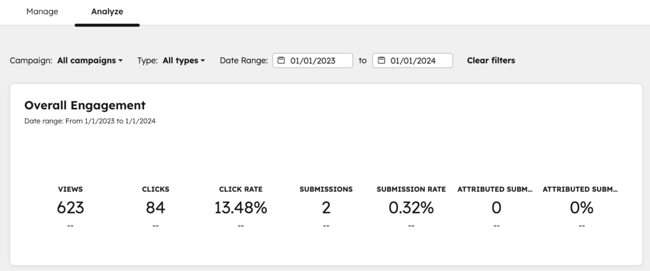
This is where HubSpot’s Calls-to-Action tool shines. It lets you manage all your CTAs in one dashboard and see how many views, clicks, and conversions each one is generating across all your pages.
No-code Drag-and-drop Builders
No-code CTA builders use drag-and-drop editors and templates to simplify the creation process and save a substantial amount of money and time on design.
No-code CTA builders also come in handy for marketers who need to launch a time-sensitive promotion. They simply cannot afford to wait days for a developer to code a custom pop-up. Having a library of templates and an intuitive editor means a marketer can go from idea to execution in minutes.
Advanced Triggering and Targeting
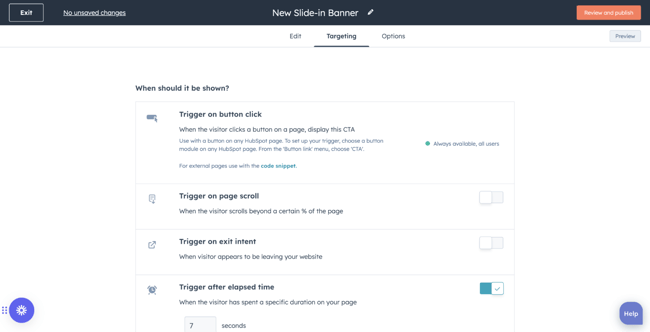
The best pop-up CTA tools support triggers such as scroll depth, time on page, and exit intent. These features ensure that the CTA appears at the exact moment a user is most likely to engage, rather than interrupting their experience prematurely.
I believe that timing is everything when it comes to CTAs. If a pop-up appears the second I land on a page, I usually close it immediately. However, if an offer is triggered just as I am about to leave, I am more likely to click on it because the context and timing are right.
HubSpot’s Calls-to-Action supports rule-based triggering, where marketers can display CTAs based on exit intent, scroll depth, or elapsed time on page.
How I Found and Tested the Best Call-to-action Tools
I looked for platforms that offered a seamless blend of ease of use, advanced functionality, and measurable impact. Initially, I selected 15 tools, but narrowed them down to seven after reading feedback on Reddit.
Then, I tested each tool in real-world scenarios, such as setting up an exit-intent pop-up or running an A/B test on button copy.
I also evaluated the depth of the analytics provided and assessed how well the tool integrates with existing marketing stacks. I prioritized tools that leverage AI to reduce manual effort on copywriting and design and improve targeting precision.
Lastly, I considered the specific needs of different users, from small business owners who need quick, template-driven solutions to enterprise teams requiring complex, multi-channel personalization.
How to Choose the Right CTA tool
You’ll need only one tool from the list, so it’s important to review them with your current marketing workflow in mind. Lay out your goals, channels, tech stack, and reporting needs. Here is a quick guide to help you choose the right tool based on your specific use case.
- Best for B2B website personalization: HubSpot Calls-to-Action. Ideal for teams that want their CTAs deeply integrated with their CRM data, email marketing, and overall inbound strategy.
- Best for AI-driven ecommerce pop-ups: Wisepops. Perfect for online stores looking to leverage AI for product recommendations and cart abandonment predictions.
- Best for high-converting landing pages: Unbounce. Excellent for growth teams focused on paid acquisition that need to build and test landing page CTAs rapidly.
Best Call-to-action Tools
Here are seven tools to generate CTAs and start increasing conversions from your website traffic.
1. HubSpot Calls-to-action
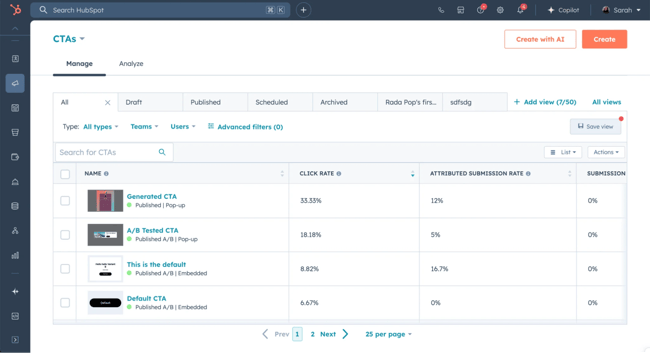
Get started with HubSpot’s free CTA tool.
HubSpot’s Calls-to-action tool allows growth teams to create, personalize, test, and optimize CTAs that drive qualified leads to the landing pages in seconds.
The easy-to-use CTA builder doesn’t require a designer and helps you make CTA buttons, banners, or pop-ups. You can also upload custom button designs or image-based CTAs.
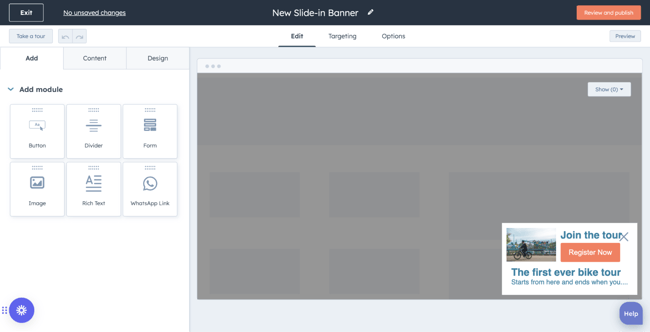
When personalizing CTAs, HubSpot provides useful information about prospects from the business’s contact database (e.g., industry, lifecycle stage) to help teams tailor the CTA to them. Or, if targeting anonymous visitors, use other helpful details like their location or language. To generate on-brand CTA copy, use an AI assistant, Breeze.
Key Features
- Use contact data to personalize CTAs for a target audience
- Generate more conversions with A/B tests and engagement data
- Upload custom designs or use drag-and-drop editing
- Generate, edit, and personalize CTA copy automatically with a Breeze
- Customize CTAs based on persona, industry, lifecycle stage, location, device, referral source, or preferred language, and more account-level data
Pricing: The HubSpot CTA tool is included in the HubSpot Marketing Hub. Plans start at $20/month/seat.
Best for: Marketing teams of all sizes that want CTA creation, personalization, and CTA analytics tightly integrated with their CRM and inbound strategy.
What I like: With HubSpot’s Calls-to-action feature, I can A/B test, analyze, and optimize CTAs and see their performance from a single dashboard.
2. Wisepops
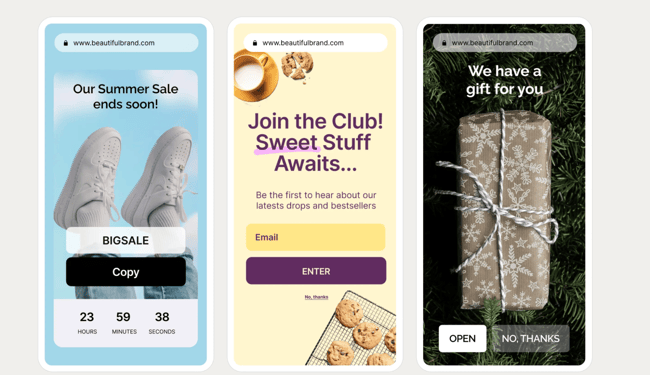
Wisepops is a powerful on-site marketing platform that excels in creating AI-driven pop-ups and embedded CTAs. The platform offers a drag-and-drop builder, advanced targeting options, and A/B testing with control groups to measure the true incremental impact of your campaigns. It also features an AI product recommendation engine that personalizes offers for each visitor.
Key Features
- AI product recommendation that predicts purchase intent and surfaces relevant offers inside pop-ups, embeds, and the onsite notification feed
- Drag-and-drop popup builder with 200+ conversion-optimized templates
- A social media-styled channel that delivers personalized messages to visitors without interrupting their browsing experience
- Advanced A/B testing with statistical control groups and p-value measurement
Pricing: Starts at €499/month (custom pricing based on traffic volume and channels). A 14-day free trial is available.
Best for: Ecommerce brands looking to reduce cart abandonment and increase average order value through highly personalized, timely interventions.
3. Mutiny
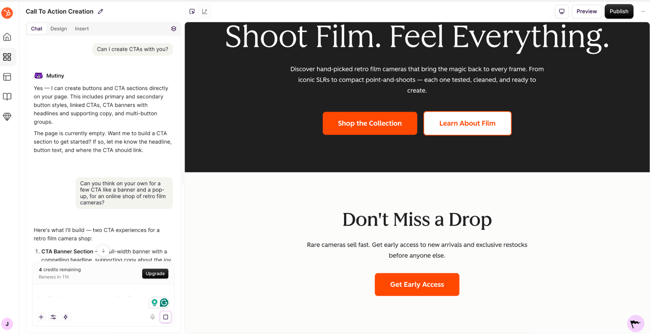
Mutiny is a no-code AI platform designed specifically for B2B companies to personalize their website experiences. Marketers ask the tool to build a banner for their site, and they get it in the business’s brand colors within a few seconds. With Mutiny, teams can describe the audience they want to target, and the AI will suggest personalized copy and CTA variations.
Key Features
- AI-powered asset creation
- Account-level personalization that swaps headlines, CTAs, and logos based on the visiting company’s industry, size, or CRM data
- Visitor intelligence integrations with Outreach and Salesloft (Business plan) to align sales and marketing outreach
- CRM integrations with Salesforce and HubSpot (Enterprise plan) for seamless data sync and pipeline attribution
Pricing: Free plan available ($0/month, up to 5 team members). Business plan starts at $50/month per seat.
Best for: B2B demand-generation and ABM teams that want to dynamically personalize website CTAs, landing pages, and content based on account-level firmographic data.
4. Unbounce
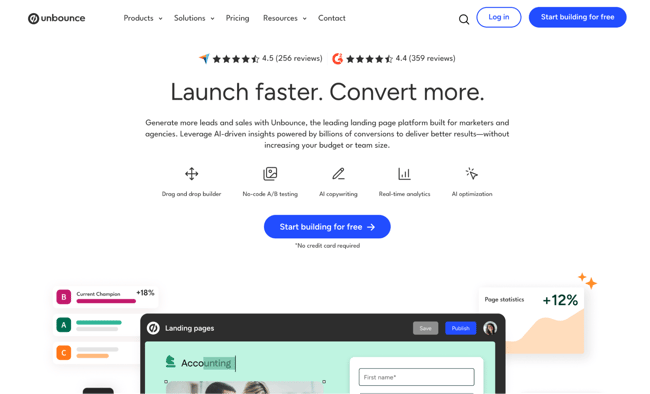
Unbounce is a leading landing page builder and conversion rate optimization (CRO) platform that features robust CTA capabilities. Its Smart Builder uses AI to help you design pages quickly, while the Smart Copy feature assists in generating compelling CTA text. One of its standout features is Smart Traffic, an AI-powered optimization tool that automatically routes visitors to the landing page variant where they are most likely to convert based on their attributes (like location, device, and browser).
Key Features
- Smart Traffic AI automatically routes each visitor to the landing page variant where they are most likely to convert
- AI copywriting assistant that generates next-sentence suggestions for CTA copy directly inside the builder
- Drag-and-drop landing page builder
- Popups and sticky bars with advanced action triggers, including exit intent, scroll depth, time on page, and click-based activation
Pricing: Starts at $22/month. A free 14-day trial is available with no credit card required.
Best for: Growth marketers and agencies running paid acquisition campaigns who need to rapidly build, test, and optimize landing page CTAs without developer support.
What I like: The combination of rapid page building and AI-driven traffic routing makes Unbounce an incredibly efficient tool for maximizing the ROI of paid ad campaigns.
5. ConvertBox
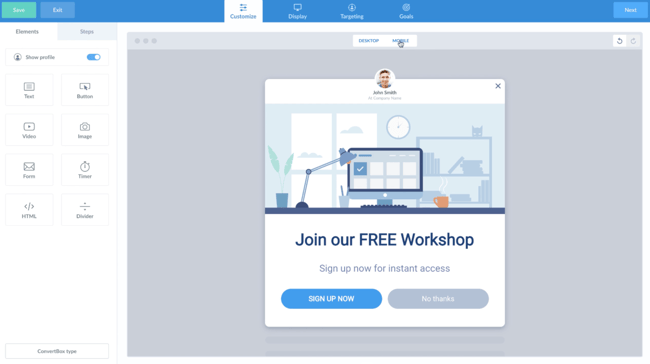
ConvertBox is a dynamic, behavior-based list-building and retargeting tool. It allows marketers to create personalized offers, lead capture forms, and segmentation funnels that appear as pop-ups, slide-ins, or embedded CTAs. The platform is known for its excellent user experience, fast editor, and robust targeting rules based on user behavior.
Key Features
- Behavior-based targeting rules that trigger CTAs based on the number of visits, pages seen, scroll percentage, exit intent, and time on page
- Segmentation funnels that guide visitors through multi-step forms to self-qualify
- Embedded CTA forms that can be placed inline within any page content
- A/B split testing
Pricing: One-time lifetime deal at $495. No ongoing monthly or annual fees.
Best for: Digital marketers and creators who need a fast, reliable tool for building segmented email lists and delivering targeted offers based on user behavior.
What I like: It integrates seamlessly with most major email marketing platforms and CRMs.
6. Popupsmart
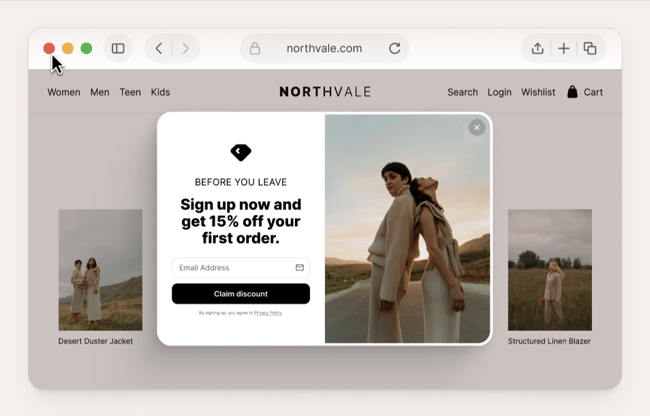
Popupsmart is a no-code pop-up builder that focuses on simplicity and speed. Its AI Popup Builder allows you to create a ready-to-publish, fully designed pop-up with a single text prompt. The AI generates the headline, body copy, image, and CTA button in seconds. It offers over 500 templates and advanced targeting options, making it easy to launch campaigns for lead generation, announcements, or sales promotions without any technical skills.
Key Features
- AI Popup Builder that generates a fully designed, ready-to-publish popup
- Smart Mode with AI that analyzes visitor behavior to automatically select the best-performing display trigger
- Advanced targeting options, including exit intent, scroll depth, inactivity sensor, geo-location, traffic source, and new versus returning visitor detection
- A/B split testing with built-in analytics
Pricing: Free plan available (up to 5,000 pageviews/month, 1 popup). Paid plans start at $32.50/month (Basic plan, 50,000 pageviews/month).
Best for: Small business owners and marketers who want to launch professional, AI-generated pop-up CTAs quickly without any design or coding experience.
7. Getsitecontrol
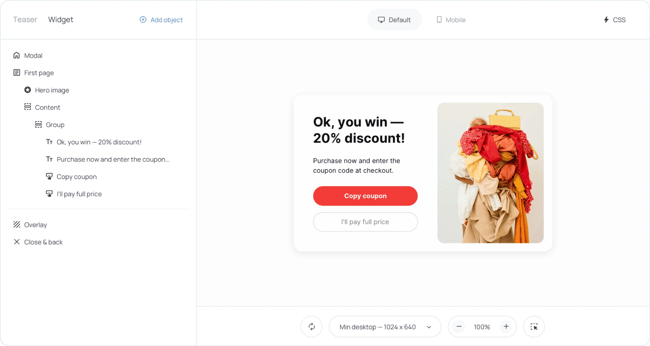
Getsitecontrol is a versatile tool for creating pop-ups, slide-ins, and floating bars. It provides a full-featured widget editor that allows you to adjust layouts, form fields, and buttons to match your brand perfectly. While it may not have the deep AI personalization of some other tools on this list, the ease of use and a wide range of CTA triggers, including exit intent, scroll depth, and time on page, make it a worthy contender.
Key Features
- Full-featured drag-and-drop widget editor for pop-ups, slide-ins, floating bars, and inline forms
- Page-level targeting with frequency controls to prevent over-exposure
- Email marketing and CRM integrations with Klaviyo, Mailchimp, HubSpot to sync captured leads automatically
Pricing: Free plan available (full platform access, no time limit). Paid plans start at $19/month (Pro plan, 100,000 widget views/month, unlimited contacts).
Best for: It is a solid, reliable choice for capturing leads and promoting offers.
What I like: The intuitive interface and extensive gallery of stylish templates make it incredibly easy for beginners to get professional-looking CTAs live quickly.
Frequently Asked Questions About CTA Tools
What are examples of effective calls to action?
Effective CTAs are clear, action-oriented, and offer immediate value. Examples include “Start your free 14-day trial,” “Download the 2026 Industry Report,” or “Get 20% off your first purchase.” These examples work because they tell the user exactly what they will get and what action they need to take.
What makes a good CTA?
A good CTA stands out visually from the rest of the page, uses compelling and concise copy, and is placed logically within the user’s journey. It should create a sense of urgency or highlight a clear benefit, reducing friction and making the decision to click as easy as possible.
How do I write action-oriented CTA copy?
To write action-oriented copy, start with a strong verb that directs the user, such as “Discover,” “Build,” “Join,” or “Claim.” Avoid passive language like “Click here” or “Submit.” Focus on the value the user will receive, framing the action from their perspective (e.g., “Get my free template” instead of “Download template”).
What are CTA best practices for placement?
Best practices for placement dictate that CTAs should be visible without interrupting the user experience. Place primary CTAs above the fold for immediate visibility, but also include them at the end of engaging content where the user is primed to take the next step. Use sticky banners or exit-intent pop-ups to capture attention without being overly intrusive.
Take your conversions further with HubSpot’s calls-to-action.
If you’re looking for a CTA tool that goes beyond buttons and pop-ups, HubSpot’s Calls-to-Action is built for teams that want personalization, A/B testing, and analytics all working together inside their CRM. You can create high-converting CTA buttons, banners, and pop-ups in seconds — no designer needed — and personalize them for every visitor using contact data like industry, lifecycle stage, location, and device. With a single dashboard showing views, clicks, and conversions across all your pages, you always know exactly what’s working and why.
The right call-to-action tool can be the difference between a website that generates leads and one that lets visitors slip away. Whether you choose HubSpot for its native CRM integration, Wisepops for AI-driven ecommerce pop-ups, or Getsitecontrol for lightweight lead capture, the best approach is to start with your biggest gap — personalization, testing, triggering, or analytics — and build from there. The best CTA tool is the one your team will actually use consistently to turn more of your existing traffic into qualified leads.
Editor's note: This post was originally published in January 2021 and has been updated for comprehensiveness.
Free Marketing Software
Easy marketing tools that deliver fast time-to-value, unified in one place.
- AI Tools
- Email Marketing
- Social Media Management
- And More!