

SEO analysis tools are a critical part of SEO. They solve reporting problems and help SEO teams spot opportunities and potential issues before they become big problems.

There are so many good tools on the market that it’s easy to get overwhelmed by choice. Marketing teams often end up with a tech stack that’s too shallow, too pricey, not fit for purpose or too complicated to actually use.
I’ve tested most of the major players, and in this guide, I share the free tools worth bookmarking, the paid platforms worth the spend, and where technical SEO and AEO tools fit into the mix.
What are SEO analysis tools?
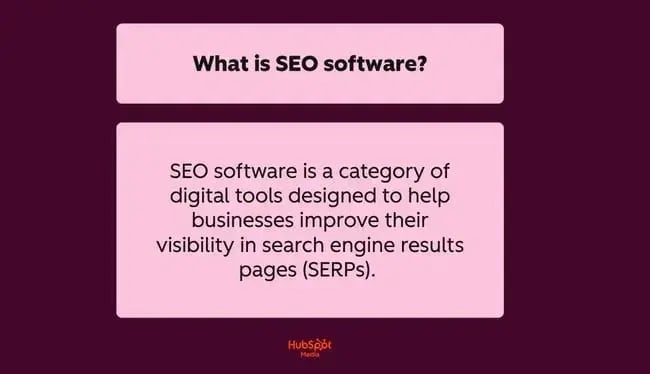
SEO software is a category of digital tools designed to help businesses improve their visibility in search engine results pages (SERPs) and answer engine results (AEO). SEO analysis tools help teams evaluate site health, rankings, keywords, competitors, and content performance.
Instead of guessing why traffic dropped or why a competitor outranks a page, marketing teams get data pulled straight from search engines, crawlers, and AI models. SEO analysis tools then turn that data into a clear set of next steps.
Most tools fall into one of five categories, and the right stack usually pulls from more than one.
HubSpot SEO Marketing Software
Build your authority in search with tools that help you plan your SEO strategy, optimize your content, and measure ROI.
- Get SEO recommendations.
- Create an optimized content strategy.
- Build search authority.
- And more!
Site Audit Tools
Site audit tools crawl a website the way a search engine would, surfacing issues like broken links, slow pages, duplicate content, and indexing problems before they cost rankings.
These tools are critical because technical issues are often invisible until traffic starts slipping, and a site audit is usually the fastest way to catch potential issues before they cause catastrophic problems.
Every single website I work on has a site audit set up on a website auditing tool. An audit is usually the first thing I do when I start talking to a potential client. I like HubSpot’s SEO recommendations and Semrush for managing site audits.
Keyword Research Tools
Keyword research tools identify the search terms your target audience uses, along with search volume, difficulty scores, and competitive data.
Instead of having marketing teams guess what people are searching for, keyword research tools provide data. This means content strategists or SEO teams can build a content plan around proven search terms or problems. A solid keyword research process is the foundation for most other SEO work.
Although AI search is on the rise and search behavior is changing, I still value keyword research. For me, keyword research provides insights into what people search and what problems they want to solve. These days, keyword research isn’t where it stops. Once I’ve found a keyword, I like to learn more about my audience before creating pages, but keyword research is the gateway into a new topic and all the potential content opportunities.
Rank Tracking Tools
Rank tracking tools monitor where pages show up in search results for specific keywords, across devices and locations, over time. This matters because rankings shift constantly, and teams need to know whether their efforts are moving the needle or whether a competitor just took their spot.
I still set up keywords in rank-tracking software. Usually, I select the focus keyword from each cluster and focus on that one. If users set up too many keywords, the rank tracker can become overwhelming.
All-in-One SEO Tools
All-in-one tools combine auditing, keyword research, and rank tracking in a single platform, reducing tool-switching and keeping SEO reporting consistent. This matters most for teams managing multiple sites or clients, where stitching together five different tools becomes its own full-time job. Platforms like HubSpot’s website SEO software go a step further by connecting that SEO data directly to CRM and content workflows, as well as providing AI features like Agent Hub.
I’ve used Semrush for years as my all-in-one platform. Having keyword research, backlink analysis, and site auditing in one place is genuinely useful. That said, I still bring in specialized tools alongside it, like Google Search Console for keyword data straight from Google or Majestic for deeper backlink analysis. An all-in-one tool is great for breadth, but it isn’t always the strongest option in every single category.
AEO and AI Visibility Tools
AI visibility tools measure brand presence in answer engines and AI search experiences. AEO tools are becoming an essential part of any tech stack as AI grows and searchers turn to AI search tools like ChatGPT or Perplexity. In modern-day SEO a brand can rank well on Google and still be invisible in AI-driven search. Tools like HubSpot AEO and HubSpot AI Search Grader measure a website’s coverage in LLMs and AI Overviews.
Without doubt, now is the time to start using AEO and AI visibility tools if you’re not already. Even if the marketing team is struggling for time and the learning curve of a new tool, set it up anyway. At the very least, the marketing team can set up the tool and start collecting benchmark data or data ready for comparisons later.
I use AI visibility alongside actual visits from people arriving via AI traffic sources. From there, I look at how that traffic is converting. These two signals give a true picture of how AI search tools contribute to business growth.
Resource: Best website research tools for competitive intelligence and market analysis
What Makes Great SEO Site Analysis Software
The best SEO site analysis software helps SEO teams identify technical, content, and performance issues that affect organic and AI visibility. It then turns those findings into clear next steps. The more mature your business becomes, the more SEO tools needed to match with the specific use case.
Key Features
- Crawl depth: Full site crawls surface indexability issues. A good tool needs to crawl the site deeply enough to find indexability issues, redirect chains, canonical conflicts, duplicate pages, orphaned URLs, broken internal links, and JavaScript-dependent problems.
- Reporting quality: A strong website audit groups issues clearly, explains the business and ranking impact, and helps teams separate critical fixes from low-priority cleanup.
- Integrations: SEO software shouldn’t live in isolation. Look for integrations with Google Search Console, Google Analytics, content management systems, page speed tools, and project management or content workflows.
- Historical data and monitoring alerts: The best SEO analysis tools show whether technical health is improving or declining over time, and flag sudden problems, like noindex directives, robots.txt mistakes, uptime issues, or sharp performance drops, before rankings take the hit.
- Scalability: A tool might run smoothly on a 50-page trial site, then struggle once a team sends it 20,000 URLs across multiple subfolders. Check crawl limits and test whether the tool can handle your website as it scales.
- Actionable recommendations: SEO site analysis tools should say what is wrong and what to do next. It should give SEO pros practical guidance on real issues, such as consolidating duplicate templates or compressing render-blocking assets.
How to Evaluate Tools by Use Case
SEO software (unfortunately) isn’t one-size-fits-all. The right SEO site analysis software for your team depends on the scope of SEO specialists’ tasks and the type of your business. In practice, the best approach is to match the tool to the bottleneck.
- For one-time audits, prioritize crawl quality, issue discovery, and reporting. All-in-one SEO tool will make the best fit. Free SEO analyzer tools may also be a good option, as well as the free HubSpot AI Search Grader, which measures how your brand appears in answer engines, like Gemini, Perplexity, and ChatGPT.
- For ongoing SEO monitoring on large websites, look for recurring crawls, historical data, and alerts. Deep crawlers and technically focused website audit software, such as Screaming Frog, usually outperform all other contenders.
- For technical SEO, depth matters most. Look at how well the tool handles canonicals, redirects, internal linking, XML sitemaps, status codes, render-dependent pages, and duplicate content. The tool has to perform well across hundreds or thousands of URLs.
- For content optimization, the goal is not just to find technical errors but also to identify weak pages, intent mismatches, content gaps, and internal linking opportunities.
Remember, in many cases, the strongest setup is not one tool alone. Multiple SEO tools can work well together when each one serves a distinct purpose in the workflow.
Pro tip: Sometimes, SEO teams need to use multiple tools for the best results. For example, an all-in-one SEO tool for breadth, alongside Google Search Console for in-depth keyword research, then Screaming Frog for a deep technical crawl, and the HubSpot AI Search Grader for AI visibility. Together, these tools cover major SEO analysis categories thoroughly and affordably.
Best SEO Tools
- HubSpot Website Grader
- Microsoft Bing Webmaster Tools
- Google Rich Results Test
- Google Search Console
- Google Sheets + Search Analytics for Sheets
- Google Trends
- HubSpot SEO Software
- Google PageSpeed Insights
- Screaming Frog SEO Spider
- HubSpot AI Search Grader
- Semrush
- Ahrefs
- Screaming Frog
- Sitebulb
- Surfer SEO
- AirOps
- Glimpse
- HubSpot AEO and Marketing Hub
SEO Site Analysis Software Feature and Pricing Comparison
The table below provides a summary of the SEO tools list outlined in detail later.
Free SEO Tools That Actually Deliver Value
I recommend using free SEO tools when your team needs foundational visibility into site health, search performance, speed, or AI presence without adding software costs. Free SEO analysis tools work best for quick checks and early-stage workflows where the goal is to identify obvious issues before investing in deeper audits.
Can SEO teams trust these tools? Absolutely. Google Search Console is a free tool that all businesses use for technical SEO audits and performance analytics. That said, free tools have limits. Most don’t support deep crawls, large-scale reporting, and advanced collaboration.
Now that I’ve provided the 411 on how to choose the right free SEO tool, here are a few options to choose from.
For Quick Website Health Checks
Some free tools from the list I use for fast diagnostics. They help me spot high-level issues and validate whether a site has obvious performance or technical problems.
1. HubSpot Website Grader
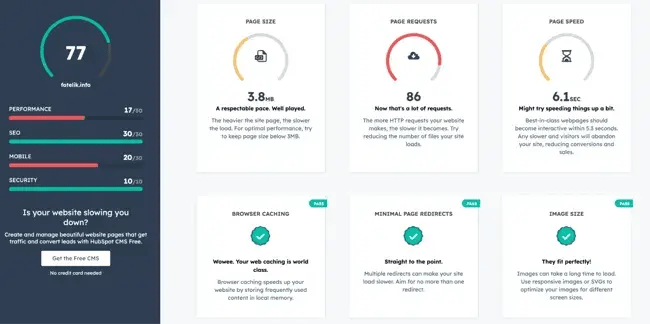
HubSpot Website Grader is a free website analysis tool that gives website owners a quick read on the site’s overall health across performance, SEO, mobile readiness, and security. The tool also says how to fix your SEO mistakes and why it matters.
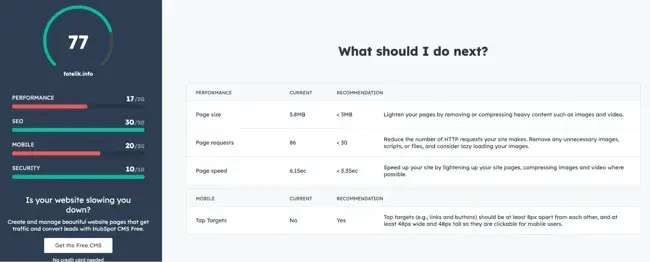
I recommend it when the goal is speed. It is one of the fastest ways to benchmark a site and determine whether a more thorough audit is worth the time.
Key Features
- Website performance scoring
- Basic SEO checks
- Mobile optimization review
- Security checks, including HTTPS
- Actionable suggestions for improvement
Limitations
- High-level analysis only
- Not built for deep technical SEO audits
- No recurring crawl or monitoring workflows
Best for: Quick website health checks for marketers and small teams.
Ease of use: Beginner
Who should use it: Marketers, founders, and small teams that need a fast website health snapshot before moving into deeper SEO analysis.
What I like: HubSpot Website grader is so easy to use. It presents information clearly and in a way that makes sense even for beginner SEO teams. The tool outlines what needs fixing and how the problem can be solved.
2. Microsoft Bing Webmaster Tools
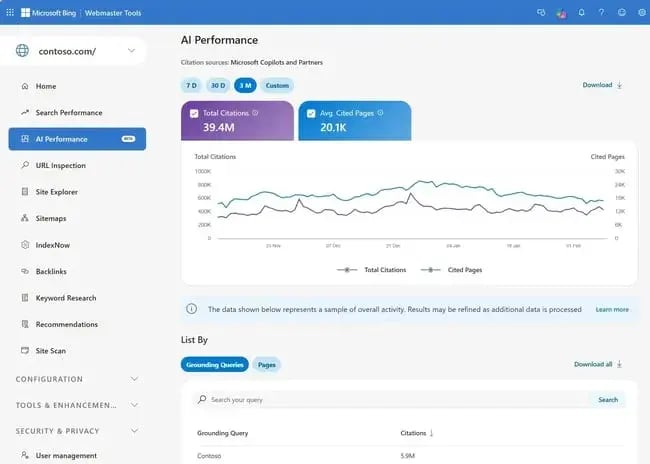
Microsoft Bing Webmaster Tools is a free SEO tool that mirrors much of Google Search Console’s functionality, but for Bing. Given that Bing powers a meaningful share of desktop searches and feeds results into AI tools like Microsoft Copilot, I think it’s an underutilized tool that’s worth adding to your stack.
Key Features
- Search performance reporting for Bing
- Site crawl reports and crawl error detection
- A keyword research tool built directly into the software
- SEO analyzer with on-page recommendations
- Backlink data
Limitations
- Bing’s market share is significantly smaller than Google’s
- Less third-party integration compared to Google Search Console
- Data insights are less granular than Google’s equivalent
Best for: Broader search coverage beyond Google.
Ease of use: Beginner
Who should use it: SEO professionals and marketers who want full search coverage, particularly those targeting desktop users or tracking answer engine visibility.
What I like: Bing Webmaster tools is the gateway to what’s going on in Microsoft Bing, and like Google Search Console which shows how a website is performing in Google, Webmaster Tools shows exactly where a website is getting visibility in Bing.
3. Google Rich Results Test
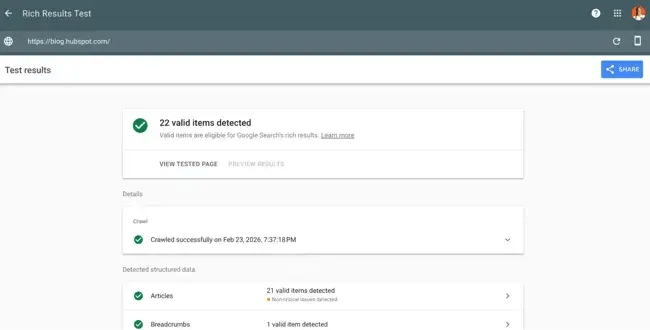
The Google Rich Results Test, part of Google’s Search Central tool, is a free SEO tool that checks whether your structured data markup is correctly implemented and eligible to generate rich results in Google Search.
Key Features
- Tests URLs or code snippets for valid structured data
- Shows which rich result types a page is eligible for
- Flags warnings and errors in schema implementation
- Supports all major schema types (Article, FAQ, Product, HowTo, and more)
Limitations
- Validates markup only (doesn’t guarantee Google will display rich results)
- No bulk testing capability; analyzes one page at a time
- Requires a basic understanding of structured data to act on results
Best for: Technical SEO and structured data validation.
Ease of use: Beginner
Who should use it: SEO professionals and developers implementing or auditing schema markup across their sites.
What I like: I use Google Rich Results Test any time I add or modify schema markup; it catches errors before they affect how your pages appear in SERPs. Unlike a schema validator, Google Rich Results reports on schema and whether or not it’s likely to help achieve a rich snippet or not.
HubSpot SEO Marketing Software
Build your authority in search with tools that help you plan your SEO strategy, optimize your content, and measure ROI.
- Get SEO recommendations.
- Create an optimized content strategy.
- Build search authority.
- And more!
For Search Performance Tracking
When the job is to understand visibility, clicks, impressions, indexing, and trend movement over time, I use search performance tracking tools as a strong, free starting point.
4. Google Search Console
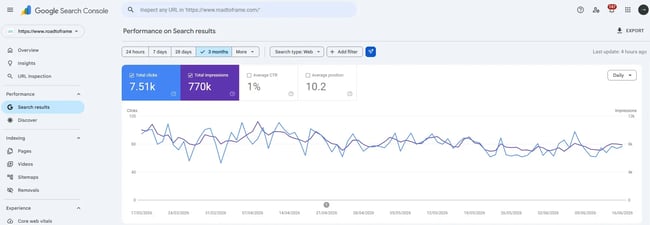
Google Search Console is a free SEO tool provided directly by Google. Google Search Console shows search performance and indexing data. It’s my non-negotiable starting point for any SEO audit; nothing tells SEO analysts more about how Google actually sees your site than data straight from the source.
Key Features
- Search performance reporting (clicks, impressions, CTR, average position)
- Index coverage reporting to identify pages Google can’t crawl or index
- Core Web Vitals monitoring
- Manual actions and security issue alerts
- Sitemap submission and URL inspection
Limitations
- Data is limited to Google Search only (no Bing or other engines)
- Keyword data is sampled and capped at 16 months of history
- No competitor data or keyword suggestions
Best for: All website owners and SEO practitioners.
Ease of use: Beginners
Who should use it: Every website owner, marketer, and SEO professional, regardless of experience level or budget.
What I like: Google Search Console is so easy to use, but the data available within the tool for free is just incredible. It allows marketers to see how a website is actually performing in Google. There are no “guesses” in GSC. It provides the most accurate keyword and click data than any other tool.
5. Google Sheets + Search Analytics for Sheets
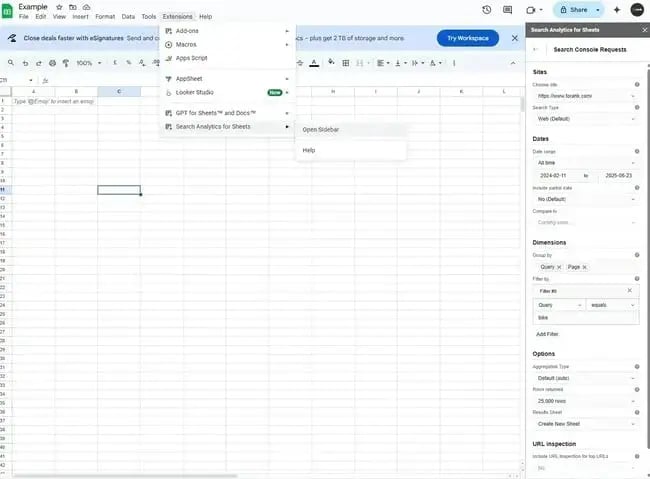
Search Analytics for Sheets is a free Google Sheets add-on that pulls Google Search Console data directly into a spreadsheet for custom analysis and reporting.
I recommend using this combination when there’s a need to go beyond Search Console’s native interface, particularly for tracking keyword trends over time or building client-ready reports.
Key Features
- Direct Google Search Console data import into Sheets
- Customizable filters by date, device, country, and query
- Historical data comparison beyond Search Console’s native interface
- Fully customizable reporting and visualization
- Schedulable automatic data refreshes
Limitations
- Requires familiarity with Google Sheets to use effectively
- No built-in visualizations (charts must be built manually)
- Data is still sourced from Search Console, so the same sampling limitations apply
Best for: Data-savvy marketers who want custom Search Console reporting.
Ease of use: Beginner
Who should use it: SEO analysts and marketers who need flexible, custom reporting beyond what Google Search Console’s native dashboard provides.
What I like: I’m a big fan of Search Analytics for Sheets. First, it’s free. Second, it pulls in more data than GSC provides because it uses the GSC API. With all the data exported into a Google sheet, it’s easy to filter through the data, assign conditional formatting and sort data to help with SEO analysis.

6. Google Trends
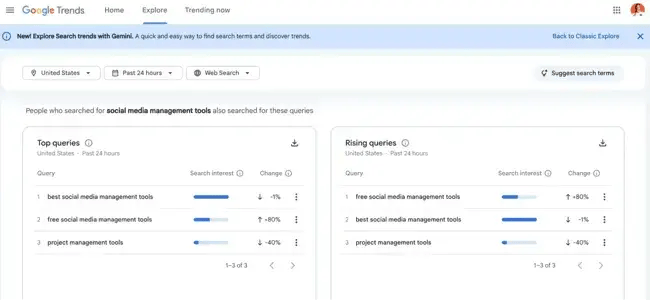
Google Trends is a free SEO tool that shows how search interest in a topic changes over time, across regions, and categories.
I rely on it heavily for content planning; it helps me validate whether a topic is rising, declining, or seasonal before investing time in a full article.
Key Features
- Relative search interest over custom time ranges
- Geographic breakdown by country, region, and city
- Related queries and breakout topics
- Side-by-side topic comparisons
- Real-time trending data
Limitations
- Shows relative interest, not absolute search volume
- No keyword difficulty or CPC data
- Works best when paired with a volume-based keyword tool
Best for: Content strategy and keyword trend research.
Ease of use: Beginner
Who should use it: Content strategists and SEO teams validating topic demand before committing to content production.
What I like: Google Trends is easy to use and provides a quick snapshot into whether or not people are searching for a topic. I like pairing it with the chrome extension, Glimpse as it provides more information.
7. HubSpot SEO Software
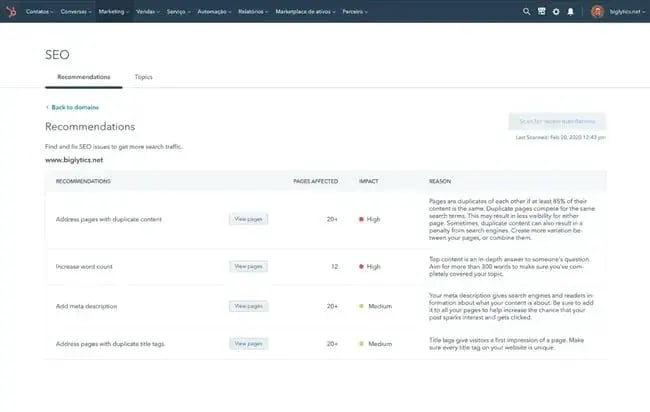
Hubspot SEO Software connects SEO work with broader marketing and CRM workflows. HubSpot’s Smart CRM provides integrated SEO tools within its unified marketing software, connecting search optimization directly to content creation, CRM data, and campaign performance.
Unlike standalone SEO tools, HubSpot’s SEO Software makes SEO optimization part of the publishing process through the free HubSpot CMS and HubSpot’s Content Hub, so your team isn’t context-switching, which is why it’s my top recommendation for teams already on HubSpot. Create content, remix, distribute, and generate performance reporting in one place.
Key Features
- On-page SEO/AEO recommendations embedded directly in the content editor
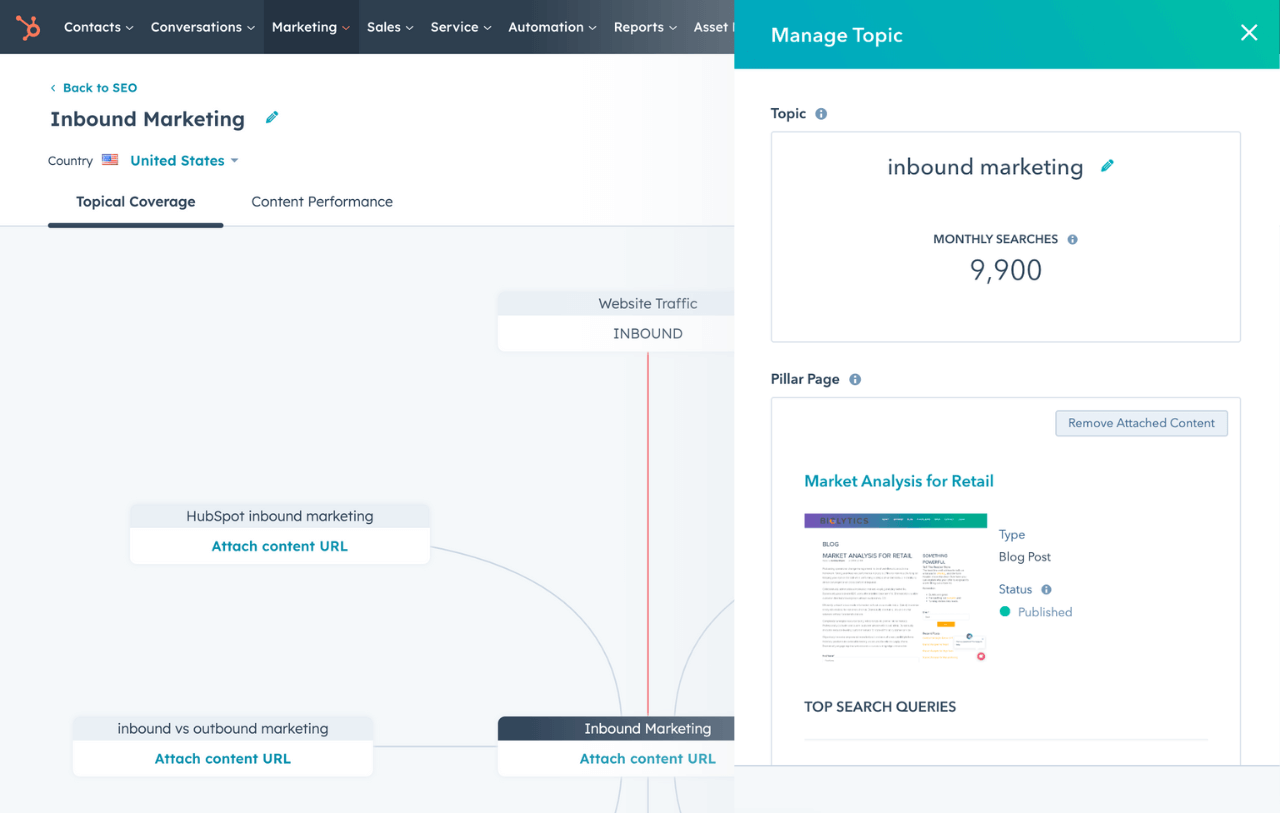
- Topic cluster and pillar page planning tools for building content authority
- Search performance reporting connected to contact and CRM data
- AI-assisted content suggestions and optimization with Hubspot's AI
- Integration with Content Hub for end-to-end content strategy and publishing
Limitations
- Full SEO features require a Marketing Hub or Content Hub subscription
- Less suited for deep technical audits compared to dedicated tools like Screaming Frog
- Competitive analysis features are less robust than Semrush
Best for: Teams using HubSpot who want SEO integrated into their marketing workflows
Ease of use: Beginner
Who should use it: Marketing teams already using HubSpot who want SEO software that integrates with their CRM, content workflows, and campaign reporting rather than operating as a separate, siloed tool.
What I like: The best thing about HubSpot’s SEO software is that it helps make SEO as simple as can be. Anyone could use it because the software doesn’t just present SEO jargon, like tech issues, it provides recommendations with priorities and even the person likely responsible for the fix.
For Speed and Performance Diagnostics
Speed tools are best used when SEO pros need page-level performance data, Core Web Vitals insights, or technical diagnostics tied to loading behavior.
8. Google PageSpeed Insights
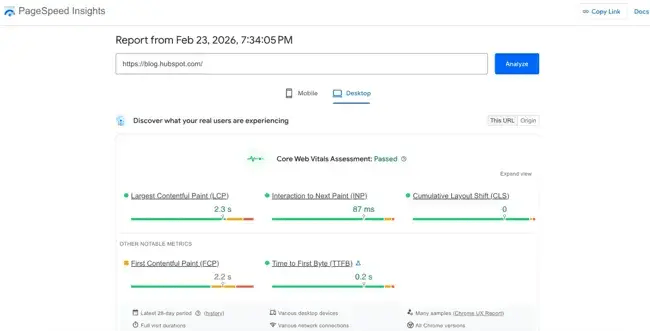
Google PageSpeed Insights is a free SEO tool that analyzes a URL’s loading performance and Core Web Vitals scores for both mobile and desktop. Use it to quickly diagnose speed issues before diving into deeper technical audits. It surfaces actionable fixes without requiring developer-level expertise.
Key Features
- Core Web Vitals scoring (LCP, INP, CLS)
- Field data from real Chrome users alongside lab data
- Specific, prioritized recommendations for improvement
- Mobile and desktop performance are scored separately
Limitations
- Analyzes one URL at a time (not suitable for site-wide audits)
- Recommendations require developer involvement to implement
- Lab data doesn’t always reflect real-world user experience
Best for: Technical SEO and web performance optimization.
Ease of use: Intermediate
Who should use it: Marketers and developers who need a fast, reliable read on page speed and Core Web Vitals performance.
What I like: I often turn to Google PageSpeed Insights when I want an overview of what’s going on with a website. I like the overall scores. I don’t think that PageSpeed Insights is as easy to use as HubSpot’s SEO Recommendations since they provide the severity of the issue and who resolves it, whereas PageSpeed Insights simply lays out the issue with the fix.
9. Screaming Frog SEO Spider
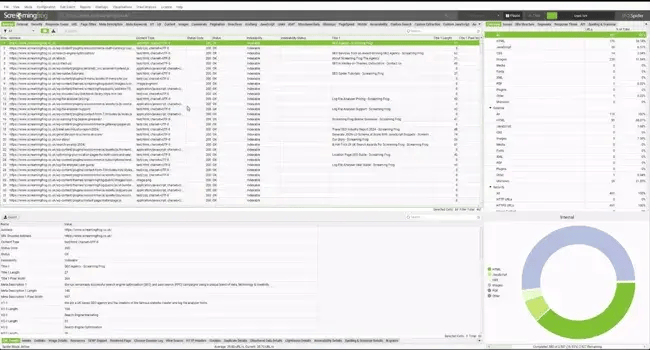
Screaming Frog SEO Spider is a desktop-based site crawler that audits websites for technical SEO issues at a depth most cloud-based tools can’t match. The free version crawls up to 500 URLs, which is enough for small sites and spot checks.
Key Features
- Full site crawl surfacing broken links, redirect chains, and duplicate content
- On-page element analysis (titles, meta descriptions, headers, canonical tags)
- Integration with Google Analytics, Search Console, and PageSpeed Insights
- JavaScript rendering for crawling dynamic sites
- XML sitemap generation and visualization
Limitations
- The free version is capped at 500 URLs
- Desktop-based (not accessible via browser or mobile)
- Steeper learning curve than most cloud-based SEO tools
Best for: Technical SEO audits on sites of any size.
Ease of use: Advanced
Who should use it: SEO professionals and technical marketers who need comprehensive site crawl data, particularly for large or complex websites.
What I like: Screaming Frog SEO Spider crawls websites to surface technical SEO issues. When working with smaller sites (500 URLs or smaller), I like how quickly the tool crawls a website and surfaces every HTML page. I use it to review a site’s current content repository and site hierarchy.
For AI Visibility Tracking
Free AI visibility tools are still a smaller category, but they matter the most now. As answer engine answers take up more search real estate, teams need a way to understand how their brand appears in answer engines alongside traditional search.
10. HubSpot AI Search Grader

HubSpot AI Search Grader is a free AEO tool that scores how prominently your brand appears in answer engines, including tools like ChatGPT and Perplexity. It evaluates visibility and suggests areas for improvement.

HubSpot AI Search Grader is one of the few tools I’ve found that directly addresses answer engine optimization (AEO) and evaluates your website across dimensions such as share of voice, and sentiment analysis.
Key Features
- Answer engine visibility score for your brand
- Sentiment analysis of how AI tools describe your brand
- Share of voice benchmarking against competitors
- Actionable recommendations to improve answer engine visibility
Limitations
- Focused on brand-level visibility, not individual keyword rankings
- AEO metrics are still an emerging category — methodology will evolve
- Best used alongside traditional SEO tools, not as a replacement
Best for: Marketers tracking brand visibility in answer engines.
Ease of use: Beginner
Who should use it: Marketers and SEO professionals who want to understand and improve how their brand appears in answer engines.
Pro tip: Hubspot AI Search Grader measures brand visibility in AI answer engines. Use it to access deep and ongoing AI attribution and AI visibility analytics with HubSpot AEO. It finds and tracks the best prompts for your industry, creates competitor comparisons, and performs citation analysis. With HubSpot AEO, users can finally track ROI from answer engine optimization.
Paid SEO Analysis Tools for Scaling Teams
The free SEO tools I’ve shared are useful for diagnostics. Plenty are excellent at what they do, but in many cases, at some point, businesses need to shift from free to paid, but only when the time is right. For example, not every business needs to run out and buy an expensive AEO tool just because AI search is rising. Data by Semrush suggests that AI Overviews are not as impactful on click-through rates as we’re led to believe. In many cases, the existing tech stack might be enough.
But, for those ready to scale, let’s look at some of the best paid SEO tools, suitable for for deeper crawls, recurring audits, integrations, and stakeholder reporting. I personally use Ahrefs, HubSpot SEO Software, HubSpot AEO, ScreamingFrog, and SurferSEO from the list. Some of these tools have free trial periods. Some also offer entirely free plans, but with restrictions in terms of flexibility and customization. Keep this in mind!
HubSpot SEO Marketing Software
Build your authority in search with tools that help you plan your SEO strategy, optimize your content, and measure ROI.
- Get SEO recommendations.
- Create an optimized content strategy.
- Build search authority.
- And more!
For Comprehensive SEO Suites
These tools combine site audits, keyword tracking, competitor research, backlink analysis, and reporting in one interface. They work best for in-house SEO teams, agencies, and companies managing multiple sites.
11. Semrush
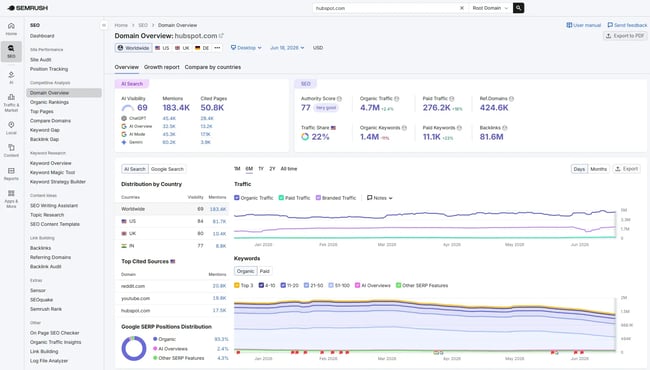
Semrush is one of the most comprehensive SEO software tools available, and its AI Visibility Toolkit expands the platform beyond traditional search into AI search visibility. Teams can measure their presence with a Visibility Score, track prompts across ChatGPT, Google AI Mode, Gemini, and Perplexity, and monitor how their brand compares with competitors in AI-generated responses.
Alongside its AI visibility capabilities, Semrush covers keyword research, competitive analysis, local SEO audits, technical auditing, rank tracking, and content optimization in a single suite. For teams already using Semrush for SEO, that makes it possible to monitor traditional and AI search performance within a broader search workflow.
Key Features
- AI Visibility Toolkit with a Visibility Score for measuring brand presence in AI search
- Prompt tracking across ChatGPT, Google AI Mode, Gemini, and Perplexity
- Competitor visibility insights for comparing your brand’s presence and share of voice in AI-generated responses
- Keyword Magic Tool with 25+ billion keywords across geographic databases
- Domain and competitor analysis via Traffic Analytics and Organic Research
- Position Tracking for daily rank monitoring across devices and locations
- Backlink Analytics and Link Building tool
Limitations
- Semrush’s breadth of SEO and AI visibility data can be overwhelming for beginners without SEO experience
- Some advanced features and workflows may require higher-tier plans
- Pricing varies by plan and feature needs, so check Semrush’s current pricing for the latest options
Best for: Agencies and enterprises that want all-in-one SEO software with AI visibility tracking
Ease of use: Intermediate
Who should use it: Agencies, in-house SEO teams, and enterprises that want to manage traditional SEO and track brand visibility across AI search platforms within a broader search toolkit.
What I like: Semrush has been in my tool kit for many years. I log into it most days and rely on the site audit to flag technical issues, and I really like the keyword research and competitive research tools and reports. The addition of AI visibility tracking makes it especially useful now that search extends beyond traditional rankings. I can track how a brand appears across major AI platforms while still using the SEO tools I already rely on. I’ve used Semrush for just about every type of business and use case, including small businesses, niche B2B, enterprise SEO audits, and more.
12. Ahrefs
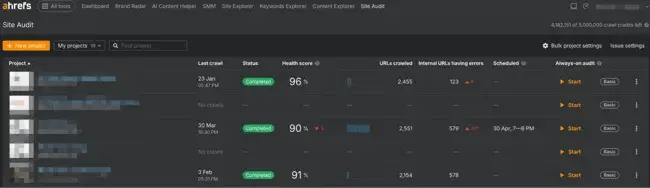
Ahrefs is one of the most widely used all-in-one SEO software tools on the market, with particular strength in backlink data and keyword research. Though, Ahrefs supports backlink research, keyword research, and competitor analysis.
Key Features
- Site Explorer for backlink profile and organic traffic analysis
- Keywords Explorer with search volume, difficulty, and click data across multiple search engines
- Site Audit tool for technical SEO crawling and issue detection
- Content Explorer for identifying top-performing content in any niche
- Rank Tracker for monitoring keyword positions over time
- Competitor gap analysis for keywords and backlinks
Limitations
- No free plan (entry-level Lite plan starts at $129/month)
- Less integrated with CRM or content management workflows compared to HubSpot
- Steeper learning curve for users new to SEO software
Best for: SEO professionals who prioritize backlink analysis and keyword research.
Ease of use: Intermediate
Who should use it: SEO professionals, content marketers, and agencies who need deep backlink intelligence and comprehensive keyword data across a full site or competitive landscape.
What I like: I consider Ahrefs the gold standard for link analysis. Its index is among the largest and most frequently updated available.
For Technical SEO Auditing
These tools prioritize crawl depth, diagnostics, and technical analysis. They are best for large sites, migrations, and ongoing technical SEO monitoring.
13. Screaming Frog (Paid Version)
The paid version of Screaming Frog removes the 500-URL crawl limit and unlocks automation, advanced extraction, and API integrations. It’s one of the most flexible tools for diagnosing indexing, architecture, and rendering issues across large sites.
Key Features
- Scheduled crawls for recurring technical audits
- JavaScript rendering using Chromium for SPA frameworks
- Custom extraction using XPath, CSS selectors, and regex
- Log file analyzer integration for crawl budget analysis
- Google Analytics, Search Console, and PageSpeed Insights API integrations
- Crawl comparison to detect changes between site versions
- Custom robots.txt testing and rendering controls
Limitations
- Desktop-based software (requires local machine resources like your RAM)
- No built-in keyword tracking or rank monitoring
- Reporting exports require manual setup for stakeholder summaries
Best for: Large-scale technical SEO audits and crawl-level diagnostics.
Ease of use: Advanced
Who should use it: Technical SEO specialists, developers, and agencies auditing large or complex sites.
What I like: Screaming Frog is a tool that has been in my toolkit for a long time. I love combining crawls with the GA4 and GSC API to get a spreadsheet with all the data in one place. It helps me make decisions about content strategy. While anyone can use it, even beginners, it is better suited to advanced level technical SEO teams because Screaming Frog doesn’t provide any further insights about technical issues. Once someone finds the problem using the tool, they will need to know how to resolve it.
14. Sitebulb
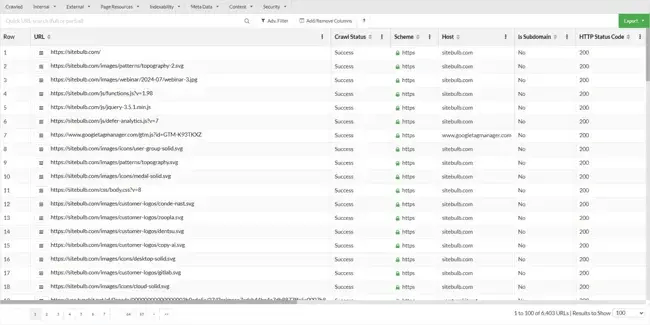
Sitebulb is a desktop-based crawler designed for technical SEO analysis with visual reporting. I find it especially useful when communicating technical issues to non-technical stakeholders.
Key Features
- Full technical site crawler with JavaScript rendering support
- Visual crawl maps showing architecture depth and link flow
- Internal linking analysis with crawl depth visualization
- Structured data auditing with schema validation reports
- Crawl comparisons between audits
- Page type segmentation for templates and sections
- Page speed insights integration
Limitations
- Desktop-based software (cloud version priced separately)
- Smaller third-party integration ecosystem than Semrush/Ahrefs
- No native backlink database
Best for: Visual technical SEO audits and stakeholder-friendly reporting.
Ease of use: Intermediate
Who should use it: Technical SEO professionals and agencies needing visual technical diagnostics.
What I like: Sitebulb is very similar to Screaming Frog, but unlike Screaming Frog it creates more visual reports and dashboards and adds more information making it the more accessible of the two. I still think Sitebulb is quite a technical tool but it’s suitable for intermediate and advanced SEO teams.
For Integrated Marketing and SEO Workflows
These tools connect SEO audits with content, marketing, and CRM workflows. They work best for teams where SEO is embedded in broader marketing operations.
15. Surfer SEO
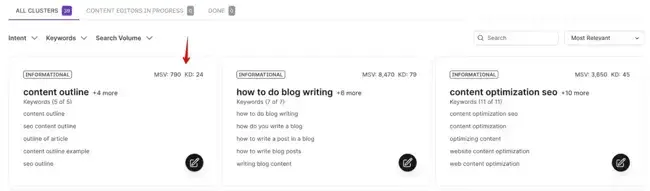
Surfer SEO analyzes top-ranking pages and provides data-driven content recommendations for new content, together with an AI outline. It has a built-in Content Editor with the score system for on-page SEO and a content audit feature for existing pages.
Key Features
- Content Editor with real-time optimization scoring
- SERP Analyzer compares ranking pages by word count, headings, and NLP terms
- Content Audit tool for existing pages
- Keyword clustering and topic grouping
- Content planner for topical authority mapping
- Google Docs and WordPress integrations
- AI outline and content generation support
Limitations
- Not a technical SEO audit tool (no crawl-based diagnostics)
- Pricing starts around $79/month for content-focused plans
- Requires separate tools for site architecture and indexing analysis
- Recommendations based on correlation, not direct ranking factors
Best for: Content-driven SEO teams and content optimization tied to ranking signals.
Ease of use: Beginner
Who should use it: Content marketing teams optimizing articles for search visibility.
What I like: Surfer SEO helps teams optimize content coverage and on-page relevance. It is incredibly helpful for content writers or content marketing teams because it pulls recommendations into a content creation document so recommendations can be added on-the-go. It helps bridge the gap between writer and SEO pro.
Pro tip: While SurferSEO is a great tool, avoid adding every recommendation, it’s important that a human reviews what the tool is suggesting because without some balance it would be easy to over-optimize content, stuff keywords, or veer off topic.
16. AirOps
AirOps is an AI workflow tool that lets SEO and content teams build custom, repeatable AI pipelines without engineering support. This can include content briefs, metadata generation, keyword clustering, and content audits. SEO software should integrate with existing marketing and sales systems, and AirOps is built on that principle.
Key Features
- Custom AI workflow builder for SEO and content tasks
- Pre-built templates for briefs, audits, metadata, and content refreshes
- Integrations with Google Search Console, Ahrefs, Semrush, and other SEO tools
- Bulk processing for large-scale keyword clustering and content operations
- Team collaboration features with workflow sharing and version control
Limitations
- Airops requires integration with data sources like Search Console or Ahrefs to be effective
- Workflow setup requires upfront time investment
- Pricing scales with usage and team size; it can become costly at enterprise scale
Best for: SEO and content teams scaling AI-assisted workflows.
Who should use it: SEO managers and content operations teams who need to scale AI-assisted workflows across keyword research, content creation, and site optimization without manual repetition.
17. Glimpse
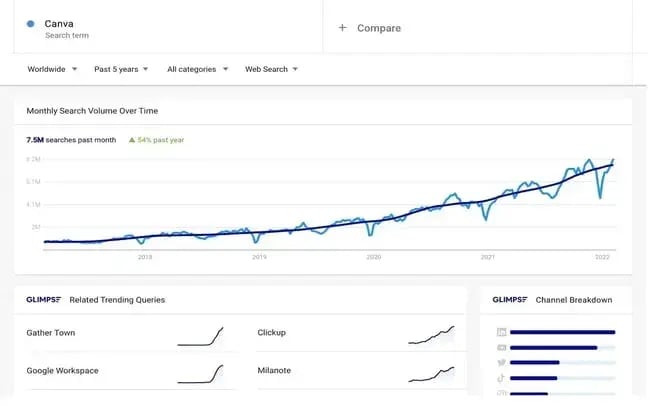
Glimpse layers additional data on top of Google Trends, surfacing actual search volume estimates, trend velocity, and related topic suggestions that Google Trends alone doesn’t provide.
Key Features
- Search volume estimates layered onto Google Trends data
- Trend alerts for rising topics in your niche
- Related keyword suggestions with volume data
- Trend velocity scoring to identify breakout topics early
- Export functionality for content planning workflows
Limitations
- Full feature access requires a paid plan; pricing requires a demo call
- Data is directional rather than precise
- Less useful as a standalone tool without Google Trends context
Best for: Content strategists who want deeper trend intelligence.
Ease of use: Beginner
Who should use it: Content-focused SEO teams who want to move faster from trend discovery to content execution.
What I like: I recommend using Glimpse when there’s a need to turn a trend signal into a concrete content brief. It bridges the gap between “this topic seems interesting” and “here’s the data to justify writing about it.
For Auditing AI Attribution and Share of Voice
18. HubSpot AEO and Marketing Hub
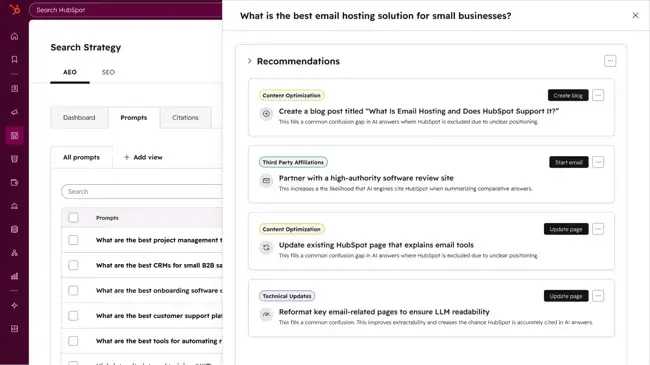
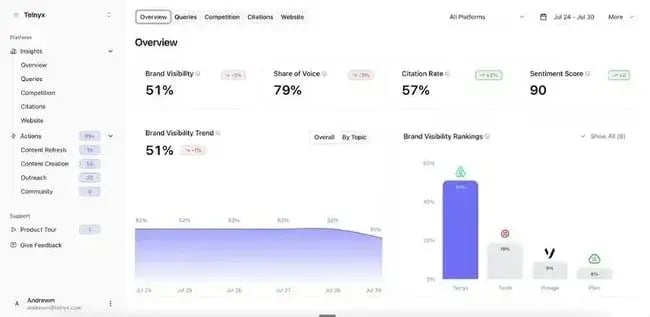
HubSpot AEO gives marketers a clear view of how their brand appears in AI-generated answers across ChatGPT, Perplexity, and Gemini. The tool tracks brand visibility, analyzes which sources and content types are driving citation.
Marketing Hub Pro and Enterprise already have access to AEO features, giving teams prioritized recommendations for improvements. Using CRM data, Marketing Hub automatically suggests and tracks the right AI prompts that matter for your market. The longer marketing teams use HubSpot, the smarter the HubSpot AEO tool gets since it trains on your industry, competitors, content library, and customer segments.
For example, when Marketing Hub’s AEO features flag gaps in your owned content, HubSpot users can create new content with the AI Blog Writer. If AEO identifies Reddit as a heavily cited source in your category, it suggests increasing the presence via Reddit integration with HubSpot. That’s a compounding advantage of using AEO features in Marketing Hub Pro.
Key Features
- AI visibility score across ChatGPT, Perplexity, and Gemini
- CRM-powered prompt suggestions, auto-tuned to your business
- Full integration with your existing HubSpot workflows
- Citation Analysis across domains, content types, and source types
- Recommendations with prioritized actions to improve your AI visibility
- Weekly score tracking and trend alerts
Limitations
- If marketing choose HubSpot AEO without Marketing Hub Pro or Enterprise, the CRM data won’t inform prompt suggestions.
- Teams that want to go from recommendation to published content in one system will get more value from AEO in Marketing Hub Pro or Enterprise.
Best for: Marketing and SEO teams who want fast visibility into AI prompts that cite your website or your competitors instead, and where you’re completely absent across ChatGPT, Perplexity, and Gemini.
Ease of use: Intermediate or Advanced
Who should use it: Marketers and business owners who want to see how their brand performs in popular answer engines, stack up against competitors, and get a clear action plan on improving the brand’s presence in LLMs.
What I like: Most AEO tools tell a brand what’s being asked across AI search; HubSpot AEO tells it which of those prompts actually map to revenue-relevant segments, since it’s pulling from the same customer data already living in the CRM.
HubSpot SEO Marketing Software
Build your authority in search with tools that help you plan your SEO strategy, optimize your content, and measure ROI.
- Get SEO recommendations.
- Create an optimized content strategy.
- Build search authority.
- And more!
How to Choose the Right SEO Software For Your Needs
Choosing SEO software comes down to business goals, budget, and technical expertise. The sections below break down the factors that matter most, how the right stack changes by team size, and a quick framework for deciding what to buy.
Selection Criteria
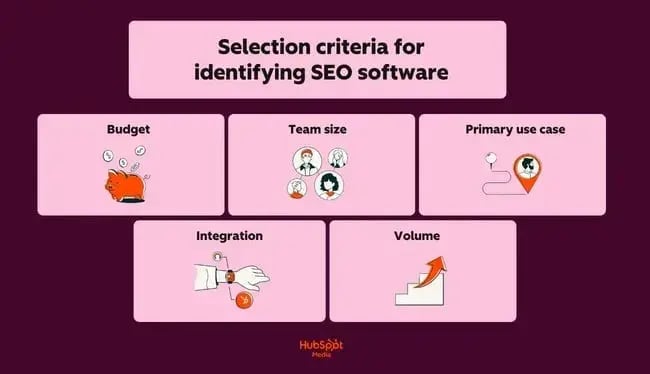
Before committing to any SEO software, SEO tool buyers compare free tools against paid platforms based on budget, scale, and workflow needs. Five factors shape that decision.
- Budget: Free SEO tools cover the basics. Paid SEO tools unlock competitive analysis, advanced reporting, and scale. While paid tools cost, procurement teams must consider costs saved from using them. It’s cheaper to pay for a tool for a year than pay a developer to monitor site updates manually, or fix a serious issue that could’ve been a cheap fix if noticed early enough.
- Team size: Some tools are built for solo use; others offer multi-seat access and client reporting dashboards. Consider what the team needs now, and how it might grow because adding seats or users can impact price significantly.
- Primary use case: What does the team need the tool for? Is the business focused on technical audits, keyword research, rank tracking, or content optimization? Providing the tool meets the primary use case is the primary goal; the rest is a bonus.
- Integrations: Ideally, SEO software should integrate with existing marketing and sales systems, including the CMS, CRM, and content workflows.
- Volume: The number of many pages, keywords, or domains that the tool needs to manage all impact costs so consider the quantity of what the tool needs to do.
Recommendations by Team Size
- Beginners and small businesses should lean on free SEO tools where possible. For example, Google Search Console is excellent for search performance, PageSpeed Insights for technical health, and the HubSpot AI Search Grader to see how a brand shows up in answer engine results. Together, these cover foundational monitoring at no upfront cost.
- Content-focused teams get the most value from pairing all-in-one tools for topic discovery with HubSpot’s SEO Software for on-page optimization and performance tracking. HubSpot’s Content Hub extends this by connecting SEO insights directly to content creation, publishing, and distribution.
- Agencies and SEO professionals managing multiple clients or large sites should anchor their stack around Semrush for competitive analysis and client reporting, and Screaming Frog for deep technical audits. Both offer the depth and scalability client work demands.
Quick Decision Framework
A few quick questions can narrow down whether a free tool, an all-in-one platform, or a specialized tool makes the most sense:
- Is there budget for $100+ per month in professional SEO software, or is a free tool enough for now?
- Do multiple people need simultaneous access, or is this a solo workflow?
- What’s the primary bottleneck: technical issues, content gaps, search ranking, or AI visibility?
- How many keywords, pages, or domains need active management?

The best SEO software is the one a team will consistently use. Start with free tools, master the fundamentals, then upgrade when real limits show up.
Frequently Asked Questions About SEO Analysis Tools
How often should I run a website audit?
Run a full SEO audit at least quarterly, and after major changes like migrations, redesigns, CMS updates, algorithm updates, or large content launches. Enterprise sites should audit crucial pages monthly. Most paid SEO audit tools support scheduled crawls, so SEO teams can catch indexing issues, broken links, or performance regressions before rankings drop.
What’s the difference between free and paid SEO site analysis software?
Free SEO tools cover quick health checks, basic diagnostics, and platform-native data, usually focused on a single area like search performance, AI visibility, page speed, or structured data. Google Search Console, PageSpeed Insights, HubSpot AI Search Grader, and HubSpot Website Grader are strong free options. Paid SEO audit software adds deeper crawls, automation, historical tracking, integrations, and stakeholder-ready reporting. Teams typically upgrade when they need recurring audits, collaboration features, or visibility across larger websites.
Can I use multiple SEO tools together?
Yes, and most SEO teams do since each tool tends to serve a different purpose. A typical setup might include Google Search Console for search performance, Screaming Frog for technical crawling, HubSpot AEO for AI share of voice, Ahrefs for keyword and competitor analysis, and HubSpot Website Grader for simple website auditing. A complete SEO workflow usually pulls from several of these at once rather than relying on a single tool.
What’s the Best SEO Analysis Tool Stack for Beginners?
Beginners should start with tools that provide clear scoring and actionable recommendations. HubSpot Website Grader covers quick website health checks, Google Search Console tracks indexing and performance, PageSpeed Insights identifies speed issues, and HubSpot AI Search Grader measures brand visibility in answer engines. Together, these cover the fundamentals at no cost. As teams grow, they typically move to all-in-one tools like Semrush or Ahrefs.
When should I upgrade to paid SEO monitoring software?
Upgrade when manual checks become hard to maintain, usually once a site passes 500 pages, multiple stakeholders need reports, client work requires white-label reporting, or issues need tracking over time. Paid software also makes sense when managing multiple sites or clients, or when reporting needs go beyond what free tools provide. If organic traffic drives meaningful revenue, the ROI on a $100 to $500 monthly tool is usually easy to justify. The rule of thumb: start free, and upgrade only when the current setup becomes the bottleneck.
Do SEO tools integrate with other marketing platforms?
Most modern SEO audit tools integrate with analytics platforms, CMS tools, and reporting dashboards, commonly including:
- Google Analytics
- Google Search Console
- Looker Studio
- Content management systems
Some platforms go further by connecting directly to marketing workflows. HubSpot’s SEO tools, for example, tie audit recommendations directly into the HubSpot Content Hub, making it easier to act on them.
How do I choose between similar SEO tools?
A quick checklist for choosing the best SEO software:
- Define the primary use case and secondary features needed
- Compare crawl limits, reporting depth, integrations, and pricing
- Check whether the tool fits the existing workflow
- Compare pricing and features for scaling up later
- Check integration with the current marketing stack
- Review support and learning resources
Are free SEO tools enough for small businesses?
For small businesses just getting started, free SEO tools usually cover the basics well: site health, search performance, page speed, and a first look at AI visibility. Tools like Google Search Console, PageSpeed Insights, and the HubSpot AI Search Grader can catch the obvious issues without adding software costs.
Start analyzing your website with confidence.
I always suggest choosing SEO software based on business maturity, not feature lists. Early-stage teams need visibility and simple fixes; growing teams need consistent reporting and deeper crawls; advanced teams need scale and automation. The right tool supports the next operational step, not every possible feature.
Once that stack is in place, the next step is finding out what AI is saying about a brand before competitors do. The HubSpot AI Search Grader and HubSpot AEO are built for exactly that.
Editor’s note: This post was originally published in December 2018 and has been updated for comprehensiveness.
HubSpot SEO Marketing Software
Build your authority in search with tools that help you plan your SEO strategy, optimize your content, and measure ROI.
- Get SEO recommendations.
- Create an optimized content strategy.
- Build search authority.
- And more!