
Many companies pour their energy into closing a deal, then treat everything after the sale as an afterthought. When onboarding drags, handoffs between sales and customer success aren’t smooth, or customers can’t figure out how to get value from the product, they don’t stick around to complain. Customers simply cancel, and the revenue a team worked hard to win walks right back out the door with them.
![→ Download Now: 8 Free Customer Onboarding Templates [Free Kit]](https://no-cache.hubspot.com/cta/default/53/b6abbd56-b7d5-42bf-8a85-b7ae63ca70d2.png)
Strong customer onboarding helps prevent churn. Excellent onboarding gets customers to their first win quickly, sets clear expectations, and builds the early momentum that turns a new signup into a long-term, loyal customer. This guide covers the strategy and tools that make it easier to pull off.
What is customer onboarding?
Customer onboarding is the process that guides a new customer from the moment they buy or sign up to the moment they get real value from a product and use it with confidence. It spans the welcome, the setup, and the first few wins, carrying the customer through to the point where the product becomes a natural part of their workflow.
The main goal of customer onboarding is to reduce time-to-value, which is how long it takes a customer to reach their first meaningful win. The sooner they get there, the more likely they are to stick around. A customer who gets value in their first week will see the ROI of what they bought, while one who’s still struggling with setup three weeks later will start second-guessing the purchase.
Customer onboarding typically starts right after the sale closes. The sales team hands the customer off to customer success or a dedicated onboarding function. They then pass along context from the deal, including the customer’s goals and the promises made. This handoff enables onboarding to pick up where sales left off without having the customer repeat themselves.
.png)
Free Customer Onboarding Templates
Eight templates to lead your new customers through their first several months with your product or service
- Customer Intake Form Template
- Customizable Welcome Packet
- Onboarding Timeline Template
- And More!
Download Free
All fields are required.
Form not available
Why Customer Onboarding Matters
A good onboarding experience pays off across the metrics customer success teams care about most, including:
- Retention. Onboarding is one of the biggest levers against early churn. According to Rocketlane’s 2025 report, The Future of Customer Onboarding, customers who had a smooth onboarding experience were 53.5% less likely to churn. This means that the work done in those first weeks keeps paying off long after the customer is up and running.
- Loyalty. A strong onboarding process builds trust, encouraging customers to expand their use of the product. In Rocketlane’s survey, 21.1% of companies said the quality of onboarding influenced their cross-sell opportunities. Customers who feel supported early tend to say yes when the team suggests a relevant upgrade.
- Customer lifetime value. Onboarding also directly affects whether customers renew their subscriptions. In fact, 64.9% of the companies Rocketlane surveyed said successful onboarding directly impacts their renewal rates, so a customer who gets value quickly tends to stay longer and spend more.
- Lower support costs. Customers who learn the product properly the first time raise fewer tickets down the line, which frees up the support team to focus on bigger issues.
Who’s involved in customer onboarding?
Good onboarding is a team sport. A customer might only see one or two faces, but behind the scenes, several functions pitch in to move them from sign-up to value.
- Sales: The sales team kicks things off with the handoff. They pass along the customer’s goals, what they were promised, and any quirks about the account, so the next team has full context from day one.
- Customer success: The customer success team usually owns the onboarding process from start to finish. They lead the kickoff call, map out milestones, keep the customer on track toward their first win, and act as the main point of contact throughout.
- Implementation: For more technical products, an implementation or solutions team handles the heavy lifting, such as data migration, integrations, and configuration. They ensure the product works for the customer’s specific needs before anyone uses it.
- Customer support: The support team answers questions that pop up along the way and clears minor roadblocks that would otherwise stall a customer’s progress.
- Product and education: This group builds the self-serve side of onboarding, including in-app guides, tutorials, help docs, and training materials. These resources let customers troubleshoot issues and find answers on their own, without sending a ticket to the support team.
- Leadership: For larger or higher-value accounts, leaders such as the VP of Customer Success or a Chief Customer Officer step in for executive check-ins and to keep both sides aligned on goals. Their involvement signals that the company takes the relationship seriously.
What is a customer onboarding playbook?
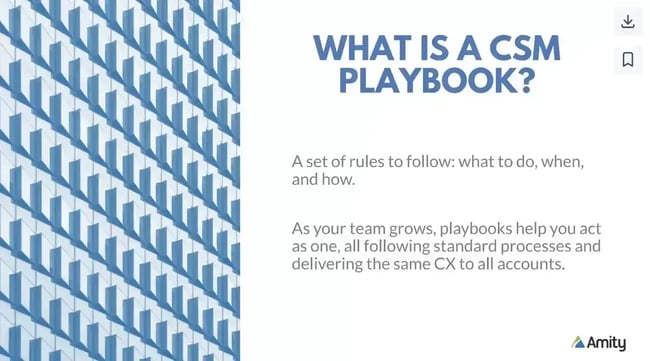
To keep customer onboarding consistent, companies may create a customer onboarding playbook. A customer onboarding playbook is a comprehensive guide outlining the steps companies must take to onboard new customers. The playbook defines, based on data, the necessary customer journey to retain and nurture customers.
The playbook outlines every element, such as:
- Initial contact
- Product demonstration
- Onboarding process
- Follow-up support
The playbook serves as a “how-to” for building relationships with customers and delivering the most effective onboarding experience possible. It ensures that all employees follow the same process when interacting with customers.
Creating a Customer Onboarding Strategy
Before launching an onboarding program, set a goal and develop a plan. Where possible, use data to determine which objectives matter most to customers during onboarding.
Here are a few questions that help narrow down those onboarding goals:
- What does the churn data say about why (and when) people churn?
- What milestones should customers achieve on their first day, first week, first month, and so on?
- Which metrics are known to be important for adoption and retention, like monthly active users (MAU)?
- How do customers see value in the product?
- Which “sticky” features reliably lead to retention and upsell?
This type of data shows what’s important for customers, including where they get stuck or feel frustrated. A team might decide one of its goals is to get new customers to use the product more than once in the first week, or to build and launch something on their own before the end of the first month.
Once the goal is defined, the team can start planning an excellent customer onboarding experience.
Types of Customer Onboarding
Onboarding generally falls into three models, and the right one depends on the product’s complexity and the account’s value.
1. High-touch Onboarding
High-touch onboarding relies on direct, personal guidance from a customer success manager or onboarding specialist. The customer gets dedicated kickoff calls, custom setup help, live training sessions, and regular check-ins toward their goals.
This model fits complex products and higher-value accounts where the stakes justify the time. An example is a mid-market company rolling out a new analytics platform across its sales, marketing, and product departments. An onboarding specialist maps out their reporting needs, configures dashboards alongside their team, and holds training sessions for each group.
2. Low-touch Onboarding
This model mixes light human involvement with self-serve resources. Here, the customer mostly works through setup on their own but receives nudges and support at key moments, such as a welcome email sequence or a check-in when they stall.
Low-touch onboarding works well for mid-tier plans and moderately complex products. For example, a marketing team signing up for a project management tool would likely follow a guided setup checklist, watch a couple of pre-recorded onboarding webinars, and only reach out to the support team when they encounter an issue they can’t solve on their own.
3. Tech-touch Onboarding
Tech-touch onboarding runs almost entirely on automation and self-serve resources. The customer learns the product through in-app tutorials, automated emails, and a help center.
This model works for simple products and high-volume, lower-priced plans where one-on-one attention isn’t practical. For example, a freelancer signing up for an invoicing app can follow an in-app tour that walks them through creating their first invoice, and use a help doc when they want to set up recurring billing. There’s no need to reach out to support or get specialized training.
How to Choose the Right Onboarding Model
The right model comes down to three factors.
- Product complexity: The harder a product is to set up and learn, the more hands-on the onboarding needs to be. A tool with extensive configuration and integration requires high-touch support, while a simple, intuitive app can lean on tech-touch support.
- Deal size: Higher-value accounts justify the cost of personal attention, since the revenue at stake (and the cost of losing it) is bigger. Lower-priced, high-volume plans usually can’t support one-on-one onboarding and work better with self-serve.
- Customer maturity: Customers who already know the product category or have technical chops can move faster with less guidance. Those new to the space or to this kind of tool tend to need more guidance to achieve their first win.
Most teams don’t pick just one onboarding model. Instead, they use a hybrid model in which customers self-serve on the basics and receive human support during trickier moments or on higher tiers.
The Customer Onboarding Process: Six Steps That Work
An effective onboarding process takes a customer from their first login to the point where the product becomes part of their routine. The six steps below cover that journey from sign-up to the ongoing check-ins that keep customers engaged for the long haul.
1. Start with a frictionless sign-up.
The sign-up is where onboarding either gains momentum or loses it. Every extra field or confusing step gives a new customer a reason to abandon the process before they’ve even seen the product.
To prevent that:
- Ask for only the information needed to get started, and save the rest for later.
- Offer single sign-on options, such as Google or Microsoft, so customers don’t have to create yet another password.
- Show a progress bar if the sign-up runs more than one screen, so customers know how close they are to being done.
- Confirm the account instantly, rather than making people wait for a verification email before they can do anything.
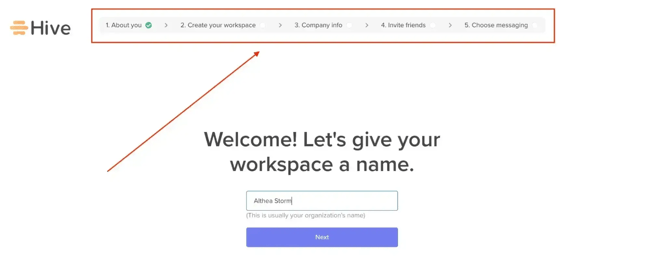
Pro tip: Give customers a couple of options to choose from, describing what they hope to achieve with the product. This helps the onboarding specialist identify and accelerate their first win.
2. Send a personal welcome email.
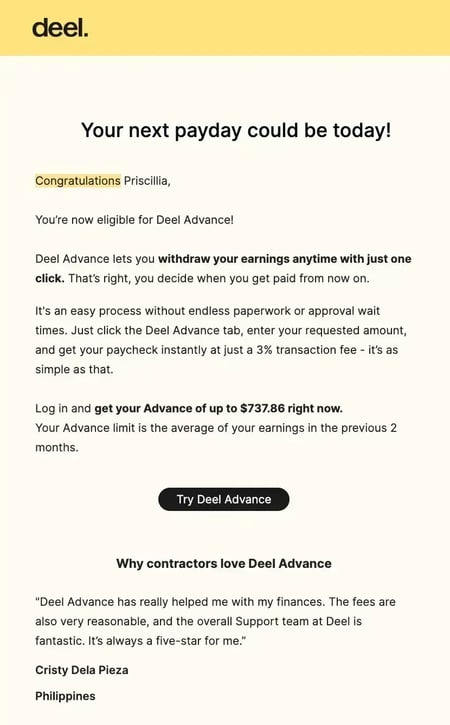
The welcome email is usually the first message a customer gets after signing up, and it sets the tone for everything that follows. A warm, helpful first impression makes the customer feel like they made the right call, while a cold or generic one starts the relationship off on the wrong foot.
Here are a few tips for an effective welcome email:
- If the email is automated, make it feel personal by setting the “reply” address to a real team member and using personalization tokens to include the customer’s first name. Email marketing tools can automate this and set it up in minutes.
- Include the most important resources, like a Getting Started guide, but don’t overwhelm the customer with too many links at once.
- For high-touch onboarding, express genuine excitement about working with the customer and offer to set up a kickoff call or first meeting.
- Give the email a clear CTA. Whether it’s logging in to set up a profile, scheduling a kickoff call, or signing up for new user training, make the next step obvious and easy to complete.
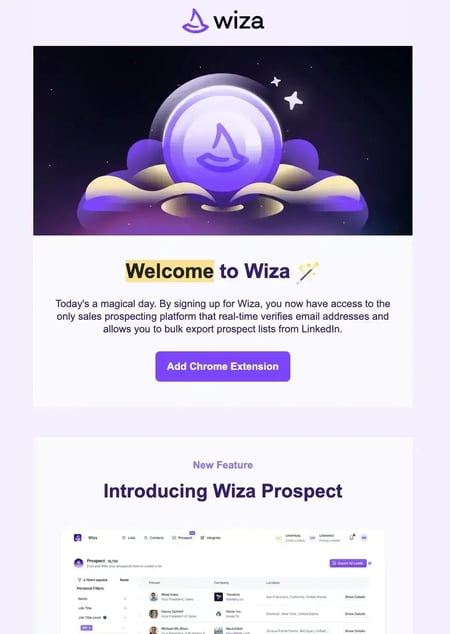
Here’s a great welcome email I received from Wiza explaining other ways I could use their platform. Knowing the first step to take when using a new product prevents me from feeling overwhelmed.
Pro tip: Use HubSpot’s customer service email templates to welcome, onboard, and communicate with your customers.
3. Guide them through product setup.
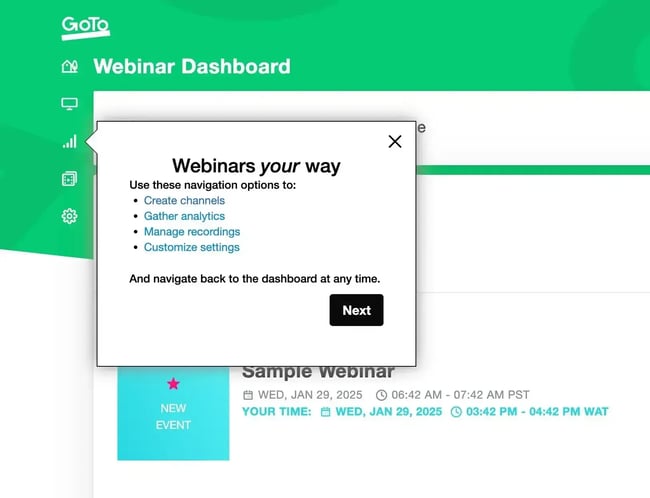
A guided tutorial works well for customers who are ready to jump in on their own. It walks them through setup one step at a time, so they’re not staring at a blank dashboard wondering where to begin.
Here are a few tips for building one:
- Keep it short and sweet. Cover the essentials to get started and leave the advanced features for later.
- Make sure customers who don’t finish the first time can easily find the information again, such as in an FAQ or a Getting Started section.
- Let customers skip steps they already understand instead of forcing them through every screen.
- Use tooltips and in-app prompts to highlight key features as customers encounter them, rather than front-loading everything at once.
4. Drive customers to their first value moment.
The first value moment looks different for each customer. For one, it might be sending their first automated report. For another, it’s importing their contacts and seeing them organized for the first time.
An onboarding specialist’s job is to take what the sales team passed along, plus anything from the sign-up process (such as the goal the customer selected during setup), and figure out the fastest path to that first win.
Here are a few tips to do that:
- Pinpoint the one action that delivers the most value for each customer’s specific goal, and build the early onboarding steps around it.
- Remove anything that stands between the customer and that action, including optional setups that can wait.
- Use context from the sales team and the sign-up process to point the customer straight to what matters to them.
- Celebrate the win when it happens so the customer notices they’ve gotten value, not just completed a task.
Free Customer Onboarding Templates
Eight templates to lead your new customers through their first several months with your product or service
- Customer Intake Form Template
- Customizable Welcome Packet
- Onboarding Timeline Template
- And More!
Download Free
All fields are required.
Form not available
5. Provide self-serve support at scale.
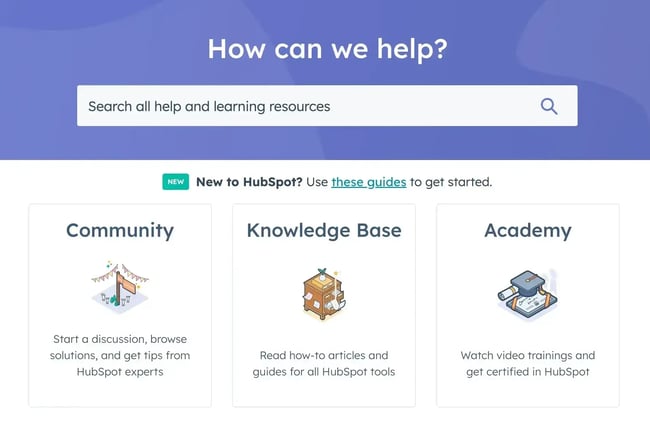
No team can answer every question one-on-one, and most customers would rather find an answer themselves than wait for a reply. A knowledge base full of articles, guides, templates, FAQs, and videos lets customers solve their own problems quickly, keeping them moving and taking pressure off the support team.
Here are a few tips for building one:
- Create a dedicated section for new users and admins that covers everything they need to know to get started.
- Set up a chatbot connected to the knowledge base to surface relevant help articles as customers ask questions. HubSpot’s free chatbot builder lets teams do this without code, so new users can type a question and be directed to the right article. This results in faster resolutions and happier customers.
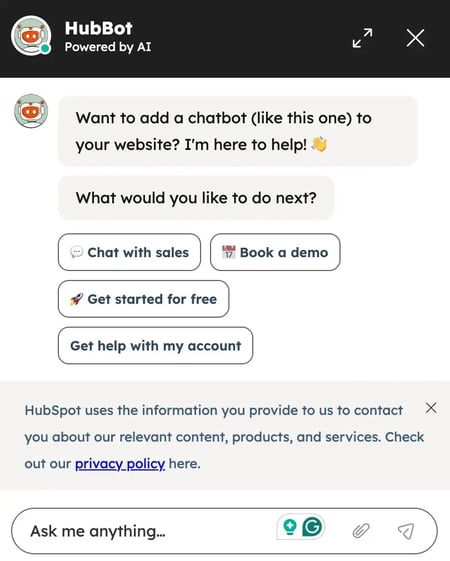
- An AI chatbot takes this further. HubSpot’s AI-powered Breeze Customer Agent uses natural language processing and a company’s existing data, like knowledge base articles, FAQs, and URLs, to autonomously resolve customer inquiries, qualify leads, and even book meetings.
- Keep the content current. An outdated help article frustrates customers more than no article at all.
6. Keep checking in (and celebrate wins).
Getting a customer set up isn’t the end of onboarding. The relationship needs ongoing attention, and regular check-ins catch problems early while reminding the customer that the team is invested in their success.
Here are a few ways to stay in touch:
- Host webinars to help new customers learn the product and get their questions answered. Record them and add them to the knowledge base so future customers can watch on their own time.
- Run monthly office hours with time set aside for live Q&A.
- Schedule milestone check-ins tied to the customer’s goals, so each conversation has a clear purpose.
- Celebrate the wins out loud, whether it’s hitting an adoption milestone or renewing, so the customer feels the progress they’re making.
Customer Onboarding Template
Creating a customer onboarding process from scratch is a time-consuming task, and it can be hard to know where to begin. A template helps teams get on the right track faster. The HubSpot customer onboarding template covers everything needed to get started.
- An internal onboarding checklist: This keeps everything ready to go by automating onboarding tasks and checking off the individual steps for each customer.
- A welcome packet template: This covers everything needed to set a customer up for success, including a team introduction, a customer intake form, a timeline for the first few months, and a resource sheet with links to help documentation. It’s especially useful for teams running an email onboarding sequence.
- A first onboarding call agenda: The first onboarding call is a make-or-break moment that sets the tone for the whole relationship. Sharing this agenda with the customer in advance keeps everyone on the same page.
- A training resources template: Customers shouldn’t leave the call unsure of what to do next. A set of training resources gives them everything they need to get the most out of the product.
- Handoff templates: These make it easy to hand a customer off to their long-term contact at the company.

Download your free customer onboarding templates
When using these templates or creating a customer onboarding process from scratch, it’s important to follow best practices. Let’s take a look below.
Customer Onboarding Best Practices
Here are a few customer onboarding best practices that help create a solid onboarding experience.
The following tips draw on information from every point of contact with the customer, so it’s important to track those interactions in a CRM or data management platform.
1. Understand the customer.
Strong onboarding starts with understanding what the customer actually wants from the product. Two companies can buy the same tool for completely different reasons, and onboarding that ignores those reasons tends to push generic steps that don’t connect to what the customer cares about.
Here are some ways to understand a customer’s goals so it’s easy to guide them to value:
- Dig into their goals early. During the kickoff call or sign-up, ask what the customer is hoping to achieve and what success looks like to them in the first few months. Pull in whatever the sales team already learned during the deal so the customer doesn’t have to start from scratch.
- Tailor onboarding to their outcome. Once their goal is clear, build the early steps around it. A customer who signed up to speed up reporting needs a different first week than one who came for team collaboration.
- Note their starting point. Track how familiar the customer already is with this kind of tool, since a seasoned admin and a first-timer need different levels of guidance.
- Keep the context in one place. Log what’s learned in a CRM so everyone working on the account has the same context, rather than asking the customer to rehash what they’ve already mentioned.
2. Set clear expectations.
Onboarding goes sideways when the customer and the team aren’t aligned on what happens next, who’s doing what, and how long it’ll take. Setting expectations up front keeps the customer from feeling lost and saves the team from fielding the same “what now?” questions over and over.
Here’s how to set expectations:
- Lay out the timeline. Walk the customer through the onboarding milestones and roughly when each one should happen, so they know what to expect in week one vs. month one.
- Clarify who owns what. Make it clear which tasks fall to the team and which require the customer’s input, such as providing data or looping in their colleagues.
- Be honest about the work involved. If reaching the value requires some setup or a time investment, say so early rather than letting the customer learn it halfway through.
- Name the point of contact. Tell the customer exactly who to reach out to when they have a question.
3. Show value.
Onboarding is the right moment to connect the product directly to what the customer is trying to achieve. Once the team understands the customer’s goals and success metrics, they can show exactly how the product addresses those pain points and helps them get there. Here’s how to do that:
- Connect features to their goals. Don’t just demo what the product does. Show the customer how a specific feature solves the exact problem they signed up to fix.
- Personalize the experience. Use what the team knows about the customer to tailor the demo, sample data, and early tasks to their unique situation, so the product feels built for them rather than a generic user.
- Lead with quick wins. Point the customer toward actions that deliver value quickly, so they feel the payoff sooner rather than waiting weeks for results.
- Tie progress back to their metrics. When the customer hits a milestone, frame it in terms of the success metrics they care about, like time saved or leads captured.
Pro tip: For customers who don’t receive 1:1 onboarding, create consultative guidance at scale through digital outreach. At my last company, we created email campaigns to expedite value realization for specific use cases. In these campaigns, I focused on including consultative guidance to make it feel like it was coming from a CSM. This could be done for onboarding.
4. Stay in constant communication.
The welcome email is just the first touchpoint. Throughout onboarding, teams should keep the conversation going to support any in-app tutorials and guides, since automated resources can’t capture everything a customer is feeling or struggling with.
Here are a few tactics that help:
- Ask about their preferred channel. Some customers love email, while others may prefer Slack or a quick call. Ask how they’d like to hear from the team and meet them where they already are.
- Check in at the right moments. Reach out when a customer hits a milestone or stalls at a step, so the timing aligns with where they are in the process.
- Keep it useful, not noisy. Make sure each message has a clear purpose, like sharing a relevant tip or unblocking a task, so the customer doesn’t start tuning the team out.
- Be reachable between touchpoints. Let customers know how to get help when they need it, so they’re never stuck waiting for the next scheduled call.
Pro tip: Measuring the efficacy of outreach efforts shows what’s working. If customers aren’t opening the onboarding emails, look for ways to make them feel more personal without overloading them with in-app notifications. I recommend using HubSpot’s email marketing tools to help with this.
5. Create customer-centric goals.
Onboarding goals work best when they’re built around what the customer wants to achieve, rather than the steps the team wants them to complete. When the goals reflect the customer’s own definition of success, every milestone feels like progress toward something they care about.
In my previous role, we’d typically come to the onboarding kickoff call with a few milestones in mind based on the information we had from the sales handoff.
Then we’d ask the customer to identify their specific success metrics. It was important for us to discuss those success metrics during that call, as the customer’s expectations sometimes didn’t align with what we could feasibly accomplish during the onboarding period.
By gently pushing back on the customer and helping to reset their expectations, we positioned ourselves as a trusted partner and the expert in our product.
Here are a few ways to set goals that center on the customer:
- Start with their success metrics. Ask the customer what a win looks like for them, then shape the onboarding milestones around those outcomes.
- Use the sales handoff as a head start. Come to the kickoff with a few proposed milestones based on what the sales team already learned, so the conversation builds on existing context.
- Reset expectations when needed. If a customer’s goals don’t match what’s realistic for the onboarding period, address it early and honestly rather than letting them realize it later.
- Write goals down and revisit them. Keep the agreed milestones somewhere both sides can see, and check progress against them as onboarding moves along.
Pro tip: Having an onboarding “graduation” or wrap-up call is a great way to celebrate all the hard work the customer has done throughout onboarding. Create a slide that highlights those early wins and includes relevant metrics. This makes it easy for the customer to share it with their leadership team.
If a dedicated wrap-up call isn’t feasible, automate it and send them an “Onboarding Wrapped” email highlighting the great work they’ve accomplished so far.
6. Seek to impress.
Every interaction during onboarding is a chance to show the customer they made the right call. A positive experience builds the kind of relationship that carries the account through renewals, and that comes from bringing value to each touchpoint.
A few ways to make that happen:
- Come prepared with a point of view. Don’t wait for the customer to ask what to do next. Offer prescriptive guidance based on what works for similar customers, so they feel like they’re in expert hands.
- Clear roadblocks fast. When a customer hits a snag, jump on it quickly. A fast, helpful response in a tense moment leaves a strong impression.
- Add value beyond the ask. Share a relevant tip, template, or shortcut the customer didn’t think to request, so each interaction gives them a little more than they expected.
- Follow through on the small stuff. If the team promises to send something or follow up, do it on time. Reliability early on signals what the rest of the relationship will feel like.
7. Measure your success.
Like any major company initiative, an onboarding program should be measured so teams know what’s working and where it can improve. Do this by gathering customer feedback, identifying friction points, and tracking key onboarding metrics.
Here are a few questions worth considering when measuring a program’s success:
- Did the onboarding program meet the goals that were outlined?
- Are customers hitting the milestones the team identified?
- How is the onboarding program impacting churn and revenue?
- Is the onboarding program positively impacting the metrics that matter, like MAU?
- Are customers happy as they exit onboarding?
Pro tip: Running a post-onboarding survey helps gauge how customers rate their onboarding experience. I suggest including an open-ended question in the survey so they can share their feedback in more detail.
Customer Onboarding Checklist
Taking the best practices above, here’s a quick onboarding checklist worth saving to refer to again and again when creating an onboarding program. Right-click to save the image.
- Create an automated welcome email that triggers when a new user signs up.
- Schedule a follow-up email to invite the new customer to log in to the software, triggered after two days of inactivity.
- Build a greeting message for the initial login that includes a CTA to the first step.
- Design feature callouts that pop up when a user enters the app for the first time.
- Create content for all empty states.
- Build a knowledge base with answers to FAQs, and update it frequently.
- Schedule tasks for regular check-in calls or emails with the new customer.
- Trigger a celebratory notification once a client hits a milestone.
Free Customer Onboarding Templates
Eight templates to lead your new customers through their first several months with your product or service
- Customer Intake Form Template
- Customizable Welcome Packet
- Onboarding Timeline Template
- And More!
Download Free
All fields are required.
Form not available
The Benefits of Customer Onboarding
A strong onboarding program pays off well beyond a customer’s first few weeks. When customers start off on the right foot, the effects ripple through retention, revenue, and just about every metric a customer success team tracks.
Here are seven benefits of customer onboarding:
- Increased customer retention. Customers who get value from the product early have a reason to stick around. A smooth start reduces early churn that happens when people sign up, get stuck, and quietly walk away.
- Improved customer satisfaction. A supportive onboarding experience makes customers feel cared for from day one, which sets a positive tone for the entire relationship.
- Higher product adoption rates. Onboarding that points customers to the right features gets them using more of the product, and the more they rely on it, the less likely they are to leave.
- Reduced customer support costs. Customers who learn the product properly the first time raise fewer tickets, freeing the support team to focus on bigger, more complex issues.
- Stronger brand loyalty. A great first experience builds trust, and customers who trust a company are more likely to stay, recommend it to others, and give honest feedback.
- Increased revenue. Customers who reach their goals renew their subscriptions more often and are more open to upsells and cross-sells, which increases the value of each account over time.
- Improved customer insights. Onboarding is a goldmine of information about what customers want, where they get stuck, and which features matter most, all of which sharpens future onboarding and the product itself.
Pro tip: If you need a free tool to help you perfect your customer onboarding process, check out HubSpot’s Customer Service Software.
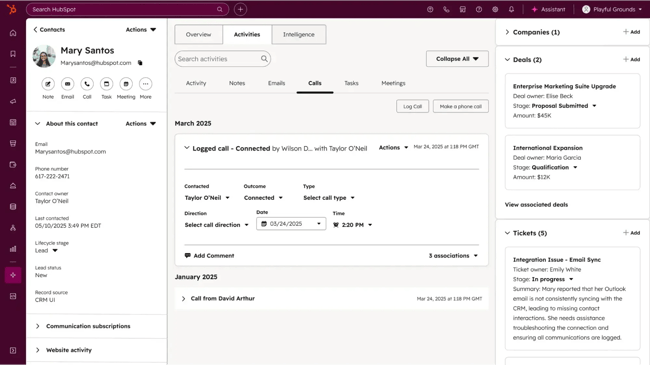
Customer Onboarding Examples
By now, it’s clear that a customer onboarding process can take almost any direction.
Here are a few customer onboarding examples teams can use for inspiration.
1. Duolingo
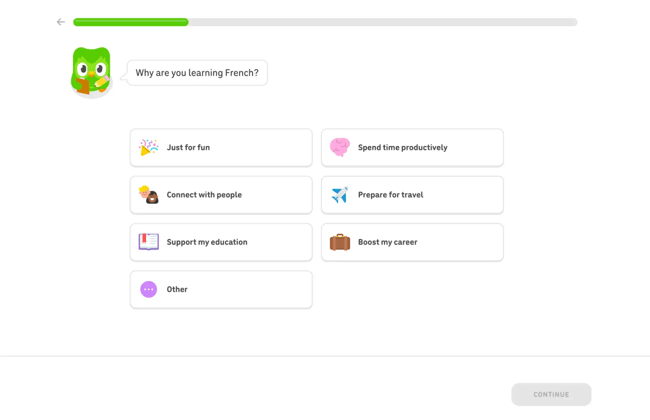
When someone gets on Duolingo for the first time and asks to learn a language (say, French), it first asks where they heard about the platform, then why they’re learning French and how much French they already know, so it can personalize lessons to their situation and knowledge level.
Because Duolingo personalizes lessons based on knowledge level, someone who already knows some common French words and is learning to support their education won’t get the same lessons as someone who doesn’t know a lick of French and is learning just for fun.
2. Canva
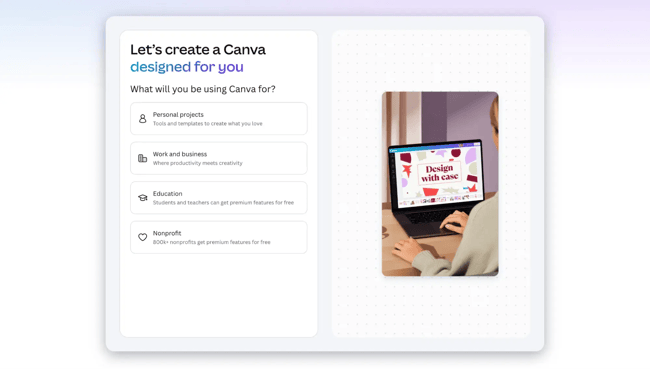
Once a new user signs up for Canva and enters their email, Canva asks what they’ll be using it for (Personal projects, Work and business, Education, or Nonprofit). It then asks them to sign up for a plan, which they can skip, and tells them about its AI features. That initial question helps Canva curate its templates and overall experience to the user’s needs.
Based on this initial question, someone who chooses “Work and business” will receive templates for logos, resumes, and presentations. They’ll still see templates for other purposes, but work- and business-related ones get prioritized.
3. Slack
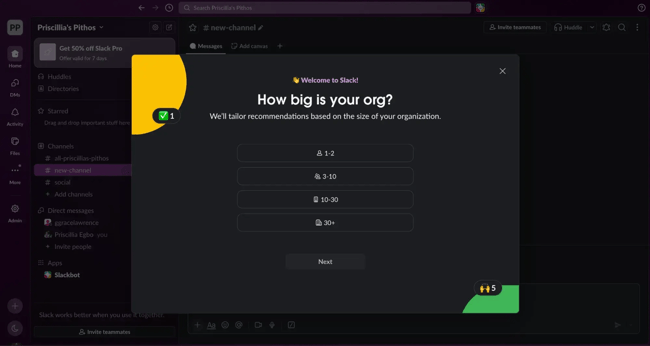
When someone signs up for Slack, they first choose a pricing plan and provide their email. Once that’s done, they get taken into Slack, where they create a workspace right off the bat. This is the first value they get since the workspace is usable and they can invite team members to it.
Then, to personalize the experience even further, Slack asks single-choice questions such as “How big is your organization?“ and “How will you use Slack?“
Once they’ve answered, Slack takes them to their very first channel, where it shows what other steps they can take to get more out of the platform, such as inviting external partners, running a project, or connecting other apps.
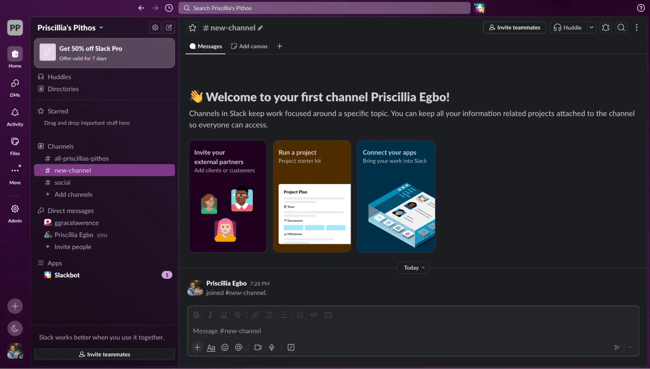
This helps them tailor the platform to their organization’s needs, team members, and tech stack.
4. Dropbox
Once a new user signs up with their email, Dropbox asks what they’ll use it for (Personal, Work, or School).

After choosing the purpose, they pick a plan or continue with the Basic free plan. From there, they’re taken into Dropbox’s interface, where tooltips explain the main features and how to use them.
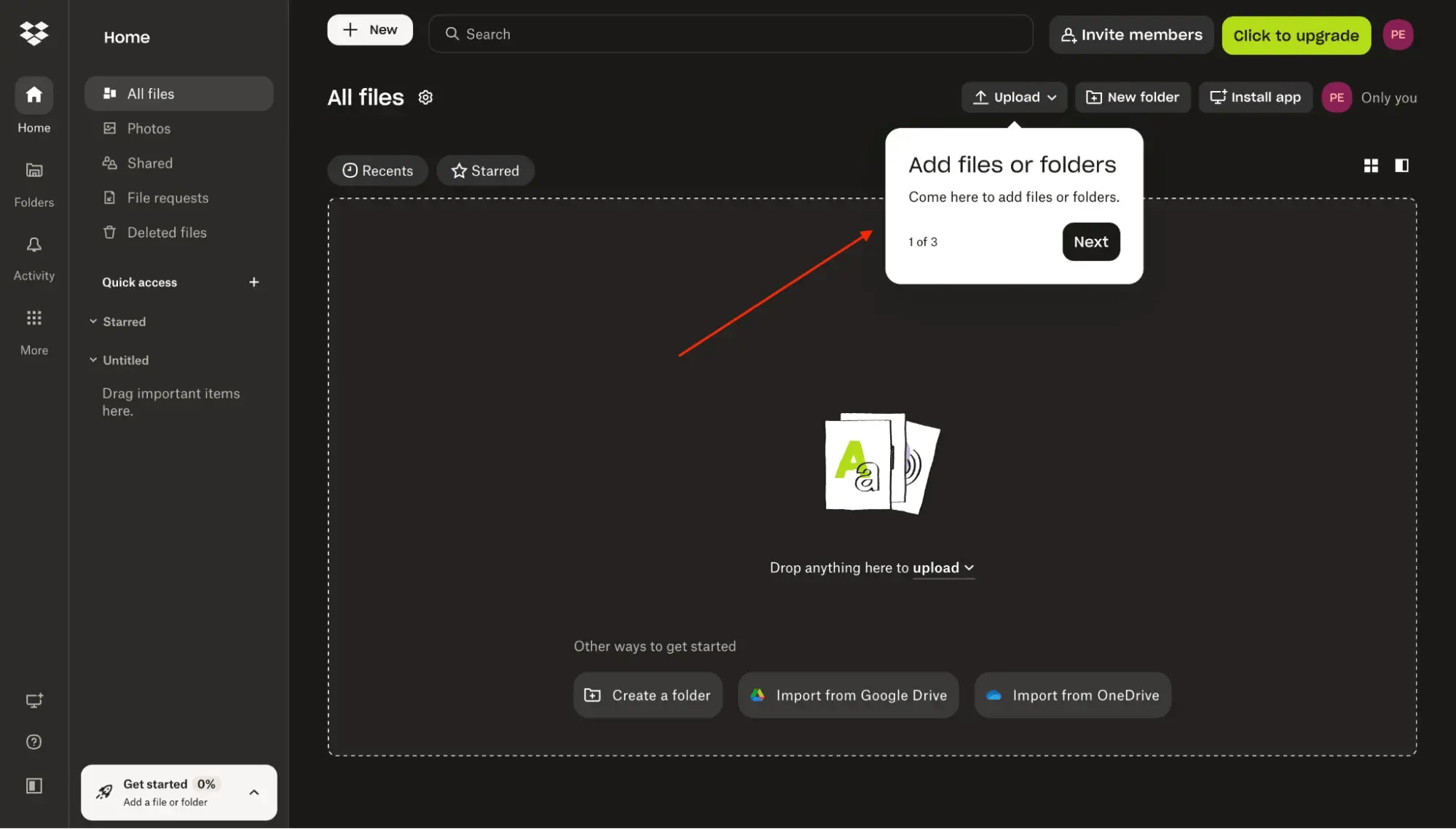
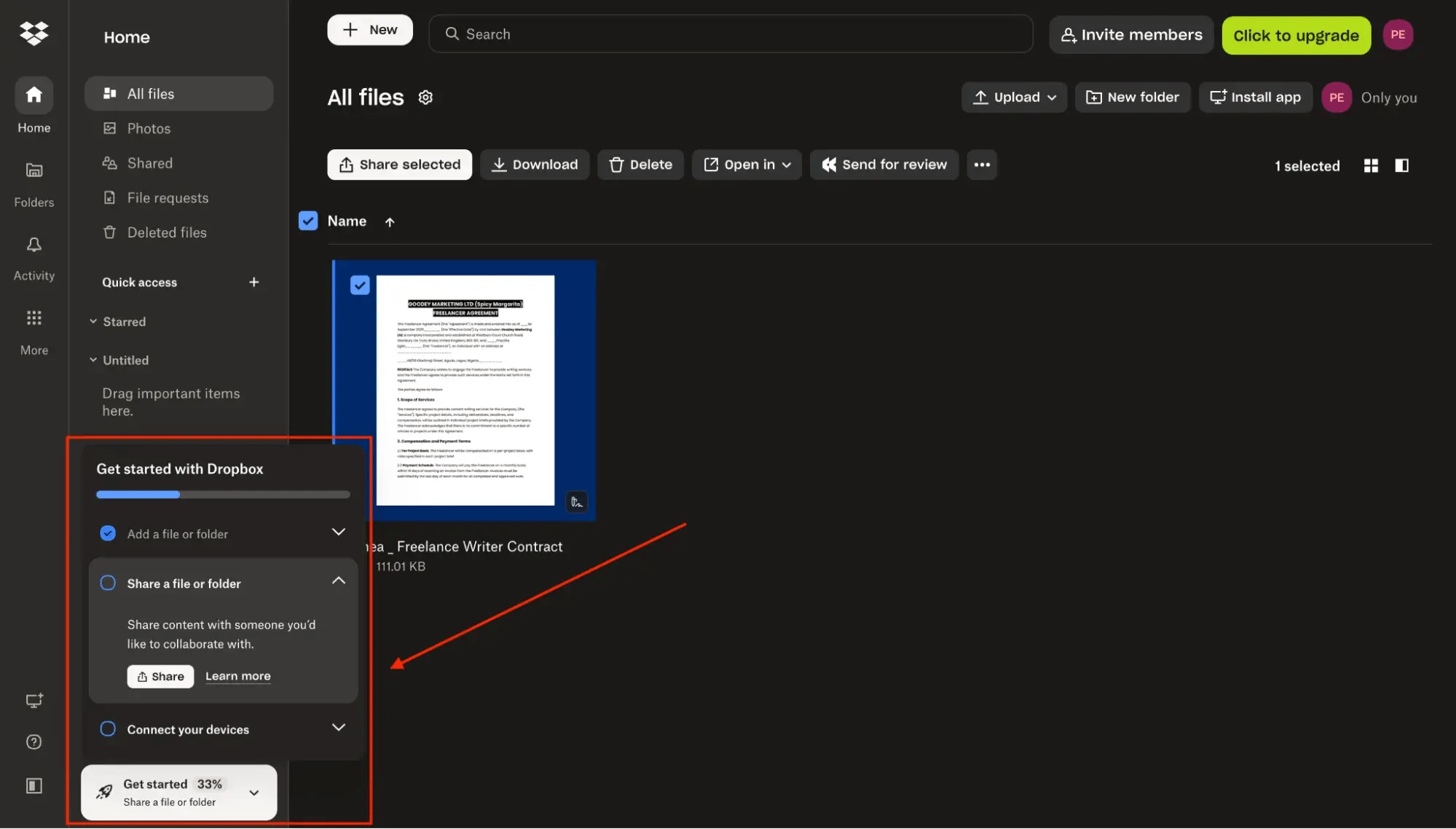
Then they get an onboarding checklist with a couple of tasks to start getting value from Dropbox. As they complete each one, it gets checked off, so they can see their progress as they familiarize themselves with the platform.
Customer Onboarding Software
The right software takes a lot of the manual work out of onboarding, from automating welcome emails to guiding customers through setup and tracking their progress.
The best tool for any team depends on the onboarding model they use, the size of their customer base, and the budget they’re working with. Here’s a look at some of the top options and what each one brings to the table.
1. HubSpot Service Hub
Best for: Teams that want customer service and onboarding to run on the same platform as their sales and marketing data.
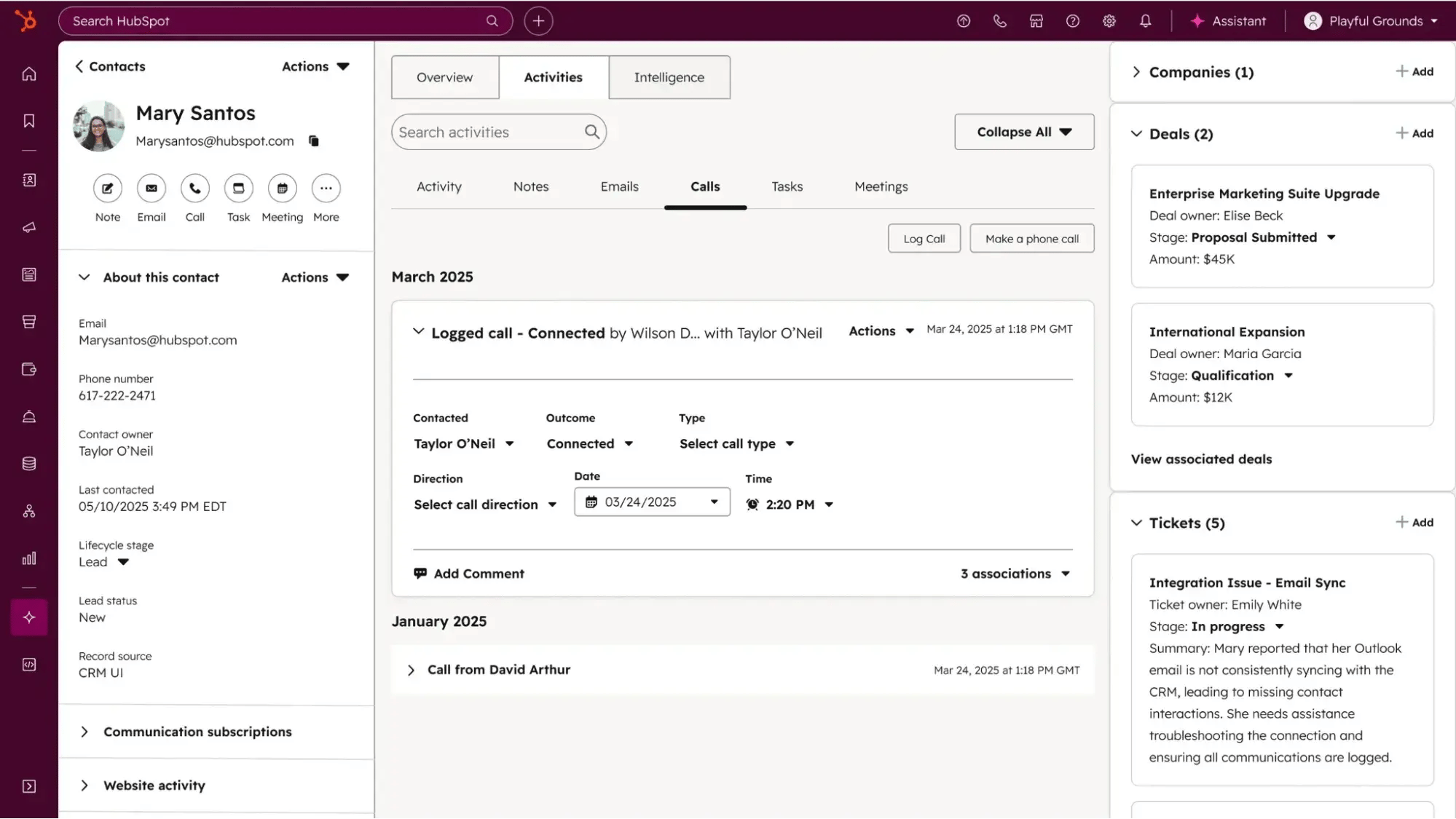
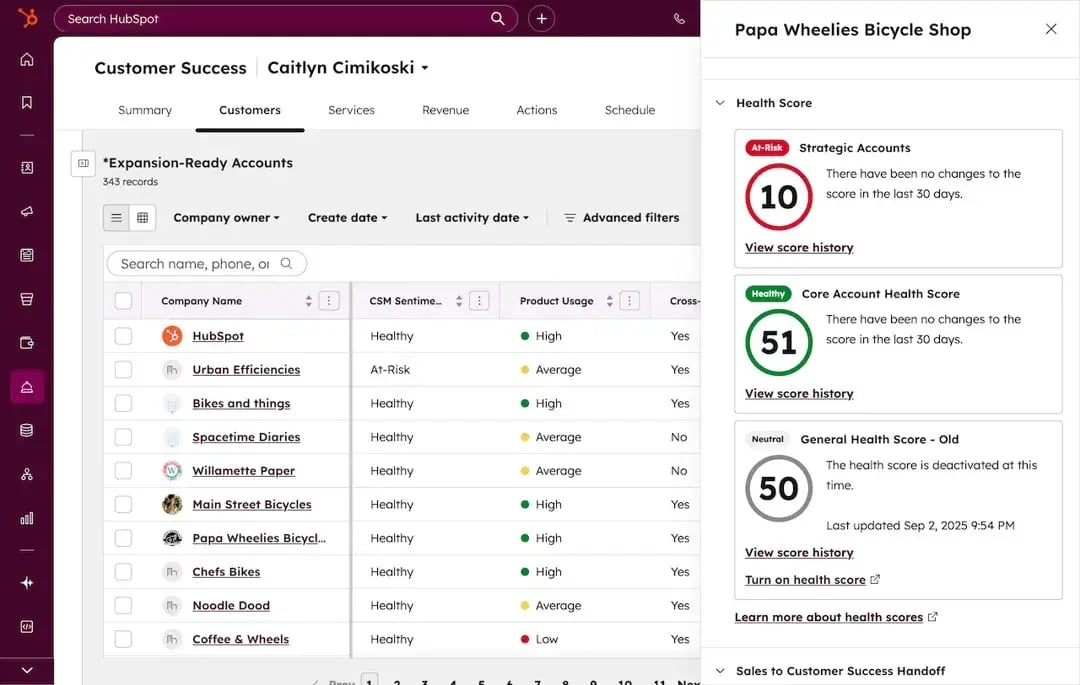
HubSpot Service Hub is a customer service platform that brings ticketing, customer communication, and self-service support together in one place. It gives support teams a single help desk view where they can track every case, respond faster, and keep customer conversations organized, which matters during onboarding when a new customer’s early questions need quick, informed answers.
HubSpot Service Hub sets itself apart through how it connects to HubSpot’s other hubs, including Marketing Hub, Sales Hub, Content Hub, Data Hub, and Revenue Hub, all built around a Smart CRM. Because everyone works from the same customer record, there are no data silos, and no information is lost when a customer moves from sales to onboarding.
Key features of HubSpot Service Hub
- Help desk and ticketing: Centralize every customer issue in one workspace, with tracking that keeps each case moving toward resolution.
- Automation: Route conversations to the right team and automatically trigger follow-ups, so the team isn’t stuck handling each step by hand.
- Knowledge base: Build a self-service library that lets customers find answers without opening a ticket.
- Customer feedback surveys: Send satisfaction surveys to gauge customer sentiment and identify areas for improvement.
- SLA management: Set and track service-level agreements to maintain consistent response times.
- AI-powered reply recommendations: Suggest responses to agents to speed up resolution.
- Reporting and dashboards: Give managers transparent insight into how the team is handling support requests.
- Smart CRM integration: Tie every interaction back to the shared customer record across all hubs.
Pricing
Service Hub has a free plan. The Starter plan starts at $20 per seat/month, and the Professional plan starts at $100 per seat/month.
What Users Say About HubSpot Service Hub
Teams value the ability to manage tickets and customer service from one platform, where they can track each case, respond faster, and keep customer communication organized. They also say the automations, knowledge base, and satisfaction surveys improve the customer experience and surface insights for ongoing improvement.
Managers like the transparency, too: they can audit their team’s performance for quality assurance, while agents find every detail they need to resolve an issue right in the help desk view.
2. Arrows
Best for: HubSpot- or Salesforce-based SaaS teams that want customer-facing onboarding plans tied directly to their CRM.
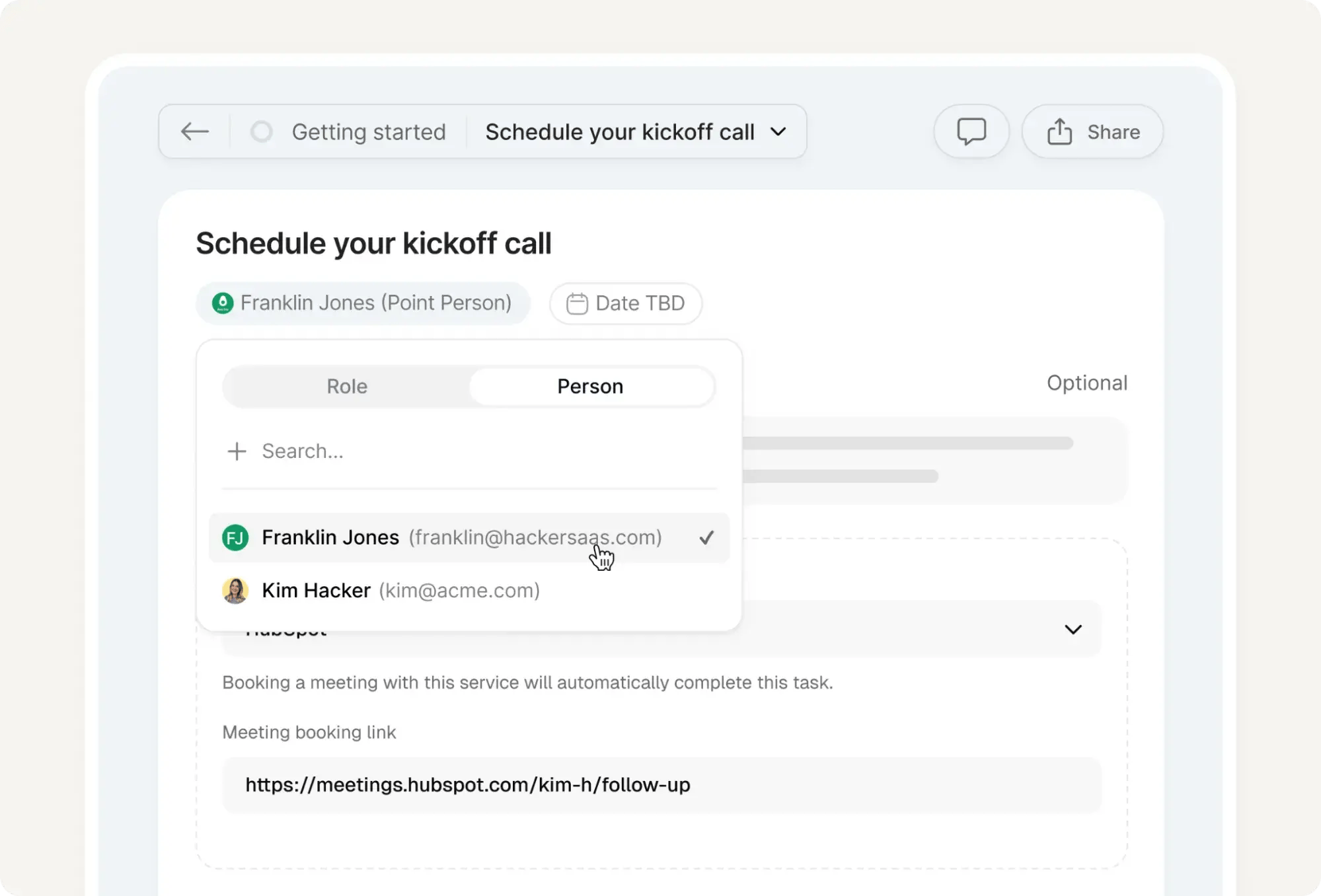
Arrows is a customer onboarding and digital sales room platform that gives both the company and the customer a single shared view of the post-sale journey, so everyone can see which tasks are done, which are pending, and who’s holding things up.
With Arrows, customers follow a clear, linear plan through one link rather than having onboarding get buried in email threads, and the team works the same plan from inside HubSpot or Salesforce.
Key Features of Arrows
- Onboarding templates: Build a standard onboarding plan once, then customize it per customer so each one gets a relevant path without starting from scratch.
- HubSpot and Salesforce sync: Connect onboarding plans to HubSpot (or Salesforce) deals, tickets, or custom objects, and track plan activity right alongside the rest of the customer record.
- Task-based planning: Assign tasks to the customer or the team so it’s clear who’s responsible for what at every stage.
- Automated reminders: Nudge customers about overdue tasks, so the team doesn’t have to chase people manually.
- Embeddable tools: Drop resources like Loom videos, PandaDoc documents, and Calendly links directly into tasks.
Pricing
Arrow uses custom, quote-based pricing, so teams need to contact their sales team for a quote.
What Users Say About Arrow
Customers consistently praise how intuitive the tool is on both sides of the table. Admins find it easy to build a clear, linear path for customers and adjust it for the one-off scenarios that inevitably arise, while customers tend to complete onboarding without snags.
They also love that Arrows syncs with HubSpot, has a task-based layout that makes it obvious who owes what, and offers automated reminders for overdue tasks.
3. Userlane
Best for: Enterprises that want to guide users through complex software and measure adoption across multiple applications.
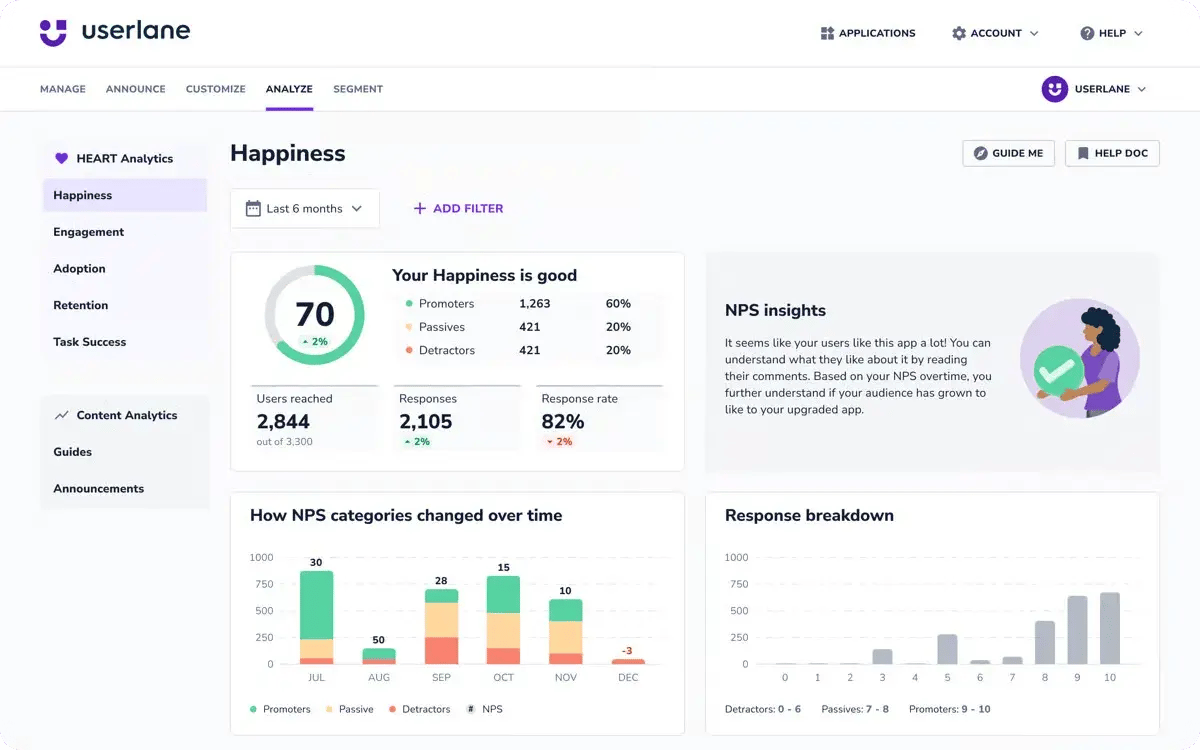
Userlane is a no-code digital adoption platform that helps people learn software as they use it through interactive guides, tooltips, and in-app prompts. It uses two core technologies to improve product adoption:
- Application Intelligence reveals how people interact with an application, showing where they succeed, where they struggle, and what that friction costs.
- Contextual Assistance acts on those findings in the moment with in-app help that walks users through complex tasks.
These two core technologies — Application Intelligence and Contextual Assistance — create a loop in which teams spot gaps, fix them in context, and then measure whether improvements have occurred.
Key Features of Userlane
- In-app guides and tooltips: Build step-by-step walkthroughs, tooltips, and in-app announcements, so users get help without leaving what they’re doing.
- HEART analytics: A structured score for every app and team across five dimensions: Happiness, Engagement, Adoption, Retention, and Task success.
- User and page segmentation: Target guides and messages to specific user groups or specific pages, so the right people see the right content.
- Easy embedding: Drop the Userlane code snippet into a platform and adjust it as needed, with minimal lift for developers.
- In-app surveys. Collect experience feedback directly from users, which feeds the Happiness side of the HEART score.
Pricing
Userlane uses custom, quote-based pricing, so teams need to contact their sales team for a quote. A free demo is available.
What Users Say About Userlane
Userlane’s users note how fast it is to build and edit guides, tooltips, and announcements, and how effective the segmentation is for tailoring content to different users and pages.
Developers also appreciate how simple the code snippet is to embed and tweak, and teams love that HEART analytics provides solid data on how users behave on the platform.
Free Customer Onboarding Templates
Eight templates to lead your new customers through their first several months with your product or service
- Customer Intake Form Template
- Customizable Welcome Packet
- Onboarding Timeline Template
- And More!
Download Free
All fields are required.
Form not available
4. GUIDEcx
Best for: Onboarding and implementation teams managing complex, multi-step client projects across internal and external stakeholders.
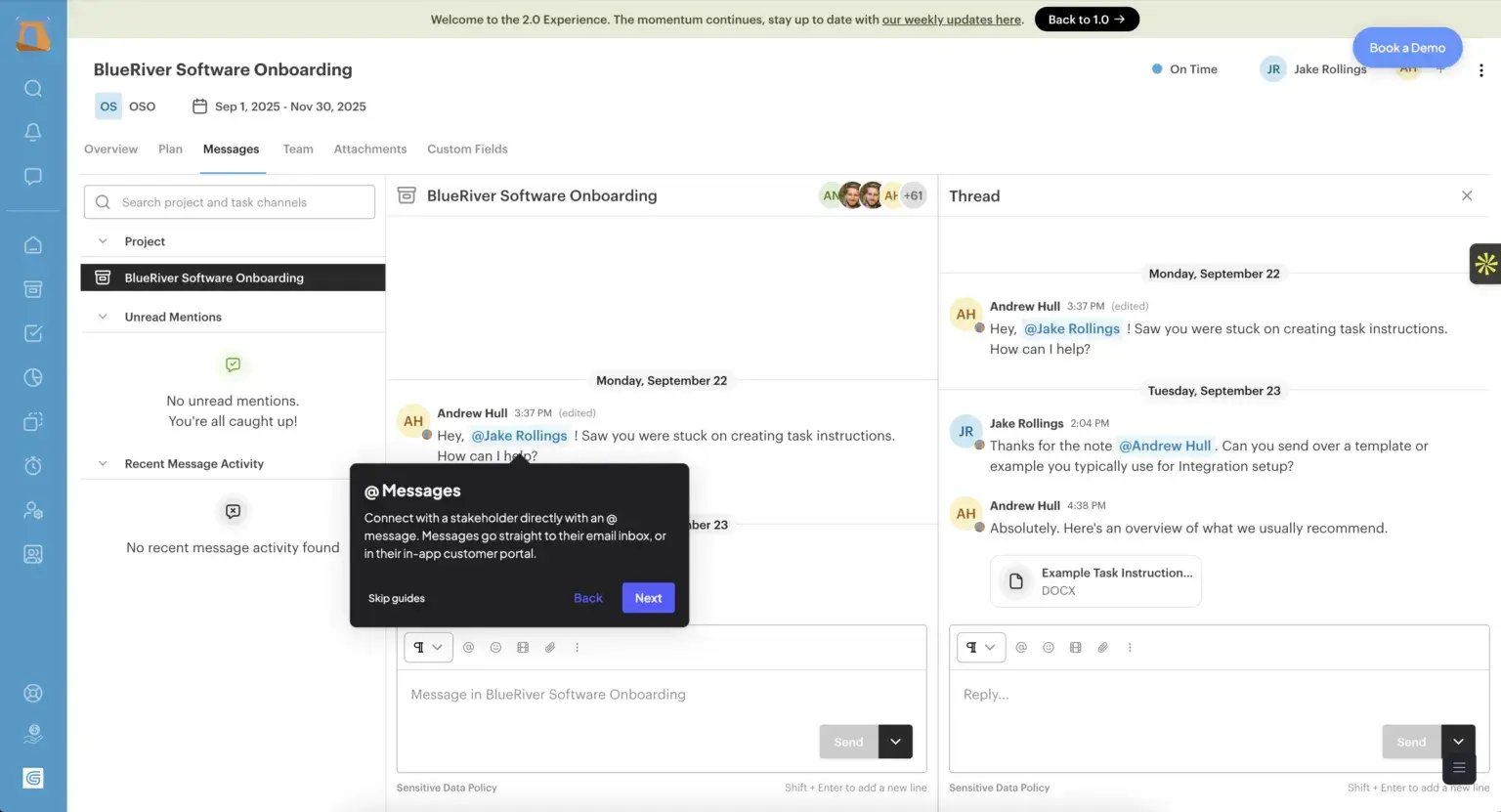
GUIDEcx is a client onboarding and project management platform that brings internal teams, customers, and external contributors into a single shared workspace, so everyone knows what needs to happen, when it’s due, and who owns it at each step.
The platform prioritizes transparency, giving customers a clear view of where their onboarding stands and what’s coming next, which helps prevent long, multi-week implementations from stalling.
Key Features of GUIDEcx
- Task and milestone management: Break each onboarding into tasks and milestones, then track progress so nothing slips through the cracks.
- Role-based customer views: Show customers an organized picture of status, dependencies, and what’s next on their list, without exposing internal clutter.
- Login-less customer access: Let customers join their project through an email verification code instead of forcing them to create an account.
- Integrations: Connect GUIDEcx to the CRM and project tools the organization already uses to keep work flowing between systems.
- Knowledge base and support: An extensive self-service library covers most common questions, backed by a support team for anything it doesn’t.
Pricing
GUIDEcx offers three pricing tiers: Starter, Premium, and Advanced, but their specific prices are not publicly available. A free demo is available.
What Users Say About GUIDEcx
Teams managing multiple onboarding journeys at once find it easy to keep everything organized and up to date with GUIDEcx, especially across cross-functional teams. They also love that GUIDEcx integrates with existing project tools and provides an organized customer view that lays out status and dependencies.
The self-service knowledge base handles the bulk of questions on its own, and when something does need a human, reviewers say the support team responds quickly and walks them through implementation smoothly.
5. Userpilot
Best for: Product and growth teams that want to build in-app onboarding flows and easily collect user feedback.
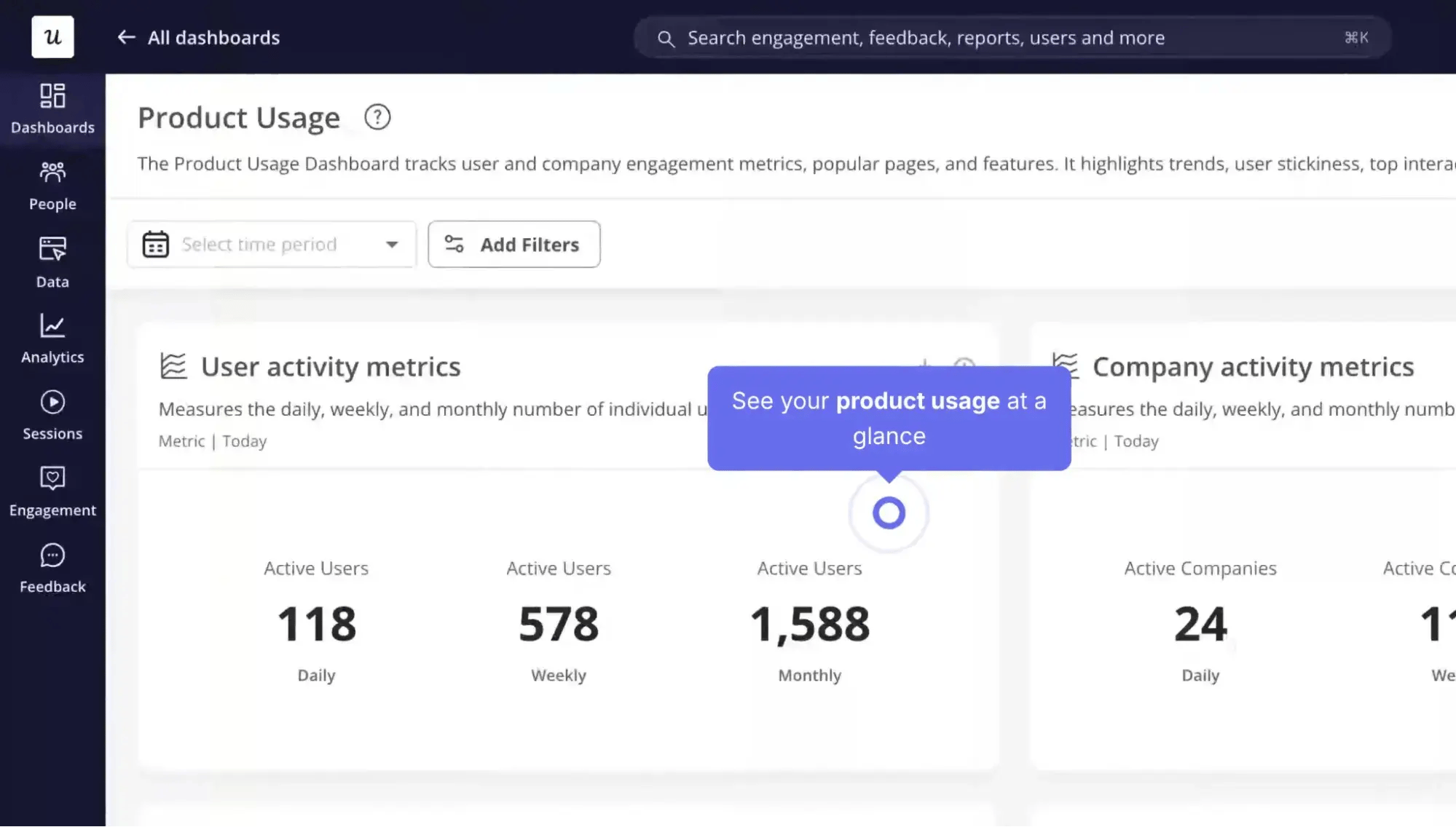
Userpilot is a product growth platform that lets teams create in-app onboarding experiences, like product tours, checklists, and tooltips, with little to no code.
Beyond guiding users, it doubles as a feedback engine, capturing input from people while they’re working rather than days later through an email survey. That timing makes the feedback more specific, since responses are tied to the exact action a user just took, like running a search or placing an order.
Key Features of Userpilot
- No-code flow builder: Create onboarding flows, step-by-step guides, and feature announcements in a few clicks, then measure their impact on user behavior.
- In-app surveys: Trigger lightweight, non-disruptive surveys immediately after a user completes a key action, so feedback stays tied to the workflow it pertains to.
- Product analytics: Track feature usage and the events users generate during their sessions to help teams spot friction and decide what to prioritize.
- Segmentation: Target specific experiences to specific user groups based on behavior or attributes.
- Easy setup: Embed the snippet and get running quickly, often within a couple of days, with a developer’s help.
Pricing
Userpilot offers a free trial. Paid plans start at $299/month billed annually. The Growth and Enterprise plans are custom-priced. Pricing scales with monthly active users, so costs rise as a user base grows.
What Users Say About Userpilot
Teams describe Userpilot as quick to learn and act on. Building onboarding flows and guides takes a few clicks, and in-product surveys provide feedback tied to specific workflows, which makes it easier to see where friction shows up and what to fix first. The surveys also draw more responses, so teams get steadier input.
Reviewers consistently praise the support team, too, citing fast responses and follow-up calls that resolve issues without dragging on.
6. Apty
Best for: Enterprises that want to drive employee adoption and process compliance across complex internal software.
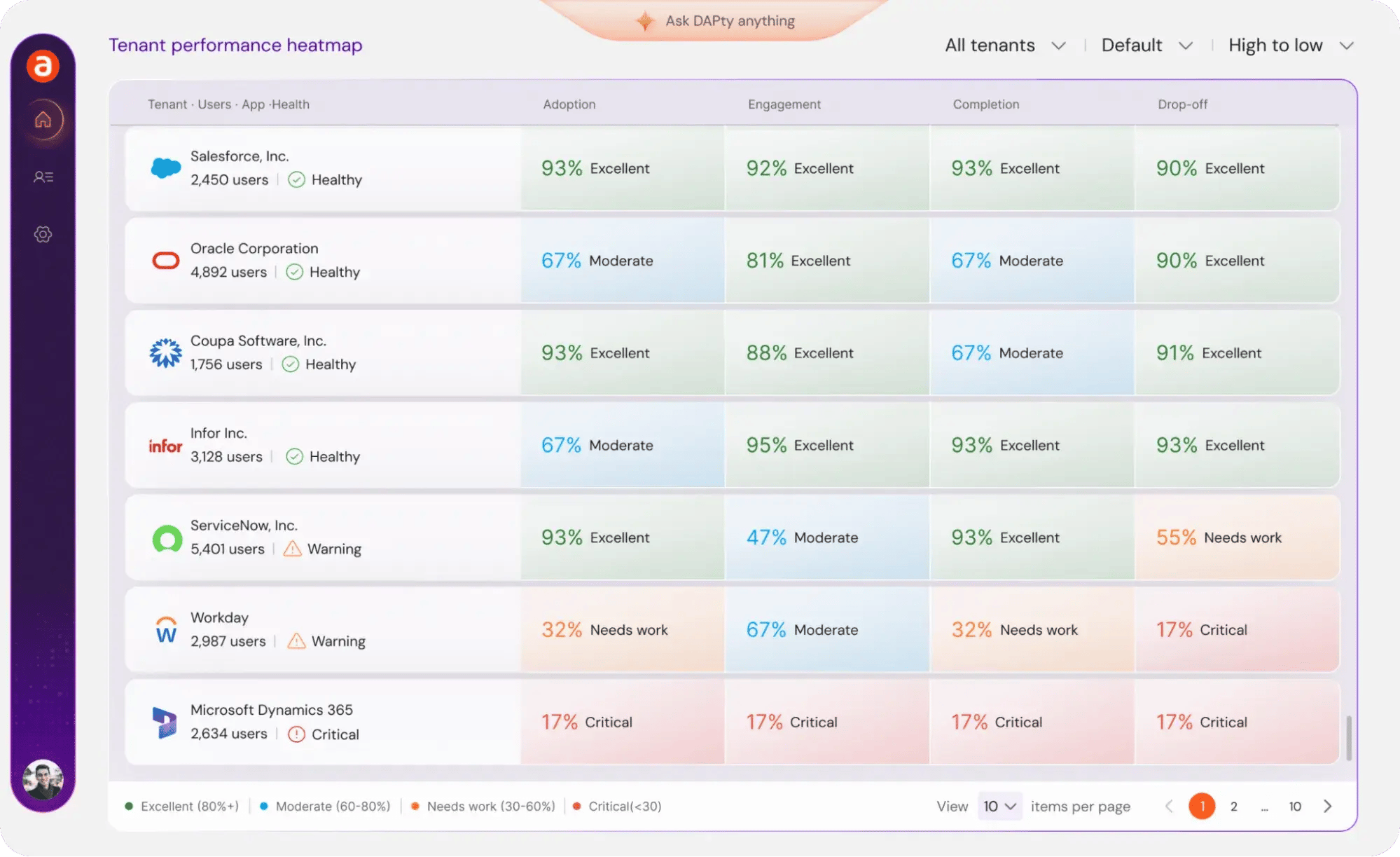
Apty is a digital adoption platform focused on internal onboarding, helping employees learn and use the business software their company uses. It overlays in-app guidance directly onto tools like ServiceNow, Workday, and Salesforce, so users get step-by-step walkthroughs and reminders right where they work.
Apty focuses on process compliance, meaning it doesn’t just show people how to complete a task; it nudges them to do it the right way and reduces the variation that creates data-quality problems down the line.
Key Features of Apty
- In-app guidance and walkthroughs: Layer clear, step-by-step prompts onto enterprise applications so employees can complete complex tasks without having to ask for help.
- Process compliance: Show users how to correctly set up and implement workflows. This reduces errors and keeps data clean across the organization.
- No-code content creation: Build and manage guidance content quickly, with a setup process that’s fast and intuitive.
- Analytics: Track where users struggle within applications so teams can pinpoint and fix friction points.
- Multi-app coverage: Deploy guidance across several internal systems at once, rather than one tool at a time.
Pricing
Apty starts at $9,500 per app, with all features included from the start and no separate tiers or hidden fees. For more functionality, reach out to Apty’s sales team.
What Users Say About Apty
Organizations describe Apty as the tool that finally taught their teams to use their software correctly. One company branded it internally as “Alfred,” a built-in helper, and credited it with cutting call volume (during onboarding and open enrollment) by 60%.
Administrators also appreciate the quick setup and the simplicity of creating and managing content, while end users find the in-app walkthroughs clear and genuinely helpful.
How to Measure Customer Onboarding Success
The only way to know if a customer onboarding program is working is to track the right metrics. The KPIs below show how quickly customers reach value, how far they get through onboarding, and how they feel once they’re through it.
Each one also points to a specific area to fix when the numbers come up short.
1. Time to First Value (TTFV)
Time to first value (TTFV) measures how long it takes a customer to reach their first meaningful win after signing up. This metric is one of the clearest signals of onboarding health, since a short TTFV usually means customers are getting where they need to go without friction.
A rising or prolonged TTFV points to roadblocks early in the journey, such as a clunky setup or a first task that’s too hard to complete. Here are a few ways to shorten it:
- Remove any setup steps that aren’t essential to the first win.
- Guide customers straight to the action that delivers value, instead of leaving them to find it on their own.
- Use context from sales and sign-up to skip generic steps and point each customer at what matters to them.
2. Onboarding Completion Rate
This measures the percentage of customers who finish the onboarding process, whether that’s completing a setup checklist, finishing a tutorial, or hitting a defined set of milestones.
A low completion rate shows that customers are dropping off somewhere along the way, and the fix starts with finding exactly where.
- If most customers quit at the same step, that step is the problem. It might be too complex, poorly explained, or simply unnecessary; simplify or cut it.
- If customers drop off at different points, the issue is usually broader, like weak momentum or unclear value. In that case, tightening the overall flow and reinforcing the payoff/value at each stage will help more than fixing any single step.
3. Product Adoption Rate
Product adoption rate measures how widely customers use the product, often by tracking how many people engage with key features or how often they log in.
Low adoption after onboarding suggests customers aren’t discovering or understanding the features that would help them. Teams can respond by:
- Highlighting underused features through in-app prompts or follow-up emails.
- Tying each feature to a specific customer goal, so its value is obvious.
- Adding short tutorials for the features customers tend to skip.
4. Early Engagement
Early engagement looks at how active a customer is in their first days and weeks, such as how often they log in, how much time they spend in the product, and how many core actions they take. It gives teams an early read on whether onboarding is working, often before completion or adoption numbers come in.
Tracking early engagement lets teams catch at-risk customers quickly, while there’s still time to step in with a check-in, a helpful resource, or a nudge back toward their first win.
5. Post-onboarding Satisfaction
Post-onboarding satisfaction measures how customers feel about the onboarding experience after completing it. Teams usually track it with a short survey that has two parts.
- A satisfaction score: “On a scale of 1 to 10, how satisfied are you with your onboarding experience?”
- An open-ended follow-up: “If anything fell short, can you tell us what?”
The score and the comment work together to show the full picture.
Say a customer rates their experience a 4 and writes that they felt rushed or couldn’t find the setup guide. The score flags that something went wrong, and the comment points out exactly what, showing the team what they need to fix.
6. Early Churn
Early churn measures the percentage of customers who leave shortly after signing up, often within the first 30, 60, or 90 days. It’s the bluntest measure of onboarding failure, since customers who churn this early rarely got enough value to justify staying.
A high early churn rate means something isn’t working in those first weeks, and the other metrics on this list help pinpoint what it is.
Pairing early churn data with exit feedback helps determine whether customers left because of slow time-to-value, a confusing setup, or a mismatch between what they expected and what they received.
From there, teams can fix the specific stage where customers are slipping away.
7. Qualitative Context
Metrics, like a drop in completion rate or a slow time-to-value, flag a problem but don’t explain the cause. To get that explanation, teams need qualitative data, such as survey responses, CSM feedback, and support tickets.
This information reveals the reasons behind the numbers, like which step confuses people or where customers lose momentum. Having this context shows teams exactly what to focus on, how to fix the situation, and what customers ideally want.
Common Customer Onboarding Mistakes to Avoid
Most onboarding programs run into the same handful of mistakes. They’re easy to spot once a team knows what to look for, and catching them early keeps them from leading to churn. Here are five of the most common ones.
1. Overwhelming Customers
It’s tempting to show new customers everything the product can do, but bombarding them with too much information at once can make them freeze up.
A better approach is to focus the early experience on the few actions that lead to a first win, and leave the advanced features for once the customer finds their footing.
2. One-size-fits-all Onboarding
Every customer signs up for different reasons, so putting them through the same steps makes them feel like the product wasn’t built with their situation in mind.
Tailoring the early steps to each customer’s goal, using context from sales and sign-up, keeps the experience relevant and gets customers to value faster.
3. Poor Sales-to-CS Handoff
When sales closes a deal and passes the customer along without sharing context, onboarding starts from zero. The customer ends up re-explaining goals they already covered, which makes the company look disorganized, and erodes trust before onboarding starts.
A clean handoff prevents this. Sales should relay the customer’s goals, expectations, and any account-specific details so the customer success team has full context from day one.
4. Focusing on Features Over Outcomes
Onboarding that focuses on product features without tying them to a goal leaves customers unsure why any of it matters.
To prevent this, frame every step around an outcome to keep onboarding grounded in what the customer cares about. So, instead of saying “here’s the reporting tab,” explain how they can quickly build the weekly report and save their team an afternoon.
5. Going Silent After Kickoff
A strong kickoff call means little if the customer doesn’t hear from the team again until renewal. Customers who churn are often the ones encountering issues with the product, and without check-ins, no one notices until they’ve decided to leave.
Staying in regular contact during the first couple of weeks keeps customers engaged and catches problems early.
Frequently Asked Questions About Customer Onboarding
What is customer onboarding?
Customer onboarding is the process that guides a new customer from the moment they sign up to the moment they get value from a product and start using it with confidence. It covers the welcome, setup, the first few wins, and the point at which the product becomes part of the customer’s routine. The main goal is to reduce time to value so customers keep renewing their subscriptions.
What are the five stages of the onboarding process?
The five stages move a customer from sign-up to a steady, ongoing relationship. The welcome stage sets a positive tone and points to the first step. Setup involves configuring the account through a guided tutorial or hands-on help. First value focuses on getting the customer to their first meaningful win as quickly as possible. Adoption helps the customer build the product into their routine and use more of its features. Ongoing support then maintains engagement through regular check-ins, resources, and milestone celebrations.
What are the four steps of onboarding?
A simplified onboarding flow comes down to four steps: welcoming the customer with a warm first message and a clear next action, guiding them through setup so their account is ready to use, getting them to first value by pointing them at the action that solves their main problem, and following up with check-ins and support to keep them on track.
What are the 5 C’s of onboarding?
The 5 C’s started as an employee onboarding framework but apply equally well to customers. Compliance covers the basic setup, terms, and account requirements needed to get started. Clarification means making sure the customer understands how the product works and what to do first. Confidence involves helping the customer feel capable of using the product independently. Connection is about building a relationship between the customer and the team supporting them. Culture familiarizes customers with how the company operates and what the relationship will feel like.
Customer onboarding helps you grow better.
A great customer onboarding process starts with truly understanding what the customer wants to achieve. Using data and feedback to map those needs makes it possible to build an experience that stays relevant at every step of the new-customer journey.
When customers reach value quickly, they hit their personal goals and are far more likely to renew, expand, and advocate for the product. That outcome is good for the customer and good for the business.
Editor’s note: This article was originally published in June 2018 and has since been updated for comprehensiveness.
Free Customer Onboarding Templates
Eight templates to lead your new customers through their first several months with your product or service
- Customer Intake Form Template
- Customizable Welcome Packet
- Onboarding Timeline Template
- And More!
Download Free
All fields are required.
Form not available
Customer Onboarding

![Email onboarding examples you can use to increase customer loyalty [+ templates and tips]](https://53.fs1.hubspotusercontent-na1.net/hubfs/53/onboarding-email-examples-1-20251219-2952026.webp)


![10 Customer Onboarding Challenges You Might Face This Year [+Expert Tips]](https://53.fs1.hubspotusercontent-na1.net/hubfs/53/ai%20customer%20service%20predictions%20(2).webp)


![Digital Onboarding: How to Make It Work For You [+ 5 Helpful Tools]](https://53.fs1.hubspotusercontent-na1.net/hubfs/53/digital%20onboarding_featured%20image.jpg)
![Perfect your customer onboarding with our expert tips [+ checklist]](https://53.fs1.hubspotusercontent-na1.net/hubfs/53/client-onboarding-best-practices-1-20251029-7553263.webp)