.png?width=112&height=112&name=Image%20Hackathon%20%E2%80%93%20Horizontal%20(14).png)

An internal knowledge base stores information that teams reference repeatedly, so nobody has to dig through emails and Slack threads to find what they need. Done well, a knowledge base saves hours per employee per week and speeds up onboarding, collaboration, and daily work.

I learned this firsthand loading out of a venue at midnight with my band, fielding questions about hotel locations, tomorrow’s load-in time, and guest list requests all at once. Nobody had the answers because the information was scattered across emails and texts. That’s why I built an internal knowledge base for everything bands need on the road.
This post will cover what an internal knowledge base is, the benefits of implementing one, and the best software tools businesses can use to create their own internal knowledge bases.
Table of Contents
What is an internal knowledge base?
An internal knowledge base is a centralized, searchable library of company information accessible to internal teams. These libraries house operating procedures, onboarding materials, HR policies, troubleshooting guides, and any other documentation a team references regularly. Unlike customer-facing knowledge bases, which are publicly available to customers and prospects, an internal knowledge base is private and accessible only to employees.
AI has transformed how internal knowledge bases work. AI-powered knowledge bases can identify knowledge gaps and automatically flag out-of-date documentation. They can also intelligently recommend relevant articles based on natural language queries and create new articles based on support ticket resolutions.
.png)
Customer Support Strategy & Planning Template
Outline your company's customer support strategy with this free template.
- Customer Support Vision
- Team Structure & Hiring Plan
- Support Process
- And More!
Download Free
All fields are required.
Form not available
Benefits of an Internal Knowledge Base
An internal knowledge base has many benefits, including increased efficiency and enhanced team collaboration via a single source of truth for all company information. Below are key knowledge base benefits in more detail:
Saves Employees Time
Without an internal knowledge base, employees who need to find documentation or reference a brand style guide are left scouring a mix of scattered drive documents, Slack threads, and old email chains. That time spent searching for company info adds up. According to a 2025 knowledge management report, 47% of professionals spend 1-5 hours a day searching for specific information.
An employee knowledge base provides a single source of truth for all company information. Every team member can search a single library and get the answers they need in seconds. That time saving across teams adds up to real productivity gains.
Before I created an internal knowledge base app for my band, I’d search my email for hotel confirmation numbers and dig through texts from promoters to find load-in times. Now, I send all the day-of-show info to my app. The AI parses it, associates it with the correct show date, and everything lives in one place.
Disperses Information Efficiently
An internal knowledge base structures the dispersal of important company information. Without an internal knowledge base, important info dies in people’s inboxes. With one, recurring info gets a permanent home where employees know to look, and they automatically get the most updated versions of all docs, eliminating the need to ping coworkers or send company-wide email updates.
When I worked at HubSpot Support, our internal and external knowledge bases were crucial to my daily workflow. Instead of bugging my coworkers for troubleshooting steps and escalation paths for tricky tickets, I could rely on our internal documentation for all the company info I needed. The result was time saved for me and for anyone I would otherwise have pulled away from their own work. That compounded across the org.
Improves Team Collaboration
Teams accumulate institutional knowledge over time, and without a platform to document it, those learnings can disappear when people leave or get promoted. An internal knowledge base provides specific teams with a place to collaborate and share information.
When I worked at HubSpot Support, we had a Support Wiki in the company’s knowledge base where my teammates and I could find department-specific information. If a coworker or I discovered a handy workaround or an edge case bug, we could author a knowledge base post to share the findings directly with the team. If my manager updated a team-specific workflow, or a coworker needed help testing a feature, we could collaborate and document our findings in the team’s internal knowledge base.
Centralizes Information
Even teams that stay on top of documentation can run into a problem: too many versions of the same thing spread across multiple platforms. An internal knowledge base creates a central, authoritative home for all company information. Without one, employees may find an old onboarding deck in Drive and a newer version in Notion, with no clear signal about which to trust. An internal knowledge base eliminates that confusion.
I built an internal knowledge base for my band to solve this exact problem. Load-in times, venue addresses, and backline information were spread across email and Slack threads, or siloed in our booking agent’s inbox. Now, the whole band has one place to look for everything they need on the day of a show.
Speeds Up Onboarding
Without centralized documentation, new hires are often left piecing together information from scattered drives and emails, with no choice but to ping coworkers for help. An internal knowledge base gives new hires a single searchable platform with everything they need to get up to speed.
When I was a new hire at HubSpot, I leaned on our internal knowledge base throughout onboarding. It was my reference for internal tools, ticketing systems, and best practices for communicating with customers. When it came time to onboard new hires myself, I realized just how much time that knowledge base saved everyone from shoulder taps and Slack pings.
Examples of Internal Knowledge Base Resources
An internal knowledge base can house almost any piece of documentation a team references regularly. The exact mix depends on the company and the department, but most internal knowledge bases contain some combination of the following:
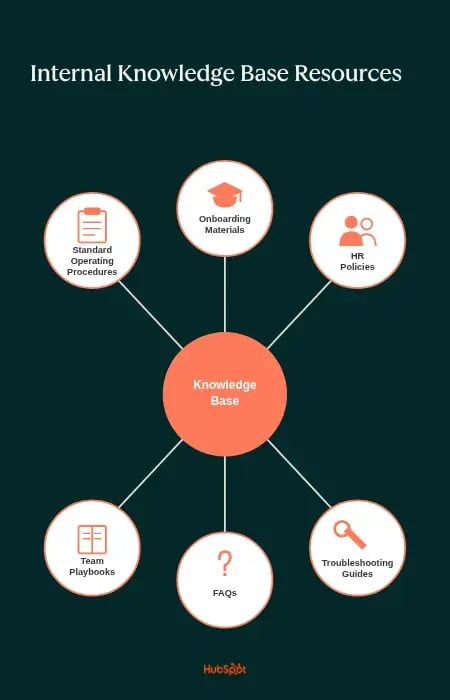
Standard Operating Procedures (SOPs)
Step-by-step instructions for recurring processes, such as submitting an expense report, running a quarterly review, or creating and closing a customer support ticket. SOPs ensure teams consistently get work done through standardized processes.
Onboarding Materials
Welcome guides, role-specific training, org charts, and walkthroughs of internal tools. Onboarding content helps new hires get oriented and gives them resources to refer to during their first few weeks.
During my first few weeks as a HubSpot support rep, I frequently consulted onboarding materials hosted in our internal knowledge base. Since resources were available in one place, I always knew where to look when I had a question. The result was that I didn’t have to bother my team lead or take time away from the queues for myself or my co-workers, because whenever I had an onboarding question, I knew where to find the answer.
HR Policies
Benefits documentation, time-off procedures, code of conduct, parental leave policies, and other people-operations content. Centralizing HR documentation means employees can answer their own questions without having to send repeat emails to the HR team.
Troubleshooting Guides
Internal documentation for common technical issues, product bugs, edge cases, and known workarounds. Support and engineering teams rely heavily on troubleshooting guides to handle common issues and pain points.
Pro tip: Write troubleshooting guides immediately after resolving a newly discovered issue to capture details that matter when they are fresh. HubSpot’s HubSpot’s Knowledge Base Agent can automatically turn support ticket resolutions into troubleshooting guides, so new resolutions and edge cases get documented as they happen.
FAQs
Short answers to the questions that come up frequently, organized by topic or department.
Pro tip: FAQs are the first stop for most knowledge base users. Teams should make the FAQ section prominent and easily accessible to eliminate any confusion.
Team Playbooks
Department-level documentation for workflows, terminology, escalation paths, and internal best practices. Playbooks help teams move faster within their own work and give other departments a way to understand how a team operates.
When I was a support rep at HubSpot, we had a support playbook that organized all of our team-specific knowledge, which made it simple for me to find all the info I needed from specific troubleshooting guides to best practices for working with frustrated customers.
How to Create an Internal Knowledge Base
Building a useful internal knowledge base is less about the software and more about discipline. The right tool matters, but a clear content strategy matters more. These seven steps walk through the work required to build a knowledge base teams can actually rely on.
1. Identify what internal knowledge needs to be shared.
Start by mapping what employees actually need to find. Most companies already have raw knowledge base content scattered across drives, Slack channels, and emails. Knowledge base managers should talk with team leads about what their teams reference most, gather recurring questions from onboarding and support workflows, and audit existing documentation to see what’s current, outdated, or missing.
When I built the knowledge base app for my band, I started with the pain point. Information from show advances needed to reach the band in a usable format, and forwarded emails and group texts weren’t cutting it. Once I identified that the core knowledge was logistical, load-in times, soundcheck schedules, hospitality details, and parking information, the rest of the build had a clear target.
By mapping the knowledge I needed to share with my band before designing anything, I was able to build a tool specifically designed to house that information in a way that was logical, easy to discover, and shareable.
Customer Support Strategy & Planning Template
Outline your company's customer support strategy with this free template.
- Customer Support Vision
- Team Structure & Hiring Plan
- Support Process
- And More!
Download Free
All fields are required.
Form not available
2. Choose the right platform.
Once teams have identified what the knowledge base needs to include, the next step is selecting a platform. The right choice depends on team size, existing tech stack, and how much integration is required. A small startup might do fine with a lightweight tool like Notion, while a larger organization with multiple departments will likely need a more robust platform that connects to tools like a CRM or help desk.
Before committing to a platform, knowledge base leaders should consider a few evaluation criteria and features:
- Search: The platform’s search must actually return the correct article, not just match keywords. An AI-powered search that understands natural language queries helps surface the right articles without requiring employees to know the exact keywords to find them.
- AI capabilities: Modern knowledge base platforms can draft articles from resolved tickets, flag outdated content, and recommend relevant articles inside other tools using AI. AI features can turn a once static resource into one that updates itself and surfaces relevant information to team members at the right times.
- Integrations: A knowledge base should connect to tools a team already uses, such as Slack, Microsoft Teams, the help desk, and a CRM.
- Access controls and permissions: Internal knowledge often includes sensitive HR, financial, or product information. Teams need granular controls over who can see, edit, and publish what.
- Reporting and analytics: Knowing which articles get read and where content gaps exist is essential to maintaining a useful knowledge base over time.
HubSpot’s Knowledge Base Software integrates natively with HubSpot CRM and Service Hub, handling both internal and customer-facing content. The AI tools draft and update articles based on resolved support tickets and recommend relevant articles to reps directly inside the help desk.
3. Structure it like a library.
A knowledge base full of great content isn’t valuable if employees can’t find what they need or don’t know where to look. Once teams have assessed the content they need to collect, the next step is to create a structure to organize it logically, mirroring the company’s existing organizational structures and logical patterns.
Teams can think of it like structuring the knowledge base as a library, with clear sections, predictable categories, and consistent labeling, all based on naming conventions and department information that teams and employees are already familiar with. Most internal knowledge bases work best with a two- or three-level hierarchy. The top-level groups are composed of departments or functions, such as HR, IT, Support, and Sales. Within each top-level category, content gets grouped by topic or process. Under HR, separate sections might cover benefits, time off requests, and compliance.
Pro tip: Knowledge base managers should test the structure of their knowledge base with employees who didn’t help build it. Discover where the actual end users expect certain information to be, and use that to inform the knowledge base’s hierarchical structure.
4. Write articles that are clear and actionable.
Internal knowledge base articles don’t need to be boring, dense, or jam-packed with jargon. Article writers should use plain language and answer the reader’s questions as directly as possible, ideally immediately after a clear heading that states the issue or question at hand. They should use easily scannable formatting with H2s, H3s, and bullet points to create articles that are visually easy to scan.
A clear and actionable article should include a few core elements:
- A clear title that matches how people search: Articles titled in plain language (“How to request paid time off”) outperform articles titled in internal shorthand (“PTO Policy v3”) because they match the queries readers actually type.
- A short summary at the top: A quick TLDR that explains what the article covers and who it’s for, so readers can confirm they’re in the right place before committing to the scroll.
- Step-by-step instructions when applicable: Numbered or bulleted steps are far easier to scan than instructions buried within paragraphs of prose.
- A “last updated” date: Readers need to know whether they’re looking at current information. A visible date signals trust and enables a framework for keeping content fresh.
- An owner: Every article needs a person or team responsible for writing and maintaining the content and ensuring the information is current. Without clear ownership, articles can decay quickly.
In my current work as a freelance writer and editor for the HubSpot Blog, I’ve learned that clarity and concision are two of the most important things in any piece of writing. In particular, I’ve found the most success in framing my mental writing model around delivering value to the reader. The last thing I want to do is create an article that’s like one of those recipe blogs with 10 paragraphs of prose and an entire life story before the recipe itself.
When I write articles, I like to include a clear H2/H3 that states what the section will cover and shows readers where to find the information they want, then answer the question as concisely as possible. Either in a few sentences or a paragraph at the top, or, even better, with a bulleted list or step-by-step guide that breaks the information into more digestible chunks. The principle matters even more in internal knowledge base writing, where there are no SEO requirements to balance. An internal article exists for one reason: to help an employee do something.
5. Set access and editing permissions.
Access controls and editing permissions serve two purposes: preventing unintentional edits or deletions, and keeping irrelevant content from cluttering searches for employees who don’t need it.
A typical permission structure gives administrators full editing rights across all content. Department contributors can author and update articles within their own area, while all other employees have read-only access.
Pro tip: Leaders should select a knowledge base platform with version control to easily roll back changes if necessary.
6. Train your team to use it (and contribute).
Knowledge base administrators need to train teams to use a knowledge base. Even the most well-built and thoroughly documented knowledge base will fall short if employees don’t know it exists. If they don’t know how to reach it, or default to pinging people on Slack instead, the investment goes to waste.
Teams should cover knowledge base adoption and onboarding training for new hires. Existing hires should also undergo a training module on using a knowledge base if it’s being implemented for the first time.
Knowledge base contributors will require even more guidance, which can get kind of meta. Teams will need articles and guidance on:
- How to author an article
- Which templates to use
- How to tag and categorize content
- How to apply brand style guides, tone, and voice
- Review and publishing workflows
Some employees who aren’t officially part of the knowledge base team may still need to contribute to it. For example, front-line customer support reps are the first to experience customer pain points and product bugs. They should be able to document common issues they see customers run into, as well as workarounds and solutions they’ve developed.
When I was a support rep at HubSpot, we had a formal process for authoring and documenting new support-specific knowledge base content. Now, with tools like HubSpot’s Knowledge Base Agent, the AI agent can automatically create and update support documentation and internal knowledge articles based on support ticket resolutions.
Pro tip: Organizational adoption of the knowledge base is the ultimate goal. Managers and team leaders should set the precedent of sharing relevant knowledge base articles with their team when answering questions and demonstrating ideas, so employees get used to reaching for the knowledge base first.
7. Keep it updated.
A neglected knowledge base full of outdated information is worse than no knowledge base at all. When employees can’t trust what they find, they stop using it entirely and go back to pinging coworkers and digging through Slack threads. Knowledge base teams should run recurring reviews, monthly or quarterly, to update outdated content. Any employee should be able to flag missing or inaccurate articles.
A knowledge base is a living product, not a one-time project. A successful one has a clear owner, a regular review cadence, and a documented process for flagging stale content.
When I built my band’s knowledge base, keeping day-of-show information current turned out to be the most important consideration. Details change at the last minute, and without a process for updating the team, we sometimes showed up for soundcheck working from outdated schedules. Now, the knowledge base updates as information changes, and the whole band works from the same current version.
Pro tip: Teams should use data to inform the update process. Some platforms surface search terms that return no results, which point directly to content gaps. Data can also flag articles with low ratings or high bounce rates, a signal that an article isn’t helping employees and needs to be reworked.
Internal Knowledge Base Software
The best internal knowledge base software helps companies create a centralized, searchable repository where teams can store and access vital company documentation while offering features like AI capabilities, integrations, and strong access controls. The solutions below serve different needs, from platforms that integrate directly with a CRM and help desk, to verification layers that keep answers accurate across existing tools, to full collaborative workspaces that include a knowledge base. The right choice depends on team size, existing tech stack, and how much the knowledge base needs to do beyond storing documentation.
1. HubSpot Knowledge Base Software
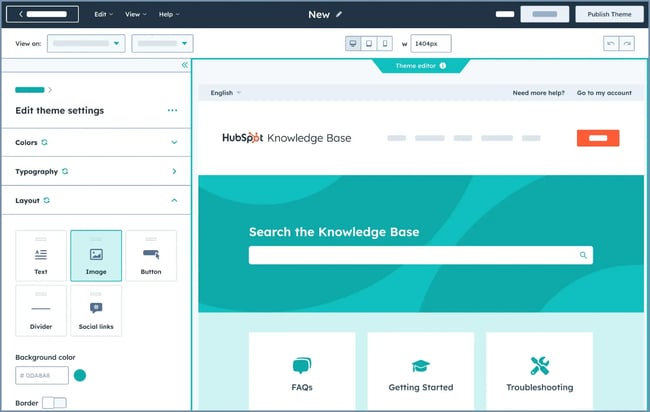
Best for: Teams looking for an internal knowledge base that integrates directly with their ticketing system and CRM, especially those already using HubSpot.
HubSpot’s Knowledge Base Software is part of Service Hub and is built for teams that want their internal documentation connected to the same system that powers their ticketing and CRM. Because it sits on top of HubSpot’s CRM, the knowledge base draws on the same ticket data that support reps already work with.
HubSpot’s knowledge base platform has AI features, including Knowledge Base Agent, which can draft and update articles based on resolved support tickets, recommend relevant articles to support reps directly inside the help desk, and flag outdated knowledge base articles for review.
What I like: I love the AI features and tight integration between HubSpot’s knowledge base platform and the ticketing system. I wish I had access to features like that back when I was a rep. I constantly relied on our internal and external knowledge bases to troubleshoot and clarify internal support processes, and half the battle was finding the right article. Now HubSpot’s AI tools recommend the right articles for reps, which would have saved me a lot of time.
Pricing: HubSpot Knowledge Base Software is part of Service Hub, and knowledge base functionality is available on Professional and Enterprise plans.
- Starter: $7/mo/seat
- Professional: $90/mo/seat
- Enterprise: $150/mo/seat
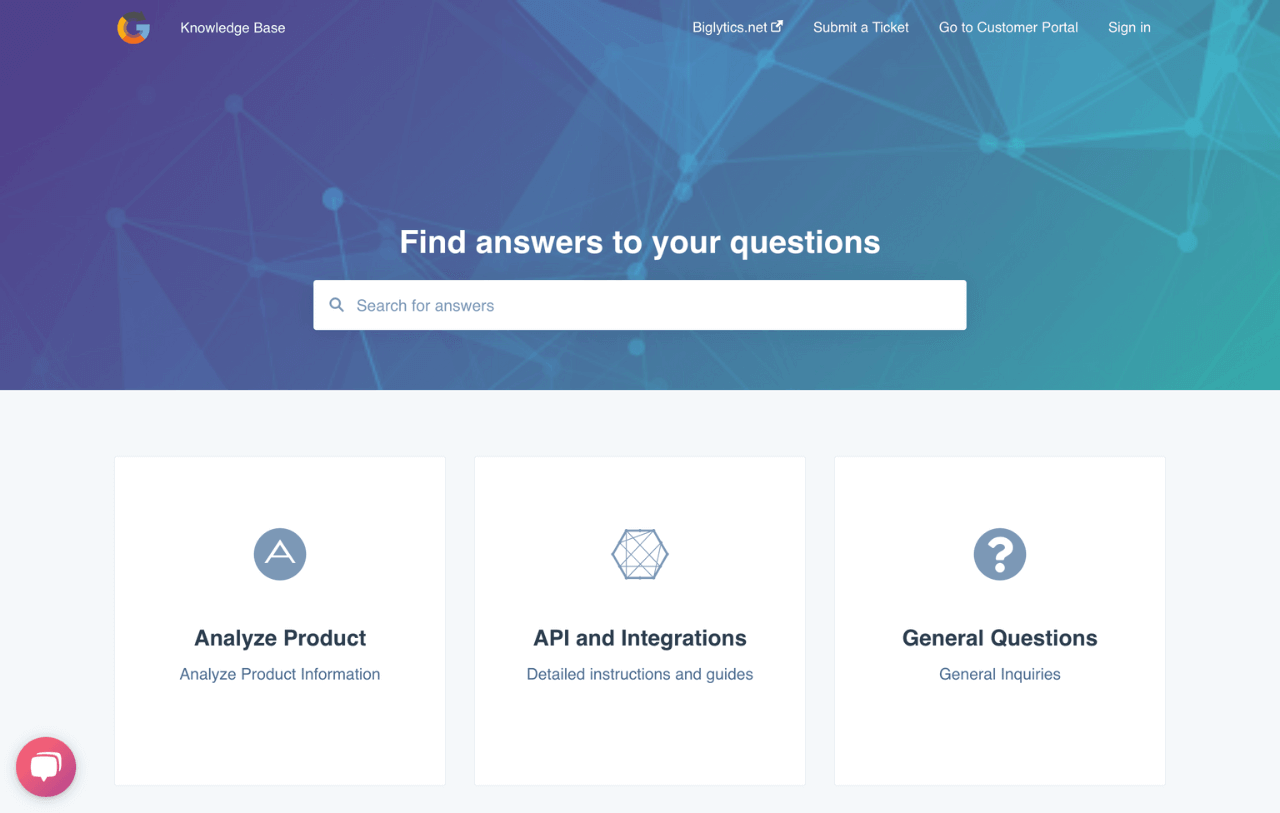
HubSpot's Knowledge Base Software
Enable customers to get answers quickly with a searchable knowledge base built from common support questions.
- Create self-serve help articles that are optimized for search
- Make it easy to browse knowledge base articles by topic
- Improve knowledge base content and fill gaps with insights
- And more!
2. Guru
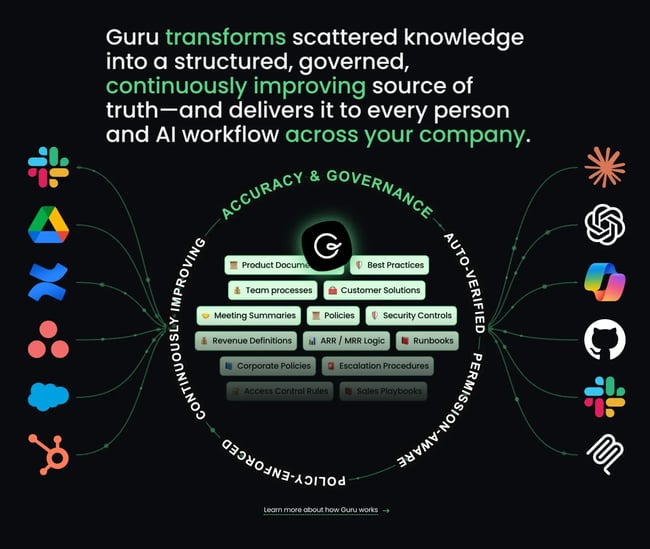
Best for: Teams looking to consolidate and verify knowledge across multiple enterprise tools.
Guru is an enterprise AI knowledge management platform. It serves as a governed knowledge layer and an AI-powered knowledge base designed to consolidate disparate information across the tools a team uses, such as Slack, GitHub, HubSpot, Google Drive, and Microsoft Teams. Guru integrates with 100+ enterprise tools and features a Model Context Protocol (MCP) server that connects directly to AI tools like Claude Code and Codex.
What differentiates Guru from other knowledge base tools is its focus on governance and accuracy. It automatically detects conflicting versions of content, merges duplicates, and flags stale or outdated pages. Guru also guards against AI hallucinations with a dedicated verification system that ensures its tools draw on accurate, governed company knowledge.
What I like: Guru allows teams to configure separate knowledge agents for each department. For example, an IT support knowledge agent can be tuned specifically to internal IT knowledge and expertise, while a separate agent is dedicated to support team operations.
Pricing: Available upon request.
3. Confluence
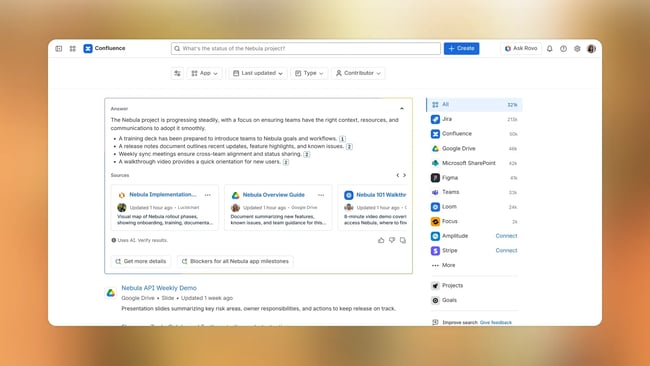
Best for: Structured documentation in technical or cross-functional teams that require deep collaboration features.
Confluence, by Atlassian, is more than a knowledge base. It’s a collaborative workspace designed to support the full arc of work, from early ideation through documentation and implementation. Rovo, Atlassian’s AI assistant, powers search, generates and reformats content, summarizes pages and comments, and runs AI agents to automate work across the platform.
For creating documentation, Confluence supports multiple content types, including live documents, pages, databases, and videos via Loom integration. Ready-to-use templates cover common deliverables like product requirements, briefs, and implementation plans.
What I like: Confluence integrates natively with other Atlassian tools like Jira and Trello, enabling teams to create an all-encompassing productivity, ticketing, collaboration, and knowledge management solution that automatically stays up to date.
- Free plan: Free forever for 10 users
- Standard: $680 per year for up to 10 users
- Premium: $1,300 per year for up to 10 users
- Enterprise: Custom pricing (available for 801+ users)
4. Tettra
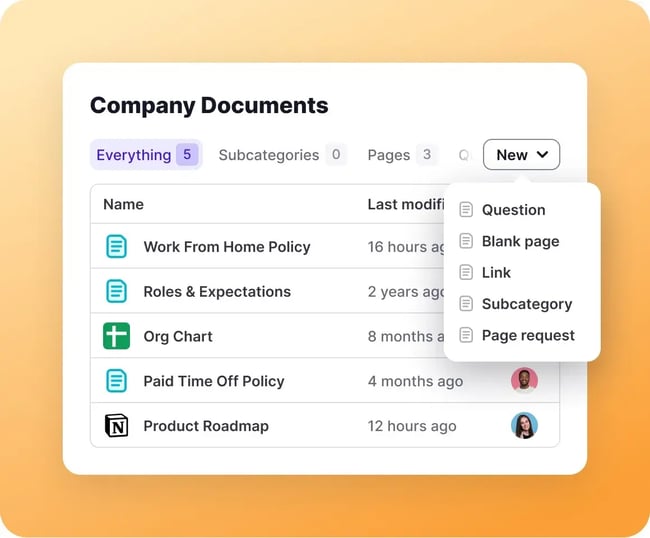
Best for: Fast-growing teams that use Slack heavily and want to keep knowledge updated automatically and get accurate answers directly in chat.
Tettra is an AI-enabled knowledge management tool that is clean, fast, and purpose-built for internal documentation. Tettra makes it easy to create new documentation with its simple editor and can also ingest existing Google Docs and Markdown files to build a knowledge base. It also has AI-powered tagging and search, making it easier for employees to find the documents they’re looking for. Teams can publish any individual document or knowledge category as a standalone public website to share with customers or clients.
Tettra also features a Slack integration that can automatically answer questions in Slack and write and update knowledge base articles based on the conversations teams are already having.
What I like: Tettra is a focused, simple knowledge base solution. Other tools on this list, like Confluence, differentiate themselves with a host of additional collaboration features that turn their tools into entire workspace platforms. Tettra doesn’t try to do that. It’s a simple, clean, and easy-to-use knowledge platform that plugs right into a company’s existing tech stack.
Pricing
- Scaling: $8/mo/seat - 10 user minimum (billed annually)
- Enterprise: Custom pricing
5. Iorad

Best for: Teams that want to turn software walkthroughs and multi-step processes into interactive, hands-on tutorials.
Iorad isn’t a traditional knowledge base platform. Instead, it’s a specific tool that helps teams create interactive tutorials in seconds. Teams can upload screen recordings of key processes or product walkthroughs, and Iorad turns them into interactive tutorials. Users can click around and enter text in the fields to learn how to use a product or complete an internal process in a hands-on way.
Using the Iorad and HubSpot integration, knowledge base managers can embed interactive tutorials directly within HubSpot knowledge base articles.
What I like: I’m the kind of person who learns by doing rather than just reading, so I like that Iorad creates interactive tutorials where users can perform a process firsthand rather than just read a document. It’s not a replacement for a knowledge base platform, but it’s a tool that can enhance existing knowledge documentation, onboarding, and even external customer walkthroughs and guides.
Pricing
- Individual: $200/mo for one user
- Team: $500/mo base, plus $50/mo per additional creator
Frequently Asked Questions About Internal Knowledge Bases
What is an example of an internal knowledge base?
An internal knowledge base is a centralized library where employees store, find, and share company information. An example of an internal knowledge base is a company-wide employee wiki that stores all company documentation, including onboarding guides, HR policies, and troubleshooting articles, in a single searchable location. Examples of internal knowledge base platforms include HubSpot Knowledge Base Software, Guru, and Confluence.
What are the four pillars of knowledge management?
Knowledge management is organized around four pillars: people, process, technology, and governance. People are the employees who contribute to and maintain the knowledge base. Process covers the repeatable steps for creating, updating, and organizing content. Technology is the platform that houses it all. Governance defines the ownership, permissions, and standards that keep content accurate and current. AI-powered knowledge base tools are beginning to automate parts of the process and governance pillars, handling tasks like drafting articles from resolved tickets and flagging stale content, freeing teams to focus on work that requires human judgment.
What’s the difference between an internal and external knowledge base?
The difference lies in the audience. An internal knowledge base serves employees and is private. An external knowledge base serves customers and prospects and is publicly available. They also differ in content: internal knowledge bases house operating procedures and HR policies, while external ones contain help articles and product documentation. Despite these differences, both types often share the same platform and can contain overlapping content.
Build and rebuild your knowledge base.
The best internal knowledge base is not the one with the most articles. It is the one employees actually rely on. A small, well-organized knowledge base full of current information beats a sprawling library of outdated documents every time.
Start with the problems employees run into most and the information they request most frequently. When a knowledge base is built around what employees actually need, adoption comes naturally, and the Slack pings and inbox searches that pull people away from their work start to disappear.
Editor’s note: This post was originally published in August 2020 and has been updated for comprehensiveness.
Customer Support Strategy & Planning Template
Outline your company's customer support strategy with this free template.
- Customer Support Vision
- Team Structure & Hiring Plan
- Support Process
- And More!
Download Free
All fields are required.
Form not available
Knowledge Base








![20 Crystal-clear FAQ page examples [+ How to make your own]](https://53.fs1.hubspotusercontent-na1.net/hubfs/53/faq-page-examples-1-20250505-1619995.webp)