

This guide will break down the best interactive content tools, the features that matter most, and how to choose the right platform for your business so your website can start engaging your audience with interactive content more effectively.
Table of Contents
- What are interactive content tools?
- Do you need interactive content on your website?
- Features to Look for in Interactive Content Software
- Best Interactive Content Tools
- How to Create Interactive Content Without Developers
- Frequently Asked Questions About Interactive Content Tools
What are interactive content tools?
Interactive content tools are software that allow businesses to create dynamic, user-driven experiences on their websites. Interactive content tools enable the creation of quizzes, calculators, assessments, polls, interactive graphics, and videos. Instead of passively consuming information, visitors can actively participate by answering questions, clicking through scenarios, submitting inputs, exploring visual elements, or engaging in other interactions.
Some interactive content examples include the following:
- Quizzes
- Polls
- Calculators
- Assessments
- Infographics with interactive elements
- Product recommenders
- Surveys
- Virtual/augmented reality experiences
- Contests
- Maps
- Timelines
- Simple games
- Stories
Unlike traditional static content (like basic blog posts or landing pages), interactive content adapts based on user behavior. For marketers and website owners, interactive website content tools can create more engaging user experiences while helping to more effectively collect insights, qualify leads, and personalize experiences in real time.
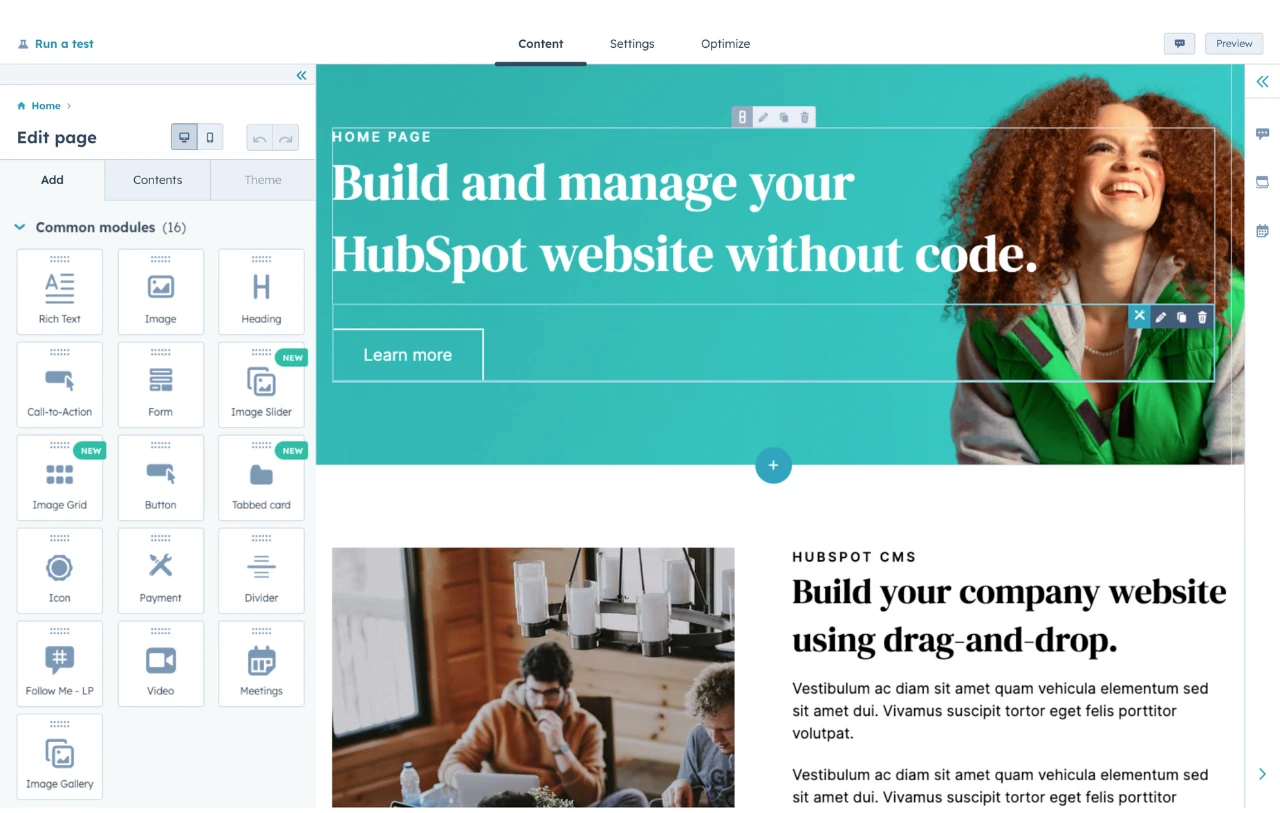
HubSpot's Free Website Builder
Create and customize your own business website with an easy drag-and-drop website builder.
- Build a website without any coding skills.
- Pre-built themes and templates.
- Built-in marketing tools and features.
- And more!
Do you need interactive content on your website?
If a website’s primary job is to generate leads or revenue, interactive content can be a competitive advantage. Static pages inform; interactive experiences engage. Interactive content improves lead quality and engagement rates.
Quizzes, calculators, and assessments encourage visitors to actively participate, naturally increasing time on page, reducing bounce rates, and creating stronger intent signals. When users invest effort into an experience, they’re far more likely to convert, share their information, or move further down the funnel.
For example, a visitor who has already invested time into using a quote builder or product recommender will be more likely to make a purchase, or at least provide their contact information.
More importantly, interactive content can move a website beyond being a static content delivery platform and turn it into something that can more easily generate business results. Instead of guessing what visitors want, businesses can collect first-party data, personalize next steps, and connect insights directly to their CRM.
Features to Look for in Interactive Content Software
The best interactive content tools share a core set of capabilities that make it easier to build, publish, and measure interactive experiences without developer support:
- No-code content builder. No-code interactive content tools allow marketers to build and launch assets without developers. Tools must offer some type of no-code builder so that marketing teams and other non-technical users can create interactive content on their own. Pre-made templates can also make it easy for non-technical users to build content.
- Responsive and mobile-friendly interactive elements. It’s important that visitors can easily engage with interactive content, whether they’re browsing on a smartphone or a computer. Basic responsiveness isn’t enough. The tool should offer a good user experience on all devices.
- Lead capture and CRM integration. The best interactive content tools integrate with CMS, CRM, and marketing automation platforms. For teams looking to use interactive content to drive conversions, it’s essential that the tool supports lead capture and integrates with well-known CRMs like HubSpot CRM.
- Logic options for personalization. Conditional logic (e.g., “show result A if user answers X”) and branching paths help content teams personalize the interactive experience to each respondent, increasing relevance and conversions.
- Analytics and reporting. Data on completion rates, drop-offs, and answers helps content teams measure performance and refine interactive content strategy. Easy data export can also help teams integrate interactive content data with other analytics sources.
- Custom branding and styling. To create a more cohesive experience, tools must allow for business branding and styling. Note that free interactive content tools will often include their own branding and typically require businesses to pay to remove it.
- Flexible embed options. The tool should offer flexible embed options such as JavaScript, iframes, or native integrations. For teams managing multiple types of interactive assets across pages and campaigns, having a centralized system for content creation and publishing becomes increasingly important. HubSpot Content Hub centralizes creation, brand governance, and publishing of interactive content.
- A/B testing support. A/B testing can help marketers and content strategists optimize individual pieces of interactive content and find which configuration drives the most engagement and conversions.
Best Interactive Content Tools
While there are a lot of great interactive content creation tools, I decided to narrow down the list to these seven options.
When curating this list, I focused on tools that help with different types of interactive content, rather than just offering different variations on creating the same types of interactive content.
1. Convert Calculator

Convert Calculator is a no-code interactive content tool that businesses can use to create all kinds of calculators. The options include basic interactive calculators, as well as more specific use cases such as price quote tools, product configurations, lead generation, and more.
As the name suggests, Convert Calculator emphasizes marketing and using calculators to improve conversions, a key feature that helps differentiate it from more generic calculator creators.
For example, businesses can easily integrate their calculators with the HubSpot CRM and CMS, enabling them to use calculators as an effective lead-generation tool.
Key Features
- No-code builder: Even non-technical content teams can easily create simple or complex calculators using 32+ different question, layout, element, and result types.
- Flexible use cases: Convert Calculator can handle pretty much any calculation-based use case, including interactive calculators, price quotes, product configurators, and more.
- Branching logic: It’s easy to adjust the calculator based on visitors’ answers, enabling more personalized, interactive experiences.
- Sync leads to CRMs: Businesses that are using calculators for lead generation can automatically sync form submissions to supported CRMs, which include a dedicated integration for HubSpot’s CRM.
- Easy website embed: The tool supports embeds via iframe or script. This means it should work with virtually all website builders, including HubSpot Content Hub.
- Built-in analytics: Convert Calculator includes built-in analytics and reports to help teams optimize their calculators.
Pricing
- Free plan: Up to 100 calculator visits per month.
- Hobby: $20/month for up to 2,000 calculator visits.
- Pro: $40/month for 10,000 visits.
- Premium: $100/month for 50,000 visits.
- Platinum: $200/month for up to 300,000 visits.
Note: Businesses that want to use Convert Calculator for lead generation (including integrating with HubSpot) will need at least the Pro plan. The free and Hobby plans let businesses create interactive calculators, but they do not allow visitors to actually submit form data (which is required for lead generation).
Best For
Convert Calculator is an excellent option for content teams that want to create more advanced interactive calculators. While most form tools can handle basic calculators, Convert Calculator excels at handling more unique cases with custom calculations and information. It can also sync form submissions directly to the HubSpot CRM, which makes it a great option for using calculators as a lead generation tool.
2. Mapme
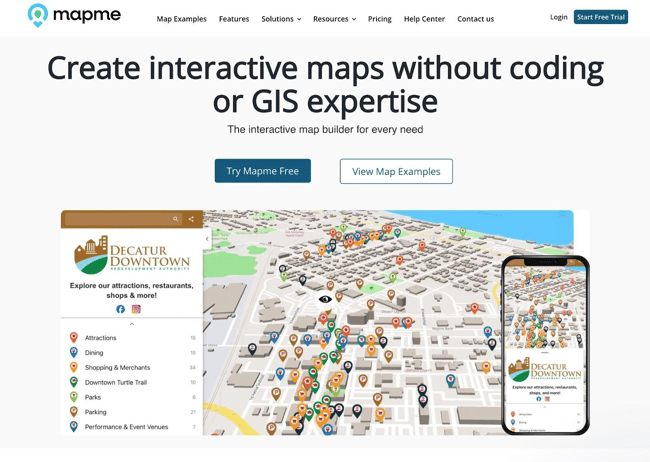
Mapme is a no-code solution that helps content teams easily create interactive map experiences. In addition to the map itself, Mapme also makes it easy to embed rich media for more immersive experiences, including images, video, 360° views, and full virtual reality (VR) experiences.
While something basic like Google Maps can work fine for simple embeds, Mapme really stands out for the many options it offers content teams for embedding rich media and CTAs within the map.
Key Features
- Non-technical setup process: Mapme makes it easy for content teams and marketers to create interactive maps without requiring any technical knowledge or GIS expertise (geographic information system).
- Easy website embeds: Mapme should work with any website builder or CMS, including HubSpot Content Hub. It offers simple iframe embeds that will work with virtually any platform.
- Flexible map options: Mapme supports a variety of map styles and options.
- Style and branding customization: Mapme makes it easy for content teams to customize the branding, style, and layout of the map.
- Conversion tools: Mapme lets content teams add calls-to-action (CTAs) to drive conversions, such as lead generation, payments, bookings, and other actions.
- Built-in analytics: Mapme includes built-in analytics to track engagement (map views, category clicks, etc.) and conversions (e.g., clicks on CTAs). It can also combine general website analytics with map-specific data.
Pricing
Mapme offers a 14-day free trial.
- Starter: From $30 per month for up to 30 locations.
- Professional: From $55 per month for up to 300 locations.
- Expert: From $110 per month for up to 500 locations.
- Enterprise: Customer pricing.
All of the prices above are for a single published map. Prices go up from there to create additional maps. However, the price increases are not linear. For example, the Starter plan costs $30 per month for one map but only $36 per month for two maps. The per-map prices go down even further as the quantity increases.
Best For
Mapme is a great option for creating any type of interactive map. While there are free tools that can work fine for basic maps, Mapme excels at making map embeds more interactive and engaging. It also includes tools to help content teams use maps to drive conversions, including CTAs and analytics.
Because it uses easy iframe embeds, Mapme will work with any website platform, including HubSpot Content Hub.
3. Typeform
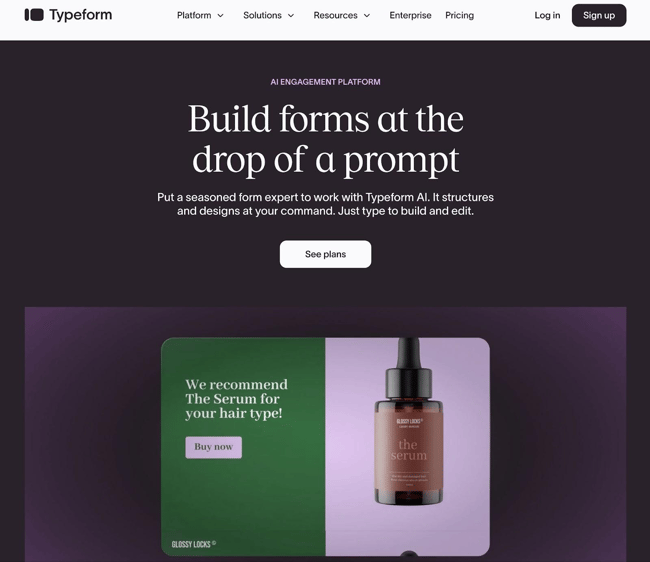
Typeform is a form builder tool that teams can use for all kinds of form-based interactive content, including quizzes, product recommenders, polls, and even lightweight calculators.
What differentiates Typeform from other form builder tools is that it uses a unique conversational interface for all of its forms. This creates a more engaging and interactive experience for visitors as compared to a traditional web form.
Key Features
- Conversational form interface: This interface is a major part of what makes Typeform unique compared to other form-building tools.
- Non-technical form setup: In addition to a no-code form builder, Typeform also includes AI tools to help content teams create interactive forms using AI.
- Video form support: Beyond text-based conversational forms, Typeform also supports embedding interactive videos as part of forms.
- HubSpot CRM integration: Typeform offers a dedicated integration with HubSpot CRM, making it easy to use for interactive lead-generation forms.
- Easy website embeds: Typeform is easy to embed in virtually any website builder or CMS, including HubSpot Content Hub.
- Built-in analytics and reports: Typeform includes built-in analytics to help content teams discover which forms are most engaging for visitors and even where visitors drop off during form completion.
HubSpot's Free Website Builder
Create and customize your own business website with an easy drag-and-drop website builder.
- Build a website without any coding skills.
- Pre-built themes and templates.
- Built-in marketing tools and features.
- And more!
Pricing
- Basic: From $28/month.
- Plus: From $56/month.
- Business: From $91/month.
- Enterprise: Custom pricing.
Typeform has a free plan, but with pretty strict limits on functionality and the number of form responses per month. While it’s a good option for letting teams test the product, it probably won’t work for content teams that are serious about setting up interactive content.
Best For
Typeform is a great option for content teams that want to use its unique conversational form interface to create all kinds of interactive form content. It also works well with HubSpot, as teams can easily embed forms in HubSpot Content Hub, and Typeform also integrates with HubSpot’s CRM to save leads directly.
4. Riddle
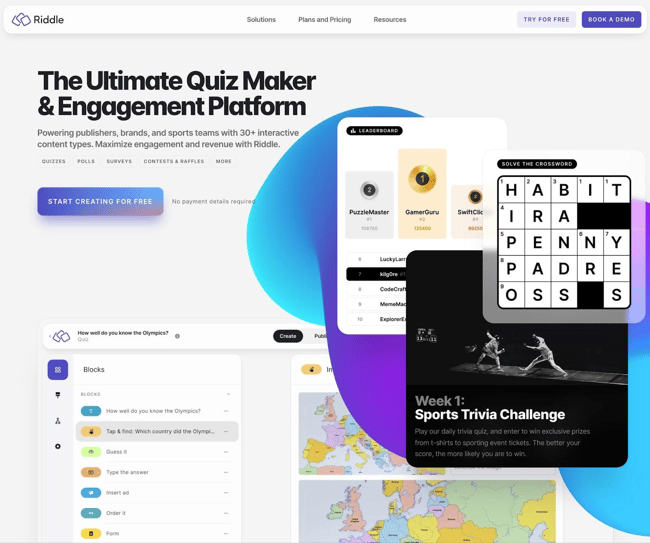
Riddle is an interactive content tool that helps content teams create all different kinds of quizzes, polls, and surveys. It stands out from other more generic quiz maker tools by including forms and other ways to collect users’ email addresses and other types of first-party data.
In total, Riddle supports more than 15 different interactive content formats, which makes it a versatile option for teams looking to engage visitors in different ways.
It also makes it easy for teams to save leads and visitor data to third-party CRMs, including the HubSpot CRM. Flexible embed options also allow it to work on different website platforms, including HubSpot Content Hub.
Key Features
- Support for multiple types of interactive content: Riddle can work for all types of quizzes (personality quizzes, trivia, etc.), simple polls, surveys, predictions, mini games, product recommendations, and more. In total, it supports 15+ different interactive formats.
- No-code builder: Riddle offers a simple no-code builder that makes it easy for content teams and other non-technical users to create interactive content.
- Lead generation focus: Riddle includes built-in forms and other tools to help businesses use their interactive content to generate leads and collect first-party data about users.
- HubSpot integration: Teams can easily integrate Riddle with HubSpot using third-party automation services like Zapier or Integrately. While Riddle doesn’t currently offer a direct integration, its built-in support for automation platforms makes it easy to save leads to HubSpot CRM.
- White-label branding/styling: Excluding the entry-level plan, all of Riddle’s other plans allow teams to use their own branding and styling for all of the interactive elements.
- Flexible embed options: Riddle works with pretty much all website-building platforms thanks to its flexible embed code, including HubSpot Content Hub. For WordPress users, Riddle also offers a dedicated WordPress plugin.
Pricing
Riddle offers a full-featured 14-day free trial that teams can use to test the platform.
Starting prices below; prices go up if teams want to add more users and/or domain names.
- Starter: From $59/month.
- Pro: From $119/month.
- Business: From $249/month.
- Enterprise: Custom pricing.
Best For
Riddle is great for content teams that want to take their quizzes to the next level. While any form builder can create a basic quiz, Riddle goes above and beyond to deliver an engaging, interactive quiz experience for visitors.
5. Stornaway
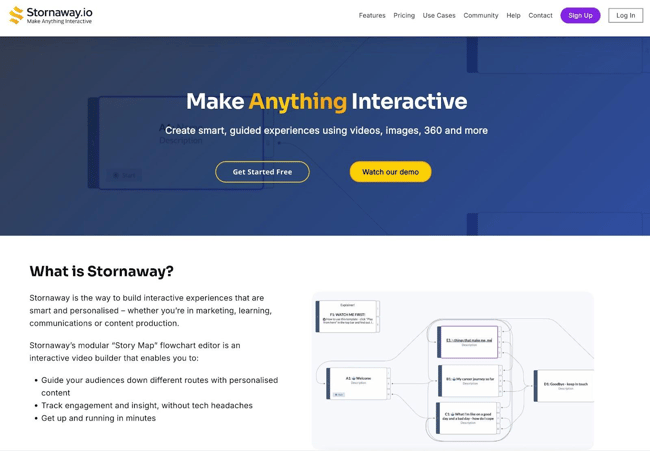
Stornaway is a great option for content teams that want to create interactive content based on videos or other more immersive content formats. It makes it easy to blend interactive questions and CTAs with videos, images, virtual reality experiences, and more. In their words, it lets teams “Make Anything Interactive,” giving them a lot of flexibility in creating interactive marketing materials.
Content teams can easily create their own story maps using a flow chart editor and a no-code builder.
It’s hard to describe in words — Stornaway’s interactive plan guide does a good job of illustrating what types of interactive content the tool supports.
Key Features
- Unique interactive experience: The way that Stornaway blends videos and user interaction to create stories is unique from a lot of other interactive content tools.
- Non-technical interface: Stornaway’s modular flowchart-based editor makes it easy for even non-technical teams to set up complex interactive stories.
- CRM integration: Stornaway lets content teams sync leads to their CRM, including a direct integration with HubSpot CRM.
- Flexible embed options: While Stornaway does include an option to host stories for brands, it’s also easy to embed Stornaway stories in any website builder, including HubSpot Content Hub.
- Built-in analytics: Stornaway includes built-in analytics for views, watch time, clicks, completions, and other important metrics.
Pricing
Stornaway has a variety of different pricing options, but the basic Editing Plan starts at $25 per month.
To help decide on the right plan, use Stornaway’s interactive plan guide tool or reach out to their support staff.
Best For
Stornaway is a great option for content teams that want to experiment with using videos as part of an interactive experience. The flowchart-based editor makes it easy for content teams to create very unique and personalized interactive experiences.
6. Flourish
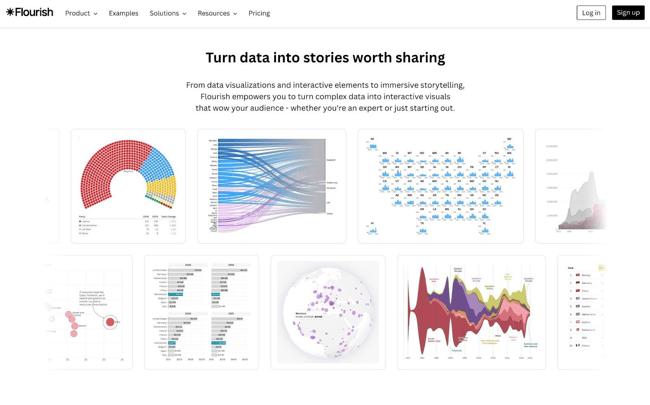
Flourish is a great option for using data presentation to create interactive content. Its headline is “Where data meets storytelling,” and that is indeed a pretty good summary of what it offers.
Content teams can use Flourish to create all kinds of interactive charts and maps. It supports basic visualizations such as bar charts and pie charts, as well as much more complex visualizations such as sankey graphs. The best way to experience Flourish is to check out some of the examples here.
Flourish is owned by Canva, and content teams can access it via Canva Business, though there are also standalone Flourish plans.
Key Features
- Turn data into charts: Flourish makes it easy to turn even complex data into charts. It supports a wide array of both simple and complex chart types.
- No-code setup: Flourish makes it easy for non-technical teams to set up charts. Teams can upload data in various formats and edit it in a spreadsheet-like editor. Higher-tier plans even allow for connecting to a live data source.
- Focus on storytelling: Flourish puts extra emphasis on storytelling, making it especially great for interactive content. This includes functionality such as scrollytelling, interactive presentations, and audio-driven stories.
- Easy code embed: Flourish makes it easy to embed charts in any website builder, including HubSpot Content Hub.
Pricing
- Presenter plan: Included at no extra cost as part of a Canva Business or Enterprise plan, which starts at around $10 per month/user.
- Publisher and Enterprise plans: Custom pricing.
Flourish offers a free plan that teams can use to create fully functional interactive charts. However, it lacks the ability to use custom branding and has some other limitations.
Best For
Flourish is a great option for teams looking to take complex data and display it in an easy-to-understand, interactive format. For teams with access to a lot of unique data (or who use a lot of data in general), it’s a great way to leverage that data to create an interactive experience for visitors.
7. Shorthand

Shorthand is a tool that helps content teams create entire interactive stories.
Instead of adding a single interactive element to a page like some of these other tools, think of it more as a tool to use an entire page to tell a story. TripAdvisor’s 2025 Transparency Report is a great example of this idea (and it was built with Shorthand). There are many other examples in Shorthand’s gallery.
Most importantly, Shorthand lets content teams create these interactive stories without needing to involve developers.
Key Features
- No-code story builder: Even non-technical content teams can create interactive stories.
- Assistive tools: Shorthand also includes pre-built templates, along with AI-powered layouts.
- Custom branding: Shorthand lets teams add their own branding and styling.
- Flexible embed options: While Shorthand can host the stories, it also makes it easy for teams to embed stories in virtually any website builder, including HubSpot Content Hub. Teams can self-host the entire story or embed it using a code snippet.
- Built-in analytics: In addition to its own built-in analytics, Shorthand also makes it easy for teams to add their own tracking snippets for tools like Google Analytics or others.
- Lead generation support: Shorthand lets content teams embed lead generation forms from a variety of tools, including HubSpot’s form builder
Pricing
- Starter: From $50/month.
- Team: From $700/month.
- Business: From $1,400/month.
- Enterprise: Custom pricing.
Best For
Shorthand is a great option for content teams that want to create entire interactive stories, rather than just adding a single interactive element to an otherwise static page. For content teams that want to access this level of storytelling without needing to ask a developer for help, Shorthand could be a great option.
How to Create Interactive Content Without Developers
Content teams don’t need access to developers to launch high-converting quizzes, calculators, or assessments. Most modern interactive content tools are built specifically for marketers and non-technical teams, including all of the tools curated above.
Here’s a step-by-step process teams can follow.
1. Define the business goal first.
Before choosing a tool, teams should clarify the outcome they want:
- Improved engagement with content?
- Lead generation?
- Product qualification?
- Sales enablement?
- Audience segmentation?
The goal determines both the format and the tool. Different business outcomes call for different types of interactive content:
- Use a quiz or assessment if you want to segment leads.
- Use a calculator if you want to demonstrate ROI.
- Use a poll or survey if you want quick engagement and insights.
2. Choose the right no-code tool.
Different tools excel at different formats, and the right choice depends on the type of interactive experience the team wants to create:
- Quiz and assessment builders (Typeform, Riddle, etc.) work great for lead magnets, personality quizzes, segmentation, etc.
- Calculators (Convert Calculator, Typeform, etc.) work well for ROI tools and cost estimators.
- Storytelling tools (Stornaway, Shorthand, etc.) work great for general audience engagement.
For teams where CRM integration and automation are a priority, the platform should also connect directly to the existing marketing stack.
3. Map the user journey.
If a team is creating interactive content such as quizzes or calculators, they should map out the user journey before going further:
- Entry point (blog post, landing page, homepage)
- Questions or inputs
- Branching logic (if applicable)
- Result or recommendation
- Follow-up action (CTA)
Most tools include visual logic builders that make this easy.
4. Build (prioritize using templates when available).
Now, it’s time to build interactive content. All of the tools above include no-code builders to make that happen. Most tools also offer pre-built templates for:
- ROI calculators
- Product match quizzes
- Lead generation assessments
- Pricing estimators
Many teams are also starting to incorporate AI into this stage to speed up ideation, content generation, and workflow automation. HubSpot Breeze AI accelerates AI-powered ideation and workflow for interactive content.
When available, templates can be great for speeding things up and reducing the technical burden of creating interactive content. Start with a template and customize:
- Branding (colors, fonts, logos)
- Questions and answer options
- Scoring logic
- Results page messaging
- Call-to-action
If a team is using interactive content for lead generation, they’ll also want to set up an integration to sync leads directly to their CRM.
5. Optimize for performance and UX.
Embedding interactive content can affect page speed if not implemented carefully. To protect website performance, follow these technical best practices:
- Use asynchronous embed scripts.
- Enable lazy loading if available.
- Keep media lightweight.
- Test mobile responsiveness.
Testing page performance before and after embedding interactive content will help flag any issues early. Beyond technical performance, teams should also track how visitors are actually engaging with the content itself:
- Completion rate
- Drop-off points
- Conversion rate
- Average time on interaction
Small tweaks to question flow or result messaging can significantly improve performance. Some interactive content tools also include A/B testing to help marketers further optimize for engagement and conversions.
Frequently Asked Questions About Interactive Content Tools
Do interactive content tools slow down my site?
They can — but only if implemented poorly. Heavy scripts, unoptimized embeds, or tools that load large external assets can negatively impact page speed. However, most modern interactive content platforms use asynchronous loading and lightweight embeds, which can eliminate or at least minimize any performance issues.
Performance and accessibility best practices include lazy-loading, keyboard navigation, alt text, and structured data. To further protect performance, choose tools that support CDN delivery and script optimization. Also, monitor Core Web Vitals and other performance metrics after implementation. When done correctly, interactive content often improves overall website performance metrics like time on page and bounce rate — which can offset minor load differences.
Which interactive content formats work best for B2B?
For B2B, formats that tie directly to business value perform best. Examples of effective B2B interactive content formats include:
- ROI calculators
- Cost-savings estimators
- Product fit assessments
- Maturity or benchmarking quizzes
- Solution recommendation tools
A well-built calculator or assessment can double as both a lead magnet and a sales enablement asset by qualifying prospects before they talk to the sales team.
Do I need a developer to build a calculator or assessment?
In most cases, no. Modern interactive content tools include drag-and-drop builders and formula editors that make it easy for marketers and content teams to create interactive content without requiring any special technical knowledge.
Generally, content teams only need help from a developer if they require advanced API integrations, highly custom UI components, or complex backend logic. But for most marketing use cases — including conditional logic, scoring systems, and CRM syncing — most interactive content tools are built for non-technical teams.
How do I prove ROI to my leadership team?
ROI of interactive content is measured by micro-conversions, macro-conversions, and CRM-attributed pipeline. Marketers and content teams can start proving ROI by tying interactive content to measurable KPIs: lead conversion rate, qualified lead volume, sales pipeline contribution, and engagement metrics like completion rate.
For example, compare a static ebook landing page to an interactive quiz landing page. If the quiz increases conversions from 2% to 6%, that’s a 3x lift in lead generation from the same traffic source.
How do I ensure accessibility and compliance?
Look for tools that support WCAG accessibility standards, including keyboard navigation, screen reader compatibility, and proper color contrast. Accessibility is especially important for assessments and quizzes, where form usability directly affects completion rates.
For compliance (such as GDPR or CCPA), ensure the tool supports consent checkboxes, data storage controls, and secure CRM integrations. For businesses in regulated industries, teams should confirm data processing agreements (DPAs) and hosting policies before deploying new interactive content tools.
Get started with interactive content tools today.
In addition to just generally creating more engaging experiences, interactive content is also an effective way to achieve more measurable business goals. Quizzes, calculators, assessments, and interactive visuals increase time on page, reduce bounce rates, capture higher-quality leads, and provide first-party data that marketers can use for smarter segmentation and follow-up.
Better yet, quality interactive content tools don’t require any special technical knowledge, which means that content and marketing teams can implement interactive content without requiring developer resources. All of the tools on this list can also easily integrate with existing marketing tools, including HubSpot Content Hub and HubSpot CRM.
In my experience, interactive content tools are worth testing out, as interactive content can be effective for both B2C and B2B businesses. Start small with one or two tools on this list that you find interesting, and then expand beyond that as needed.
HubSpot's Free Website Builder
Create and customize your own business website with an easy drag-and-drop website builder.
- Build a website without any coding skills.
- Pre-built themes and templates.
- Built-in marketing tools and features.
- And more!
Cms