
Thankfully, link building strategies aren't as tough to implement as many people say they are. Think of it like social media — if you’re a source of great content, and you get it in front of the right people, they’re going to share it.
With that in mind, we'll get you started with tested and effective tricks to help you build legitimate inbound links. Read on to see how to use these link building ideas in your SEO strategy.

What is link building?
Link building is the process of increasing the quantity and quality of inbound links to your website to gain referral traffic, boost domain authority, and increase search engine rankings.
What are backlinks?
Backlinks, also called inbound links and incoming links, are a form of off-page SEO where you earn links from other websites that direct readers to your own site.
The person receiving the link is the one who refers to a link as a backlink.
Backlinks are different from outbound links (links from your website to another website) and internal links (links from one page on your website to another).
The right backlinks can do two great things for your website:
- They can drive traffic to your website. If someone posts a backlink to your website on their website or blog, their readers might click on it — and you'll benefit from that referral traffic.
- They can help you rank higher in search. Backlinks tell search engines that your website is an authority on a certain subject — so the more backlinks you earn from high-quality, high-authority sites, the better your website will rank in search engine results pages (SERPs).
A good inbound link comes from an authoritative website, and uses natural anchor text. Anchor text is simply the text copy that's hyperlinked. For example, if I link to our blog post about backlink strategies, the anchor text is "backlink strategies.”
Natural anchor text means you're not just hyperlinking keywords left and right. Google understands the context of a link, so more generic "learn more" and "click here" anchor text can be just as valuable as keyword-optimized anchor text.
For an inside look into how Glassdoor successfully utilized backlinking to rise to the top of the search pages, check out our video case study.
Link Building Strategies
- Maintain a steady blog with great content.
- Link to other blogs on your blog.
- Write guest blog posts.
- Curate and publish helpful resource lists.
- Do expert roundups to build relationships.
- Write newsjack posts.
- Create case studies about your most impressive clients.
- Volunteer to be the subject of a case study.
- Administer surveys.
- Write book reviews.
- Conduct free webinars and post archived copies online.
- Create free tools.
- Create shareable templates.
- Create compelling infographics.
- Create other forms of visual content.
- Create SlideShare presentations.
- Do something funny.
- Write press releases about interesting company news.
- Send out a joint press release when your news involves another company.
- Do some outreach when you have big news or a great piece of content.
- Set up press request alerts and look for opportunities to send quotes.
- Write and pitch op-ed articles.
- Partner with companies in complementary industries.
- Do some co-marketing.
- Ask for reviews.
- Make friends with other webmasters in real life.
- Search for and monitor mentions of your brand.
- Identify broken links through site-crawling tools.
- Search for and monitor your competitors' backlinks.
- Incorporate 'Tweet This' links into your content.
- Install social sharing widgets.
- Sponsor or speak at an event.
- Help another webmaster fix an error on their site.
- Give away free trials and sneak-peeks of your product.
1. Maintain a steady blog with great content.
Consistently creating great blog content that people naturally want to link to is one of the most tried and true ways to organically generate inbound links.
You should publish content that’s directly related to your industry and that helps your reader. That way, they feel compelled to share it. They might even link to it from their own website, if they own one.
Learn how to start a successful blog with our free guide and checklist.
2. Link to other blogs on your blog.
A blog is meant to be a social tool. The more you link to others — especially when you do it in a consistent, opportunity-driven way — the greater likelihood one of those bloggers will return the favor.
Plus, you can't cover everything about everything on your blog. It makes sense to leverage the wealth of resources on the web to make your blog's experience better and more rewarding for your readers.
3. Write guest blog posts.
Write a great blog post, and shop it around to blogs it'd be a good fit for. If one accepts, they should be willing to give you an inbound link insertions the post. Guest blogging is a great way to both promote your expertise and earn quality white-hat links.
Don't know whom to write for? Most media outlets allow people to submit original articles on topics relevant to their readership. You should start, however, with publications directly in your niche. If you’re a branding agency, you might inquire with branding publications.
4. Curate and publish helpful resource lists.
Resource lists are both great link bait and helpful content for your readers. If you create a comprehensive resource list, it'll be easy for other bloggers to link to it in their own posts instead of rehashing and curating all that content themselves. To give you an idea of what one might look like, here's an example of a list of resources we curated for beginner SEO’s.
5. Do expert roundups to build relationships.
Expert roundups can be a great tool for building relationships with influencers. While these roundups may not get you a lot of inbound links or leads right away, building relationships with influencers will help you get solid backlinks from authoritative sources down the line.
After they contribute to your roundup, you can reach out to them later to ask about a guest post opportunity or something else — while thanking them again for contributing to the previous expert roundup.
In one of our expert roundups, we reached out to successful marketers and asked them to share their top content marketing tips.
6. Write newsjack posts.
Newsjacking is when you capitalize on the popularity of a news story to amplify your own sales and marketing success. If you're the first blogger to comment on a news event, you'll rise to the top of the SERPs due to the "freshness" component of Google's algorithm, and others will link to your content in their own accounts of the story.
If you’re not sure what newsjacking can look like, take a look at a few newsjacking examples we found across the web.
7. Create case studies about your most impressive clients.
If you make your clients look good in case studies about their business, you can bet they'll be linking to your site. But you've got to make them good. This means choosing companies that have seen the best results, are enthusiastic, and know your product or service well.
It also means asking the right questions and laying out the case study in an attractive, comprehensive way.
Download three free case study templates to get you started.
8. Volunteer to be the subject of a case study.
Why not get on the other side of the case study link love? Companies are always looking for customers who are willing to be the subject of a case study. Volunteer your time for one of your major vendors, and get a backlink from the case study once it's published.
9. Administer surveys.
If you conduct research, promise to share the data with others. If you do the data collection and crunching and give some high authority sites access to the findings afterwards, you can bet they'll do some promotion and inbound linking for you to make sure you have a great sample size.
10. Write book reviews.
If you provide a comprehensive review about another author's content, there's a good chance they (and others) will link to it. Here's an example of a book review from our blog, which sums up The Challenger Sale in a five-minute read or less.
11. Conduct free webinars, and post archived copies online.
If it’s informative, your attendees will absolutely share it. One easy way to do this is to turn your PowerPoint presentation slides into a SlideShare presentation, and then embed that presentation into a blog post. You can also embed it into the webinar's landing page so that anyone looking to sign up for a webinar that's already over can check out the presentation.
For an even better shot at backlinks to these archived webinar pages, partner up with another link building company, brand, or influencer for the webinar. Not only do two well-aligned brands make for a powerful presentation, but it'll widen the audience — even after the webinar is over. (Learn tips on creating a webinar in this blog post.)
12. Create free tools.
Remember when I talked about curating and publishing resource lists for your blog? What do you think people include and link to on those resource lists? Free tools are a big one. You can get on the other side of those resource lists by creating free tools that are really helpful for your target customers.
Here at HubSpot, for example, we created Website Grader, a tool that has won links from many agencies, partners, and others in our industry.
13. Create shareable templates.
Like free tools, templates are another thing people will find useful enough to link to. Before you create a template, think about what kind of templates would make people's jobs easier. A designer, for example, might create a library of downloadable business card templates to which others could link to over and over. Bookmarkable content is often the kind of content that gets tons of inbound links.
14. Create compelling infographics.
People absolutely love to share infographics. If you create an original infographic yourself, people will link back to you as the original source. To increase the likelihood of an inbound link, you might also share your design with the sources you cited, and make the embed code for your infographic easily accessible.
Not a designer? Anyone can create professional-looking, high-quality infographics — and quickly with templates like these free infographic templates. Before creating an infographic, you’ll want to come up with a topic that can actually be visualized and that relates to your industry.
15. Create other forms of visual content.
Cartoons, content visualizations, charts and graphs, and the like are an important part of a visual content marketing strategy and a great way to win inbound links. Since they take time and money to make, others will probably skip the fuss of creating their own visual content and link to yours instead.
You can use free online design tools to create your own graphics, regardless of how tech-savvy you are.
16. Create SlideShare presentations.
Slice one of your infographics into pieces or repurpose one from your last speaking gig. You can put these up on your blog, in your website's resource center, or even on a SlideShare account for more links.
Keep in mind that the most shareable presentations are the ones that are the most compelling. That means great content and great design. Read this blog post for a start-to-finish guide on nailing your next PowerPoint presentation.
17. Do something funny.
Funny things spread like wildfire. Think about the funny inside jokes in your industry, and capitalize on it with some humorous content that's linkable. You can create a meme, a short video, or a tweet that captures the joke. Just be careful that you understand your audience and how they're likely to respond so that nothing is taken offensively.
18. Write press releases about interesting company news.
By turning your PR strategy into an inbound one, you create opportunities that weren’t there before and carve out a place for your company, building meaningful mindshare in the process with your target audiences.
Once you write a great press release, post it up on your website and then push out your releases to one of the big newswires to get more coverage.
Download our inbound press release templates for free.
19. Send out a joint press release when your news involves another company.
This can help reach thousands of other related sites that, in a press release about just your company, may not have linked to your site. This will give you a chance to reach a larger number of people — and get more backlinks as a result.
20. Do some outreach when you have big news or a great piece of content.
Gaining attention from the press and getting published in industry publications can help you build your brand, increase your visible expertise, improve your credibility, and, of course, get backlinks from authoritative sources.
First, create a dedicated page about the story on your website for them to link to. Then, reach out to a handful of journalists and/or publications that you can see really valuing your story. Be sure to give context to your request, follow their rules, write a compelling subject line on your pitch email, and be helpful, not boastful.
21. Set up press request alerts and look for opportunities to send quotes.
Press request alerts are requests for sources of information from journalists. These journalists are constantly looking for quotes from specific people to feature in their article, and there are several mediums they use to send requests and find those quotes.
Here's a list from HubSpot's VP of Marketing Matthew Barby of the services you can sign up for to receive alerts from journalists in your inbox:
- HARO (one of the most popular free services)
- Muck Rack (paid service)
- Gorkana (paid service)
- Source Bottle (free service)
- #JournoRequest (Twitter hashtag used by journalists)
- #PRrequest (Twitter hashtag used by journalists)
Because of the high volume of requests you'll receive, Barby also recommends creating email filters or folders to keep yourself organized.
22. Write and pitch op-ed articles.
If you have an interesting opinion to share and can express it clearly and persuasively in an op-ed article, you could have the opportunity to reach a lot of people, earn recognition for yourself and your organization, and get authoritative backlinks to your website. I find the most effective op-ed articles make a single point, embrace the author's personal voice, and then offer specific recommendations.
Once you write the article, target online versions of industry newspaper and magazine publications for an extremely valuable inbound link.
23. Partner with companies in complementary industries.
It’s common practice for corporate channel partners to link to each other's great content, because they have a vested interest in one another's success.
You might consider assessing how much traffic a partner can drive to your website by taking a look at their overall web presence on Alexa and SimilarWeb. These sites can help get a rough idea of traffic, bounce rates, keywords, and sources people are using to find that site, as well as the next action they take after visiting.
24. Do some co-marketing.
You can also go a step further and build co-marketing partnerships. This means partnering up with another company to promote a piece of content or product and then sharing the results of that promotion. When you leverage the relationship and reach of a partner, you'll get more links and more buzz with less work.
Effective co-marketing doesn't have to be complicated or expensive, either. You can reach out to a similarly-sized brand in another space and pitch the project to them. You can start with something as simple as a few tweets, then build your way up to creating marketing collateral.
25. Ask for reviews.
You can ask users of your product and industry experts or analysts to review new features you're rolling out, for example. Not only will you receive an inbound link, but you'll also get great feedback and strengthen your relationship with those you asked to write reviews.
Don't know where to ask for reviews? Check out our list of the best product review websites for B2B and B2C companies.
26. Make friends with other webmasters in real life.
Strengthening your relationship with other webmasters will open the door for relevant inbound link requests when future opportunities arise, and make it more likely those requests don’t go ignored.
Networking is an unparalleled skill to have. The wider and more open your network, the more opportunities could be unlocked that you didn't even know existed. Here are helpful tips on networking like a pro to get you started. In some cases, it makes sense for your brand to hire an agency to help with white label link building who can provide those connections to other sites.
27. Search for and monitor mentions of your brand.
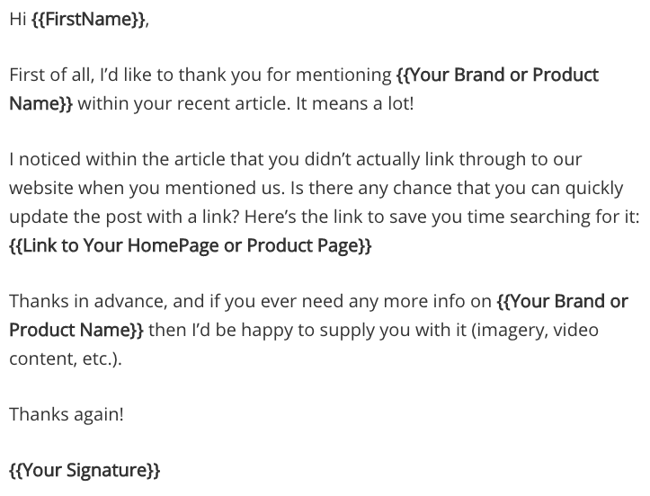
Contact webmasters about turning those mentions into inbound links, but only when it's warranted — like when they're citing data of yours, for example. This is a tactic called "link reclamation.”
Monitor brand mentions by setting up alerts using tools like Mention or BuzzSumo, and adding keywords related to your brand or products. Just make sure you exclude any mentions from your own website within the alert, which you can do in these tools' settings.
Here's an email template for reaching out to ask for a link from our VP of Marketing:
28. Identify broken links through site-crawling tools.
Similar to the step above, some webmasters may link to your site but use old or broken links. This is natural as you change and update your website over time. However, these inbound links are still valuable — and you can update them.
Use tools like Dead Link Checker, Link Juice Recovery Tool, and Screaming Frog to scan for broken links on other websites. Then, using the above template as inspiration, reach out to webmasters with a correct link as replacement.
29. Search for and monitor your competitors' backlinks.
Find opportunities where you can get similar links. This is a great way to find high-value link opportunities fairly easily. Run competitor research weekly or monthly to find new opportunities you can take advantage of while they're still fresh.
Use a link analysis tool like Ahrefs, Majestic, or Moz's Link Explorer to get a list of the backlinks for one of your competitors. Then, check out what types of posts are earning backlinks and benefiting from that off-page SEO.
For example, if one of your competitors is writing guest posts for certain publications, there's a high likelihood those publications would be interested in guest posts from you on similar topics.
30. Incorporate "Tweet This" links into your content.
Part of getting inbound links is getting your content out to the masses. Including "Tweet This" or "Click to Tweet!" links for tweetable nuggets in your content will get people sharing your content socially more often.
The result? Greater visibility in search engines, news feeds, and Twitter streams — and thus more opportunity for your data to be referenced in other people's content.
Here's what one of these links can look like:
Researchers found that colored visuals increase people's willingness to read a piece of content by 80%. [Tweet this stat! ]
You can easily create tweetable links using the ClickToTweet service — without having to learn any custom code.
31. Install social sharing widgets.
Just like "Tweet This" links get your content out there, so do social sharing buttons and widgets. Put them on your marketing content like case studies, whitepapers, ebooks, and blog posts. The more often your site appears on other social media sites, the more likely someone will see it, share it, and link to it from their website.
32. Sponsor or speak at an event.
Events usually give their speakers and sponsors great website publicity. They’ll either list you on their sponsors page or introduce you as a speaker on a blog post. You can also negotiate inbound links into your terms to be sure your time and resources yield a beneficial inbound link.
If you're speaking at an event, make a really awesome, shareable presentation that people will want to find, share, and even link to later.
33. Help another webmaster fix an error on their site.
Remember when I said you should get to know other webmasters? This is another time those connections will come in handy. When you find broken links on others' sites, let them know (politely, of course), and provide them with a piece of your own content that would be a suitable replacement for that broken link. Be personal, friendly, and helpful, and this could be an opportunity to start building a relationship with that webmaster, too.
34. Give away free trials and sneak-peeks of your product.
When people get to see your product beforehand, they will want the world to know they're part of the VIP crowd, and might write a review with a link back to your site about it.
There are a few ways to give away free trials. You could create some call-to-action buttons for your website or blog. (Download these free, customizable CTA templates to help you out.)
You could also send a new product announcement email to folks who you think might be interested, like current customers. If you’re not sure how to announce your product, check out our guide on how to create a great product launch email.
Build Inbound Links the White-Hat Way and Increase Rankings
The days of spamming comment sections and paying for link-building services are over. With the tips and methods I’ve shared, you’re well on your way to building high-quality backlinks the white-hat way. As more links point to your site, you’ll rank much higher in the SERPs, boosting organic traffic and attracting more potential leads and customers.
Editor's Note: This post was originally published in April 2012 and has been updated for freshness, accuracy, and comprehensiveness.
Link Building

.jpg)
-Sep-29-2023-11-40-51-6755-PM.png)




![How to Find & Add Nofollow Links to Your Website [Step by Step]](https://53.fs1.hubspotusercontent-na1.net/hubfs/53/how-to-add-nofollow-links.jpg)