
-1.png)
While this strategy can end up getting marketers the most tested, optimized subject line that will ever reach an inbox, the impact of these tests are minimal compared to all the other things an email marketer could be testing.
This blog post highlights the top email testing tools marketers should try and what to test on them.
Table of Contents
- What is A/B testing in email marketing?
- Email Marketing Tests
- Email Testing Tools
- Frequently Asked Questions About Email Testing Tools
- Conclusion
TL;DR: Testing tools improve emails.
Email testing tools help marketers check how emails render across inboxes and devices, spot spam and deliverability issues, evaluate sender reputation, and improve subject lines before sending. Compare five email testing tools — HubSpot, Litmus, Mail-Tester, Sender Score, and SubjectLine — and learn what to test, including offers, landing pages, segmentation, format, send time, and sender name.
What is A/B testing in email marketing?
A/B testing is when marketers launch and test how engaging two designs are. Marketers send two versions of the same email to a portion of their list, then the software quickly identifies which is most engaging to the earliest recipients and sends that format to the rest of the subscriber list.
A/B testing is a great way to test two different newsletter formats that promote the same content or two newsletters with slightly different design elements, such as different images or types of CTAs. It is important that marketers only test one element at a time so they can be confident in identifying what led to the better performance.
Rather than testing one template repeatedly for a few weeks, followed by another email format test, this testing phase quickly allows marketers to compare two styles and pick a winning template on a limited schedule.
As marketers consider A/B testing or other email experimentation, here are a few vital things they’ll want to test when building out their email marketing strategy.
Email Marketing Tests
1. Test different types of offers in your messages.
Possibly the biggest lever marketers have in their email marketing is not the few words they use to describe the offer, but rather, the offer itself.
Whether marketers are testing two ebooks against each other, or an ebook versus a webinar, this test is bound to get them better results overall. The reason this is particularly important is, while marketers may think their offer is the best thing since the iPod, they may also be wrong.
HubSpot started doing this sort of testing religiously back in the summer of 2010 and saw dramatic results. Instead of taking our email list and sending them all our latest ebook, we would take a smaller portion of the list, split it in half, send them each two different offers, and then send the better performing offer to the (larger) remainder of the list. This testing alone increased our monthly email leads 4-8x instantly.
Here are some more specific offer elements you can consider testing:
- Topic. Do certain offer topics resonate better with the audience? For example, we might test one of our ebooks on Facebook against one of our ebooks on X.
- Format. Which offer format does the list prefer? Do they love webinars? How does that compare to their interest in ebooks, kits, free trials, etc.?
- Length/Size. Does the audience prefer smaller, bite-sized offers like tip sheets, or are they hungry for more, like an 80-page ebook? Try testing longer forms of content versus shorter offers, or one offer versus a set of offers.
- Name of Offer. Sometimes, the way an offer is positioned can make a difference with the audience. Think ebook vs. guide vs. white paper, or fact book vs. slideshow vs. download.
2. Analyze the landing page you’ll be linking.
The goal of an email is not just to get someone to open or click through; it’s also to take some action. For example, to download an offer. So don’t think of the email in a vacuum. Think of it in the context of driving that particular action, which means optimizing where the action takes place: the landing page.
After all, if marketers create this great email that drives lots of clicks to their website but then they lose those potential leads at the last stage, it’s like they’ve run the first leg of a marathon but then decided to drop out of the race during the very last mile.
Here are some important landing page elements to test:
- Description of Offer. The way a brand positions its offer may have an impact. Calling out that a consultation is free, or referencing testimonials of people who have downloaded that offer, for example, can be interesting variables to test.
- Length of Description. Does the copy go on and on about the offer, providing testimonials and screenshots, or does it keep things short and sweet in bullet point form?
- Image/Preview of Offer. Using a supporting image is great, but what does it show? An image of the ebook cover, a sample page of the ebook so people can see what’s inside, or a preview of the first few pages?
- Form Placement. Is the form on the left? The right? Below a block of text? Best practices say make it visible on immediate page load (above the fold), but feel free to play around with the placement.
- Number of Form Fields. What data do marketers really need from their prospects? Fewer form fields usually leads to a higher conversion rate, but they should always test asking the bare minimum versus asking for every personal detail and somewhere in between. HubSpot has also published some great advice about this debate in the guide to landing page form best practices.
- Which Form Questions to Ask. In addition to the number of form fields, which questions marketers ask on their form can have a big impact. Asking for Social Security Numbers or visitors’ first born child’s name is very different from asking for size of company or industry.
- Form “Submit” Button Text. Does the button use a straightforward, action-oriented phrase like “Download Ebook Now,” a fun option like “Let’s Go!” or a standard “Download” button? Test out the text of the button each lead is clicking on.
3. Leverage audience segmentation tests.
The success of an email is not just dependent on what is being emailing or how marketers are emailing it, but also who they are emailing.
For HubSpot, an offer called, “Agency Kit: How to Create Effective Ebooks for Your Clients” may get a great response from marketing agency owners, but it’d probably get a terrible response from the nonprofit marketers interested in our content.
The simple act of segmenting an email list to narrow the audience down to one that would find the content more relevant can have an amazing impact on results.
Here are some audience segmentation tests you can run:
- Interest. Has someone downloaded an ebook on this topic before? Do marketers know they have a particular challenge based on their website browsing history? Target the offers around those interests for a boost in response rate.
- Persona. Identify the main business personas, and target content to each one. At HubSpot, this means we send different content to small business owners than what we send to nonprofit marketers, for example.
- Recency or Level of Engagement. Did this subscriber come to a brand’s site recently, or has it been a few months? Did they download a dozen ebooks, or just one?
- Other Demographics. Try segmenting on other demographics collected by marketing or sales — things like industry or role or company size.
- Lifecycle Stage. Where is this person in the sales and marketing funnel? Did they just start engaging with the brand, or are they in the last stages of the sales process? It’s essential to carefully choose what to send at each stage of the funnel.
Check out this blog post for even more examples of how to slice and dice an email list for better segmentation.
4. Test different newsletter formats.
Changing up the format of an email can also have a surprising effect on the response rate. This could mean everything from the length of the email, to including a lot of images, to creating a simple, plain text email. Keep in mind that results may differ depending on the type of offer.
For example, HubSpot’s new ebooks perform best when sent in a nicely formatted html email, while our free consultation offers perform better when sent as a simple, plain text email.
Here are some formatting elements marketers can test in their email marketing:
- Plain Text vs. HTML. Simply try changing the pretty HTML email into a plain, personal-looking email to see how that changes response rates.
- Content in Text Only vs. Text and Images. At HubSpot, for example, we tend not to rely too much on images because many subscribers don’t enable or download images in their emails. That being said, some companies have had great success with using visuals to tell stories that they simply can’t convey through words alone.
- Number of Calls-to-Action. Do marketers go with a newsletter style with a lot of calls-to-action, or zone in on one single offer?
- Length of Email. Do marketers go short and sweet, include meaty content, or go on and on about the value of the offer?
If a marketing team has a number of different email templates or design tweaks they want to test in a limited amount of time, they should consider A/B testing.
5. Send newsletters at different times and frequencies.
Timing is one of the most popular things marketers try to optimize. But it seems like there’s more talk about the best time to send in general, and not enough testing going on to determine the best time to send email to their own subscribers or even a specific segment of their subscribers.
Even within HubSpot, we have segments of subscribers who respond more to emails on Mondays, Saturdays, mornings, afternoons, all in their own timezones.
Instead of sending email at every marketer’s favorite time (Tuesdays at 10 a.m.), break away from the pack and see what works specifically for an audience in order to optimize for a particular business and to have a better chance of breaking through the clutter of other businesses’ emails.
Consider conducting the following timing/frequency tests in your email marketing:
- Day of the Week. If marketers always email on Tuesdays, try mixing it up and sending on a Monday or Saturday.
- Time of Day. Does a team always send emails in the mornings on the East Coast? Try an afternoon send or even go for after work hours.
- Triggered by Specific Behavior. It’s not just about when marketers want to send an email, it’s about when their subscriber has taken some interesting action. Try targeting the follow-up around when they take an action using marketing automation.
- Timing Around Trigger Event. How soon after the triggering event should marketers send that email? Immediately? An hour later? A day later? Longer?
- Frequency. How much should marketers email someone, and how much time should they leave in between? Once a month, once a week, once a day? This article helps marketers determine their optimal email frequency.
6. Determine if your sender name or address impacts your email numbers.
If marketers haven’t tested a different sender name or address yet, they should definitely add this to their list. While best practices still apply (in other words, using a name that recipients will recognize as well as a real email address that prospects can respond to), marketing teams can always try out different names to see how it affects their open and clickthrough rates.
Here are some sender name tests to try out:
- Consistency vs. Change. Should marketers use the same name for consistency, or try changing it up email to email to garner more attention?
- Personal vs. Company. Should marketers use an individual’s name, the company name, or some combination? (e.g. ‘Ellie Mirman,‘ ‘HubSpot,‘ or ‘Ellie Mirman, HubSpot’)
- Category-Related Name. If a brand has a subscriber in a particular segment of their business, marketers can try sending an email from the name of that segment (e.g. ‘Small Business Team’). If the subscriber signed up for a particular type of content, try using a name related to that specific content type (e.g. ‘HubSpot Webinars)‘.
Email Testing Tools
1. HubSpot’s Free Email Software
HubSpot’s free email tool helps marketers create, test, and send email campaigns to subscribers and CRM contacts.
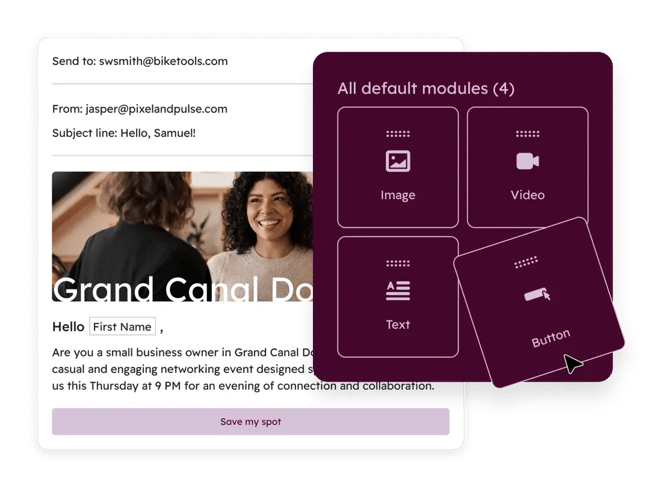
Apart from providing an easy-to-use drag-and-drop editor, HubSpot also helps marketers test and improve emails before they send. For example, they can use it to:
- Run A/B tests on email designs.
- Check subject line and preview text length.
- Verify that key copy won’t get cut off in the inbox.
HubSpot also flags a few common pre-send issues, including:
- Missing links in the email.
- Messages that may be trimmed in inboxes like Gmail.
These built-in checks make HubSpot’s software a solid starting point for teams that want testing and sending in one platform.
2. Litmus
Litmus helps email marketers preview how emails render across devices, browsers, and inbox providers before sending. With Litmus, marketers can test how their email appears before it goes live. After sending Litmus a draft, it can:
- Review the email automatically.
- Generate preview screenshots.
- Show how the message will appear across different email providers.

3. Mail-Tester
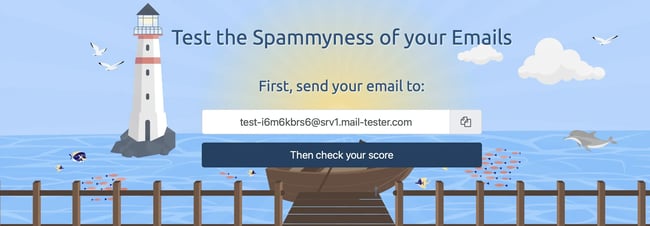
Mail-Tester checks emails for spam triggers and deliverability issues before marketers send campaigns to their full list. With Mail-Tester, marketers send their draft to a dedicated test address and get a report back before sending it to their full list. That report can help marketers spot:
- Spam-triggering words or phrases.
- Language that may hurt deliverability.
- Issues to fix before launch.
4. Sender Score
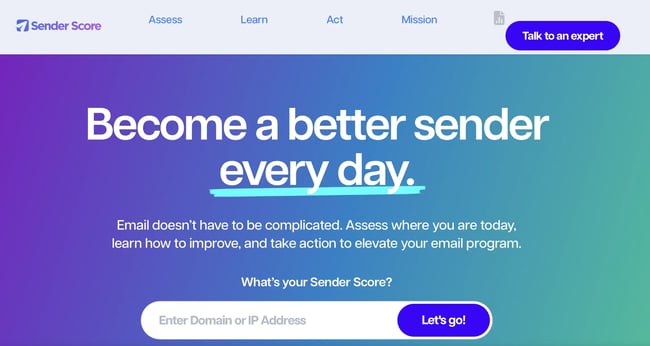
Sender Score helps marketers evaluate IP reputation so they can spot deliverability risks before emails land in spam. If marketers suspect that their IP address could be negatively impacting their email numbers, they can use SenderScore to find out if their IP address is considered “spammy.”
5. SubjectLine
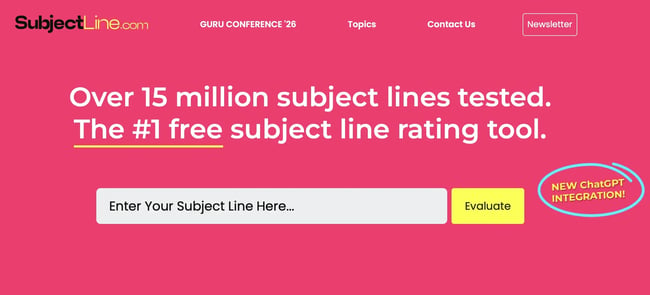
SubjectLine.com scores subject lines so marketers can improve open-rate potential before sending an email. When users go to the website, they simply type in a subject line and click the submit button. Then, they’ll receive a grade out of 100 points as well as pointers for improvement.
The key with any of these tests is to test just one element at a time so marketers can isolate their variables and thus tie the difference in results to that particular change.
Frequently Asked Questions About Email Testing Tools
How do I know which email testing tool I need?
Choose the tool based on the problem you’re solving. Rendering tools check how emails look across devices and inboxes, deliverability tools flag spam and reputation issues, and subject line tools help optimize opens. If you use multiple tools, build a simple pre-send workflow that covers appearance, deliverability, and performance.
What do email testing tools actually test?
Email testing tools typically check email rendering, spam risk, deliverability signals, HTML or code issues, sender reputation, and subject line quality. Some tools also support A/B testing so you can compare variations and send the better-performing version.
Are free email testing tools enough for most marketers?
Free tools can cover basic needs like subject line checks, spam testing, and simple email previews, especially for smaller teams. As your program grows, paid tools usually become more useful for deeper rendering tests, deliverability diagnostics, and team workflows.
What is the difference between email testing and A/B testing?
Email testing is the broader process of checking whether an email will render correctly, avoid spam filters, and perform well. A/B testing is one type of email test that compares two versions of an email element, such as an offer, format, or subject line, to see which performs better.
How often should I test emails before sending?
You should test every important campaign before it goes out, especially when you change templates, sender details, links, or segmentation. Regular testing helps catch rendering and deliverability issues before they affect your results.
Do email testing tools work with all email service providers?
Many email testing tools work across a wide range of email platforms because they test the email itself rather than requiring a specific provider. Still, integrations vary, so it’s worth checking whether a tool connects with your ESP, CRM, or automation platform before adopting it.
Getting Started
Effective email marketing isn’t about chasing tiny wins — it’s about building a consistent testing strategy that helps marketers better understand their audience and improve every stage of the customer journey. By experimenting with offers, segmentation, timing, design, and deliverability, marketers can uncover the insights that drive meaningful increases in engagement, conversions, and revenue over time.
The most successful teams treat testing as an ongoing process, not a one-time task, and use the right tools to make smarter decisions faster. For marketers ready to start optimizing campaigns without adding complexity, HubSpot’s free email marketing tools provide an easy way to build, test, and improve emails from one platform.
Editor’s note: This post was originally published in December 2012 and has been updated for comprehensiveness.
.png)
The Complete A/B Testing Kit for Marketers
Start improving your website performance with these free templates.
- Guidelines for effective A/B testing
- Running split tests for email, landing pages, and CTAs
- Free simple significance calculator
- Free A/B test tracking template.
Download Free
All fields are required.
Form not available
A/b Testing

![How I Use Landing Page Split Testing to Find Untapped Marketing Potential [+ 12 Places to Start]](https://53.fs1.hubspotusercontent-na1.net/hubfs/53/landing-page-split-testing-1-20250121-3573417.webp)
![How to Understand & Calculate Statistical Significance [+ Example]](https://53.fs1.hubspotusercontent-na1.net/hubfs/53/how-to-calculate-statistical-significance-1-20250106-7754856.webp)




.png)