If you’re looking for on-page SEO tips that actually move the needle, you’re in the right place — but first, a reality check: most marketers treat on-page SEO like an afterthought. A quick title tweak after publishing. A keyword is forced into the opening paragraph. That habit is quietly costing you rankings, traffic, and revenue.
Here’s the stakes: 68% of all online experiences begin with a search engine, yet the top five organic results capture over 67% of all clicks. Every under-optimized page is a compounding loss — qualified visitors landing on a competitor’s site, and blog posts that took weeks to write sitting at position 14, generating near-zero traffic.
The good news is that on-page SEO is entirely within your control. This guide picks up where keyword research leaves off. Work through the on-page SEO checklist below, and you’ll give search engines exactly what they need to rank your pages — and give visitors a reason to click.
![→ Download Now: SEO Starter Pack [Free Kit]](https://no-cache.hubspot.com/cta/default/53/1d7211ac-7b1b-4405-b940-54b8acedb26e.png)
Table of Contents
- What Is On-Page SEO?
- On-Page SEO Tips: Your Complete Optimization Checklist
- Start Optimizing: Your On-Page SEO Action Plan
- The Bottom Line
What Is On-Page SEO?
On-page SEO optimizes elements on a webpage that the site owner controls — it’s the practice of refining individual web pages so they rank higher in search engine results and attract more relevant traffic.
Unlike tactics that depend on third parties — like earning backlinks or building domain authority — on-page search engine optimization is work you do directly on your own site, on your own schedule.
It covers two broad categories: the content on your page (the words, structure, and context that communicate your topic to both readers and search engines) and the HTML source code behind it (the title tags, meta descriptions, alt text, and other elements that search engine crawlers read to understand and index your page).
When done well, on-site SEO doesn’t just help search engines find your pages — it helps the right people find them.
.png)
Complete SEO Starter Pack
An introductory kit to optimize your website for search.
- Increase your organic traffic.
- Plan your keyword strategy.
- Debunk SEO myths.
- Build a blog strategy.
Download Free
All fields are required.
Form not available
What On-Page SEO Includes
On-page SEO encompasses every element you can directly optimize on a given webpage, including:
- Title tags — the clickable headline shown in search results
- Meta descriptions — the summary snippet beneath your title in the SERP
- Headings (H1–H6) — the structural hierarchy of your content
- Body content — the depth, relevance, and clarity of what you’ve written
- Image alt text and file names — descriptive labels that help search engines index your visuals
- URL structure — clean, readable slugs that signal what a page is about
- Internal links — connections between your own pages that distribute authority and guide crawlers
Each of these elements sends a signal to search engines about what your page covers, who it’s for, and whether it deserves to rank for a given query.
On-Page SEO vs. Off-Page SEO vs. Technical SEO
On-page SEO differs from off-page SEO and technical SEO — these three terms get used interchangeably, but they describe distinct areas of work, and confusing them leads to wasted effort.
On-page SEO is what your page says — the content, keywords, and HTML elements you control directly on the page itself.
Off-page SEO is what the rest of the web says about your page — primarily backlinks from other sites, but also brand mentions, reviews, and social signals. You can influence it, but you can’t fully control it.
Technical SEO is how well your site functions at an infrastructure level — site speed, crawlability, mobile-friendliness, Core Web Vitals, structured data, and XML sitemaps. It ensures search engines can access and index your content in the first place. Without it, even perfect on-page optimization won’t reach its potential.
Think of it this way: technical SEO gets you in the game, on-page SEO wins the match, and off-page SEO builds your reputation over time. All three matter — but on-site SEO is where most sites have the most immediate room to improve.
Why On-Page SEO Matters More Than Ever
On-page SEO has always been foundational — but in 2025, its importance has expanded well beyond traditional blue-link rankings. Today, well-optimized pages determine whether you show up across three distinct layers of search visibility.
Traditional rankings remain the baseline. Google still evaluates on-page signals — keyword relevance, content depth, heading structure, internal linking — to decide which pages deserve to rank for a given query.
A well-optimized page consistently outperforms a well-written but poorly structured one, especially in competitive niches, where the difference between positions 3 and 8 can mean thousands of visits per month.
Featured snippets reward pages that are structured to answer questions directly. When Google pulls a definition, a numbered list, or a comparison table into a prominent snippet above organic results, it’s almost always pulling from a page whose content is clean, clearly formatted, and directly responsive to a specific query.
On-page optimization — particularly how you use headings, bullet points, and concise answer-first writing — is what makes your content snippet-eligible in the first place.
Answer Engine Optimization (AEO) is the newest frontier.
As AI-powered search experiences like Google’s AI Overviews and tools like ChatGPT, Perplexity, and Claude increasingly synthesize answers from across the web, the pages they cite and surface tend to share the same characteristics: authoritative, well-structured, clearly scoped content that directly addresses a specific question.
On-page SEO — particularly E-E-A-T signals (Experience, Expertise, Authoritativeness, Trustworthiness), semantic clarity, and structured data — is what makes your pages legible and trustworthy to AI systems, not just traditional crawlers.
The bottom line: the SEO best practices that make a page rank well in traditional search are the same ones that make it eligible for snippets and AI citations. On-page SEO isn’t a legacy discipline — it’s the foundation on which every new layer of search visibility is built.
Complete SEO Starter Pack
An introductory kit to optimize your website for search.
- Increase your organic traffic.
- Plan your keyword strategy.
- Debunk SEO myths.
- Build a blog strategy.
Download Free
All fields are required.
Form not available
On-Page SEO Tips: Your Complete Optimization Checklist
This on-page SEO checklist covers 11 proven SEO techniques — each one explained with what it is, why it matters, and exactly how to implement it. For a deeper dive into how these fit into your broader SEO strategy, bookmark that guide to read alongside this one.
1. Craft Compelling Title Tags That Earn Clicks
Title tags influence search visibility and click-through rate — your title tag is the clickable headline that appears in search results, and it’s one of the strongest on-page signals Google uses to understand what your page is about.
Why it matters: A well-written title tag does two jobs simultaneously: it tells search engines your page is relevant to a query, and it convinces a human being to choose your result over the nine others on the page. Weak title tags hurt both.
How to implement it:
- Lead with your target keyword. Front-loading your primary keyword — rather than burying it at the end — signals relevance clearly and reduces the risk of it being cut off on smaller screens.
- Keep it under 60 characters. Google typically truncates titles beyond 600 pixels wide, which is roughly 60 characters. Use a title preview tool like Portent’s SERP Preview Tool or Moz’s Title Tag Preview to check how yours will display.
- Be specific, not clever. Vague titles like “The Ultimate Guide to Marketing” underperform specific ones like “10 Email Marketing Tips to Increase Open Rates in 2025.” Specificity signals relevance and sets accurate expectations.
- Add click appeal without clickbait. Numbers, brackets, and parenthetical qualifiers — like “(With Examples)” or “[Free Template]” — consistently show higher CTRs without misleading the reader.
- Write a unique title for every page. Duplicate title tags confuse crawlers and split click-through rate across pages competing for the same query.
Example:
- ❌ Weak: Marketing Tips for Businesses
- ✅ Strong: 12 On-Page SEO Tips to Rank Higher in 2025 [Checklist]
2. Write Meta Descriptions That Match Search Intent
Meta descriptions help improve click-through rate from search results — they’re the short summary that appears beneath your title tag in the SERP. Google doesn’t use them as a direct ranking factor, but they directly affect whether a searcher clicks your result or scrolls past it.
Why it matters: Think of your meta description as a 155-character ad for your page. When it matches what a searcher is actually looking for — and communicates the value they’ll get from clicking — CTR goes up. Higher CTR sends a positive engagement signal back to Google, which can indirectly support rankings over time.
How to implement it:
- Match search intent first. Before writing a word, ask: is the searcher looking for information, a comparison, a tool, or a place to buy? Your meta description should reflect exactly what they’ll find — not what you wish they were looking for.
- Include your target keyword naturally. Google bolds keywords in meta descriptions that match the search query, making your result stand out visually. Don’t force it — but include it where it reads naturally.
- Stay between 140–155 characters. Shorter descriptions get padded by Google with unrelated page text. Longer ones get cut off mid-sentence, which looks unprofessional and loses the call to action.
- End with a clear value statement. Tell the reader exactly what they’ll get: “Learn how to optimize every critical page element with a step-by-step checklist.” Specificity outperforms generic descriptions every time.
- Write a unique description for every page. Duplicate meta descriptions are wasted opportunities and signals of low editorial care.
Example:
- ❌ Weak: Learn about on-page SEO and how it works.
- ✅ Strong: Master on-page SEO with 11 actionable tips — from title tags to schema markup — and start ranking higher today.
3. Use Clean, Descriptive URLs
URL slugs should be short, descriptive, and readable — your URL slug is the part of the web address that identifies a specific page. It’s a lightweight but meaningful on-page signal that tells both search engines and users what a page is about before they even land on it.
Why it matters: Clean URLs reinforce relevance, build click confidence, and are easier to earn links to. Messy, auto-generated URLs like /p=1847 or /category/uncategorized/post-title-with-date-2019 dilute topical signals and look untrustworthy in search results.
How to implement it:
- Keep slugs short and descriptive. Aim for 3–5 words that accurately describe the page. /on-page-seo-tips is better than /blog/2024/march/the-complete-guide-to-on-page-seo-optimization-tips-for-beginners.
- Include your primary keyword. Place it naturally in the slug — don’t pad the URL with extra keywords. One relevant keyword phrase is enough.
- Use hyphens, not underscores. Google treats hyphens as word separators; underscores are treated as connectors, meaning on_page_seo reads to crawlers as one word rather than three.
- Use lowercase letters consistently. Mixed-case URLs can create duplicate content issues depending on your server configuration.
- Remove stop words. Words like “a,” “the,” “of,” and “and” add length without adding context. /tips-for-on-page-seo becomes /on-page-seo-tips.
- Never change a live URL without a 301 redirect. Broken URLs destroy any link equity and ranking history the page had accumulated.
4. Structure Pages With Clear Header Hierarchy
Header hierarchy helps organize page content for readers and search engines — header tags (H1-H6) are HTML elements that define the structure of your content and tell search engines how your page is organized.
Why it matters: A clear header structure improves scannability for human readers, signals topical organization to crawlers, and — increasingly — makes your content more legible to AI systems that synthesize answers from across the web.
Pages with logical, well-labeled headers are significantly more likely to be pulled into featured snippets and AI Overviews. This is also one of the core on-site SEO techniques covered in our step-by-step on-page SEO guide.
How to implement it:
- Use exactly one H1 per page. Your H1 is the page’s primary headline — it should include your main target keyword and clearly describe what the whole page covers. Multiple H1s send a confused signal to crawlers.
- Use H2s for major sections. Each H2 should cover a distinct subtopic and, where natural, include a secondary keyword or related phrase.
- Use H3s for sub-points within H2 sections. Think of your structure as an outline: H1 is the thesis, H2s are the main arguments, H3s are the supporting points.
- Write headers that describe the content below them. Vague headers like “More Information” or “Next Steps” waste a genuine relevance signal. Specific headers like “How to Write a Title Tag That Ranks” tell crawlers exactly what follows.
- Write headers for humans first. Headers that read naturally and answer real questions are more likely to surface as featured snippets than headers written purely for keyword density.
5. Start With an SEO Audit of Your Existing Pages
An SEO audit identifies optimization opportunities on existing pages — before optimizing new content, it gives you a clear picture of where your existing pages stand: what’s working, what’s underperforming, and what structural issues are holding back your overall site health.
Why it matters: Many sites have a handful of high-traffic pages doing most of the heavy lifting, and a long tail of neglected pages actively dragging performance down. A targeted audit lets you prioritize high-ROI fixes rather than optimizing blindly.
If you want to go deeper on website performance as a whole, HubSpot’s guide to optimizing your website is a strong companion resource.
How to implement it:
- Inventory your pages. Export all URLs into a spreadsheet using a tool like Screaming Frog, Ahrefs Site Audit, or Google Search Console. Record each page’s title tag, meta description, target keyword, word count, and current traffic.
- Flag duplicate metadata. Multiple pages sharing the same title tag or meta description confuse crawlers and split ranking potential. Each page needs unique, purposeful metadata.
- Identify thin content. Pages with fewer than 300–400 words rarely have the depth to rank competitively. Decide whether to expand them, consolidate them with a related page, or redirect them.
- Spot keyword cannibalization. If two or more pages target the same keyword, they’re competing rather than reinforcing each other. Consolidate, differentiate, or canonicalize.
- Review traffic trends in Google Search Console. Pages that once ranked but have lost significant traffic over the last 6–12 months are strong candidates for a content refresh rather than a full rewrite.
- Check internal linking gaps. Look for high-value pages with few internal links pointing to them — these are the easiest ranking boosts to miss, and the easiest to fix.
Useful tools: Google Search Console (free), Screaming Frog (free up to 500 URLs), Ahrefs, Semrush, Moz Pro.
6. Place Keywords Naturally in High-Impact Areas
Keywords should appear naturally in high-importance page elements — keyword placement is the deliberate practice of including your target keywords in the specific locations where they carry the most weight, without over-optimizing to the point where content reads unnaturally or triggers a spam signal.
Why it matters: Google’s algorithms have grown sophisticated enough to distinguish between pages that are genuinely about a topic and pages that have merely repeated a keyword enough times to appear relevant.
Strategic placement signals the former. Stuffing signals the latter — and gets pages demoted.
Where to place keywords:
These tactics still exist in the wild — and they still result in manual penalties. For more on what not to do, our SEO tips overview covers the most common mistakes marketers make.
7. Build Strong Internal Linking Paths
Why it matters: Internal linking is the practice of hyperlinking from one page on your site to another relevant page on the same site. It’s one of the most underused on-page levers available, and one of the highest-ROI fixes for sites that haven’t approached it deliberately.
Internal links help search engine crawlers discover and index pages that might otherwise be missed, pass authority from high-performing pages to pages that need a ranking boost, and guide human visitors deeper into your site — reducing bounce rate and increasing time on page.
How to implement it:
- Use descriptive anchor text. The clickable text of a link tells crawlers what the destination page is about. “Click here” wastes that signal entirely. “On-page SEO checklist” tells Google exactly what to expect on the other end.
- Link from high-authority pages to pages you want to rank. Your most visited or most linked-to pages carry the most internal authority. Use them to send equity toward pages that need support.
- Build topic clusters. Group related content around a central pillar page — a comprehensive guide — with cluster pages covering specific subtopics. Each cluster page links back to the pillar, and the pillar links out to each cluster. This signals topical authority to Google across the whole subject area. For a practical walkthrough of this approach, see our guide on how to optimize landing pages for long-term lead generation.
- Audit for orphan pages. Any page with zero internal links pointing to it is invisible to crawlers unless it’s in your sitemap. Find them with Screaming Frog or Ahrefs and connect them to the rest of your site.
- Don’t over-link. A page crammed with internal links dilutes the value passed to each destination. Prioritize links that genuinely add context or value for the reader.
Internal linking also plays an important role in integrating search and social media marketing — well-linked, discoverable content earns more shares, which amplifies organic reach beyond search alone.
8. Optimize Images for Accessibility and Search
Why it matters: Image optimization covers everything from how you name image files before uploading, to how you describe them in your HTML, to how you compress and format them for fast delivery.
Images are frequently the single largest contributor to slow page load times — and page speed is a confirmed ranking factor. Properly labeled images also provide additional contextual signals to search engines, help your visuals appear in Google Image Search, and make your content accessible to users who rely on screen readers.
How to implement it:
- Use descriptive file names before uploading. Rename IMG_4823.jpg to on-page-seo-checklist-example.jpg. Crawlers read file names, and descriptive ones reinforce page relevance.
- Write meaningful alt text for every image. Alt text tells search engines what an image depicts and is read aloud by screen readers for visually impaired users. Describe the image accurately and include a keyword where it fits naturally — but never stuff keywords into alt text.
- ❌ Bad: alt=”seo seo tips on-page seo checklist seo guide”
- ✅ Good: alt=”On-page SEO checklist showing title tag and meta description fields”
- Compress images before uploading. Use tools like Squoosh, TinyPNG, or ImageOptim to reduce file sizes without visible quality loss.
- Use modern formats. WebP images are typically 25–35% smaller than JPEG or PNG at equivalent quality and are now supported by all major browsers. Where possible, serve WebP.
- Add width and height attributes. Specifying image dimensions in your HTML prevents layout shifts as the page loads — directly improving your Cumulative Layout Shift (CLS) score, a Core Web Vital.
9. Improve Page Speed and Core Web Vitals
Why it matters: Core Web Vitals are a set of user experience metrics Google uses as ranking signals. They measure how fast your page loads, how quickly it becomes interactive, and how visually stable it is as it loads.
Beyond rankings, page speed directly affects user behavior: a one-second delay in load time can reduce conversions by 7%, and 53% of mobile users abandon a page that takes more than three seconds to load.
The three metrics to know:
- LCP (Largest Contentful Paint): Measures how long it takes for the largest visible element on the page — usually a hero image or headline — to load. Target: under 2.5 seconds.
- INP (Interaction to Next Paint): Replaced FID in 2024. Measures how quickly your page responds to user interactions like clicks or taps. Target: under 200 milliseconds.
- CLS (Cumulative Layout Shift): Measures visual stability — how much the page layout shifts unexpectedly as it loads. Target: under 0.1.
How to implement it:
- Run your pages through Google PageSpeed Insights or the Core Web Vitals report in Google Search Console to identify specific issues.
- Compress and properly size images (see tip 8).
- Enable lazy loading for images and videos below the fold.
- Minify CSS, JavaScript, and HTML files.
- Use a content delivery network (CDN) to serve assets from servers geographically closer to your visitors.
- Remove or defer render-blocking JavaScript that delays the page from displaying.
10. Add Schema Markup Where It Supports Search Visibility
Why it matters: Schema markup (also called structured data) is code you add to your HTML that explicitly tells search engines what type of content your page contains — an article, a product, a recipe, an FAQ, a review, an event, and so on.
Pages with valid schema markup are eligible for rich results — enhanced SERP listings that include star ratings, FAQs, prices, or how-to steps displayed directly in search results. Rich results typically earn higher CTRs than standard blue-link listings. Schema also improves your pages’ legibility to AI systems, which rely on structured signals to confidently cite and surface content.
How to implement it:
- Start with the schema types most relevant to your content:
- Article or BlogPosting — for editorial content
- FAQPage — for pages with question-and-answer sections (excellent for featured snippet eligibility)
- HowTo — for step-by-step instructional content
- Product — for e-commerce pages with pricing and availability
- Review / AggregateRating — for product or service review pages
- BreadcrumbList — for site navigation context
- Use JSON-LD format. Google recommends JSON-LD as the cleanest implementation method — it lives in the <head> of your page and doesn’t require editing your visible HTML.
- Validate your markup. Use Google’s Rich Results Test and Schema Markup Validator to confirm your code is error-free before publishing.
- Don’t mark up content that isn’t visible on the page. Adding schema for hidden content is a policy violation and can result in a manual penalty.
11. Publish High-Quality, Up-to-Date Content
Why it matters: Content quality is the cumulative measure of how well a page serves the person reading it — how accurately it matches their intent, how thoroughly it covers the topic, how original and trustworthy the information is, and how recently it was updated.
Google’s Helpful Content updates have made one thing explicit: pages written primarily to rank, rather than primarily to help, will be systematically demoted. Quality isn’t a soft concept anymore — it’s an algorithmic one, evaluated through signals like dwell time, return visits, links earned, and the degree to which a page demonstrates first-hand expertise.
These content SEO best practices apply whether you’re writing a new post or refreshing an old one. Our full guide on blog SEO goes deeper on content structure, keyword targeting, and format optimization specifically for blog content.
How to implement it:
- Match search intent precisely. Before writing a word, determine what type of result the searcher actually wants: an informational explainer, a comparison, a how-to guide, a product page, or a list. Writing the right format for the intent is more important than any keyword tactic.
- Cover the topic with genuine depth. Thin content — pages that skim the surface of a topic without adding insight — rarely earns rankings or links. Ask: does this page answer every reasonable follow-up question a reader might have?
- Demonstrate E-E-A-T. Include original data, first-hand examples, author credentials, and cited sources. These signals communicate Experience, Expertise, Authoritativeness, and Trustworthiness — factors Google weighs heavily, especially for health, finance, and legal content.
- Refresh content regularly. A page about SEO best practices published in 2021 that hasn’t been updated is a liability, not an asset. Review high-traffic and high-ranking pages at least annually.
- Update statistics, swap out outdated tool recommendations, and add sections covering developments that didn’t exist when the page was first published.
- Lead with the answer. Structure content so the most important information comes first — for both readers who don’t want to scroll, and search engines evaluating whether your page directly answers a query. This structure also increases featured snippet eligibility.
- Write for humans. Content written to satisfy a word count or keyword density target reads like it was written to satisfy a word count or keyword density target. Real expertise shows in the specificity of the examples, the clarity of the explanations, and the confidence of the voice.
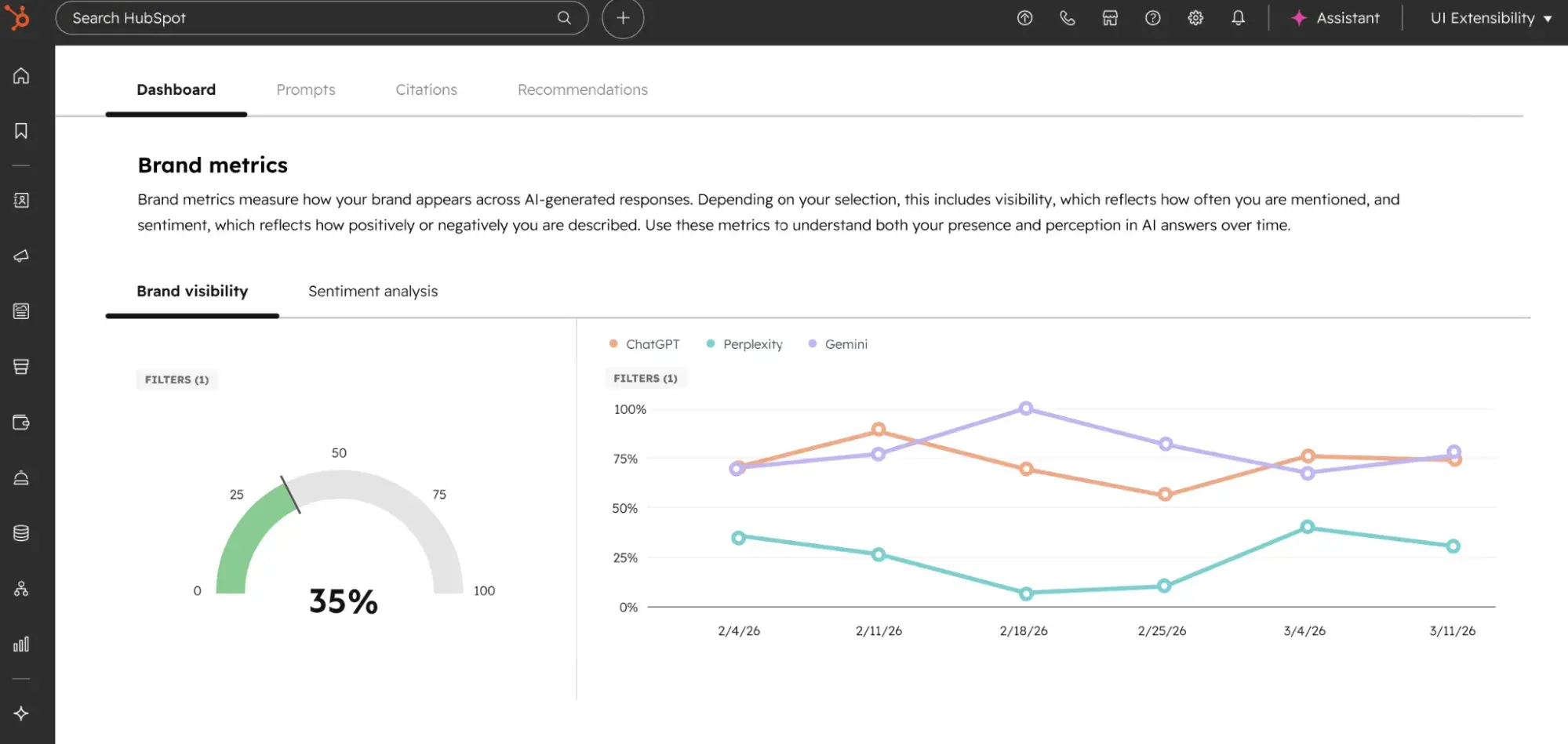
Want to measure how your content is performing in AI-generated answers — not just traditional search? HubSpot AEO helps marketers track where their brand appears in AI responses across tools like ChatGPT, Perplexity, and Google’s AI Overviews.
HubSpot AEO provides visibility into AI answer coverage so marketers can identify content gaps, monitor citation trends, and optimize pages for the answer engines that are reshaping search.
As you apply the content SEO techniques in this checklist — particularly around E-E-A-T and structured data — HubSpot AEO surfaces which of your pages are being cited in AI answers and which are being overlooked. It’s the measurement layer that closes the loop between on-page optimization and AI search visibility.
Start Optimizing: Your On-Page SEO Action Plan
Reading about on-page SEO and actually implementing it are two different things. This section closes that gap — giving you a concrete starting point so the checklist above turns into measurable results, not a browser tab you’ll get back to later.
If you’re still getting up to speed on the fundamentals, our SEO in 30 days guide is a great starting point before you run through this action plan.
Start With a Quick Win Audit
Don’t try to optimize everything at once. Begin with your five highest-traffic pages and run through this sequence for each one:
- Check the title tag. Is your primary keyword present and front-loaded? Is it under 60 characters? Does it give a searcher a reason to click?
- Check the meta description. Is it unique, under 155 characters, and written to match search intent? Does it end with a clear value statement?
- Check the URL. Is it short, readable, and keyword-relevant? If it’s a legacy URL with dates or stop words, assess whether a 301 redirect is worth the tradeoff.
- Check the H1. Is there exactly one? Does it include your target keyword and clearly describe the full page?
- Check the images. Do all images have descriptive alt text and compressed file sizes?
Five pages, five checks each. That’s 25 targeted fixes that can meaningfully move the needle within weeks — without touching a line of code or rebuilding your content strategy from scratch.
Then Work the Full Checklist
Once your top pages are tightened, work through the complete on-page SEO checklist systematically — page by page, starting with your most commercially important content. Use a simple spreadsheet to track each page’s status across every optimization element. Prioritize in this order:
- Title tags and meta descriptions — highest immediate impact on CTR
- Header structure and keyword placement — foundational for relevance signals
- Internal linking — highest ROI for the time invested
- Image optimization and page speed — direct ranking factors with compounding benefits
- Schema markup — incremental but meaningful gains in rich result eligibility
- Content quality and freshness — the long game that pays off for years
For a pre-built version of this tracking system, HubSpot’s on-page SEO template gives you a ready-to-use spreadsheet that maps every optimization element across your pages.
Set a Maintenance Cadence
On-page SEO isn’t a one-time project — it’s an ongoing practice. Search intent shifts. Competitors publish stronger pages. Google updates its algorithms. Content ages. Build a simple review cycle into your content calendar:
- Monthly: Monitor Google Search Console for pages with declining impressions or CTR drops — these are early signals that a page needs attention before it loses its ranking.
- Quarterly: Audit your top 20 pages for content freshness, internal linking opportunities, and metadata quality.
- Annually: Do a full site audit using Screaming Frog or Semrush to surface technical issues, duplicate content, thin pages, and cannibalization problems before they compound.
For a broader view of how these on-site SEO techniques fit into a full SEO for beginners framework, the guide covers the foundational principles that underpin everything in this checklist.
The Bottom Line
On-page SEO is the most controllable lever you have in search. You don’t need to wait for backlinks to accumulate or for domain authority to build. Every improvement you make to a title tag, a header structure, a URL, or a piece of content is a direct signal you’re sending to search engines — and to the readers you’re trying to reach.
The sites that consistently earn organic traffic aren’t the ones with the biggest budgets or the most aggressive link-building campaigns. They’re the ones that treat every page as an opportunity — and optimize it like they mean it.
You now have everything you need to do exactly that. Start with your five highest-traffic pages today, work through the on-page SEO checklist methodically, and revisit your work regularly. The rankings will follow.
Complete SEO Starter Pack
An introductory kit to optimize your website for search.
- Increase your organic traffic.
- Plan your keyword strategy.
- Debunk SEO myths.
- Build a blog strategy.
Download Free
All fields are required.
Form not available
On-page Seo




![The fundamentals of on-page SEO [+How-to checklists and templates]](https://53.fs1.hubspotusercontent-na1.net/hubfs/53/on-page-seo-1-20260413-5199924.webp)




.jpg)