

Creating an SEO strategy can be challenging because many teams know the tactics but not how to connect them to business results. Without a clear strategy, keyword research, content creation, technical fixes, and reporting can turn into disconnected work that fails to drive leads, pipeline, or revenue.
![→ Download Now: SEO Starter Pack [Free Kit]](https://no-cache.hubspot.com/cta/default/53/1d7211ac-7b1b-4405-b940-54b8acedb26e.png)
Without establishing goals tied to business outcomes (such as revenue growth in a priority category), SEO becomes a series of disconnected tasks that fail to deliver meaningful results. And when SEO doesn’t generate revenue, it results in wasted effort, missed pipeline, and growth opportunities. Over time, stakeholders question SEO’s value, budgets get cut, and the challenges only become harder.
In this guide, we’ll show you how to create an SEO strategy that connects research, execution, and measurement to business outcomes. This guide outlines how to improve SEO through a structured SEO optimization plan, covering keyword research, competitor analysis, technical SEO, content planning, and the additional considerations needed to compete in modern search, including AI search.
Table of Contents
- Why You Need an SEO Strategy in 2026
- What is an SEO strategy?
- How to Create an SEO Strategy: Step-by-Step Guide
- Implementing Your SEO Strategy: Ongoing Optimization
- SEO Strategy Template and Tools
- Create A Strategy That Supports Your Business Goals
Why You Need an SEO Strategy in 2026
SEO has always been about visibility in search engines, and it still is. Still, modern-day SEO encompasses control over how AI search tools like Google AI Overviews, AI Mode, ChatGPT, Perplexity, Claude, and traditional search engines assist with brand discoverability as people search in a multitude of ways. This AI layer matters significantly because AI search is one of the highest-intent acquisition channels available.
In my experience, traffic from AI search can convert at rates of up to 7%, compared to traffic from traditional Google search, which converts at 1-2%.
Tools like HubSpot AEO support forward-thinking SEO teams by helping them track AI visibility KPIs, such as how often a brand appears in answer engines.
Without a defined strategy, SEO teams won’t be able to optimize their visibility across the search landscape effectively. With SEO strategy:
- Content continues to generate traffic over time
- Rankings build authority over time
- Acquisition costs decrease as efforts compound
- Teams are better prepared for changes like algorithm updates and new search engine results page (SERP) features
The risk of not having a strategy can increase over time. Search gets more competitive, with established players investing heavily in content SEO, authority building, and technical performance. And on top of that, SEO teams have growing responsibilities, including gaining visibility in AI search and traditional listings. With increased responsibilities comes new strategies for success.
Those without a plan will fall behind, and catching up in a rapidly evolving landscape will take considerable time (and budget).
AI search optimization requires clear answers, strong structure, entity-rich language, and trusted sourcing. Visibility in AI is about being selected, summarized, and cited across search experiences.
There’s also a growing commercial impact. Organizations that treat SEO as a strategic growth channel — rather than a set of tactics — are better positioned to capture demand, defend their market share, and scale efficiently.
What is an SEO strategy?
An SEO strategy is a plan for increasing organic visibility, traffic, leads, and revenue. It’s a plan that connects content, technical performance, and authority signals into a single system designed to improve a brand’s visibility across search.
At its core, an SEO strategy defines how to structure and prioritize content, ensure your site is crawlable and indexable, and build credibility through links, mentions, and expertise. Rather than publishing content in isolation, it aligns topics, keywords, and site architecture so search engines can clearly understand your relevance and authority.
A well-defined strategy ensures content SEO, technical SEO, and authority-building efforts work together to drive consistent, compounding growth.
Featured Resource: What is SEO?
The Three Pillars of SEO
SEO specialists ready to execute a robust SEO plan create their plan with all three core pillars in mind. The three pillars are:
- On-page SEO
- Off-page SEO
- Technical SEO
These three pillars work together to determine how well Google (and AI search tools) trusts and ranks websites (or cites or mentions them, if referring to AI). Here are the three pillars, with brief explanations of their roles and key elements.
On-Page SEO
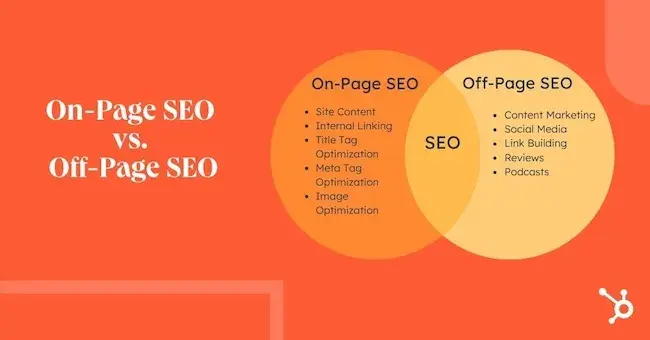
On-page SEO focuses on content creation, including structure and search intent. Strong on-page SEO ensures your content is not only discoverable but also valuable enough to rank and convert. Key elements include:
- Intent alignment ensures content matches what users are actually searching for (informational, commercial, transactional).
- Page structure that uses headings (H1–H3), logical formatting, and scannable layouts.
- Metadata with optimized title tags and meta descriptions that improve relevance and click-through rates.
- Internal linking that connects related pages to build topical authority and guide both users and search engines.
- Content quality that includes depth, originality, and usefulness (not just keyword inclusion).
Off-Page SEO
Off-page SEO is about building your site’s authority and trust beyond your own domain. It signals to search engines that your content is credible and worth ranking. Key elements include:
- Backlinks. These are links from relevant, high-authority websites.
- Digital PR. These campaigns generate coverage, links, and brand visibility.
- Brand mentions, which are unlinked references that reinforce entity authority.
- Partnerships and collaborations, which are co-marketing and industry relationships that expand reach.
Off-page SEO can be a differentiator between content that exists and content that ranks. For example, backlinks and mentions increase site authority and ranking potential. Backlinks act like a “vote” for a website’s credibility. When someone links to a website, it indicates that Google can trust the content on that website.
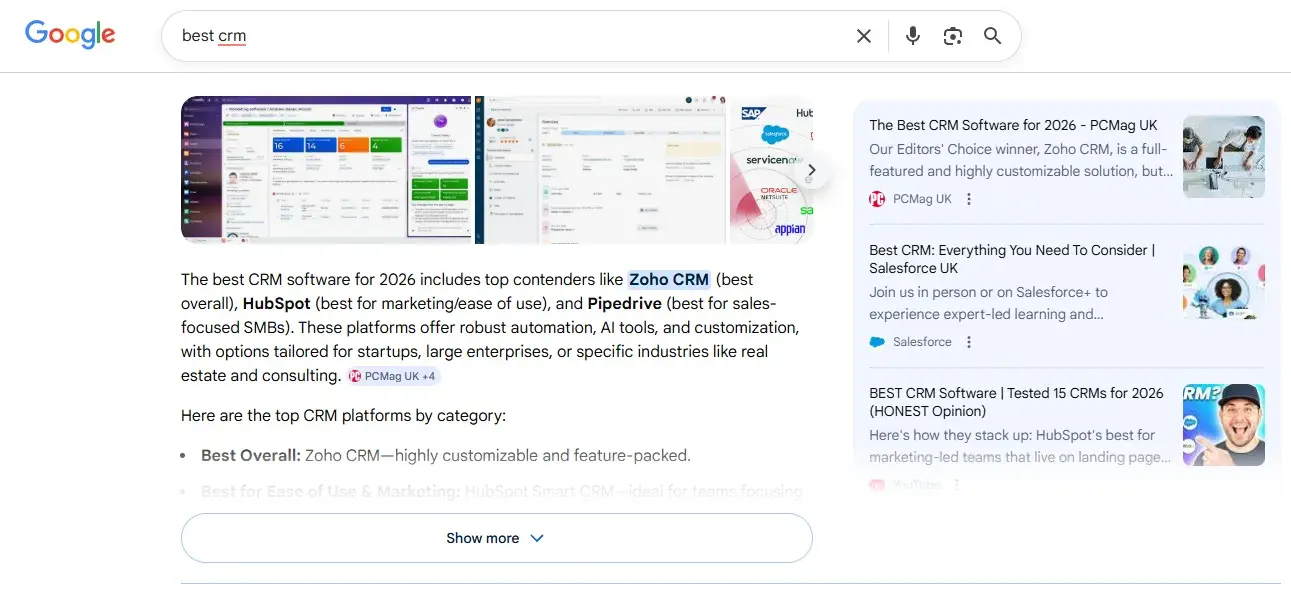
In an AI search era, a mention on a website (even an unlinked mention) is enough to earn visibility in AI search.
Here’s an example, as pictured below, a search for the keyword “best CRM” returns AI Overviews recommending HubSpot Smart CRM, Zoho CRM, and Pipedrive. AI has recommended these CRM systems over others because other websites have mentioned them. The AI cites PCMag as the source.
Technical SEO
Technical SEO ensures crawlers can access, understand, and efficiently process a website. Without it, even the best content and strongest authority signals can be limited. Technical SEO improves page experience and site performance. Key elements include:
- Crawlability, making sure search engines can access your pages.
- Indexability, ensuring important pages are eligible to appear in search results.
- Site speed and performance, meaning fast-loading pages that support user experience.
- Mobile usability, which is optimized experiences across devices.
- Structured data, which is markup that helps search engines interpret your content
- Site architecture for clear, logical structures that support navigation and topical relevance.
If a key technical component, like crawlability, isn’t possible, content will never rank. It helps to understand how search engines crawl websites. Here’s a guide featuring four videos that break down each phase.
In short, technical SEO provides the foundation that allows your SEO management efforts to scale effectively.
Mobile SEO Strategy
Keeping mobile SEO in mind when creating your overall strategy is crucial. Mobile optimization ensures your site and content are available and accessible to visitors on mobile devices. (That means they can have the same experience and receive the same value as desktop browsers.)
Mobile optimization is also essential because Google practices mobile-first indexing. Instead of crawling a desktop site, the algorithm will use the mobile version of your site when indexing and ranking pages for SERPs.
Aside from mobile-first indexing, a mobile SEO strategy also matters to consumers. According to HubSpot Blog’s 2025 Web Traffic & Analytics Report:
“Mobile devices are the preferred way to view websites, with 53% of SEOs and marketers ranking them as the most used device by their visitors.”
Optimizing your site to reach and capture that market share makes sense when all’s said and done. While it’s not an entirely separate process, there are distinct considerations for mobile SEO, such as monitoring page speed, responsive site design, local SEO, and creating high-quality content, regardless of the device used to view it.
Expert Insight
I spoke with Mersudin Forbes, a portfolio SEO director and agency advisor with 15 years of SEO experience.
“When it comes to thinking about a mobile strategy for SEO, it is important to think about how a user is seeking to complete their desired transaction and ensuring that this matches their expectations on mobile,” says Forbes.
Forbes explains that it’s not only Google that uses a mobile-first indexing system; most search engines do as well, so ensuring that mobile surfaces relevant content and functionality remains essential.
Pro tip: “You may also want to test your website speed by throttling page speed tests to 3/4G to ensure that user experience and page responsiveness don’t decline with less bandwidth,” says Forbes.
This article covers the steps that top SEO strategists take to ensure an SEO strategy sets a business up for success.
How to Create an SEO Strategy: Step-by-Step Guide
Creating an SEO strategy means building a system that connects all SEO efforts (research, execution, measurement, and more) to tangible business outcomes (leads, conversions, and revenue). Below is a practical framework for developing and scaling a high-impact SEO optimization plan.
Step 1: Set Goals and KPIs
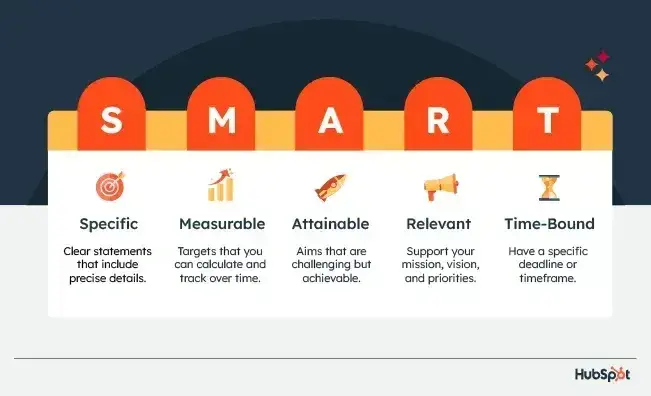
Start by defining what success looks like, and tie it directly to business performance. SEO goals should align with business outcomes, including leads, pipeline, sales, and retention. Use SMART goals to write meaningful goals. SMART goals are:
- Specific. Clear statements that include precise details.
- Measurable. Targets that you can calculate and track over time.
- Attainable. Aims that are challenging but achievable.
- Relevant. Support your mission, vision, and priorities.
- Time-Bound. Have a specific deadline or timeframe.
For example, in SEO strategy, you might set a SMART goal that looks like this:
“Increase organic-driven demo requests for [product/category] by 25% within six months by improving rankings and conversion rates across high-intent pages.”
SMART goals are important because they:
- Create alignment between SEO and commercial objectives
- Help prioritize work that drives real impact (not just traffic)
- Make it easier to measure ROI and report to stakeholders
- Provide a benchmark for ongoing optimization
To use goals effectively, start by identifying your highest-value areas (e.g., key product pages or revenue-driving topics), set one to three primary goals, and map your KPIs directly to them. For example:
- If your goal is revenue, track conversions and pipeline
- If your goal is visibility, track rankings and impressions
- If your goal is engagement, track behavior metrics like CTR and time on page
Pro tip: SEO is full of new tactics and distractions. Your SMART goals should act as the filter for what gets prioritized. High-performing teams stay focused by consistently aligning execution to the outcomes those goals define.
Step 2: Analyze Competitors
SEO is relative. All websites compete for visibility, and do not operate in isolation. For example, if a competitor continues to improve their content, authority, and technical performance while your SEO team stands still, the competitor can replace top-ranking websites in the SERPs and AI-driven results.
That’s why ongoing competitor analysis is critical. Monitoring who ranks for your priority queries helps identify gaps, defend positions, and find opportunities to outperform where it matters most. Here’s a screenshot from a competitor comparison including traffic, keyword gaps, keyword opportunities, and other metrics:
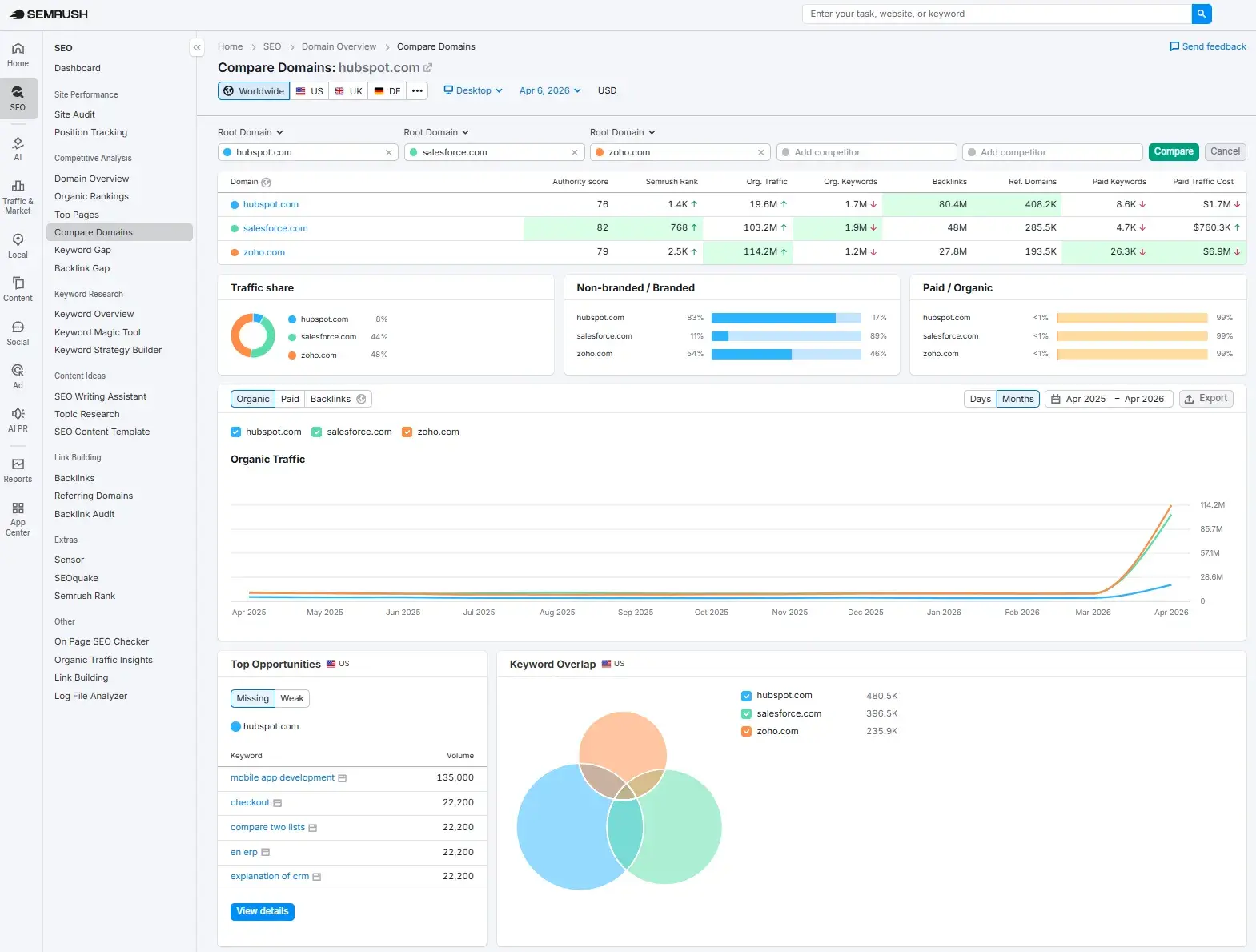
A report like this is scraping the surface of what SEO competitor analysis can reveal. For example, competitor research can uncover:
- Which keywords and topics competitors are ranking for (and where you’re not)
- Content gaps where demand exists but your site lacks coverage
- High-performing pages are driving the majority of their traffic
- Content formats and structures that are consistently ranking (e.g., guides, comparisons, tools)
- Internal linking strategies and how they build topical authority
- Backlink profiles, including where competitors are earning links and from whom
- Authority signals such as mentions, partnerships, and digital PR activity
- Emerging topic areas or categories that competitors are investing in
- Shifts in positioning (e.g., moving upmarket, targeting new industries, expanding product lines)
- Signals of broader business strategy, based on where competitors focus their content and SEO efforts
- Weaknesses in their approach, such as thin content, outdated pages, or poor UX
Competitor analysis reveals ranking gaps, content opportunities, and authority benchmarks. It helps SEO teams prioritize where to play, how to win, and where they can create a genuine advantage, rather than just following the market.
Pro tip: It’s really easy to let competitor analysis dictate your strategy. That isn’t the goal. Take inspiration, then return to your SMART goals, using competitor tactics only if they align with your brand, values, business, and priorities.
Step 3: Conduct Keyword and Prompt Research
Keyword and prompt research helps teams identify topics and search intent worth targeting. Although similar, keyword and prompt research differ in their approaches. The table below breaks down keyword and prompt research by area.
The notable difference is that keyword research usually involves a short query, and it’s highly trackable in free tools like Google Search Console and in paid tools like Semrush.
Prompts, however, are longer, more natural-language questions related to specific circumstances or problems. It’s more challenging to track every prompt because every searcher’s situation is unique. Here’s an example of a prompt versus a keyword.
- Keyword: best CRM for startups
- Prompt: What is the best CRM for a startup with a small sales team and a limited budget?
The key, with any type of search research, is to build the strategy around:
- Real customer problems and questions
- Search intent (informational, commercial, transactional)
- Business value (Does this keyword drive revenue or leads?)
When SEO teams build an SEO strategy around real customer problems, search intent, and business value, they develop a solution that meets an actual need. That’s more effective than writing content for the sake of meeting a keyword with high search volume or a prompt just because a competitor shows up for it. Use keyword and prompt research to inspire topic clusters.
Pro tip: When conducting keyword research, start with the most important keywords first, those that belong on money-generating pages like product pages or services, then build out to cover blogs, case studies, and other pages. This SEO tip will ensure the strategy is business-focused, not lost in keywords and content for the sake of staying busy or generating clicks that don’t convert.
Step 4: Create a Content Plan
Once SEO teams have selected keywords, translate them into a structured content plan. A content plan translates keyword and prompt insights into topic clusters, pages, and publishing priorities. Your plan should include:
- Pillar pages targeting core topics
- Cluster content supporting long-tail queries
- Clear intent mapping (awareness, consideration, and decision)
- Defined CTAs aligned to the funnel stage
- Internal linking between related pages
For example, HubSpot creates SEO content. The topic “SEO” becomes a pillar, and there’s a large hierarchy of content surrounding it. These content pieces are called clusters, and they’re all linked since they’re related. The infographic below outlines what a pillar and cluster strategy looks like:
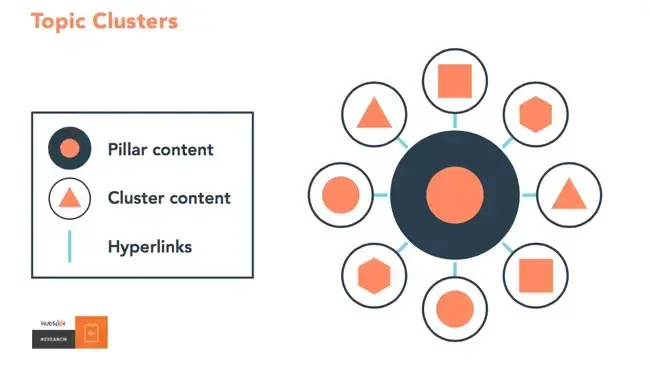
Pillars and clusters help rankings (and visibility in AI) by building expertise on a subject, demonstrating to Google and traditional search engines that a website is authoritative. For AI to summarize and cite content, the content needs to exist. If content teams don’t create content, then the brand can scarcely exist in AI search.
Here’s a short video on this concept:
Think of it this way: The more specific your content, the more specific the needs of your audience can be, and the more likely you‘ll convert this traffic into leads. That’s how Google finds value in the websites it crawls — the pages that dig into the inner workings of a general topic are seen as the best answer to a person’s query and will rank higher.
Once you’ve identified your pillar topics and supporting clusters, prioritize content based on business value, search intent, and internal-linking opportunities. The goal is not simply to publish more, but to build a connected library of content that helps search engines understand topical depth and helps readers move through the funnel.
Pro tip: A simple Google sheet helps manage blog production. At minimum, use a Google sheet to keep a record of the blogs you‘re posting, their keywords, the date published, the cluster they belong to, and the live URL. Refer back to this sheet when you’re monitoring performance or for internal linking.
An important note about AI: AI Overviews (AIO) — the AI-generated summaries appearing at the top of SERPs — are reducing clicks to websites. While it may feel counterintuitive to create content that doesn’t always drive a click, buyer behavior is shifting. At least two-thirds of buyers are starting their research with AI tools. If your brand isn’t appearing in those answers, you risk exclusion before a user ever clicks through to a website. Zero-click search has its role in the marketing funnel.
Step 5: Optimize Technical SEO
Technical SEO improves crawlability, indexability, page experience, and site performance. A well-built site ensures search engine crawlers and AI crawlers can discover, access, understand, and index content.
Technical SEO is foundational. If search engines can’t efficiently crawl, render, and index your site, your content won’t be eligible to rank, regardless of how well it’s written or how strong your strategy is.
To use technical SEO effectively, prioritize fixes based on impact. Start with issues affecting indexation and performance, then move toward enhancements that improve visibility (e.g., structured data) and scalability (e.g., site architecture).
Large websites can face a large number of issues across thousands—even hundreds of thousands—of pages, making it difficult for SEO teams to know what to prioritize.
There are tools, such as HubSpot’s SEO recommendations, that help teams prioritize tech fixes by impact.
The following screenshot shows what HubSpot’s SEO recommendations look like. The table shows the issue, the expected impact, the technical difficulty, and who can resolve it. SEO teams can use the SEO recommendations report to manage workflows. Usefully, there’s a “view more information” link that provides more detail on the issue.
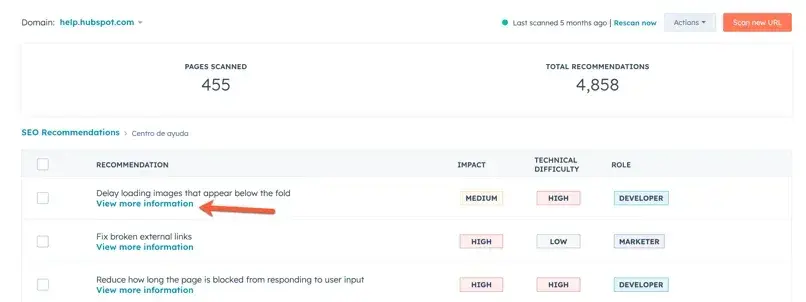
While the SEO recommendation tool is part of HubSpot’s ecosystem, you can scan your entire site (including externally hosted pages), identify issues impacting crawlability and indexability, and prioritize fixes based on impact.
Within the platform, teams can view recommendations at both site-wide and page-level, making it easier to spot patterns and resolve issues efficiently. Features such as internal linking insights, search query data (via Search Console integration), and structured recommendations help ensure that your technical SEO supports your broader SEO optimization plan.
When reviewing technical SEO issues, focus on:
- Crawlability and indexing (robots.txt, sitemaps, canonical tags)
- Mobile usability
- Structured data and schema markup
- Clean, logical site architecture
Step 6: Build Authority Through Links
To compete in search, websites need more than content. Credibility matters. And the onus on credibility is only growing with the introduction of AI search. In fact, some suggest that one mention on a third-party site could be all a site needs to generate visibility in AI search. SEO teams must develop a link-building strategy that includes:
- Digital PR campaigns
- Outreach to relevant publishers
- Partnerships and co-marketing
- Creation of linkable assets (research, tools, data)
A link-building strategy must include a variety of link types to maintain a natural link profile. No brand wants thousands of links from semi-relevant blogs covering multiple topics. Instead, aim for backlinks from credible and relevant sources.
For example, my byline on this HubSpot article is a dream for me as an SEO consultant. It helps build my authority in traditional search, and I can share the articles on my LinkedIn to help my prospects see that HubSpot trusts me. Plus, I hope those who come across it in AI search results have an easier time creating an SEO strategy.
Brand mentions, citations, and visibility across trusted sources all contribute to how search engines, AI systems — and critically — your target audiences assess your authority.
Important note: Authority compounds over time. The more consistently you invest in it, the easier it becomes to rank, scale content, and compete for higher-value keywords or prompts.
New to backlinking? HubSpot offers a free link-building training course at its academy.
Step 7: Measure and Refine
SEO is iterative. It starts with building foundations, then compounds. In many cases, it can take years to develop a true SEO growth engine. The advantage is that each round of work builds on the last, making future growth more efficient.
For example, it’s common for businesses to revisit strategies, like seasonal trends. The year previous means the groundwork is already in place, allowing performance to scale rather than to restart when it’s repeated in the next year or cycle.
To successfully iterate on completed work, SEO teams regularly review performance data to inform their next steps. That helps you identify what to expand, improve, and deprioritize. Look back at the previous year to understand what actually drove results:
- Which pages generated traffic and conversions
- Which topics gained traction
- Where performance plateaued
From there, build on what worked. Refresh and scale high-performing content, refine underperforming pages, and double down on strategies that contributed to growth. Over time, this data-led approach turns SEO from a series of one-off efforts into a compounding system that becomes more effective with each cycle.
There are free tools like Google Search Console and GA4 that measure content performance. Plus, HubSpot tools support content planning, SEO management, analytics, and CRM-based attribution. Here’s what content measurement looks like in Content Hub:
.webp?width=650&height=459&name=sources%20data%20performance%20(1).webp)
With Content Hub, content teams can connect content performance directly to business outcomes. Instead of just tracking traffic, Content Hub shows how individual pages contribute to leads, conversions, and revenue. That makes it easier to identify which content is driving real impact, not just visibility.
It also supports ongoing refinement by surfacing performance data alongside optimization opportunities. Teams can quickly spot underperforming pages, update content, improve internal linking, and refine CTAs all within the same platform. This closed-loop approach helps turn insights into action, making it easier to improve and scale your SEO strategy continuously.
Pro tip: Sometimes, SEO results drop, graphs don’t look as positive as anticipated, but the real value is in the SEO specialist’s analysis. Don’t shy away from results, good or bad. The key is to move beyond reporting and into action. Use performance data to refine your strategy, update content, and reallocate effort toward what’s driving the most value.
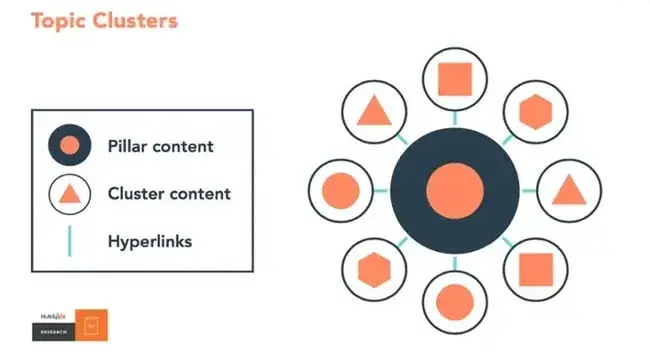
With internal linking, SEO teams signal to the algorithm that a set of pages is interrelated. It’s also a signal that the website covers relevant topics in depth; therefore, it’s an authoritative resource worth ranking.
Implementing Your SEO Strategy: Ongoing Optimization
Creating a strategy is only the starting point; once a website is rolling and gaining traction in SERPs, the work has just begun. Traction in search means access to data and performance, and now the real impact comes from consistent execution, maintaining performance, adapting to changes in search, and compounding gains.
Content Optimization Schedule
Content is a living asset, not a one-time deliverable. Devote time each month to updating old pages, especially blog posts, with up-to-date information to maintain rankings in SERPs.
A content optimization schedule is useful for traditional SEO and AEO. Seer Interactive found a strong content recency bias in Large Language Models (LLMs) such as ChatGPT and Perplexity. They discovered that the majority (79%) of hits (visits from AI crawlers) were to content from the last two years.
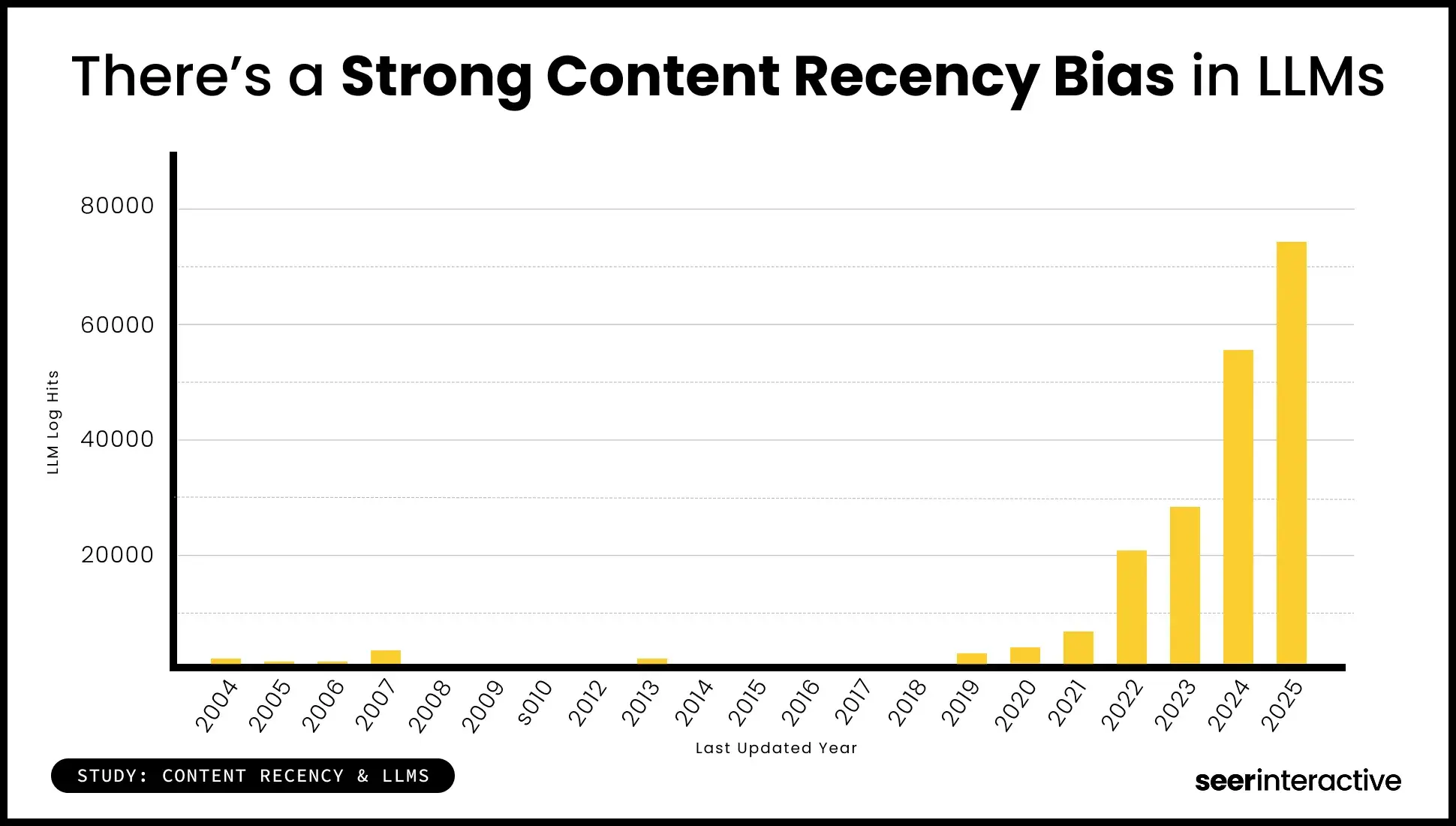
Establish a recurring cadence, for example:
- Monthly. Update underperforming pages (refresh copy, improve internal links, optimize for new queries) and add missing elements like FAQs, schema, or clearer answers for AI visibility
- Quarterly. Consolidate overlapping or cannibalizing content, fully refresh outdated posts with new data, insights, and structure, re-evaluate keyword targeting based on performance and intent shifts
Manage the recurring cadence and assign tasks and accountability. Effective SEO management requires clear ownership, repeatable processes, and defined review cadences. The Seer Interactive research also examined specific industries to identify which benefited most from content refreshers; consider this when creating the SEO strategy.
Pro tip: After a few months, track how your blog posts are ranking and which keywords they’re ranking for. That can help adjust subheadings and copy to leverage new search intent that your audience may be interested in.
Technical SEO Maintenance
Technical SEO isn’t a one-off audit — it’s ongoing maintenance that protects and enhances performance. Generally, a technical SEO audit will reveal issues, and SEO teams work with developers to resolve high-impact issues.
Remember: Efficient SEO teams are using tools like HubSpot’s SEO recommendations to highlight tech issues. The tool shows what users need to do, the potential impact of those actions, how easy they are to do, and who needs to do them.
Once the team resolves most issues, the site should be in good shape and should remain fine for a while. But sites break all the time, and issues occur. It’s critical to maintain technical SEO health. Regularly monitor:
- Crawl errors and indexation issues (via Google Search Console)
- Broken links and redirect chains
- Page speed and Core Web Vitals
- Mobile usability
- Duplicate content and canonicalizations
- Structured data implementation
Once a site is optimized, technical SEO maintenance becomes low-effort, allowing the SEO and development teams to focus on expanding the content strategy instead of laying the groundwork.
Link Building Campaigns
Treat authority-building as an always-on activity, not a one-time push. Develop ongoing campaigns that include:
- Digital PR and outreach
- Partnerships and co-marketing initiatives
- Promotion of linkable assets (research, tools, data-led content)
- Reclaiming unlinked brand mentions
Sustained effort is essential because authority compounds over time and directly affects a site’s ability to rank for competitive terms. Ideally, for every piece of content created, SEO teams will have a distribution plan to reach the right audiences. Part of this plan includes backlinking.
.png)
Complete SEO Starter Pack
An introductory kit to optimize your website for search.
- Increase your organic traffic.
- Plan your keyword strategy.
- Debunk SEO myths.
- Build a blog strategy.
Download Free
All fields are required.
Form not available
Performance Tracking and Reporting
To understand how to improve SEO, have a consistent reporting rhythm tied to business outcomes. Establish:
- Weekly monitoring, tracking rankings, traffic trends, and technical issues.
- Monthly reporting, tracking performance against KPIs (traffic, conversions, revenue).
- Quarterly reviews, looking at strategic shifts, content gaps, and growth opportunities.
Focus on metrics that matter — not just visibility, but how SEO contributes to pipeline and revenue. Over time, this allows SEO specialists to refine what’s working, address what isn’t, and scale your strategy with confidence.
Featured Resource: How to create an SEO report [+ benefits, best practices, and examples]
SEO Strategy Template and Tools
This section provides a practical framework for planning, executing, and evaluating SEO optimization plans at scale.
Monthly SEO Planning Template
A consistent cadence helps turn strategy into repeatable execution; that’s how to create SEO success stories. Here’s a simple 4-week plan you could re-run frequently.
- Week 1 - Research & prioritization. Review performance data (traffic, rankings, conversions), identify keyword opportunities and content gaps, and prioritize pages/topics based on business value and effort
- Week 2 - Content production & optimization. Create new content aligned to keyword clusters and intent, update existing pages (refresh copy, improve internal linking, optimize for AI visibility), and align CTAs and conversion paths
- Week 3 - Technical SEO & link building. Fix crawl errors, broken links, and indexing issues, improve Core Web Vitals and page speed, execute outreach, PR, and backlink acquisition
- Week 4 - Reporting & refinement. Measure performance against KPIs, identify wins, losses, and opportunities, refine priorities for the next cycle
The more SEO teams repeat the monthly plan, the easier SEO becomes. For example, if technical issues are resolved and SEO teams simply maintain a healthy site, your research in cycle two may be easier than in cycle one, as keywords uncovered in cycle one may still be applicable or require content creation.
Pro tip: Work in categories, within pillars, or in clusters on your site. I often tell my clients that if we try to optimize an entire site, we’ll do everything but achieve anything. Go back to the SMART goals and choose a priority, based on the business. For example, if a specific service is a business focus, start optimizing its service page, then move out to supporting content clusters.
Essential SEO Tools by Function
The right tools help SEO and content teams execute faster, uncover insights, and connect SEO performance to business outcomes. Here are some top picks:
Keyword Research and Competitor Analysis Tools
Semrush
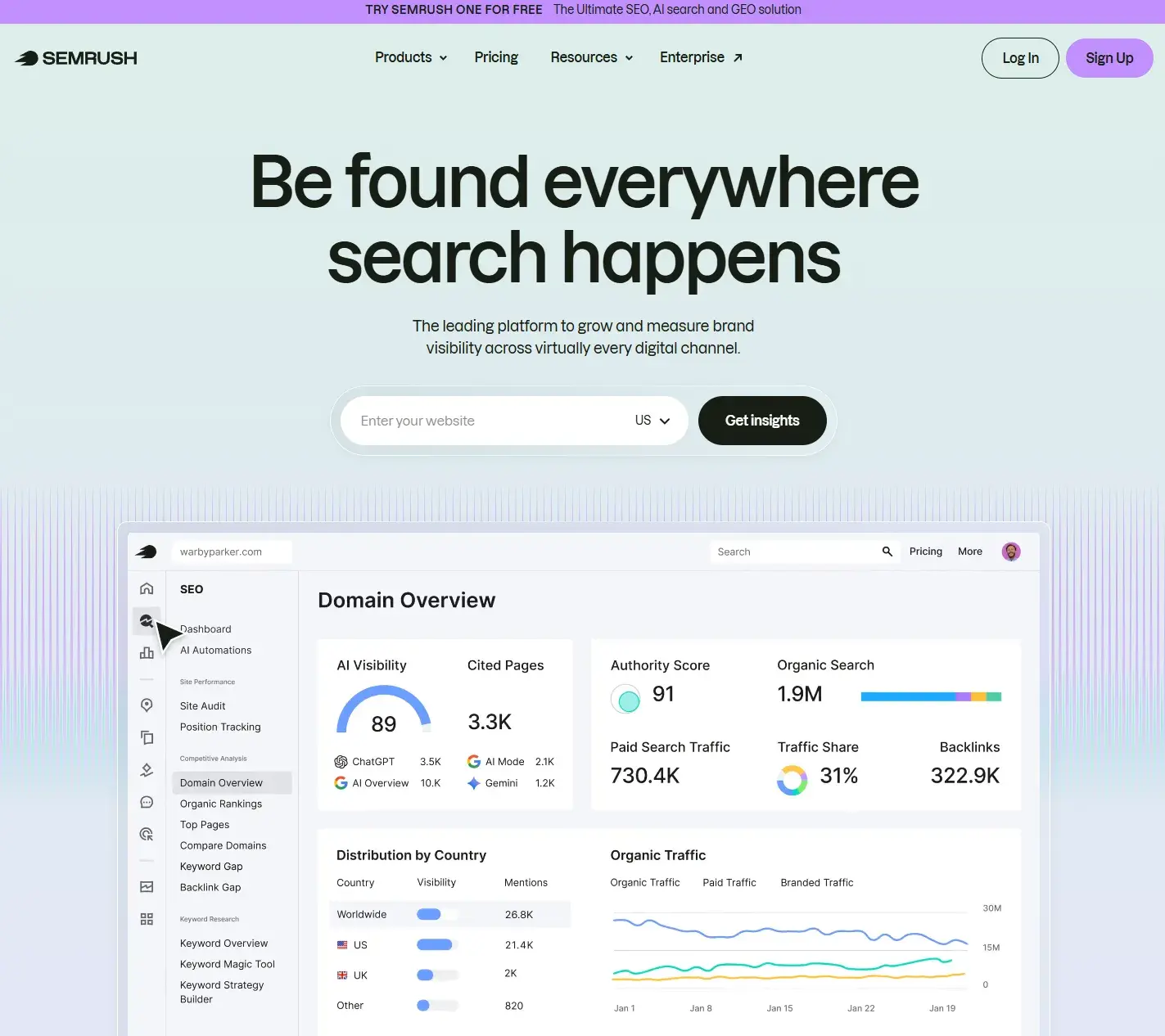
Semrush is an all-in-one SEO platform widely used for keyword research, competitor analysis, and visibility tracking.
Key features:
- Keyword database with volume, difficulty, and intent data
- Competitor domain analysis
- SERP tracking and visibility insights
- Content gap analysis
What we like: Its competitive intelligence capabilities make it easy to benchmark against others and identify opportunities quickly. It’s a comprehensive SEO tool that’s been around for years.
Pricing: Paid plans starting from $117.33/mo
Ahrefs
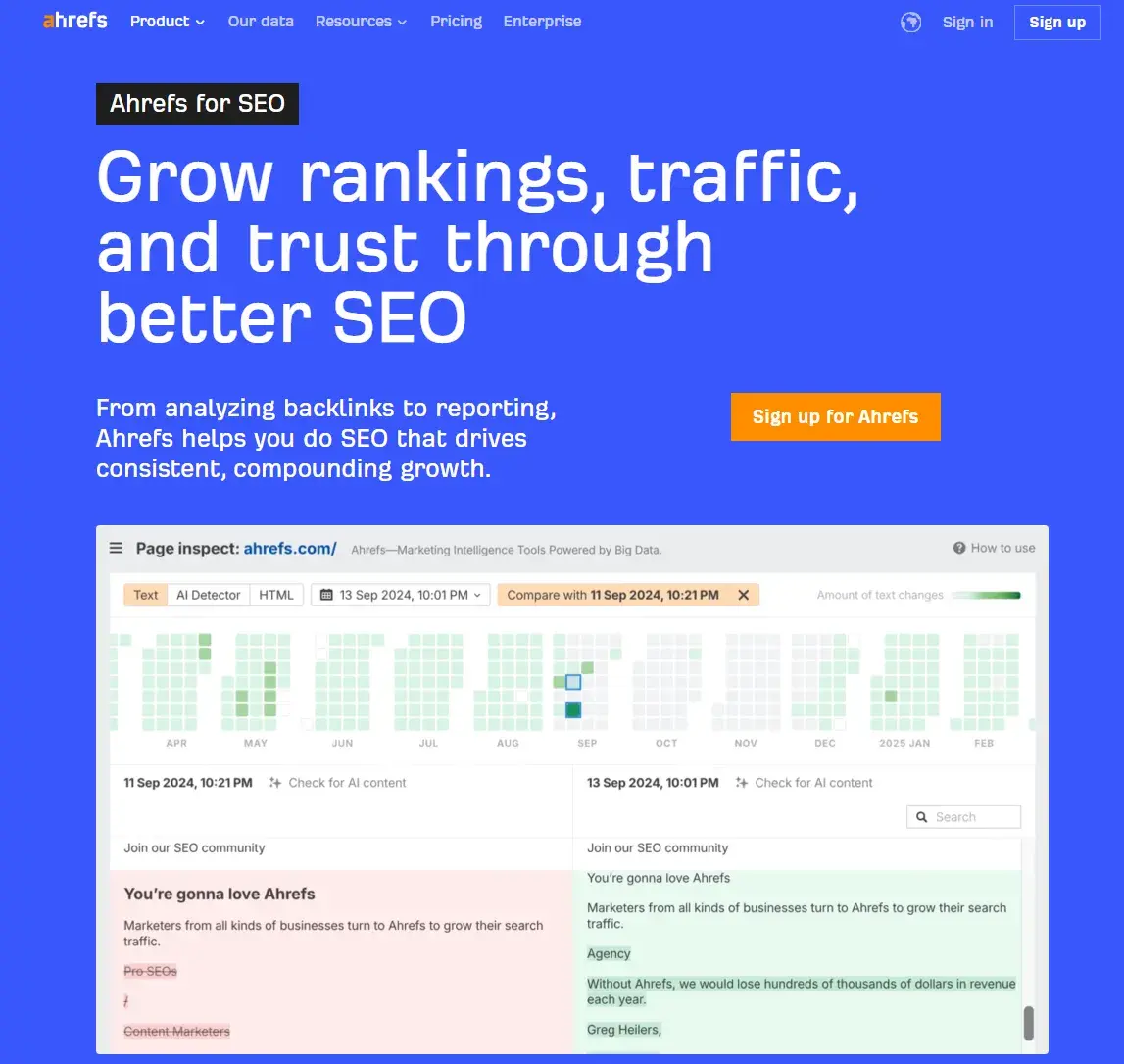
Ahrefs is known for its backlink data and robust keyword research capabilities, making it a strong choice for both content and authority analysis.
Key features:
- Keyword explorer with click data and difficulty scores
- Backlink analysis and link growth tracking
- Content explorer for topic research
- Site audit tools
What we like: Ahref’s is an industry-leading backlink database and strong insights into how content earns traffic.
Pricing: Prices start from $129/month
Technical SEO Tools
HubSpot’s SEO Recommendations (as part of Content Hub)
One of the key features of Content Hub is the SEO recommendations report, which scans your site (including pages off HubSpot) and surfaces issues that impact performance across both technical SEO and on-page optimization.
The tool analyzes your pages at scale and identifies opportunities related to crawlability, indexability, metadata, internal linking, and overall content quality. That allows SEO teams to move beyond manual audits and continuously monitor site health as content evolves.
Recommendations are categorized by impact, technical difficulty, and ownership, making it easier to prioritize fixes and assign work across marketing and development teams. Instead of working through static audit documents, teams can focus on the highest-value actions first and manage implementation more efficiently.
At a page level, SEO specialists can drill into specific recommendations to understand:
- What the issue is and why it matters
- Which pages are affected
- How to fix it, with additional context provided in-platform
That’s particularly useful for scaling SEO across large sites, where thousands of pages can introduce overlapping or competing issues. By centralizing recommendations and tying them to specific pages and categories, teams can identify patterns, batch fixes, and streamline workflows.
Another key advantage is the ability to filter recommendations by category, impact, or role. That means developers can focus on technical fixes, while marketers can address content-related improvements — all within the same system.
Google Search Console
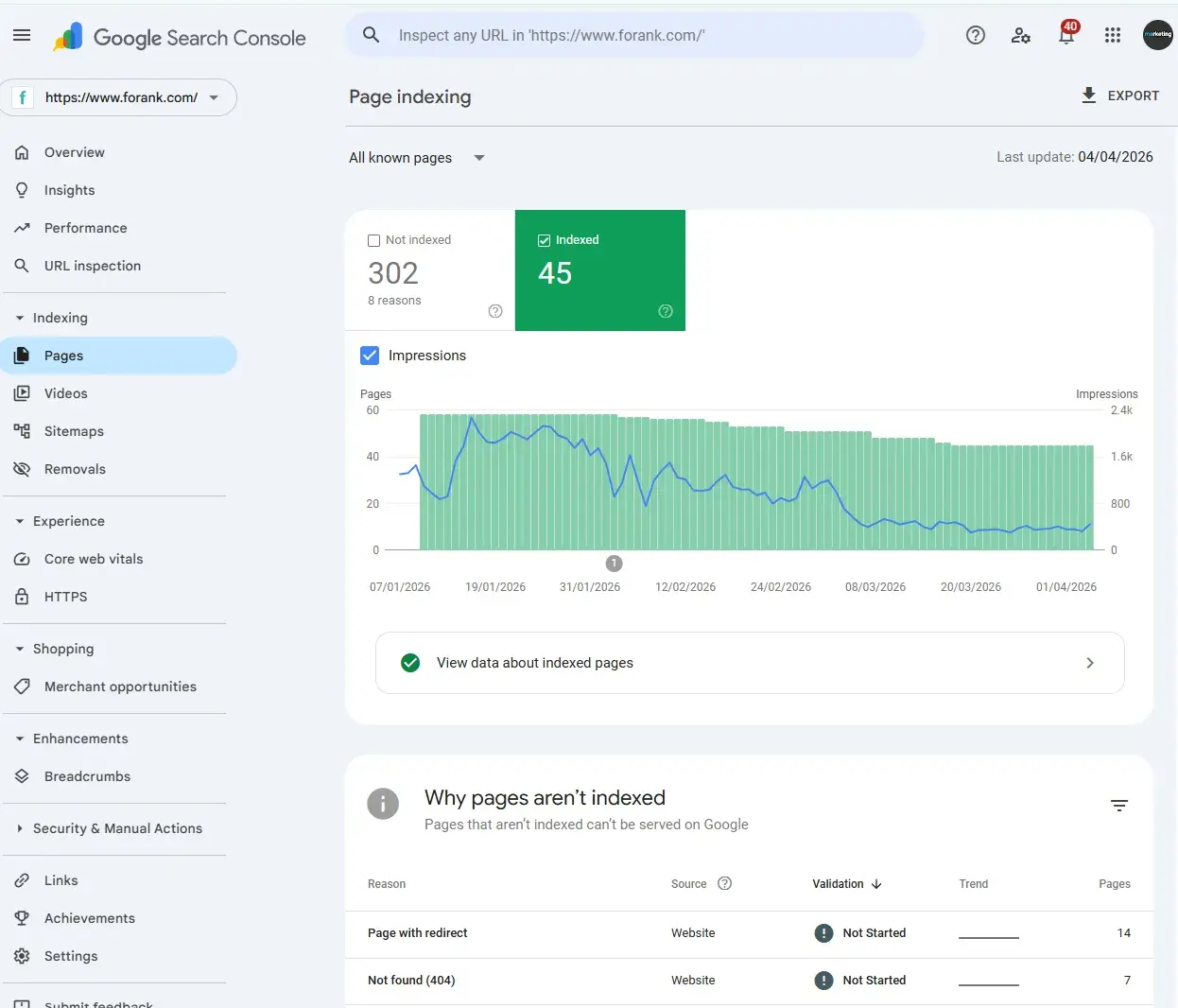
Search Console provides direct insight into how your site performs in Google Search.
Key features:
- Indexing and crawl status
- Search performance data (clicks, impressions, queries)
- Coverage and error reports
What we like: It’s essential, free, and provides first-party data directly from Google.
Google PageSpeed Insights
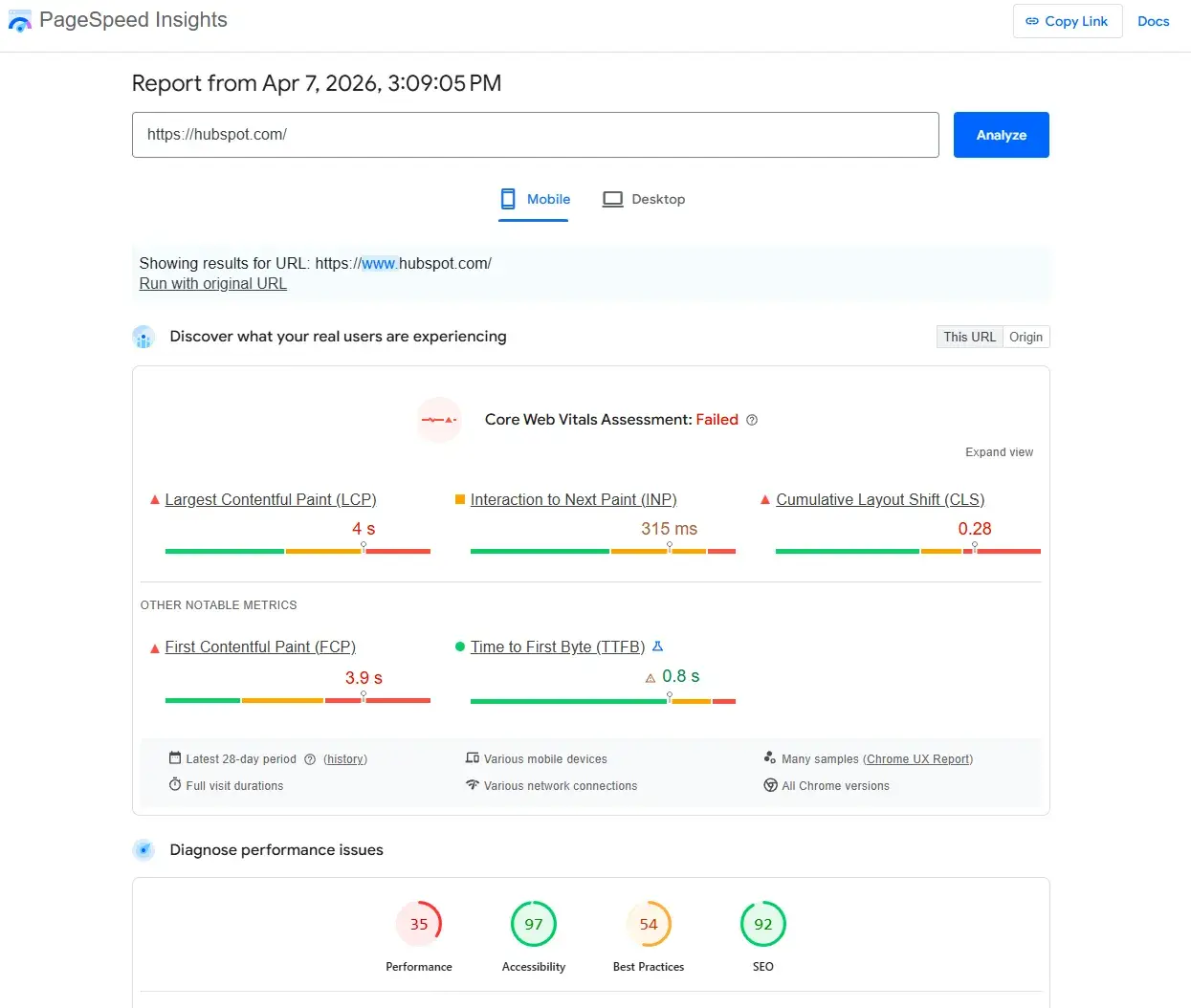
PageSpeed Insights evaluates page performance and Core Web Vitals.
Key features:
- Page speed diagnostics
- Core Web Vitals scoring
- Optimization recommendations
What we like: Clear, actionable insights for improving technical performance.
HubSpot Website Grader
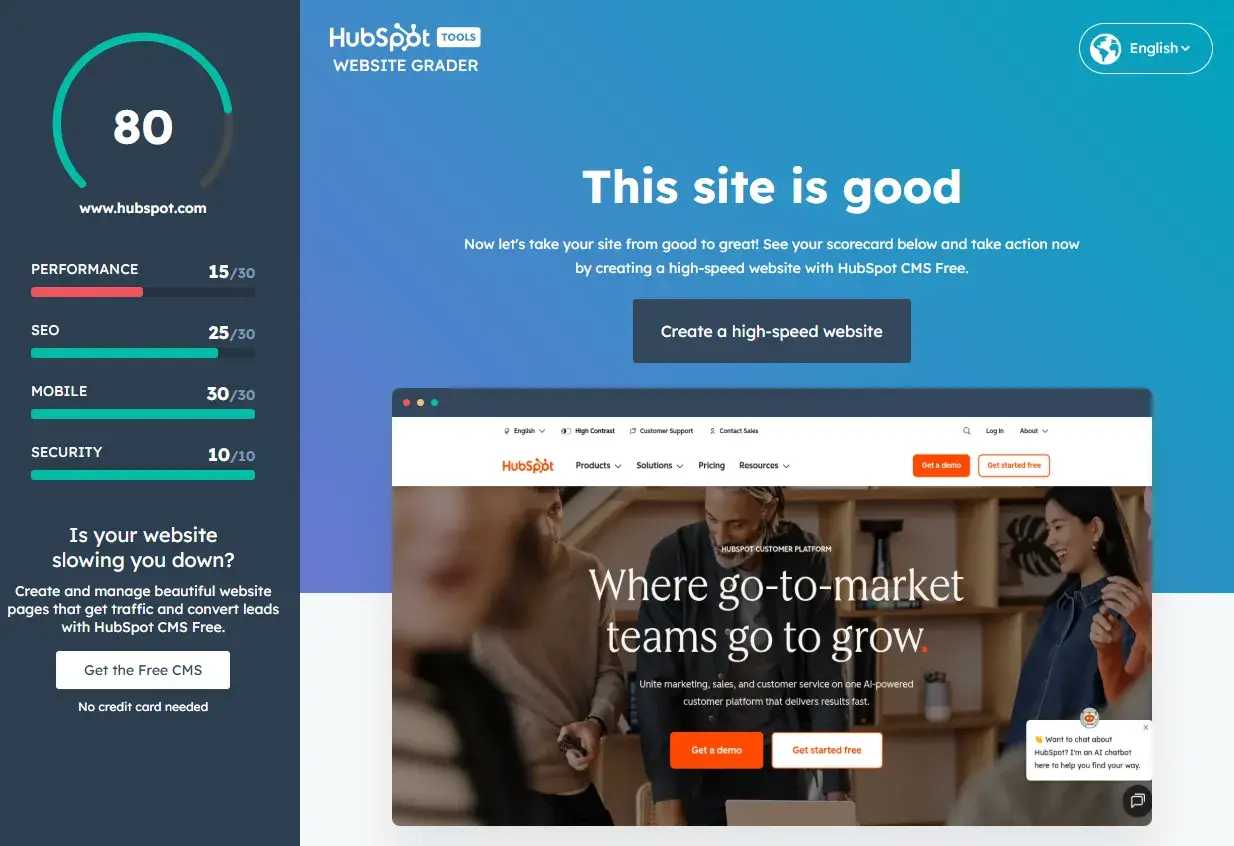
HubSpot’s Website Grader simplifies technical and performance analysis by translating complex SEO and website issues into clear, actionable insights.
While tools like Google PageSpeed Insights provide detailed diagnostics, they can be difficult to interpret, especially for non-technical teams. Website Grader bridges that gap by evaluating your site across key areas like performance, SEO, mobile experience, and security, then presenting the results in a clear, easy-to-understand report.
The tool analyzes:
- Page performance, like load speed and optimization opportunities
- Technical SEO factors like basic on-page and structural issues
- Mobile experience, such as responsiveness and usability across devices
- Security, like HTTPS implementation and site safety
Each section is scored and paired with practical recommendations, helping teams quickly understand what’s working, what isn’t, and where to focus next. That makes it particularly useful for early-stage audits, stakeholder reporting, or prioritizing improvements before diving into more detailed technical analysis.
What sets Website Grader apart is its accessibility. It gives marketers, not just developers, a clear view of site health. This makes it easier to diagnose issues, communicate them internally, and take action.
In practice, Website Grader works well as a starting point within your SEO management workflow, helping you quickly identify high-impact opportunities before moving into deeper tools or platform-specific fixes.
Content Optimization Tools
Content Hub
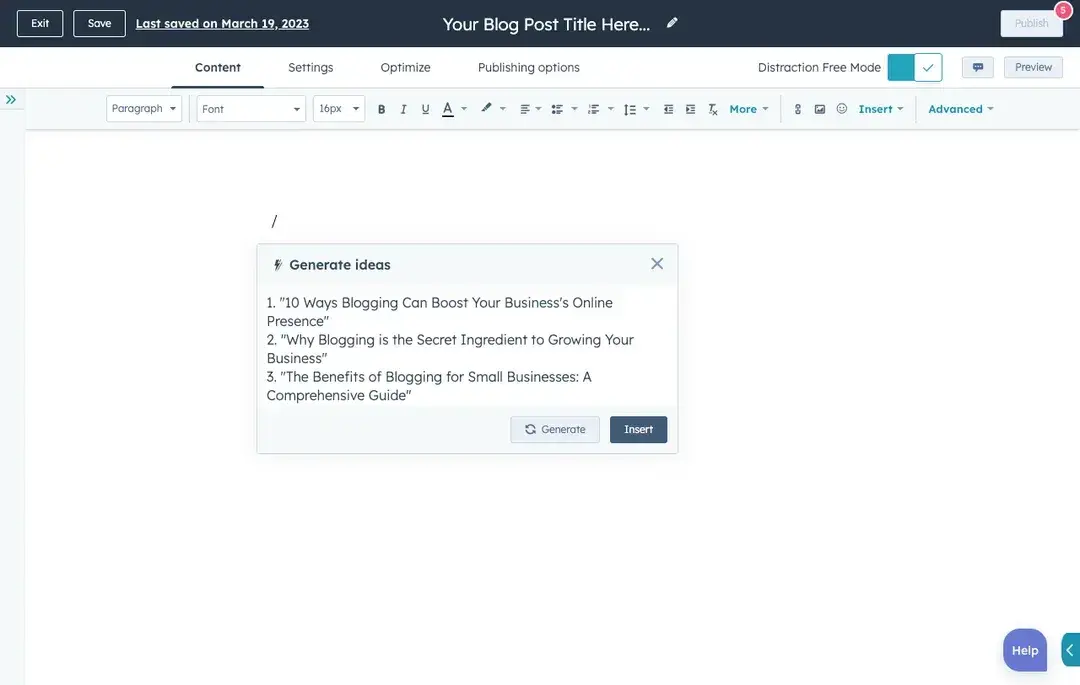
Content Hub brings SEO directly into the content workflow, allowing teams to plan, optimize, and measure performance without switching between multiple tools. Rather than treating SEO as a separate function, HubSpot integrates it into the process of creating, publishing, and improving content over time.
At its core, the SEO tools within Content Hub help teams move from disconnected tactics to a structured, scalable SEO management process. That includes everything from topic planning and on-page optimization to technical recommendations and performance tracking.
Content Hub supports topic cluster planning, helping teams organize content around core themes (pillars) and supporting pages (clusters).
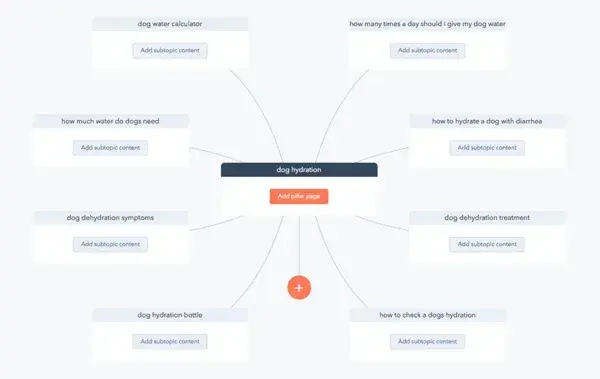
The topical planning aligns closely with how modern search engines — and AI systems — understand topical authority. By structuring content this way, teams can build depth in key areas and improve visibility across both traditional search and AI-driven results.
Within the content editor, HubSpot provides real-time SEO recommendations as you create or update pages. That includes guidance on metadata, headings, internal linking, and content structure — allowing teams to apply SEO best practices without needing separate tools or manual checklists. Because the workflow embeds these recommendations, they reduce friction and help maintain consistency across teams.
Another major advantage is the connection between SEO performance and business outcomes. HubSpot links content performance data to CRM and conversion data, so teams can see not just which pages drive traffic but also which ones generate leads, pipeline, and revenue. That makes it easier to prioritize high-impact work and justify SEO investment.
Content Hub also integrates with tools like Google Search Console, allowing teams to view search queries, impressions, and click data alongside on-site performance metrics. Combined with internal linking insights and page-level recommendations, this creates a centralized view of how content performs and where improvements are needed.
HubSpot’s free AEO Grader is also available separately as a quick diagnostic for assessing how well a site’s structure supports AI visibility. That is increasingly important as content SEO evolves beyond rankings into being cited and surfaced in AI-generated answers.
What makes HubSpot’s approach particularly effective is that it closes the loop between planning, execution, and measurement. Instead of exporting data between platforms or relying on disconnected workflows, teams can manage their entire SEO optimization plan within a single environment. This makes it easier to scale efforts and continuously improve performance.
Yoast SEO

Yoast helps optimize on-page SEO within WordPress.
Key features:
- Readability and SEO scoring
- Metadata optimization
- XML sitemap generation
What we like: Simple, accessible way to apply SEO best practices at the page level.
Link Building and Outreach Tools
Moz Link Explorer
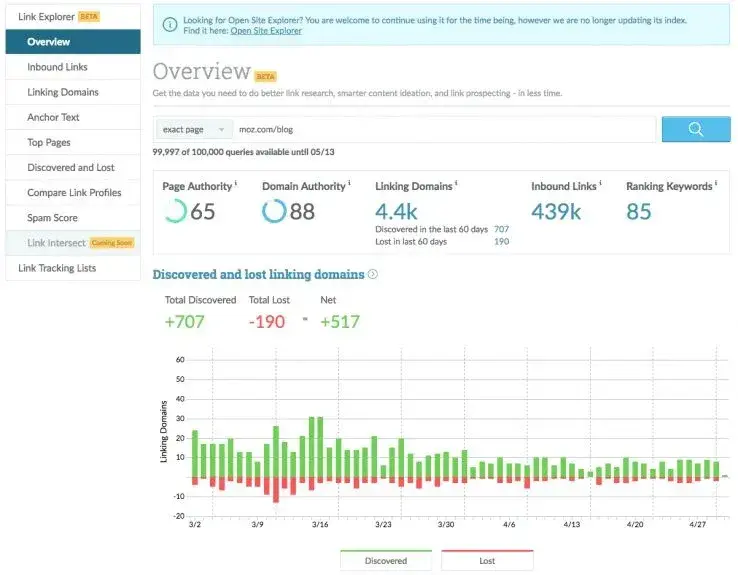
Moz Link Explorer helps analyze backlink profiles and identify link-building opportunities.
Key features:
- Domain authority scoring
- Backlink tracking
- Link gap analysis
What we like: Clear, digestible view of authority and link opportunities.
Analytics and Reporting Tools
Google Analytics 4 (GA4)
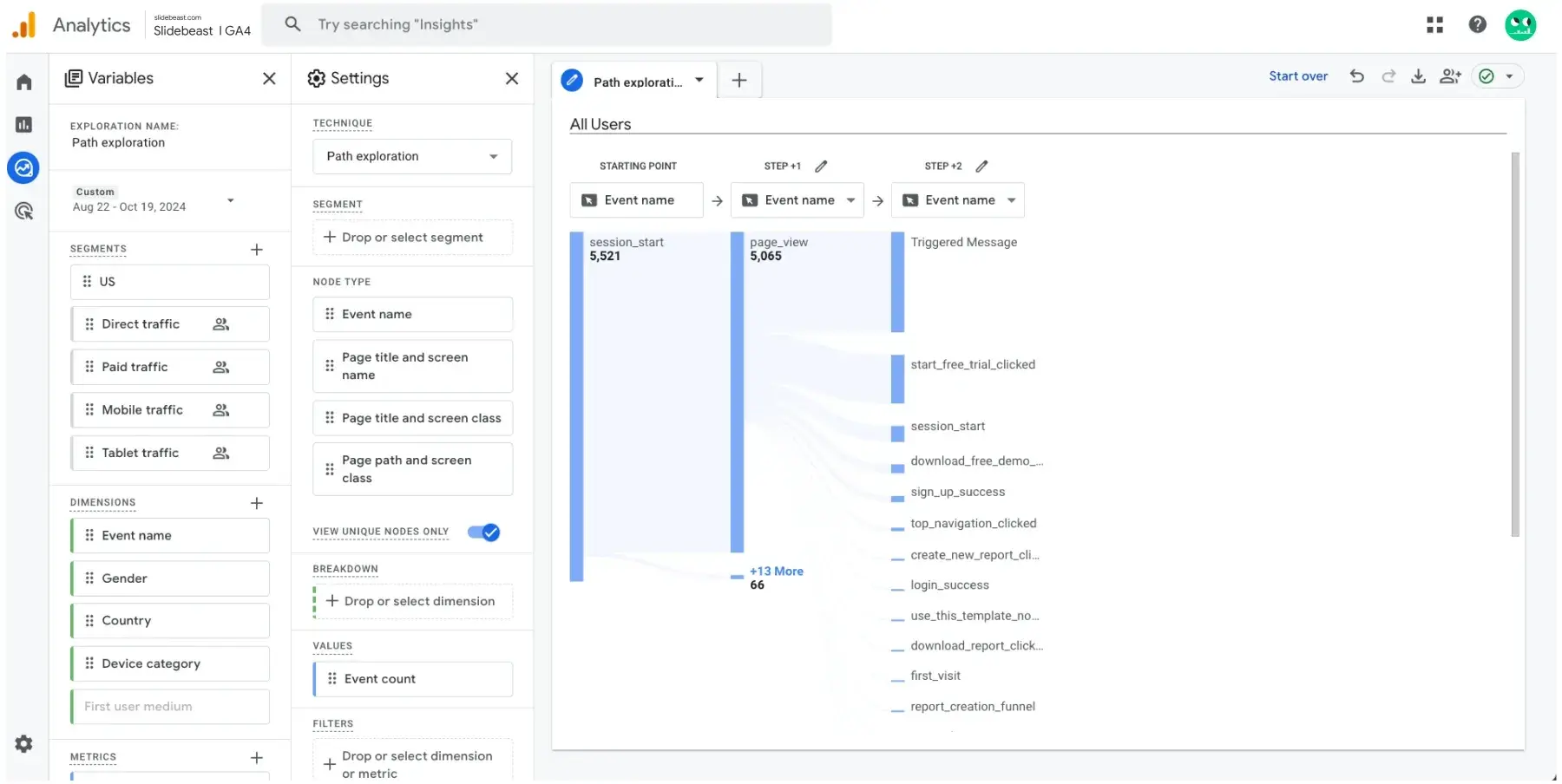
GA4 tracks user behavior, conversions, and traffic sources across your site.
Key features:
- Event-based tracking
- Conversion analysis
- Audience insights
What we like: Essential for understanding how organic traffic contributes to conversions.Data Studio
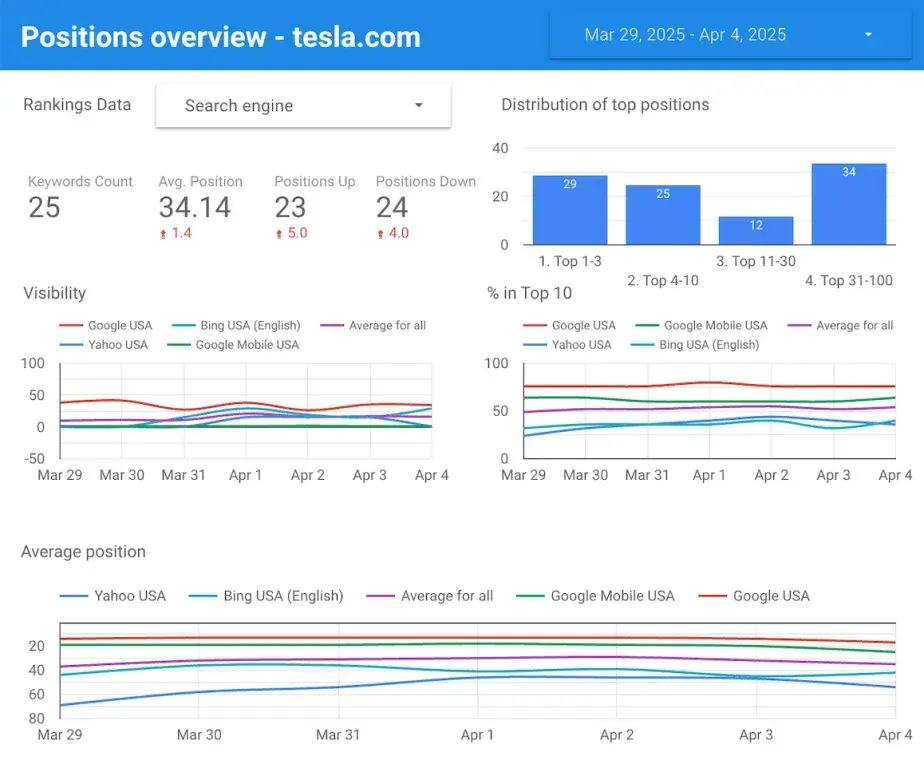
Data Studio, formerly known as Looker Studio, allows SEO teams to build custom SEO dashboards.
Key features:
- Data visualization and reporting
- Integration with GA4, Search Console, and other tools
- Custom dashboards
What we like: Flexible reporting for stakeholders and performance tracking.
AEO (Answer Engine Optimization) Tools
HubSpot AEO
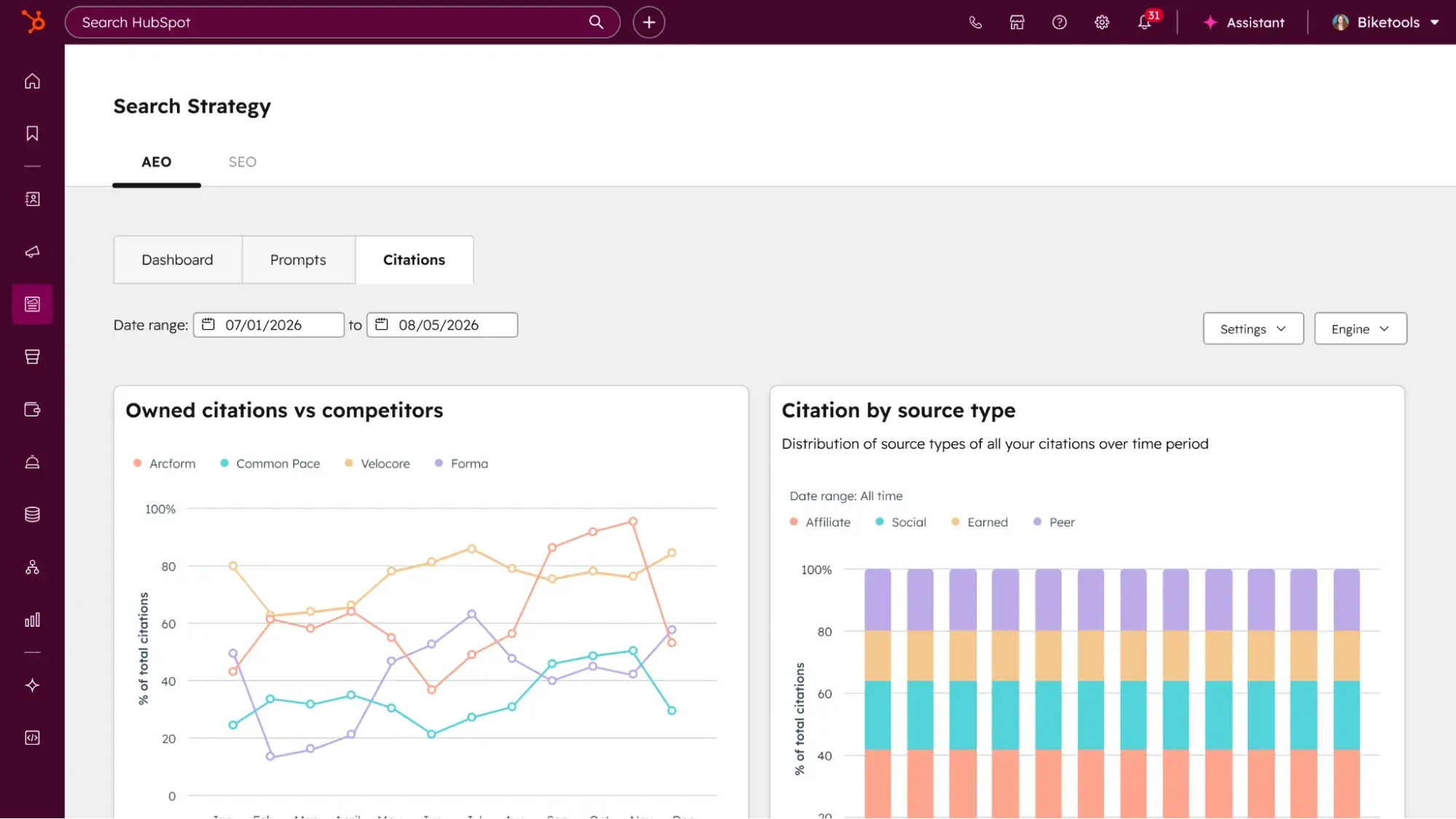
HubSpot AEO gives marketers immediate visibility into how their brand appears across answer engines like ChatGPT, Perplexity, and Gemini. It’s available as part of Marketing Hub Pro and Enterprise, as well as a standalone tool for $50/month.
With HubSpot AEO, teams can understand whether AI-generated answers mention their brand, how they compare to competitors, and where gaps exist. That’s especially valuable in a landscape where buyers are increasingly starting their research in AI tools rather than traditional search engines.
At its core, HubSpot AEO focuses on three things:
- Measuring AI visibility through a unified score
- Benchmarking performance against competitors
- Delivering clear, prioritized recommendations to improve presence
That makes it an ideal entry point for teams looking to quickly start building an AEO strategy, without adding complexity or committing to a broader marketing system. Unlike a one-time diagnostic, HubSpot AEO tracks visibility continuously so teams can see how their brand’s presence across answer engines shifts over time as content and strategy evolves.
Because AEO connects to HubSpot Smart CRM, it understands your business context from day one including your products, audience segments, and existing content. That allows it to suggest more relevant prompts, prioritize the most valuable opportunities, and generate tailored recommendations for your actual buyers. More importantly, it closes the loop between insight and execution. Teams can:
- Turn recommendations into content using built-in content tools
- Distribute and amplify content across channels
- Track performance and tie AEO efforts directly to pipeline and revenue
The result is a connected system in which AEO isn’t a standalone activity but part of a broader strategy that links visibility, content creation, and revenue impact.
SEO ROI Measurement Framework
To understand how to improve SEO, you need to measure performance beyond rankings alone. Focus on the metrics that show whether your SEO optimization plan is actually driving impact:
Organic Traffic (Qualified)
Track not just traffic volume, but whether visitors align with your target audience and intent. High-quality organic traffic should map to your ICP, key use cases, and revenue-driving pages, not just informational visits with no conversion potential.
The best way to determine whether SEO efforts are gaining traction with qualified audiences is to talk with the sales team and confirm they’re converting organic leads.
Keyword Visibility
Measure rankings for your priority keywords and topic clusters, not for vanity terms. That helps SEO teams understand whether efforts are building authority in the areas that matter most to your business.
Conversions and Revenue
Tie SEO performance directly to leads, pipeline, and sales. That’s where strategy becomes accountable—showing how organic visibility contributes to real business outcomes, not just traffic growth.
Engagement Metrics
Monitor behavioral signals like time on page, bounce rate, scroll depth, and interactions. These metrics indicate whether your content is actually satisfying intent and delivering value.
Backlinks and Authority Growth
Track link acquisition, referring domains, and brand mentions over time.
Technical Health
Monitor crawl errors, indexing issues, and Core Web Vitals to ensure your site can be properly discovered and ranked.
AI Search Visibility
As search behavior shifts, tracking presence in AI-generated answers is becoming essential. That includes whether AI searches cite your brand, how often you appear in responses, and how you compare to competitors across key prompts.
Tools like HubSpot AEO make this measurable by showing exactly where your brand appears across answer engines, which prompts trigger visibility, and where they cite competitors instead. That gives teams a clear view of their AI search performance and a prioritized path to improve it.
Create A Strategy That Supports Your Business Goals
Ranking in search pages can be difficult. While it may seem enticing to create content centered on high-traffic keywords, that strategy may not help SEO meet business goals.
Instead, opt to create an SEO strategy that addresses your business needs, such as increasing customer acquisition, for greater marketing success.
Platforms like Content Hub help teams plan, create, and optimize content at scale. At the same time, tools like HubSpot AEO provide visibility into how your brand is showing up in AI-driven discovery and what to do about it.
Together, they enable a more connected approach to SEO management, where insights don’t just sit in reports — they drive action, content, and measurable growth.
Editor’s Note: This blog post was originally published in April 2019 but was updated in January 2024 for consistency and freshness.
Complete SEO Starter Pack
An introductory kit to optimize your website for search.
- Increase your organic traffic.
- Plan your keyword strategy.
- Debunk SEO myths.
- Build a blog strategy.
Download Free
All fields are required.
Form not available


![SEO audits: How to conduct one that drives traffic growth [+ checklist]](https://53.fs1.hubspotusercontent-na1.net/hubfs/53/seo-audit-1-20251217-6006144.webp)

.png)


.webp)
![How to create a landing page with high ROI [+ expert and data-backed tips]](https://53.fs1.hubspotusercontent-na1.net/hubfs/53/%5BUse-2.webp)