.png?width=112&height=112&name=Image%20Hackathon%20%E2%80%93%20Square%20(10).png)

Well, any web designer hearing this would probably be ready to pull their hair out.
Today, I get it. Front and center, web design is about functionality, user experience, and ensuring every element on the page has a purpose.
So, let’s dive into the top web design best practices for 2024 to make your site do the work — convert visitors into paying clients. I’ll also cover key design guidelines and requirements that you should keep in mind, too.

12
- Select a typography that’s easy to read and skim.
- Be mindful of auto-translation.
- Choose a color scheme that suits your brand.
- Use white space to break up text and other elements.
- Use texture to add personality and depth.
- Add images to engage and inform readers.
- Simplify your navigation.
- Make your CTAs stand out.
- Optimize for mobile.
- Limit the options presented to users.
- Prioritize functionality over aesthetics.
- Choose the content your users understand.
1. Select a typography that’s easy to read and skim.
Typography refers to how letters and characters (type) are arranged and presented on the page. Since website typography affects not only how we read but how we feel about text on a web page, it’s important to pick carefully.
Ideally, you want a typeface that is:
- Easy to read
- Easy to skim
- Accessible to all users
- Legible across multiple devices and screen sizes
You also want it to match the look and feel of your brand.
For example, the luxury fashion brand Burberry refreshed its logo for the first time in 20 years in 2018. It replaced the old serif typeface with a bold, all-caps, sans serif typeface and dropped the knight emblem.
The result was a simpler and more modern-looking logo that’s easier to read on any screen — and that reflects changes in the company to become more transparent and appeal to a younger generation.

But then, in February 2023, creative director Daniel Lee introduced Burberry's new logo again. This time, we’re talking about something completely different — a modern blue design that nods to its British heritage.

Why did this change happen?
Fashion brands often refresh their logos when a new creative director steps in, reflecting their vision. When Lee joined in October 2022, he aimed to honor Burberry’s past while embracing the future. He called the logo “a modern take on British luxury” and “a new chapter for the brand.”
While I personally liked the first version a bit more, the second logo and its typography have a story and meaning.

HubSpot's Free Website Builder
Create and customize your own business website with an easy drag-and-drop website builder.
- Build a website without any coding skills.
- Pre-built themes and templates.
- Built-in marketing tools and features.
- And more!
2. Be mindful of auto-translation.
Test how auto-translation will affect your site’s content.
Many users will rely on translation tools to navigate your site, so ensure your design doesn't create confusion or miscommunication. Pay attention to layout, spacing, and typography — translated text must fit well and remain legible.
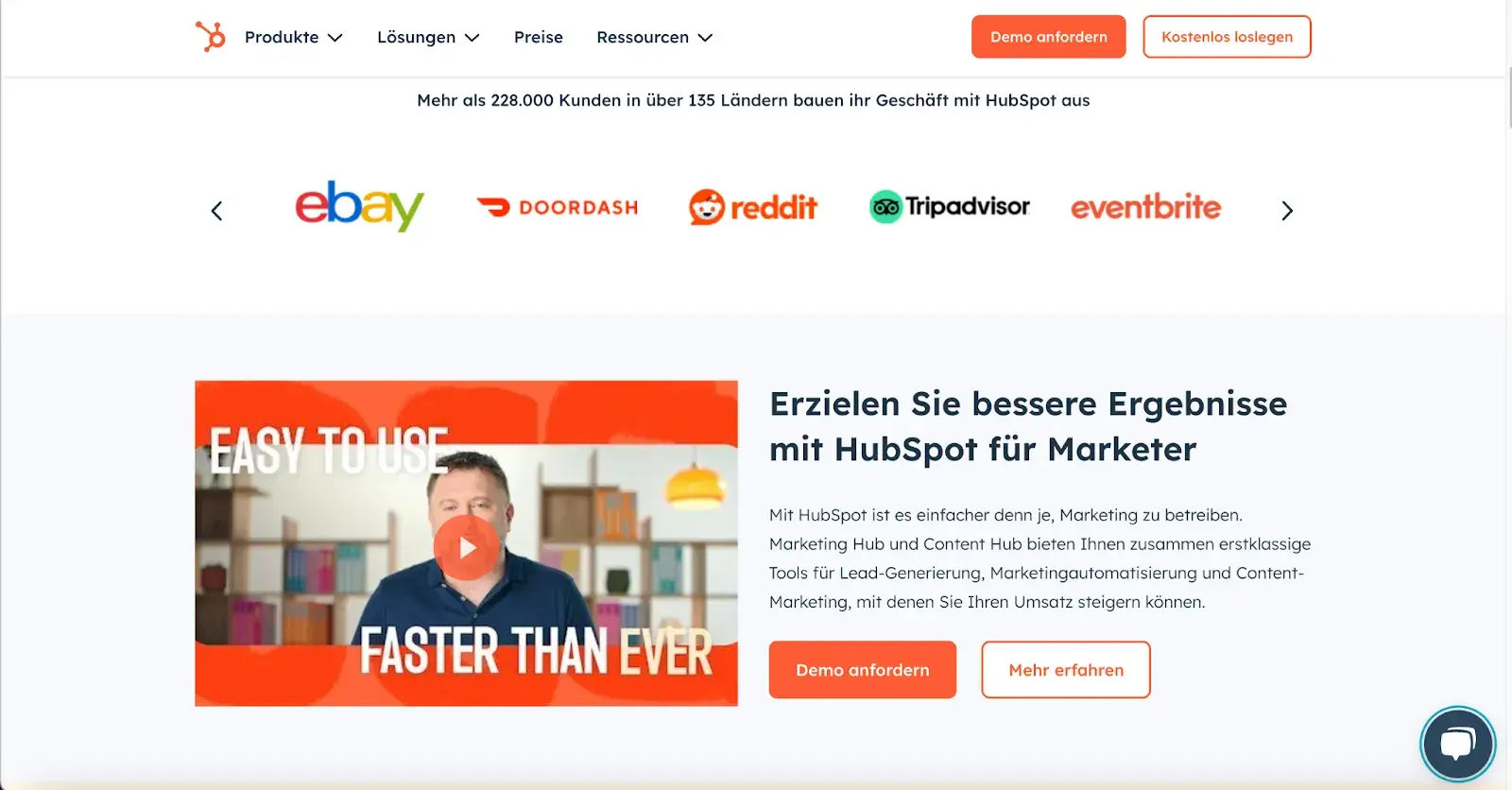
Let’s bring it to life.
I translated HubSpot’s site from English to German. The result? A polished translated site with no extra spaces, weird letters, or structural issues. Everything looks neat, just like the original:
“At Wrike, we use TT Norms Pro for its clean, modern aesthetic and readability across devices — accessibility is essential. It’s neutral, builds trust, and has multilingual character sets, so materials look polished even after translation,” shares Elisa Daniela Montanari, head of organic growth and website strategy at Wrike.
According to Montanari, a great font should be adaptable to different platforms, pages, and audiences.
“With TT Norm Pro‘s clean lines, it doesn’t compete against our visuals and messaging but complements it,” Montanari says.
3. Choose a color scheme that suits your brand.
Like typography, color can affect not only how we understand and interact with content but how we feel about it. Your color scheme should, therefore, check off the same boxes as your website typography. It should:
- Reinforce your brand identity.
- Make your site easy to read and navigate.
- Evoke emotion.
- Look good.
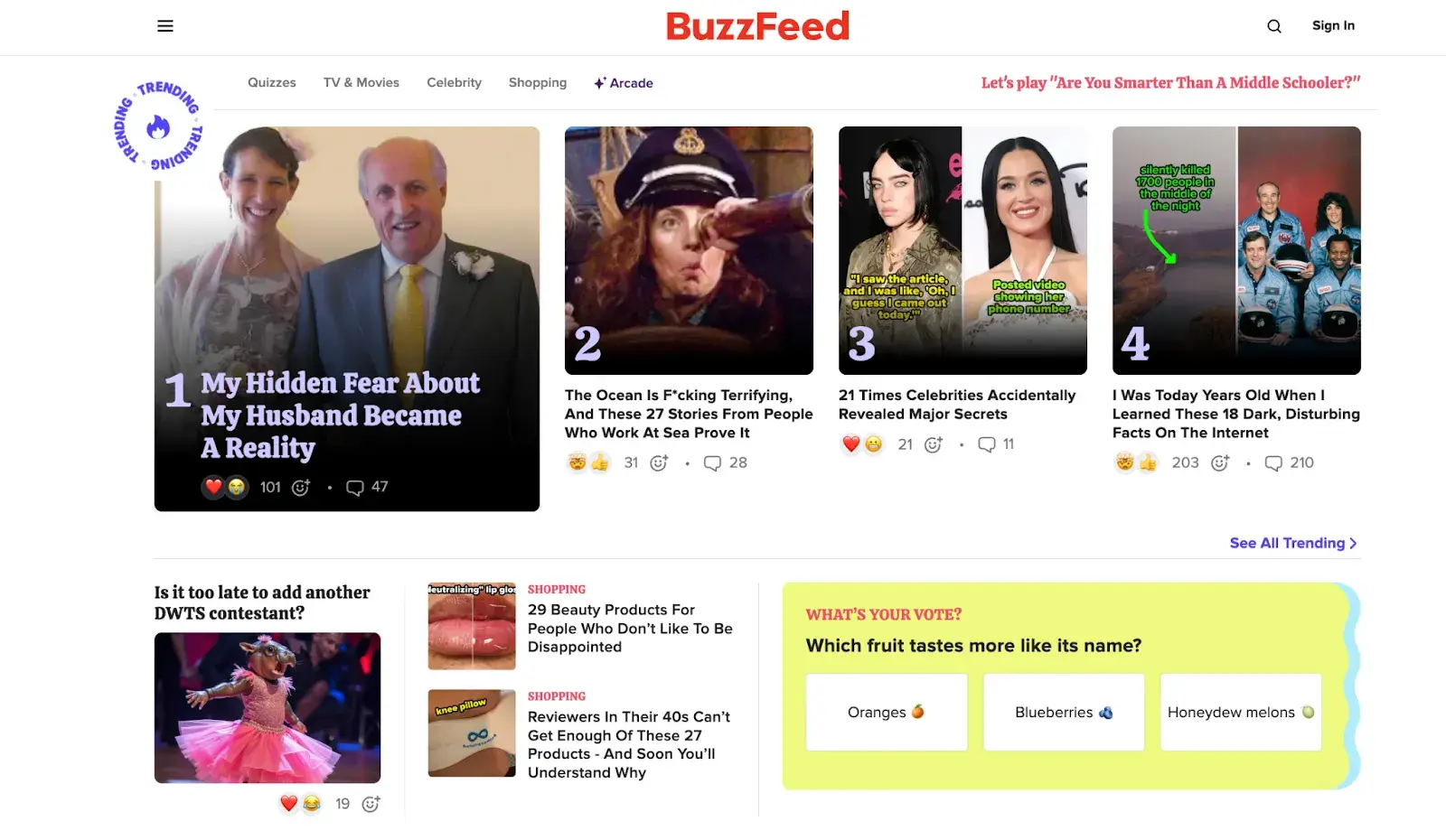
Buzzfeed, for example, uses the primary colors yellow and red to grab users' attention and get them excited about the content. It reserves the use of the primary color blue — which is associated with trust — exclusively for links and CTA buttons. Both emotions are ideal to evoke for a media site.
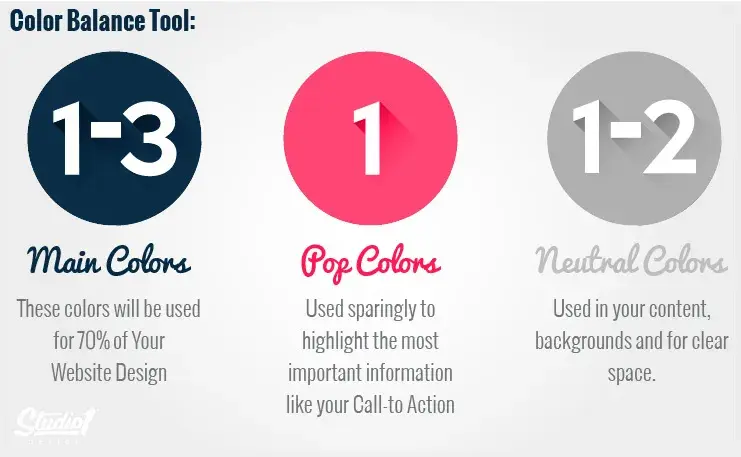
I recently came across a great piece by Greg Merrilees, CEO and Founder of Studio1 Design, highlighting the importance of finding the right balance.
He suggests considering color harmonies — when picking a color palette, start with your dominant color and then layer it. Darker colors grab attention first and carry more visual weight, so you’ll want to move back to lighter colors from there.
4. Use white space to break up text and other elements.
Whitespace provides users with visual breaks as they process a website’s design or content, which is aesthetically pleasing but also offers other benefits.
By minimizing distractions, whitespace makes it easier for users to focus, process information, and understand what is important.
That means you can use whitespace to avoid causing information overload or analysis paralysis — and to emphasize important elements on the page.
This might help persuade users to take a specific action, like sign up for a newsletter, shop your latest collection, and more.
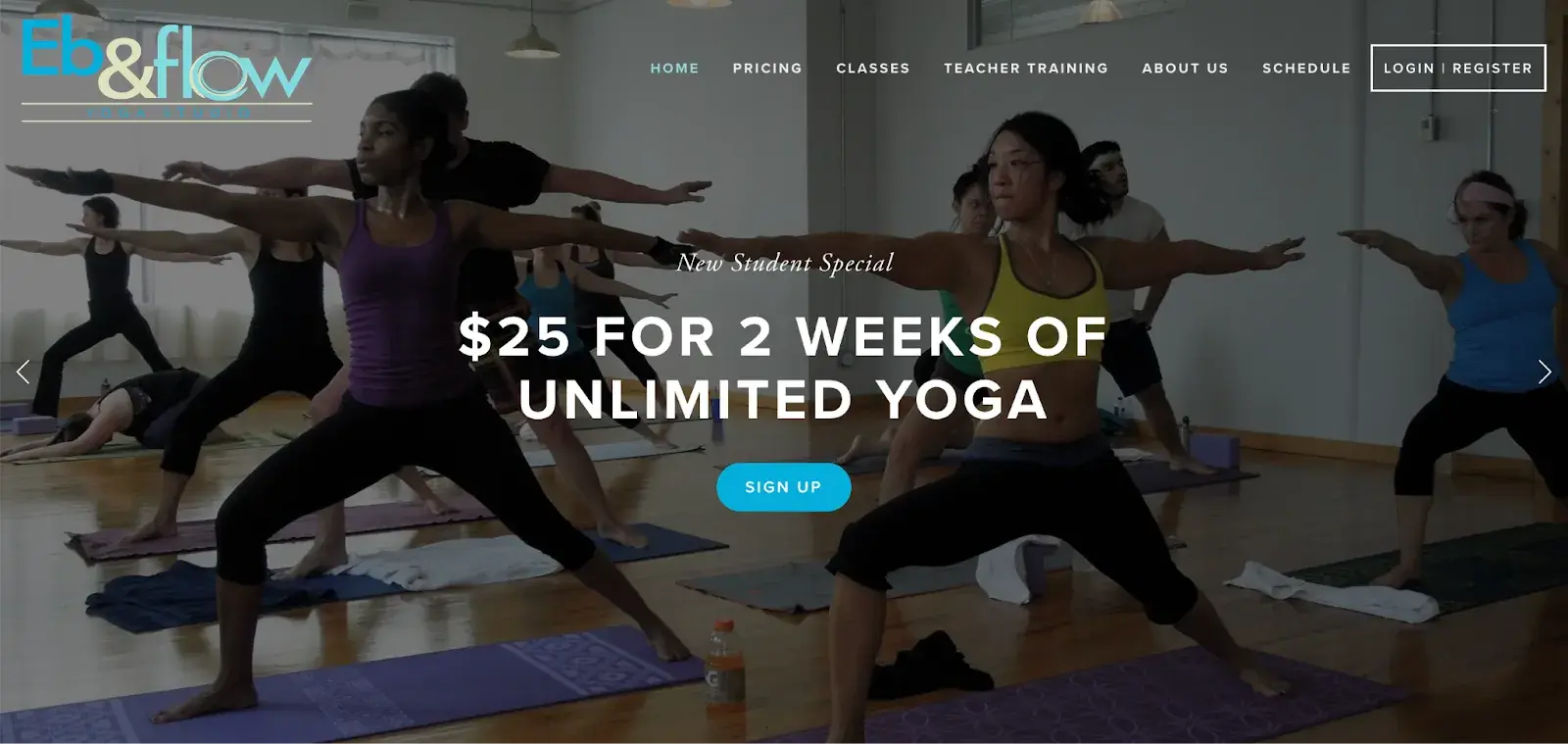
For example, Eb & flow Yoga Studio uses whitespace to lead users toward a specific action: to sign up for three weeks of classes. Notice that whitespace doesn’t mean the absence of color or imagery.
Instead, it means that every element on the page is positioned strategically, with lots of space in between, to avoid overwhelming or confusing visitors.
One of the best insights I’ve come across on this topic comes from Sean Lee-Amies, CEO and founder at Square One Digital, who explained it perfectly.
“Take Google for example. They’re massive. There’s no end of things they could talk about, and yet the only thing on their homepage is a logo, a search bar, and two buttons,” Lee-Amies says.
“Whitespace is always the first casualty of a web design created by people who haven’t yet learned to use a less is more approach to content and communication.”
5. Use texture to add personality and depth.
Resembling a three-dimensional, tactile surface, web textures aim to replicate the physical sensation of touch with another sensation — sight.
They’re a great design alternative to solid color backgrounds, particularly if you want to add personality and depth to your site.
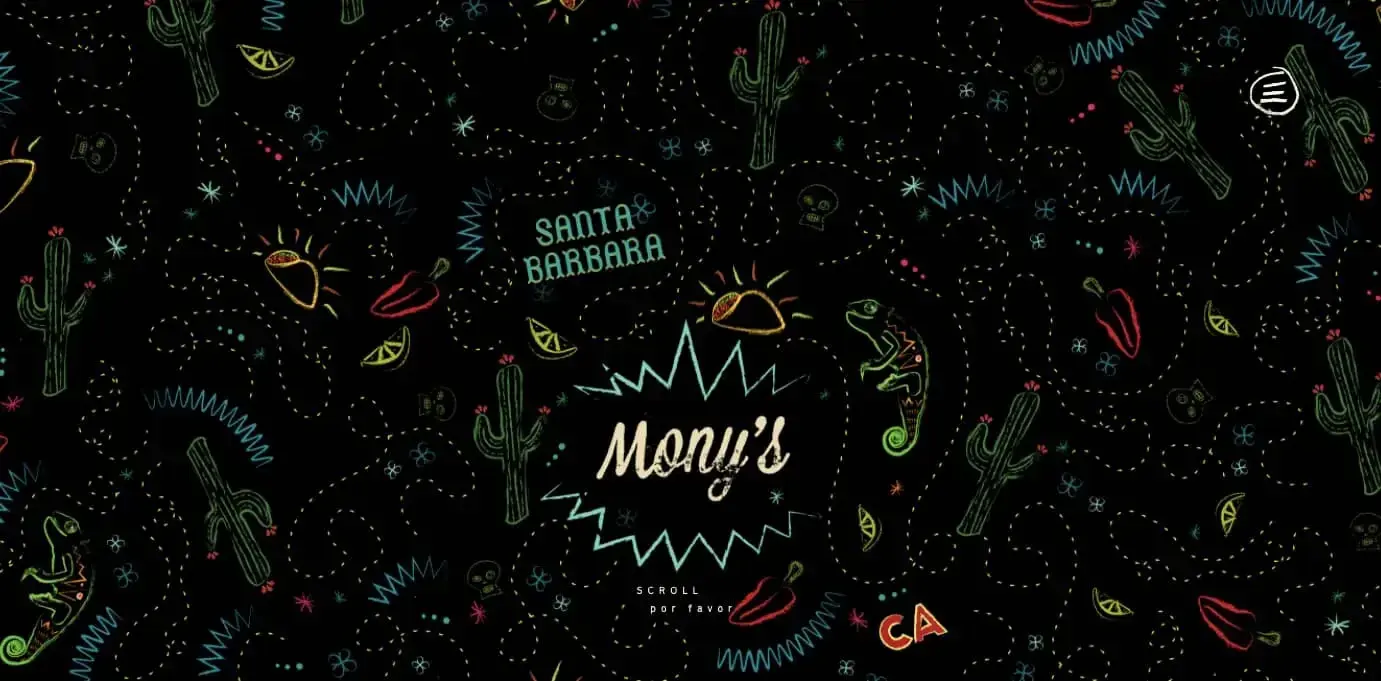
Take a look at the texture on the homepage for the Santa Barbara-based restaurant Mony’s Tacos below.
It looks like chalk drawn on a blackboard, doesn’t it?
I don’t know about you, but I can almost feel the chalk on my fingers just by looking at it. It‘s the perfect look for a restaurant that aims to be California’s preferred Funk Zone choice for Mexican delights.
6. Add images to engage and inform readers.
Striking a balance between text and images is essential in website design. Incorporating visuals can make your content more informative, engaging, and memorable. It’s easier for some people to learn and process information visually.
Here‘s a unique example of breaking up text with images from a cosmetic company’s website. This shows how endless the possibilities of incorporating imagery into your website design are.
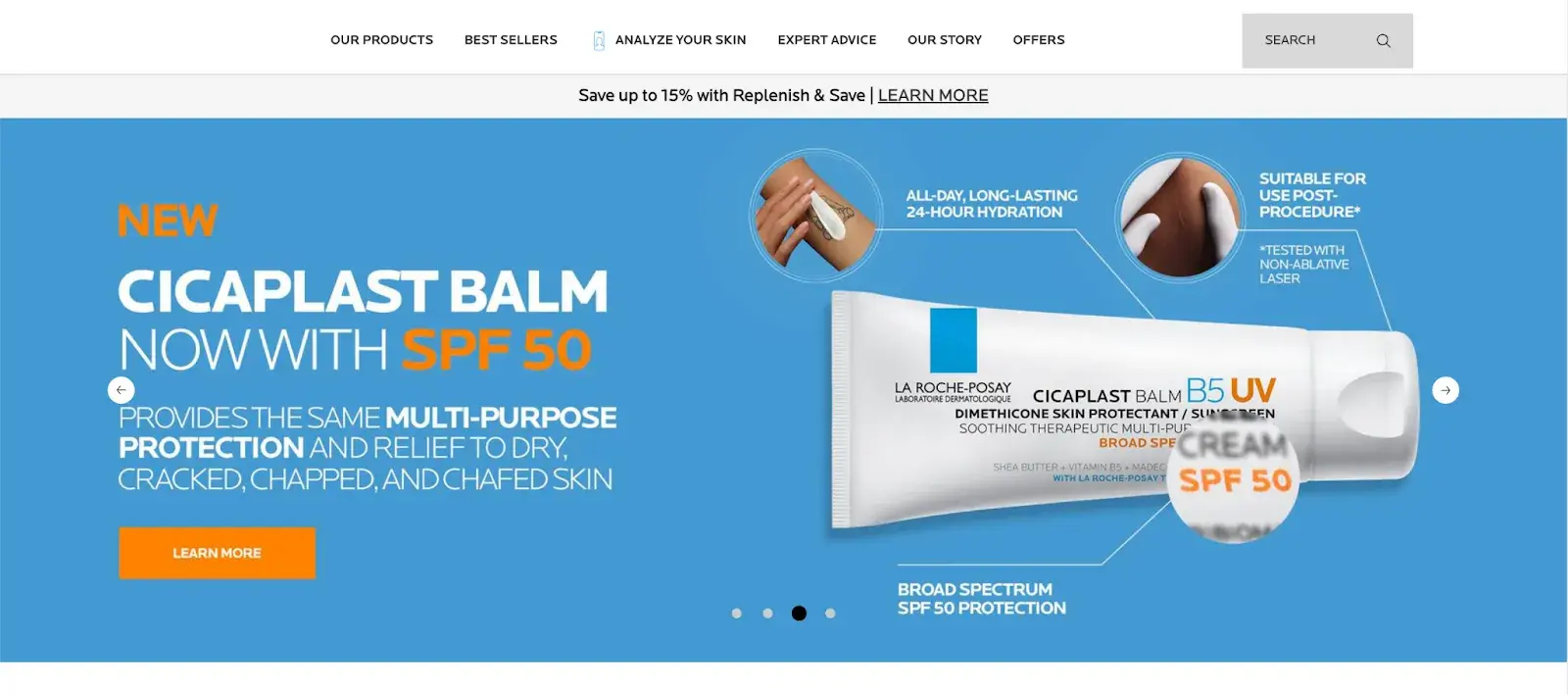
Images should be part of your entire website, not just the homepage, but must be used carefully and in balance.
The design team at Dgtl Infra, for example, creates blog posts with images every 200-300 words and sees 40% more shares than text-heavy articles. They aim for a 60/40 text-to-image ratio.
This balance keeps readers engaged without sacrificing substance. The team uses a mix of infographics, product shots, and relevant stock images.
Every image should serve a purpose. Randomly inserted visuals can do more harm than good. Each should either illustrate a point or provide a visual break at a natural pause in content.
7. Simplify your navigation.
Navigation is one of the most important design elements on a website. It impacts whether visitors arrive on your homepage and browse or click the “Back” button. That’s why it’s important to keep it as simple as possible.
Many websites opt for a horizontal navigation bar. This navigation style lists the major pages side by side and is placed in the website header.
Take the navigation bar on Blavity as an example. The main navigation categories (Entertainment, Culture, Small Business, Blavity U, Blavity Brands, Digital Cover) are clearly labeled and easy to notice.
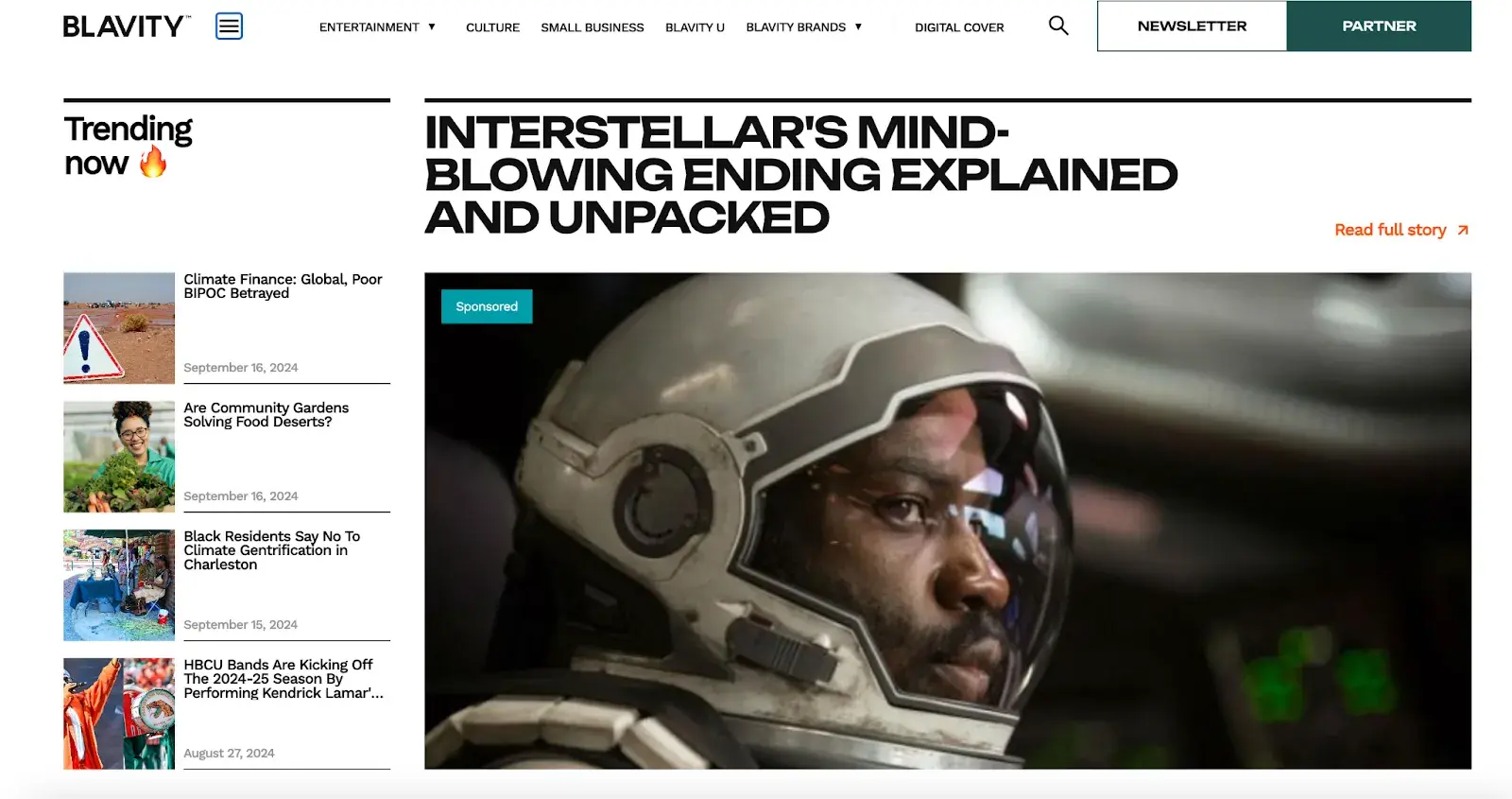
The use of a dropdown menu for the “Blavity” category adds a layer of organization without overwhelming the user with too many options at once. This is a subtle visual cue that helps to guide the user's navigation.
The search bar found its place in the top right corner, providing a convenient way for users to find specific articles or topics.
8. Make your CTAs stand out.
CTAs are elements on a web page, advertisement, or another piece of content that encourages the audience to do something. The call to action could be to sign up, subscribe, start a free trial, or learn more, among many others.
You want your CTAs to pop in your website design. To make that happen, consider how you’re using color as well as other elements like background color, surrounding images, and surrounding text.
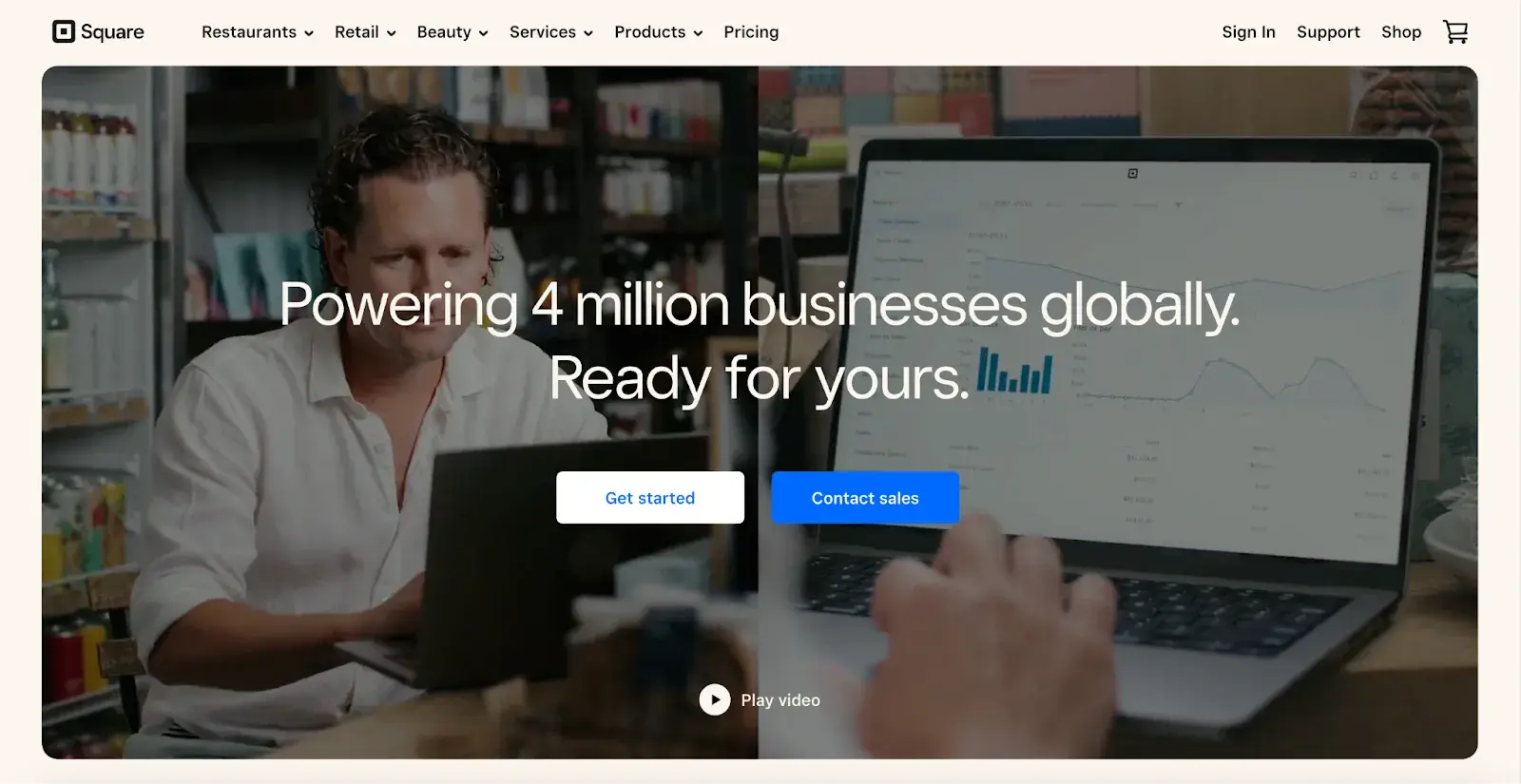
Square provides an excellent call-to-action example. Using a smooth video background, Square shows how unique and future-oriented its product is. Against this dramatic backdrop, the white “Get Started” CTA awaits your click, as well as “Contact Sales” in catchy blue color.
UX/CRO Manager Jade Jordan from Add People also suggests animating CTAs but in balance.
He says that a subtly animated button that wiggles or pulses after a delay can capture attention without being intrusive. Triggering such animations only after a user has spent time on the page ensures the interaction feels timely and relevant.
This technique, similar to well-timed pop-ups, respects the user's browsing flow while effectively drawing their focus toward conversion.
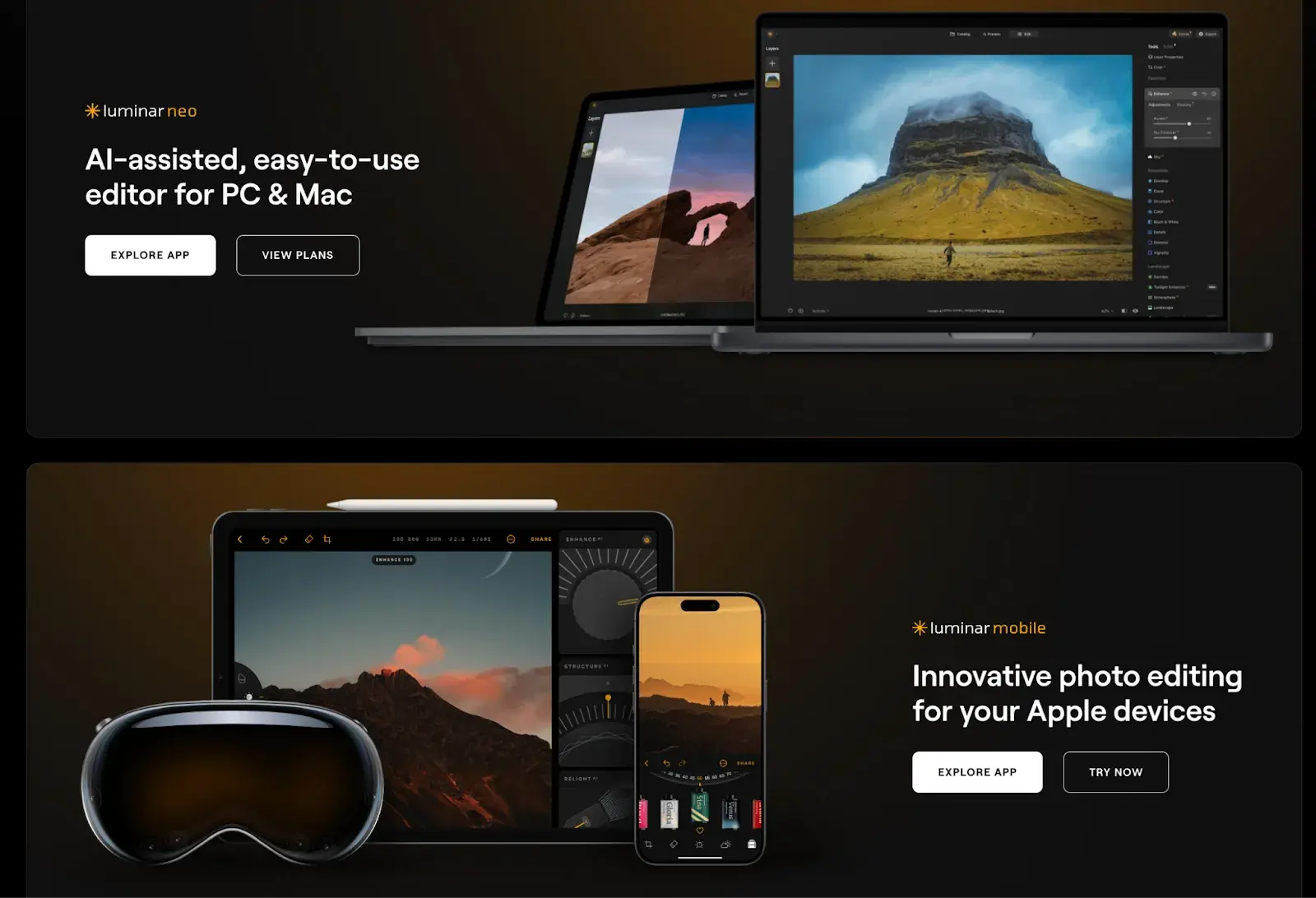
While the design of a button is important, we can't overlook its content: the text it contains. Yevhenii Tymoshenko, CMO at Skylum, touched on this during our conversation, saying:
“We recently redesigned the layout of our website by placing CTAs at the top and the bottom of the page. We also reworded them to be more actionable. Now they say ‘View Plans’ and ‘Explore App,’ speaking to the customer directly without using pushy language like ‘Buy Now.’ As a result, our conversion rates increased by 12%,” Tymoshenko says.
9. Optimize for mobile.
We’ve already discussed how important it is for your website to be responsive. That might mean altering or removing some elements that would clutter smaller screen sizes or negatively impact load time.
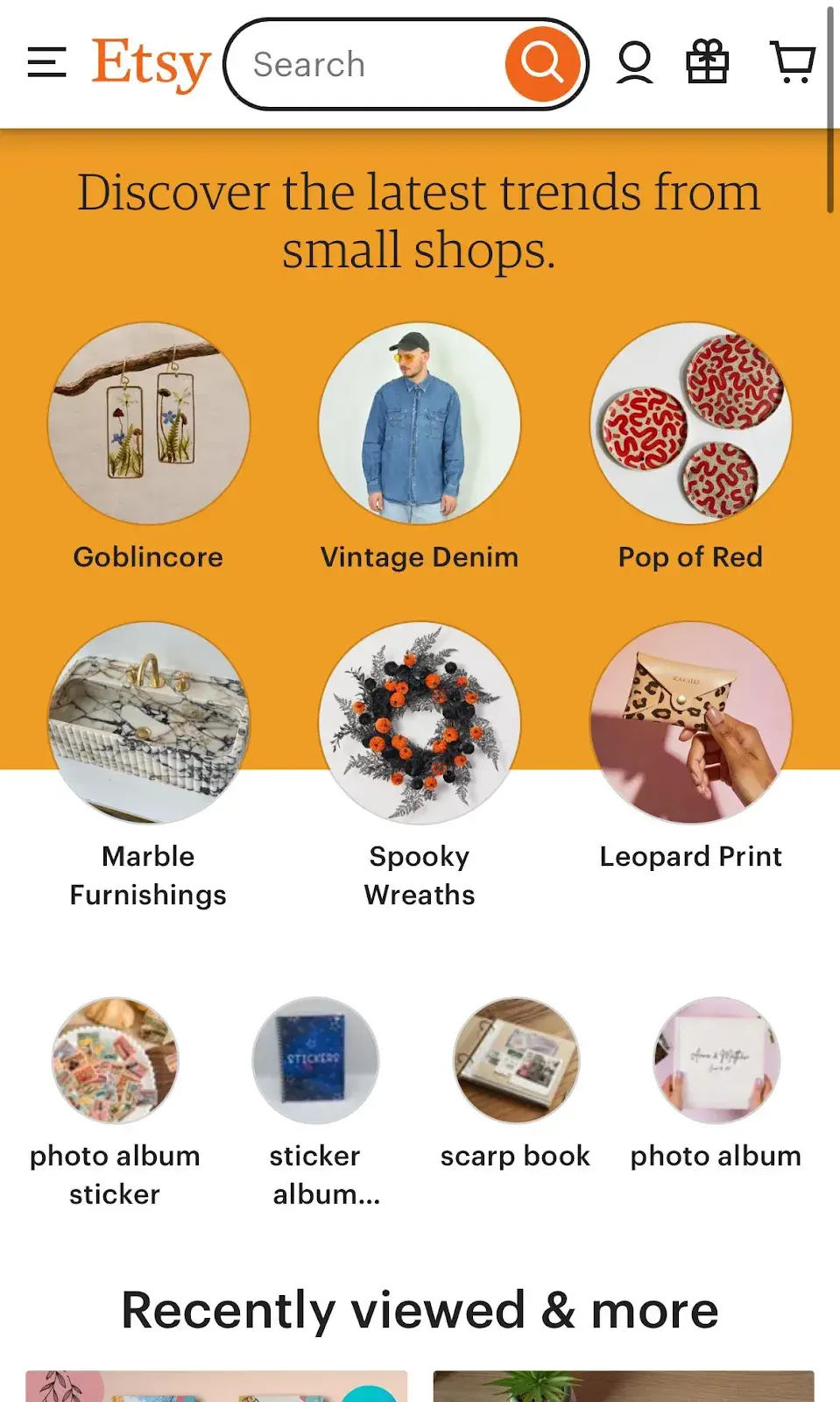
For an example of one of the best website designs, compare Etsy’s homepage on desktop vs mobile. On the desktop, you’ll see a navbar with categories. Hovering over each category will reveal a dropdown menu.
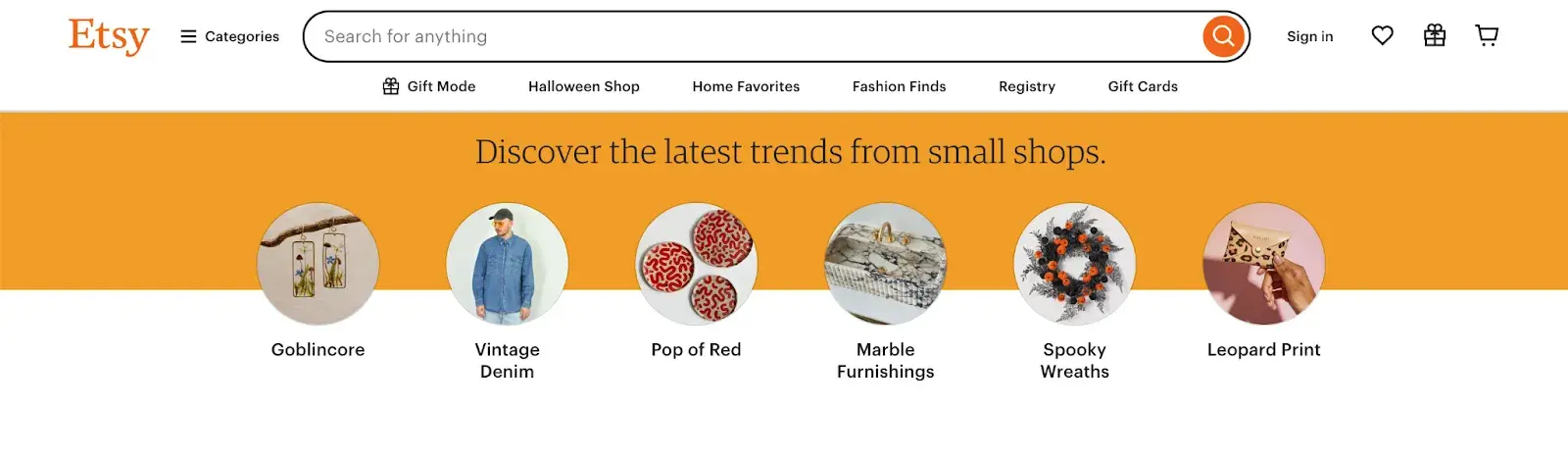
On mobile, this collapses behind a hamburger button, which improves the appearance and performance of the mobile site. You'll also notice that the images are larger — perfect for tapping with your finger on a mobile screen.
Claire Escobedo from Online Optimism says that one of the main mistakes she sees in mobile design is a lack of accessible features. This includes things that violate WCAG standards and features like hover effects that impact a site's functionality.
She continues, "You can't hover on a phone! You have to account for mobile interactions when designing for any site accessed on a mobile device, which these days is pretty much all sites.”
According to Escobedo, just because your site navigation functions well on desktop doesn’t mean it will transfer to mobile.
“A beautiful mega menu is nice for a laptop user, but how is a mobile user going to access those same four tiers of links?" Escobedo notes.
.png)
Free UX Research Kit + Templates
3 templates for conducting user tests, summarizing your UX research, and presenting your findings.
- User Testing Template
- UX Research Testing Report Template
- UX Research Presentation Template
Download Free
All fields are required.
10. Limit the options presented to users.
According to Hick’s Law, increasing the number and complexity of choices will increase the time it takes for a person to make a decision. This is bad news in website design.
If a website visitor is presented with too many options, they might get frustrated and bounce — or they might pick an option you don’t want, like abandoning their cart. That’s why it’s important to limit the number of options presented to a user.
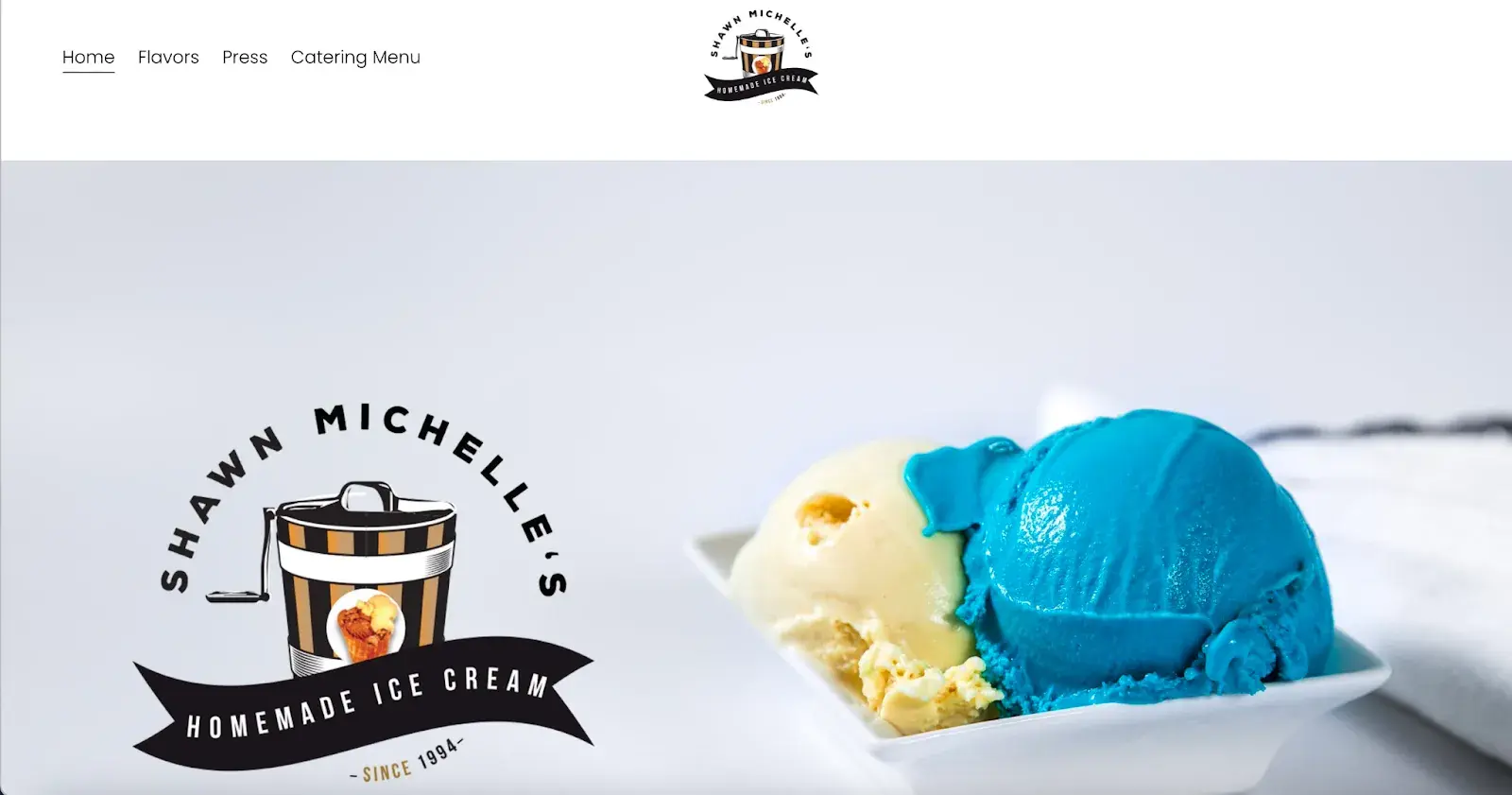
For example, when a visitor lands on Shawn Michelle's Ice Cream homepage, they have three clear options: learn about the company, explore the flavors, or check out the catering menu.
It‘s clean, with all the key info easy to find. Does a site like this need anything more? Absolutely not. Everything’s right there, making it easy for customers to get what they need, reducing the chance they’ll leave frustrated.
This is a perfect example of Hick’s Law in UX design.
Pro tip: Don't have the time to follow the rules? You can always download a pre-built website template that will provide a sound foundation for your site.
11. Prioritize functionality over aesthetics.
“Design should support content and functionality — not the other way around. The vast majority of users are going to your site for the information that’s there, not for the way it looks.
As a designer, I know how great it is for a website to look nice, but it can never come at the expense of making sure that your website is functional and understandable for all users.” says Escobedo.
Concentrate on functionality instead of just aesthetics. Create solutions that are easy to use, dependable, and practical, putting the needs of users front and center.
12. Choose the content your users understand.
Website content should be straightforward and doesn’t require all your brainpower to get it and deliver value at the same time. Since that’s not an easy task at all, I hit up Damon Culbert again for advice:
“In order for people to spend time and energy doing something, like sit and read through all the features of a new product or service, you have to create a compulsion within them to do so,” Culbert says.
According to Culbert, strong visuals allow people to invest time and energy into learning more about something you want to sell.
“B2B services are a great example of this; they’re often very complex, and non-experts don’t understand them. It might take a non-expert an hour or more of reading just to get a basic understanding,” Culbert says. “Or they could look at a visual that gets them there in five seconds or less.”
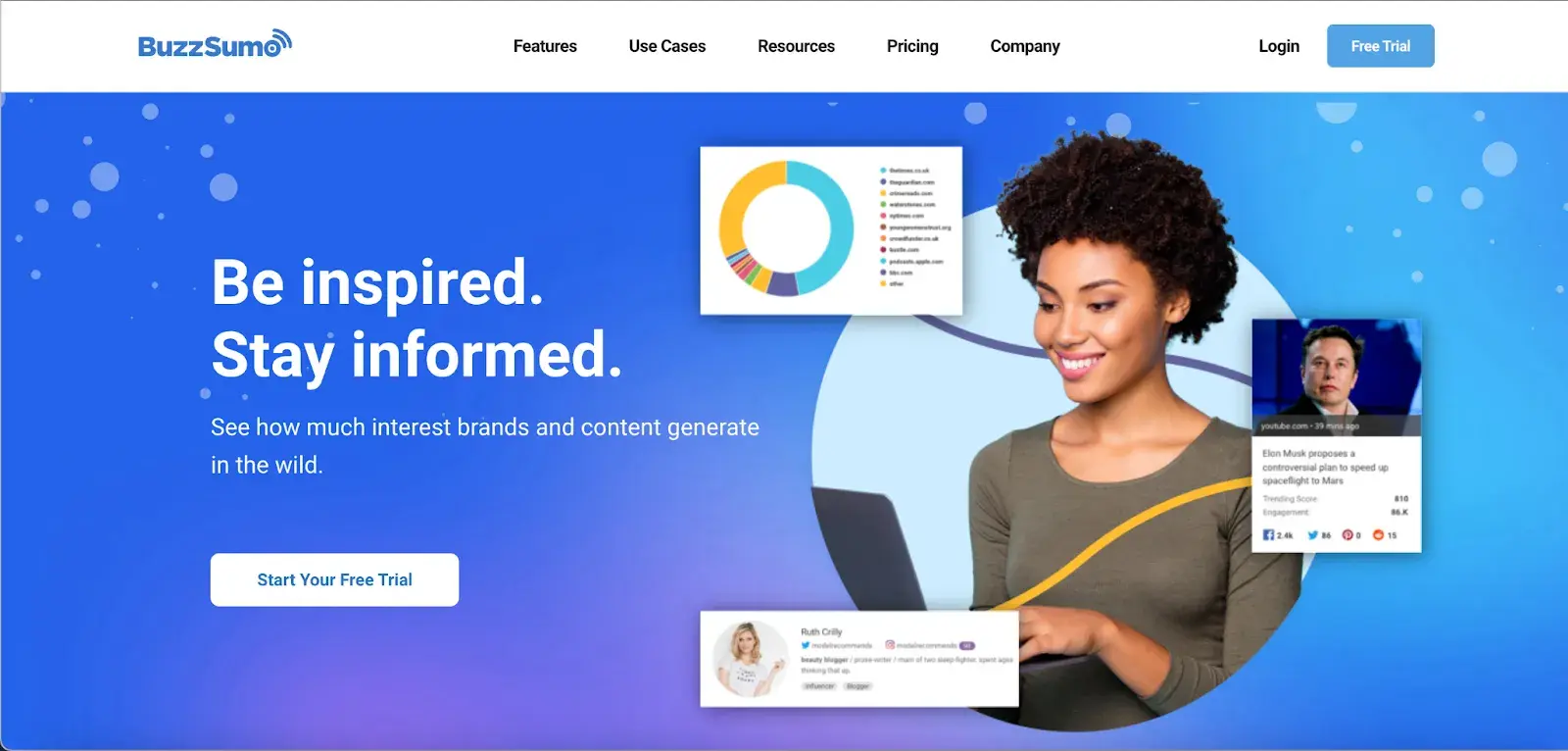
A good example is BuzzSumo’s homepage. It delivers a clear, concise message with visuals like magazine excerpts and social media screenshots, making it obvious what they do — even for first-time visitors.
My final point: People don’t spend money on things they can’t understand if they add value or not. This is why commercially successful companies invest in marketing and sales intelligence tools, mapping out their customer’s buyer journeys and hiccups along the way.
Now, you could spend years studying the ins and outs of web design.
But for the sake of giving you a jumping-off point, we've assembled a list of the fundamental guidelines and best practices you can apply to your next website redesign or website launch.
9
- Simplicity
- Visual Hierarchy
- Navigability
- Consistency
- Responsivity
- Accessibility
- Conventionality
- Credibility
- User-Centricity
1. Simplicity
While the appearance of your website is certainly important, most people aren't coming to your site to evaluate how slick the design is. They want to complete some action or find some specific piece of information.
Therefore, unnecessary design elements (i.e., those that serve no functional purpose) will only overwhelm and make it more difficult for visitors to accomplish what they're trying to accomplish.
From a usability and UX perspective, simplicity is your best friend. If you have all the necessary page elements, it’s hard to get too simple. You can employ this principle in a variety of different forms, such as:
- Colors. Basically, don't use a lot. The Handbook of Computer-Human Interaction recommends using a maximum of five (plus or minus two) different colors in your design.
- Typefaces. The typefaces you choose should be highly legible, so nothing too artsy and very minimal script fonts, if any. Again, keep the text color minimal and always ensure it contrasts with the background color. A common recommendation is to use a maximum of three different typefaces in a maximum of three different sizes.
- Graphics. Only use graphics if they help a user complete a task or perform a specific function (don't just add graphics willy-nilly).
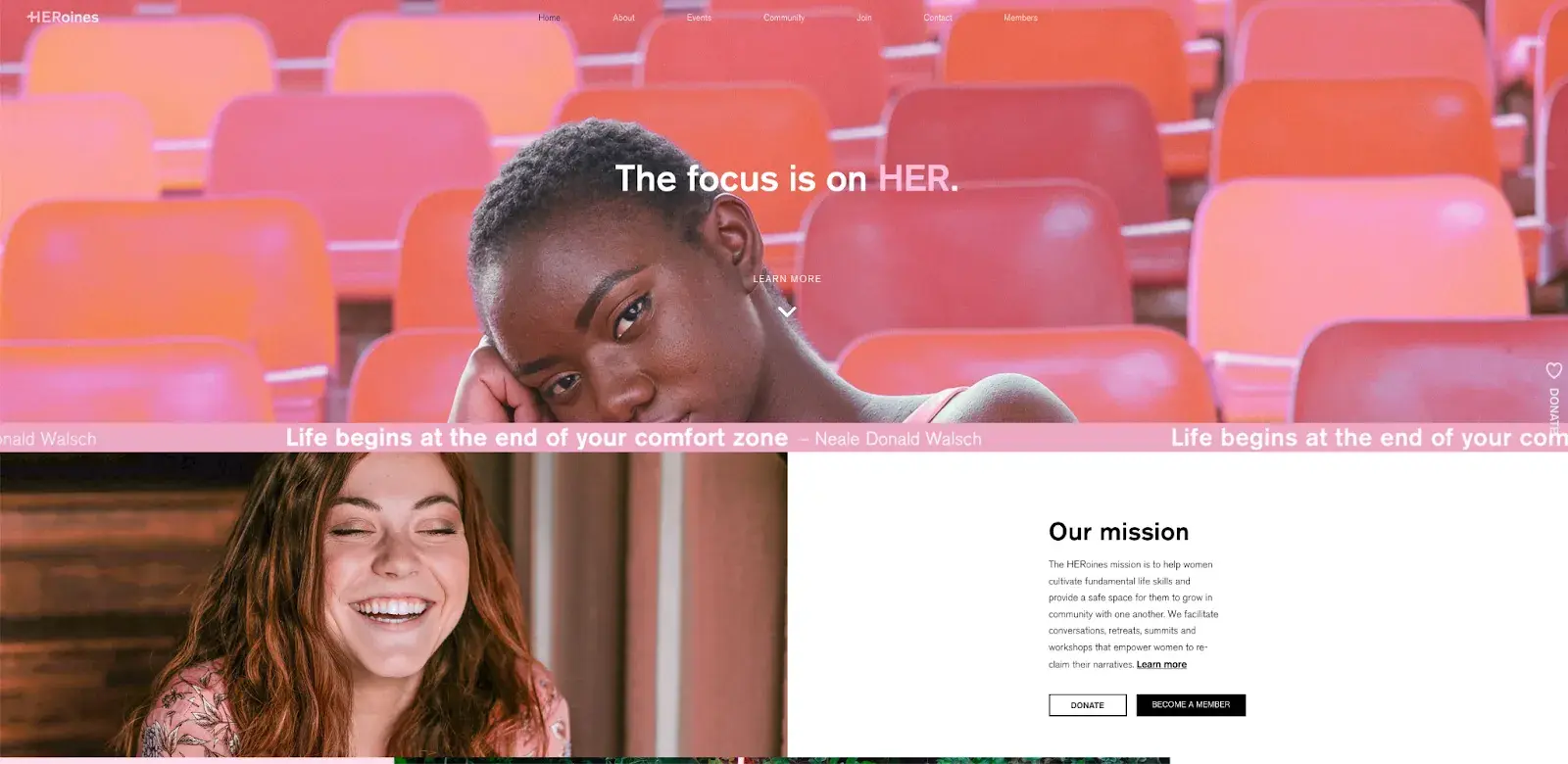
Here's a great example of a simple but effective homepage design from HERoines Inc.
2. Visual Hierarchy
Closely tied to the principle of simplicity, visual hierarchy means arranging and organizing website elements so that visitors naturally gravitate toward the most important elements first.
The goal is to lead visitors to complete a desired action, but in a way that feels natural and enjoyable. By adjusting the position, color, or size of certain elements, you can structure your site in such a way that viewers will be drawn to those elements first.
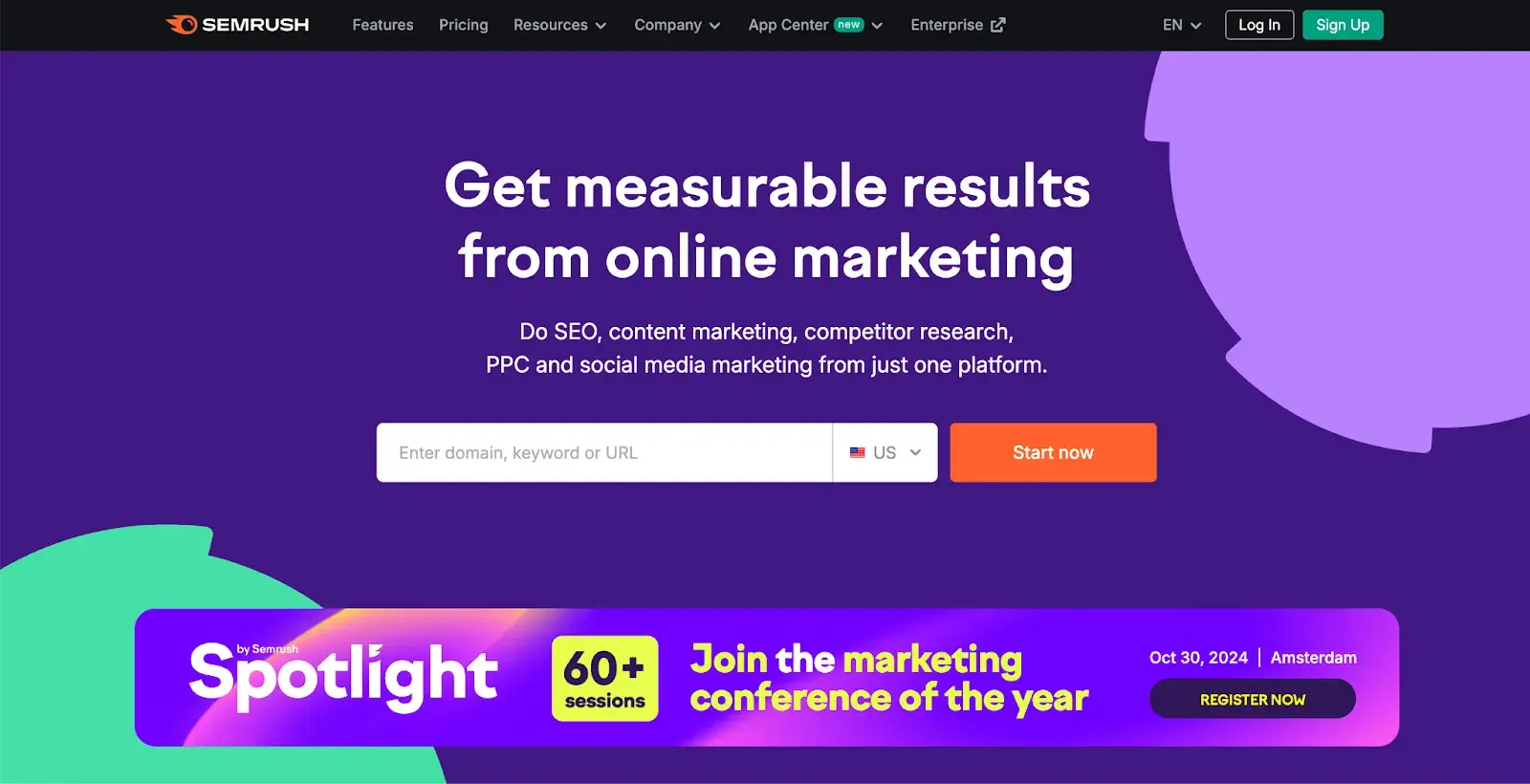
The Semrush website is a great example of how visual hierarchy should look. The prominent placement of the “Start now” button, coupled with clear typography and ample white space, ensures that it stands out.
Secondary elements, such as the input field and headline, support the primary CTA and provide context. This well-executed visual hierarchy makes the website easy to navigate and understand its purpose.
3. Navigability
Planning out intuitive navigation helps visitors find what they're looking for.
Ideally, a visitor should land on your site and not have to think extensively about where to click next. Moving from point A to point B should be as frictionless as possible.
Here are a few tips for optimizing your site's navigation:
- Keep the structure of your primary navigation simple (and near the top of your page).
- Include navigation in the footer of your site.
- Consider using breadcrumbs on every page (except your homepage), so users remember their navigation trail.
- Include a search bar near the top of your site so visitors can search by keywords.
- Don't offer too many navigation options per page.
- Include links within your page copy, and make it clear where those links go.
- Don't make users dig too deep. Try making a basic wireframe map of all your site pages arranged like a pyramid: Your homepage is at the top, and each linked page from the previous forms the next layer. In most cases, it’s best to keep your map no more than three levels deep.
One more pointer: Once you‘ve settled on what your site’s main (top) navigation will be, keep it consistent. The labels and location of your navigation should remain the same on every page.
This leads us nicely to our next principle below.
4. Consistency
In addition to keeping your navigation consistent, the overall look and feel of your site should be similar across all of your site's pages.
Backgrounds, color schemes, typefaces, and even the tone of your writing are all areas where consistency has a positive impact on usability and UX.
That‘s not to say every page should follow the same layout. Instead, create different layouts for specific types of pages (e.g., landing pages, informational pages, etc.).
By using those layouts consistently, you’ll make it easier for visitors to understand what type of information they're likely to find on a given page.
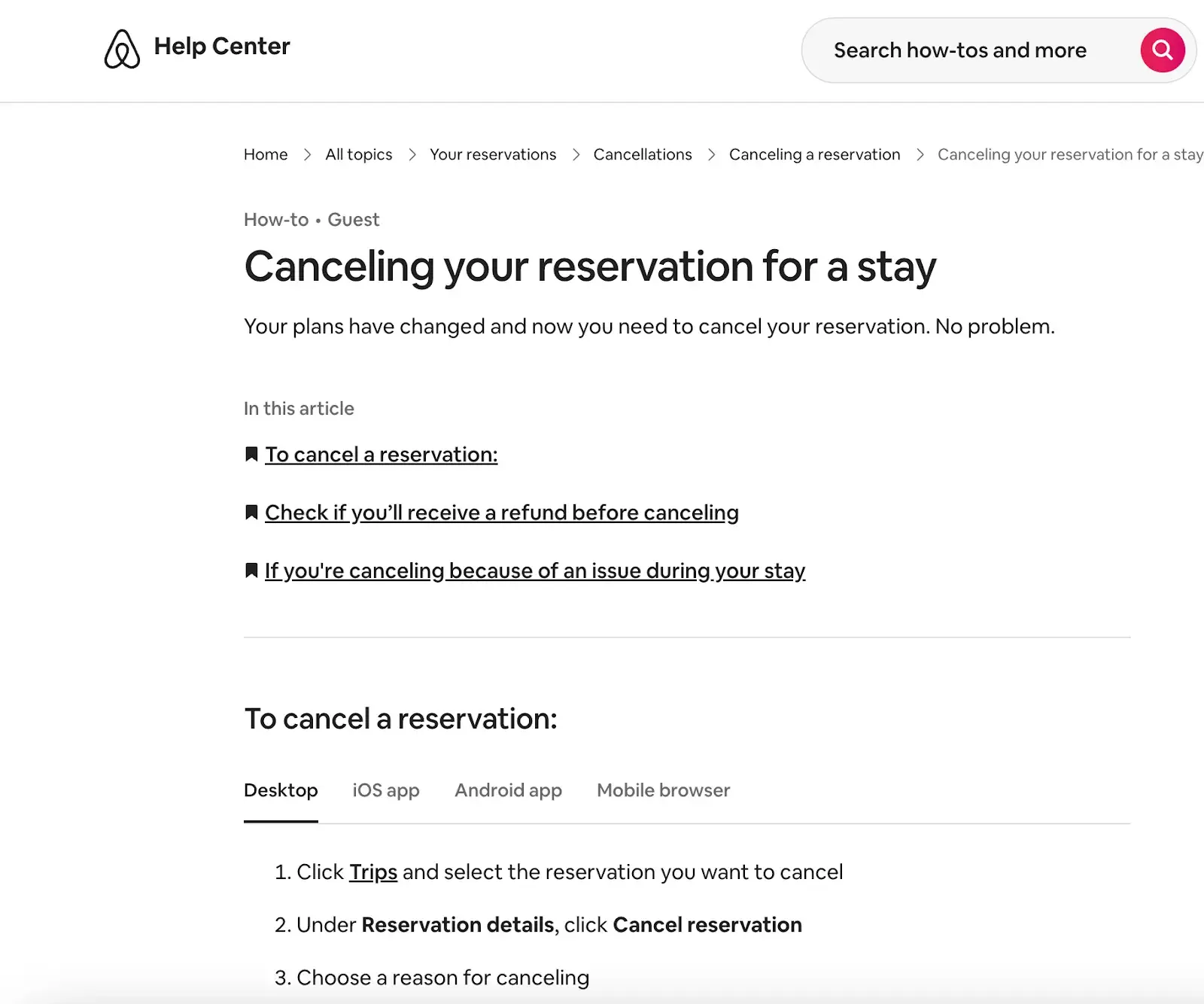
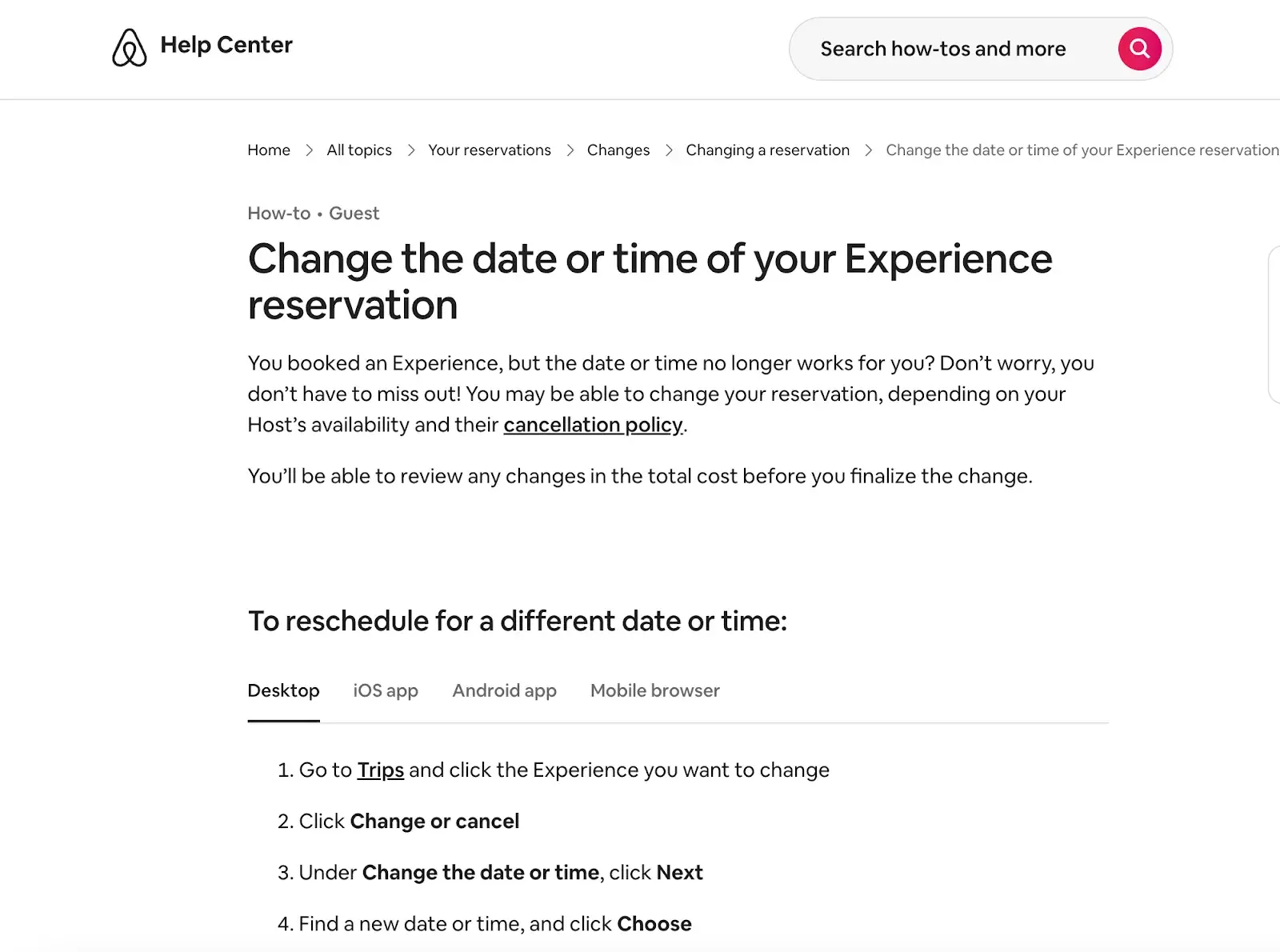
In the example below, you can see that Airbnb uses the same layout for all of its “Help” pages, a common practice. Imagine what it would be like from a visitor's perspective if every “Help” page had its own, unique layout.
There would probably be a lot of shoulder shrugging.
5. Responsivity
60% of page global views are from mobile devices like smartphones and tablets, according to Statista.
To provide a truly great user experience, your site has to be compatible with the many different devices that your visitors are using. In the tech world, this is known as responsive design.
Responsive design means investing in a highly flexible website structure. On a responsive site, content is automatically resized and reshuffled to fit the dimensions of whichever device a visitor happens to be using.
This can be accomplished with mobile-friendly HTML templates or by creating a special mobile site.
Escobedo points out that one of the biggest issues she frequently encounters is pages that are way too long.
Avoid endless mobile scrolling by making content collapsible or including links to other pages instead of repeating content on the page.
In addition, make sure your external links open in new tabs and that you aren’t using text that’s too small to read on mobile.
6. Accessibility
The goal of web accessibility is to make a website that anyone can use, including people with disabilities or limitations that affect their browsing experience. As a website designer, it’s your job to think of these users in your UX plan.
Like responsiveness, accessibility applies to your entire site: structure, page format, visuals, and both written and visual content.
The Web Content Accessibility Guidelines (WCAG), developed by the Web Accessibility Initiative and the World Wide Web Consortium, set the guidelines for web accessibility. In a broad sense, these guidelines state that websites must be:
- Perceivable. Visitors are aware of the content on your site.
- Operable. The functionality of your website should be possible in different ways.
- Understandable. All content and alerts can be easily understood.
- Robust. Your website is usable across different assistive technologies, devices, and browsers.
“At Online Optimism, we adhere to a minimum of WCAG Level A for all website builds, with most of our sites adhering to Level AA and some to AAA,” says Escobedo.
Escobedo shares a few easy accessibility tips, including:
- Adding alt text for all non-decorative images.
- Using descriptive link text.
- Using visual cues like underlines for links.
- Enabling focus states.
- Not hiding information or functionality in hover states or in images without alt text or descriptions.
- Using form field labels.
For a deeper dive into this topic, see our guide to web accessibility.
7. Conventionality
A big challenge in web design is balancing originality with your expectations. Most of us are expert internet users, and there are specific conventions we’ve grown accustomed to over time. Such conventions include:
- Placing the main navigation at the top (or left side) of a page.
- Placing a logo at the top left (or center) of a page.
- Making the logo clickable, so it always brings a visitor back to the homepage.
- Having links and buttons that change color/appearance when you hover over them.
- Using a shopping cart icon on an ecommerce site. The icon also has a number badge signifying the number of items in the cart.
- Ensuring image sliders have buttons users can click to manually rotate slides.
While some might opt to throw these out the window for the sake of uniqueness, this is a mistake. There’s still plenty of room for creativity within the constraints of web conventionality.
Let’s briefly consider another field of design: architecture. Building codes ensure people can safely use spaces. Architects don’t ignore these rules because they ensure safety and comfort. No matter how impressive a building looks, if the stairs are uneven or you can’t exit during a fire, you'd rather stay outside.
In the same way, you can craft a memorable experience while meeting user expectations. If you violate what users anticipate, they may feel uncomfortable or even frustrated with your site.
HubSpot's Free Website Builder
Create and customize your own business website with an easy drag-and-drop website builder.
- Build a website without any coding skills.
- Pre-built themes and templates.
- Built-in marketing tools and features.
- And more!
8. Credibility
Sticking to web conventions lends your site credibility. In other words, it increases the level of trust your site conveys. And if you're striving to build a site that provides the best user experience possible, credibility goes a long way.
One of the best methods to improve your credibility is to be clear and honest about the product or service you‘re selling. Don’t make visitors dig through dozens of pages to find what it is you do. Be up-front on your homepage, and dedicate some real estate to explaining the value behind what you do.
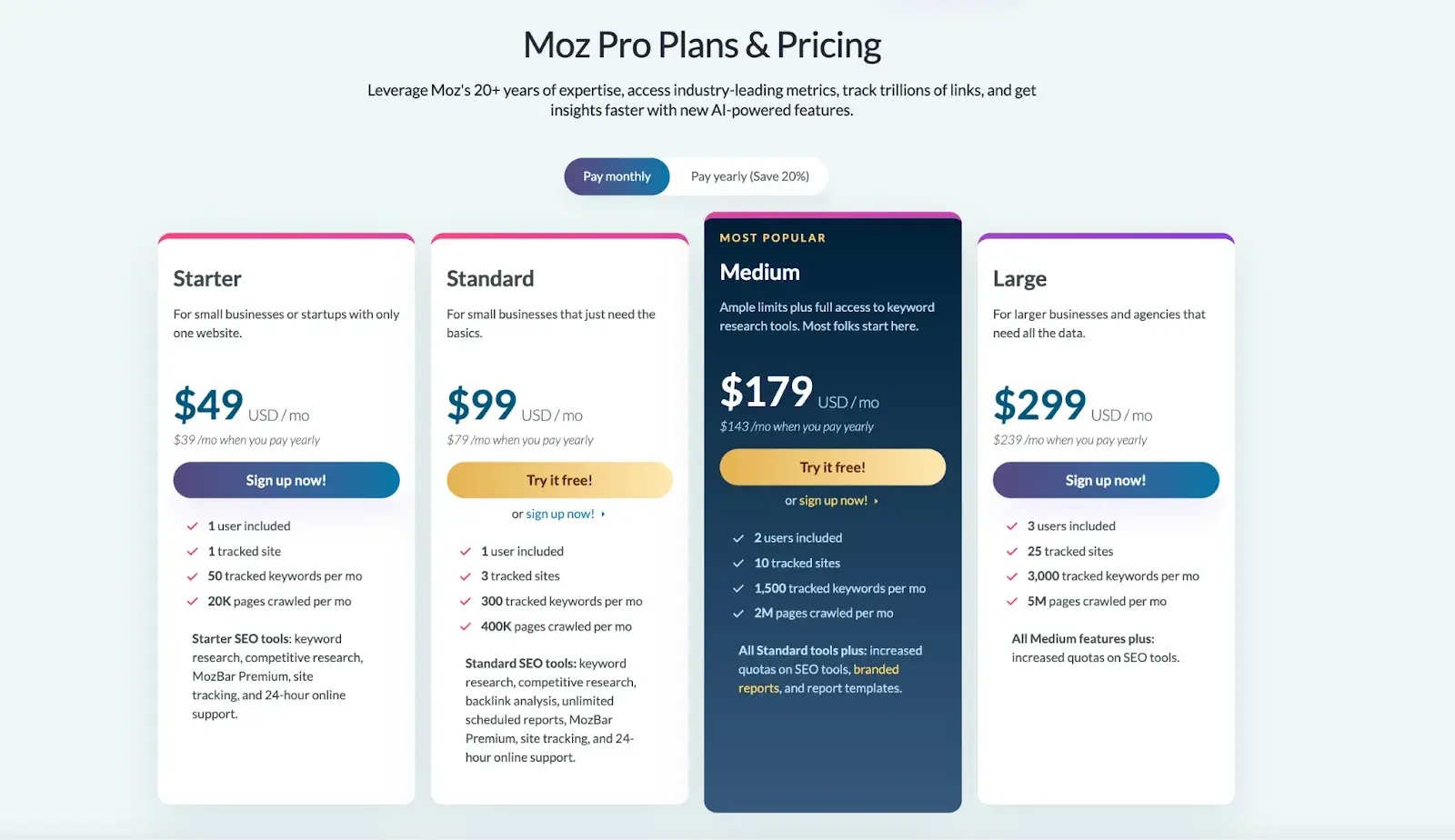
Another credibility tip: Have a pricing page linked on the homepage. Rather than force people to contact you to learn more about pricing, list your prices clearly on your site. This makes your business appear more trustworthy and legitimate.
Here's an example of an effective pricing page from the Moz website:
9. User-Centricity
At the end of the day, usability and user experience hinge on the preferences of the end-users. After all, if you're not designing for them, who are you designing for?
So, while the principles detailed in this list are a great starting point, the final key to improving the design of your site is to conduct user testing, gather feedback, and implement changes based on what you've learned.
And don’t bother testing usability by yourself. You’ve already invested a lot of time into your design, which brings your own biases into the equation. Get testers who have never seen your site before, the same as any first-time visitor.
Here are a few user testing tools to get you started:
- Website Grader. Our free tool evaluates your website based on several factors: mobile, design, performance, SEO, and security. It then offers tailored suggestions for improvement. You can learn more about Website Grader in our dedicated blog post.
- Crazy Egg. Track multiple domains under one account and uncover insights about your site's performance using four different intelligence tools -- heat map, scroll map, overlay, and confetti.
- Loop11. Use this tool to easily create usability tests -- even if you don't have any HTML experience.
- The User Is Drunk. Pay Richard Littauer to get drunk and review your site. Don't believe me? We tried it.
Now, we understand the principles and best practices that should guide you throughout the design process. In the next section, let's run down the essential page elements that you should strongly consider including in your design plan.
Website Design Requirements
- Header and Footer
- Menu Navigation
- Search Bar
- Branding
- Color Palette
- Headers
- Clear Labels
- Visuals and Media
- Calls to Action (CTAs)
- Whitespace
1. Header and Footer
The header and footer are a staple of just about every modern website. Try to include them on most of your pages, from your homepage, to your blog posts, and even your “No results found” page.
Your header should contain your branding in the form of a logo and organization name, menu navigation, and maybe a CTA, and/or a search bar if well-spaced and minimal.
On the other end, your footer is where many users will instinctively scroll for essential information. In your footer, place contact information, a signup form, links to your common pages, legal and privacy policies, links to translated versions of your site, and social media links.
2. Menu Navigation
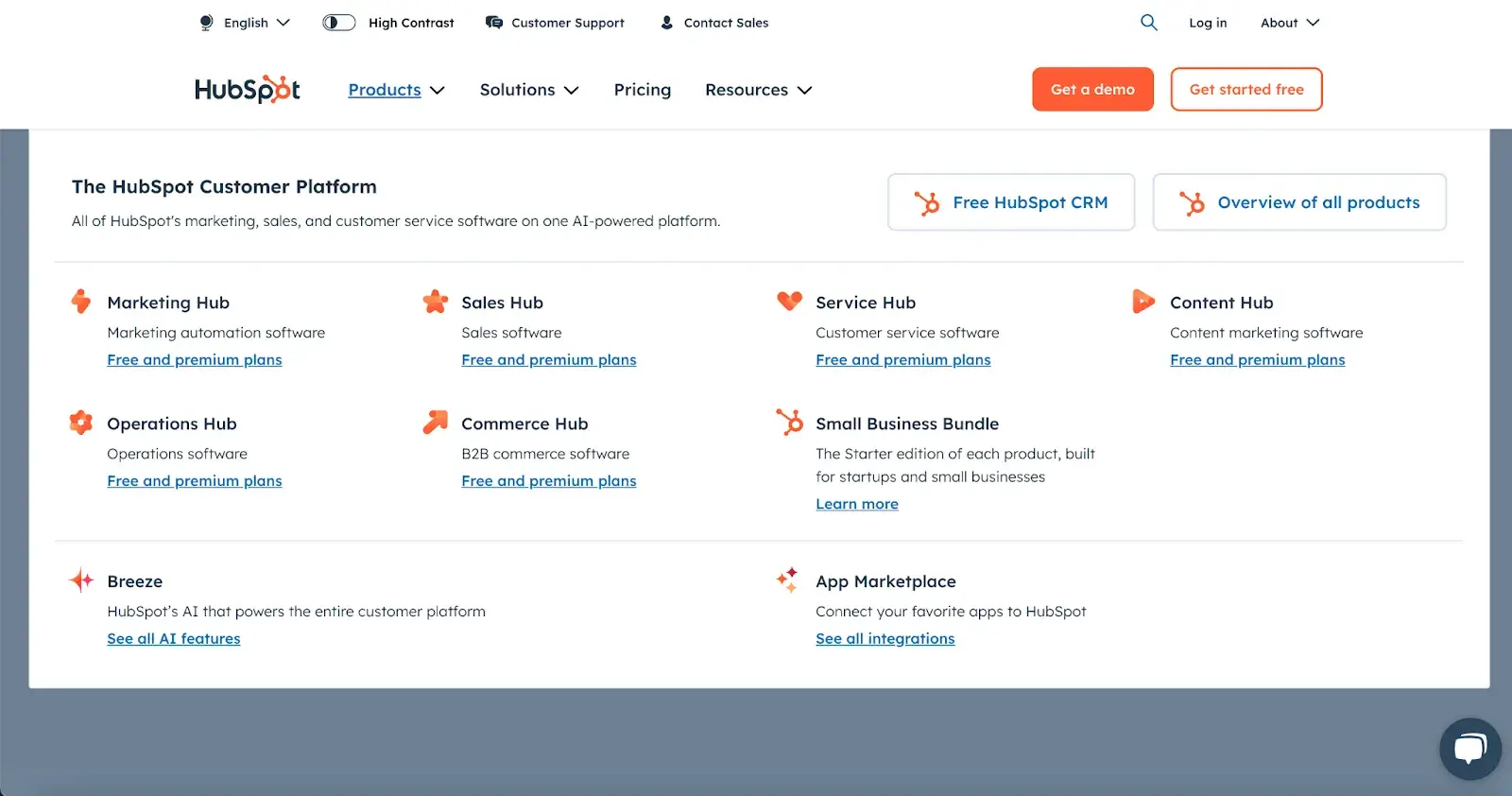
Whether it’s a list of links across the header or a tidy and compact hamburger button in the corner, every website needs a guide for navigation positioned at the top of at least your homepage and other important pages. A good menu limits the number of clicks to reach any part of your website to just a few.
To reduce clutter, you might consider making some or all menu options a dropdown menu with links within it, as can be seen on HubSpot's homepage.
3. Search Bar
In addition to menu navigation, strongly consider placing a search bar at the top of your pages, so users can browse your site for content by keyword.
If incorporating this functionality, make sure your results are relevant, forgiving of typos, and capable of approximate keyword matching.
Most of us use a high-quality search engine every day, be it Google, Amazon, YouTube, or elsewhere. These all set the standard for your own site search.
4. Branding
Remember the conventions we’ve discussed?
One that you see practically everywhere is a logo in the top left corner. On first landing, many visitors’ eyes will instinctively shift to this region to check they’re in the right place. Don’t leave them hanging.
To reinforce this notion, incorporate your company branding into every element you add, piece of content you post, and color scheme you create.
That’s why I recommend establishing brand guidelines if you haven’t already. Check out our style guide for a reference.
Pro tip: Create a unique online presence with the HubSpot Brand Kit Generator, which allows you to easily customize logos, icons, and color palettes by entering your business name, industry, and slogan.
5. Color Palette
Color choice plays a major role in your site’s usability and UX as well. This decision tends to be more subjective than other requirements in this list.
But, like everything else we’ve discussed, try to simplify — limit your color selection to 3-4 prominent colors at most.
Starting a color palette from scratch can be surprisingly difficult the first time. We seem to intuitively pick up on which colors work well together and which don’t, but we stumble when trying to pick from the infinite combinations available.
The solution? Try a color palette that’s been shown to work on other websites. Take influence from your favorite sites, and see our list of our favorite website color schemes to get started.
P.S. There are many free website design tools that can suggest color palettes and do a lot of the heavy lifting for you, so be sure to check it out for inspo if you’re feeling stuck.
6. Headings
Headings are key to establishing the visual hierarchy we discussed earlier, especially on text-heavy pages.
As users skim your pages, you need, a clear and to-the-point heading to alert readers to stop scrolling after finding what they want.
Use only as many headings as there are distinct sections of your page, as too much blown-up and bolded text will dampen this effect.
7. Clear Labels
Whenever a user takes an action on your website, it must be obvious exactly what they’re doing and/or where they’re going. All buttons should have clear text or an icon to precisely and concisely signal their purpose.
The same goes for in-text links and widgets (simple interactive elements, like dropdowns and text forms).
For example, a button linking to a pricing page should just read “Pricing” — anything beyond that (e.g., “See our prices”, “Check out the pricing page for a deal”) is superfluous. A search bar/button only needs a search glass icon (🔍) and perhaps also the word “Search” to denote its purpose.
User testing can be a major help here. While you yourself know what all of your interactive page elements do, the same can’t be said for a new user.
Testing will give valuable insight into what users think your labels mean beyond your own perspective.
8. Visuals and Media
When incorporating static images, gifs, videos, and other media into your pages, remember to be consistent and intentional in your choices.
These elements will draw attention over most other text and will likely stay in users’ minds, so choose wisely.
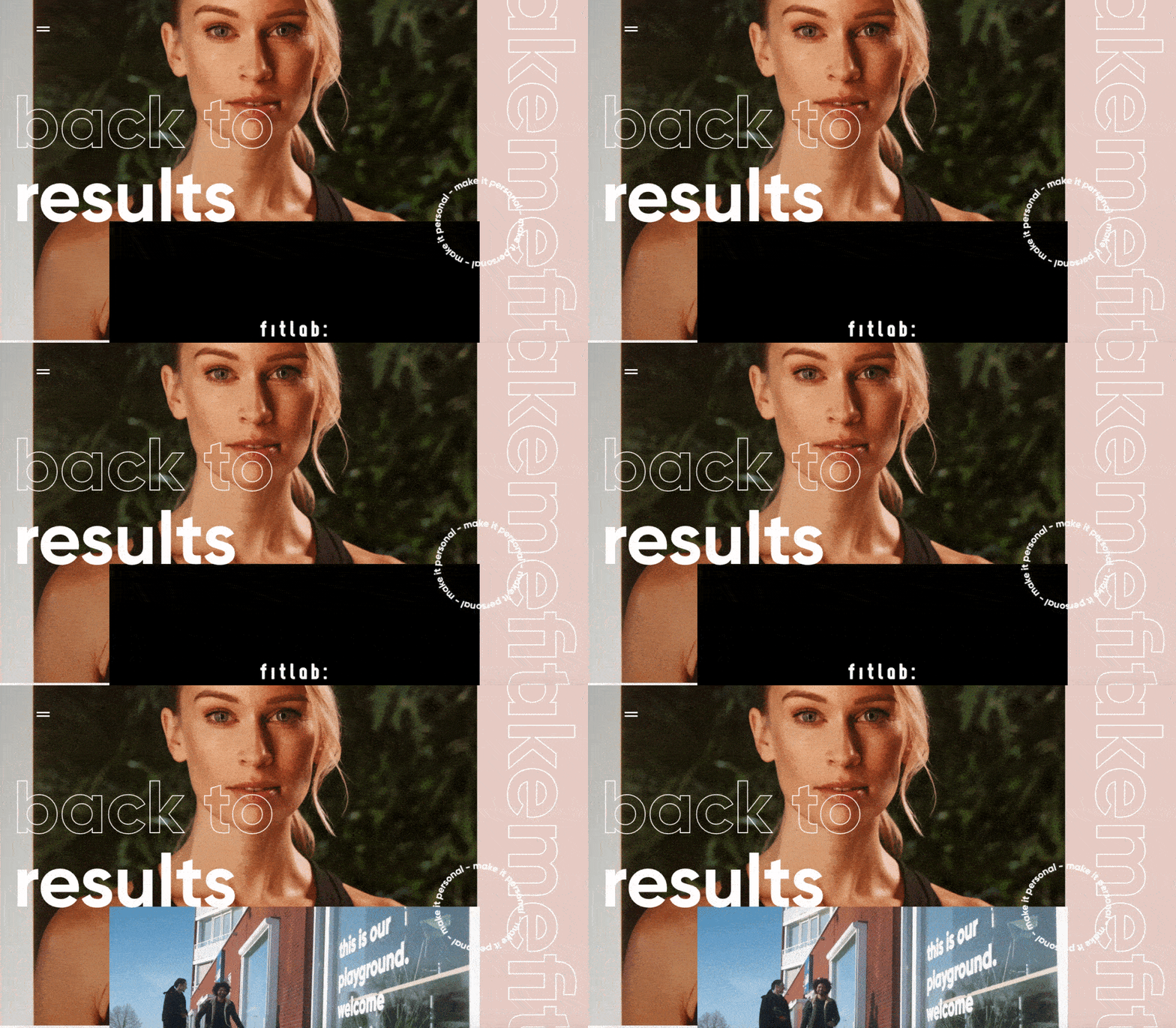
Here’s just one example of effective media on a homepage. Notice how every image complements the page aesthetic and supports the offer of personalized fitness training with results.
Also, all images and videos should be optimized for search engines and include descriptive alt text for accessibility.
9. Calls to Action (CTAs)
Having a pleasing website is great, but how do you know whether your visitors are actually doing what you want? Are they engaging with your content? This is where CTAs come into play.
A CTA is any page element that prompts user action. The action could be adding a product to a card, downloading a content offer, or signing up for an email list.
Make your CTA elements prominent in the visual hierarchy, but not intrusive or distracting like many click-through ads tend to be.
If you need ideas for sleek CTAs that drive more conversions, see our CTA examples list.
10. Whitespace
As I mentioned above, sometimes it’s about the elements you don’t include. After reading these guidelines and requirements, you may feel tempted to stuff your pages with all the bits and bobs needed for a flawless UX.
Don’t forget that your viewers need room to digest all this new info, so give your elements room to breathe.
But, how much whitespace should you have? That’s another personal call, and varies from site to site. So, user testing is handy here as well.
What are people focusing on? Do they feel overwhelmed with the density of content? Once again, it all ties back to our first guideline, simplicity.
Focus on Design that Puts Users First
If you add up all of my advice here, there’s one main takeaway to keep in mind — the visitor is number one, and you are number two.
I know this sounds a bit harsh, like you’re putting your own desires and visions aside. But when creating a site, you simply need to imagine that you’re dealing with a first-time visitor.
Someone who’s dropped in like a parachutist and needs to quickly find what they’re looking for, or they’ll just leave your “destination” and keep “flying.”
Once you get this mindset, designing the entire web layout will be easy.
If we go back to the beginning, you’ll remember that I once thought it was all about aesthetics. Today, I’ll tell you that’s partially true. Yes, we still want it to look good, but if it’s not functional, beauty means nothing.
Simplicity. Smooth experience. No labyrinths. No confusing routes. That’s what the visitor needs. And that’s what your website must provide.
Editor's note: This post was originally published in May 2021 and has been updated for comprehensiveness.
HubSpot's Free Website Builder
Create and customize your own business website with an easy drag-and-drop website builder.
- Build a website without any coding skills.
- Pre-built themes and templates.
- Built-in marketing tools and features.
- And more!