.png?width=112&height=112&name=Untitled%20design%20(17).png)

So, how can you create and maintain a successful blog that provides your target audience worthwhile, high-quality content — all while building your business's reputation as an industry thought-leader and expert?
The answer is with a blog marketing strategy.
Before we review the steps to your blog marketing strategy, let's take a look at how to start a successful blog. We'll also include examples of successful blog sites to illustrate some of these steps.

How to Start a Blog
- Choose your blog topic and purpose.
- Register and host your blog.
- Design your blog.
- Decide who will write and manage your blog.
- Determine how frequently you'll share blog posts.
- Write compelling and valuable content.
- Include CTAs.
- Launch your blog.
- Track and analyze your blog’s success.
1. Choose your blog topic and purpose.
The first part of developing your blogging strategy is to clearly define your blog's topic and purpose.
Your blog topic should be broad enough so you can write hundreds of articles about it but also specific enough to relate to your business niche and area(s) of expertise.
When thinking about your blog's purpose, ask yourself, "Why does this blog exist?"
You should be able to answer that question in one, straightforward, defining statement. (Document your blog's purpose to you can refer to it as you grow and your business evolves.)
If you need help defining your blog's purpose, take a moment to ask yourself these questions:
- What is the greater purpose your company is trying to fulfill?
- What story supports this purpose?
- Who shares your passion for this purpose?
- Is your team aligned with the meaning of this purpose?
.png)
6 Free Blog Post Templates
Save time creating blog posts with these free templates.
- "How-to" Post
- "What is" Post
- Listicle Post
- And More!
Download Free
All fields are required.
Example
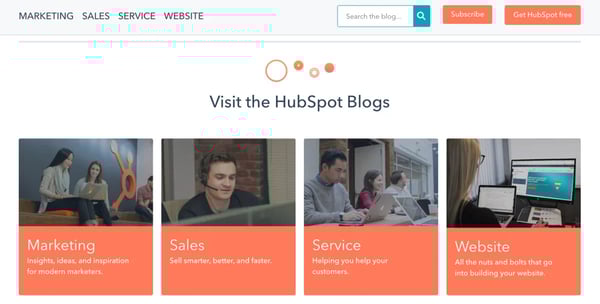
HubSpot has four blog properties: Marketing, Sales, Service and Website. Each blog focuses on its respective industry and relates the content back to the appropriate HubSpot product.
2. Register and host your blog
This step is two-fold. First, ;let's talk about your blog's URL structure.
A domain name, also known as the root domain, is the text in a URL that identifies your website — and, therefore, your business — for a web browser. For example, HubSpot's domain name is hubspot.com.
Subdomains are part of your root domain — they appear before the domain in your URL like this: blog.hubspot.com. "Blog" is the subdomain. Subdomains are helpful for organizing a lot of content, including multiple content types. If you have a large blog operation, this structure can help you over time. However, it does pass less authority from your root domain in the short-term.
Subdirectories are divisions of your domain that live on your website, but represent specific pages on your website. For example, a subdirectory that'd take visitors to a specific blog post on a website would look something like this: hubspot.com/blog/article-name. Subdirectories often pass more authority from your root domain and subdomain. However, they can make it hard to scale your content strategy over time since you need more subdirectories to organize your content properly and protect your user experience (UX).
Subdirectories can also represent certain types of content within a subdomain. For example, blog.hubspot.com/marketing/article-name takes visitors to a marketing article on blog.hubspot.com.
The option you choose for your blog has the potential to impact your organic ranking, which is why it's important to choose wisely.
Next, you'll need to pick a host for your business's blog. The simplest way to host your blog is through the same software on which your website is run.
For example, HubSpot users can employ Content Hub and access their website creation and management tools alongside their blogging tools — all from a central location.
Another common way to host your business's blog is through WordPress — compare HubSpot vs. Wordpress here. Other popular options include Wix, Bluehost, and Squarespace.
3. Design your blog.
Design your blog in a way that entices your readers to regularly read (and hopefully, share) your content.
Your blog should be inviting and on-brand. It should be well-organized, clean, and easy to navigate. Within seconds of visiting your blog, readers should know it's published by your company.
To do this, choose a theme that's consistent across your blog properties and articles. Depending on the host you choose for your blog, you'll likely have several theme options that are both free and paid.
For example, HubSpot offers a marketplace of free and paid blog template options. Templates help you easily customize and edit your blog template to tailor it to your business.
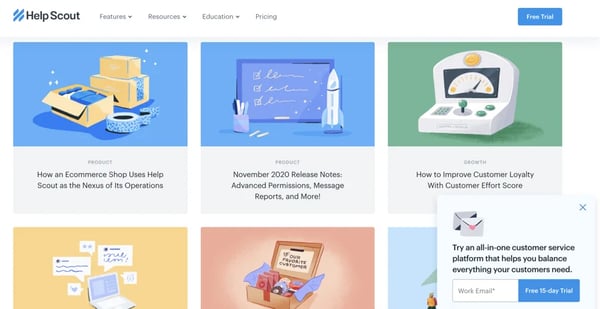
The Help Scout blog is a wonderful example of beautiful blog design. Its minimalist design limits the use of copy and embraces negative space by promoting the latest posts with gorgeous feature images. The blog is aligned with the Help Scout brand and promotes readability and easy navigation.
4. Decide who will write and manage your blog.
Now it's time to think about who's writing, running, and managing your blog. Ask yourself (or your team): Who's accountable for each role within your blog strategy? There are lots of moving parts when it comes to your blog — if you don’t create ownership around each component, it'll be difficult to reap the benefits of a successful blog operation.
We've put together a list of some examples of the roles you need to fill to effectively implement a blogging strategy.
- Blog article topic ideation
- Search engine optimization (SEO) and keyword research
- Statistics, examples, personal stories, and thought leadership
- Editing
- Strategy and editorial calendar governance
- Promotion
- Repurposing, updating, and historical optimization
Depending on your resources and the size of your marketing team, you may find one person holds responsibility for multiple roles.
An effective solution to this challenge is using AI tools like HubSpot's free AI blog writer. Using AI assistance can help streamline your content creation process and save you valuable time.
You'll also want to determine what the ideal blog post looks like for your publication. Consider using blog post templates to build an outline for posts to share with writers (or if you need an outline yourself). ;
.webp?width=350&height=350&name=Untitled%20design%20(17).webp) Download Free Blog Post Templates
Download Free Blog Post Templates
5. Determine how frequently you’ll share blog posts.
How many blog posts can you commit to writing and publishing? How often are you planning on producing blog content for your audience? Consistency is the key to keeping your audience engaged and interested. This will also allow you to maintain your status as an active thought-leader and expert in your industry. Use a content calendar to consistently manage and schedule your blog posts.

Plan and optimize your marketing content with these free calendar templates.
The beauty of creating this type of blogging rhythm and sharing that information via an editorial calendar is that it creates a sense of accountability among your team of bloggers. It ensures all writers and contributors have optimized for keywords, added CTAs, and edited their pieces by a certain time and date. This way, you'll have a consistent stream of content your readers can get in sync with.
If you're a HubSpot CRM user, you already benefit from an editorial calendar built right into the COS.
6. Write compelling and valuable content.
It's important to reiterate just how critical it is for your blog content to be both compelling and valuable to your readers. This plays a large part in how you're viewed by your target audience, customers, competitors, and other industry leaders. It's also how you're going to keep readers engaged and loyal to your blog — and hopefully converting to customers, too.
Remember, it takes more time and energy to obtain new subscribers than to maintain current readers. Plus, your current readers have the potential of becoming your brand advocates faster than new subscribers do. So, focus on consistently producing content that captivates your audience all while providing them with useful and worthwhile information so they stick around for the long run.
150+ Free Content Creation Templates
Access ebook, blog post, CTA, case study, and more content templates.
- Ebook Templates
- CTA Templates
- Blog Post Templates
- And more!
Download Free
All fields are required.
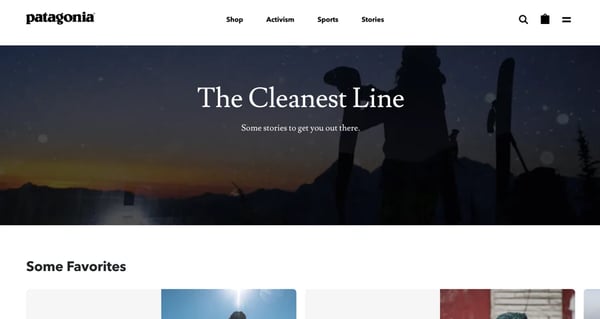
Patagonia's blog, The Cleanest Line, is a fascinating publication. It's not a generic brand blog that discusses Patagonia products or customers; it tells compelling stories written by some of the best writers on the web — yet it still resonates with Patagonia's target audience and those who share its core values. I've personally spent hours reading the articles on The Cleanest Line, and it's endeared me to Patagonia in the process.
7. Include CTAs.
Are any of the reasons you're developing your business's blog to drive organic traffic to your website, improve conversions, and boost sales?
That's great news — but to accomplish these goals, you'll need to include relevant calls-to-action (CTAs) throughout your blog posts.
CTAs can be paid or free for your audience members. Either way, effective CTAs provide readers with a level of value that they simply cannot pass up.
A CTA might share in-depth content and information with your audience on a specific topic. Or maybe it includes a discount code or special deal on your product or service. A CTA could also provide further training related to the subject of your blog article.
Check out this blog post if you're looking for some examples of clickable CTAs to insert in your content.
If you're a HubSpot user, the CRM offers a CTA creation tool to help you develop relevant — and even personalized — offers to drive traffic to your landing pages and convert more leads.
For example, the Omniscient Digital blog naturally weaves CTAs into its posts, making the linked items part of the broader story or takeaway. The goal of CTAs should be to encourage readers to take action without deviating too far from the purpose of the post.
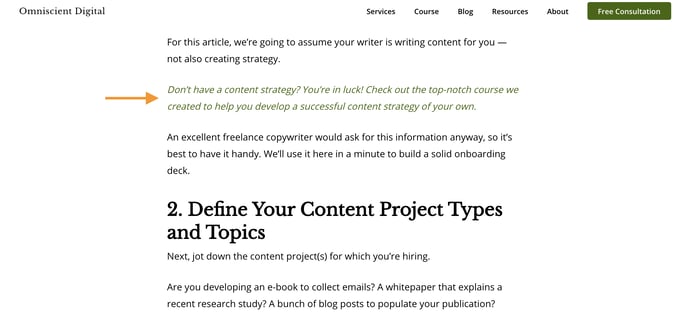
CTAs can also appear as visuals in your blog posts. For these, it's best to create uniquely-designed CTAs for your publication. If you're not design-savvy, you can use these free Call-to-Action Templates for your posts. ;

8. Launch your blog.
Now it's time to launch your blog!
This is the exciting part — you finally get to share the content you've been working so hard to develop. Put your blog content on it's corresponding landing page on your website and send your email list of recipients their blog article(s). Share it via social media and send it to members of your network as you see fit. ;
9. Track and analyze your blog’s success.
Remember to track and analyze the success of your blog over time. To do this, decide which metrics matter most to you and your business. Once you understand how a specific metric contributes to a positive outcome, then you'll be able to make your blogging strategy more targeted. Examples of blogging metrics you might track include:
- Number of readers and subscribers
- Number of page views per post
- Number of conversions
- Number of backlinks
- Number of referrals
- Overall traffic
When applying these metrics to the goals you're looking to set, consider the following questions to provide concrete targets that make sense for your business.
- Does this goal help you achieve your purpose, or is there something more relevant we can aspire to?
- Is this goal aligned with the initiatives of other parts of our business?
- Which metrics track the progress towards this goal? Are these metrics complementary or counterintuitive?
Once you determine which metrics you're going to use, start by setting goals for a 60-day period. This gives you enough time to see whether your strategy is working and then you can adapt your goals based on the results you see.
Next, let's dive into your blog strategy.
Blog Marketing Strategy
Your blog is an important component of your business marketing strategy and will hopefully market your products and services, but in order for it do this, you must market the blog itself.
A blog marketing strategy is how you share and promote the content on your blog. Unfortunately, "build it and they will come" doesn't apply to blogging as well as it does in Field of Dreams.
For your blog to do its intended job — drive traffic, convert visitors, increase revenue, and/or promote your brand as a thought-leader or expert — it must have a marketing strategy in itself. How will people locate your blog? What type of content will keep them reading? How can you use your other promotional channels to elevate your blog content?
Follow these blogging best practices to promote and market your blog content to your target audience.
Always keep your buyer personas top of mind.
When writing, managing, and scheduling your blog — or working on anything related to your blog, really — keep your buyer personas in mind. ;
Ask yourself, "Who are our ideal customers?" and "Why do they need our product or service?" Once you can answer these questions in detail, you'll be nail down your buyer persona(s).
Use this free template to create your business's buyer personas.
Once you create your buyer personas, document a detailed description of who this person is so you can reference it has your business and blog grow. You should be able to refer to this description every time you write a new blog post.
This way, you'll be able to create content specifically suited to your target customers' wants, needs, challenges, and/ or pain points. This will also help you turn your blog into a powerful lead conversion tool for your business (i.e. your blog will show your readers and target audience why they need your product or service).
To get a deeper understanding of the actions your buyer personas are likely going to take, research the behaviors of your target audience so you can adapt and tailor your blog content to meet their needs in a way that pushes them to convert in some way. To conduct this type of customer research, you can use:
- Q&A forums (Quora, Yahoo! Answers, or Fluther)
- Social media (LinkedIn Groups, Twitter Advanced Search, and Google+ Communities)
- Content creation tools within your industry or niche (BuzzSumo or Topsy)
- Other blogs (comments and interactions on blogs similar to yours; your competitors' blogs)
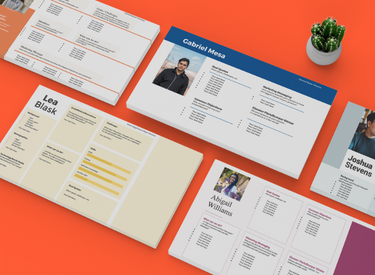
Buyer Persona Templates
Organize your audience segments and make your marketing stronger.
- Learn about personas.
- Conduct persona research.
- Create targeted content.
- Build your own personas.
Download Free
All fields are required.
Keep an eye on your competition.
Speaking of your competitor's blogs, it's important to keep an eye on these other thought-leaders in your industry. Your competitors provide insight into what's working (or not working) in terms of blog content among your target audience.
It also tells you a little bit about what they're experimenting with and what you'll need to accomplish to stand out and provide your readers with valuable content they can't get anywhere else — something unique to your business and your business only.
Create a list of 5-10 of your closest competitors with blogs you could conduct a content audit on. Make conclusions about the type of content they share, unique techniques they've implemented in their blog, and how they're doing in terms of ranking for the keywords you hope to rank for.
Then, look for gaps in their content so you can capitalize on them. To help you do this, use tools like QuickSprout, Open Site Explorer by Moz, and SEMRush Competitor Research.
Perform SEO and keyword research.
When one of your customers searches a phrase on Google (or any search engine), you want them to find your blog (or web page), not a competitor’s. To make this happen, dedicate some time to researching which keywords and phrases your target audience is typing into search engines so you can include them in your blog posts where they naturally fit.
In other words, you'll significantly improve your chances of ranking on the search engine results page (SERP) by performing appropriate search engine optimization (SEO) and keyword research prior to writing your blog post, and then incorporating those findings in your content.
Start by creating a list of 5-10 keyword groups you want to rank for, along with their associated long-tail keywords, in the SERP.
Remember, ;Google's algorithms are constantly changing to become more intuitive — meaning, old tactics like keyword stuffing will hurt your ranking in the SERP. Instead, you're better off writing copy that engages audience members first and search engines second.
Note: HubSpot customers have access to a built-in keyword and SEO tool to help with this.
Focus on your blog's SEO and keyword research with HubSpot CRM's Content Strategy tool.
Decide where you'll distribute your blog content.
Strategically determine where you'll distribute your blog content. You chose a host for your blog already, meaning your content is likely already easily shareable on your website.
For example, if you use the HubSpot CRM and blogging software to host and manage your website and blog, it's simple to add your articles to their corresponding landing page on your site.
Other ways and platforms through which you might distribute your content include social media, such as Facebook or LinkedIn, and online publishing platforms, such as Medium. You might also work with industry leaders, experts, and influencers to share your content on their websites and social profiles.
Promote your blog content.
It's probably safe to assume you want your blog content to be as discoverable as possible. In terms of your blogging strategy, this refers to your ability to get your content out there so members of your target audience find, read, and (hopefully) share it.
There are many inbound tactics you can use to promote your blog. We touched on a few options above, but another common form of effective blog promotion involves an influencer marketing strategy.
Get started promoting your content with the help of a free influencer marketing guide.
To begin, identify the key influencers in your niche or industry you want to contact and work with. These should be people your current customers and target audience perceive as credible, trustworthy... and, yes, influential.
As you begin making and managing your influencer connections, remain in regular contact with the ones who are promoting your blog content. Be sure you know what they're doing to support, share, and promote your blog content and that their tactics meet your business's standards — you want to ensure they're representing your brand accurately. After all, you're likely paying them to promote your content among their audience members.
You can make your relationship with your influencers even stronger by interacting with their content regularly to show your support. For example, if you're working with an influencer who also has a blog, then go to their blog and read, comment on, and share it (even when the content they're publishing isn't necessarily related to your business). ;
How to Maintain a Blog
Creating and marketing your blog is merely half the battle. As we mentioned above, consistency is key to a successful blog — which means maintenance is most of the hard work.
Creating blog content can be time-consuming, especially when you aim to command authority in your niche with researched, thoughtful, and planned posts.
This is why updating, repurposing, and republishing your existing blog content is so valuable — it saves you time and energy but it also allows you to efficiently achieve the results you're looking for.
What do I mean by this? Well, ranking in the SERP with a net new post takes significantly more time (I'm talking months) than an updated post. Meaning, you'll see a positive impact sooner if you start repurposing existing posts rather than solely creating new content.
Audit your existing blog posts to determine what you can repurpose and update. Outdated content to remove and/ or replace might include statistics, examples, infographics, quotes, product or service details, research, and irrelevant ideas. You can also add keywords you've determined are missing through your research.
The process of updating content also allows you to reinvigorate the brand new content you've worked so hard on. Updating allows you to maintain the quality and relevance of your blog without having to recreate blog posts from scratch.
Grow Better With An Effective Blogging Strategy
Growing an influential blog in your niche is a surefire way to nurture your potential customers. By creating regular content that solves the challenges of your readers and fulfills their biggest curiosities, you'll start to build a vault of trust and advocacy. This will inevitably contribute to the overall success of your business. Start with your purpose — the big why — and slowly unpack the individual levers that will contribute to your blog marketing performance through the steps and strategy we've reviewed above.
Editor's note: This post was originally published in December 2014 and has been updated for comprehensiveness.


.webp)
![How to create a landing page with high ROI [+ expert and data-backed tips]](https://53.fs1.hubspotusercontent-na1.net/hubfs/53/%5BUse-2.webp)

![Signs it's time to redesign your website [+ 15 steps to follow]](https://53.fs1.hubspotusercontent-na1.net/hubfs/53/phaseswebsiteredesign%20copy.png)


![How to start a blog (the right way) and write posts people actually want to read [+ free templates]](https://53.fs1.hubspotusercontent-na1.net/hubfs/53/how-to-start-a-blog-2.webp)
![What is a lead magnet? 20 lead magnet ideas and examples [+ step-by-step]](https://53.fs1.hubspotusercontent-na1.net/hubfs/53/lead%20magnet%20represented%20by%20a%20magnet.webp)
![15 best AI SEO tools & how I use them [new data]](https://53.fs1.hubspotusercontent-na1.net/hubfs/53/ai-seo-tools-1-20260313-9008245.webp)