
.webp?width=112&height=112&name=Help-Desk-EN@3x%20(1).webp)

Customers expect immediate responses and fast resolutions. Help desk software gives support teams the tools to track every conversation, route tickets automatically, and close issues without things slipping through.
.png)

In fact, companies using customer support software report 81% improved CSAT scores (often above 85%). Companies that use IT help desk services have witnessed up to 25% increase in productivity due to quick resolution and a decrease in downtime.
A help desk tool, like HubSpot’s Help Desk software, gives support agents one place to manage issues, track conversations, and keep customers from falling through the cracks. A help desk benefits even the smallest of businesses; it’s a myth that this technology is only a good fit for enterprise companies with thousands of customers.
Let’s unpack the nuts and bolts of a help desk, the benefits of help desk software, and some top help desk tools for business needs.
What is help desk software?
Help desk software is a cloud-based, centralized digital system that helps customer service teams manage and report on customer questions or issues. It typically organizes incoming issues (i.e., tickets) across multiple channels such as email, chat, or phone, and helps support teams prioritize, assign, and respond efficiently.
Help desk software typically includes:
- A ticketing system
- A shared inbox
- A routing system
- Automation
- Knowledge bases for self-service
- A reporting dashboard
- Integrations with other business systems
Overall, help desk software improves response times, ensures accountability, and enhances the overall support experience for users.
Example of how a help desk works:
- A customer submits a support request through a website form.
- The help desk system automatically converts the request into a ticket.
- The system assigns the ticket to a support representative based on availability and expertise.
- The representative reviews the ticket details and responds with a solution.
- The customer replies if additional help is needed.
- Once the issue is resolved, the representative closes the ticket.
.webp?)
Free Help Desk & Ticketing Software
Keep track of customer requests in one unified help desk that connects to your CRM database.
- Provide personalized, AI-powered support to your customers
- Save time, reduce errors, and streamline service processes
- Improve rep efficiency & time to resolution
- And more!
Benefits of a Help Desk Tool
Help desk software provides customer support teams with the structure, visibility, and automation needed to deliver fast, consistent, and scalable service. Companies with high-performing help desks are 2.2x more likely to improve customer retention. Below are the core benefits of help desk software.
Streamlines Customer Intake Across Channels
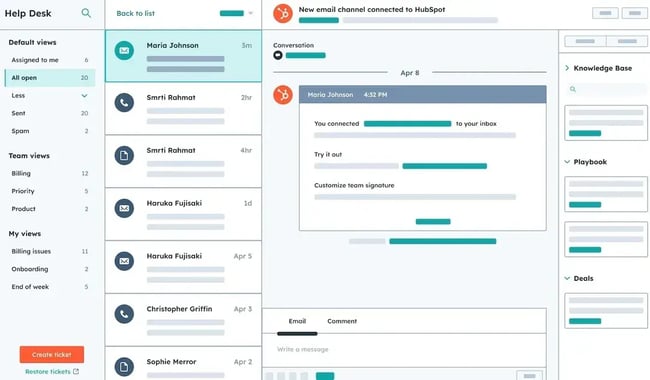
A help desk ticketing system centralizes customer conversations from multiple channels. It enables customer support teams to capture inquiries from multiple channels within a single system. This includes:
Ninety-three percent of customers say they sometimes or almost always have to repeat themselves when switching support channels.
Help desk software converts every incoming request into a trackable ticket. Instead of juggling disconnected tools or manual forwarding, support reps get one place to manage it all. This ensures that no inquiry is lost and allows teams to meet customers on their preferred channels, reducing friction and improving accessibility.
A help desk keeps information in one central location, where support agents can change the priority level of an inquiry and easily escalate the issue to the appropriate party. This keeps customers happy because they don’t have to repeat information or constantly reach out to customer support.
Pro tip: Platforms like HubSpot Service Hub offer omnichannel support tools that unify conversations without adding operational complexity.
Centralizes Customer Communication in a Shared Workspace
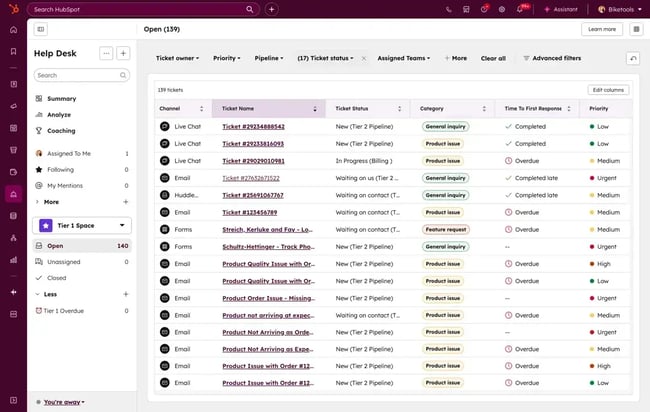
Support teams use help desk software to consolidate all customer interactions into a shared inbox or unified workspace. This allows multiple representatives to collaborate on tickets, maintain full conversation history, and respond with complete context. Top-performing support teams achieve up to 92% first-contact resolution with modern help desk tools. As a result, customers receive consistent, informed responses, regardless of how many channels they’ve used or which representative is assigned. Features of shared inboxes include:
What this means for teams: Fewer silos, better collaboration, and a seamless customer experience.
Organizes, Prioritizes, and Routes Tickets Automatically
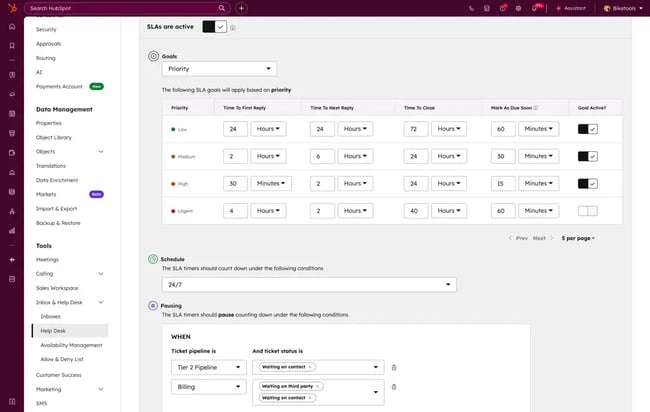
Help desk software helps support managers maintain control over ticket volume by organizing requests based on urgency, topic, or customer type. Automated routing assigns tickets to the most appropriate representative based on availability or expertise, reducing manual effort and response delays. This is especially critical during high-volume periods, where efficient triage directly impacts customer satisfaction.
Best for: Teams scaling support operations or managing complex issue queues.
Provides Actionable Reporting and Performance Insights

Help desk tools give operations leaders access to real-time dashboards. Help desk reporting measures track key metrics such as:
- First response time
- Resolution time
- Ticket volume
- Ticket backlog
- Customer satisfaction
- Agent performance
These insights help teams optimize workflows and make data-driven decisions about staffing and support strategy. A service level agreement (SLA) defines response and resolution targets, and help desk software can hold teams accountable to SLAs.
Pro tip: Look for tools like HubSpot Service Hub that connect reporting with CRM data for deeper customer insights.
Improves Response Speed and Consistency With Automation and AI
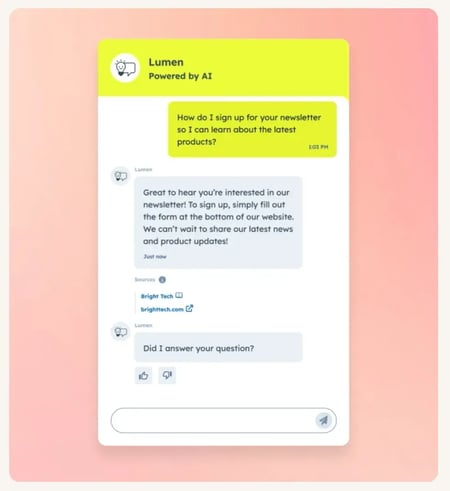
Modern help desk software leverages automation and AI to reduce repetitive tasks and accelerate response times. Help desk automation handles repetitive tasks like tagging, routing, and notifications.
Features like automated replies, suggested answers, and AI-powered chatbots allow support representatives to resolve common issues instantly while maintaining consistency in messaging. This ensures faster first responses and frees up reps to focus on more complex customer needs. Gitnux reports that AI-powered help desks can reduce ticket resolution time by up to 47%.
Pro tip: Leverage a tool like HubSpot’s Customer Agent for faster resolutions that lead to higher customer satisfaction and reduced support costs.
How to Choose the Right Help Desk Software
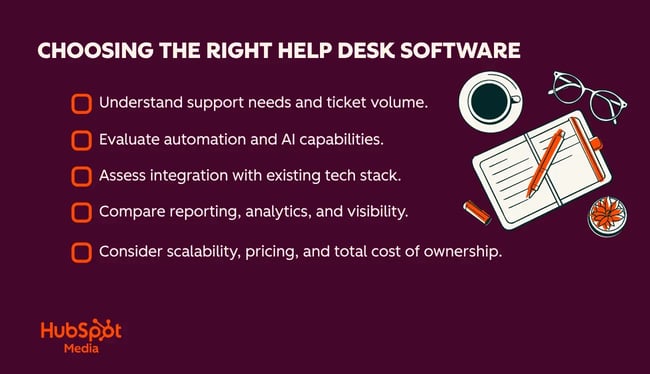
Selecting the right help desk software requires more than comparing feature lists. The tool must align with a team’s workflows, growth plans, and customer expectations. For customer support managers and operations leaders, the goal is to invest in a platform that improves efficiency today while scaling for tomorrow. Below are the key factors teams should evaluate before committing to a solution.
1. Understand support needs and ticket volume.
Customer support managers should start by assessing their current support environment, including average ticket volume, peak periods, and channel mix. A small business handling low ticket volume may prioritize ease of use and affordability, while a growing team managing high volumes will need automation, routing, and workload balancing.
Choosing software that matches operational complexity ensures teams don’t overpay for unused features or outgrow the tool too quickly.
2. Evaluate automation and AI capabilities.
Operations leaders should look closely at how each platform uses automation and AI to improve efficiency. Features like automated ticket routing, AI-generated responses, chatbots, and workflow triggers can significantly reduce manual work and response times. The most effective tools prioritize speed of resolution and consistent answers while maintaining ease of use for representatives.
Pro tip: Focus on tools that offer explainable, customizable automation rather than “black box” AI features.
3. Assess integration with existing tech stack.
Help desk software should integrate seamlessly with a company’s CRM, communication tools, and internal systems. For teams already using a CRM platform, choosing a help desk that connects customer data, conversation history, and support activity in one place is critical. This eliminates data silos and allows support representatives to deliver more personalized, context-rich service.
Why it matters: Poor integrations create fragmented data, slower responses, and frustrated teams.
4. Compare reporting, analytics, and visibility.
Support leaders need clear visibility into performance metrics to make informed decisions. When evaluating tools, teams should prioritize reporting features that track resolution times, customer satisfaction, agent productivity, and ticket trends.
5. Consider scalability, pricing, and total cost of ownership.
Finally, decision-makers should evaluate how well the software scales as the business grows. This includes reviewing pricing tiers, feature limits, and potential upgrade costs. A tool that appears affordable upfront may become expensive as ticket volume increases or advanced features are unlocked. Teams should look for transparent pricing models and flexible plans that align with long-term growth.
Best Help Desk Software at a Glance
Best Help Desk Software
Below, I’ve rounded up the best help desk software options to help marketers choose the right solution for their team’s size, goals, and support strategy.
Best Overall
1. HubSpot’s Help Desk Software
HubSpot’s help desk tool is part of Service Hub. HubSpot Service Hub is a powerful solution for customer support teams because it combines an intuitive interface with advanced tools that improve both efficiency and service quality. Its help desk allows teams to manage tickets, enforce SLAs, and maintain consistency across all customer interactions, while remaining easy for reps to use daily. With built-in automation, clear visibility into workloads, and features that reduce repetitive tasks, Service Hub helps support teams stay organized, respond faster, and deliver high-quality customer experiences at scale.
HubSpot’s help desk tool features include:
- AI-powered automation and assistance. HubSpot uses AI to suggest replies, summarize tickets, detect sentiment, and automate repetitive tasks, helping support reps resolve issues faster and more consistently.
- Customer Agent. HubSpot’s AI-powered customer-facing agent handles inquiries autonomously, 24/7, across a range of channels like email and WhatsApp. It resolves common issues instantly, pulls from your knowledge base and CRM data to give accurate answers, and escalates to a human rep when needed.
- Omnichannel support in a shared inbox. Teams can manage conversations across email, chat, phone, WhatsApp, and more from a single inbox, ensuring a seamless customer experience across channels.
- Smart ticket routing and workflow automation. HubSpot’s ticketing system automatically assigns tickets based on agent availability or expertise, with built-in routing, SLAs, and workload balancing to improve response times.
- Built-in reporting and service analytics. Real-time dashboards and customizable reports provide visibility into performance metrics like resolution time, SLA compliance, and agent productivity.
- CRM-powered 360° customer view. Because it’s connected to HubSpot’s CRM, support reps can see the full history of customer interactions, enabling more personalized and context-rich support.
Service Hub is particularly powerful when it’s used with other tools in the HubSpot platform.
Users on G2 note the following benefits and drawbacks of Service Hub.
Pros:
- Intuitive interface makes it easy for teams to get started right away.
- Automation and workflow tools streamline support processes and save time.
- Integration with HubSpot Smart CRM provides a centralized view of customer interactions.
- Visual ticketing features like Kanban boards help with organization and pipeline transparency.
- Centralized reporting and dashboards give teams insight into performance and response metrics.
Cons:
- Some advanced features are costly and require higher-edition plans.
- Limited customization options for reports, ticket views, and workflows.
Best for: Customer support teams that need seamless cross-team collaboration between service, sales, and marketing to deliver a unified, end-to-end customer experience.
Price: Free plan available. Starter starts at $20 per seat/month, Professional at $90 per seat/month, and Enterprise at $150 per seat/month.
Free Help Desk & Ticketing Software
Keep track of customer requests in one unified help desk that connects to your CRM database.
- Provide personalized, AI-powered support to your customers
- Save time, reduce errors, and streamline service processes
- Improve rep efficiency & time to resolution
- And more!
Small Business
2. Zoho Desk
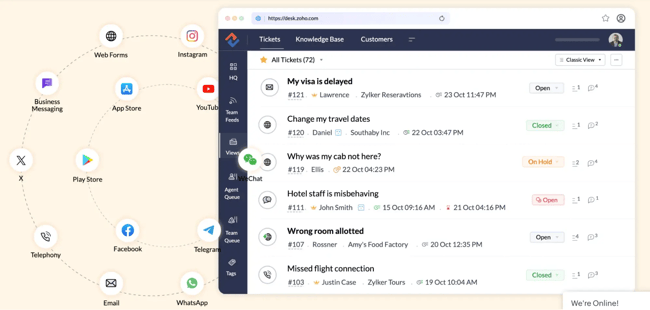
Zoho Desk’s help desk solution is aimed at increasing individual customer support rep productivity. Its tools help identify insights and trends to help service teams make better decisions to resolve customer cases faster.
Zoho Desk also includes a smart sentiment analysis tool that allows service leaders to gauge how customers are feeling about the customer service, without needing to send a satisfaction survey.
Users on G2 note the following benefits and drawbacks of Zoho Desk.
Pros:
- Intuitive, easy-to-use interface.
- Robust ticket management and automation features.
- Strong integrations with other tools and channels.
Cons:
- Advanced features have a learning curve.
- Customization and key features are limited on lower-tier plans.
Best for: Teams who want to gauge customer sentiment analysis without relying on surveys.
Price: Free; Paid plans range from $9 per user/month to $50 per agent/month for more advanced features when billed annually.
3. Help Scout
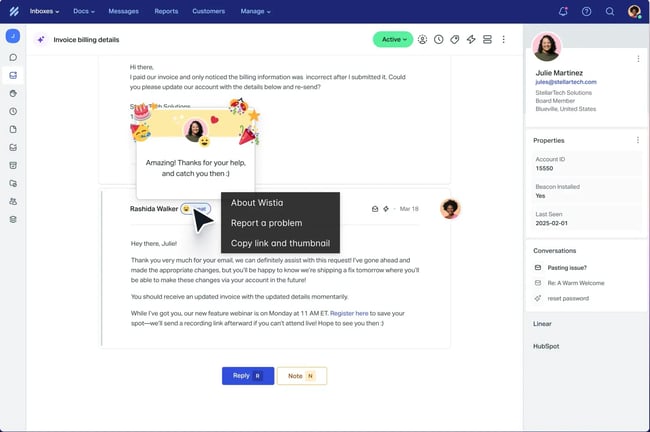
Help Scout is a help desk platform built around simplicity and human-centered support. It centralizes customer interactions into a unified inbox, making it easy for teams to respond quickly without juggling multiple tools. Help Scout is designed to keep support conversations feeling personal and natural. It’s particularly well-suited for small to medium-sized teams that prioritize efficient, personalized communication.
Users on G2 highlight the following benefits and drawbacks of Help Scout.
Pros:
- Easy to use with a clean, intuitive interface that simplifies ticket management.
- Shared inbox and collaboration features improve team communication and workflow.
- Quick setup and straightforward onboarding make it simple to get started.
Cons:
- Lacks some advanced features, such as in‑depth reporting and HelpDocs enhancements.
- Limited functionality in certain areas can restrict automation and scalability.
Best for: Teams that often work together to answer tickets, customer issues, and customer inquiries.
Price: Free; Paid plans start at $25 per user/month and go to $75 per user/month.
Enterprise
4. Zendesk
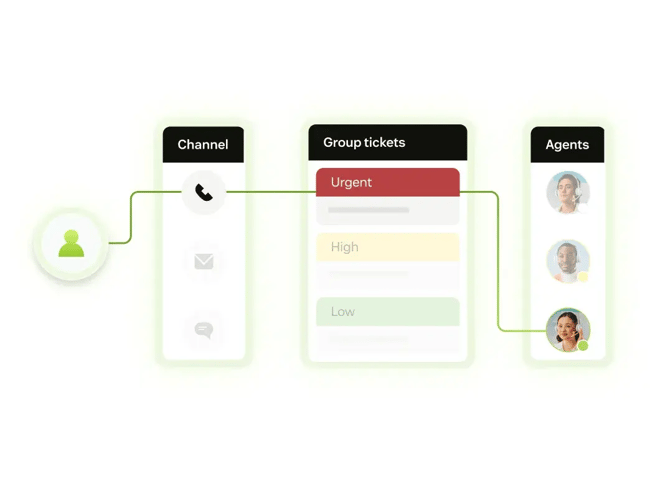
Zendesk is one of the most established customer service software companies, with tools that cater to a variety of different small, mid-sized, and enterprise companies. Its help desk tools consolidate all customer data across different platforms.
Zendesk’s customer portal feature is what it’s best known for. It allows customers to access their previously submitted tickets and add responses. The self-service portal lets customers find answers and track requests. For high-volume support teams, a customer portal lets people track their own tickets, cutting down the ‘any update?‘ requests that eat into rep time.
Users on G2 highlight the following benefits and drawbacks of Zendesk.
Pros:
- Streamlined, centralized ticket and interaction management across multiple channels.
- Powerful, feature‑rich platform that helps teams track support metrics and improve response capabilities.
- Generally intuitive to use once set up, helping teams quickly access and manage customer tickets.
Cons:
- Steep learning curve and configuration complexity.
- Limited customization for ticket statuses and workflows without moving to higher-tier plans.
Best for: Customer support teams that need to create customer portals and provide self-service options to reduce repetitive inquiries while keeping customers informed.
Price: Plans range from $19 per user/month to $169 per user/month.
5. Jira Service Management
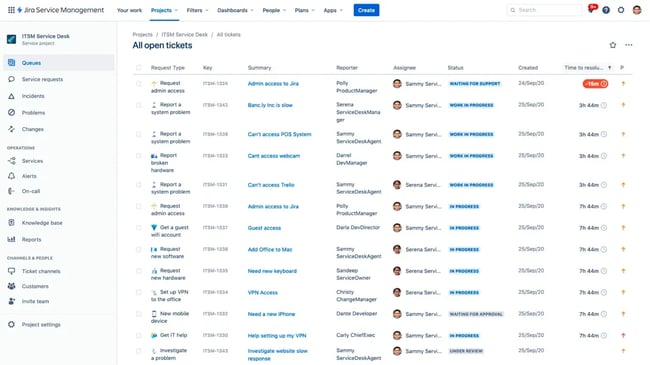
Jira’s service desk offers self-service options, ticket automation, SLA management, and more. Teams already on Jira can link IT tickets directly to their development backlog, making it easier to catch and fix issues before they reach customers.
Jira also works well for internal IT ticketing within an organization. Any business running on software needs a way to handle it when things break. Jira includes an employee self-service portal, conversational ticketing, and SLAs.
Users on G2 note the following benefits and drawbacks of Jira Service Desk.
Pros:
- Strong ticket and request management with automation features that streamline workflows.
- Flexible, customizable queues and SLA tracking that help teams stay organized and accountable.
- A centralized system that improves visibility into tickets and status across internal support teams.
Cons:
- Steep learning curve and complex interface.
- Complicated setup and configuration.
Best for: Support teams and IT organizations that need highly customizable workflows, strong SLA tracking, and structured ticket handling.
Price: Free; Starts at $20 per agent/month.
AI-powered
6. Intercom
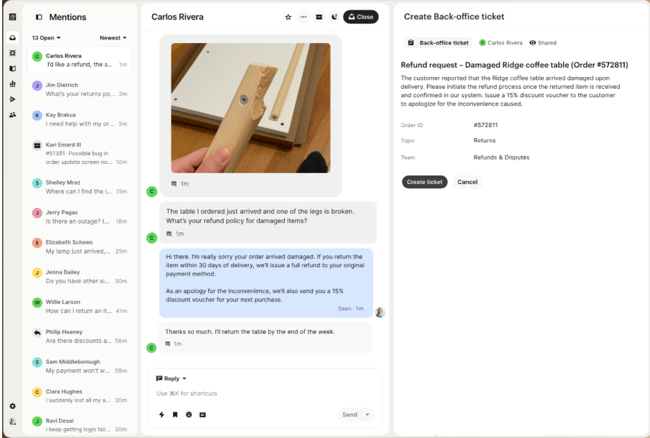
Intercom is best known for its AI-powered help desk, a simple, easy-to-use interface with tools that help teams scale support and resolve customer inquiries faster. Its AI Agent, Fin, assists reps by drafting replies, surfacing relevant knowledge base content, and prioritizing tickets, while continuously learning from past interactions to improve future responses.
Intercom also includes onboarding tools, proactive messaging, and omnichannel support, enabling teams to deliver personalized experiences without extra manual work. Plus, Intercom integrates with HubSpot.
Users on G2 note the following benefits and drawbacks of Intercom.
Pros:
- AI automation efficiently handles common and repetitive support queries, reducing agent workload.
- Easy to set up and use with an intuitive interface that speeds resolution time.
- Fast, relevant responses improve support speed and consistency across channels.
Cons:
- Response accuracy can depend heavily on the quality and structure of knowledge base content.
- AI may struggle with complex or edge‑case queries, requiring human intervention.
Best for: SaaS businesses that want to leverage AI to reduce repetitive inquiries, speed up customer support, and provide proactive, personalized experiences as customers get started with a new product.
Price: 14-day free trial. Starts at $29 per agent/month.
7. Tidio Helpdesk and Ticketing
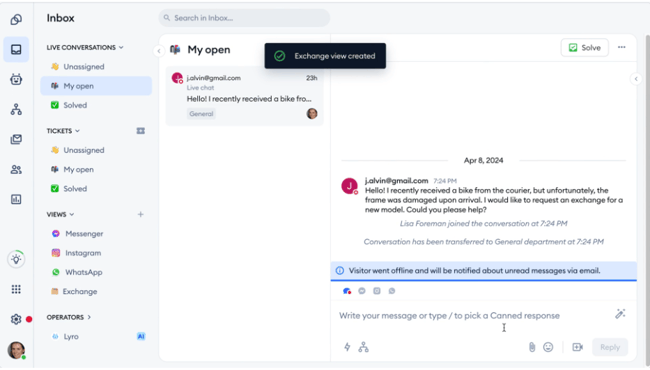
Tidio is an all-in-one customer service and helpdesk solution designed to help small and growing businesses triage tickets and engage clients through live chat, chatbots, and email. Unlike many competitors, Tidio includes a free ticketing system with unlimited tickets, making it a budget-friendly option for teams that want to stay organized without sacrificing functionality.
Tidio is powered by its AI agent, Lyro, which automatically addresses repetitive questions, closes tickets when possible, and escalates complex cases to human agents. With multichannel capabilities (email, Messenger, Instagram, and live chat), Tidio ensures all customer interactions are centralized in one place, helping businesses save time and provide consistent support.
Reviewers on G2 note the following benefits and drawbacks of Tidido Helpdesk.
Pros:
- Easy to use with quick setup and an intuitive interface.
- Integrated chatbots and AI features help automate common customer inquiries.
- Strong live chat and automation improve real‑time engagement and response efficiency.
Cons:
- Some users find the pricing high for essential AI and advanced features.
- Limited functionality and customization on lower‑tier plans.
Best for: Small to midsize teams and ecommerce businesses that want an easy‑to‑set‑up chat‑first help desk with built‑in AI and automation to engage customers in real time.
Price: 7-day free trial; paid plans start at $15.83/month billed annually.
Budget-friendly
8. Freshdesk
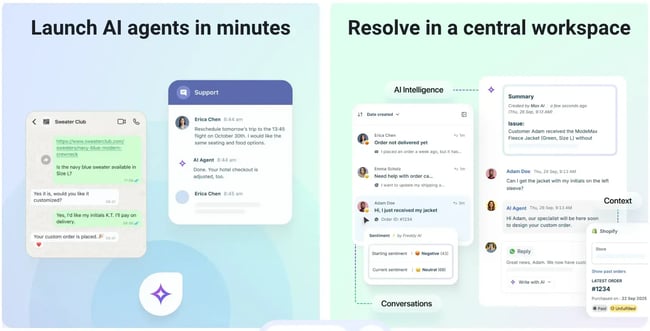
Freshdesk offers a help desk that unifies customer messages and data across all communication channels. This gives teams a central workspace to deliver faster and more accurate support. With AI-powered tools, Freshdesk automates repetitive tasks, suggests replies, and provides real-time guidance for support agents. Its mobile and field service capabilities also let teams manage on-site customer interactions efficiently, from routing tasks to capturing signatures.
Reviewers on G2 highlight the following benefits and drawbacks of Freshdesk.
Pros:
- Easy to use with an intuitive interface that helps teams navigate and manage tickets quickly.
- Robust ticketing, automation, and collaboration features improve efficiency and workflow organization.
- Time‑saving automation, including canned responses and workflows, boosts agent productivity.
Cons:
- Some users report performance issues like slow loading or lag during high ticket volume periods.
- Advanced features and reporting capabilities can be limited or require higher‑tier plans to unlock.
Best for: Customer service teams that want AI-assisted support to resolve tickets faster and streamline both in-office and field service operations.
Price: 14-day free trial. Starts at $15 per agent/month (billed annually)
9. LiveAgent
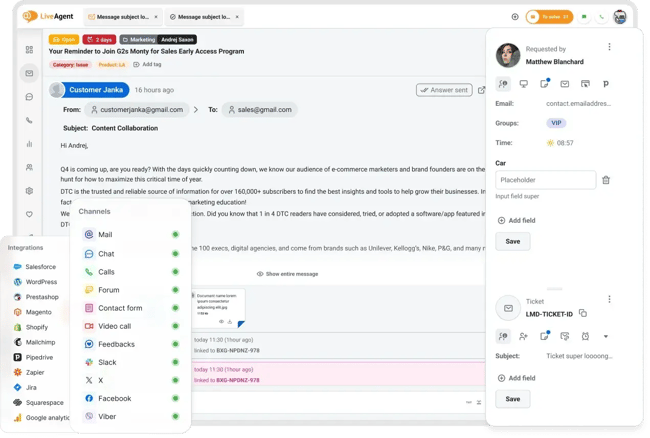
LiveAgent is an all‑in‑one, AI‑powered help desk designed to deliver fast, smart customer support across every channel. It brings together live chat, email ticketing, social messaging, and a built-in call center into a single dashboard so teams can manage interactions without switching tools. LiveAgent’s AI agents automate ticket sorting, draft replies, tag categories, and filter spam. These agents help support teams resolve issues more quickly and focus on high‑value conversations.
Because of its strong call center tools, LiveAgent is ideal for companies that often provide support over the phone. LiveAgent offers unlimited call recordings and call transfers, making it simple and easy to provide live phone support to your customers.
Users on G2 highlight the following benefits and drawbacks of LiveAgent.
Pros:
- Easy to use with an intuitive interface that helps teams manage communication and tickets across channels.
- Comprehensive communication features (live chat, calls, email) improve efficiency and support quality.
- Responsive customer support enhances onboarding and ongoing use.
Cons:
- Steep learning curve for mastering all features and customization.
- Some missing or limited features, especially around mobile integration and customization.
Best for: Teams that need a unified, omnichannel help desk with strong live chat, AI automation, and call center capabilities.
Price: 30-day free trial. Plans start at $15 per agent/month (billed annually)
Specialized
10. Happy Fox
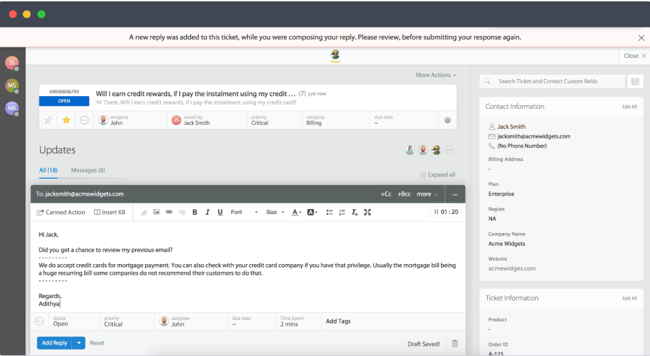
HappyFox is an all-in-one help desk platform built to manage both internal and external support requests across customer service, IT, HR, and operations teams. It consolidates inquiries from email, chat, phone, social media, and web forms into a unified inbox, so support teams can track and manage tickets without switching between tools. Most teams can get up and running in under an hour, with dedicated onboarding support included regardless of plan size.
One of its most notable features is its “task management” tool, which allows agents to break down items from a ticket into different tasks. For that reason, it’s ideal for companies that offer a complicated product where, if a customer submits a ticket, several steps are required to close it.
Reviewers on G2 note the following benefits and drawbacks of Happy Fox.
Pros:
- Easy to use with intuitive setup and straightforward ticket management.
- Strong automation features that help streamline workflows and improve efficiency.
- Responsive customer support and reliable assistance.
Cons:
- Some users report email communication and management issues that can make it harder to track ticket status clearly
- Pricing can feel expensive for smaller teams or wider adoption.
Best for: Teams with specific operational requirements due to its niche strength in highly customized workflows and structured ticketing environments.
Price: Starts at $24 per agent/month.
Frequently Asked Questions About Help Desk Software
What is the best help desk software?
The best help desk software depends on a team’s size, support channels, and the complexity of needs. Small teams often prioritize ease of use and affordability (tools like Help Scout or Zoho Desk), while mid-sized teams benefit from platforms with automation and reporting (like Freshdesk or HubSpot Service Hub).
Enterprise organizations typically require advanced customization, scalability, and multi-team workflows, making solutions like Zendesk or Jira Service Management a better fit. Teams with heavy chat or automation needs may lean toward AI-first platforms like Intercom or Tidio.
How much does help desk software cost?
Help desk software pricing typically ranges from free plans for small teams to $15 to $50 per user/month for standard tiers, and $75 to $150+ per user/month for advanced or enterprise plans.
In addition to subscription costs, teams should account for implementation fees, premium integrations, onboarding support, and potential add-ons for AI, analytics, or additional channels. Total cost of ownership often increases as teams scale or require more advanced capabilities.
What software do most call centers use?
Most call centers use help desk platforms that include or integrate with voice and omnichannel support systems, such as Zendesk, Freshdesk, or HubSpot Service Hub. These tools allow teams to manage phone, email, chat, and social interactions in one place while providing call tracking, recording, and performance analytics. Many call centers also integrate specialized VoIP or contact center software to extend functionality.
How long does help desk implementation take?
Help desk implementation timelines vary based on complexity. Small teams can get started in a few hours to a few days using out-of-the-box configurations. A standard rollout for a growing team typically takes 2 to 6 weeks, including setup, integrations, and training. Enterprise implementations can take 2 to 4 months or longer due to custom workflows, data migration, and cross-team alignment. A phased rollout, starting with core ticketing before adding automation and advanced features, helps reduce risk and improve adoption.
Can I migrate from my current help desk?
Yes, most modern help desk platforms support migration from existing tools. Many vendors provide migration tools, APIs, or partner support to streamline the process. The key considerations are data mapping, downtime minimization, and preserving historical context so support teams can maintain continuity during the transition.
What ROI should I expect?
Help desk software typically delivers ROI through faster response and resolution times, improved agent productivity, higher customer satisfaction (CSAT), and increased ticket deflection via self-service and automation. Teams often see reduced manual workload, better visibility into performance, and can scale support without increasing headcount.
Do small teams need help desk software?
Small teams benefit significantly from help desk software because it introduces structure, visibility, and consistency early on. Even with low ticket volume, a centralized system prevents missed requests and improves response quality. Free or entry-level plans are often sufficient for small teams, with the option to upgrade as support needs grow.
How do help desks integrate with other tools?
Help desk software commonly integrates with CRM systems, chat and voice tools, ecommerce platforms, collaboration tools (like Slack or Microsoft Teams), and analytics platforms. The most important integrations are those that unify customer data (CRM), streamline communication (chat/voice), and enable team collaboration. Strong integrations reduce context switching and create a more efficient support workflow.
Help desk support is a must for your business to grow.
Help desk software is no longer “nice to have.” It’s a foundational system for any team that wants to deliver fast, consistent, and scalable customer support. From centralizing conversations to automating workflows and surfacing actionable insights, the right platform directly impacts both customer satisfaction and team efficiency.
For service leaders looking for a solution that balances ease of use with powerful capabilities, HubSpot’s Service Hub stands out as a strong choice. Its combination of AI-powered automation, omnichannel support, and native CRM integration gives teams a complete view of the customer while reducing manual work for reps.
To find the right tool, evaluate your current support setup, identify where your team is losing time or visibility, and choose a help desk that aligns with your goals. If you’re ready to streamline operations and elevate your customer experience, exploring HubSpot’s help desk software is a practical place to start.
Editor’s note: This post was originally published in November 2018 and has been updated for comprehensiveness.
Free Help Desk & Ticketing Software
Keep track of customer requests in one unified help desk that connects to your CRM database.
- Provide personalized, AI-powered support to your customers
- Save time, reduce errors, and streamline service processes
- Improve rep efficiency & time to resolution
- And more!