.png?width=112&height=112&name=Image%20Hackathon%20%E2%80%93%20Horizontal%20(56).png)
Wireframes are the blueprints of websites. Just like you wouldn’t build a house without a floor plan, you wouldn’t build a website from scratch without a wireframe. Or if you did, it probably wouldn’t turn out the way you wanted.
A website wireframe lets you test drive the page layout and evaluate user flows to see exactly how the new website will function. It also exposes any potential mistakes that might eventually hinder conversions — all before you actually build the website.

In this post, I’ll discuss what the wireframing process looks like for websites, the types of wireframes you can use, and how to create a wireframe for your own web design project. I’ll even throw in some premade wireframe templates to get you started.
Table of Contents
- What is a website wireframe?
- What to Include on a Website Wireframe
- Why create a website wireframe?
- When to Use a Website Wireframe (And When You Can Skip It)
- How to Create a Simple Wireframe
- Should you use an AI wireframing tool?
- Wireframe Examples
- Website Wireframe Templates
- Frequently Asked Questions About Website Wireframes
- How a Website Wireframe Improves the Design Process

What is a website wireframe?
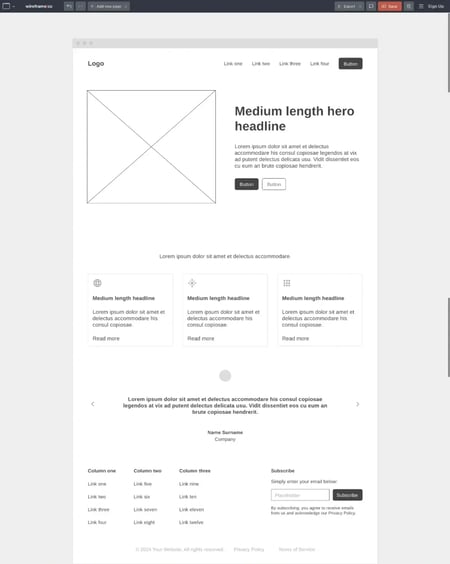
A website wireframe is an early, low-fidelity representation of a website’s page-level structure and layout. It maps out the basic hierarchy, features, and functionality of a webpage before finalizing content or adding visual design elements, such as color schemes, typography, and imagery.
Below is an example of a website wireframe that I made using Wireframe.cc.
Mockup vs. Wireframe vs. Prototype
People often get confused about the differences between wireframes, mockups, and prototypes, so let me offer some clarity:
- A wireframe focuses on structure and layout without visual design.
- A mockup applies visual design — colors, typography, imagery — to that structure, and is typically static.
- A prototype adds interactivity and simulates the user experience.
But the truth is that there is a lot of overlap, and the lines between wireframe versus mockup versus prototype are often blurry, as my friend and UX designer Alissa Chan explained to me. “The definitions you mentioned above are what I learned in school, but at work I often hear ‘wireframe’ and ‘mockup’ used interchangeably,” she says.
Additionally, not every designer follows the rigid linear process of wireframe → mockup → prototype. “The reality is that not all projects will use all three steps because it depends on project scope, time, and resources. That said, understanding what each step is for gives you the judgment to know when it’s okay to skip it,” Chan adds.
If you want more of a visual explanation, here’s a graphic comparing a wireframe versus a mockup and a mockup versus a prototype:

Why create a website wireframe?
Wireframes ensure you and all stakeholders are aligned on a website’s structure before you invest time in content, visual design, or code. Working without a wireframe can lead to rework — or risk a project failing altogether.
For tips on keeping things organized as your site evolves, check out this guide on website management for small business.
Wireframes make website architecture visible early.
Wireframes form the structural foundation of your website, much like floor plans do for construction projects. With a wireframe, you can see exactly where core elements like navigation menus, content sections, and conversion points will sit on the page — and how visitors will move through them to reach goals like making a purchase or requesting a demo. This visibility is what makes wireframes essential for aligning designers, developers, and stakeholders before anyone starts building. It’s especially critical for larger websites with complex architecture, though even smaller projects benefit.
.png)
Free Website Design Inspiration Guide
77 Brilliant Examples of Homepages, Blogs & Landing Pages to Inspire You
- Agency Pages
- Ecommerce Pages
- Tech Company Pages
- And More!
Download Free
All fields are required.
Form not available
Wireframes reduce rework by catching issues before development.
It’s far easier to move a content block or restructure a page hierarchy in a wireframe than after you’ve finalized copy or started coding. Because wireframes surface friction points early — before visual design and development begin — they prevent the kind of expensive late-stage changes that derail timelines. Identifying a broken user flow in a wireframe costs minutes; discovering it after launch costs weeks.
Wireframes speed up feedback and iteration.
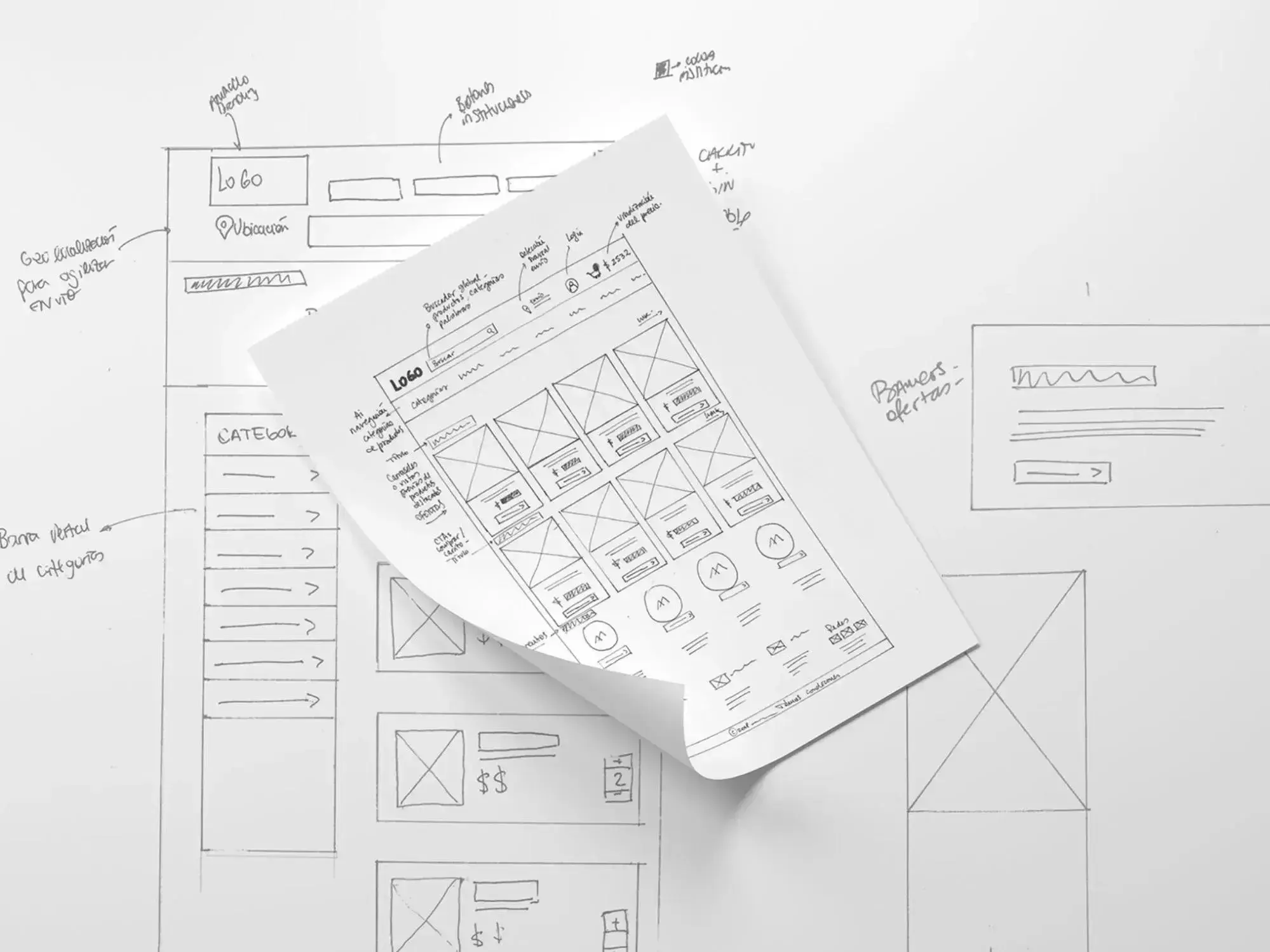
Because wireframes strip away visual design elements, they keep stakeholder feedback focused on structure and content priority rather than colors or fonts. This makes review cycles faster and more productive. In the early stages, you can even sketch a rough wireframe on paper; a basic sketch is enough to collect feedback and iterate before committing to any digital tool.
Pro tip: If you’ve hand-drawn a wireframe but feel bashful about sharing it in such a rough form, I recommend experimenting with AI wireframing tools to polish your drafts. For example, Balsamiq’s Image to Wireframe uses AI to transform an uploaded sketch into a polished low-fidelity digital wireframe.
When to Use a Website Wireframe (And When You Can Skip It)
Not every project calls for the same level of wireframing — and in a few cases, you might not need one at all. Here’s how I think about it.
Designing from scratch? Wireframe it.
If there’s no existing site to reference, a wireframe is essential. You need to define the page hierarchy, user flow, and content layout before anyone starts writing copy or pushing code. Skipping this step could lead to rework — and rework on a from-scratch build is expensive.
I recommend starting with a low-fidelity wireframe to map out the general placement of elements on the screen. From there, you can develop those initial designs into higher-fidelity wireframes as the project takes shape. Whether you stay low-fi or move into more detail will depend on what the project needs at the time.
Working with multiple stakeholders? Wireframe it.
When designers, developers, marketers, and clients all have a say in the final product, a wireframe is the fastest way to get everyone aligned before the heavy lifting starts. It gives each group a shared reference point for structure, content priority, and user flow — which means fewer surprises (and fewer revision cycles) later on.
You can use wireframes to work effectively with your team and explain concepts to clients who may not have a design background.
Using a website builder or template? You can probably skip it.
A website builder helps non-designers create a site without coding, typically using premade templates. More recently, AI website builders have flooded the market, allowing you to describe the site you want in plain language. In either case, the template or AI output handles much of the structural planning a wireframe would normally cover, so you can often skip the formal wireframing process.
Caveat: Even when using a website template or AI builder, I still think it’s useful to sketch out a quick wireframe. It can help you choose the right template or give the AI a clearer description of your vision. A five-minute sketch can save you a lot of back-and-forth later.
Building a small, simple website? You can probably skip it.
Small websites or personal projects with a single purpose — think a restaurant site with just a location page and a menu — might not require a formal wireframe. These sites might have only 1–3 pages and no external stakeholders, so there’s less need for alignment.
I think the same holds true for other basic brochure-style business websites. But if the project starts growing in scope or adding stakeholders, bring a wireframe back into the process.
How to Create a Simple Wireframe
1. Define your goal and map the user flow.
Before you sketch anything, get clear on what your website needs to accomplish. Should visitors make a purchase? Request a demo? Download an app? Whatever the goal is, make sure your team is aligned on it — everything else in the wireframe flows from that decision.
From there, outline the user flow: the path someone takes to complete a task. I recommend writing it out in plain text before starting on wireframing. Moving steps around in a bulleted list is a lot faster than rearranging boxes on a screen (or erasing and redrawing them on paper).
A wireframe map can help you visualize how individual pages connect within the larger site structure.
2. Choose your starting point: sketch or template.
There are two quick ways to get started, and neither is wrong.
- Hand-draw it. Grab a piece of paper — grid or dotted paper works best — and sketch out the basic layout. This is the fastest way to get ideas out of your head, and it’s especially useful in group brainstorming sessions where nobody wants to fumble with software. As I mentioned earlier, you can always use an AI tool like Balsamiq’s Image to Wireframe to digitize a hand-drawn sketch later.
- Start with a template. If you’d rather work digitally from the start, pick a wireframe template that’s close to what you need and customize it. Tools like Figma, Miro, and Uizard all offer free wireframe templates (I share some of my favorites later in this post). Templates are great when you already have a general sense of the page structure and just want to move faster.
Either way, start simple. I recommend beginning with a low-fidelity wireframe — basic shapes, placeholder text, no colors or imagery — and layering in detail as the project takes shape.
Free Website Design Inspiration Guide
77 Brilliant Examples of Homepages, Blogs & Landing Pages to Inspire You
- Agency Pages
- Ecommerce Pages
- Tech Company Pages
- And More!
Download Free
All fields are required.
Form not available
3. Add conversion points and simplify.
Once you have a rough wireframe, zoom in on how users will actually move through it. Identify the specific buttons, links, or elements that guide someone from one step to the next. Just because you’ve mapped out the flow doesn’t mean it’s intuitive yet — this is where you make it intuitive.
At the same time, look for opportunities to simplify. You might notice that two pages could be combined, or that a step in the flow is redundant. Wireframing is iterative by nature, so don’t be afraid to cut, merge, or rearrange.
4. Get feedback and iterate.
Before moving into visual design or development, share your wireframe with stakeholders, teammates, and (if possible) actual users. Getting input at this stage prevents the core UX from getting lost once colors, images, and code enter the picture.
I believe this is one of the biggest advantages of wireframing in the first place. It’s cheap to change a wireframe and expensive to change a finished website. Use that to your advantage.
What is a website wireframe?
A website wireframe is an early, low-fidelity representation of a website’s page-level structure and layout. It maps out the basic hierarchy, features, and functionality of a webpage before finalizing content or adding visual design elements, such as color schemes, typography, and imagery.
Page Hierarchy
Your website’s page hierarchy is part of its information architecture, the structure that organizes and connects all of the various pages and content on your site. To help visitors easily navigate your website and achieve their goals, I can’t overemphasize how important it is to have a clear hierarchy.
When you’re building your wireframe, you should include key sections like headers, footers, and so on, while also making sure to clearly outline how you want content to appear on your website and in the order of importance they should appear.
Content Areas
Most pages on your website will be divided into multiple content areas. These content areas could include the hero section, categories, testimonials, videos, etc.
Getting the page layout design right at this stage ensures your content flows logically.
When you create your wireframe, you want it to clearly show the different content areas that you want to have on your website, along with how those different content areas connect and flow together.
The content areas should work logically and draw visitors down the page. Typically, you’ll put the most important information at the top of the page and less important information lower down.
Buttons and Links
For most websites, your call-to-action (CTA) buttons will be one of the most important elements on your site. These CTA buttons are what actually drive actions on your site and push visitors to perform whatever it is you want them to.
Because these buttons are so important, many of the website wireframe templates that I’ll feature later in this post include lots of pre-built buttons that you can use to set up your wireframe.
User Flow
A user flow is the series of steps someone takes on your site to reach a specific goal — like finding a product, signing up for a newsletter, or requesting a demo. For example, a visitor might land on your homepage, click through to a pricing page, and then fill out a contact form.
Including the user flow in your wireframe means mapping out that sequence of pages and showing how each one connects to the next. At its simplest, this could be arrows between wireframed pages showing the intended path. In a higher-fidelity wireframe, you might label the specific buttons or links that move someone from one step to the next.
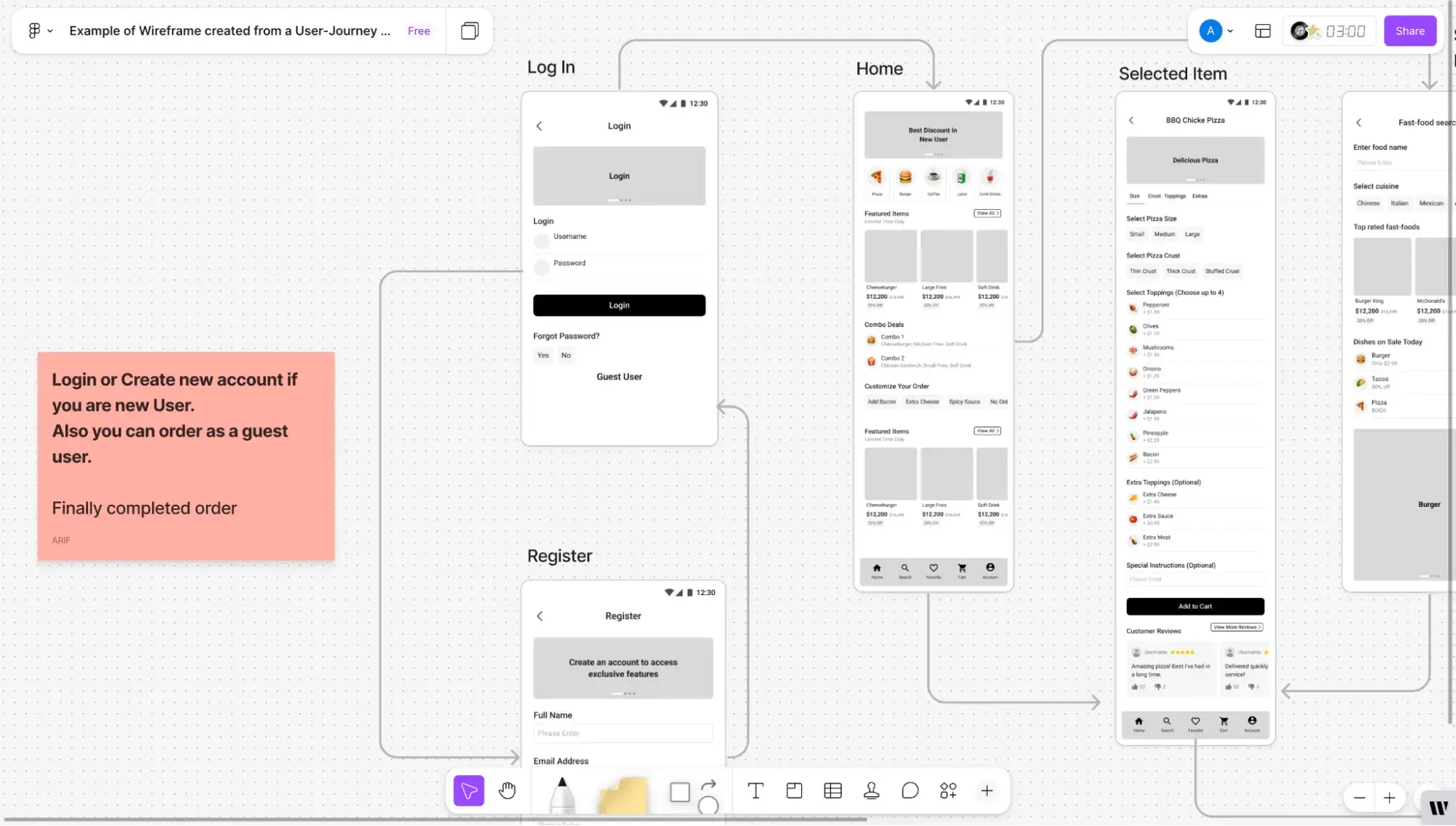
The goal is to make sure visitors have a clear, logical path to follow, and to catch any dead ends or confusing detours before you start building. If you want to dig into this topic further, I recommend reading our full guide on user flows.
Notes
Notes or annotations give context to different elements on your wireframe. You’ll likely be showing the wireframe to stakeholders who don’t have a design or marketing background, and these notes will help them understand how the website is intended to work.
You can also use these notes to leave instructions or suggestions for other team members working on the wireframe.
Because notes are so important to collaboration, most website wireframe tools should include a built-in feature to help you do this.
Should you use an AI wireframing tool?
AI can help you with wireframing, but I don’t recommend it for everyone. Back in September 2025, I tested wireframing tools extensively and wrote a detailed blog post about it. Many of these tools had AI features, and here’s what I found most useful:
- Balsamiq’s Image to Wireframe feature uses AI to turn a hand-drawn sketch or any other image you upload into a digital wireframe in its dashboard. I tested this by hand-drawing a very basic wireframe onto a paper towel and uploading it to Balsamiq. It worked really well and was convenient for me.
- Framer’s Wireframer tool builds the layout of your website based on a natural language prompt. Similar to Claude or ChatGPT, you simply describe what you want to see in a text box, and the AI will generate it for you.
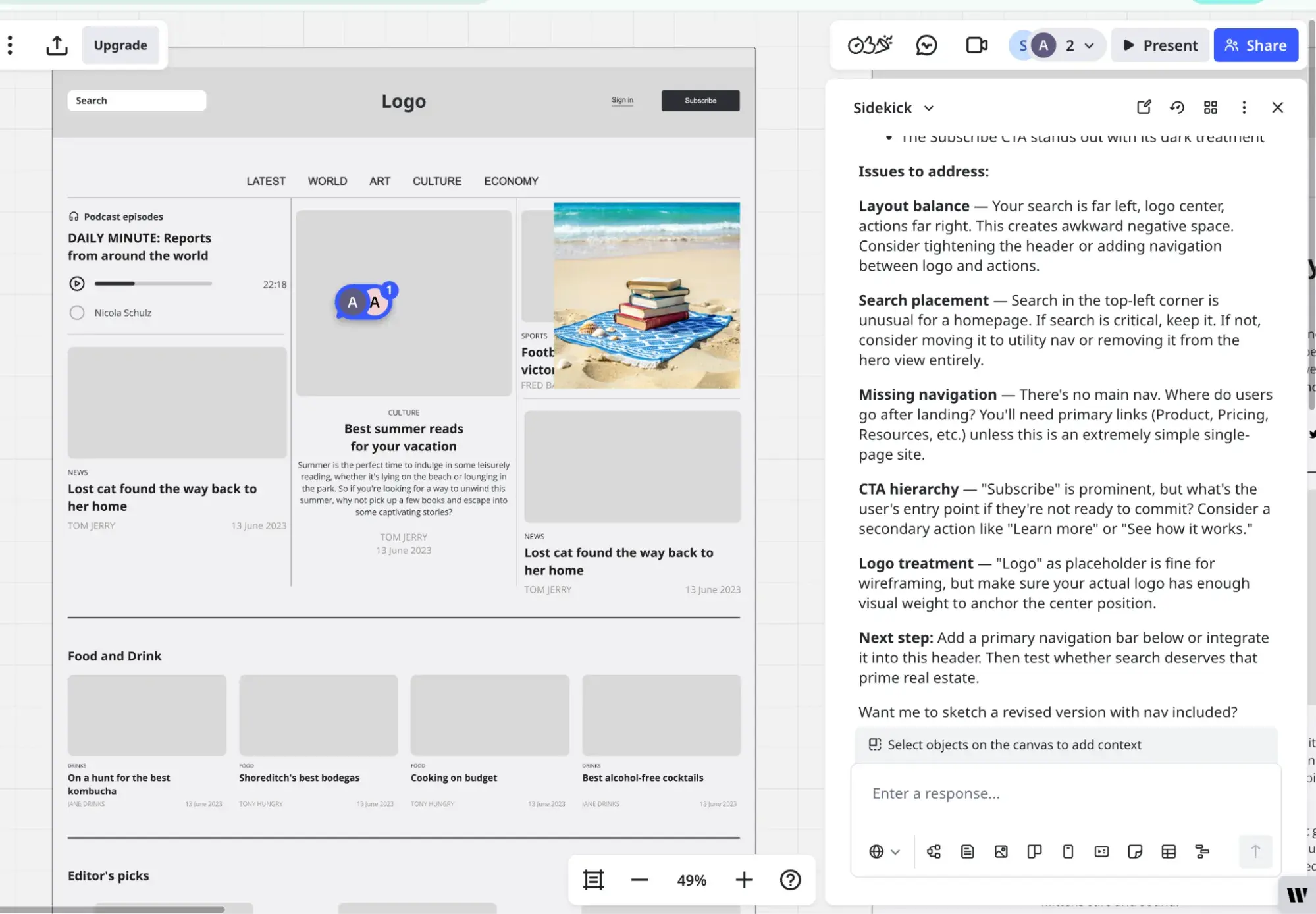
- Miro AI provides feedback on your wireframe. Simply click the AI icon to the left of your Miro dashboard, and the Sidekick AI chat will pop out. You can then prompt it with something like, “Give me feedback on my homepage wireframe,” and it’ll tell you how to improve it. I found this really helpful. If you upgrade to the Prototype add-on, Sidekick will revise the wireframe for you.
Having said that, though, my favorite wireframing tool is AI-free: Wireframe.cc. I love the purist, distraction-free approach. Digitally creating my wireframe without AI helped me to be more intentional about how I wanted the site to look, and it felt more freeing and creative than simply describing it to AI and tweaking the AI-generated output.
Free Website Design Inspiration Guide
77 Brilliant Examples of Homepages, Blogs & Landing Pages to Inspire You
- Agency Pages
- Ecommerce Pages
- Tech Company Pages
- And More!
Download Free
All fields are required.
Form not available
Wireframe Examples
Below are some of the best examples of wireframe types I found to help you better understand which type might work best for you.
1. Low-Fidelity Hand-Drawn Website Wireframe
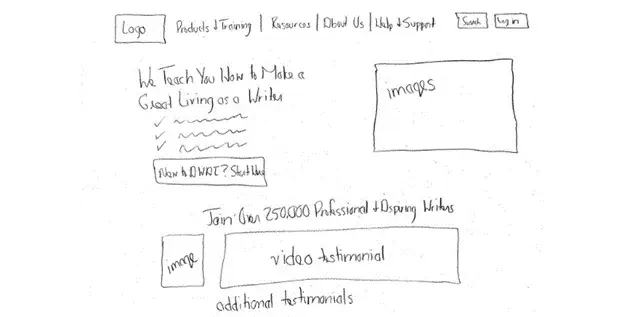
This simple, hand-drawn method illustrates a basic concept before spending time fussing with graphical elements. The best part? Anyone can do it.
“Even if you think you can’t draw usually any sketch is better than no sketch at all,” writes UX designer Alan Trow-Poole.
It allows easy iteration, which can be especially helpful when you’re in the early stages of working on your wireframe. It can also be helpful in group sessions, as you and your collaborators can quickly get your ideas down on paper without knowing how to use wireframing software.
2. Low-Fidelity Services Page Wireframe
I created this Services page wireframe using Balsamiq, a low-fi wireframing tool. It was incredibly easy to use; in fact, I asked its AI chatbot to generate a low-fidelity Services page for me, and it gave me this with just a couple of prompts for tweaking.
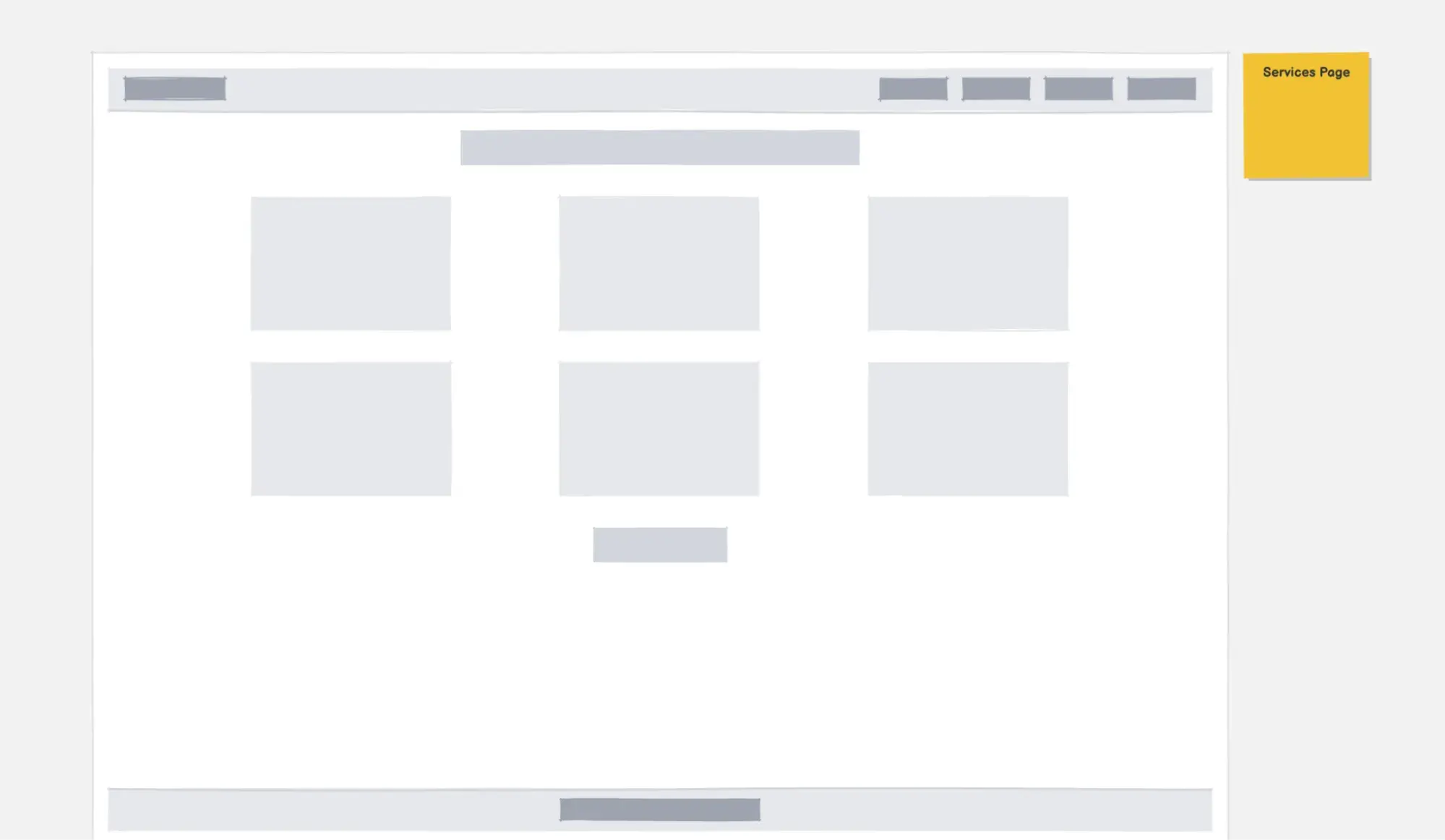
Digital low-fidelity wireframes display elements in simple content blocks. They take your basic concept sketch and turn it into something more refined.
Low-fidelity wireframes are important for determining what graphical elements need to be created and what copy needs to be written.
At the same time, because low-fidelity wireframes keep things very simple, they don’t require as much time to create as other types of digital wireframes. Basically, I recommend thinking about it as an intermediary between any ideas you’ve sketched on paper and the more high-fidelity wireframes and mockups that you’ll create later on.
3. Low-Fidelity Landing Page Wireframe
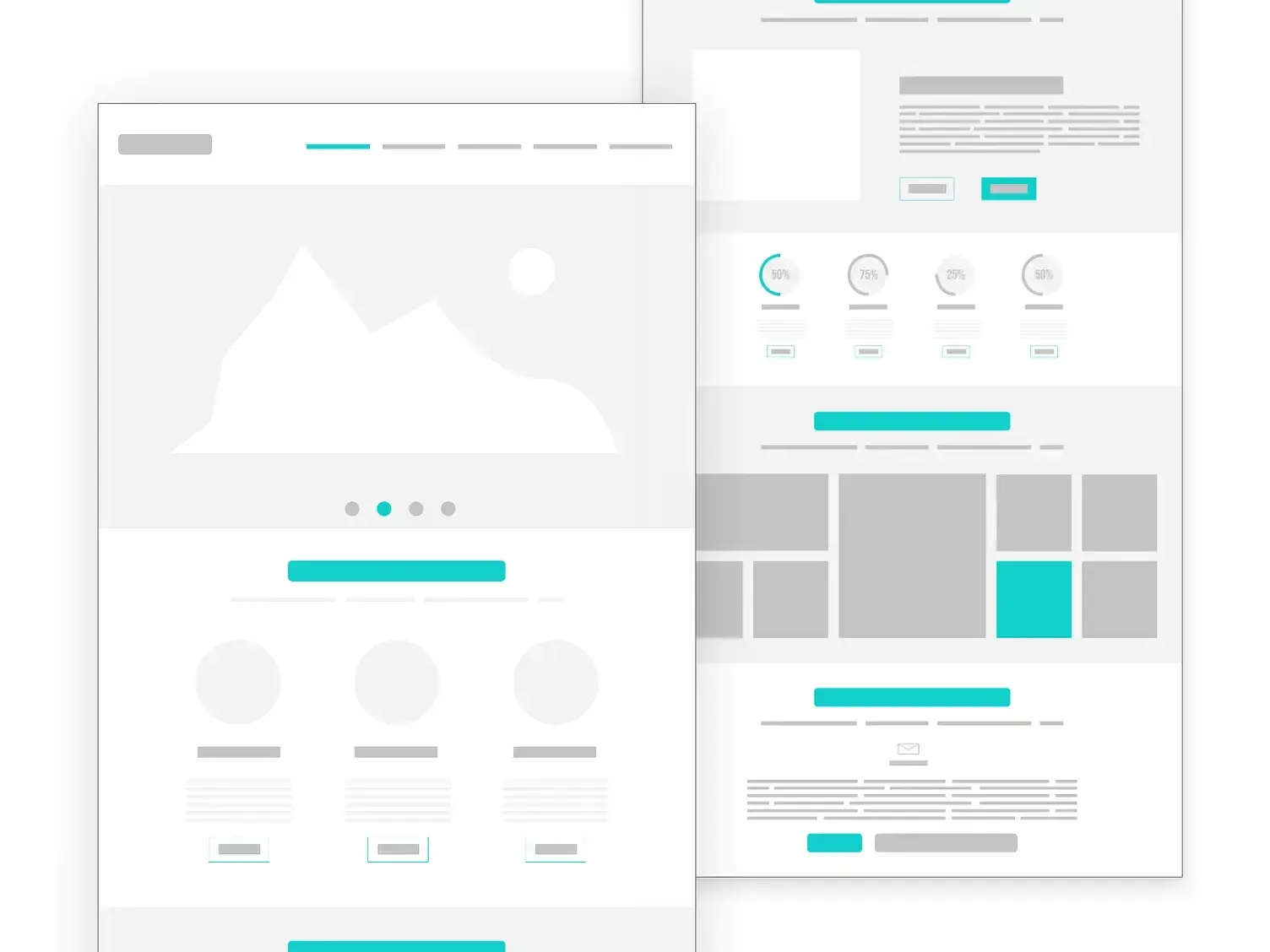
This landing page wireframe proves that low-fidelity doesn’t always mean grayscale. It still uses basic shapes and blocks in place of actual typography and has no images (classic low-fi), but it adds a pop of turquoise on buttons and other elements.
4. Medium-Fidelity Homepage Wireframe
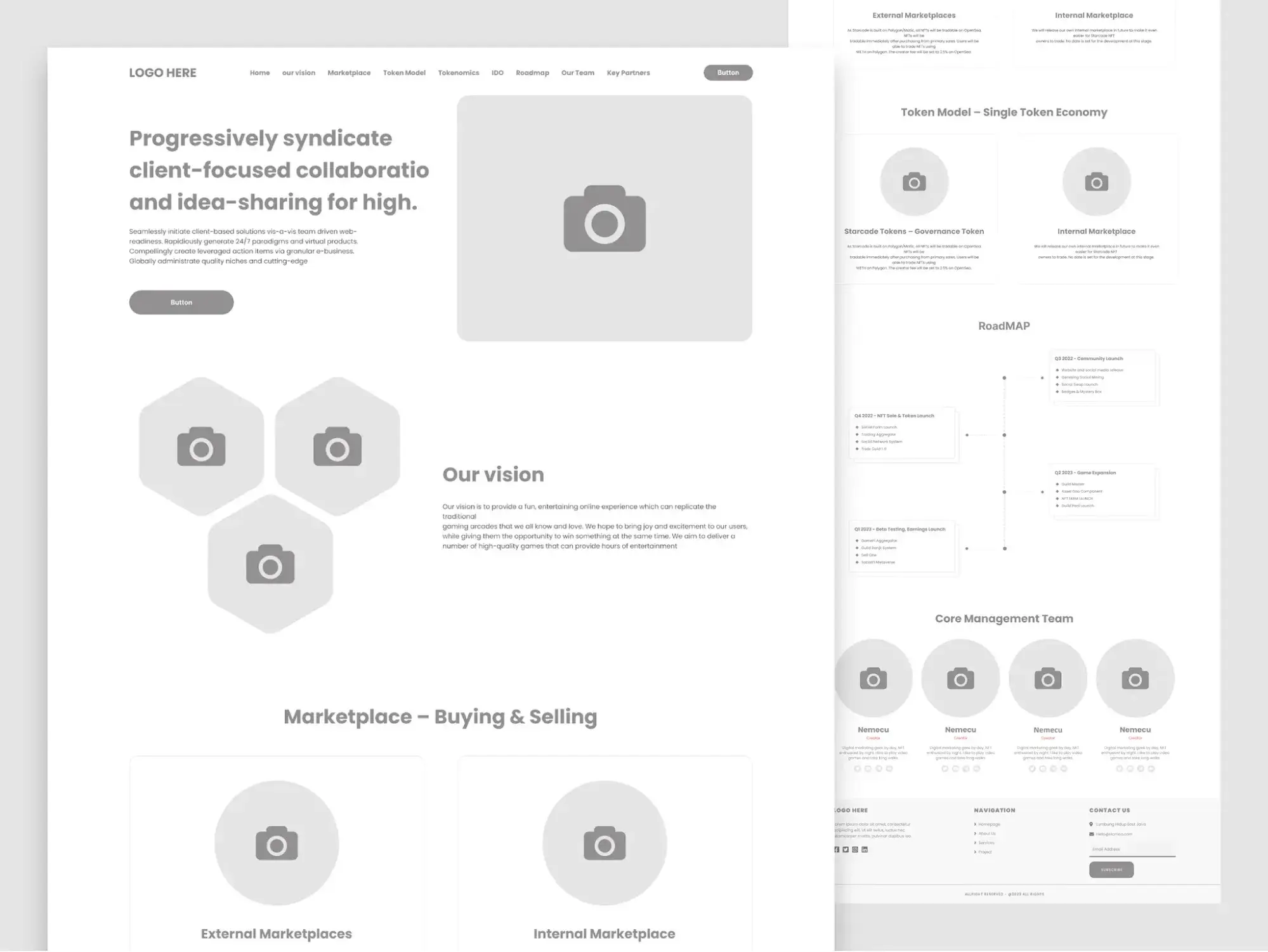
This homepage wireframe lands squarely in medium-fidelity territory. It goes beyond basic content blocks by including placeholder body text, labeled navigation items, and distinct content sections — like a hero area, a vision statement, a marketplace overview, and a team section. But it still uses generic camera icons in place of real imagery and sticks to a grayscale palette.
I think medium-fidelity wireframes like this one are especially useful when you need to show stakeholders how much content will actually appear on the page. A low-fidelity version might leave people guessing about how text-heavy or image-heavy a section will be, whereas this level of detail gives a much clearer picture without requiring any final design work.
5. High-Fidelity Dashboard Wireframe
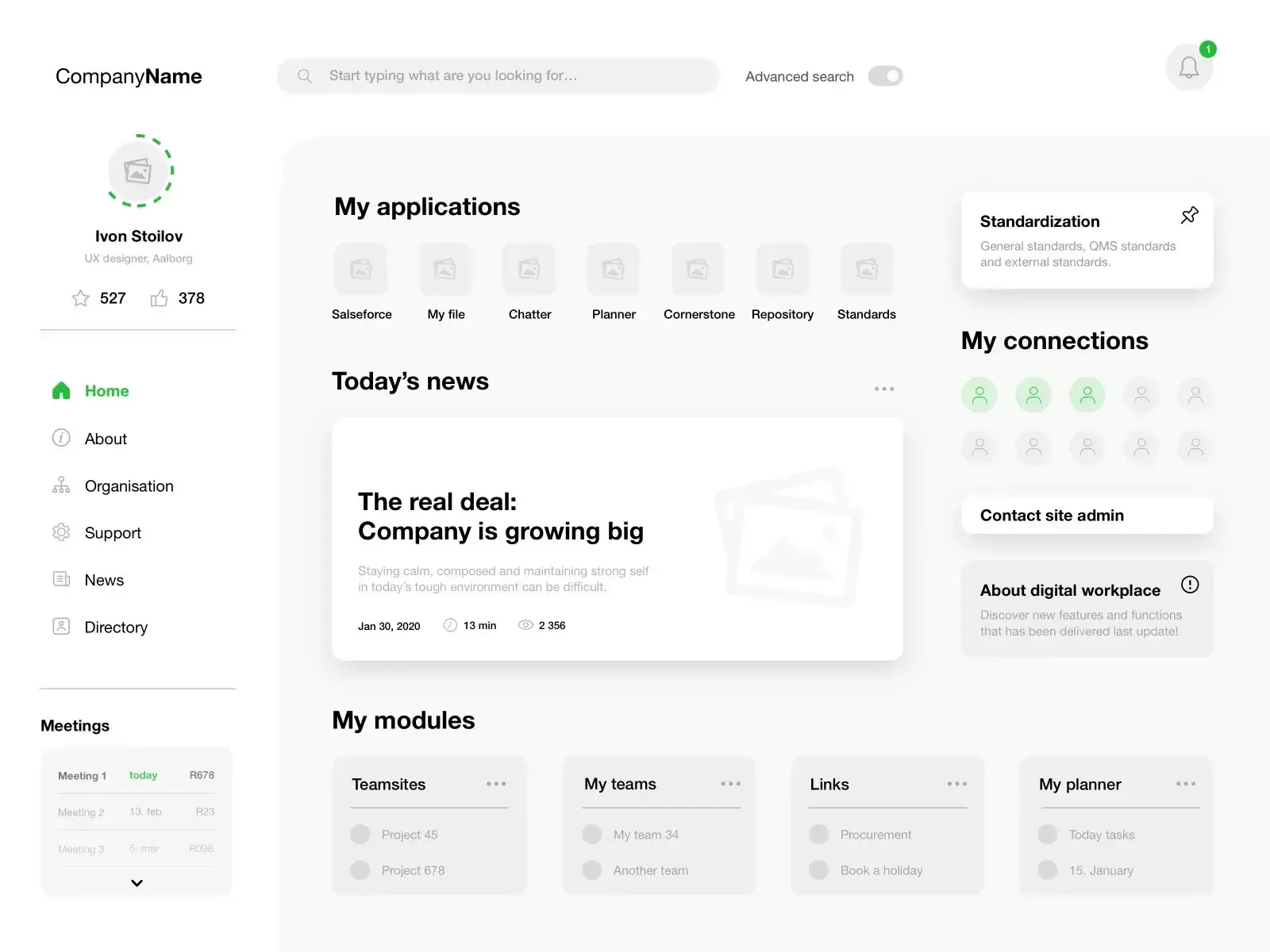
Using digital tools, you can create a high-fidelity wireframe that illustrates structure and functionality in fine detail — without committing to any final visual design. This intranet dashboard wireframe is a great example. It includes a left-hand navigation sidebar, a user profile area, application shortcuts, a news feed, meeting schedules, and modular content blocks for teams, links, and tasks.
Even though the labels are realistic and the layout is highly structured, notice what’s not here: no finalized color palette, no brand imagery, no styled icons. Everything is still in placeholder mode, which is exactly what makes it a wireframe rather than a mockup. I think high-fidelity wireframes like this are especially useful for complex projects like intranets or dashboards, where stakeholders need to understand how many modules and content areas will coexist on a single screen before the team invests time in prototyping or development.
Website Wireframe Templates
To help you implement some of the different wireframe examples from the previous section, I want to share some actual website wireframe templates you can use for your own projects.
1. Uizard: Website Wireframe Template
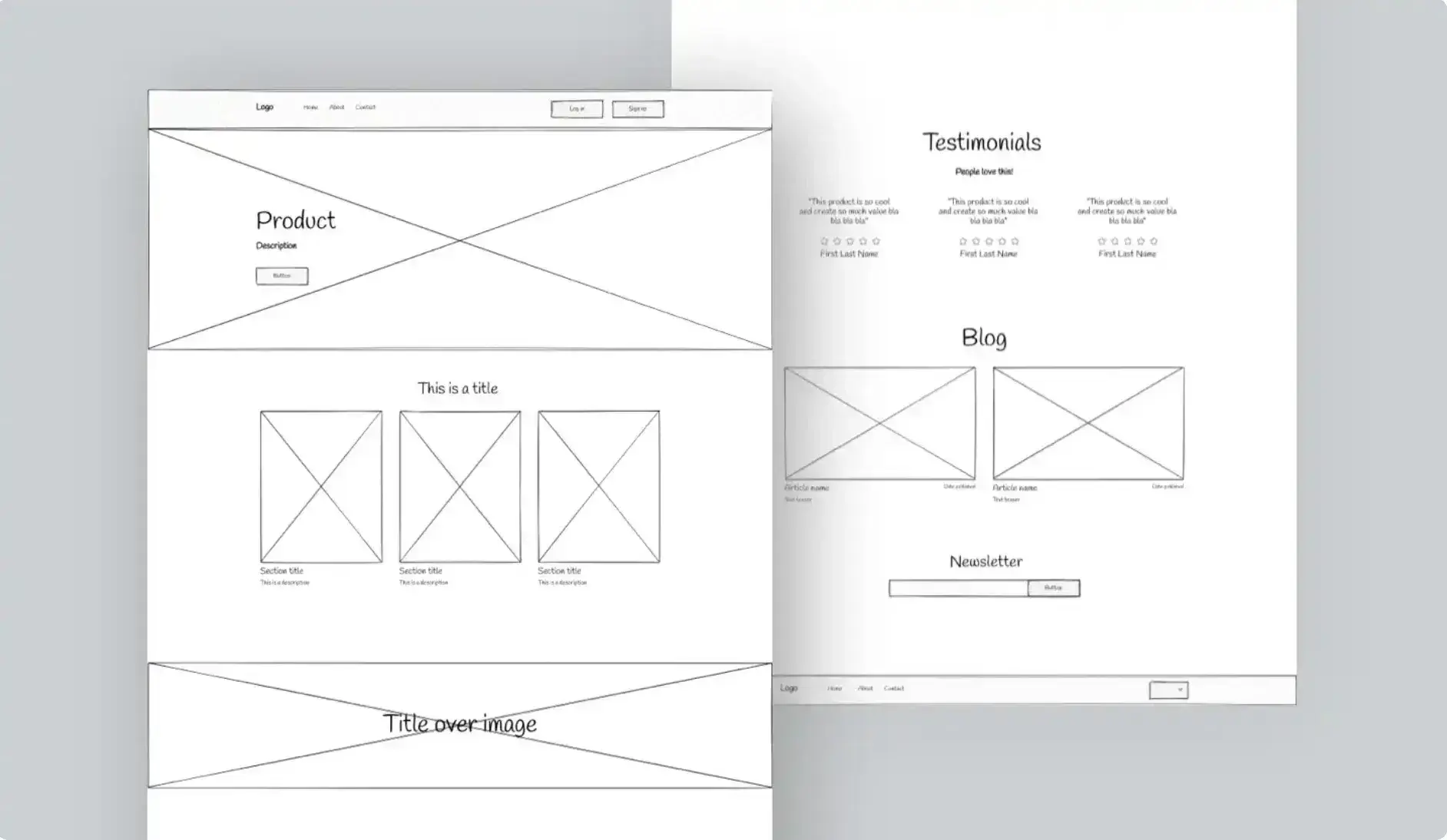
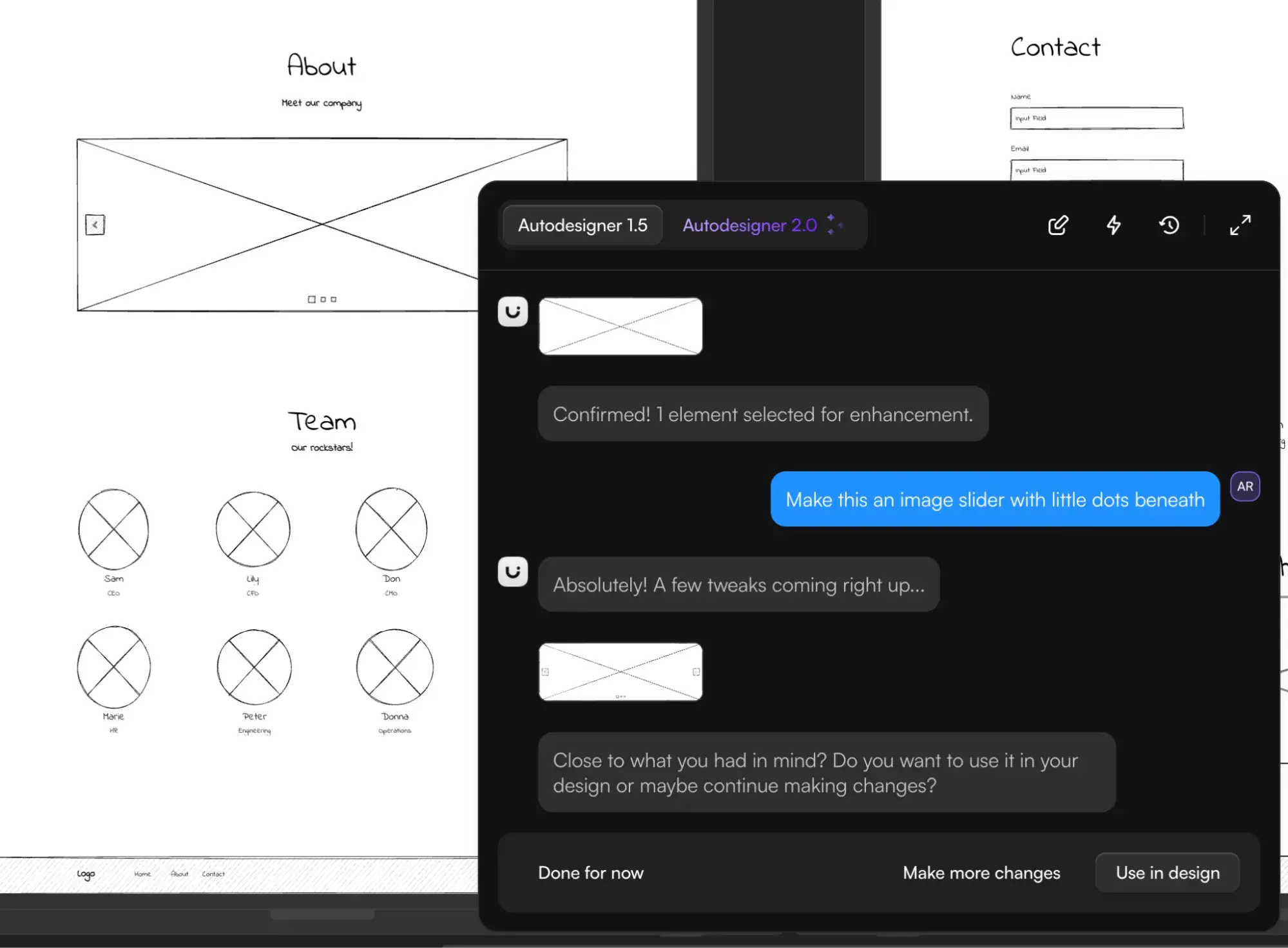
This website wireframe template from Uizard is a basic, but free, lo-fi wireframe that will work for a variety of different use cases. It includes wireframes for multiple essential web pages, including the homepage, about page, and contact page.
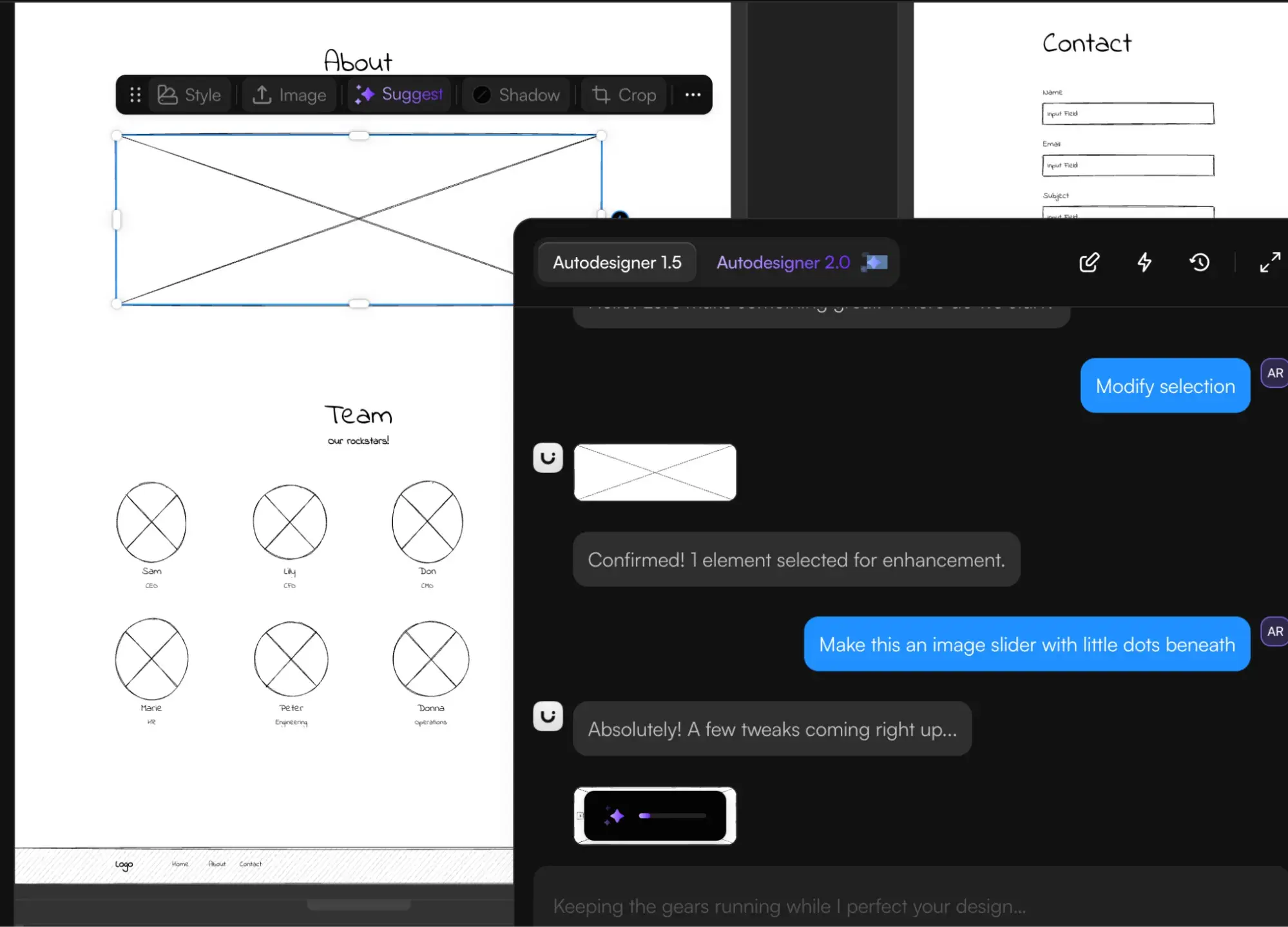
Because this wireframe template is powered by Uizard, you can also use Uizard’s generative AI tools to tweak and adjust your wireframe using AI. For example, you can use simple text prompts to change the template according to your needs, which I think is pretty helpful.
Check out how I used Uizard’s AI to turn a single hero image into an image slider in my wireframe.
2. Figma: Ultimate Landing Page Wireframe Kit
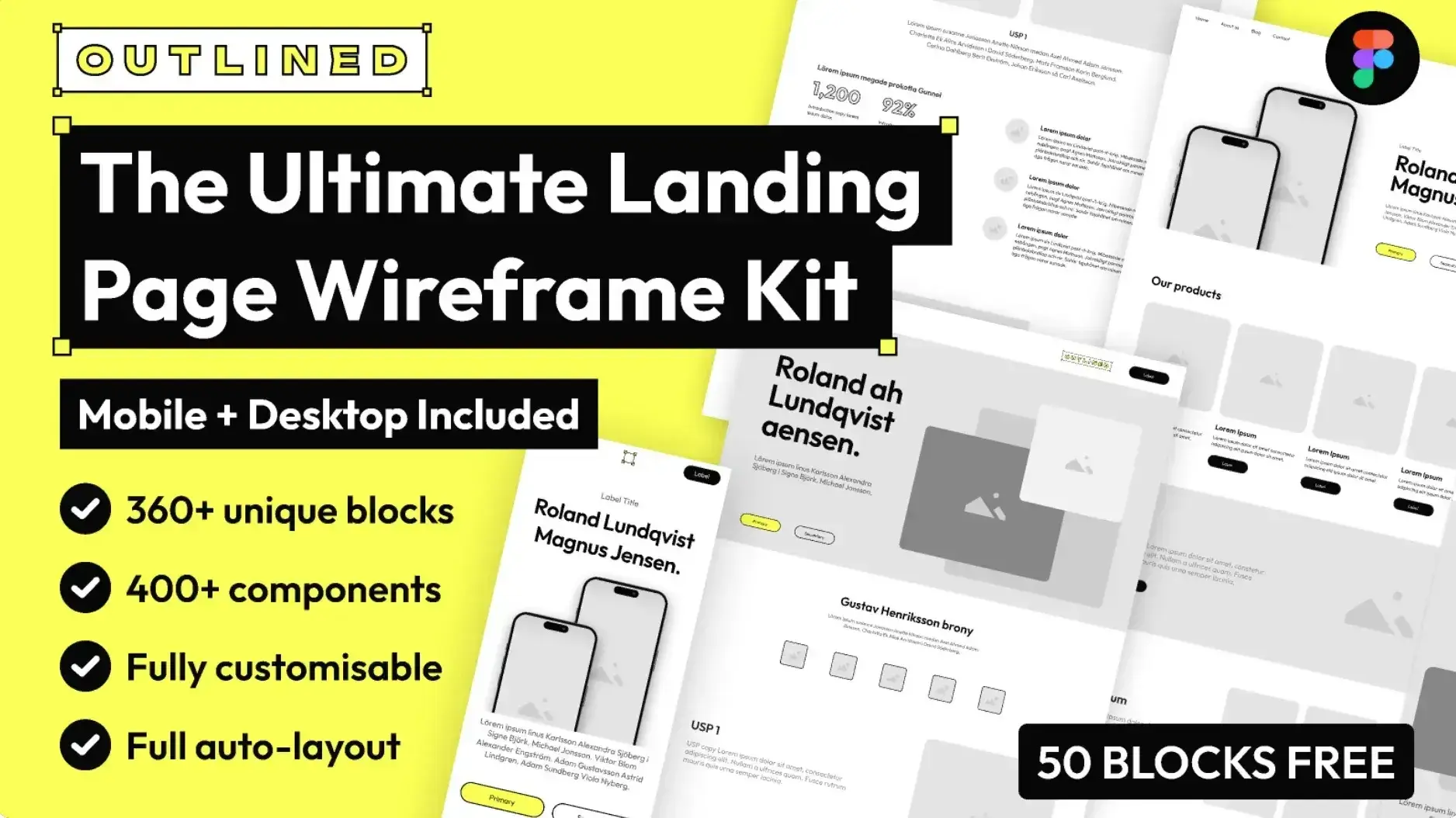
As the name suggests, Will Houghton’s Ultimate Landing Page Wireframe Kit is a collection of website wireframe Figma templates focused on helping you prototype your website’s landing pages.
It includes wireframes for two full-page layouts — a SaaS-style landing page and a product-style landing page. It also includes multiple variants for the components, which gives you even more flexibility.
Free Website Design Inspiration Guide
77 Brilliant Examples of Homepages, Blogs & Landing Pages to Inspire You
- Agency Pages
- Ecommerce Pages
- Tech Company Pages
- And More!
Download Free
All fields are required.
Form not available
3. SmartDraw: Homepage Wireframe Template
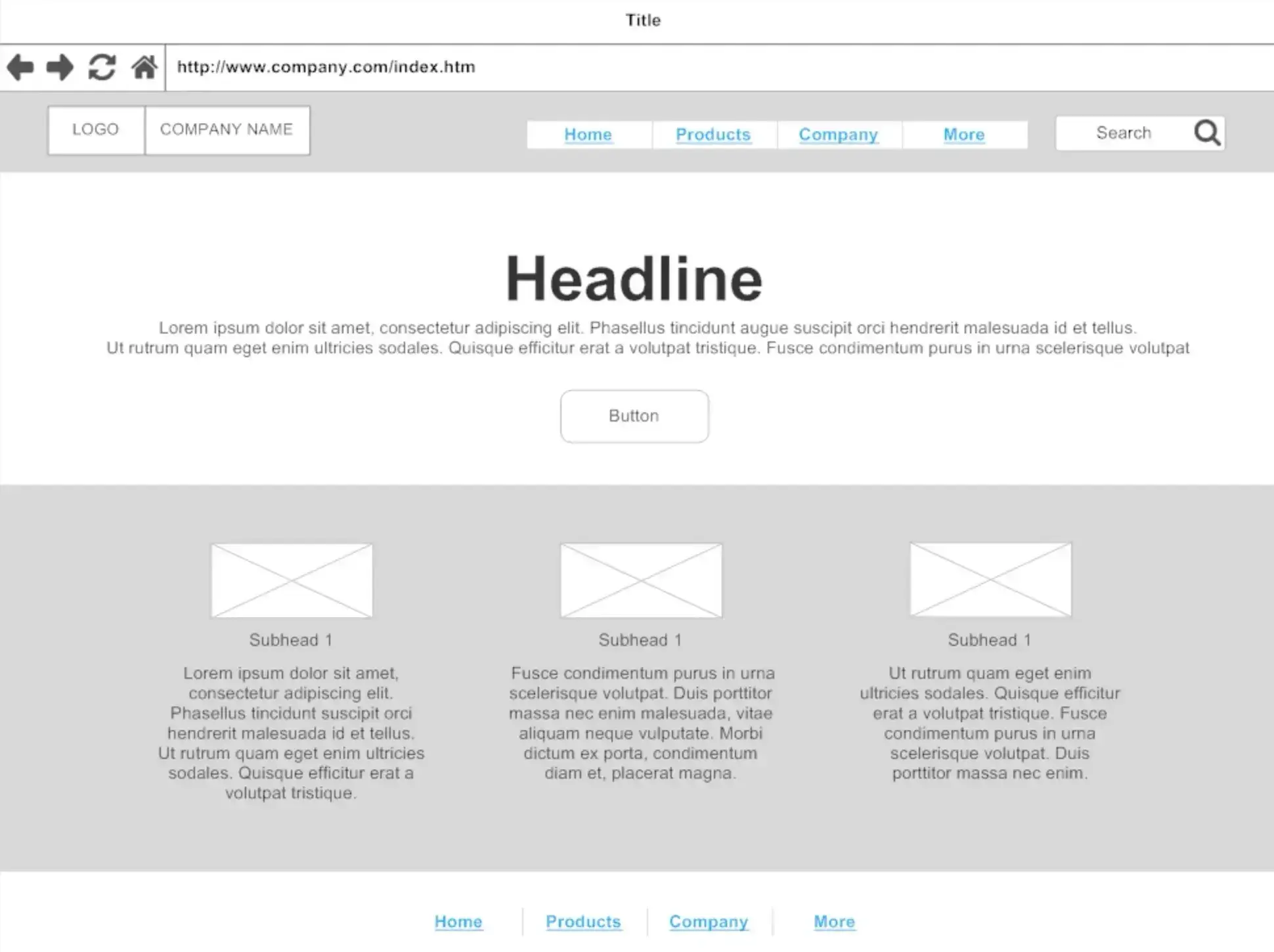
SmartDraw is a collaborative design app that can be a great website wireframe tool. It offers a number of website wireframe templates as part of its functionality, including this nice lo-fi homepage wireframe.
You can easily edit the template using SmartDraw’s tools to make it your own, including working with your team to provide feedback.
4. Miro: Mid-Fidelity Responsive Website Wireframing Template
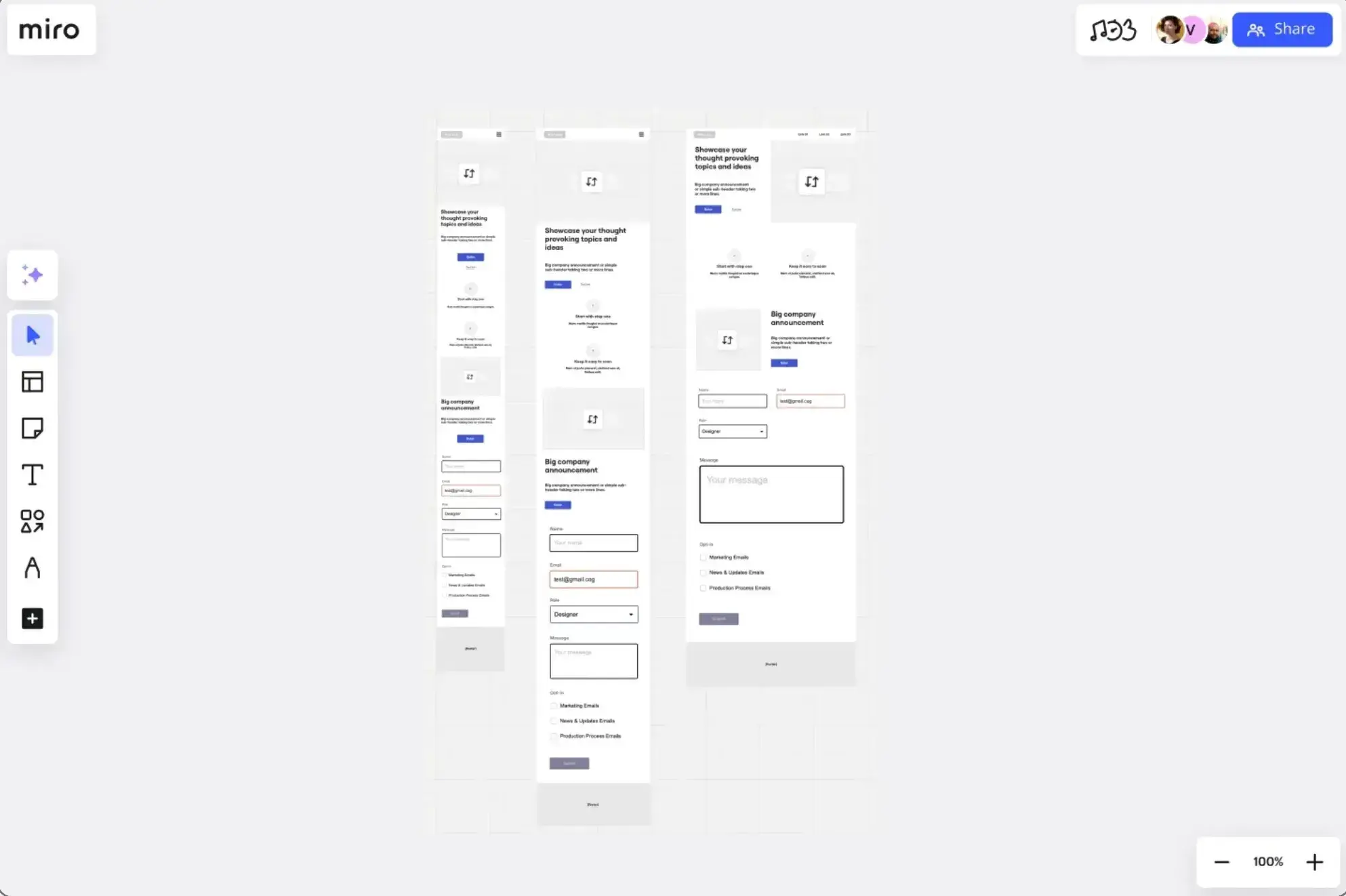
Miro’s website wireframing template includes all of the essential components that your website needs, including wireframes for the desktop and mobile versions of your site.
You can easily tweak the template according to your needs using Miro’s free tool.
Note: Miro acquired the same Uizard tool that powered one of the previous templates, but the two tools are still separate for now.
5. Figma: WireFramer Template
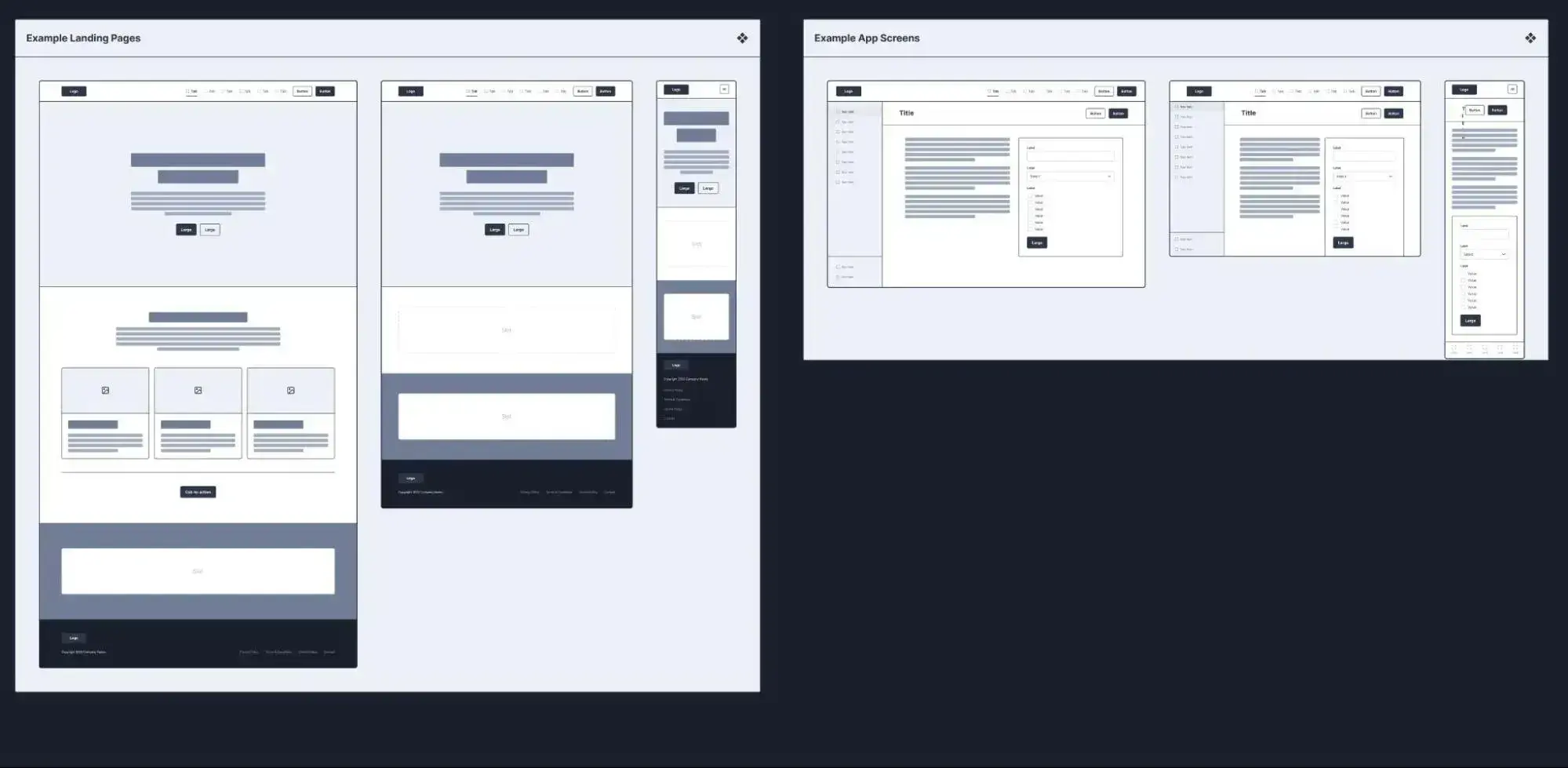
WireFramer is another Figma-based wireframe template that you can use for a ton of different situations. It comes with lots of pre-built templates for important pages, along with hundreds of components that you can use to quickly build your own wireframes from scratch.
If you’re looking for full-page wireframe templates, you might want to choose a different option. However, if you’re looking for block templates and components that you can use to quickly build your own wireframes, I think that this one is a great option.
6. Visme: Marketing Brand Website Wireframe Whiteboard Template
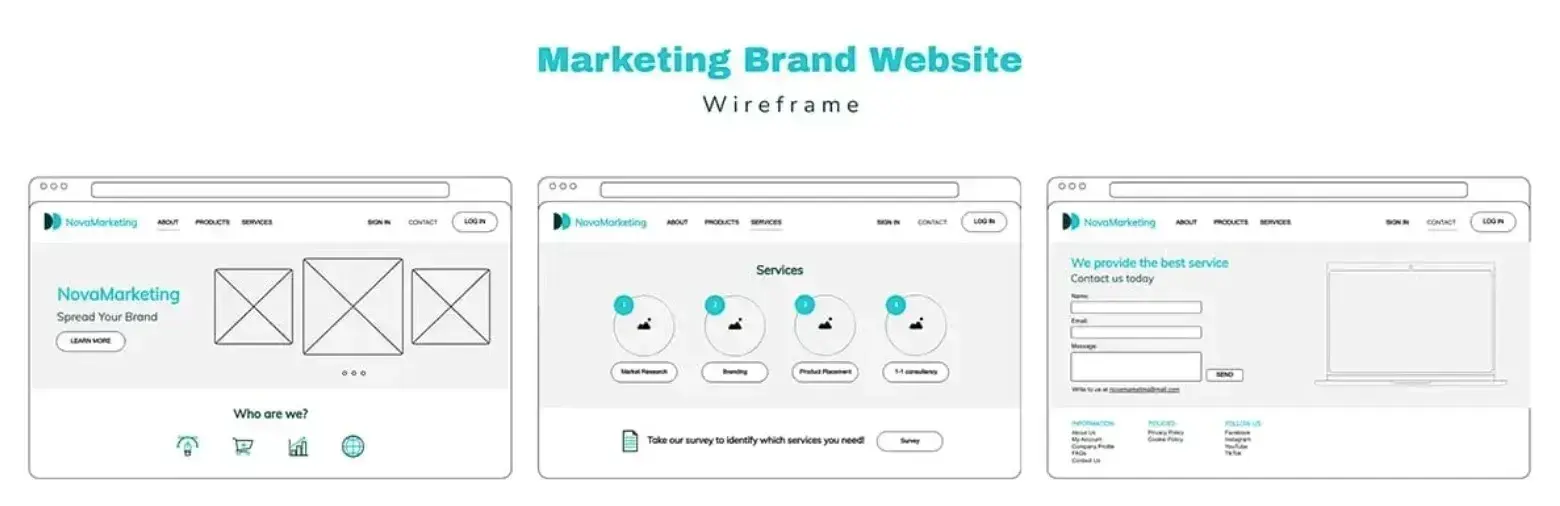
This last Marketing Brand Website Wireframe Whiteboard template comes from Visme and is built with Visme’s cloud-based design tool. It includes full-page wireframe templates for three essential website pages:
- Homepage
- Services page
- Contact page
While Visme brands these templates as being for a “marketing website,” I personally think that they’re very versatile designs, and you could easily adapt them to other types of websites, such as a personal portfolio or a service business website.
Frequently Asked Questions About Website Wireframes
What is a wireframe in a website?
If you’re wondering what is a wireframe for a website, the answer is simple: A website wireframe is a simplified, early-stage layout of a webpage that shows its structure, navigation, and content priority — without any visual design like colors, typography, or imagery. Think of it as a blueprint: it maps out where elements like headers, content sections, buttons, and navigation will go on the page so that everyone involved in the project can align on structure before the heavy lifting of design and development begins.
Wireframes range in detail from low-fidelity (basic shapes and placeholder text) to high-fidelity (realistic labels, detailed spacing, and near-final layout), depending on how far along the project is and how much clarity stakeholders need.
How do you do wireframes for a website?
The wireframing process starts with defining your website’s primary goal — whether that’s driving purchases, collecting sign-ups, or something else — and mapping out the user flow that supports it. From there, you can either hand-draw a sketch on paper or start with a digital template using tools like Figma, Miro, or Uizard.
I recommend starting with a low-fidelity wireframe and keeping it simple: basic shapes, placeholder text, no colors. Once the general structure is in place, add conversion points (the buttons and links that move users through the flow), simplify any redundant steps, and get feedback from stakeholders before moving into visual design or development. I walk through the full process step by step earlier in this post.
What are the three types of wireframes?
There are three basic types of wireframes: low-fidelity, mid-fidelity, and high-fidelity. A low-fidelity wireframe uses basic shapes and placeholder text to validate page structure quickly — it can even be hand-drawn on paper. A mid-fidelity wireframe adds more detail like spacing, content hierarchy, and real labels, but still avoids final visual styling. A high-fidelity wireframe approximates near-final layout detail and can include realistic content and components, though it still stops short of being a mockup (no finalized colors, brand imagery, or styled icons).
Which type you use depends on where you are in the project. I generally recommend starting low-fi and adding detail as you go.
How a Website Wireframe Improves the Design Process
Wireframes help you clarify your website’s vision, align with stakeholders, and ultimately, reduce wasteful back-and-forth when designing a website. As I’ve illustrated with these examples, a wireframe can help you easily map out the elements of each page and make changes as you see necessary — before it’s implemented in code.
I recommend starting with a low-fidelity wireframe and adding details gradually. If you like working with pen and paper, you could even start with a sketch and work up from there.
Once your wireframe is locked in, the next step is choosing a website builder that can bring that structure to life. To save time, look for a platform that lets you start from a template close to your wireframe and adjust the layout with drag-and-drop so you’re not rebuilding decisions you already made.
HubSpot’s Content Hub lets you turn a wireframe into a live website without writing code. Start with a template that’s similar to your wireframe’s layout, then customize it with drag-and-drop to layer in real content and design. Get started with a free account today.
Editor’s note: This post was originally published in November 2023 and has been updated for comprehensiveness.
Free Website Design Inspiration Guide
77 Brilliant Examples of Homepages, Blogs & Landing Pages to Inspire You
- Agency Pages
- Ecommerce Pages
- Tech Company Pages
- And More!
Download Free
All fields are required.
Form not available
![How to create a website to sell products: 7 steps I used [+ expert tips]](https://53.fs1.hubspotusercontent-na1.net/hubfs/53/how-to-create-a-website-to-sell-products-1-20240909-6141294.webp)
![Website design proposal: A streamlined approach to pitching [+ templates]](https://53.fs1.hubspotusercontent-na1.net/hubfs/53/%5BUse%20(1)-Oct-23-2025-03-34-31-8363-PM.webp)



.png)
![21 Freelancer website examples we love [+ How to make your own]](https://53.fs1.hubspotusercontent-na1.net/hubfs/53/freelancer-website-examples-1-20260319-9141964.webp)
-2.png)