
As a technical consultant and founder of Bea’Viewed, I’ve configured analytics dashboards across dozens of client sites and my own platform. That experience taught me one consistent lesson: individual metrics need context, combination, and clear goals to become meaningful.
This guide breaks down 16 essential website metrics across four categories, covers technical performance benchmarks, and walks through how to track all of it in HubSpot.
Table of Contents
- Website Engagement Metrics
- What are website engagement metrics?
- Traffic & Audience Metrics
- Engagement Metrics
- Conversion & Revenue Metrics
- Content Performance Metrics
- How to Track Website Performance Metrics
- How to Improve Website Engagement Metrics
- Why Website Metrics Matter for Business Growth
- Website Performance Metrics
What are website engagement metrics?
Website engagement metrics are data points that measure how users interact with a website. These metrics capture behaviors like time spent on a page and click patterns. Marketing teams and site owners use these metrics to evaluate design choices, refine the user journey, and identify which elements drive conversions.
Every website exists to attract visitors and guide them toward a specific action, whether that’s filling out a form, subscribing to a newsletter, or completing a purchase. Website engagement metrics show how effectively a site moves visitors toward those goals and where the journey stalls.
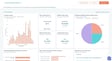
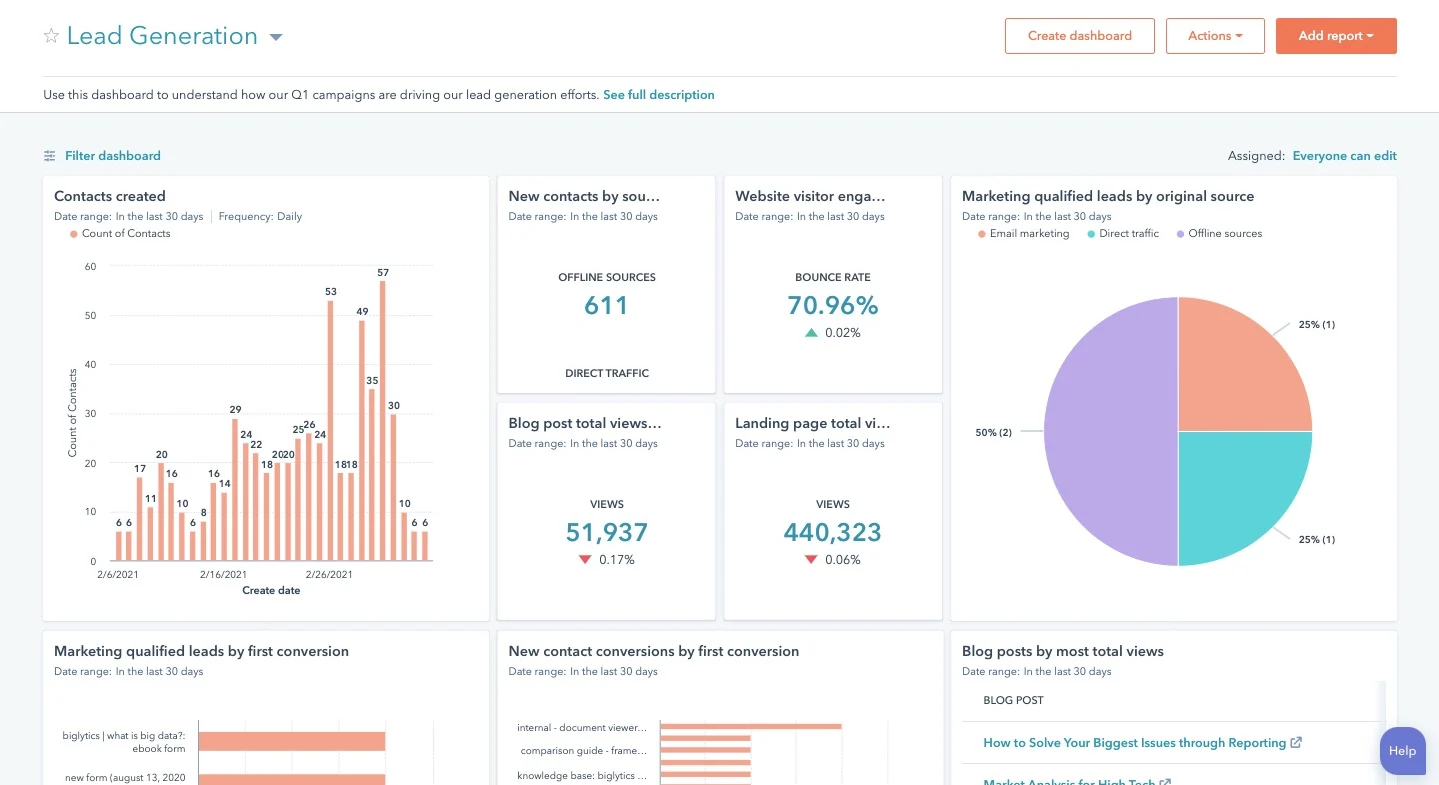
HubSpot’s Marketing Analytics tool organizes engagement data into visual dashboards that surface trends across traffic, conversions, and user behavior. Google Analytics provides similar functionality with its own reporting structure. Here’s a glimpse of how HubSpot’s analytics tool breaks down complex website data into a user-friendly format:

One important note before diving into individual metrics: terminology varies across platforms. GA4 relabeled “conversions” as “key events” in 2025, and what one tool calls “bounce rate,” another may report as “engagement rate.” Checking metric definitions within each platform keeps reporting accurate and consistent.
This guide uses the most common generic terms for each metric, with platform-specific labels noted where they differ.
HubSpot Marketing Analytics Software
Measure the performance of all your marketing campaigns in one place with built-in analytics, reports, and dashboards.
- Marketing Analytics
- Dashboard Software
- Website KPIs
- And More!
Website Engagement Metrics
Marketing teams categorize website metrics into four distinct areas to ensure that data analysis aligns with specific business goals. This structure allows digital strategists to isolate technical performance from audience behavior, providing a clearer view of the conversion funnel. The following 16 indicators represent the essential measurements for tracking website success metrics in HubSpot.
- Views
- New Visitor Sessions/New Users
- Returning Visitor Sessions
- Traffic Sources
- Device Type
- Average Time on Page
- Average Session Duration
- Pages per Session (Views per User)
- Engagement Rate/Bounce Rate
- Exit Rate
- Conversion Rate
- Revenue Attribution
- Event Tracking
- Top Pages
- Top Exit Pages
- Social Referrals
Analytics platforms like HubSpot Marketing Analytics surface these categorized website metrics to help digital strategists connect on-page behavior to business outcomes.There are lots of terms and buzzwords out there when it comes to marketing metrics. So let’s break down the best website engagement metrics and why I think it’s worthwhile to track them.
Traffic & Audience Metrics
Traffic and audience metrics show who visits a website, where they arrive from, and what devices they use. These data points help marketing teams evaluate channel performance, measure brand awareness, and identify gaps in audience reach.
1. Views
Views measure the number of times a page on a website loads in a browser. This metric is also known as page views. Every time a webpage loads, including a refresh or reload, the platform counts it as a separate page view.

Views and sessions track different things. Views count individual page loads and can be aggregated into a site-wide total, but the underlying measurement is page-by-page. Sessions represent the entire chunk of time a user spends on a site. A single session can include nine views if the visitor navigates to nine different pages.
Web traffic ranks among the top two most common content marketing measurements of success. Tracking views over time reveals whether a site’s visibility is trending upward and which pages attract the most attention.
Pro tip: I recommend pairing views with a quality metric like time on page or scroll depth. A high view count on its own says people are arriving. Pairing it with engagement data shows whether they’re staying.
2. New Visitors
New users (formerly new visitor sessions in Google Analytics) measures the proportion of website traffic from first-time visitors. This metric serves as a brand awareness indicator.
Unique vs. New Visitors
A new visitor is someone arriving at the site for the first time. A unique user count measures how many individual people visited, regardless of how many sessions they logged. The same person can visit multiple times, which is why session counts are typically higher than unique user counts.
Important note: HubSpot doesn’t track unique visitors because this metric relies on cookies and browser behavior, which makes it inconsistent. A user who clears cookies, switches browsers, or blocks tracking will generate multiple unique visitor counts from a single person. HubSpot continues to track page views from these users, so the underlying activity data remains intact.
I usually drill into new users by channel to see where first-time visitors are coming from. If I’ve launched campaigns for market entry in a new country, I’ll pair new users with geographic data to see whether the brand is gaining traction there.
3. Returning Visitors
Returning visitor sessions measures how many sessions come from people who have visited the site before. High returning visitor numbers signal brand recall, content loyalty, or an effective long-form buyer journey. The ratio between new and returning visitors reveals whether growth strategies are expanding reach and whether the site provides enough value to bring people back.
Returning visitor numbers shift my focus toward conversion rates.
4. Traffic Sources
Traffic sources break down all the external channels that bring visitors to a website, typically organized into eight categories.
- Organic Search: Visitors from search engines like Google, Bing, or Yandex.
- Paid Search: Visitors from paid search engine ads, such as Google Ads.
- Organic Social: Visitors from unpaid social media posts.
- Paid Social: Visitors from paid ad placements on social media platforms.
- Direct: Visitors who type a URL directly into their browser, often returning users.
- Referrals: Visitors who clicked a link on another website.
- Organic Video: Visitors from video platforms like YouTube through links in descriptions or comments.
- Paid Other: A catch-all for any additional paid ad sources.
Most websites rely heavily on organic search as the primary growth channel, but email, social media, and referral traffic all contribute to a well-rounded acquisition strategy.
Pro tip: Analytics platforms allow deeper drill-downs within each source. I frequently filter organic social to see which specific platform drives the most clicks, or break out paid search by campaign to evaluate ad spend efficiency. That level of granularity turns a general traffic report into an actionable channel-by-channel assessment.
5. Device Type
Device type shows the split of desktop, mobile, and tablet traffic to a website. Analytics platforms can surface additional detail, including browser type and operating system breakdowns like Android versus iOS.
This metric helps UX teams and site owners evaluate whether the experience on each device matches visitor expectations. A high mobile bounce rate paired with strong mobile traffic volume often points to responsive design issues or slow load times on smaller screens.
Pro tip: I analyze top pages by device type to see how behavior differs across screens. Mobile visitors often gravitate toward research content, while desktop users complete purchases. That breakdown helps me prioritize which pages need device-specific improvements first.
When I built Bea’Viewed as a progressive web app, Plausible analytics showed that 74% of visitors came from mobile devices. That data confirmed mobile was the primary way users interacted with the platform, which made native mobile app development the clear next investment priority.
Engagement Metrics
Engagement metrics reveal how visitors interact with website content once they arrive. They measure behaviors like time spent reading, number of pages explored, and where visitors lose interest. Content strategists and UX teams use these signals to prioritize design improvements and refine on-page experiences.
6. Average Time on Page
Average time on page measures how long visitors spend on a single page before navigating away. This metric is one of the clearest indicators of content attention and relevance.
HubSpot’s 2026 State of Marketing report found that 52% of marketers believe AI makes content so easy to create that it’s less effective overall, and 53% struggle to differentiate their content in an AI-saturated market. In that environment, time on page becomes an especially meaningful measure of whether content is earning genuine attention.
A long-form blog post should see a higher average time on page than a product page or a webinar sign-up page, since each serves a different purpose and asks for a different level of engagement. A consistently low average on content-heavy pages can signal a mismatch between the content and the audience reaching it.
Pro tip: GA4 renamed this metric to “average engagement time per session,” which I prefer because it captures active interaction time rather than just the duration a tab stays open. If I see a low number on a page where the content is solid, I start looking at whether the wrong audience segment is finding that page through search.
7. Average Session Duration
Average session duration measures the total time a visitor spends on a website during a single visit, regardless of how many pages they view. Context matters when interpreting this metric. A restaurant site with a low session duration may be performing well because visitors found addresses and hours quickly, while a content-heavy publication with the same number would raise concerns about engagement depth.
I often tie session duration to specific projects for a before-and-after comparison. After a blog overhaul that improves content quality and internal linking, I track session duration to confirm the changes are keeping visitors on the site longer.
Pro tip: Short session durations combined with rapid clicks across multiple pages can indicate navigation confusion. Evaluating menu structure and internal linking first can often help reveal what needs to be fixed.
8. Pages per Session (Views per User)
Views per user (previously pages per session in Google Analytics) shows how many pages the average visitor views within a single session. Higher numbers indicate deeper engagement with site content. Visitors who click through multiple pages are more likely to become subscribers or complete a purchase.
I always compare this metric to someone walking past a shopfront and admiring the window display without stepping inside. When visitors explore beyond that first page, it signals genuine interest. I also look at views per user in combination with average session duration, since one metric without the other only tells half the story.
9. Engagement Rate/ Bounce Rate
Bounce rate measures the percentage of visitors who land on a single page and leave without interacting or navigating to another page. A high bounce rate signals that something on the page, whether design, copy, load speed, or audience targeting, is preventing further engagement.
GA4 has introduced engagement rate as the inverse of bounce rate. According to Google, an engaged session meets at least one of the following criteria:
- Lasts longer than 10 seconds
- Includes a key event
- Includes 2 or more page or screen views
Common root causes of a high bounce rate include confusing navigation, a mismatch between content and visitor intent, unclear calls to action, and broken page elements. Identifying which cause applies requires pairing bounce rate with other engagement data points like traffic source and device type.
Visitors carry expectations from every other website they’ve encountered, and breaking established conventions creates friction. Using a hamburger menu for anything other than navigation, for example, violates a pattern visitors rely on. Researching competitor sites helps marketing teams spot where their design deviates from what users expect.
Pro tip: According to Google’s mobile performance research, bounce probability increases by 32% as page load time goes from 1 to 3 seconds, and by 90% at 5 seconds. My first check is always page speed through PageSpeed Insights and Hubspot’s Website Grader Tool.
10. Exit Rate
Exit rate measures the percentage of visitors who leave a website from a specific page. Every page on a site has an exit rate, since every session ends somewhere. The metric becomes meaningful when exit rates are high on pages designed to keep visitors moving forward, like product pages, service pages, or key conversion points.
A high exit rate on a thank-you page or confirmation page is expected. A high exit rate on a homepage where visitors scroll through content and still leave often points to irrelevant traffic, weak brand positioning, or unclear next steps. The distinction from bounce rate matters here: a bounce means someone visited only one page and left, while an exit means someone left from that page regardless of how many others they viewed during the session.
Pro tip: Even on pages where the exit rate is expected, adding a call to action like a content offer or related resource link converts a small percentage of visitors who would otherwise leave, adding incremental value across the entire site.
HubSpot Marketing Analytics Software
Measure the performance of all your marketing campaigns in one place with built-in analytics, reports, and dashboards.
- Marketing Analytics
- Dashboard Software
- Website KPIs
- And More!
Conversion & Revenue Metrics
Conversion and revenue metrics connect website activity to business outcomes. They measure how effectively a site turns visitors into leads, customers, and revenue. These are the data points that give marketing managers and growth leads the clearest view of ROI.
11. Conversion Rate
Conversion rate measures the percentage of website visitors who complete a desired action. If a site receives 100 visitors and two of them fill out a form or purchase a product, the conversion rate is 2%. In GA4, conversions are tracked as “key events.“
Conversions represent any action where a visitor becomes a lead or a customer, such as:
- Subscribing to a newsletter
- Purchasing a product
- Submitting a contact form
- Providing an email address to download a gated resource
Conversion rate is the metric I pair with everything else on this list. Traffic numbers, session duration, and pages per session all gain context when measured alongside how many visitors actually take a meaningful action. Without conversion rate, many of those metrics become vanity numbers.
Pro tip: GA4 tracks “form_submit” as a default event, but the data capture can be unreliable. Setting up custom events for each specific conversion action produces cleaner, more trustworthy numbers.
12. Revenue Attribution
Revenue attribution tracks a visitor’s full journey from first interaction to purchase, connecting marketing activity to actual revenue. Attribution modeling provides the framework, with first-touch, last-touch, and multi-touch models each crediting different stages of the buyer journey. HubSpot’s revenue attribution reports surface which channels contribute most to closed deals and serve as a starting point for teams evaluating more complex models.
Pro tip: I find revenue attribution especially valuable as a complement to conversion tracking. Conversion metrics capture individual actions like CTA clicks or form submissions. Revenue attribution follows visitors through the full buyer journey, giving a clearer view of what’s actually moving the revenue needle across the entire funnel.
13. Event Tracking
Event tracking captures the specific actions users take on a website, such as downloading a resource, clicking a link, submitting a form, scrolling, or playing a video. GA4 tracks several events by default, including page views, scroll depth, file downloads, and video engagement. Each event appears in reports alongside event count, total users, and event count per user.
The real value of reliable event tracking tools is customization. Every business has unique actions that matter most to its goals. An ecommerce brand might prioritize “add to cart” clicks, while a SaaS company might focus on free trial sign-ups or demo request button clicks.
I use event tracking to identify where visitors are engaging and where they’re getting stuck in the customer journey. For Bea’Viewed, I ran a grassroots campaign where I dropped off branded marketing boxes to beauty professionals. Each box included a reed diffuser, a flyer about how Bea’Viewed could help grow their client base, and a custom acrylic sign where they could apply their QR code after signing up.
I tracked two specific events: account sign-ups from the box and whether each professional downloaded their custom template with their profile QR code. That level of tracking told me exactly where the funnel was working and where people dropped off.
Pro tip: I often use Google Tag Manager to set up project-specific events beyond the GA4 defaults. For one project, it might be a specific button click on a pricing page. For another, it’s a file from a resource library. Tailoring event tracking to each site’s goals makes engagement analysis significantly more precise.
Content Performance Metrics
Content performance metrics identify which pages drive the strongest results and which ones interrupt visitor journeys. Marketing teams and content strategists use these signals to refine editorial calendars, prioritize page updates, and connect content output to measurable business outcomes.
14. Top Pages
Top pages is a group of metrics, because how it’s measured can vary. In GA4, marketing teams can view top pages by visits, top pages by new users, or top pages by conversions. Ultimately, top pages reveal which pages on a website perform best.
I usually look at a few of these reports together. I’m looking for what’s missing from the list more than what’s appearing. If I’ve put serious effort into specific pages for Google Search but older blog content keeps ranking higher, I know I need to revisit those pages.
Pro tip: Filtering top pages by traffic source reveals whether high-performing pages earn their traffic from organic search, paid campaigns, or referrals, which helps marketing teams double down on the channels driving the strongest results.
15. Top Exit Pages
Top exit pages show which pages visitors land on last before leaving a website. This metric works as a focused view within the broader exit rate analysis, highlighting the specific pages where journeys end.
A high exit rate on a page designed for conversion, like a product page with a low purchase rate, signals a problem worth investigating. Common causes include broken links or formatting issues that prevent visitors from clicking through, content that doesn’t match visitor intent, thin or outdated page content, and site structure errors that create dead ends.
Pro tip: I review top exit pages monthly. Pages that consistently appear on the list across multiple reporting periods point to structural issues worth prioritizing over one-time spikes that may just reflect a seasonal traffic shift.
16. Social Referrals
Social referrals measure the traffic that arrives at a website from social media platforms, including both organic posts and paid ads. This metric bridges social media performance and website engagement by showing how effectively social content drives visitors to the site.
According to Synup, 90% of small businesses are incorporating social media into their 2025 marketing strategy. For teams investing in social, referral data reveals which platforms generate the most traffic and how those visitors behave once they arrive.
UTM codes allow marketing teams to separate organic social referrals from paid social referrals. HubSpot’s social publishing tool automatically appends UTM tracking to posts linked to a campaign, which simplifies this process for HubSpot customers.
Social referrals is one of my favorite metrics to watch. For Bea’Viewed, beauty professionals regularly share the platform on social media, and I track which pros are sharing and on which platforms. Following those visitors through on-site engagement metrics like time on page and conversion rate shows whether social traffic is delivering engaged visitors or just inflating view counts.
Pro tip: Pairing social referral data with social listening tools gives a fuller picture of how audiences respond to content across platforms.
How to Track Website Performance Metrics
Analytics platforms surface a lot of information. Marketing managers and site owners frequently want to focus on high-level items and need guidance on which metrics carry the most business impact. That focus on business impact is ultimately the point of having a website.
Website metrics help marketing teams:
- Troubleshoot the customer experience.
- Highlight and address pain points.
- Focus on the strongest content.
Competitor research and benchmarking add another essential layer. Measuring performance against industry averages reveals whether a site is surpassing benchmarks or falling short.
For example, 2025 HubSpot research shows that 46% of surveyed businesses saw monthly site traffic between 1,001 and 15K. The same research found that the average website gets seven page views per visit and has a bounce rate of 37%.
Before digging into individual metrics, here are some of the top questions to answer about the website in question:
- Is the priority improving traffic or conversions?
- Is the focus on returning visitors or the newest members of the audience?
- Is the goal making improvements or focusing on growth?
Different businesses and websites have different goals. These questions guide which metrics to track and combine for a full performance picture.
1. Page Views
Page views measure the total number of times pages on a website load, making them one of the most fundamental indicators of overall site visibility and traffic volume.
How to Analyze Page Views
Page views on their own rarely tell a complete story. Most clients fall into one of two categories: they either ignore page views entirely or treat the metric as the primary measure of success.
Page views are a high-level metric that need to be paired with other data points to become useful. To decide which metrics to combine with page views, I ask questions like:
- Is this good quality traffic? Time on page and scroll events help answer that.
- Is this number rising or falling? Tracking overall growth is where page views earn their value.
- Is this traffic coming from expected sources? Combining page views with traffic source or geographic data shows whether specific strategies are working.
- Is this normal or below average? Competitor data can help contextualize page views to see whether a site falls within a healthy range.
Pro tip: Competitor data should always be taken with a grain of salt. Estimation tools can only approximate traffic numbers. High traffic on a competitor site also says nothing about traffic quality. That’s why pairing page views with conversion rate is one of the most important combinations.
How to Track Page Views
- Log into HubSpot and navigate to Reporting > Reports. In the left sidebar, select Marketing > Web traffic analysis.
- Adjust the date range and frequency (daily, weekly, or monthly) at the top of the page.
- Select the Pages tab.
- Select Page Views from the dropdown menu in the upper left of the chart to see how the metric has changed over time.

Scroll down to the table below the chart and find the column labeled Views. The total appears at the bottom in the row labeled Total.

2. Average Time on Page
Average time on page measures how long visitors spend on a single page before navigating away, making it one of the clearest signals of content relevance and quality.
How to Analyze Average Time on Page
According to MetricHQ the average time on a page is 54 seconds. While that benchmark is useful, meeting it does not automatically mean a site’s average time on page is ideal.
That number is an average, and it’s nearly always worth drilling into further. See Hubspot’s guide to landing page design for pointers on improving this part of a website. A 1,500-word blog post should ideally hold readers for a couple of minutes. Comparing different page types against their intended purpose gives the metric real meaning.
If the average time on page seems stable, the next step is tracking how it changes over time. For most pages, the number should be going up or staying consistent. Sharp drops could indicate a performance issue on the site. A steady decline often signals content fatigue or a shifting audience.
How to Track Average Time on Page
- Log into HubSpot and navigate to Reporting > Reports. In the left sidebar, select Marketing > Web traffic analysis.
- Select the Pages tab.
- Select Time on Page from the dropdown menu in the upper left of the chart to see how the metric has changed over time.

Scroll down to the table below the chart for a column view of the data. First-time viewers may need to click Edit Columns to add Time on Page to the results. The average appears at the bottom in the row labeled Report Total.

How to Improve Average Time on Page
A low average time on page on a content-heavy page usually traces back to one of three areas.
- Content quality: Long-form content needs to give readers a reason to stay. Weak copy, thin insights, or outdated information push visitors to leave early.
- Page layout: A frustrating user experience can make visitors scroll quickly and exit. Font size, color contrast, whitespace, and visual hierarchy all affect how long someone stays on a page.
- Technical performance: Slow load times and poor optimization for tablets or mobile devices make content difficult to navigate and read.
Sometimes the cause is a combination of factors. If a few quick performance tests surface nothing, I recommend focusing on the content itself, as that’s usually the culprit.
3. Average Session Duration
Average session duration measures the total time a visitor spends on a website during a single visit, giving marketing teams a site-wide view of content depth and engagement.
How to Analyze Average Session Duration
Average session duration on its own provides limited insight. Context and page-specific analysis make the metric actionable.

Tying session duration to specific projects for a before-and-after comparison is usually ideal. After a blog overhaul that improves content quality, strengthens internal linking, and updates navigation, tracking session duration to confirm the changes are keeping visitors on the site longer is a good best practice. Regardless of the starting number, the goal is an upward trend.
How to Track Average Session Duration
- Log into HubSpot and navigate to Reporting > Reports. In the left sidebar, select Marketing > Web traffic analysis.
- Select the Sources, Topic Clusters, UTM Parameters, Device Types, Countries, or Browsers tab.
- Select Avg. Session Length from the dropdown menu in the upper right of the chart to see how the metric has changed over time.

Scroll down to the table below the chart and find the column labeled Avg. Session Length. The average appears at the bottom in the row labeled Report Total.

How to Improve Average Session Duration
Improvement strategies for session duration focus on keeping visitors moving through multiple pages. The most impactful areas to evaluate are internal linking, audience alignment, navigation, and video content.
- Internal linking and CTAs: Related posts at the bottom of content and well-placed internal links guide visitors to the next step.
- Audience alignment: HubSpot’s 2026 State of Marketing report found that 41% of marketers are updating their SEO strategy for changes in search, which directly affects whether visitors match the content waiting for them. HubSpot customers can improve pages for search intent using HubSpot’s built-in SEO tools.
- Site navigation and structure: When visitors get confused or struggle to find information, rapid clicks across multiple pages paired with a short session duration often follow.
- Video embeds: Embedding video content encourages visitors to spend more time on a page before moving to the next.
Session duration becomes a useful signal for assessing user experience at the site-wide level.
HubSpot Marketing Analytics Software
Measure the performance of all your marketing campaigns in one place with built-in analytics, reports, and dashboards.
- Marketing Analytics
- Dashboard Software
- Website KPIs
- And More!
4. Pages per Session
Pages per session shows how many pages the average visitor views within a single visit, indicating how deeply visitors are exploring site content.
How to Analyze Pages per Session
Pages per session reveals which visitors are exploring content and which are most likely to convert. Mapping where visitors land, which pages they move through, and where they exit helps marketing teams identify conversion paths.
Page layout and content type affect expectations. A B2B website may see two or three pages per session as a healthy benchmark. A clothing ecommerce site should expect significantly higher numbers given how shoppers browse product pages.
How to Track Pages per Session
- Log into HubSpot and navigate to Reporting > Reports. In the left sidebar, select Marketing > Web traffic analysis.
- Select the Sources, Topic Clusters, UTM Parameters, Device Types, Countries, or Browsers tab.
- Select Page Views/Session from the dropdown menu in the upper left of the chart to see how the metric has changed over time.
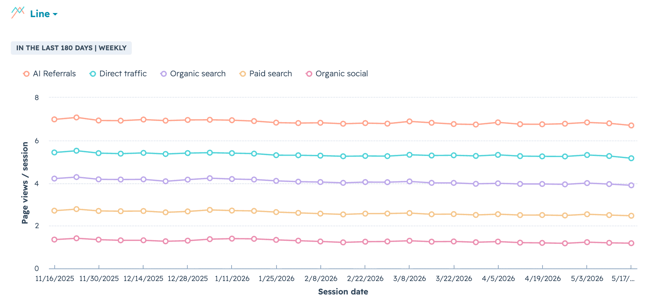
Scroll down to the table below the chart and find the column labeled Page Views/Session. The average appears at the bottom in the row labeled Report Total.
How to Improve Pages per Session
One of the fastest ways to increase pages per session is adding contextual prompts that encourage visitors to explore the rest of a website. Random recommendations create friction. I start with core content pillars and map them to target audiences so the suggestions feel relevant.
Useful prompts to add include content offers, related post recommendations, and inline links to product pages. Each gives the visitor a clear reason to click deeper into the site.
5. Bounce Rate
Bounce rate measures the percentage of visitors who land on a page and leave without taking any further action, making it a key signal of content and design effectiveness
How to Analyze Bounce Rate
A high bounce rate generally signals that a website is underperforming in a specific area. Identifying the root cause takes time and a systematic approach. Common causes include confusing navigation, a mismatch between content and visitor intent, hidden or overly aggressive CTAs, and broken page elements.
I once worked on a restaurant chain website that had a bounce rate around 90%. Quick visits for an address or phone number were expected, but the rate was still unusually high. When I dug into the site, the mobile version was essentially unusable. After a full project to improve the mobile experience, bounce rate came down significantly.
A survey by Clutch found that 42% of consumers would leave a website because of poor functionality.
How to Track Bounce Rate
- Log into HubSpot and navigate to Reporting > Reports. In the left sidebar, select Marketing > Web traffic analysis.
- Select the Sources, Topic Clusters, UTM Parameters, Device Types, Countries, or Browsers tab.
- Select Bounce Rate from the dropdown menu in the upper left of the chart to see how the metric has changed over time.
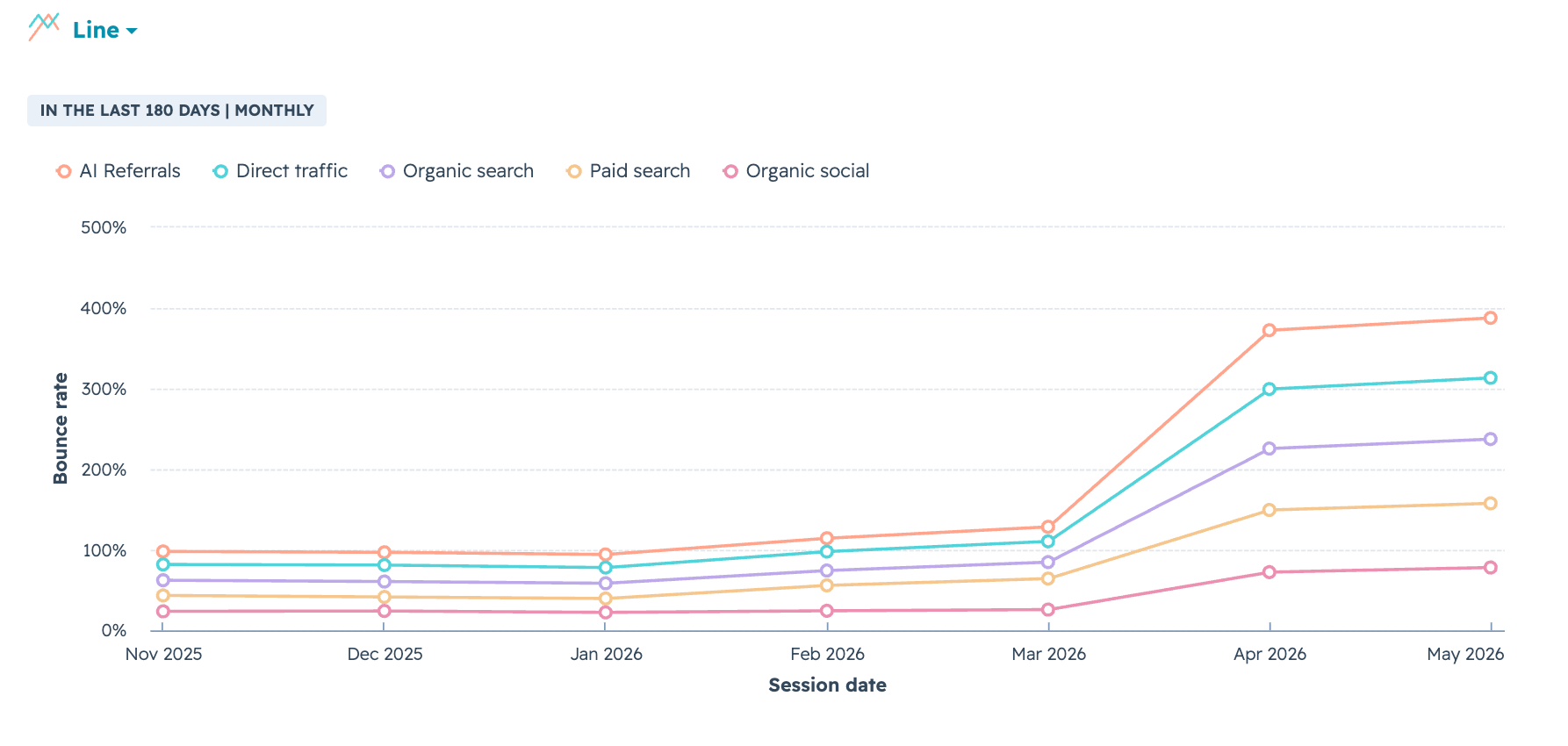
Scroll down to the table below the chart and find the column labeled Bounce Rate. The average appears at the bottom in the row labeled Report Total.
How to Improve Bounce Rate
Lowering bounce rate requires identifying the root cause first. I recommend determining whether a specific page or group of pages is driving the metric up, or whether the issue is site-wide. That distinction narrows whether the problem is content, usability, or technical performance. Steps to fix it might include:
- Ensuring external links open in new tabs.
- Improving page speed scores and load times.
- Optimizing page titles and metadata to better match search intent.
For a more in-depth look at best practices, check out this guide to reducing bounce rates for any platform.
6. Traffic Sources
Traffic sources categorize all the external channels that bring visitors to a website, giving marketing teams a clear view of which acquisition efforts are working.
How to Analyze Traffic Sources
Every website relies on external channels to draw in visitors. Most websites depend heavily on organic search to grow and retain visitor numbers, and email, social media, and referral traffic each contribute to a well-rounded acquisition strategy.
Traffic volume is only part of the picture. How well a specific traffic source converts is equally important.
For SEO projects, check conversion rates by channel. A low conversion rate for organic search is unusual and can indicate poor keyword targeting that attracts irrelevant traffic.
Phil Vallender, co-founder of Blend Marketing and HubSpot Elite partner, notes how traffic sources pair with other metrics like conversion: “I will always look at sessions, traffic sources, and conversion rates before anything else.”
How to Track Traffic Sources
- Log into HubSpot and navigate to Reporting > Reports. In the left sidebar, select Marketing > Web traffic analysis.
- Select the Sources tab.
- Select different metrics from the dropdown menu in the upper left of the chart to compare data across multiple sources.
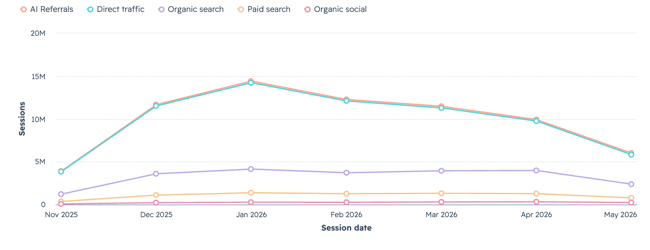
Scroll down to the table below the chart to see raw metrics based on each source.
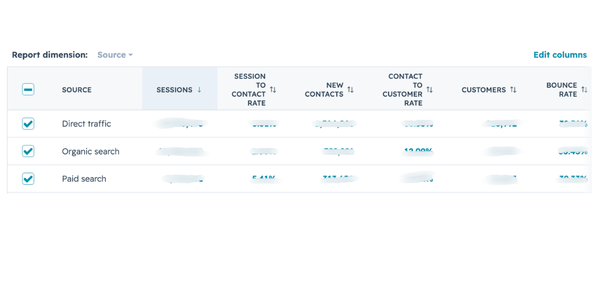
How to Improve Traffic Sources
Improving traffic sources comes down to extending efforts on each specific channel. If social media traffic is low, a more regular posting schedule or expanding to new platforms like TikTok may help. If email traffic is low, immediately assess the current email marketing strategy and strategize adjustments.
For more best practices, check out HubSpot’s guide to diagnosing and fixing traffic drops.
7. Social Referrals
Social referrals measure the traffic arriving from social media platforms, connecting social media performance directly to website engagement.
How to Analyze Social Referrals
Social referrals can come from paid ads on social media or organic posts. Teams should use UTM codes whenever possible to track the split between organic and paid social referrals.
HubSpot’s social publishing tool automatically appends UTM tracking when a campaign is associated with a post.
Once consistent data is flowing, always check two things. First, look at how much traffic each referral source sends to identify top performers. Then, check how those referred visitors engage with the website. Conversions and goal completions from social visitors help measure how social media performance impacts the site and highlight differences in user experience between top channels.
How to Track Social Referrals
- Log into HubSpot and navigate to Reporting > Reports. In the left sidebar, select Marketing > Web traffic analysis.
- Select the Sources tab.
- Scan the chart to see how social referrals compare to other traffic sources. Compare this data with historical data for trend analysis.
- Scroll down to the table below the chart to isolate organic or paid social metrics.
How to Improve Social Referrals
I use this metric to build and refine social media strategy. The data might lead toward improving content for each channel, tweaking messaging for different audiences, or collaborating with relevant partners and influencers to increase overall social referrals.
8. New Visitor Sessions
New visitor sessions measure the proportion of traffic coming from first-time visitors, serving as a direct indicator of brand awareness and audience growth.
How to Analyze New Visitor Sessions
Growth is the most important factor in most of my work. Businesses work with consultants because they have specific goals in mind and need help boosting site performance to get there.
For new visitor sessions, I always look for a consistent upward trend. I also track how the number changes after design updates, SEO improvements, and marketing campaigns. If the number stagnates or declines, something in the strategy needs reassessment.
How to Track New Visitor Sessions
- Log into HubSpot and navigate to Reporting > Reports. In the left sidebar, select Marketing > Web traffic analysis.
- Select the Sources, Topic Clusters, UTM Parameters, Device Types, Countries, or Browsers tab.
- Select New Visitor Sessions from the dropdown menu in the upper left of the chart to see how the metric has changed over time.
Scroll down to the table below the chart and find the column labeled New Visitor Sessions. The total appears at the bottom in the row labeled Report Total.
How to Improve New Visitor Sessions
Increasing new visitor sessions starts with pairing traffic sources with new visitor data to identify which channels are driving discovery. Ways to improve:
- SEO or marketing strategy updates
- Generating more backlinks
- Promoting highly targeted content on social media
- Working with influencers to attract new audiences
Suzanne Bull, Director of Content and Communications at Cambridge Education Group (Digital), noted that improving pages with a high number of new visitors made a measurable difference. By providing better links to more top-of-the-funnel content on those pages, conversion rates improved. Visitors could take a clearer journey through content that built trust and kept them engaged through to inquiry.
Building more content on the site also helps. If a website lacks a blog, adding one can diversify the content footprint and boost new visitor numbers.
More resources:
9. Returning Visitor Sessions
Returning visitor sessions measure how many visits come from people who have been to the site before, revealing content loyalty and the effectiveness of long-term engagement strategies.
How to Analyze Returning Visitor Sessions
A high number of returning sessions indicates clear site structure, valuable content, and an audience that wants to learn more.
Comparing returning visitors with new visitors reveals whether the ratio needs to shift. New visitors drive growth. Returning visitors reveal how sticky the site is and whether first-time visitors find enough value to come back.
A returning visitor rate below 15% typically signals a retention problem worth investigating. For ecommerce sites, 30% is a commonly cited benchmark, with higher rates potentially indicating visitors aren’t converting on their first visit.
Exceptions apply by industry. A personal injury lawyer’s site will see far fewer returning visitors than a fashion ecommerce site with repeat customers.
I usually segment returning visitors when building buyer personas. The data helps clarify top customer needs and pain points.
How to Track Returning Visitor Sessions
- Log into HubSpot and navigate to Reporting > Reports. In the left sidebar, select Marketing > Web traffic analysis.
- Select the Sources, Topic Clusters, UTM Parameters, Device Types, Countries, or Browsers tab.
- Select New Session % from the dropdown menu in the upper left of the chart to see how the metric has changed over time.

Scroll down to the table below the chart and find the column labeled New Session %. The average appears at the bottom in the row labeled Report Total.

How to Improve Returning Visitor Sessions
One of the core strategies for improving returning visitor numbers is maintaining consistent content quality and publishing cadence, giving previous visitors a reason to come back.
Getting new visitors is one step. Maintaining overall site quality ensures they return.
Pro tip: Once campaigns to drive new visitors are gaining traction, I often launch strategic retargeting ads to target the best prospects in the returning visitor audience.
10. Device Type
Device type shows the split of desktop, mobile, and tablet traffic, helping UX teams and site owners evaluate whether the experience on each device matches visitor expectations.
How to Analyze Device Type
Device type can seem low priority, but it’s an extremely useful metric for understanding user experience and identifying where site performance needs work.
I typically look at the split between mobile, tablet, and desktop to get a clearer picture of visitor needs. A high number of mobile visitors paired with a high bounce rate in that segment is a classic sign that the site needs evaluation for responsive design principles.
For example, the mobile version of a website may need a hamburger menu with fewer items, or certain homepage elements may need to be hidden on mobile to improve scroll depth.
Device type impacts conversion, buyer journey flow, and overall engagement. I always check other metrics like bounce rate and CTA clicks alongside device type to see how the device a visitor uses affects their behavior.
How to Track Device Type
- Log into HubSpot and navigate to Reporting > Reports. In the left sidebar, select Marketing > Web traffic analysis.
- Select the Device Types tab.
- Scroll down to the table below the chart to see more metrics by device type. Click on device type metrics for operating system information and additional detail.
How to Improve Device Type
Mobile devices generate over 64% of traffic online as of 2025. Marketing teams working on B2C sites with low mobile traffic should start with a few practical steps:
- Test the website on mobile across different browsers and multiple pages to identify performance or UX issues behind the low numbers.
- Use PageSpeed Insights to test a sample of website pages. Low scores indicate a need to optimize website speed.
More resources:
- Responsive web design list
- Responsive web design guide
- Optimize website for mobile
- Mobile experience
Pro tip: Slow websites generally have lower visibility in Google Search and other search engines. Improving mobile page speed also contributes to overall traffic from organic search.
Device type tracking also helps measure how visitors prioritize different content at different points in the buyer journey. Analyzing page-specific data by device type reveals whether mobile visitors gravitate toward research content while desktop users complete purchases.
11. Conversion Rate
Conversion rate measures the percentage of visitors who complete a desired action, making it the metric that connects all other engagement data to actual business outcomes.
How to Analyze Conversion Rate
The most useful analysis breaks conversion rate down by specific CTAs and landing pages. When any underperform, I revisit layout, copy, CTA text, and the offers themselves. If the conversion path feels difficult or confusing, removing friction becomes the priority.
Breaking conversion rate into subtypes adds further insight. Visitor-to-lead, lead-to-customer, and visitor-to-customer CVR each reveal a different funnel stage, helping marketing teams pinpoint where drop-off happens.
How to Track Conversion Rate
There are multiple ways to track conversion rates in HubSpot:
- Log into HubSpot and navigate to Reporting > Reports. In the left sidebar, select Marketing > Web traffic analysis.
- Select the Pages tab.
- Select Page View to Submission Rate, Page View to Contact Rate, Page View to Customer Rate, or CTA Rate from the dropdown menu in the upper left of the chart to see how the metric has changed over time.

Scroll down to the table below the chart to see each metric by page. The averages are listed at the bottom in the row labeled Report Total.

How to Improve Conversion Rate
Since multiple factors can drive a low conversion rate, I break down the sub-metrics and prioritize fixes based on the root cause. Remedies might include:
- Improving landing page copy and layout
- A/B testing CTAs and offers
- Redesigning user journeys across the site if overall CVR is low
Suzanne Bull, Director of Content and Communications at Cambridge Education Group (Digital), shared that HubSpot analytics helped the team identify pages where views were high but conversion was low. Improving CTA design, position on page, and copy led to significant improvements in conversion rates.
Chris Thompson at Wellers Partner noted a similar focus: shifting attention to visitor-to-lead and visitor-to-client conversion rates, bringing on personnel to write conversion-focused content around top-performing posts, and investing in design work around calls to action.
For a deeper look at all the ways to improve CVR, check out HubSpot’s guide to conversion rate optimization.
12. Exit Rate
Exit rate measures the percentage of visitors who leave a website from a specific page, revealing where visitor journeys end and whether those endpoints align with business goals.
How to Analyze Exit Rate
The first step with exit rate is separating the data across different page types, such as landing pages, blog pages, and product pages. The key question is whether exits are happening where expected or whether there’s a high proportion of drop-off from pages where visitors should be continuing their journey.
One red flag I always watch for is a high number of visitors landing on a homepage and exiting from the same page, even after scrolling through the content. This pattern often points to irrelevant traffic, weak brand positioning, or homepage structure and copy that need reworking.
How to Track Exit Rate
- Log into HubSpot and navigate to Reporting > Reports. In the left sidebar, select Marketing > Web traffic analysis.
- Select the Pages tab.
- Select Exit Rate from the dropdown menu in the upper left of the chart to see how the metric has changed over time.
Scroll down to the table below the chart and find the column labeled Exits Per Pageview. The total appears at the bottom in the row labeled Report Total.
How to Improve Exit Rate
Improving exit rate starts with determining whether the issue is site-wide or isolated to a specific page type. A site-wide problem typically points to navigation structure, page speed, or a broad mismatch between content and visitor intent. An isolated problem on a specific page type, like product pages or service pages, usually signals a more targeted issue with copy, layout, or CTA clarity.
Once the scope is clear, common fixes include improving page speed scores, optimizing page titles and metadata to better match search intent, and ensuring external links open in new tabs so visitors don’t lose their place on the site
13. Top Pages
Top pages identifies which pages on a website drive the most traffic, conversions, or both, giving marketing teams a starting point for content strategy and optimization decisions.
How to Analyze Top Pages
Top pages is a useful metric for wider problem solving. When I’m working to drive business results on a website, I look at top blog post pages with conversions as the secondary metric. Sometimes there’s a strong correlation between traffic and lead generation. Sometimes there’s none.
I recently worked with a business that had exceptional keyword rankings and strong organic traffic, but the site generated very few leads. We overhauled the content strategy to focus on lower-volume, higher-intent keywords. Organic traffic decreased, but conversion numbers went up. The pages driving the most leads didn’t even appear in the top pages by traffic report.
Tracking whether top pages are relevant to business goals matters. High traffic that fails to convert contributes little to business growth.
How to Track Top Pages
- Log into HubSpot and navigate to Reporting > Reports. In the left sidebar, select Marketing > Web traffic analysis.
- Select the date range to analyze.
- Select the Pages tab.
- Scroll down to the table below the chart and scan the column for the category of top pages to review. Click Edit Columns to select additional data types for comparison.
- Click Export at the top, to the left of the Save Report button. Sort the spreadsheet to analyze top posts.
How to Improve Top Pages
Top pages are more of an investigative technique than a metric to improve. The focus should be on improving which pages appear in the analysis. Top pages by traffic and conversions can inform wider content strategies, like using topic clusters or revisiting conversion rate optimization on pages that should be generating more leads.
14. Top Exit Pages
Top exit pages surfaces the specific pages where visitors most commonly end their sessions, focusing exit rate analysis on the pages that matter most to the conversion funnel.
How to Analyze Top Exit Pages
Exit pages are a subcategory of overall exit rate analysis. When I spot a high exit rate on a specific page that should be lower, I investigate a few areas: broken links or formatting issues that prevent click-throughs, unmet user intent, thin or irrelevant content, site structure errors, and whether the page is performing as originally intended.
How to Track Top Exit Pages
- Log into HubSpot and navigate to Reporting > Reports. In the left sidebar, select Marketing > Web traffic analysis.
- Select the Pages tab.
- Select Exits from the dropdown menu in the upper left of the chart to see how the metric has changed over time.

Scroll down to the table below the chart and find the column labeled Exits. Click Edit Columns to select additional data types for comparison, then click Export to sort the spreadsheet and analyze top exit pages.
How to Improve Top Exit Pages
Once a specific problem page is identified, the focus shifts to page-level fixes. Common strategies for improving top exit pages:
- Finding the right placement for CTAs
- Updating CTA messaging
- Improving and optimizing content
- Tracking page speed
- Building buyer personas to meet user needs
Marketing teams may also want to use a Website Grader or learn some technical SEO skills to quickly find and fix minor site performance issues.
15. Revenue Attribution
Revenue attribution tracks the full visitor journey from first interaction to purchase, connecting marketing activity across channels to actual revenue outcomes.
How to Analyze Revenue Attribution
Customers usually have many interactions with a brand before converting or making a purchase. When the path to purchase spans multiple marketing channels, attributing marketing efforts to the end result gets complex. Attribution modeling solves this by measuring which channels and assets create sales opportunities.
Christina Kay, Director of Marketing at Hopkins Printing, noted that this type of attribution helps marketing teams think about the relationship between common website metrics and bottom-line results.
There are multiple approaches to marketing attribution, including first-touch, last-touch, and multi-source. Each has different subcategories, and the models can get complex quickly. Revenue attribution reports like those in HubSpot’s reporting tools provide insight into which channels contribute to sales and serve as a strong starting point for teams exploring more complex attribution models.
How to Track Revenue Attribution
To track attributed revenue for all asset types and channels:
- Log into HubSpot and navigate to Reporting > Reports. In the left sidebar, select Marketing > Web traffic analysis.
- Click Create Report in the top right-hand corner.
- Under Create Reports from Scratch, select Attribution.
- Scroll down to Revenue, then select “Which parts of web traffic are driving revenue over time?”
- Click Next in the top right-hand corner.
- Customize the report with chart types, attribution models, campaigns, and more.
To track attributed revenue for an individual page or post:
- Log into HubSpot and navigate to Marketing > Website > Website Pages, Marketing > Landing Pages, or Marketing > Website > Blog.
- Click on a page or post.
- Scroll to the box labeled Page Metrics to see Attributed Revenue.
How to Improve Revenue Attribution
Attribution reports show which pages and channels drive the most conversions. I use this metric to optimize marketing spend and individual channel efforts.
For example, working with a personal injury lawyer, revenue attribution metrics made it clear that social media ads related to road accidents drove the most revenue, while similar ads for work injury claims lagged behind. That data informed a decision to increase spend on the stronger category and dig deeper into the metrics for the underperforming one to find optimization opportunities.
Check out our post that includes formulas that can help you calculate web traffic to increase revenue.
HubSpot Marketing Analytics Software
Measure the performance of all your marketing campaigns in one place with built-in analytics, reports, and dashboards.
- Marketing Analytics
- Dashboard Software
- Website KPIs
- And More!
16. Event Tracking
Event tracking captures the specific actions visitors take on a website, from form submissions and CTA clicks to file downloads and video plays, revealing where engagement is strongest and where visitors stall.
How to Analyze Event Tracking
Event tracking is one of the most important metrics marketers can look at to assess user engagement with a website. It shows what people are interested in or ignoring, or where they’re getting stuck. It can also show where they are leaving the customer journey and what teams can optimize to help them convert.
One of the most common use cases of event tracking in my work is looking at form fills. For example, looking at the form conversion rate and trying to identify which people are starting the form but not completing it, could reveal a broken field, or the need to remove a field completely (like phone number) and test the results.
Other important events to track are things like:
- Scroll
- CTA clicks
- Internal link clicks
- File downloads
- Phone calls initiated
- Form submissions
Event tracking paints a clear picture of what users are interacting with on the website and how marketing teams can use that information to optimize their journey. It’s another area where A/B testing becomes very useful. For example, testing a CTA button color or headline copy to see if that improves event frequency
Matthew Wood, a HubSpot consultant, stressed the importance of this metric.
He said, “When we look at both new websites and the performance of our current clients’ websites, one of our main focuses is behavior flow and event tracking. We want to know how the users are moving around the website … Since we have spent time and money getting the user to the website, keeping them on it and getting them to the right pages is just as important.”
How to Track Event Tracking
There are many ways to create custom events in HubSpot. This user guide to creating custom behavioral events has detailed instructions.
How to Improve Event Tracking
I set up custom events when starting work on a new site. The more custom events in place, the easier it is to investigate engagement issues. Improving event completions usually comes down to:
- Removing an underperforming element entirely
- Reorganizing page layout
- A/B testing to find what increases engagement
HubSpot Academy offers a course on creating behavioral events for teams learning to track events unique to their business.
How to Improve Website Engagement Metrics
Improving website engagement metrics starts with identifying which data points matter most for a specific site’s goals. The following strategies address the most common areas where engagement breaks down.

1. Create top-of-the-line content.
Content quality is one of the biggest drivers of website engagement. Many sites suffer from thin or outdated content that gives visitors little reason to stay. A site with relatively simple design can still perform well in traffic and engagement when the content is strong.
I always start with content and messaging because it’s one of the easier fixes to implement and serves as the anchor of the entire site. Design rework usually requires more collaborative effort and expense. I also prefer changing things gradually so I can track which adjustments actually move the needle.
2. Provide a good mobile experience.
Poor mobile experiences directly impact search engine visibility, even for B2B sites with heavy desktop traffic. Key areas to evaluate:
- Content is readable and all elements are correctly sized and spaced.
- The navigation menu is tailored for mobile and fully responsive.
- All pages have fast load times.
I typically use PageSpeed Insights and Lighthouse to identify how to improve mobile load times, since websites are generally slower on mobile devices and networks.
3. Optimize website speed everywhere.
Slow load times impact engagement across the entire site, contributing to high bounce rates and low conversion rates. A website speed analysis typically covers four core areas.
- Site structure: Bulky architecture and code bloat slow everything down and should be audited regularly.
- Hosting: A Content Delivery Network (CDN) or new server provider can improve load times.
- On-page content: Videos and images need file size optimization before being embedded on any page.
- Loading strategy: Lazy loading or pagination improves load times for content-heavy pages.
I frequently work with experienced developers to accomplish better site speed, and the investment consistently pays off in improved website performance and engagement.
4. Make calls to action clear and enticing.
A clear CTA tells the visitor exactly what to expect. Vague or misleading CTA copy may generate initial clicks, but it leads to frustrating experiences that hurt engagement over time.
My biggest tip: let the CTA say what it needs to say. Predictability and familiarity are core to good UX. Visitors instinctively know where to click on well-designed sites because consistent patterns make navigation easier and engagement more likely. Experimentation and creativity still have a place, but clarity comes first.

5. Use engaging multimedia.
Graphics, images, and videos shape a visitor’s first impression of a website within milliseconds, before any copy gets read. Strong visual content keeps visitors engaged and helps communicate information more efficiently.
When editing a page, I consider whether written content could work better as an embedded video, an infographic, or a section enhanced with iconography. Different content formats cater to different preferences, and mixing formats keeps visitors engaged longer.
Pro tip: Test multimedia additions on a few pages first and track the before-and-after engagement rate. The difference is often significant.
6. Make social sharing an option.
Social sharing buttons expand the reach of website content with minimal effort. When visitors share a page, the incoming traffic carries built-in trust because the content comes recommended by a peer.
I include social share buttons as a global element on blog posts and articles. Pinterest, Facebook, and X at minimum, plus LinkedIn for B2B sites. Email share buttons also add value. Visitors who want to save an article for later will use an email button if one is available.
7. Make it interactive.
Interactive elements keep visitors on a site longer and encourage deeper engagement. Interactivity can range from simple hover effects on CTA buttons to more complex features like embedded quizzes, interactive product tours, calculators, interactive timelines, or gamified elements like progress bars and badges.
I once worked with a client whose marketing videos had low play rates, and viewers dropped off after 10-20 seconds. We rebuilt the videos into a “choose your journey” model where visitors clicked options to navigate to the next section. Engagement increased significantly.
Pro tip: Quality matters more than quantity with interactive elements. Focus on highlighting actions visitors should take rather than overwhelming the page with effects.
8. Add live chat functionality.
Live chat helps visitors find what they need quickly. When someone is in a hurry, having to dig around the site for answers is one of the fastest paths to a bounce.
HubSpot’s chatbot feature makes it easy to build and track chat interactions directly within the CRM. For sites with multiple audiences and use cases, I focus on personalizing the chat experience. Existing customers should be able to access support quickly rather than receiving sales-focused messaging.
9. Personalize the experience.
Personalized website experiences drive measurable improvements in engagement. HubSpot’s 2026 State of Marketing report found that 93% of marketers saw a direct impact on leads or purchases from personalization efforts.
Ecommerce sites benefit especially from personalization. Dynamic on-page content and personalized emails that reference previous browsing behavior, like showing a discount on a product a visitor previously viewed, increase both engagement and conversion.
Even simple personalization makes a difference. Customizing landing page copy based on a visitor’s location is easy to accomplish with tools like HubSpot’s smart content features.
10. Use social proof.
Customer testimonials, company logos, reviews, and media appearances put visitors at ease and improve engagement. Social proof works across every industry and audience.
Effective forms of social proof include product reviews, testimonials, “as seen in” sections, social media share counts, and media appearances. I place social proof in multiple locations on a site, including the homepage. This element should appear early in the visitor journey.

11. Prioritize navigation.
Clear and simple navigation is essential for keeping visitors moving beyond their landing page. Navigation establishes user journeys and determines whether visitors find what they need or drop off.
I build navigation from the user journey first, then structure menus around it. The goal is guiding visitors through the site in a logical flow rather than presenting an overwhelming set of options. Key questions to evaluate: where did visitors go on the site, how long did they spend on specific pages, which journeys ended in a conversion, and which resulted in a drop-off.
12. Keep content fresh.
Search engines prioritize fresh, up-to-date content because that’s what users prefer too. Broken links and outdated information create a poor experience that impacts search rankings and holds back marketing efforts. Three areas are worth auditing regularly.
- Blog content: Statistics and product references should reflect current data, especially on posts that still receive traffic.
- Product pages: Images should match the current product. Recent reviews should be embedded.
- Homepage: Copy should align with messaging used in ads and other external channels.
Here’s an example from the HubSpot blog where the updated date has been added to show that a post is still current:

13. Use pop-ups to target exit intent.
Pop-ups remain one of the most effective tools for capturing visitors before they leave. Exit intent pop-ups, slide-in pop-ups in the bottom corner, and “hello bar” CTAs at the top of the page all offer less intrusive alternatives to full-page overlays.
The offer matters more than the format. I’ve worked with clients who believed pop-ups didn’t work, but the issue was always the offer, not the tactic. A compelling reason to stay, like free access to a resource, converts at a much higher rate than a generic newsletter sign-up.
HubSpot’s CTA tool allows marketing teams to create and A/B test pop-ups directly within the platform.
Here’s an example of an exit intent pop-up from Surfer SEO:

14. Engage in A/B testing.
A/B testing compares two versions of a page element to see which drives more engagement. The test runs on a split audience, and enough visitors need to pass through before the data becomes definitive.
Elements I frequently test include site navigation, form fields, CTA copy, images and graphics, page layout, and element design and colors. HubSpot has A/B testing built into the platform across CTAs, dynamic content, email marketing, and more.
Pro tip: Document A/B tests carefully and stay consistent with success criteria. Testing multiple elements at once without documentation makes it difficult to isolate what actually drove the improvement.
Why Website Metrics Matter for Business Growth
Website metrics connect marketing activity to measurable business outcomes. They give marketing managers evidence of what’s working, digital strategists signals for where to optimize, and business owners a clear view of which efforts drive growth. Without consistent tracking, decisions about budget, content, and channel investment rely on assumptions rather than data.
Website metrics help marketing teams:
- Prove ROI to stakeholders with concrete performance data.
- Identify which channels generate the highest-quality traffic.
- Diagnose where visitors drop off in the conversion funnel.
- Benchmark performance against industry standards.
- Forecast trends using historical data patterns.
HubSpot’s 2026 State of Marketing report found that website, blog, and SEO efforts remain the number one ROI-generating channel for marketers. That ranking reinforces why tracking website metrics closely matters. The teams that understand which pages, channels, and audience segments produce results are the ones making informed decisions about where to invest next.
During my time as a consultant at EY, stakeholders frequently wanted to stick with high-level metrics and skip the deeper analysis. I always brought the conversation back to business impact, because that’s ultimately the point of having a website. A traffic number on its own says very little. That same number paired with conversion rate, traffic source, and session duration tells a story about what’s actually driving revenue and where the gaps are.
Website Performance Metrics
Website performance metrics measure the technical speed and stability that affect search rankings and user experience. Google uses several of these metrics as direct ranking signals, making them relevant to marketing teams and developers alike.
Page Speed
Page speed measures how quickly a webpage loads its content. Faster pages retain more visitors, convert at higher rates, and rank better in Google Search. Common fixes for slow pages include:
- Compressing images
- Reducing server response time
- Minimizing JavaScript
- Enabling browser caching
I recommend testing a sample of pages using Google’s PageSpeed Insights, which scores both mobile and desktop performance and provides specific recommendations. HubSpot’s developer documentation includes a speed optimization guide for sites hosted on HubSpot’s Content Hub.
Core Web Vitals
Core Web Vitals are three metrics Google uses to evaluate user experience on a webpage. They directly influence search rankings.
- Largest Contentful Paint (LCP): Measures how long the main visual element takes to load. Slow LCP means visitors see a blank or incomplete page.
- Interaction to Next Paint (INP): Measures how quickly a page responds to clicks, taps, or keystrokes. INP replaced First Input Delay (FID) in March 2024.
- Cumulative Layout Shift (CLS): Measures how much the page layout shifts unexpectedly during loading. Jumping elements frustrate visitors and cause misclicks.
Marketing teams can check Core Web Vitals scores through PageSpeed Insights or Google Search Console.
Mobile Performance
Mobile devices generate a significant portion of internet traffic. Google uses mobile-first indexing, meaning the mobile version of a site determines search rankings. Key areas to evaluate:
- Responsive design across screen sizes
- Touch-friendly navigation and button sizing
- Image and video optimization for smaller screens
- Readable font sizes without zooming
Keeping your mobile experience optimized is very important for a great user experience.
Site Uptime
Site uptime measures the percentage of time a website is accessible. Even brief downtime costs revenue, damages brand trust, and sends negative signals to search engines. Most businesses target 99.9% uptime as a baseline.
Monitoring tools like UptimeRobot and Datadog alert teams when a site goes down. I check uptime logs monthly alongside other performance metrics, since recurring downtime can erode organic rankings over time.
Start tracking what drives growth.
Website metrics are most valuable when they’re connected to specific goals, combined with complementary data points, and reviewed consistently over time. The 16 metrics in this guide cover the full range of what marketing teams need to move from surface-level reporting to decisions that actually drive revenue.
HubSpot’s Marketing Analytics software brings these metrics together in one place, making it easier to spot trends, diagnose problems, and connect website activity to business outcomes
Editor’s note: This post was originally published in May 2021 and has been updated for comprehensiveness.
HubSpot Marketing Analytics Software
Measure the performance of all your marketing campaigns in one place with built-in analytics, reports, and dashboards.
- Marketing Analytics
- Dashboard Software
- Website KPIs
- And More!
Web Analytics
![10 Ecommerce Website Performance Metrics to Track [+Trends & Data]](https://53.fs1.hubspotusercontent-na1.net/hubfs/53/Ecommerce%20Website%20Performance.webp)
![10 Best Tools to Check Website Traffic [+ What They’re Best For]](https://53.fs1.hubspotusercontent-na1.net/hubfs/53/GettyImages-1332148900%20copy.jpg)